Friday, August 04, 2023

Crowdsourced AI += NICS Lab

We are pleased to share that NICS Lab, a security research group from the Computer Science Department at the University of Malaga, is joining the Crowdsourced AI initiative at VirusTotal. By extending our capabilities using a different AI model for processing PowerShell files, NICS Lab not only strengthens our collective understanding of the code and its behavior, but also provides verdicts on the potential threat level of each file according to model criteria - categorizing them as malicious, suspicious, or benign.

As a reminder, Crowdsourced AI is VirusTotal's initiative that taps into the power of diverse AI models and community contributions to fortify our cyber defense strategies. Just two weeks ago, we announced the integration of Hispasec's solution, which is specifically designed for analyzing Microsoft Office documents. As we have explained in the past, these solutions based on AI LLMs can make mistakes, but their contributions are very valuable in complementing other technologies in the analysis and detection of new threats.

This time, the solution offered by NICS Lab serves as a complement to the code explanations already generated by Code Insight, which is based on Google PaLM. As a result, numerous PowerShell file reports will now benefit from the insight of solutions based on two distinct AI models. This essentially encapsulates VirusTotal’s strategy of embracing diverse threat detection solutions to improve understanding and risk assessment.

Let's explore a few examples:

In this first showcase, we see that two analyses appear in the Crowdsourced AI section: one from NICS Lab and the other from Code Insight. In the case of the former, in addition to the explanation about the file's behavior, we can observe the "Malicious" verdict highlighted in red.

f3642eacb95ad7272d5485bc1fbcd7ebb872ebd72e27fc60e0e79d5643006663

Similar example, this time with a ransomware case. Here we can see how both models, despite aligning on the overall analysis, complement each other by providing diverse details. The first model, for instance, outlines the file extensions that are encrypted by the ransomware, while the second model highlights the email where the ransom is demanded.

ff68ade91babb31db87a5dcb5b1f650cb429ae6eb7d291cda4c0d92e76c5101c


The next example shows how the models behave when analyzing a PowerShell file where attackers obfuscated the code by separating the text strings that constitute the instructions, and using a function to replace the encoded strings with their actual values at runtime.


As we can see, the sample manages to evade detection by antivirus engines, but the models succeed in deobfuscating its code, analyzing it, and providing an explanation of its behavior.

48a7c59575f61e568dbc997db09c707f5b04abfe847d19c084ce955b4f97e648

AI reports’ results are available via VT Intelligence, allowing the use of the "nics_ai_analysis:" modifier to search into the resulting AI’s output, and "nics_ai_verdict:" to search by verdict - malicious, suspicious, or benign. As an example, below we show the results of searching for NICS Lab reports where "telegram" is mentioned and the verdict is "malicious". This search is performed using the following query: nics_ai_analysis:telegram and nics_ai_verdict:malicious.


Here is the analysis of the first file that appears in the previous search:

acc91fccb084496ae0d0864c90d3ae99493cf638189995fb4d8d9f4ecbbf7a52

Similarly, the rest of AI models have specific search parameters, such as "hispasec_ai_analysis:", "hispasec_ai_verdict:", and "codeinsight:". Moreover, there are two additional parameters that enable simultaneous searching across all Crowdsourced AI models: "crowdsourced_ai_analysis:" and "crowdsourced_ai_verdict:".

We want to express our gratitude to NICS Lab, for their contribution to the VirusTotal Crowdsourced AI initiative, and congratulate the School of Computer Science and Engineering of the University of Malaga for launching Spain's first-ever degree combining Cybersecurity and Artificial Intelligence. As we forge ahead, welcoming more contributors with diverse skill sets, we remain steadfast in our commitment to building a collaborative, powerful, and diverse defense strategy to tackle the ever-evolving cyber threats. We encourage others to join us in this endeavor.
Tuesday, August 01, 2023

, ,

Actionable Threat Intel (V) - Autogenerated Livehunt rules for IoC tracking

Tuesday, August 01, 2023 Anonymous
As we previously discussed, YARA Netloc uncovers a whole new dimension for hunting and monitoring by extending YARA support to network infrastructure. All VirusTotal users have already access to different resources, including templates, a GitHub repository, and the official documentation to quickly get started on writing network YARA rules.
You can also find excellent external resources, like this blog post from SentinelOne's Tom Hegel, which discusses the use of YARA Netloc in a real investigation.
And as we highlighted in our previous post, this is just the beginning. We are playing with new ideas and features that leverage YARA Netloc, and we couldn't resist implementing a few of them already. In this blog, we will discuss a new functionality that uses YARA Netloc to help us track indicators of compromise (IoCs) and their related infrastructure with just a few clicks.

IoCs subscription

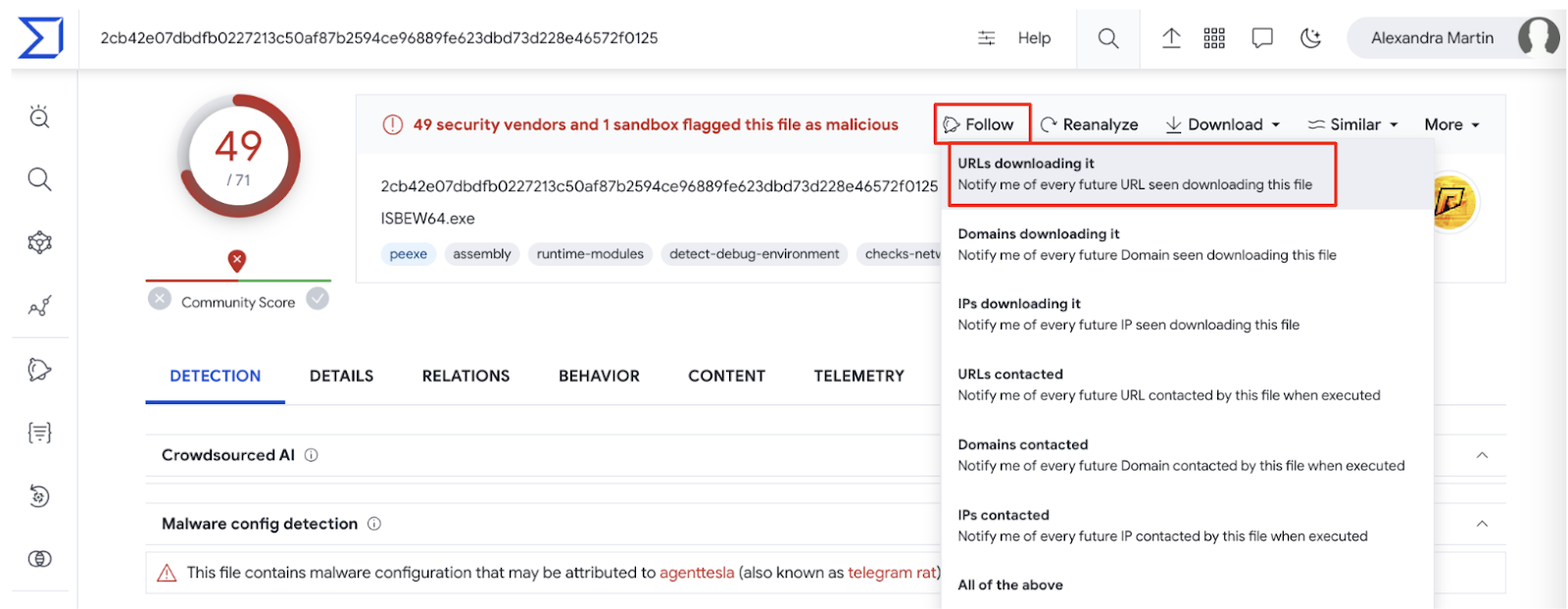
You might have noticed that all IoC reports in VirusTotal have a new Follow dropdown menu in the top right corner, which offers a few options.
The idea of this new feature is to offer VirusTotal’s users easy ways to track any IoCs’ activity. For instance, as shown in the previous screenshot, we are offered to monitor any infrastructure that this malware interacts with in the future (URLs, domains or IPs), or being notified when we see it being downloaded from anywhere.
When clicking any of these options, we are creating a one-click Livehunt rule based on a template. We can customize the resulting rule as needed, or simply deploy it as suggested, although we highly recommend renaming it to easily identify it.
For example, by clicking URLs downloading it in the previous sample’s report, the following rule will be automatically generated and deployed in our Livehunt:
import "vt"

rule UrlDownloadsFile {
  condition:
    // vt.net.url.new_url and // enable to restrict matches to newly seen URLs
    vt.net.url.downloaded_file.sha256 == "2cb42e07dbdfb0227213c50af87b2594ce96889fe623dbd73d228e46572f0125"
}
This rule will simply track and notify any new URL VirusTotal observes downloading that particular sample.

Livehunt dashboard

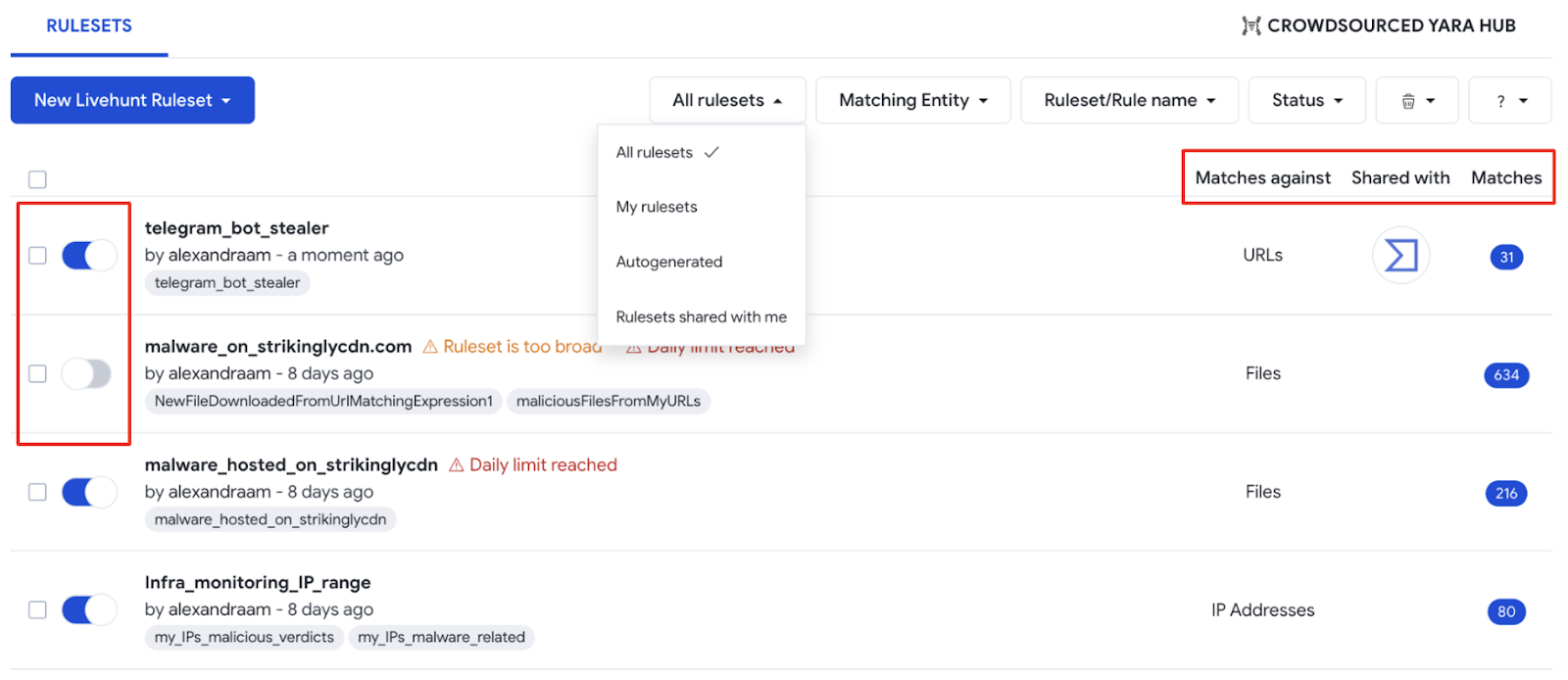
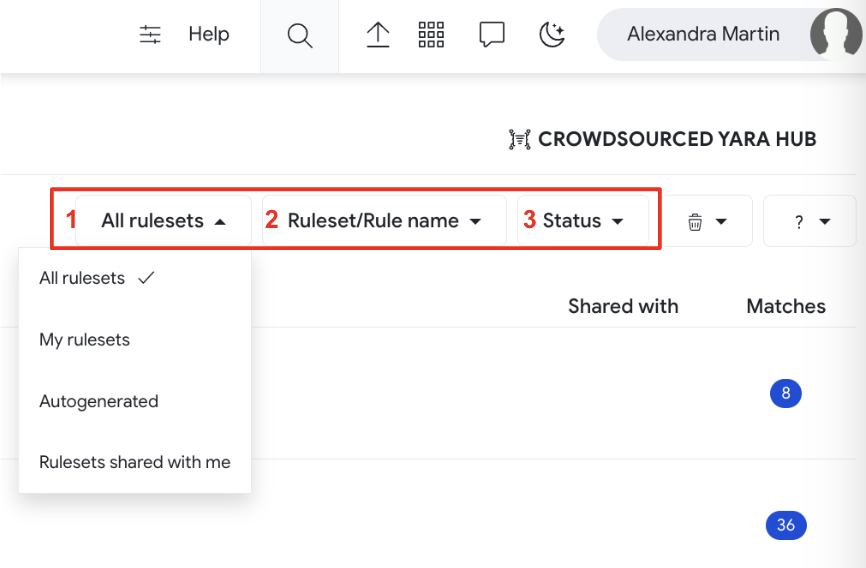
The Livehunt dashboard consolidates all your team's and your own Livehunt YARA rules in one place. We added three filtering options to help you quickly move around.
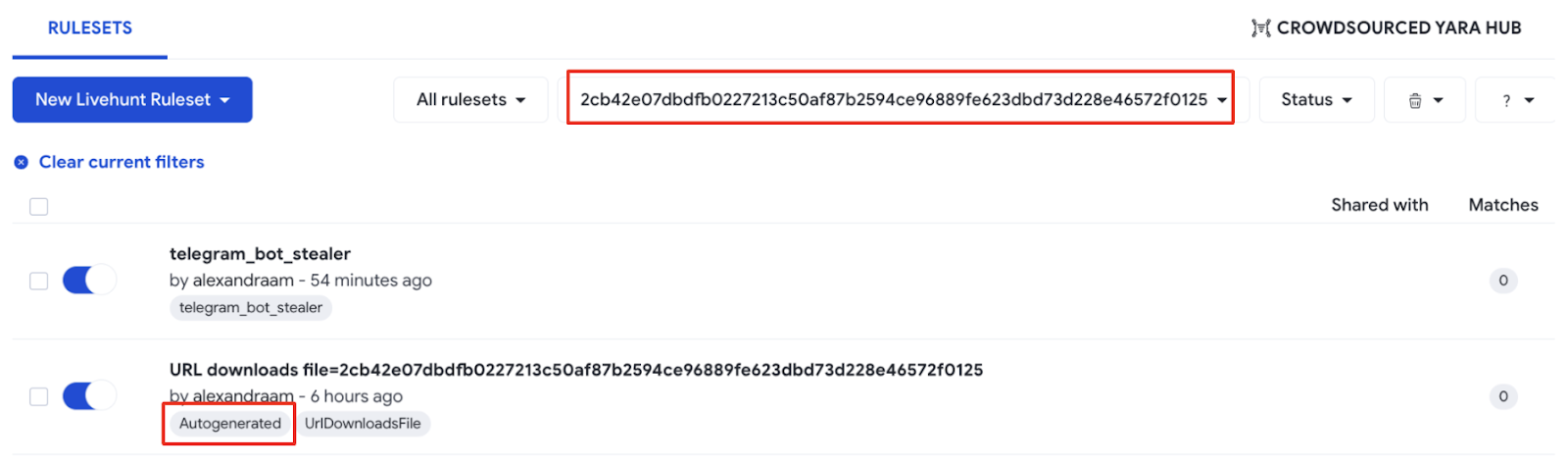
  • The first one filters rules created by yourself, created by other users in your VirusTotal group and shared with you, or “Autogenerated” with the IoC’s report Follow option, as previously explained.
  • The second filter allows you to search for rulesets containing a specific substring in its name or anywhere else in the ruleset, including comments. For example, if we use the hash of the file in the previous example (2cb42e07dbdfb0227213c50af87b2594ce96889fe623dbd73d228e46572f0125), we get the rule we previously created. Please note VirusTotal will automatically add tags corresponding to the to the names of the rules in a ruleset, plus the "Autogenerated" tag if the ruleset was generated with the Follow option:
  • The third one allows you to filter by ruleset status (active or inactive).

The dashboard also shows whether rulesets are active, as well as the entity that ruleset matches against. You can also find which users and groups that ruleset was shared with and, lastly, the number of matches - which lists all matching IoCs in the IoC Stream by clicking it.

Wrapping up

In the previous posts in our "Actionable Threat Intel" series we showed how to use the new YARA editor, deploying Livehunt rules from the editor either using templates or from scratch, using Netloc for creating network hunting rules, and how to track IoCs of interest with automatically generated hunting rules.
All these elements help us to set the monitoring rulesets we need to be on top of our investigations or any malicious activity set of our interest. IoC Stream serves as a single repository to centralize all our notifications, including Hunting rules, IoC Collections and Threat Actors subscriptions.
Last but not least, we would like to specially thank our colleagues from Mandiant and all the security researchers who kindly offered to help during early stages and beta testing to help make Netloc hunting as good as possible:
    Paul Rascagneres (@r00tbsd), Volexity
    Ariel Jungheit (@arieljt), Kaspersky
    Marc Green (@green0wl), eBay
    Vitor Ventura, Cisco
    Markus Neis (@markus_neis), Arctic Wolf
    Matt Pierce, CrowdStrike
    Pasquale Stirparo (@pstirparo), Independent Researcher
    Tom Hegel (@TomHegel), SentinelLabs
We hope you find these features as useful as we do. If you have any questions or requests please do not hesitate to contact us.
Happy hunting!

Wednesday, July 26, 2023

VirusTotal Malware Trends Report: Emerging Formats and Delivery Techniques

We just released a new edition of our “VirusTotal Malware Trends Report” series, where we want to share VirusTotal’s visibility to help researchers, security practitioners and the general public better understand the nature of malicious attacks, this time focusing on “Emerging Formats and Delivery Techniques”. Here are some of the main ideas presented there:

  • Email attachments continue to be a popular way to spread malware.

  • Traditional file types (Excel, RTF, CAB and compressed formats) are becoming less popular. Although the use of PDFs slowly decreased for the last few months in June 2023 we observed the biggest peak for the last two years.

  • OneNote and JavaScript (distributed along HTML) are the most rapidly growing formats for malicious attachments in 2023.

  • OneNote emerged in 2023 as a reliable alternative for attackers to the traditional use of macros in other Office products.

  • ISO files for malware spreading are a flexible alternative for both widespread and targeted attacks. Distribution as heavily compressed attachments makes them difficult to scan by some security solutions.

  • ISO files are being disguised as legitimate installation packages for a variety of software, including Windows, Telegram, AnyDesk, and malicious CryptoNotepad, among others.


For full details, you can download the report here


As we usually do, in this blog post we will focus on technical hunting ideas you can use to monitor malicious activity. We also provide additional technical details for some of the most interesting points discussed in the report.


Monitoring malicious attachments


Our data shows that there was an increase in the number of malicious files attached to emails between March and April of 2023. In terms of suspicious attachments, for the past two years, we have observed spikes in the number of suspicious PDF files linked to malicious campaigns. These files can be used for a variety of purposes, such as exploiting vulnerabilities (less usual) or phishing (most of the time).

OneNote is becoming a popular format for malware distributed as email attachments in 2023. We will describe the OneNote attack flow in the next section. In 2023, it became the fastest-growing format for malicious attachments, by percentage.


In 2023, we saw a significant increase in the use of JavaScript distributed alongside HTML, in sophisticated phishing attacks designed to steal victims' credentials. Excel, RTF, CAB, compressed formats, and Word all seem to be declining in popularity as malicious attachments.


OneNote to rule them all


Suspicious OneNote files uploaded to VirusTotal can we filtered using the following VTI query:

entity:file type:one p:5+

Most of the files in our collection were submitted in 2023. We can observe how AntiVirus detection during January and the first half of February was significantly lower than afterwards, when security vendors improved their detection for this format. 


Malicious OneNote files usually embed a malicious file (vba, html+jscript, powershell, or any combination of them) and, as happens with malicious Office attachments, try to convince the victim to allow execution. 

Commonalities for the files resulting the previous search offer some interesting data on who is currently using this format for distribution:

  • Many of them distribute QBot, RemcosRAT or AsyncRAT.  We also found Emotet malware samples using Onenote for spreading.

  • Around 20% seem to distribute QakBot.

  • The Microsoft_OneNote_with_Suspicious_String Crowdsource Yara rule seems to provide good detection with a low false positive ratio. 

Payloads vary from family to family, but many of them access external URLs to download a DLL file camouflaged as a PNG file. This is a very old trick used to bypass basic firewall rules or just look less suspicious to the eye. 

We can find several examples of this, for example searching for BumbleBee malware samples reaching a remote "view.png" file or Qakbot samples contacting "01.png" in any network resource.

The most usual kill chain where OneNote format is involved is as follows:

  • The victim receives an email with a OneNote attachment. The mail body encourages the victim to click on a button to see a hidden/distorted image or document.

  • This button executes a script (VB script, HTA, powershell, etc,) that will launch a payload, either embedded into the same script or downloaded from an external resource. 

  • The external payload might be yet another OneNote file, an image file renamed as a ".bat" file, a DLL file that's loaded into memory or even a Windows executable.


The following is an example of an obfuscated second stage .Net executable payload extracted from this powershell script:


ISO files as a flexible alternative

Windows-targeting malware bundled in ISO files is a highly popular delivery method used by threat actors these days. It is used on a large scale for  crimeware distribution as well as high profile APT campaigns actors. You can use the “isoimage” tag to list ISO files in VTI:


You can be more specific to detect only those ISO files containing an executable: 


Another interesting approach is to leverage Sandbox reports to get ISOs files interacting (drop/delete/open/execute) with specific file types during their execution:


Using this method you are not only no longer dependent on the “contains-pe” tag (that could be missed in some cases), but also you are able to discover ISOs with “hidden” executables, for example ISO containing archives that contain executables. It is also possible to detect cases when an ISO file contains only a non-binary file, like LNK or script, that drops and executes a malicious PE payload. 

It is possible to identify ISO clusters for specific malware campaigns. For instance, you can get samples used in a ChromeLoader distribution campaign with the following name and size filters:


Another interesting ISO cluster contains artificially zero-byte inflated executables, allowing attackers to compress the resulting ISO file from 300Mb to 400Kb:

Example of ISO file with artificially inflated executable inside

The following query will help you find some of these examples:


We also found something that appears to be a malware campaign distributing weaponized versions of legitimate software, including “Crypto Notepad”, within ISO files. Examining one of the samples, we can see that the bundled .NET executable is also inflated with zero-bytes up to 313Mb. The main purpose of the malicious injection in legit software is to download a remote binary file for execution:

It is also capable of fetching remotely hosted powershell code and execute it:


We found hundreds of samples related to this campaign related to the following C2 hosts:

installmarkets[.]hair relations with malicious samples


Other than compressing artificially inflated files, another reason to distribute ISO files is mimicking legitimate installation software packages, which you usually expect to be sizable. The following example uses a well known browser to find suspicious cases:


The previous search results in a number of files with zero AV detections. However, further manual analysis reveals their maliciousness.

Malicious samples with 0 AV detections mimicking Brave browser installer

There are different ways to explore what are the main spreading vectors used to distribute malicious ISO files and their related infrastructure. For instance, the following query provides samples seen being hosted  In-The-Wild:


You can refine the search to list samples seen being hosted in a specific host:


Email spreading can filtered using the “attachment” tag or “email_parents”, they both provide pretty much the same results:


Wrapping it up


Attackers are constantly rotating the file formats they use to deliver malware. This is done to increase the effectiveness of their campaigns and to avoid detection by security measures. The security community needs to be aware of the use of alternative file formats for malware delivery and to put more resources into stopping these new spreading methods. For example, although traditional file types, such as Word, Excel, and RTF, are still used for malware delivery, alternative formats, such as OneNote and ISO, are becoming increasingly popular.

As a proof of the effectiveness of format rotation for attackers, the simple fact of bundling a malicious sample inside of an ISO file seems to effectively decrease AV detections. We also observed poor detection in the first waves of OneNote malicious files, although improved with time. 

We suggest monitoring malware spreading trends, and actively check how your security stack responds to proactively minimize infection risks, as well as including in your analysis all logs to/from allowed legitimate sites as they are regularly used for malware distribution, do not exclusively focus your anomaly detection on unknown traffic.  


Happy hunting!

Monday, July 24, 2023

, , ,

Actionable Threat Intel (IV) - YARA beyond files: extending rules to network IoCs

Monday, July 24, 2023 Anonymous
We are extremely excited to introduce YARA Netloc, a powerful new hunting feature that extends YARA supported entities from traditional files to network infrastructure, including domains, URLs and IP addresses. This opens endless possibilities and brings your hunting to a whole new level. Let’s get started!


Creating Network rules

YARA Netloc is based on extended functionality implemented for the “vt” YARA module. In particular, you will find now a new ".net" attribute specifically for network related entities such as URLs, domains and IP addresses. Here you can find the full documentation. Remember you can use the “vt” YARA module for any of your LiveHunt YARA rules.
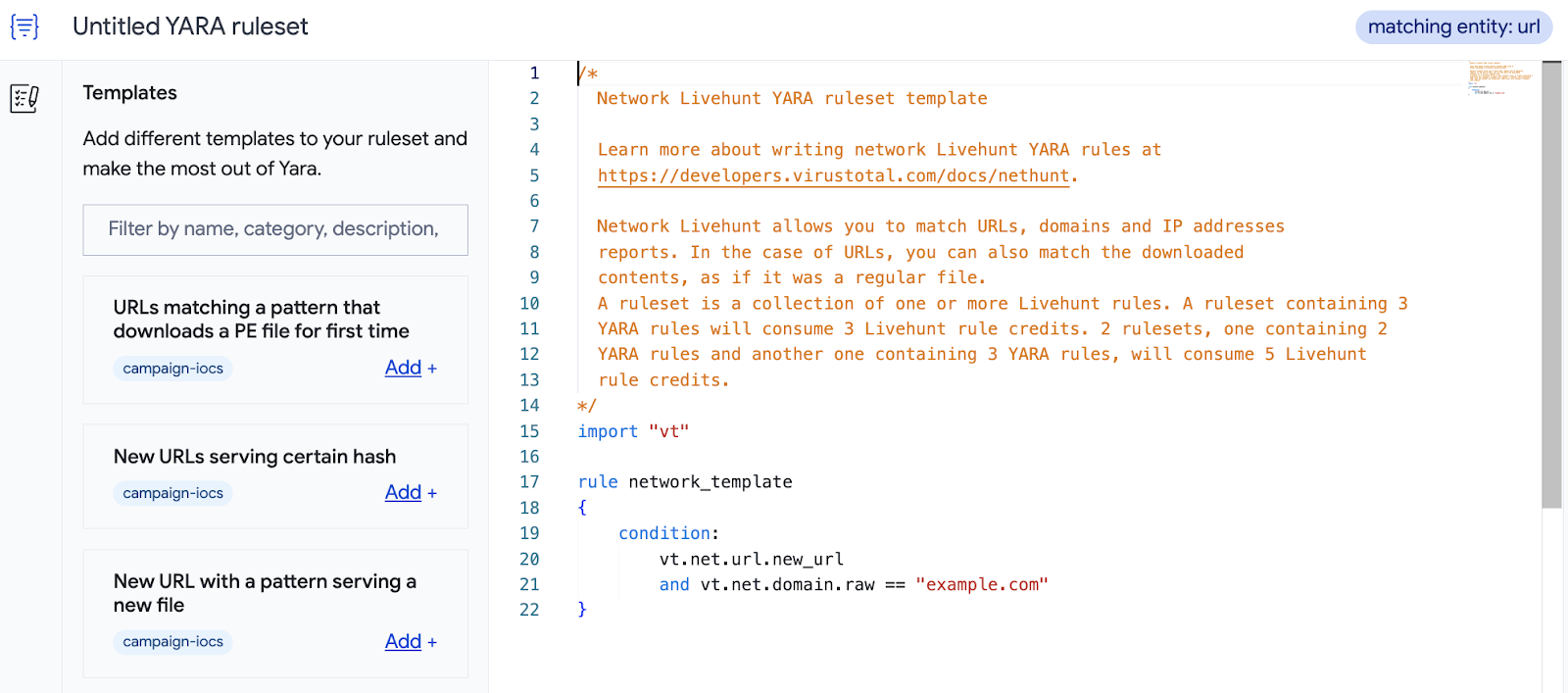
Before we start working on a few examples it is important to highlight what resources you have available to get you quickly up to speed. First, our new YARA editor has available several templates you can use to build your rules. Second, the whole community can benefit from VirusTotal’s community rules in our new crowdsourced YARA GitHub repository. The repository is split into four folders, each of which with rules matching different entities (file, domain, IP or URL).
Let’s start with a first example rule. The “New Livehunt Ruleset” dropdown on the Livehunt section now allows us to select what kind of YARA we want to create, depending on the entity we want to match against.


Let’s select “New ruleset matching against Domains” to deploy a rule to track if any of our domains is serving malware without our knowledge. We will use the “Domain serving malicious filestemplate available on the YARA editor.


import "vt"

rule malware_distribution {
  meta:
    description = "Detects if my infrastructure is being used to distribute malware or malicious domains are impersonating my legitimate domain with the same purpose."
    category = "infra-monitoring"
    references = "https://www.virustotal.com/gui/search/entity%253Adomain%2520domain%253Atelegram.com%2520downloaded_files_max_detections%253A5%252B/domains"
    creation_date = "2023-07-19"
    last_modified = "2023-07-19"
    target_entity = "domains"
  condition:
    vt.net.domain.raw icontains "telegram.com" and
    vt.net.domain.downloaded_file.analysis_stats.malicious >= 5
}
In this case we can easily see how the new “.net” attribute is used in this rule. First we use “domain.raw” to specify our domain by comparing it to a given string (“telegram.com” in this example). Then we simply check if any new downloaded file from that domain looks suspicious by having five or more antivirus verdicts. We will keep this rule running as a Livehunt, and will be notified through IoC Stream in case VirusTotal sees our domain downloading anything suspicious.

Let’s see another example.
Now we are going to reuse one of the rules available in our repository, in this case to track Cobalt Strike’s infrastructure. The rule tracks IP addresses serving a well-known Cobalt Strike certificate, which we check with the “ip.https_certificate.thumbprint” condition. We could easily create similar rules for all kinds of suspicious infrastructure serving https certificates identified as malicious.
import "vt"

rule Cobalt_Strike_Default_SSL_Certificate
{
  meta:
    name = "Default CobaltStrike self-signed SSL Certificate"
    description = "Find IP addresses serving the default SSL certificate used out of the box by Cobalt Strike for C2 comms"
    reference = "https://www.mandiant.com/resources/blog/defining-cobalt-strike-components"
    target_entity = "IPs"
  condition:
    vt.net.ip.https_certificate.thumbprint == "6ece5ece4192683d2d84e25b0ba7e04f9cb7eb7c"
}

For our final example we will create a rule from scratch.
In this case we are inspired by the Zaraza bot credential stealer that exfiltrates stolen data using Telegram channels so we will use VirusTotal to hunt for fresh infrastructure (URLs) used in that way. Our rule will check for known patterns in the URLs for a given domain (“api.telegram.org”), and then check if the last file seen communicating with them (“communicating_file”) seems suspicious (“analysis_stats.malicious”>5) and it has a particular AV verdict (“steal” or “exfilt”) looping its “signatures” .
import "vt"

rule telegram_bot_stealer {
  meta:
    description = "Detects Telegram channels that bots potentially use to exfiltrate data to."
    category = "MAL-infra"
    malware = "Stealer"
    reference = "https://www.uptycs.com/blog/zaraza-bot-credential-password-stealer"
    examples = "https://www.virustotal.com/gui/file/2cb42e07dbdfb0227213c50af87b2594ce96889fe623dbd73d228e46572f0125/detection, https://www.virustotal.com/gui/url/f4abd85188b86df95c7f8571f8043d92ad033b6376a113fd0acd8714bd345798/detection"
    creation_date = "2023-07-06"
    last_modified = "2023-07-06"
    target_entity = "url"

  condition:
    vt.net.url.raw icontains "https://api.telegram.org/bot" and
    (
      (
        vt.net.url.raw icontains "/sendMessage?" and
        vt.net.url.query icontains "text="
      ) or
      vt.net.url.raw icontains "/sendDocument?"
    ) and
    vt.net.url.query icontains "chat_id=" and
    vt.net.url.communicating_file.analysis_stats.malicious > 5 and
    for any engine, signature in vt.net.url.communicating_file.signatures : (
      signature icontains "steal" or signature icontains "exfilt"
    )
}

Wrapping up

YARA rules are no longer limited only to tracking files. The new “.net” attribute in the “vt” YARA module empowers users with the ability to discover suspicious network infrastructure and combine it with VirusTotal’s metadata for a huge range of use cases.
The YARA “vt” module provides standardized syntax for files and network detection rules and allows combining attributes of different entities for highly customized monitoring rules. Additionally, it replaces the need of periodic (manual, but specially automated) lookups by allowing the deployment of Livehunt rules for monitoring.
Although this blog post shows some of the new YARA Netloc capabilities using a few examples, there are infinite possibilities. You can use it to track threat actors’ infrastructure, to monitor your own infrastructure (including IP ranges) or to detect phishing campaigns targeting your company, amongst many other use cases. You can find many more ideas by checking the YARA editor templates, checking the official documentation or the YARA rules GitHub repository.
We will be back soon with more details, use cases and examples for YARA Netloc hunting capabilities, but in the meantime do not hesitate to contact us for anything you need.
Happy hunting!

Friday, July 21, 2023

Apology and Update on Recent Accidental Data Exposure

We are writing to share information about the recent customer data exposure incident on VirusTotal. We apologize for any concern or confusion this may have caused.

On June 29, an employee accidentally uploaded a CSV file to the VirusTotal platform. This CSV file contained limited information of our Premium account customers, specifically the names of companies, the associated VirusTotal group names, and the email addresses of group administrators. We removed the file, which was only accessible to partners and corporate clients, from our platform within one hour of its posting.

First and foremost, we want to clarify unequivocally: This was not the result of a cyber-attack or a vulnerability with VirusTotal. This was a human error, and there were no bad actors involved. 

This is an example of the data that was included in the CSV file:

Company Name

VT Group

Admin group email address

VirusTotal S.L.

virustotal

User@virustotal.com

We assure you that the data disclosed was limited strictly to the sort of information provided in the example above. Since this incident, we have implemented new internal processes and technical controls to improve the security and safeguarding of customer data.  

Trust is the bedrock of our community, and again we apologize for any confusion or concern this may have caused. 

If you have additional questions or would like to speak with our support team, please reach out to contact@virustotal.com.

Thank you,

The VirusTotal Team.


Additional Q&A

Q: Is my account at risk for hacking because of this incident?

No, the list only included company names, VirusTotal group tenant names and VirusTotal group administrator emails. The Premium VirusTotal platform is only accessible to partners and corporate clients.

Q: How did VirusTotal become aware of the file's existence?

This was quickly flagged by our partners and fellow analysts via our support system—we removed the file within an hour of its posting. We deeply appreciate their timely action.

Q: How did these partners and analysts notice this particular file?

Many of our customers have a Livehunt service based on YARA rules. This service helps them identify targeted attacks against their organizations, such as phishing. Some of these YARA rules search for files containing their own domains. In this instance, the file matched these rules and the system generated an alert. 

Q: Could a malicious entity or anonymous user have downloaded the file from the VirusTotal platform?

No. The file was only accessible to our partners and cybersecurity analysts who hold a Premium account with VirusTotal. No anonymous or free account users on VirusTotal had access to the Premium platform. 

Q: Why are files uploaded and scanned on VirusTotal accessible to partners and professional security analysts via the VirusTotal Premium platform?

The VirusTotal Premium platform facilitates the discovery of new cyber attacks by industry professionals and cybersecurity experts. This shared knowledge enables the analysis of new security threats, leading to updates in security products and an overall improvement in both corporate and worldwide security.

Q: Why was an employee able to download the list in the first place? Has VirusTotal taken any measures as a result of this incident?

This list of limited customer data was critical to their role. Since this incident, we have implemented new internal processes and technical controls to improve the security and safeguarding of customer data.