Showing posts with label detection engineering. Show all posts

Friday, January 16, 2026

, , ,

New Infostealer Campaign Targets Users via Spoofed Software Installers

Introduction

As part of our commitment to sharing interesting hunts, we are launching these 'Flash Hunting Findings' to highlight active threats. Our latest investigation tracks an operation active between January 11 and January 15, 2026, which uses consistent ZIP file structures and a unique behash ("4acaac53c8340a8c236c91e68244e6cb") for identification. The campaign relies on a trusted executable to trick the operating system into loading a malicious payload, leading to the execution of secondary-stage infostealers.

Findings

The primary samples identified are ZIP files that mostly reference the MalwareBytes company and software using the filename malwarebytes-windows-github-io-X.X.X.zip. A notable feature for identification is that all of them share the same behash.
behash:"4acaac53c8340a8c236c91e68244e6cb"
The initial instance of these samples was identified on January 11, 2026, with the most recent occurrence recorded on January 14.
All of these ZIP archives share a nearly identical internal structure, containing the same set of files across the different versions identified. Of particular importance is the DLL file, which serves as the initial malicious payload, and a specific TXT file found in each archive. This text file has been observed on VirusTotal under two distinct filenames: gitconfig.com.txt and Agreement_About.txt.
The content of the TXT file holds no significant importance for the intrusion itself, as it merely contains a single string consisting of a GitHub URL.
However, this TXT is particularly valuable for pivoting and infrastructure mapping. By examining its "execution parents," analysts can identify additional ZIP archives that are likely linked to the same malicious campaign. These related files can be efficiently retrieved for further investigation using the following VirusTotal API v3 endpoint:
/api/v3/files/09a8b930c8b79e7c313e5e741e1d59c39ae91bc1f10cdefa68b47bf77519be57/execution_parents
The primary payload of this campaign is contained within a malicious DLL named CoreMessaging.dll. Threat actors are utilizing a technique known as DLL Sideloading to execute this code. This involves placing the malicious DLL in the same directory as a legitimate, trusted executable (EXE) also found within the distributed ZIP file. When an analyst or user runs the legitimate EXE, the operating system is tricked into loading the malicious CoreMessaging.dll.
The identified DLLs exhibit distinctive metadata characteristics that are highly effective for pivoting and uncovering additional variants within the same campaign. Security analysts can utilize specific hunting queries to track down other malicious DLLs belonging to this activity. For instance, analysts can search for samples sharing the following unique signature strings found in the file metadata:
signature:"Peastaking plenipotence ductileness chilopodous codicillary."
signature:"© 2026 Eosinophil LLC"
Furthermore, the exported functions within these DLLs contains unusual alphanumeric strings. These exports serve as reliable indicators for identifying related malicious components across different stages of the campaign:
exports:15Mmm95ml1RbfjH1VUyelYFCf exports:2dlSKEtPzvo1mHDN4FYgv
Finally, another observation for behavioral analysis can be found in the relations tab of the ZIP files. These files document the full infection chain observed during sandbox execution, where the sandbox extracts the ZIP, runs the legitimate EXE, and subsequently triggers the loading of the malicious DLL. Within the Payload Files section, additional payloads are visible. These represent secondary stages dropped during the initial DLL execution, which act as the final malware samples. These final payloads are primarily identified as infostealers, designed to exfiltrate sensitive data.
Analysis of all the ZIP files behavioral relations reveals a recurring payload file consistently flagged as an infostealer. This malicious component is identified by various YARA rules, including those specifically designed to detect signatures associated with stealing cryptocurrency wallet browser extension IDs among others.
To identify and pivot through the various secondary-stage payloads dropped during this campaign, analysts can utilize a specific behash identifier. These files represent the final infection stage and are primarily designed to exfiltrate credentials and crypto-wallet information. The following behash provides a reliable pivot point for uncovering additional variants.
behash:5ddb604194329c1f182d7ba74f6f5946

IOCs

We have created a public VirusTotal Collection to share all the IOCs in an easy and free way. Below you can find the main IOCs related to the ZIP files and DLLs too.
import "pe"

rule win_dll_sideload_eosinophil_infostealer_jan26
{
  meta:
    author = "VirusTotal"
    description = "Detects malicious DLLs (CoreMessaging.dll) from an infostealer campaign impersonating Malwarebytes, Logitech, and others via DLL sideloading."
    reference = "https://blog.virustotal.com/2026/01/malicious-infostealer-january-26.html"
    date = "2026-01-16"
    behash = "4acaac53c8340a8c236c91e68244e6cb"
    target_entity = "file"
    hash = "606baa263e87d32a64a9b191fc7e96ca066708b2f003bde35391908d3311a463"
  condition:
    (uint16(0) == 0x5A4D and uint32(uint32(0x3C)) == 0x00004550 and pe.is_dll()) and
    pe.exports("15Mmm95ml1RbfjH1VUyelYFCf") and pe.exports("2dlSKEtPzvo1mHDN4FYgv")
}
sha256 description
6773af31bd7891852c3d8170085dd4bf2d68ea24a165e4b604d777bd083caeaa malwarebytes-windows-github-io-X.X.X.zip
4294d6e8f1a63b88c473fce71b665bbc713e3ee88d95f286e058f1a37d4162be malwarebytes-windows-github-io-X.X.X.zip
5591156d120934f19f2bb92d9f9b1b32cb022134befef9b63c2191460be36899 malwarebytes-windows-github-io-X.X.X.zip
42d53bf0ed5880616aa995cad357d27e102fb66b2fca89b17f92709b38706706 malwarebytes-windows-github-io-X.X.X.zip
5aa6f4a57fb86759bbcc9fc6c61b5f74c0ca74604a22084f9e0310840aa73664 malwarebytes-windows-github-io-X.X.X.zip
84021dcfad522a75bf00a07e6b5cb4e17063bd715a877ed01ba5d1631cd3ad71 malwarebytes-windows-github-io-X.X.X.zip
ca8467ae9527ed908e9478c3f0891c52c0266577ca59e4c80a029c256c1d4fce malwarebytes-windows-github-io-X.X.X.zip
9619331ef9ff6b2d40e77a67ec86fc81b050eeb96c4b5f735eb9472c54da6735 malwarebytes-windows-github-io-X.X.X.zip
a2842c7cfaadfba90b29e0b9873a592dd5dbea0ef78883d240baf3ee2d5670c5 malwarebytes-windows-github-io-X.X.X.zip
4705fd47bf0617b60baef8401c47d21afb3796666092ce40fbb7fe51782ae280 malwarebytes-windows-github-io-X.X.X.zip
580d37fc9d9cc95dc615d41fa2272f8e86c9b4da2988a336a8b3a3f90f4363c2 malwarebytes-windows-github-io-X.X.X.zip
d47fd17d1d82ea61d850ccc2af3bee54adce6975d762fb4dee8f4006692c5ef7 malwarebytes-windows-github-io-X.X.X.zip
606baa263e87d32a64a9b191fc7e96ca066708b2f003bde35391908d3311a463 CoreMessaging.dll DLL loaded by DLL SideLoading
fd855aa20467708d004d4aab5203dd5ecdf4db2b3cb2ed7e83c27368368f02bb CoreMessaging.dll DLL loaded by DLL SideLoading
a0687834ce9cb8a40b2bb30b18322298aff74147771896787609afad9016f4ea CoreMessaging.dll DLL loaded by DLL SideLoading
4235732440506e626fd4d0fffad85700a8fcf3e83ba5c5bc8e19ada508a6498e CoreMessaging.dll DLL loaded by DLL SideLoading
cd1fe2762acf3fb0784b17e23e1751ca9e81a6c0518c6be4729e2bc369040ca5 CoreMessaging.dll DLL loaded by DLL SideLoading
f798c24a688d7858efd6efeaa8641822ad269feeb3a74962c2f7c523cf8563ff CoreMessaging.dll DLL loaded by DLL SideLoading
0698a2c6401059a3979d931b84d2d4b011d38566f20558ee7950a8bf475a6959 CoreMessaging.dll DLL loaded by DLL SideLoading
1b3bee041f2fffcb9c216522afa67791d4c658f257705e0feccc7573489ec06f CoreMessaging.dll DLL loaded by DLL SideLoading
231c05f4db4027c131259d1acf940e87e15261bb8cb443c7521294512154379b CoreMessaging.dll DLL loaded by DLL SideLoading
ec2e30d8e5cacecdf26c713e3ee3a45ebc512059a64ba4062b20ca8bec2eb9e7 CoreMessaging.dll DLL loaded by DLL SideLoading
58bd2e6932270921028ab54e5ff4b0dbd1bf67424d4a5d83883c429cadeef662 CoreMessaging.dll DLL loaded by DLL SideLoading
57ed35e6d2f2d0c9bbc3f17ce2c94946cc857809f4ab5c53d7cb04a4e48c8b14 CoreMessaging.dll DLL loaded by DLL SideLoading
cfcf3d248100228905ad1e8c5849bf44757dd490a0b323a10938449946eabeee CoreMessaging.dll DLL loaded by DLL SideLoading
f02be238d14f8e248ad9516a896da7f49933adc7b36db7f52a7e12d1c2ddc6af CoreMessaging.dll DLL loaded by DLL SideLoading
f60802c7bec15da6d84d03aad3457e76c5760e4556db7c2212f08e3301dc0d92 CoreMessaging.dll DLL loaded by DLL SideLoading
02dc9217f870790b96e1069acd381ae58c2335b15af32310f38198b5ee10b158 CoreMessaging.dll DLL loaded by DLL SideLoading
f9549e382faf0033b12298b4fd7cd10e86c680fe93f7af99291b75fd3d0c9842 CoreMessaging.dll DLL loaded by DLL SideLoading
92f4d95938789a69e0343b98240109934c0502f73d8b6c04e8ee856f606015c8 CoreMessaging.dll DLL loaded by DLL SideLoading
66fba00b3496d61ca43ec3eae02527eb5222892186c8223b9802060a932a5a7a CoreMessaging.dll DLL loaded by DLL SideLoading
e5dd464a2c90a8c965db655906d0dc84a9ac84701a13267d3d0c89a3c97e1e9b CoreMessaging.dll DLL loaded by DLL SideLoading
35211074b59417dd5a205618fed3402d4ac9ca419374ff2d7349e70a3a462a15 CoreMessaging.dll DLL loaded by DLL SideLoading
6863b4906e0bd4961369b8784b968b443f745869dbe19c6d97e2287837849385 CoreMessaging.dll DLL loaded by DLL SideLoading
a83c478f075a3623da5684c52993293d38ecaa17f4a1ddca10f95335865ef1e2 CoreMessaging.dll DLL loaded by DLL SideLoading
43e2936e4a97d9bc43b423841b137fde1dd5b2f291abf20d3ba57b8f198d9fab CoreMessaging.dll DLL loaded by DLL SideLoading
f001ae3318ba29a3b663d72b5375d10da5207163c6b2746cfae9e46a37d975cf CoreMessaging.dll DLL loaded by DLL SideLoading
c67403d3b6e7750222f20fa97daa3c05a9a8cce39db16455e196cd81d087b54d CoreMessaging.dll DLL loaded by DLL SideLoading
5ee9d4636b01fd3a35bd8e3dce86a8c114d8b0aa6b68b1d26ace7ef0f85b438a Payload dropped by one of the malicious DLLs
e84b0dadb0b6be9b00a063ed82c8ddba06a2bd13f07d510d14e6fd73cd613fba Payload dropped by one of the malicious DLLs

Thursday, January 09, 2025

, , , ,

Research that builds detections

Note: You can view the full content of the blog here.

Introduction

Detection engineering is becoming increasingly important in surfacing new malicious activity. Threat actors might take advantage of previously unknown malware families - but a successful detection of certain methodologies or artifacts can help expose the entire infection chain.
In previous blog posts, we announced the integration of Sigma rules for macOS and Linux into VirusTotal, as well as ways in which Sigma rules can be converted to YARA to take advantage of VirusTotal Livehunt capabilities. In this post, we will show different approaches to hunt for interesting samples and derive new Sigma detection opportunities based on their behavior.

Tell me what role you have and I'll tell you how you use VirusTotal

VirusTotal is a really useful tool that can be used in many different ways. We have seen how people from SOCs and Incident Response teams use it (in fact, we have our VirusTotal Academy videos for SOCs and IRs teams), and we have also shown how those who hunt for threats or analyze those threats can use it too.
But there's another really cool way to use VirusTotal - for people who build detections and those who are doing research. We want to show everyone how we use VirusTotal in our work. Hopefully, this will be helpful and also give people ideas for new ways to use it themselves.
To explain our process, we used examples of Lummac and VenomRAT samples that we found in recent campaigns. These caught our attention due to some behaviors that had not been identified by public detection rules in the community. For that reason we have created two Sigma rules to share with the community, but if you want to get all the details about how we identified it and started our research, go to our Google Threat Intelligence community blog.

Our approach

As detection engineers, it is important to look for techniques that can be in use by multiple threat actors - as this makes tracking malicious activity more efficient. Prior to creating those detections, it is best to check existing research and rule collections, such as the Sigma rules repository. This can save time and effort, as well as provide insight into previously observed samples that can be further researched.
A different approach would be to instead look for malicious files that are not detected by existing Sigma rules, since they can uncover novel methodologies and provide new opportunities for detection creation.
One approach is to hunt for files that are flagged by at least five different AV vendors, were recently uploaded within the last month, have sandbox execution (in order to view their behavior), and which have not triggered any Crowdsourced Sigma rules.
p:5+ have:behavior fs:30d+ not have:sigma
This initial query can be adapted to incorporate additional filters that the researcher may find relevant. These could include modifiers to identify for example, the presence of the PowerShell process in the list of executed processes (behavior_created_processes:powershell.exe), filtering results to only include documents (type:document), or identifying communication with services like Pastebin (behavior_network:pastebin.com).
Another way to go is to look at files that have been flagged by at least five AV’s and were tested in either Zenbox or CAPE. These sandboxes often have great logs produced by Sysmon, which are really useful for figuring out how to spot these threats. Again, we'd want to focus on files uploaded in the last month that haven't triggered any Sigma rules. This gives us a good starting point for building new detection rules.
p:5+ (sandbox_name:"CAPE Sandbox" or sandbox_name:"Zenbox") fs:30d+ not have:sigma
Lastly, another idea is to look for files that have not triggered many high severity detections from the Sigma Crowdsourced rules, as these can be more evasive. Specifically, we will look for samples with zero critical, high or medium alerts - and no more than two low severity ones.
p:5+ have:behavior fs:30d+ sigma_critical:0 sigma_high:0 sigma_medium:0 sigma_low:2-
With these queries, we can start investigating some samples that may be interesting to create detection rules.

Our detections for the community

Our approach helps us identify behaviors that seem interesting and worth focusing on. In our blog, where we explain this approach in detail, we highlighted two campaigns linked to Lummac and VenomRAT that exhibited interesting activity. Because of this, we decided to share the Sigma rules we developed for these campaigns. Both rules have been published in Sigma's official repository for the community.

Detect The Execution Of More.com And Vbc.exe Related to Lummac Stealer

title: Detect The Execution Of More.com And Vbc.exe Related to Lummac Stealer
  id: 19b3806e-46f2-4b4c-9337-e3d8653245ea
  status: experimental
  description: Detects the execution of more.com and vbc.exe in the process tree. This behaviors was observed by a set of samples related to Lummac Stealer. The Lummac payload is injected into the vbc.exe process.
  references:
      - https://www.virustotal.com/gui/file/14d886517fff2cc8955844b252c985ab59f2f95b2849002778f03a8f07eb8aef
      - https://strontic.github.io/xcyclopedia/library/more.com-EDB3046610020EE614B5B81B0439895E.html
      - https://strontic.github.io/xcyclopedia/library/vbc.exe-A731372E6F6978CE25617AE01B143351.html
  author: Joseliyo Sanchez, @Joseliyo_Jstnk
  date: 2024-11-14
  tags:
      - attack.defense-evasion
      - attack.t1055
  logsource:
      category: process_creation
      product: windows
  detection:
      # VT Query: behaviour_processes:"C:\\Windows\\SysWOW64\\more.com" behaviour_processes:"C:\\Windows\\Microsoft.NET\\Framework\\v4.0.30319\\vbc.exe"
      selection_parent:
          ParentImage|endswith: '\more.com'
      selection_child:
          - Image|endswith: '\vbc.exe'
          - OriginalFileName: 'vbc.exe'
      condition: all of selection_*
  falsepositives:
      - Unknown
  level: high

Sysmon event for: Detect The Execution Of More.com And Vbc.exe Related to Lummac Stealer

{
  "System": {
    "Provider": {
      "Guid": "{5770385F-C22A-43E0-BF4C-06F5698FFBD9}",
      "Name": "Microsoft-Windows-Sysmon"
    },
    "EventID": 1,
    "Version": 5,
    "Level": 4,
    "Task": 1,
    "Opcode": 0,
    "Keywords": "0x8000000000000000",
    "TimeCreated": {
      "SystemTime": "2024-11-26T16:23:05.132539500Z"
    },
    "EventRecordID": 692861,
    "Correlation": {},
    "Execution": {
      "ProcessID": 2396,
      "ThreadID": 3116
    },
    "Channel": "Microsoft-Windows-Sysmon/Operational",
    "Computer": "DESKTOP-B0T93D6",
    "Security": {
      "UserID": "S-1-5-18"
    }
  },
  "EventData": {
    "RuleName": "-",
    "UtcTime": "2024-11-26 16:23:05.064",
    "ProcessGuid": "{C784477D-F5E9-6745-6006-000000003F00}",
    "ProcessId": 4184,
    "Image": "C:\\Windows\\Microsoft.NET\\Framework\\v4.0.30319\\vbc.exe",
    "FileVersion": "14.8.3761.0",
    "Description": "Visual Basic Command Line Compiler",
    "Product": "Microsoft® .NET Framework",
    "Company": "Microsoft Corporation",
    "OriginalFileName": "vbc.exe",
    "CommandLine": "C:\\Windows\\Microsoft.NET\\Framework\\v4.0.30319\\vbc.exe",
    "CurrentDirectory": "C:\\Users\\george\\AppData\\Roaming\\comlocal\\RUYCLAXYVMFJ\\",
    "User": "DESKTOP-B0T93D6\\george",
    "LogonGuid": "{C784477D-9D9B-66FF-6E87-050000000000}",
    "LogonId": "0x5876e",
    "TerminalSessionId": 1,
    "IntegrityLevel": "High",
    "Hashes": {
      "SHA1": "61F4D9A9EE38DBC72E840B3624520CF31A3A8653",
      "MD5": "FCCB961AE76D9E600A558D2D0225ED43",
      "SHA256": "466876F453563A272ADB5D568670ECA98D805E7ECAA5A2E18C92B6D3C947DF93",
      "IMPHASH": "1460E2E6D7F8ECA4240B7C78FA619D15"
    },
    "ParentProcessGuid": "{C784477D-F5D4-6745-5E06-000000003F00}",
    "ParentProcessId": 6572,
    "ParentImage": "C:\\Windows\\SysWOW64\\more.com",
    "ParentCommandLine": "C:\\Windows\\SysWOW64\\more.com",
    "ParentUser": "DESKTOP-B0T93D6\\george"
  }
} 

File Creation Related To RAT Clients

title: File Creation Related To RAT Clients
  id: 2f3039c8-e8fe-43a9-b5cf-dcd424a2522d
  status: experimental
  description: File .conf created related to VenomRAT, AsyncRAT and Lummac samples observed in the wild.
  references:
      - https://www.virustotal.com/gui/file/c9f9f193409217f73cc976ad078c6f8bf65d3aabcf5fad3e5a47536d47aa6761
      - https://www.virustotal.com/gui/file/e96a0c1bc5f720d7f0a53f72e5bb424163c943c24a437b1065957a79f5872675
  author: Joseliyo Sanchez, @Joseliyo_Jstnk
  date: 2024-11-15
  tags:
      - attack.execution
  logsource:
      category: file_event
      product: windows
  detection:
      # VT Query: behaviour_files:"\\AppData\\Roaming\\DataLogs\\DataLogs.conf"
      # VT Query: behaviour_files:"DataLogs.conf" or behaviour_files:"hvnc.conf" or behaviour_files:"dcrat.conf"
      selection_required:
          TargetFilename|contains: '\AppData\Roaming\'
      selection_variants:
          TargetFilename|endswith:
              - '\datalogs.conf'
              - '\hvnc.conf'
              - '\dcrat.conf'
          TargetFilename|contains:
              - '\mydata\'
              - '\datalogs\'
              - '\hvnc\'
              - '\dcrat\'
      condition: all of selection_*
  falsepositives:
      - Legitimate software creating a file with the same name
  level: high

Sysmon event for: File Creation Related To RAT Clients

{
  "System": {
    "Provider": {
      "Guid": "{5770385F-C22A-43E0-BF4C-06F5698FFBD9}",
      "Name": "Microsoft-Windows-Sysmon"
    },
    "EventID": 11,
    "Version": 2,
    "Level": 4,
    "Task": 11,
    "Opcode": 0,
    "Keywords": "0x8000000000000000",
    "TimeCreated": {
      "SystemTime": "2024-12-02T00:52:23.072811600Z"
    },
    "EventRecordID": 1555690,
    "Correlation": {},
    "Execution": {
      "ProcessID": 2624,
      "ThreadID": 3112
    },
    "Channel": "Microsoft-Windows-Sysmon/Operational",
    "Computer": "DESKTOP-B0T93D6",
    "Security": {
      "UserID": "S-1-5-18"
    }
  },
  "EventData": {
    "RuleName": "-",
    "UtcTime": "2024-12-02 00:52:23.059",
    "ProcessGuid": "{C784477D-04C6-674D-5C06-000000004B00}",
    "ProcessId": 7592,
    "Image": "C:\\Users\\george\\Desktop\\ezzz.exe",
    "TargetFilename": "C:\\Users\\george\\AppData\\Roaming\\MyData\\DataLogs.conf",
    "CreationUtcTime": "2024-12-02 00:52:23.059",
    "User": "DESKTOP-B0T93D6\\george"
  }

Wrapping up

Detection engineering teams can proactively create new detections by hunting for samples that are being distributed and uploaded to our platform. Applying our approach can benefit in the development of detection on the latest behaviors that do not currently have developed detection mechanisms. This could potentially help organizations be proactive in creating detections based on threat hunting missions.
The Sigma rules created to detect Lummac activity have been used during threat hunting missions to identify new samples of this family in VirusTotal. Another use is translating them into the language of the SIEM or EDR available in the infrastructure, as they could help identify potential behaviors related to Lummac samples observed in late 2024. After passing quality controls and being published on Sigma's public GitHub, they have been integrated for use in VirusTotal, delivering the expected results. You can use them in the following way:
Lummac Stealer Activity - Execution Of More.com And Vbc.exe
sigma_rule:a1021d4086a92fd3782417a54fa5c5141d1e75c8afc9e73dc6e71ef9e1ae2e9c
File Creation Related To RAT Clients
sigma_rule:8f179585d5c1249ab1ef8cec45a16d112a53f91d143aa2b0b6713602b1d19252
We hope you found this blog interesting and useful, and as always we are happy to hear your feedback.

Wednesday, December 20, 2023

, , , ,

Sigma rules for Linux and MacOS

TLDR: VT Crowdsourced Sigma rules will now also match suspicious activity for macOS and Linux binaries, in addition to Windows.
We recently discussed how to maximize the value of Sigma rules by easily converting them to YARA Livehunts. Unfortunately, at that time Sigma rules were only matched against Windows binaries.
Since then, our engineering team worked hard to provide a better experience to Sigma lovers, increasing Crowdsourced Sigma rules value by extending matches to macOS and Linux samples.

Welcome macOS and Linux

Although we are still working to implement Sysmon in our Linux and macOS sandboxes, we implemented new features that allow Sigma rule matching by extracting samples’ runtime behavior.
For example, a process created in our sandbox that ends in “/crontab” and contains the "-l" parameter in the command line would match the following Sigma rule:

logsource:

  product: linux

  category: process_creation

detection:

  selection:

    Image|endswith: '/crontab'

    CommandLine|contains: ' -l'

  condition: selection

We have mapped all the fields used by Sigma rules with the information offered by our sandboxes, which allowed us to map rules for image_load, process_creation and registry_set, among others.
This approach has limitations. However, about 54% of Crowdsourced Sigma rules for Linux and 96% for macOS are related to process creation, meaning we already have enough information to match all these with our sandboxes’ output. The same happens for rules based on file creation.
Let’s look at some examples!

Linux, MacOS and Windows examples

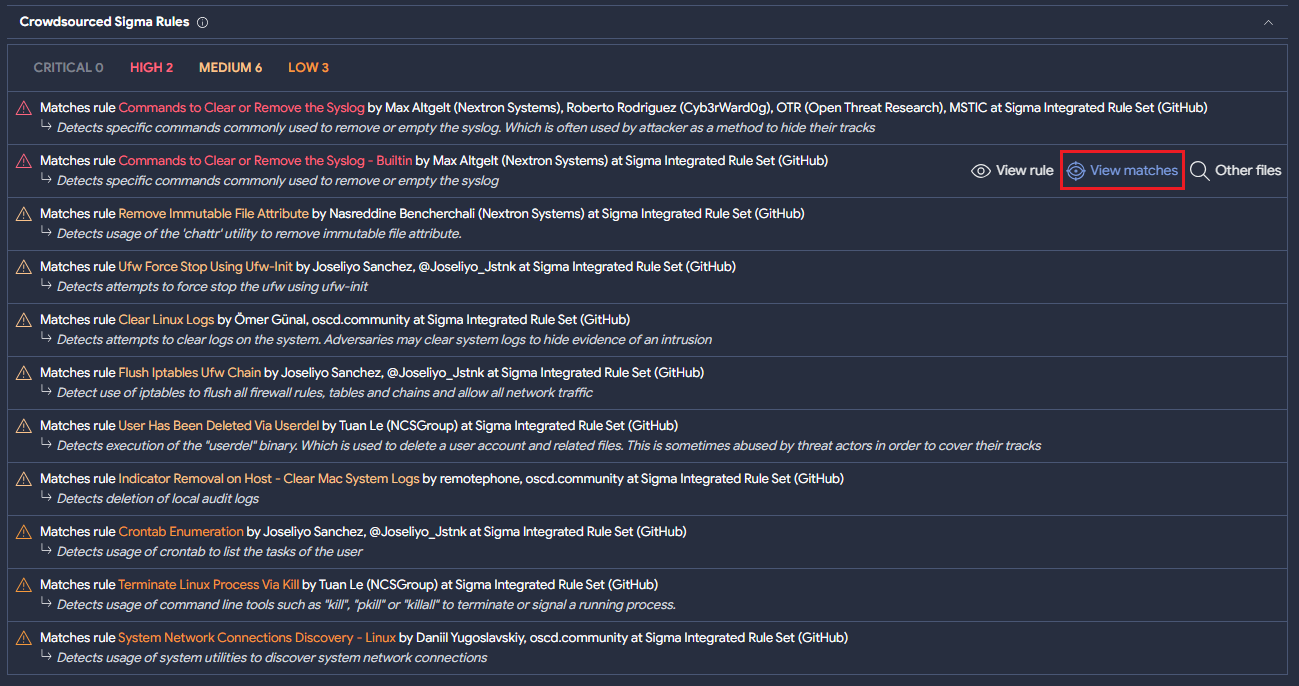
The following shell script sample matches 11 Crowdsourced Sigma Rule matches.
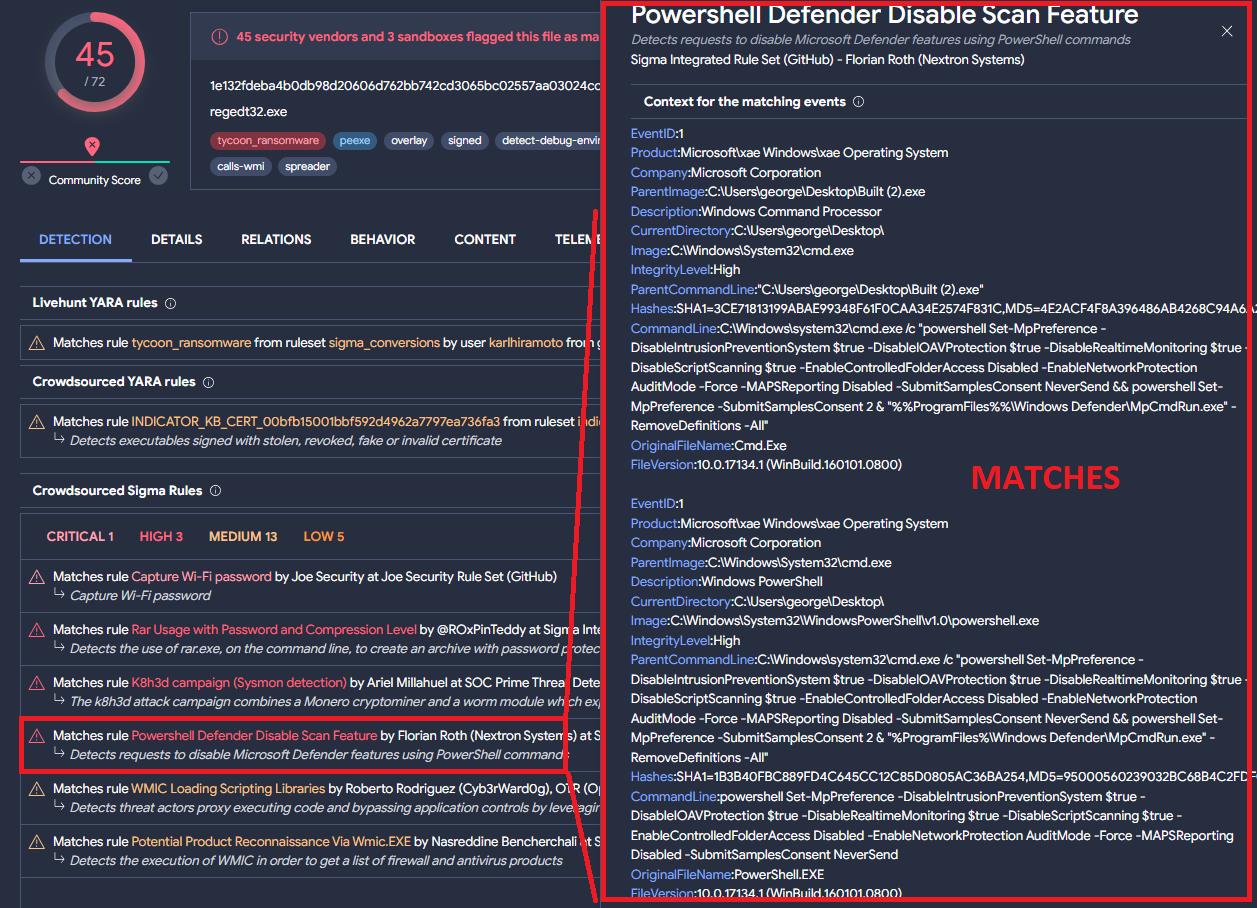
For every rule, it is possible to check what triggered the match by clicking on "View matches”. In the case of Windows binaries, it would show what Sysmon event matched the behavior described in the Sigma rule, as we can see below:
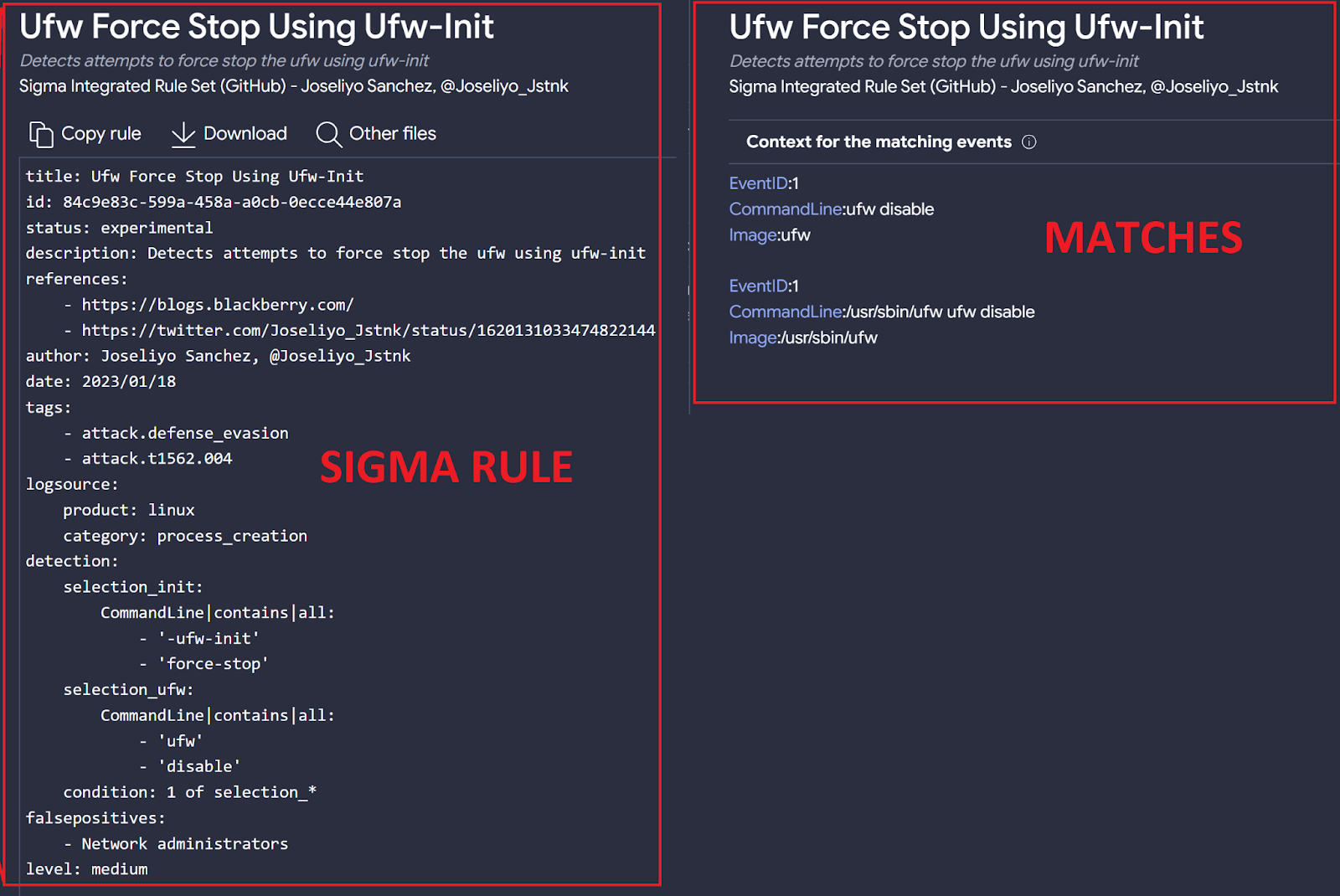
In the case of the shell script mentioned above, it shows the values that are relevant to the logic of the rule as you can see in the following image:
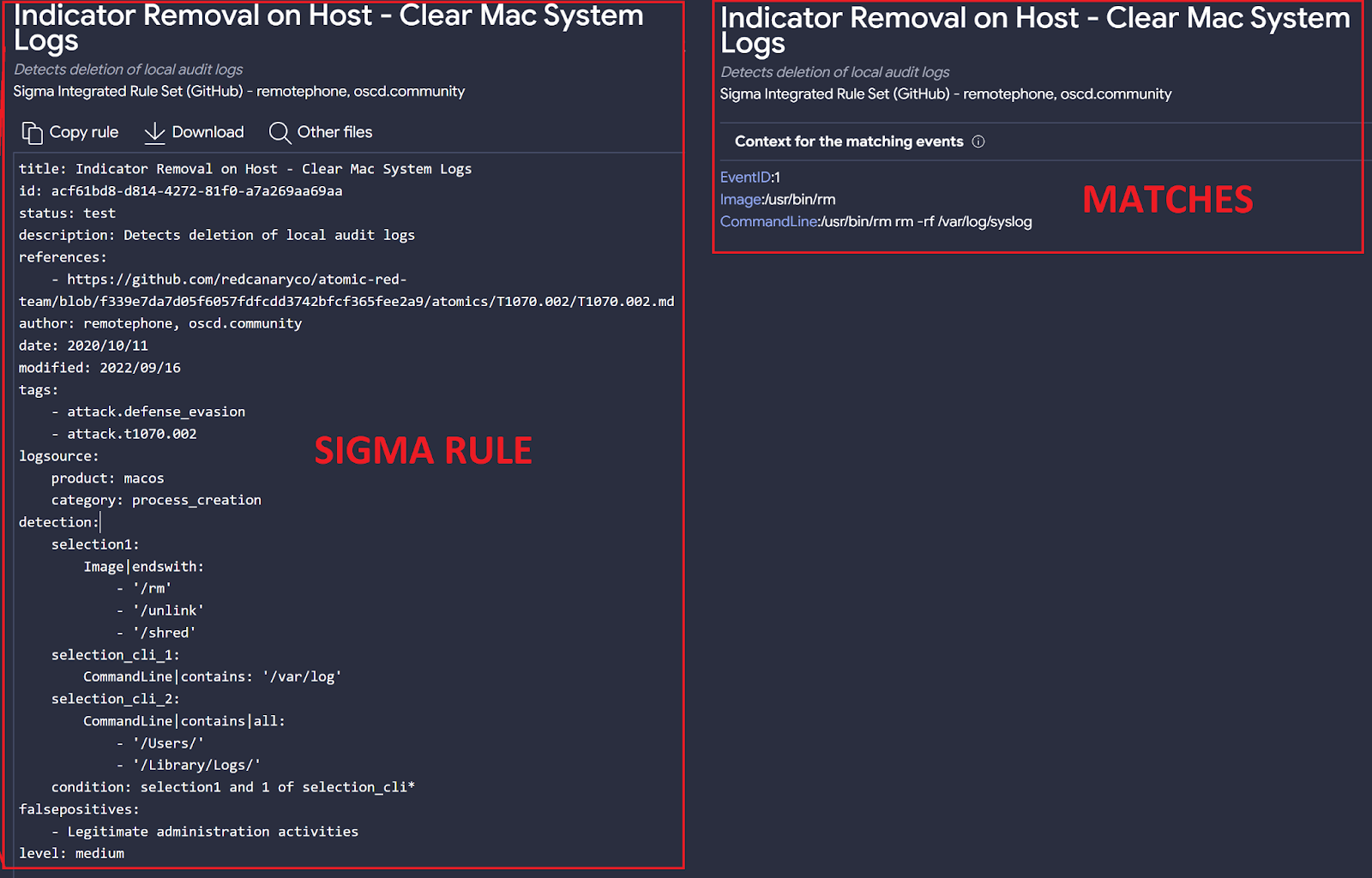
Interestingly, Sigma rules intended for Linux also produce results in macOS environments, and vice versa. In this case, the shell script can be interpreted by both operating systems. Indeed, one of the matching rules for the sample called Indicator Removal on Host - Clear Mac System Logs was specifically created for macOS:
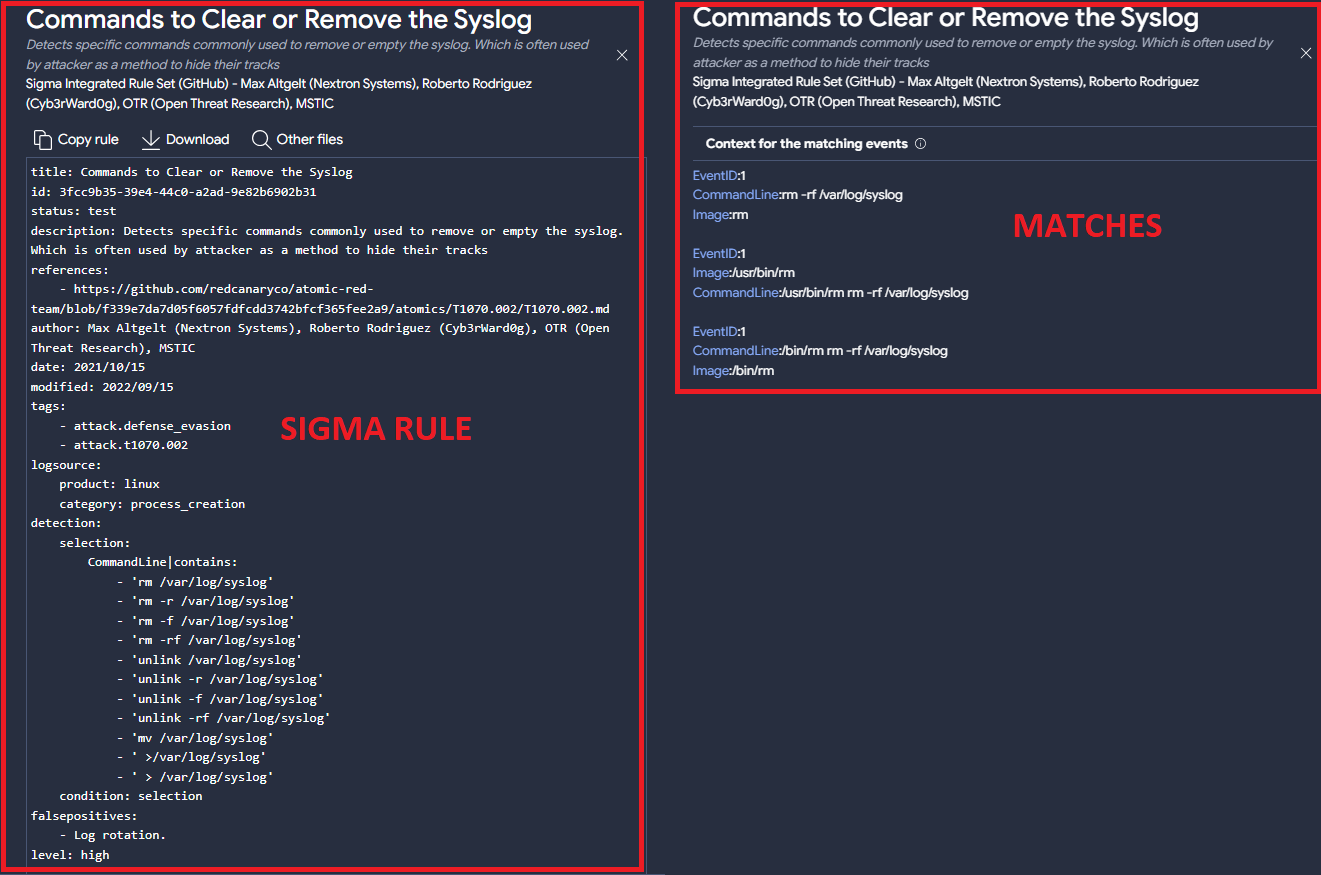
while a second matching rule, Commands to Clear or Remove the Syslog , was created for Linux:
To get more examples of samples with Sigma rules that match sandboxes’ output instead of Sysmon, you can use the following queries:
(have:sigma) and not have:evtx type:mac
(have:sigma) and not have:evtx type:linux
A second interesting example is a dmg matching 8 Sigma rules, 5 of them originally created for Linux OS under the “process_creation” category and 2 rules created for macOS. The last match… is a Sigma rule created for Windows samples!
The new feature matching Sigma rules with Linux and macOS samples helped us identify some rules that are maybe too generic, which is not necessarily a problem as long as this is the intended behavior.
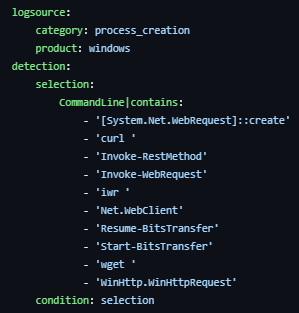
In this case, the Usage Of Web Request Commands And Cmdlets rule was originally created to detect web request using Windows’ command line:
The rule seems a bit too generic since it only checks for a few strings in the command line, although it can be highly effective for generic detection of suspicious behavior.
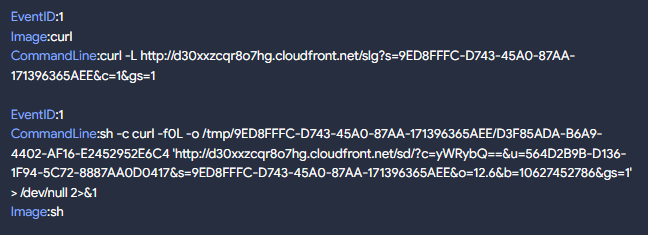
To understand why our Macintosh Disk Image sample triggered a detection for this rule, we checked the matches:
As we can see, the use of the string “curl” in the command line was enough to match this sample.
This sigma rule had about 9k hits last year only, with more than 300 of the files being Linux or macOS samples. You can obtain the full list using the following query:
sigma_rule:f92451c8957e89bb4e61e68433faeb8d7c1461c3b90d06b3403c8f3d87c728b8 and (type:linux or type:mac)

Creating Livehunt rules from Sysmon EVTX outputs

So far we have mainly focused on samples that do not have Sysmon (EVTX) logs. Now let's see how it is possible to create a Livehunt rule based on Sysmon logs. For this, we are going to use the “structure” functionality provided in the Livehunt YARA editor, as we explain in this post.
The sample we will use in this example is associated with CobaltStrike and matches multiple Sigma rules that identify certain behaviors. It is important to note that for every Sigma match, we will see in the file “structure” the context that matched but not the full EVTX logs. These can be downloaded from the sample’s VT report behavior section under “Download Artifacts” or using our API (available for public and privately scanned files).
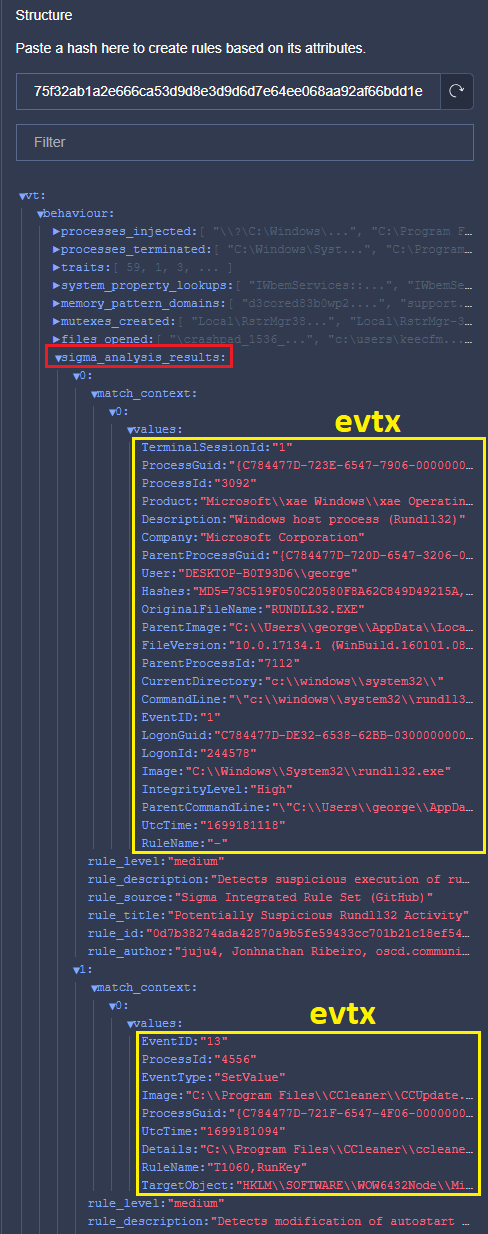
The following image shows the matching raw EVTX generated by our sample:
From the sample’s JSON Structure, Sigma_analysis_results is an array that contains objects with all the relevant information related to the matching Sigma rules, including details about the rule itself and EVTX logs. From the previous image, the first highlighted section is related to process creation and the second one is a registry event (value set).
As explained in our post, by just clicking on the fields that you are interested in you can start building your Livehunt rule, and adjust values accordingly. In this case, our rule will identify files creating registry keys under \\CurrentVersion\\RunOnce\\ with a .bat or .vbs extension:

import "vt"

rule sigma_example_registry_keys {

  meta:

    target_entity = "file"

  condition:

    for any vt_behaviour_sigma_analysis_results in vt.behaviour.sigma_analysis_results: (

      for any vt_behaviour_sigma_analysis_results_match_context in vt_behaviour_sigma_analysis_results.match_context: (

        vt_behaviour_sigma_analysis_results_match_context.values["TargetObject"] icontains "\\CurrentVersion\\RunOnce\\" and

        (vt_behaviour_sigma_analysis_results_match_context.values["Details"] endswith ".vbs" or vt_behaviour_sigma_analysis_results_match_context.values["Details"] endswith ".bat")

      )

    )

}

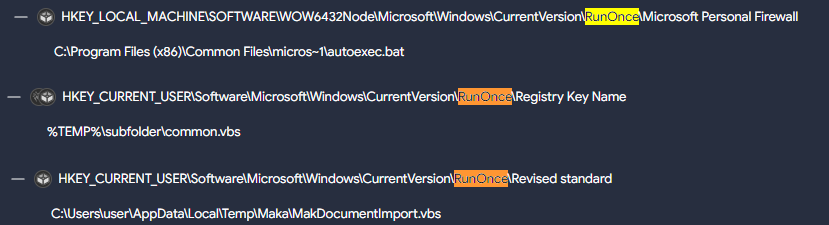
Running this YARA using a Retrohunt finds multiple files:
daef729493b9061e7048b4df10b71fdba2e11d9147512f48463994a88c834a30 141e87e62c110b86cf7b01a2def60faab6365f6391eb0d4a7cbad8d480dd4706 814b2cab7c5a12ec18f345eb743857e74f5be45c35642dc01330e7a0def6269a 31b0e9b188fe944d58867bbfc827d77c7711c3a690168a417377fe6bf1544408 dd6051509ed8cf3d059b538fa8878f87423c51b297b49a12144d3d2923c89cce 647323f0245da631cef57d9ca1e3327c3242fe1cbbf6582c4d187e9f5fbfb678 40a90dd3b2132a299f725e91a5d0127013b21af24074afb944d8bc5735c1bd53 b44c6d2dd8ad93cecd795cecde83081292ee9949d65b2e98d4a2a3c8a97bd936 710b0cca7e7c17a3dd2a309f5ca417b76429feac1ab5fb60f5502995ebbd1515 50c098119ce41771e7a3b8230a7aa61ebea925e8eda46c33f0dd42b8950b92fe
Here you can see some interesting matches:
The next rule focuses on file creation events related to Sysmon (EVID 11) under the “C:\Windows\System32” directory, with a “.dll” extension and having any “cve” tag (flagging potential CVE exploitation). Remember we can always include any additional details related to the samples we want to hunt, such as positives, metadata, tags, engines, … in addition to EVTX fields:

import "vt"

rule sigma_rule_evtx_cve {

  meta:

    target_entity = "file"

  condition:

    for any vt_behaviour_sigma_analysis_results in vt.behaviour.sigma_analysis_results: (

      for any vt_behaviour_sigma_analysis_results_match_context in vt_behaviour_sigma_analysis_results.match_context: (

        vt_behaviour_sigma_analysis_results_match_context.values["TargetFilename"] startswith "C:\\Windows\\System32\\" and

        vt_behaviour_sigma_analysis_results_match_context.values["TargetFilename"] endswith ".dll" and

        for any vt_metadata_tags in vt.metadata.tags: (

        vt_metadata_tags icontains "cve-"

        )

      )

    )

}

Sysmon EVTX fields - overlaps

Some of the details found in Sysmon EVTX fields (found in the VT JSON samples’ structure) can be redundant with details provided in other more traditional fields that you use for your Livehunt rules through the YARA VT module.
For example, instead of: vt_behaviour_sigma_analysis_results_match_context.values["TargetFilename"] from vt.behaviour.sigma_analysis_results
you could use: vt.behaviour.files_written to identify file creation events.
When that’s the case, we recommend using traditional fields found in VT samples’ structure for the following reasons:
  • Sysmon information is fully stored/indexed only the part matching the Sigma rule, which will limit any YARA hunting.
  • We mapped most Sysmon fields into YARA VT module for simplicity.
  • Linux and MacOS samples do not have any Sysmon information related to Sigma rules. Similar details about the match can be found under the “behaviour” JSON structure entry.
The new Sysmon-like details offered in the file “structure” also make VT an excellent platform for researchers and Sigma rule creators, allowing them to leverage this information without the need to create their own lab.
The following table helps mapping VT Intelligence queries, YARA VT module fields, Sigma Categories, and Sigma fields:

VT Intelligence

YARA VT module field

Sigma Category

Sigma Field

behavior_created_processes

vt.behaviour.processes_created

process_creation

Image

CommandLine

ParentCommandLine

ParentImage

OriginalFileName

behavior_files

vt.behaviour.files_attribute_changed

vt.behaviour.files_deleted

vt.behaviour.files_opened

vt.behaviour.files_copied

vt.behaviour.files_copied[x].destination

vt.behaviour.files_copied[x].source

vt.behaviour.files_written

vt.behaviour.files_dropped

vt.behaviour.files_dropped[x].path

vt.behaviour.files_dropped[x].sha256

vt.behaviour.files_dropped[x].type

file_access

file_change

file_delete

file_rename

file_event

TargetFilename

behavior_injected_processes

vt.behaviour.processes_injected

process_access

create_remote_thread

process_creation

CallTrace

GrantedAccess

SourceImage

TargetImage

StartModule

StartFunction

TargetImage

SourceImage

behavior_processes

vt.behaviour.processes_terminated

vt.behaviour.processes_killed

vt.behaviour.processes_created

vt.behaviour.command_executions

vt.behaviour.processes_injected

process_access

create_remote_thread

process_creation

CallTrace

GrantedAccess

SourceImage

TargetImage

StartModule

StartFunction

TargetImage

SourceImage

Image

CommandLine

ParentCommandLine

ParentImage

OriginalFileName

behavior_registry

vt.behaviour.registry_keys_deleted

vt.behaviour.registry_keys_opened

vt.behaviour.registry_keys_set

vt.behaviour.registry_keys_set[x].key

vt.behaviour.registry_keys_set[x].value

registry_add

registry_delete

registry_event

registry_rename

registry_set

EventType

TargetObject

Details

behavior_services

vt.behaviour.services_bound

vt.behaviour.services_created

vt.behaviour.services_opened

vt.behaviour.services_started

vt.behaviour.services_stopped

vt.behaviour.services_deleted

registry_set

process_creation

Image

CommandLine

ParentCommandLine

ParentImage

EventType

TargetObject

Details

behavior_network

vt.behaviour.dns_lookups

vt.behaviour.dns_lookups[x].hostname

vt.behaviour.dns_lookups[x].resolved_ips

vt.behaviour.hosts_file

vt.behaviour.ip_traffic

vt.behaviour.ip_traffic[x].destination_ip

vt.behaviour.ip_traffic[x].destination_port

vt.behaviour.ip_traffic[x].transport_layer_protocol

vt.behaviour.http_conversations

vt.behaviour.http_conversations[x].url

vt.behaviour.http_conversations[x].request_method

vt.behaviour.http_conversations[x].request_headers

vt.behaviour.http_conversations[x].response_headers

vt.behaviour.http_conversations[x].response_status_code

vt.behaviour.http_conversations[x].response_body_filetype

vt.behaviour.smtp_conversations[x].hostname

vt.behaviour.smtp_conversations[x].destination_ip

vt.behaviour.smtp_conversations[x].destination_port

vt.behaviour.smtp_conversations[x].smtp_from

vt.behaviour.smtp_conversations[x].smtp_to

vt.behaviour.smtp_conversations[x].message_from

vt.behaviour.smtp_conversations[x].message_to

vt.behaviour.smtp_conversations[x].message_cc

vt.behaviour.smtp_conversations[x].message_bcc

vt.behaviour.smtp_conversations[x].timestamp

vt.behaviour.smtp_conversations[x].subject

vt.behaviour.smtp_conversations[x].html_body

vt.behaviour.smtp_conversations[x].txt_body

vt.behaviour.smtp_conversations[x].x_mailer

vt.behaviour.tls

network_connection

DestinationHostname

DestinationIp

DestinationIsIpv6

DestinationPort

DestinationPortName

SourceIp

SourceIsIpv6

SourcePort

SourcePortName

behavior (too generic)

vt.behaviour.modules_loaded

image_load

ImageLoaded

Image

OriginalFileName

Wrapping up

At VirusTotal, we believe that the Sigma language is a valuable tool for the community to share information about samples’ behavior. Our objective is to make its use on VT as simple as possible. Our addition of MacOS and Linux is just the start of what we are working on, as we aim to add Sysmon for Linux to obtain more robust results, including the ability to download full generated logs.
Remember that here you have a list of all the Crowdsourced Sigma rules that are currently deployed in VirusTotal and that you can use for threat hunting.
We hope you join our fan club of Sigma and VirusTotal, and as always we are happy to hear your feedback.
Happy Hunting!