Wednesday, October 27, 2021

Introducing VirusTotal MSSP Program: Differentiate and become indispensable with preventive capabilities

Today we are excited to announce our VirusTotal MSSP partner program, providing partners a competitive advantage to differentiate and enrich their security offering with world-class crowdsourced intelligence.

Before we continue, you can find full information of the program on our program website, and we invite you to attend our kick-off webinar next November 17th, 5pm CET.

Now, let’s go into further details on the program.


It seems we can we help


The MDR market is expected to reach $2.2B by 2025. At the same time, and according to market studies, there seems to be an increasing client frustration coming from MSSPs providing suboptimal services that do not cover their customers’ main needs. Moreover, end-clients are also more likely to consolidate services with a single provider, meaning that failure to address certain use cases results in lost accounts. Threat Intelligence helps generate preventative capabilities and superior context that MSSPs can leverage to match and exceed customer expectations.

This new program allows MSSPs to integrate the full power of VirusTotal into their offering, supercharging not only their client-facing services, but also their internal operations. As an example, MSSPs can now leverage the VT AUGMENT widget to display VirusTotal advanced context in their offerings in a compliant and revenue-generating manner. 


Palo Alto Networks survey data shows that SOC analysts are only able to handle 14% of alerts generated by security tools, this is even more challenging for MSSP analysts, who have to deal with incidents coming from multiple customer networks. VirusTotal can power alert enrichment for orchestration and automatic triage, resulting in increased productivity and SOC operator efficacy, helping MSSP teams make more accurate decisions, faster. 


A true partnership


VirusTotal has become synonymous with crowdsourced Threat Intelligence. As part of our program, MSSPs can leverage VirusTotal’s brand in their sites, collaterals, research reports, events, etc. Similarly, participants will be featured in our public MSSP partners portal, generating trust and visibility. 


We also invite MSSPs to collaborate on crowdsourcing of {YARA, SIGMA, IDS} rules or other investigations and insights. This is a simple avenue to showcase technical expertise, raise brand awareness and even to attract top talent. 

If you need additional information, please check the dedicated website, kick-off webinar and as usual, feel free to reach out through virustotal.com/contact.

Happy hunting!

Wednesday, October 20, 2021

, , , , , ,

VirusTotal Multisandbox += Microsoft Sysinternals

We welcome the new multisandbox integration with Microsoft sysinternals. It was also recently announced on the sysinternals blog as part of their 25th anniversary. This industry collaboration will greatly benefit the entire cybersecurity community helping put the spotlight on indicators of compromise that may be seen if malware is detonated within your own environment.


In their own words:

"The new Microsoft Sysinternals behavior report in VirusTotal, including an extraction of Microsoft Sysmon logs for Windows executables (EXE) on Windows 10, is the latest milestone in the long history of collaboration between Microsoft and VirusTotal. Microsoft uses VirusTotal reports as an accurate threat intelligence source, and VirusTotal uses detections from Microsoft Defender Antivirus and Microsoft Sysinternals Autoruns, Process Explorer and Sigcheck tools. This cross-industry collaboration has a significant impact on improving customers protection. " says Andi Comisioneru, Group Program Manager, Cloud Security, Microsoft.


Let's take a look at a few example reports. For example in the file with sha256 1bb93d8cc7440ca2ccc10672347626fa9c3f227f46ca9d1903dd360d9264cb47

Here we see a report from Microsoft sysinternals sysmon with DNS resolutions, process tree and shell commands:


From the DNS resolution seen, we can make use of VT-Graph to pivot on other samples that also resolve the same hostname.


For our second example let's look at 1247bb4e1d0aa5aec6fadccaac6e898980ac33b16b69a4aa48fc6e2fb570141d.  Here we see a suspicious email address contained within some files written to the disk:


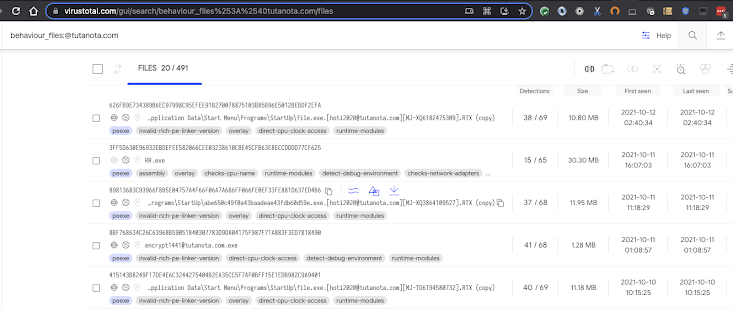
If we wish to pivot on that, we can search for other similar samples with the same modus operandi with a search query like:
behaviour_files:@tutanota.com


Finally our last example is:

4bb1227a558f5446811ccbb15a7bfe3e1f93fce5a87450b2f2ea05a0bca36bb2. This sample is a coinminer that stores a dropped file in %USERPROFILE%\AppData\Roaming\Microsoft\Telemetry\sihost32.exe

It also registers a scheduled task on logon. It is possible to find other samples doing the same thing with the following intelligence query:
behaviour_processes:"\"AppData\\Microsoft\\Telemetry\\sihost32.exe\""

For more ways to search, see documentation on the available file search modifiers.
 

Happy hunting!


Monday, October 04, 2021

Ransomware in a global context

 Today we are proud to announce our very first VirusTotal Ransomware Activity Report. This initiative is designed to help researchers, security practitioners and the general public better understand the nature of ransomware attacks by sharing VirusTotal’s visibility. 

We are also organizing a series of webinars describing the main findings of our research, so please join us for the session that works better for you:


October 5th (APAC-friendly timezone): https://bit.ly/3lZuS3K

October 6th (Americas and EMEA-friendly timezone): https://bit.ly/3APK49S

October 7th (Public Sector edition): https://bit.ly/3ERXioS


We encourage you to read the full report, but below you can find some of the main findings

  • Since 2020, users from more than 140 countries have submitted ransomware samples to VirusTotal. 
  • During this time, at least 130 different ransomware families have been active.
  • Israel, South Korea, Vietnam, China, Singapore, India, Kazakhstan, Philippines, Iran and the UK are the 10 most affected territories based on the number of submissions to VirusTotal. 
  • Activity among the most spread ransomware families comes and goes, but there is a baseline of activity of around 100 not-so-popular ransomware families that never stops.
  • According to our observations, it seems that in most cases attackers prepare fresh new samples for their campaigns.
  • In July 2021 we observed a wave of the new variant of Babuk ransomware.
  • GandCrab was the most active family in early 2020, before its prevalence decreased dramatically in the second half of the year. 

You can download the full report here


Now, how to transform all this information into something actionable we could use to protect from ransomware attacks? In this blog post we will not go over the content of the report itself. We want to discuss ideas we can use to proactively defend ourselves.


Monitoring Ryuk campaigns

The report contains insights on ransomware families and artifacts associated with their attacks. As an example, we can use this information to prioritize enforcing new security policies in our network based on the most active families. 

For instance, a first approach would be checking if any sample related to these campaigns has landed in our network. Let’s use the Ryuk ransomware family as an example. The following VirusTotal Intelligence query will help us find Ryuk PE samples with at least 10 AV detections submitted since January 2021:

"engines:ryuk  fs:2021-01-01+ (type:peexe or type:pedll) p:10+"

Given this query returns more than 9k results, we can use the VT API or the VT-PY programming interfaces. An easy way to do it would be using Jupyter Notebooks to create our custom report using some fancy graphics. We have created a couple of notebooks here and here implementing some examples using the VT-PY interface we will describe below. 

Let’s use one of the notebooks as an example where we want to list all the hashes submitted during a specific period of time related to the ransomware family we are monitoring. We basically iterate the results of the VT Intelligence query, resulting in 9426 hashes we will store in a log file.


Monitoring Babuk

Another idea would be to collect IOCs (Indicators Of Compromise) related to these campaigns, in this case identified as malicious by at least 5 antivirus engines. Here we could get all the suspicious URLs, domains and IP addresses contacted by the malware samples, or we could retrieve URLs used at different stages of the attack. This can be done with the following VT Intelligence query:

"engines:babuk  fs:2021-07-01+ (have:contacted_domains or have:contacted_ips) p:5+"

For instance, the second Jupyter notebook searches for all the domains and IP addresses contacted by Babuk since July 2021 with at least 5 positives. We can later use these IOCs to block their access in our EDR, firewall or web proxies, avoiding any attempt to contact them.


Distribution vector and spreading

It is always a good idea protecting ourselves at the initial stages of an attack. We can monitor the infrastructure used for distribution of any campaign making use of our itw (“in the wild”) tag. Additionally, we can also search for files executing or containing malware related to the campaign we monitor. These queries will help us to block any malicious infrastructure as well as to detect samples distributing the malware we monitor. This can be done with the following VT Intelligence query:

"engines:gandcrab fs:2020-02-01+ fs:2020-05-01- (type:peexe or type:pedll) have:in_the_wild"

VTI Search Link

We have also created a script available in one of the aforementioned Jupyter Notebooks showing the list of distribution vectors related to Gandcrab ransomware.

Another interesting angle is understanding what exploits a specific threat campaign is using for spreading. We can do that using the tag:exploit  modifier in our VT Intelligence query. For example: 

"engines:gandcrab fs:2020-02-01+ fs:2020-05-01- (type:peexe or type:pedll) tag:exploit"

This modifier would return those samples that are suspected to contain an exploit. This can be used to list the top countries that submitted samples related to this particular malware family containing exploits.

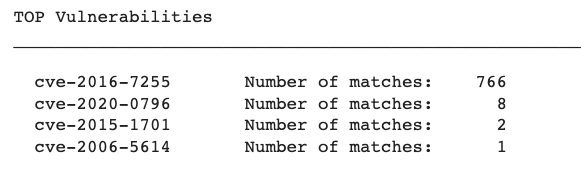
The same approach can be taken on a typical vulnerability management use case. One of the Jupyter notebooks provides the top list of exploited vulnerabilities related to a malware family.


Are we in trouble?

Another common approach is checking if our brand has been abused in any phishing campaign or if our infrastructure hosted any component of the attack. The following VT Intelligence query will search from any embedded domain or URLs used in recent Cerber campaigns, including URLs used for storing malware samples (itw urls):  

"engines:cerber fs:2021-06-01+ (embedded_domains:my_domain OR embedded_urls:my_domain OR itw:my_domain)"


What’s next?

The information provided by the VirusTotal community can be used to proactively monitor and protect against ransomware attacks. Some additional ideas on how to use VirusTotal in this direction can be found below:

  • Global Threat Intelligence. Once we know what are the most common ransomware signatures and its generic behavior, we can use this information to monitor future samples, for instance:

"p:10- fs:2021-09-01+ (engines:ransom or engines:crypto) AND tag:persistence and tag:detect-debug-environment AND tag:checks-network-adapters AND tag:long-sleeps AND tag:direct-cpu-clock-access"

VTI Search Link

This query:

  • Searches for files with less than 10 detections: p:10- 

  • Searches for samples submitted since September 2021: fs:2021-09-01+ 

  • Filters in only those samples that AV vendors or Sandbox providers identify as potential ransom or crypto attacks: (engines:"ransom" or engines:"crypto")

  • Takes into account only those tags that are most common among the ransomware samples we have seen in this report: tag:"persistence" and tag:"detect-debug-environment" AND tag:"checks-network-adapters" AND tag:"long-sleeps" AND tag:"direct-cpu-clock-access"

We can focus on files that are potentially exploiting some vulnerability. We can search for them using the “exploit” tag.

​​"p:10- fs:2021-09-01+ (engines:ransom or engines:crypto) AND tag:exploit"

VTI Search Link

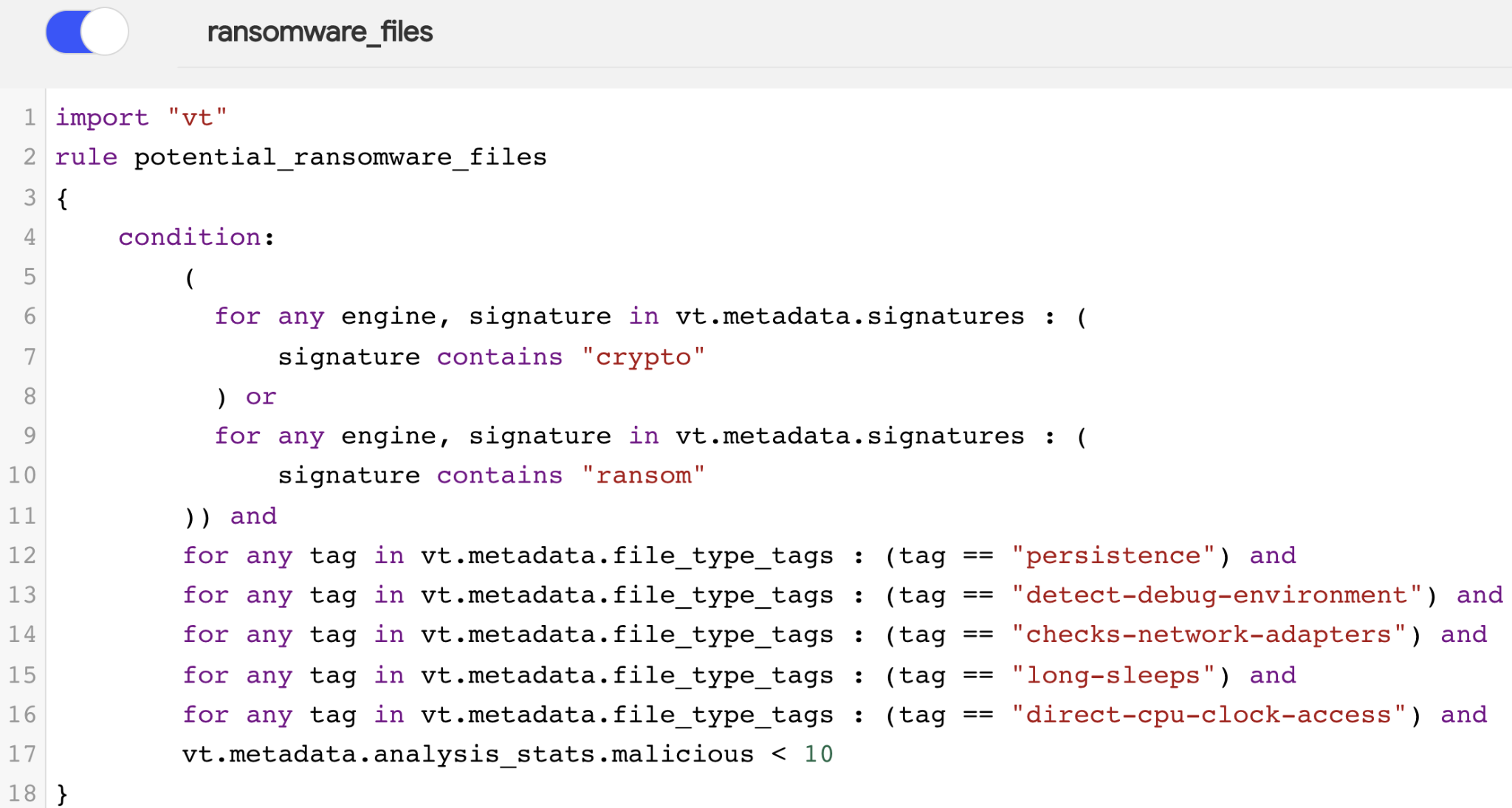
  • Advanced Threat Services. VirusTotal extensively uses YARA. Indeed, we developed our own vt YARA module. This allows to easily translate our previous VT Intelligence searches to a YARA rule like the one below:


We can find these YARA rules at the end of this post.

To sum up, it is equally important to understand global ransomware trends as to be able to do something about it. In this post we went through different use cases discussing some ideas on how to implement a live cybersecurity threat monitoring system, which can be a game changer for our current security architecture. 

At VirusTotal we will keep sharing both our visibility as well as best practices to protect against new attacks and to keep our world a little bit safer. As always, we are happy to hear from you.

Happy hunting!


Appendix - YARA rules


import "vt"
rule find_potential_ransomware_files
{
meta:
     description = "Detects potential ransomware related files"
        author = "VT Team"
        reference = "https://blog.virustotal.com/"
       date = "2021-10-04"
        vt_search = "p:10- fs:30+ (engines:ransom or engines:crypto) AND tag:persistence and tag:detect-debug-environment AND tag:checks-network-adapters AND tag:long-sleeps AND tag:direct-cpu-clock-access"
vt_link = "https://www.virustotal.com/gui/search/p%253A10-%2520fs%253A30%252B%2520(engines%253A%2522ransom%2522%2520or%2520engines%253A%2522crypto%2522)%2520AND%2520tag%253A%2522persistence%2522%2520and%2520tag%253A%2522detect-debug-environment%2522%2520AND%2520tag%253A%2522checks-network-adapters%2522%2520AND%2520tag%253A%2522long-sleeps%2522%2520AND%2520tag%253A%2522direct-cpu-clock-access%2522/files"
condition:
     (for any engine, signature in vt.metadata.signatures :
            (signature contains "crypto")    
            or
          for any engine, signature in vt.metadata.signatures :
            (signature contains "ransom"))
        and
        for any tag in vt.metadata.file_type_tags : (tag == "persistence") and
        for any tag in vt.metadata.file_type_tags : (tag == "detect-debug-environment") and
        for any tag in vt.metadata.file_type_tags : (tag == "checks-network-adapters") and
        for any tag in vt.metadata.file_type_tags : (tag == "long-sleeps") and
        for any tag in vt.metadata.file_type_tags : (tag == "direct-cpu-clock-access") and
        vt.metadata.analysis_stats.malicious < 10
}
rule find_potential_ransomware_exploits
{
meta:
     description = "Detects potential ransomware related files using exploits"
        author = "VT Team"
        reference = "https://blog.virustotal.com/"
       date = "2021-10-04"
        vt_search = "p:10- fs:30+ (engines:ransom or engines:crypto) AND tag:exploit"
vt_link = "https://www.virustotal.com/gui/search/p%253A10-%2520fs%253A30%252B%2520(engines%253Aransom%2520or%2520engines%253Acrypto)%2520AND%2520tag%253Aexploit/files"
condition:
     (for any engine, signature in vt.metadata.signatures :
            (signature contains "crypto")
          or
          for any engine, signature in vt.metadata.signatures :
            (signature contains "ransom"))
        and
        for any tag in vt.metadata.file_type_tags : (tag == "exploit") and
        vt.metadata.analysis_stats.malicious < 10
}


Wednesday, September 15, 2021

Introducing VT Alerts

 360-degrees insights into your assets


Many VirusTotal’s users deploy rules to monitor that their assets, including domains, IP ranges and intellectual property are not being abused by any attacker. Today we are proud to introduce VT Alerts, a solution designed to help detect any abuse in (almost) real time.

Before going into more details, we invite you to join us next September 28th at 17:00 CEST for our VT Alerts webinar if you want to know everything about it.


What is VT Alerts?


VT Alerts is designed to provide a feed-like experience providing different severity notifications on anything we detected in VirusTotal that matches your infrastructure and intellectual property. It offers you an easy way to create watchlists where you can include all the network-related assets of your company, as well as terms related to your brands and intellectual property. 
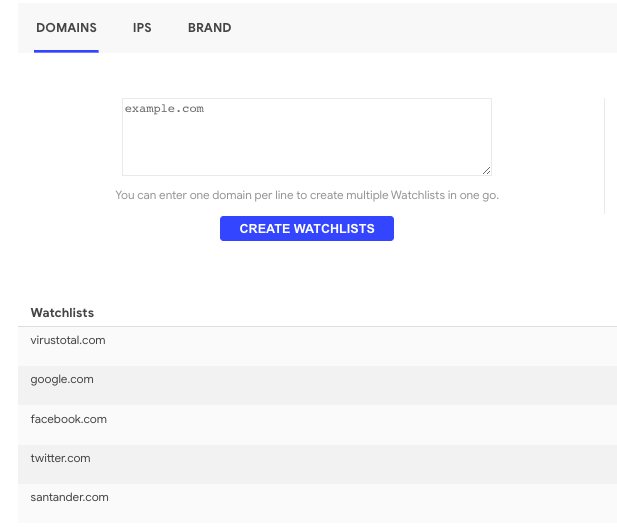
VT Alerts will take it from here, automatically monitoring anything new we detect in VirusTotal matching this criteria and providing you with alerts on anything suspicious we find in the VirusTotal ecosystem. 

Watchlists and notifications

We have designed three types of watchlists: Domains, IPs and Brand. Here is how it works.

For networking infrastructure there are two types of watchlists. The first one is for Domains and basically expects a list of, well, domains, and the second is for IP Ranges belonging to your infrastructure that you want to monitor. Once this is defined, alerts are created when any of the following criteria is met:

  • Any URL under any domain or subdomain in the Domains watchlist is detected as malicious in VirusTotal.
  • Any malicious file contacts a URL under any domain or subdomain in the Domains watchlist.
  • A malicious file is downloaded from a URL under any domain or subdomain in the Domains watchlist.
  • We detected any URLs or domains reusing any domain or subdomain in the Domains watchlist.
  • We find any Domain or IP in the content of any malicious file.
  • Domain typosquatting notifications.

Brand protection works a bit differently, as here you can provide any terms related to your business, brands and intellectual property. We will search for these terms in any suspicious network infrastructure and communication to detect abuses. 
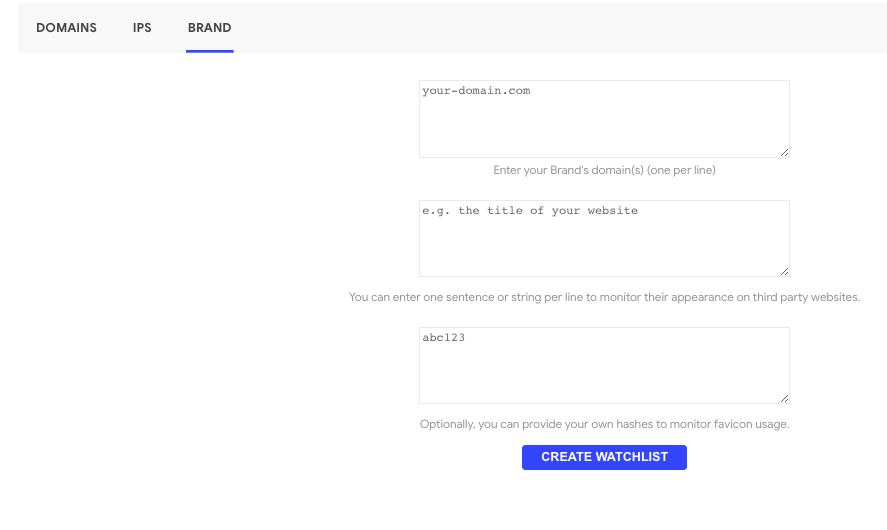
For example, we will search for any link including any of the keywords from your list of terms to monitor, which is a very usual tactic used by attackers in phishing campaigns. We will also check if any of the terms are found in any website we analyse, flagging potential abuse by third-parties. These terms could be any strings that are characteristic to your brand or that are candidates to be reused by attackers, for example, in phishing websites cloning yours. Additionally to these strings, we will need your domains (allow-list) so we make sure every time we find something suspicious it does not belong to you. 

Alright, now everything is set and ready in your Brand watchlist. VT Alerts will let you know when:

  • Any domain outside your infrastructure reuses any of your favicons.
  • Any URL outside of your infrastructure uses any of the strings you defiled.

And that would be it. Next: let’s learn more about the Alerts.


Alerts

After everything is set, we will start receiving alerts in our dashboard according to the criteria defined above. 


Each notification we get provides the following information:

  • Creation timestamp - when the alert was created
  • Severity (Info, Low, Medium, High) - depending on the detection ratio
  • Event type (URL sighting, File download, File contact, Domain sighting, IP sighting)
  • VirusTotal verdicts’ snapshot at notification time
  • Type of entity involved in the alert (Domain, URL, IP, File)
  • Detection Category
  • Use-Case Category

All this data is presented in a simplified form in the dashboard, but you can click on any of the items of the alerts to pivot to its VirusTotal report (for example, in the case of a domain or file) or you can click on the magnifying glass to get full information of the event.
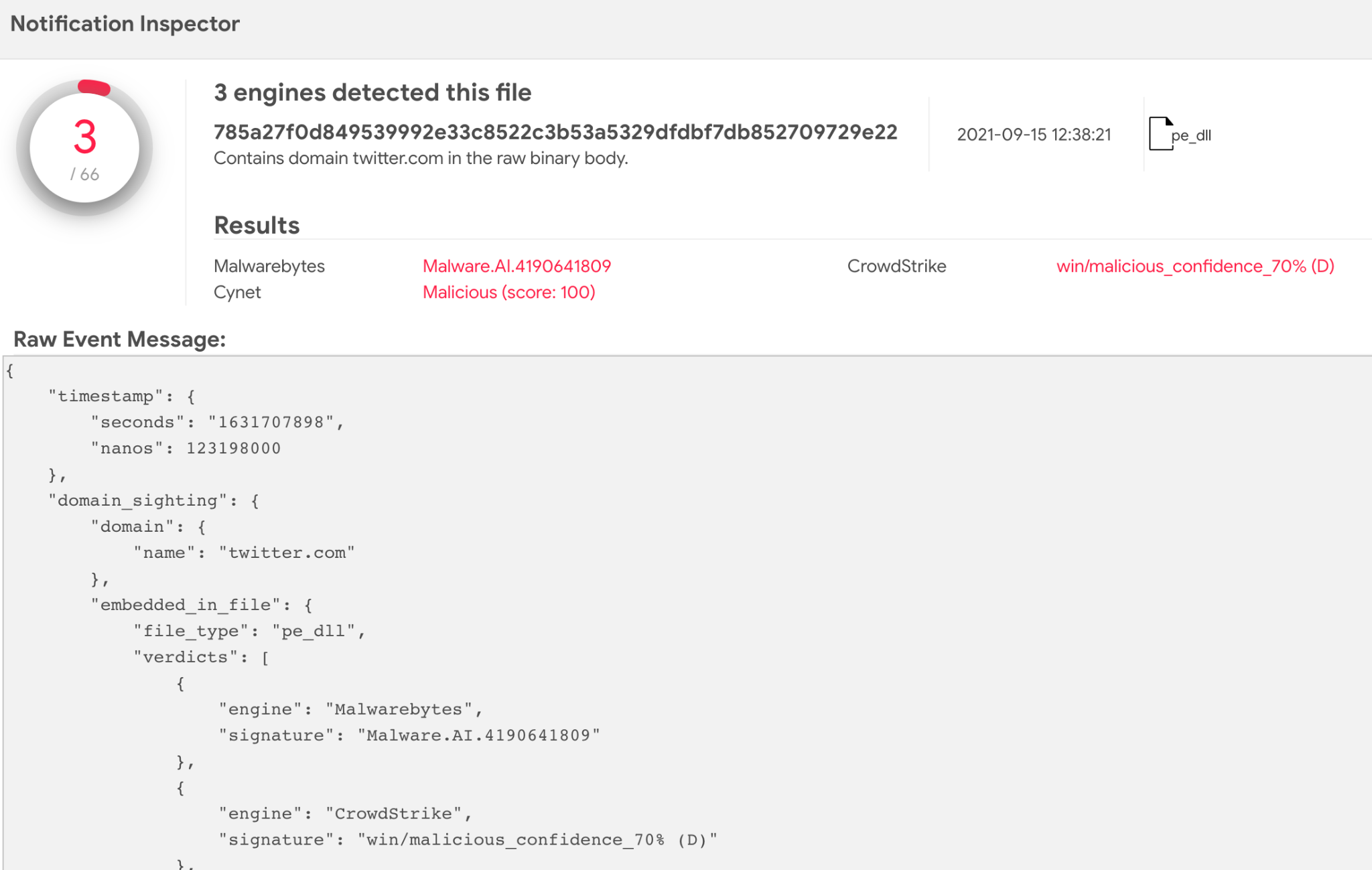
All this information is also ready to be automated through our API.

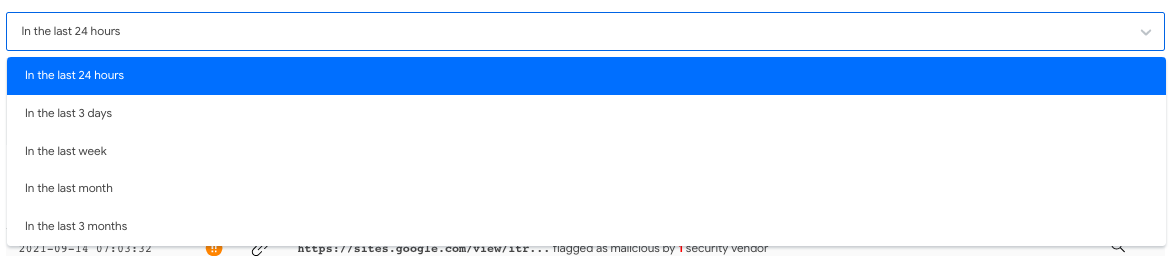
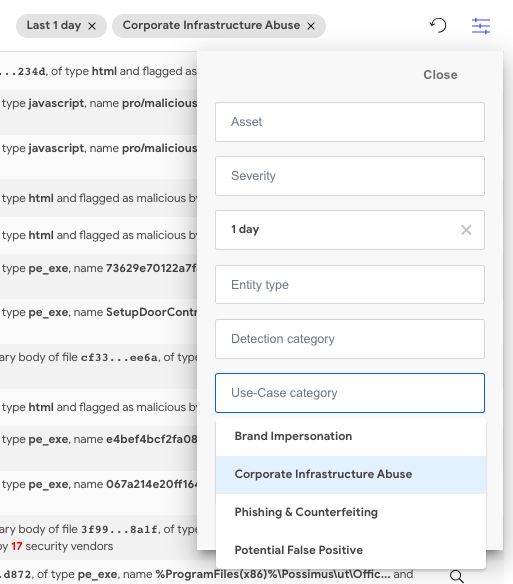
We also added different options to make filtering noise out easier, or to quickly pinpoint worrisome alerts. For example, we can filter by time of the alerts, severity or even categorize potential false positives straight away.
Or use any of combination of the filters provided:

What now?

Notifications are the starting point for your investigation. Alerts contain all VirusTotal’s links to any involved entities, so you can continue your investigation as you’d normally do.
FAQ

Q: Where is all this data coming from?

A: We use the VirusTotal corpus to watch for events to generate notifications on. Alerts won’t crawl nor visit any of the domains nor IPs that you create watchlists for.

Q: Is any of my information made public?

A: All of VT Alerts’ data (watchlists and feeds) is private to your VirusTotal group and is not published, directly or indirectly, anywhere else. Keep in mind that the suspicious artefacts found in the alerts, like URLs and files, are still accessible to other VirusTotal’s users.

Q: Can I get notifications pushed to my email/vendor/etc.?

A: We’re gathering feedback on the most sought-after delivery channels and adding those in the coming weeks.

Q: Are VT Alerts running retroactively?

A: No. At the moment, you will start receiving notifications once your alerts are set and ready.

Future Features and Parting Words

VT Alerts will be evolving quickly in the following months, with more features in the pipeline like notifications for WHOIS changes, improved typosquatting alerts, more brand protection notifications, watchlist management for large-scale users, and many more.

We’re excited about VT Alerts future, and we hope it will become your tool of choice for asset monitoring. Please let us know if you are interested or if you have any ideas how to make it better.


Happy hunting!