


We welcome the new multisandbox integration with Microsoft sysinternals. It was also recently announced
on the sysinternals blog as part of their 25th anniversary. This industry
collaboration will greatly benefit the entire cybersecurity community helping put the spotlight
on indicators of compromise that may be seen if malware is detonated within your own environment.
Let's take a look at a few example reports. For example in the file with sha256 1bb93d8cc7440ca2ccc10672347626fa9c3f227f46ca9d1903dd360d9264cb47
Here we see a report from Microsoft sysinternals sysmon with DNS resolutions, process tree and shell commands:

From the DNS resolution seen, we can make use of VT-Graph to pivot on other samples that also resolve the same hostname.
For our second example let's look at 1247bb4e1d0aa5aec6fadccaac6e898980ac33b16b69a4aa48fc6e2fb570141d. Here we see a suspicious email address contained within some files written to the disk:

If we wish to pivot on that, we can search for other similar samples with the same modus operandi with a search query like:
It also registers a scheduled task on logon. It is possible to find other samples doing the same thing with the following intelligence query:
For more ways to search, see documentation on the available file search modifiers.
In their own words:
"The new Microsoft Sysinternals behavior report in VirusTotal, including an extraction of Microsoft Sysmon logs for Windows executables (EXE) on Windows 10, is the latest milestone in the long history of collaboration between Microsoft and VirusTotal. Microsoft uses VirusTotal reports as an accurate threat intelligence source, and VirusTotal uses detections from Microsoft Defender Antivirus and Microsoft Sysinternals Autoruns, Process Explorer and Sigcheck tools. This cross-industry collaboration has a significant impact on improving customers protection. " says Andi Comisioneru, Group Program Manager, Cloud Security, Microsoft.
Let's take a look at a few example reports. For example in the file with sha256 1bb93d8cc7440ca2ccc10672347626fa9c3f227f46ca9d1903dd360d9264cb47
Here we see a report from Microsoft sysinternals sysmon with DNS resolutions, process tree and shell commands:

From the DNS resolution seen, we can make use of VT-Graph to pivot on other samples that also resolve the same hostname.
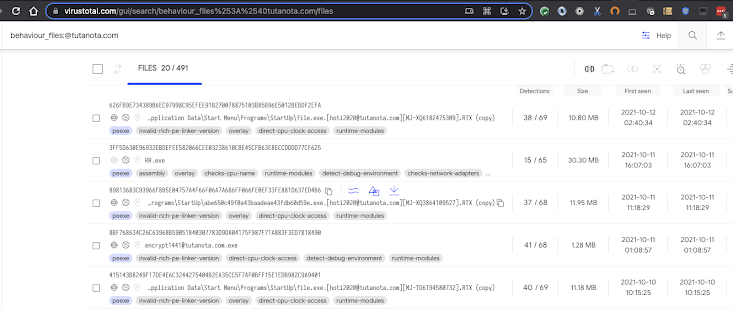
For our second example let's look at 1247bb4e1d0aa5aec6fadccaac6e898980ac33b16b69a4aa48fc6e2fb570141d. Here we see a suspicious email address contained within some files written to the disk:

If we wish to pivot on that, we can search for other similar samples with the same modus operandi with a search query like:
behaviour_files:@tutanota.com
Finally our last example is:
4bb1227a558f5446811ccbb15a7bfe3e1f93fce5a87450b2f2ea05a0bca36bb2. This sample is a coinminer that stores a dropped file in %USERPROFILE%\AppData\Roaming\Microsoft\Telemetry\sihost32.exeIt also registers a scheduled task on logon. It is possible to find other samples doing the same thing with the following intelligence query:
behaviour_processes:"\"AppData\\Microsoft\\Telemetry\\sihost32.exe\""
For more ways to search, see documentation on the available file search modifiers.
Happy hunting!