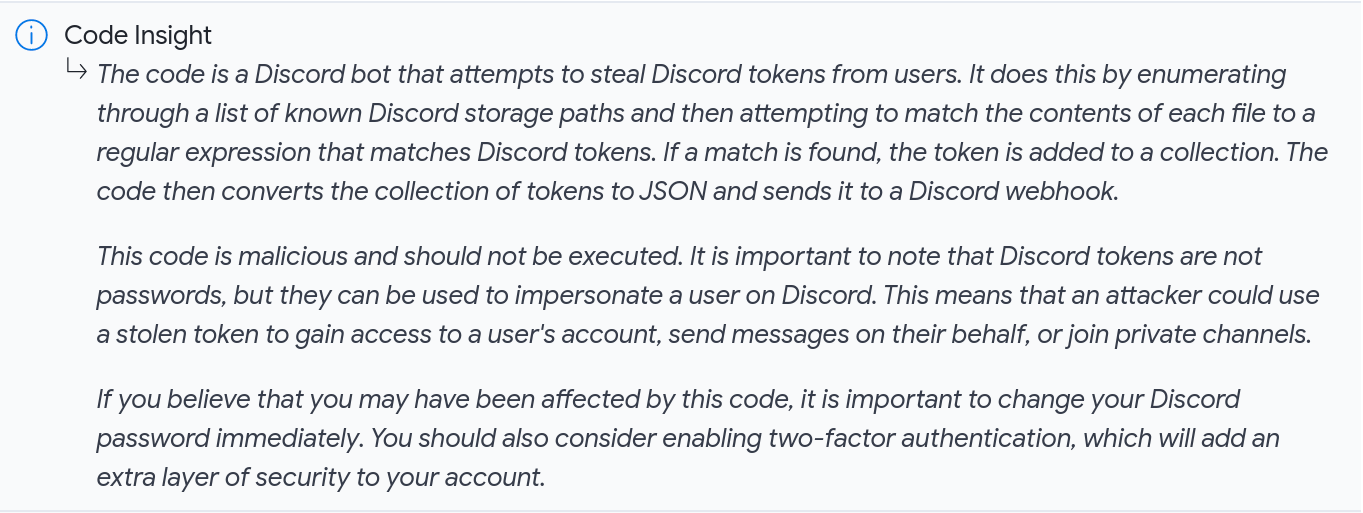
Access to RELEVANT threat data is a recurring challenge highlighted by SOCs and CTI teams, at VirusTotal we want to help you understand your unique threat landscape. Indeed, tracking campaigns and threat actors in VirusTotal’s Threat Landscape module should be a smooth and simple experience. We are excited to announce that VirusTotal users can now subscribe to any Threat Actor or IoC Collection of their interest and get notified every time a new indicator of compromise (IoC) is added to them, acting as a fully tailored stream of activity relevant to their orgs.
This helps us in making sure we don’t miss any relevant activity and allows us to proactively protect ourselves. For example, is a given campaign that targeted us in the past evolving to leverage a new set of exploits spreading through attached documents? Let’s use this new intel to make sure our patches and detection capabilities are in place before we get hit.
Let’s see how we can build out our threat landscape.
Subscribing to threat cards to follow relevant activity
(1) The Threat Landscape module collections and actor listings are equipped with an Actions dropdown option that allows users to subscribe to (or unsubscribe from) selected items. In other words, to follow adversaries, toolkit and campaigns that are particularly interesting for them.
(2) Additionally, you will find a bell icon on the top right corner of both collections and actor cards to subscribe/unsubscribe.
When looking at the full list of collections and threat actors in VT Threat Landscape, subscribed items will be called out with the icon.

Where can I find new activity notifications? Enter IoC Stream
IOC Stream is our brand new centralized notification hub. It aggregates ALL IoCs coming from:
Hunting notifications - either IoCs matching your RetroHunt jobs or your active LiveHunt rules.
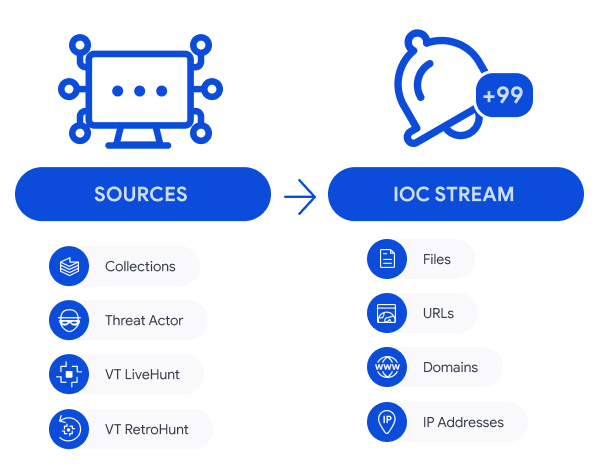
New IoCs from any of these sources will appear in your IoC Stream. Moreover, any new subscription to Threat Actors or Collections will automatically incorporate IoCs added to them in the last 7 days, this gives you a headstart. Note that you can always delete notifications you are not interested in.
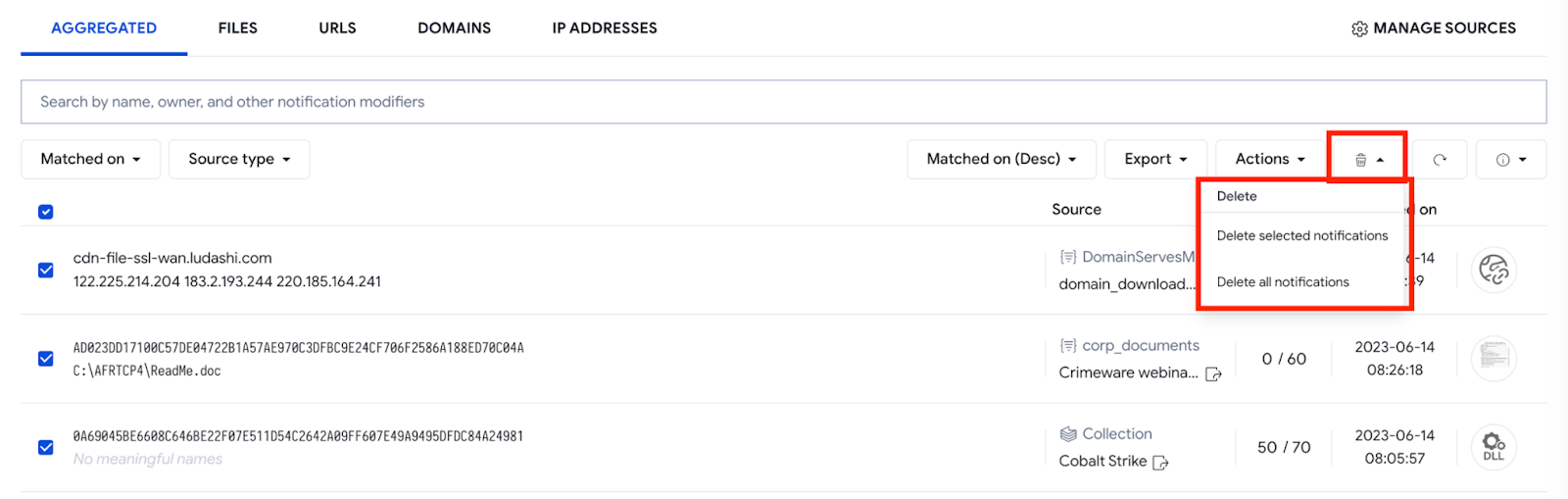
IoC Stream provides several options for filtering IoC notifications, such as:
The matching date (or date when that IoC was added to the collection/threat actor)
The source type (whether the notification is coming from a collection/threat actor subscription or Retrohunt / Livehunt rule)
The IoC type (file, URL, domain or IP address)
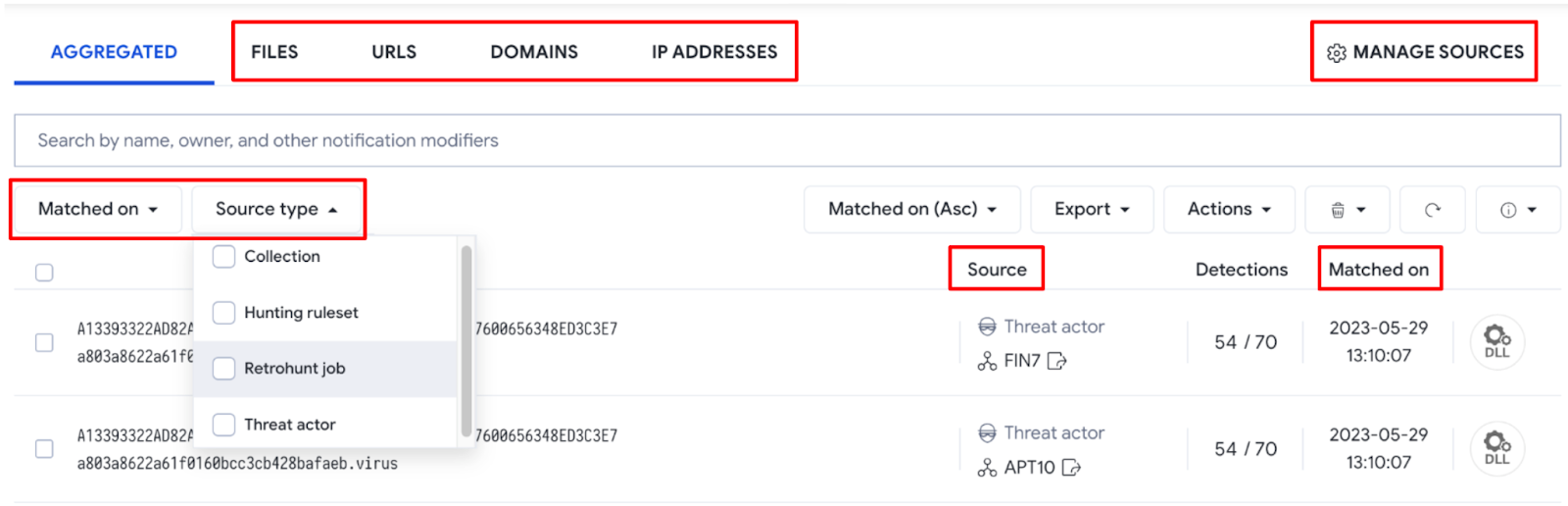
You can also manage the sources of your notifications by going to the Manage sources section at the top right corner. This view allows you to unsubscribe or disable notification sources, and to quickly pivot to all IoCs coming from that particular source by clicking on the matches number for any source - filtering modifiers will automatically be added to the search bar.
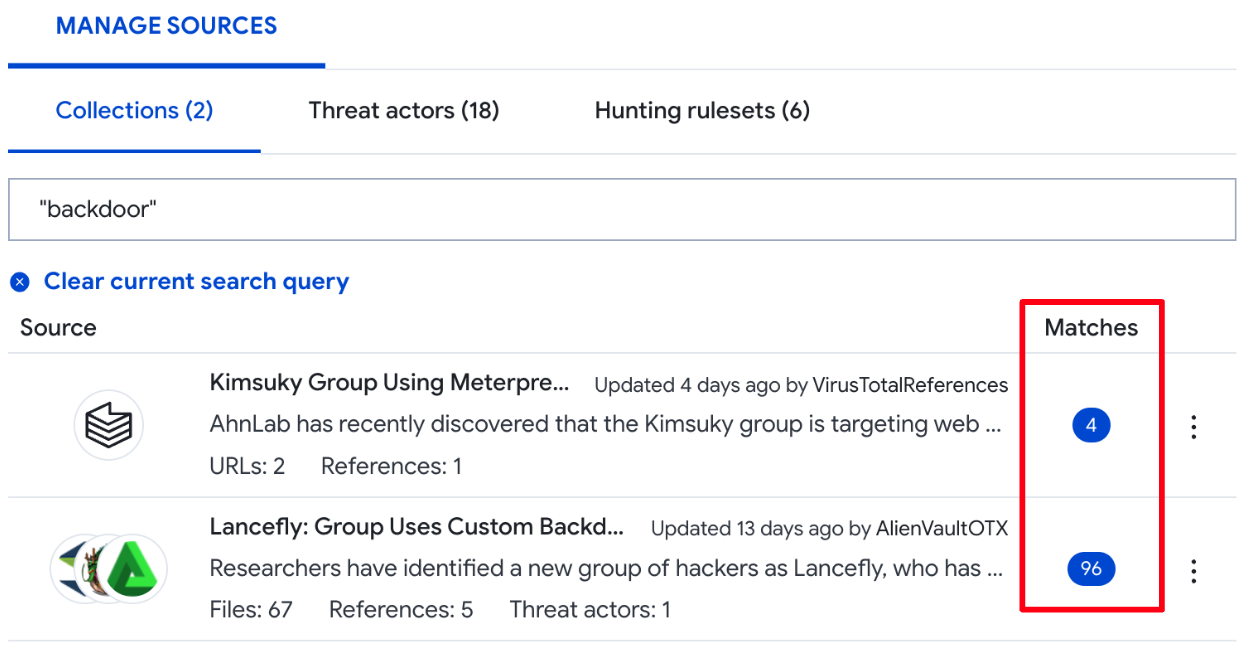
The IoCs Export option allows you to download IOCs in the most popular data formats: JSON, CSV and STIX, so that you can conveniently ingest or match them in 3rd-party technologies.
See it in action!
Automation and programmatic access
VirusTotal is about actionability and operationalization first. There are a few API v3 endpoints that will let you retrieve your IoC Stream notifications and related full-blown reports, allowing you to automate flows into third-party tools or matching against your own events.
As in the UI, you can also filter results combining criteria such as matching date, source type or entity type. Find all documentation here.
Let’s say we want to check all URL notifications from the last 3 days that come from any collection we are subscribed to. The filter would be "date:3d+ entity_type:url source_type:collection" and below is the raw Python code snippet:
import requests
import urllib
from pprint import pprint
res = requests.get(url, headers=headers)
res.raise_for_status()
return res.json()
pprint(get_ioc_stream_notifications(filters))
We also have a Python module that can be used to fetch the same information, or to regularly track what network infrastructure (URLs, domains and IP addresses) a threat actor of our interest is using (Kimsuky in this example):
import requests
from pprint import pprint
filters = 'date:7d+ (entity_type:url OR entity_type:domain OR entity_type:ip_address) source_type:threat_actor "Kimsuky"'
url = '/ioc_stream'
def get_ioc_stream_notifications(url,filters):
try:
vt_client = vt.Client(API_KEY)
result = vt_client.get_data(url,params={'filter':filters})
vt_client.close()
return result
except vt.error.APIError as e:
print(e)
return None
pprint(get_ioc_stream_notifications(url,filters))
Another option to interact with your IoC Stream is via our vt-cli. For example, we could check all files notified daily by both our LiveHunt and RetroHunt rules by using the filter "date:1d+ entity_type:file origin:hunting", where "origin:hunting" refers to both notification sources (source_type:retrohunt_job or source_type:hunting_ruleset).
~$ vt iocstream list -f "date:1d+ entity_type:file origin:hunting"
Wrapping up
Subscriptions to collections and threat actors make it easier for users to stay focused on tailored/relevant intel, and IoC Stream serves as a single repository to centralise all your notifications, including any hunting rules you use.
This has a number of advantages, including having a better visibility of adversary activity by having all notifications in a single place, plus the ability to filter it out as needed before we export it for ingestion in 3rd-party tools. Additionally, the IoC Stream provides handy analysis capabilities, such as checking Commonalities for a set of samples or direct connection with VT Diff to generate YARA rules. This saves time and democratizes security expertise, whereby less experienced team members can act as advanced threat hunters.
We hope you find all these new features as useful as we do. If you have any questions or requests please do not hesitate to contact us.
We are pleased to announce that VirusTotal has improved the identification of programming languages and file formats through the implementation of Generative AI (artificial intelligence). Historically, automating these tasks has been quite challenging, especially when it comes to certain scripting and plain text file formats. However, with the aid of Generative AI, we have expanded our programming language coverage and file format identification capabilities, enabling us to directly overcome these hurdles.
Understanding File Formats: Overcoming Challenges in Identification
File identification utilizes a diverse set of techniques. The most straightforward and prevalent of these is file extension analysis. However, this method isn't foolproof, as it can be easily deceived by simply renaming the file. To circumvent this weakness and boost the precision and reliability of file identification, several techniques have historically been employed. These time-tested strategies encompass the use of magic numbers, signature-based scanning, and structural analysis.
"Magic numbers" serve as unique signatures, identified by distinctive byte sequences at the beginning of a file. For instance, the magic number "MZ" (hexadecimal "4D 5A") signifies executable files in the DOS family and Microsoft Windows PE format. Similarly, the magic number "0x25 0x50 0x44 0x46" represents PDF files.
In addition to magic numbers, signature-based scanning plays a crucial role in detecting file formats. It matches byte patterns within files, particularly when magic numbers are absent or when dealing with complex formats. Signature-based scanning enables the identification of various file types, such as MP3 audio files, MPEG video files, SQLite databases, and more.
Structural analysis is another approach used to identify file formats, focusing on the file's structure, patterns, and other distinctive characteristics. This comprehensive approach allows for the accurate detection and classification of a wide range of file formats.
Despite the success of these techniques, challenges arise when dealing with plain text files, especially programming and scripting languages. Unlike other file types, plain text files lack clear magic signatures or well-defined structures, making it more difficult to accurately determine their content.
Advantages of AI-based Code language and File format identification
To overcome those challenges, VirusTotal has embraced the power of Generative AI based on Sec-PaLM, a LLM (large language model) extensively trained on a vast corpus of data to learn the underlying patterns, grammar, and vocabulary of programming and scripting languages. This new capability empowers the analysis of clear text code snippets within files, resulting in improved programming language identification and bringing significant advantages:
Increased Accuracy: LLM's training on extensive code repositories equips it with an in-depth understanding of programming and scripting languages. This enables VirusTotal to achieve higher accuracy in language identification, reducing false positives and ensuring more reliable results.
Real-Time Adaptability: LLM's AI-powered approach facilitates dynamic learning, allowing VirusTotal to adapt and evolve as new programming languages and frameworks emerge. This ensures that VirusTotal remains at the forefront of language identification, even in the face of rapidly changing technology landscapes.
Expanded Language Coverage and File Format: With the aid of generative AI, VirusTotal can identify a wider range of programming and scripting languages, including both mainstream and niche languages. This enhanced coverage empowers developers, researchers, and security professionals to detect potential vulnerabilities and threats across diverse codebases.
Examples
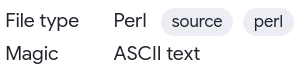
This new feature refines the existing capabilities of our system. Specifically, when dealing with previously supported file types, this new method directly changes the 'File type' attribute. To illustrate this, let’s see the following case where Magic recognized a file as 'text'. However, when the AI system analyzed the same file, it concluded that it was 'Perl'. Consequently, the file type was then adjusted to 'Perl':
In this other example, we observe how Magic categorizes the file as "text", while AI identifies it as "AutoIt". Since "AutoIt" is not a commonly supported file type, it is added as a secondary or additional label in the File type section:
By utilizing multiple tags, we prevent disruptions to established processes, canned searches, and YARA rules reliant on the "text" tag, while enabling the development of new use cases with more detailed labels. Our approach focuses on improving the platform while respecting backward compatibility, avoiding interruptions, and ensuring seamless integration with existing user workflows.
In either scenario, the crucial aspect is that these labels form part of the file identification. They are indexed and can be used to conduct searches in VirusTotal Intelligence using the "type:" modifier. For example, a query such as "type:AutoIt positives:1+ fs:2023-06-01+" will return files labeled as AutoIt, received from June 1, 2023 onwards, with at least one positive detection:
We are confident that this new capability will empower security analysts to hunt threats hiding in rare code languages or unique file formats. As we leverage the power of IA, we greatly value your feedback. Stay tuned for updates and thank you for your ongoing support.
Last Monday our colleagues over at Mandiant rolled out Permhash. In their own words, Permhash is an extensible framework to hash the declared permissions applied to Chromium-based browser extensions and APKs allowing for clustering, hunting, and pivoting similar to import hashing and rich header hashing. We are excited to announce that we have been working closely with Jared Wilson on the Mandiant side to support Permhash similarity pivoting in VirusTotal.
VirusTotal already supports multiple similarity pivots: vhash (VirusTotal’s home-grown static feature hash), behash (same concept but for dynamic analyses), ssdeep, imphash, TLSH, telfhash, main icon dhash, etc. We have blogged extensively in the past about how similarity can be used to expand context and map out threat campaigns, we even hosted a joint webinar with Trend Micro and Trinity Cyber on this very topic. But let’s see how Permhash builds upon VirusTotal’s threat hunting swissknife and provides yet another orthogonal vehicle to track threat actors and their toolkits, going beyond IoCs and rather focusing on repeatable toolkit patterns.
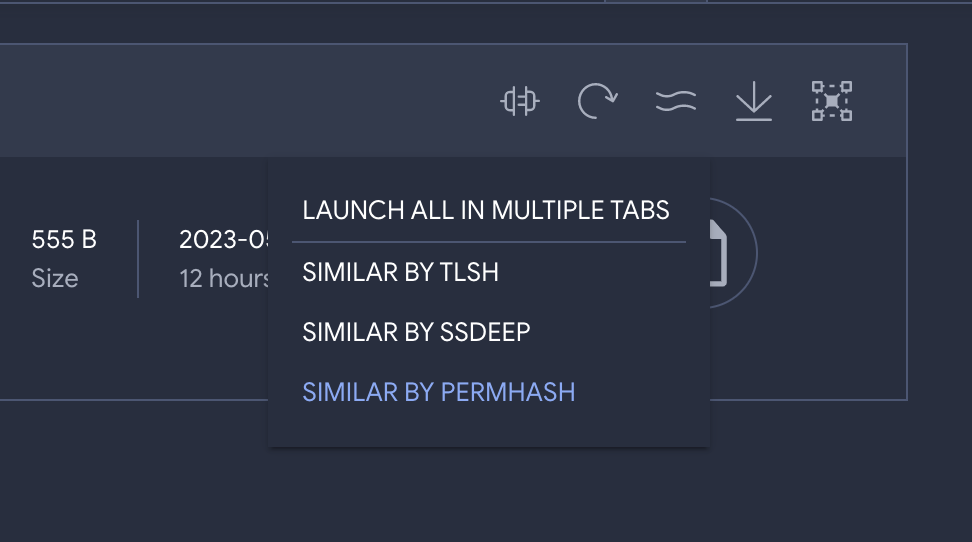
In their article, Mandiant writes about UNC3559 and CHROMELOADER. UNC3559 is a financially motivated threat cluster that has distributed the CHROMELOADER dropper since at least early 2022. CHROMELOADER is a dropper that subsequently downloads a malicious Chrome extension, which can display advertisements in the browser and capture browser search data. Mandiant shares a particular CHROMELOADER manifest, you can use that initial input to pivot to other similar files via Permhash, and you can combine it with other search modifiers to narrow down results to actual Chrome Extensions as opposed to manifests:
With a single click we get to 19 other potential variations by the same threat group, many of them with low detection coverage by the industry (we are starting to get proactive):
Now we can dig further into these to understand the group’s infrastructure and modus operandi. For instance, we can leverage VirusTotal Commonalities to identify patterns that repeat themselves across all variations, as well as distribution infrastructure:
That’s how, among other ranked aggregations, we are able to identify the following in-the-wild distribution URLs, all of which were fully undetected at the time of writing:
The use of the .xyz TLD and archive.zip file name stand out as a repeatable pattern that may be combined with others to climb the pyramid of pain and hunt for the group based on behavioral patterns and TTPs, as opposed to hashes. At the same time, Commonalities allow us to understand even more about the distribution vectors and kill chain:
Indeed, the execution parents tell us about those files that when detonated in our sandboxes drop the Chrome extensions under study. That’s how we can learn that the first stage malware consists of both DMG files (6 files, example) and Powershell scripts/commands (3 files, example):
By iteratively calculating the commonalities of the first stage malware we can identify other repeatable patterns to detect these campaigns and even understand when and where has this group been active based on crowdsourced telemetry gathered from VirusTotal’s open community:
It seems to have been a relatively targeted campaign mostly targeting US orgs and active during July 2022.
This is by no means an exhaustive investigation but rather a quick post showcasing how Permhash similarity can work with other features in VirusTotal to mature our hunting program. As you can see, while EDR tools and other security technologies might not yet generate Permhash fingerprints to support threat hunting use cases, VirusTotal’s pivots and analytical capabilities allow us to translate it into actionable intelligence in the form of hashes but also related network indicators and repeatable patterns that may indeed be logged in common security telemetry being ingested in SIEMs/XDRs/TDRs/etc.
Moreover, now that we have a group of variants as opposed to a single instance, we can study those files or even leverage tools like VTDIFF to build a YARA rule that can be used to hunt within our environment or to track relevant adversaries going forward in time (Livehunt) and take proactive actions as they evolve.
Oh, and one more thing, stay tuned because we will soon provide consolidated similarity searching across all similarity pivots taking into account prevalence and overlaps to identify best matches without having to search for each different similarity vector (vhash, ssdeep, permhash, imphash, etc.).
Following the announcement of VirusTotal Code Insight at the RSA Conference 2023, we've been thrilled by the overwhelmingly positive response from the cybersecurity community. As enthusiasm grows, we've been flooded with inquiries from those keen to discover more about Code Insight. To address these questions, we've put together a Q&A covering popular topics, including news about the tool's expanded capabilities. Our aim is to establish realistic expectations and provide a comprehensive understanding of Code Insight's purpose, challenges, and ongoing progress.
In case you missed our presentation at RSA, we compiled a brief video showcasing a few use cases:
What's New?
Code Insight has broadened its support for script formats, moving beyond PowerShell to offer analysis for a variety of scripting languages. Here are some examples:
The maximum file size limit for files processed by Code Insight has been doubled, allowing for analysis of larger files.
The model delivers more concise and focused high-level explanations, placing greater emphasis on code behavior.
The user interface has been redesigned to display only the first sentences of the report by default, with the option for users to expand the report as needed, preventing extensive reports from overwhelming the default view.
Q: Is Code Insight replacing current detection technologies?
A: No, Code Insight is no substitute for current detection technologies. Rather, it's an additional layer of support designed to boost performance of security analysts, offer a different perspective on the technical details and help the cybersecurity industry improve their technologies.
Q: Is Code Insight replacing human analysts in cybersecurity roles?
A: No, Code Insight is not designed to replace human analysts in cybersecurity. Instead, it serves as a powerful assistant and partner, enhancing their performance and effectiveness. The major advantage of Code Insight is its scalability, as it can act as an extremely productive junior analyst, working 24x7 and analyzing a vast number of files. This enables human analysts to receive preliminary analyses to help in their evaluation and focus on the most interesting or challenging samples. Ultimately, Code Insight's goal is to augment human expertise, rather than replace it, and to help the cybersecurity industry evolve by improving both technologies and workflows.
Q: Why is there a limitation on the size of PowerShell files analyzed with Code Insight?
A: The limitation on the size of PowerShell files analyzed with Code Insight stems from the inherent constraints of large language models (LLMs) concerning token inputs. LLMs have a maximum token limit for each input, which affects the amount of code that can be processed in a single pass.
Like we mentioned earlier in this blog post, Code Insight can now handle files twice the size it could before, and we're not stopping there. We're going to keep working on improving this aspect in the coming months. To overcome the limitations and increase the size of the analyzed code, we are developing several strategies. One approach involves breaking down larger code snippets into smaller chunks, processing them separately, and then combining the results. Another strategy focuses on refining the LLM's pre-processing and tokenization methods to optimize the handling of larger input sizes more efficiently.
Q: Can Code Insight analyze executables?
A: While Code Insight currently focuses on analyzing scripting languages, we are actively working on expanding its capabilities to handle executables and other file formats. Our approach comprises multiple stages, such as disassembling and decompiling, which enable the large language model to effectively generate natural language summaries of the analyzed code.
Q: What are some other limitations of Code Insight and improvements planned in the roadmap?
A: Code Insight is continuously learning and improving its accuracy based on experience and user feedback. One of the current limitations is it only uses code as its unique input, without any additional context about the cases being analyzed. Sometimes, it can be challenging to determine if something is legitimate or malicious based solely on the code. For example, a code snippet that downloads a remote file and executes it could either be a legitimate installer or a malware downloader. This lack of context can sometimes lead to model hallucinations, where the model may make incorrect assumptions about the code’s intent.
To address this limitation, we have plans in our roadmap to provide more context to Code Insight, ultimately improving its criteria and deep analysis capabilities. This includes giving access to any metadata related to the URLs and files linked in the code snippet. By incorporating additional context, Code Insight will be better equipped to distinguish between legitimate and malicious behavior, enhancing its overall effectiveness.
Q: Can attackers develop strategies to confuse Code Insight and provoke mistakes in its judgment?
A: Yes, it was anticipated, and indeed, it has been happening from the very moment Code Insight was announced. As we highlighted in our prior blog post, it's crucial to acknowledge that attackers can devise strategies to deliberately confuse LLMs when analyzing code and cause them to make errors in judgment. This is similar to how they continually refine their tactics to bypass or mislead traditional detection technologies such as antivirus, EDRs, sandboxing, IDS/IPS, and so on.
Q: Have you detected any active malware specifically crafted to confuse Code Insight?
A: So far, we haven't detected any malware designed to confuse Code Insight that has been used in real attacks. However, we have observed numerous proof-of-concept attempts testing prompt injections and other tricks during the first few days after the announcement, as expected. We remain vigilant and anticipate more genuine attempts in the future if attackers and malware creators start to recognize the effectiveness of Code Insight in enhancing cybersecurity measures.
Q: Do you plan to filter out crafted samples designed to confuse Code Insight?
A: No, the nature of VirusTotal is to scan everything, including malware with advanced obfuscation or any kind of attack technique aimed at bypassing detection capabilities. Our mission is to provide our partners and security teams with access to any observed threat to learn and improve product performance and overall security posture. Embracing failure and learning from mistakes is a crucial part of the journey to improve and evolve Code Insight. It continuously learns from attackers' attempts to confuse its judgment, adapting and enhancing its capabilities to remain a valuable tool for security analysts. By analyzing a wide range of samples, including those crafted to cause confusion, Code Insight gains valuable insights that contribute to its ongoing development and effectiveness.
Q: How can I help improve Code Insight?
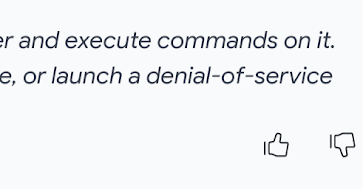
A: Your feedback is critical to learning and evolving Code Insight. The community's input helps us identify areas for improvement and fine-tune the system for better performance. You can contribute by providing feedback through the "Thumbs Up" and "Thumbs Down" buttons, which you can find in the bottom right corner of the Code Insight reports. These buttons let you express positive or negative feedback on the analysis results. By sharing your insights, you play a valuable role in enhancing the capabilities of Code Insight and driving its ongoing development.
Q: How does Code Insight integrate with VirusTotal Intelligence?
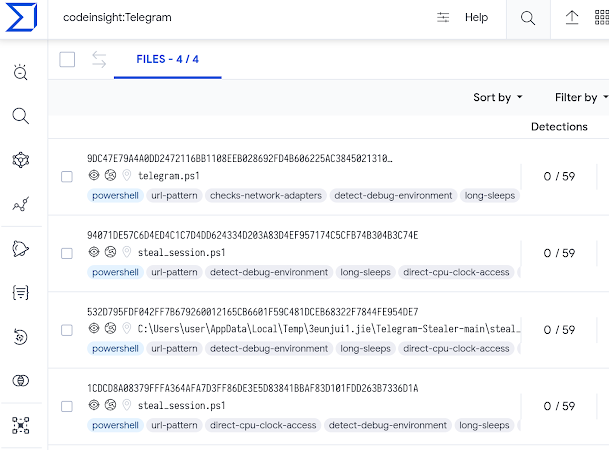
A: Code Insight's true value lies in its ability to scale analysis through the VirusTotal platform, allowing for the examination of individual code samples and the aggregation and exploitation of results on a large scale via VirusTotal Intelligence. All results generated by Code Insight are already easily searchable, pivotable, and accessible through API calls. This enables security teams to quickly and effectively scrutinize vast quantities of code and identify potential threats, ultimately enhancing their security stance.
Example of VTI query with Code Insight include to search samples related to Telegram:
Q: Are there any additional functionalities of Code Insight specifically for VirusTotal Intelligence users?
A: Yes, one of the key features in our roadmap is the introduction of Code Insight on demand for VT Intelligence users. This functionality allows VT Intelligence users to copy and paste code snippets for immediate analysis by Code Insight, bypassing the need to submit entire samples to VirusTotal. This on-demand feature emphasizes a crucial distinction compared to the standard Code Insight process, where submitted samples may or may not be processed by Code Insight depending on pre-filtering criteria.
The pre-filtering criteria take into account several factors such as size, similarity with previous code snippets already processed by Code Insight, abuse signals, and other relevant considerations. This filtering mechanism ensures that Code Insight focuses on the most valuable and unique samples, which helps maintain the platform's overall efficiency and effectiveness.
However, with the on-demand functionality tailored for VT Intelligence users, security professionals can ensure that their specific code snippets are directly analyzed by Code Insight. This provides a more streamlined and targeted approach, enabling users to receive quick and precise results to further enhance their security posture.
Q: I have new ideas and use cases for implementing AI in VT, and I'm interested in contributing with new models and tools. Can I do this?
A: Absolutely! VirusTotal thrives on its community-driven approach, welcoming contributions from users and companies who have innovative ideas for enhancing the platform. We are eager to consider new features and integrate tools from contributors who share our passion for improving cybersecurity for the benefit of the global community. If you have any new ideas, suggestions, or tools, please don't hesitate to reach out to us. Your expertise and creativity can make a significant impact in advancing our collective efforts in the cybersecurity field, ultimately promoting a safer digital environment worldwide.
What's Next for Code Insight?
We are in the early stages of Code Insight's development; this is just the beginning. We continue to enhance and expand the current features while exploring new avenues to assist analysts even more effectively. Our plans include:
Further expanding file type and size support.
Analyzing binary and executable files.
Enriching analysis with contextual information besides the code itself.
Your feedback and support play a vital role in helping us stay ahead of evolving cyber threats. Thank you for your continued involvement, and stay tuned for more updates and developments from VirusTotal.
YARA rules are an essential tool for detecting and classifying malware, and they are one of VirusTotal’s cornerstones. Other than using your own rules for Livehunts and Retrohunts, in VirusTotal we import a number of selected crowdsourced rules provided by contributors to help identify and classify samples (example report). However, finding, tracking and managing VirusTotal’s crowdsourced YARA rules can be challenging, especially as the number of rules and contributors grow. To address this, we introduce the new VirusTotal’s Crowdsourced YARA Hub, allowing users to easily search and filter existing rules, track new ones and one-click export any of them to Livehunt and Retrohunt.
It is important to highlight that the Crowdsourced YARA hub does NOT include your private VirusTotal Livehunt/Retrohunt rulesets, it rather centralizes all contributor/community YARA rules that are currently contextualizing files submitted to VirusTotal.
The new Crowdsourced YARA Hub can be found under “Livehunt”.
The new repository makes it easy to find existing YARA rules. Users can filter rules based on different criteria such as when the rules were created, who authored them, number of matches and threat category (based on the top threat categories in the samples matching the rule), in addition to search rules by name, description or metadata. This helps users quickly find the rules they need and avoid duplicating efforts. For example, let’s find all rules whose description, fields or title contain the word ransomware:
This makes it way easier for VirusTotal’s users monitoring new rules for particular actors or campaigns, checking if any rule of our interest gets updated and being on top of fresh rules. Additionally, visualizing the number of matches also helps understanding the prevalence of given rules and calibrating its impact when we find matching samples during our investigations.
Moreover, it is also a vehicle to stay up-to-date with emerging threats identified by the community.
Additionally, the new central repository allows users to check and import YARA rules into other pipelines easily. You can visualize, copy, download and one-click import rules into Livehunt and Retrohunt. Downloading and exporting allows you to action the rule against your environment via your EDR or forensics tools with YARA support. As usual, you can check all matches for a given rule.
Did you notice how gorgeous YARA rules look in our new YARA editor? This is just a sneak peek of a very basic version and we will be providing more details very soon, but get ready for a YARA editor on steroids!
Conclusion
The new Crowdsourced YARA Hub provides many advantages that will help all VirusTotal’s users get familiar with and leverage crowdsourced YARA rules. Now it should be way easier finding rules of our interest, filtering out noisy rules from our analysis and focusing on the interesting ones and understanding what new rules are available to us to track actors and campaigns, all in a new interface that makes it easier to visualize them and one-click import rules into any pipeline. We encourage all our users to give it a try and share with us any feedback, and all YARA rules creators to let us know if you are interested in sharing your amazing rules with the VirusTotal community.
At the RSA Conference 2023 today, we are excited to unveil VirusTotal Code Insight, a cutting-edge feature that leverages artificial intelligence for code analysis. Powered by Google Cloud Security AI Workbench, Code Insight produces natural language summaries of code snippets with ease. This functionality empowers security experts and analysts by providing them with deeper insights into the purpose and operation of analyzed code, significantly enhancing their capability to detect and mitigate potential threats.
For quite some time, artificial intelligence (AI) and machine learning (ML) have played a crucial role in anti-malware and cybersecurity, mainly focusing on classification tasks. However, recent advancements in large language models (LLMs) have expanded their capabilities to encompass text generation and summarization.
Impressively, when these models are trained on programming languages, they can adeptly transform code into natural language explanations. This innovation not only expedites malware analysis but also bolsters a variety of cybersecurity applications. Recognizing the immense potential of this cutting-edge technology, we have incorporated it into the VirusTotal platform, significantly enhancing its capabilities.
Code Insight is a new feature based on Sec-PaLM, one of the generative AI models hosted on Google Cloud AI. What sets this functionality apart is its ability to generate natural language summaries from the point of view of an AI collaborator specialized in cybersecurity and malware. This provides security professionals and analysts with a powerful tool to figure out what the code is up to.
At present, this new functionality is deployed to analyze a subset of PowerShell files uploaded to VirusTotal. The system excludes files that are highly similar to those previously processed, as well as files that are excessively large. This approach allows for the efficient use of analysis resources, ensuring that only the most relevant files (such as PS1 files) are subjected to scrutiny. In the coming days, additional file formats will be added to the list of supported files, broadening the scope of this functionality even further.
Let's examine a few examples derived from authentic situations to truly appreciate the functionality of this feature.
In this first case, we have a file that was detected by only three engines on VirusTotal as “PowerShell/PSW-Agent.U” and “HEUR.Trojan-PSW.Multi.Disco.gen”. Meanwhile, Code Insight provided the following explanation:
It's important to note that Code Insight conducts its analysis independently, relying solely on the content of the file being processed, without access to antivirus results or any other associated metadata. A good example can be observed in this case of a false negative, where Code Insight’s explanation helps us detect malware to stealth user’s credentials that has not been identified by any antivirus software in VirusTotal:
In this other example, we have a file that is flagged as trojan and malware by 9 antivirus engines, but it's actually a false positive. Here we can see once again how Code Insight can be a valuable ally when managing incidents and analyzing potential malware. In this case, it explains that it's simply a script that installs Postman CLI:
In this last example, Code Insight demonstrates how it can help improve file categorization in VirusTotal. Code Insight accurately identifies the sample’s file type and fixes the tag that misclassified it as JavaScript.
Although the selected examples illustrate accurate descriptions, the performance of the LLM model may vary on a case-by-case basis, including judgment errors. It’s highly likely that attackers develop new evasive strategies and an ongoing competition between malware and this new approach is expected. That’s why it is crucial for a security analyst to oversee these features as they ultimately need to interpret this information combined with other contextual information and correlations relevant to the case at hand.
Nevertheless, the integration of LLMs into the arsenal of code analysis tools is a significant advancement that enables security professionals to gain valuable insights into the structure and behavior of potentially malicious code, improving threat detection and response efficiency.
Code Insight in VirusTotal Intelligence
This kind of analysis can be carried out by various AI models, each offering varying levels of precision and depth. However, the true value of VirusTotal's Code Insight lies in its capacity to scale this analysis through its platform. This enables not only the examination of individual code samples, but also the aggregation and exploitation of results on a large scale via the VirusTotal Intelligence service. As a result, security teams can swiftly and effectively scrutinize vast quantities of code and identify potential threats, enhancing their efficiency and ultimately fortifying their security stance.
VirusTotal Intelligence finds several files that, according to the Code Insight report, record keystrokes and write them to a log file. Let’s expand the report of the first one, then we can read a comprehensive analysis explaining this specific keylogger’s behavior:
As we continue to refine and expand the capabilities of VirusTotal Code Insight and other cutting-edge features, we remain dedicated to providing our community with the most advanced and effective tools to stay ahead of evolving cyber threats. We are truly excited about what the future holds and are eager to continue pushing the boundaries of what is possible in the field of cybersecurity. Stay tuned for more updates and developments from the VirusTotal team.