Showing posts with label similarity. Show all posts

Wednesday, May 17, 2023

, , ,

VirusTotal += Mandiant Permhash: Unearthing adversary infrastructure and toolkits by leveraging permissions similarity

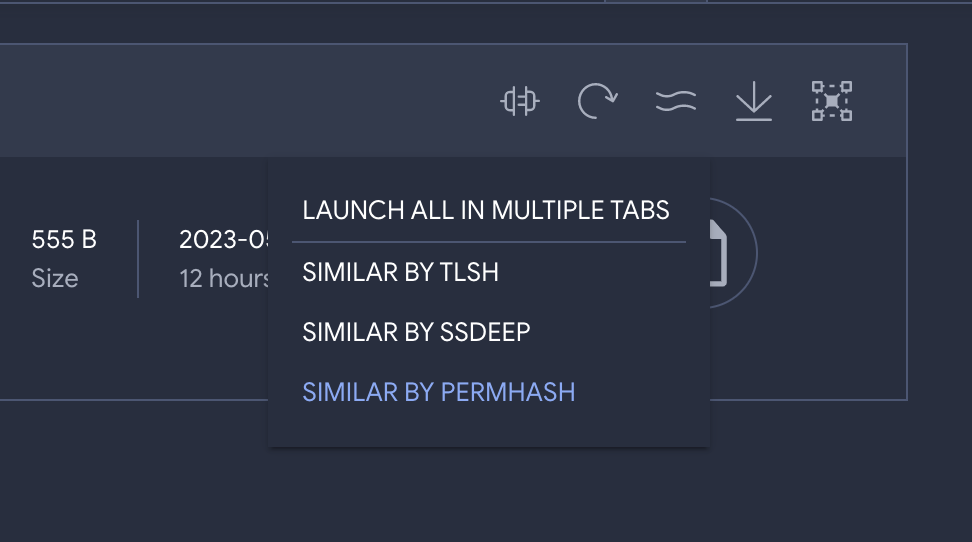
Last Monday our colleagues over at Mandiant rolled out Permhash. In their own words, Permhash is an extensible framework to hash the declared permissions applied to Chromium-based browser extensions and APKs allowing for clustering, hunting, and pivoting similar to import hashing and rich header hashing. We are excited to announce that we have been working closely with Jared Wilson on the Mandiant side to support Permhash similarity pivoting in VirusTotal.

VirusTotal already supports multiple similarity pivots: vhash (VirusTotal’s home-grown static feature hash), behash (same concept but for dynamic analyses), ssdeep, imphash, TLSH, telfhash, main icon dhash, etc. We have blogged extensively in the past about how similarity can be used to expand context and map out threat campaigns, we even hosted a joint webinar with Trend Micro and Trinity Cyber on this very topic. But let’s see how Permhash builds upon VirusTotal’s threat hunting swissknife and provides yet another orthogonal vehicle to track threat actors and their toolkits, going beyond IoCs and rather focusing on repeatable toolkit patterns.

In their article, Mandiant writes about UNC3559 and CHROMELOADER. UNC3559 is a financially motivated threat cluster that has distributed the CHROMELOADER dropper since at least early 2022. CHROMELOADER is a dropper that subsequently downloads a malicious Chrome extension, which can display advertisements in the browser and capture browser search data. Mandiant shares a particular CHROMELOADER manifest, you can use that initial input to pivot to other similar files via Permhash, and you can combine it with other search modifiers to narrow down results to actual Chrome Extensions as opposed to manifests:
 

permhash:d4d1b61f726a5b50365c8c18b2c5ac7ab34b3844e0d50112f386dfd875b6afac type:crx

With a single click we get to 19 other potential variations by the same threat group, many of them with low detection coverage by the industry (we are starting to get proactive):

Now we can dig further into these to understand the group’s infrastructure and modus operandi. For instance, we can leverage VirusTotal Commonalities to identify patterns that repeat themselves across all variations, as well as distribution infrastructure:
 
 
That’s how, among other ranked aggregations, we are able to identify the following in-the-wild distribution URLs, all of which were fully undetected at the time of writing:
 

The use of the .xyz TLD and archive.zip file name stand out as a repeatable pattern that may be combined with others to climb the pyramid of pain and hunt for the group based on behavioral patterns and TTPs, as opposed to hashes. At the same time, Commonalities allow us to understand even more about the distribution vectors and kill chain:

Indeed, the execution parents tell us about those files that when detonated in our sandboxes drop the Chrome extensions under study. That’s how we can learn that the first stage malware consists of both DMG files (6 files, example) and Powershell scripts/commands (3 files, example):

By the way, VirusTotal Code Insight comes in very handy in understanding the 3 powershell scripts that drop Chromeloader (see for yourself):

By iteratively calculating the commonalities of the first stage malware we can identify other repeatable patterns to detect these campaigns and even understand when and where has this group been active based on crowdsourced telemetry gathered from VirusTotal’s open community:

It seems to have been a relatively targeted campaign mostly targeting US orgs and active during July 2022.

This is by no means an exhaustive investigation but rather a quick post showcasing how Permhash similarity can work with other features in VirusTotal to mature our hunting program. As you can see, while EDR tools and other security technologies might not yet generate Permhash fingerprints to support threat hunting use cases, VirusTotal’s pivots and analytical capabilities allow us to translate it into actionable intelligence in the form of hashes but also related network indicators and repeatable patterns that may indeed be logged in common security telemetry being ingested in SIEMs/XDRs/TDRs/etc.

Moreover, now that we have a group of variants as opposed to a single instance, we can study those files or even leverage tools like VTDIFF to build a YARA rule that can be used to hunt within our environment or to track relevant adversaries going forward in time (Livehunt) and take proactive actions as they evolve. 

Oh, and one more thing, stay tuned because we will soon provide consolidated similarity searching across all similarity pivots taking into account prevalence and overlaps to identify best matches without having to search for each different similarity vector (vhash, ssdeep, permhash, imphash, etc.). 

Happy hunting!


Thursday, February 18, 2021

, , , , , ,

When you go fighting malware don´t forget your VT plugins

It's been a year since we launched our VirusTotal plugin for IDA Pro, followed by SentinelOne’s amazing contribution to the community with their VirusTotal plugin for GHIDRA (thanks again for the great job), inspired by the original IDA plugin but adding some cool extra features.

Now, what are IDA Pro and Ghidra? These tools are the more popular disassemblers used by the security community for malware analysis. Basically, they help researchers to understand the functionality of the code used to build the malware.

Most of VirusTotal’s users simply use the web interface or the API in order to do their investigations or enrich their threat intelligence systems, so how and when do these plugins come handy?

Before we go on, make sure to join us for our next webinar with SentinelOne next February 24th where we will demonstrate how to use both plugins with real life examples. Join us and register here!

Looking inside the malware

VirusTotal usually provides all we need to know about a malware sample and more, especially when it comes to context and the relationships with other samples or malicious infrastructure. However, sometimes as analysts we need to take a deeper look, here is when we IDA Pro and Ghidra come to the rescue.

What do VirusTotal's plugins for these disassemblers have to offer? Basically, they make analysts’ life easier by providing several handy functionalities that leverage VirusTotal’s knowledge base. For instance, in one click we can search for samples that use a specific relevant piece of code that we found in the sample we are analyzing. Indeed, plugins’ code similarity search functionality offers new ways to find related samples that aren't easily reachable without going down into the reversing process.

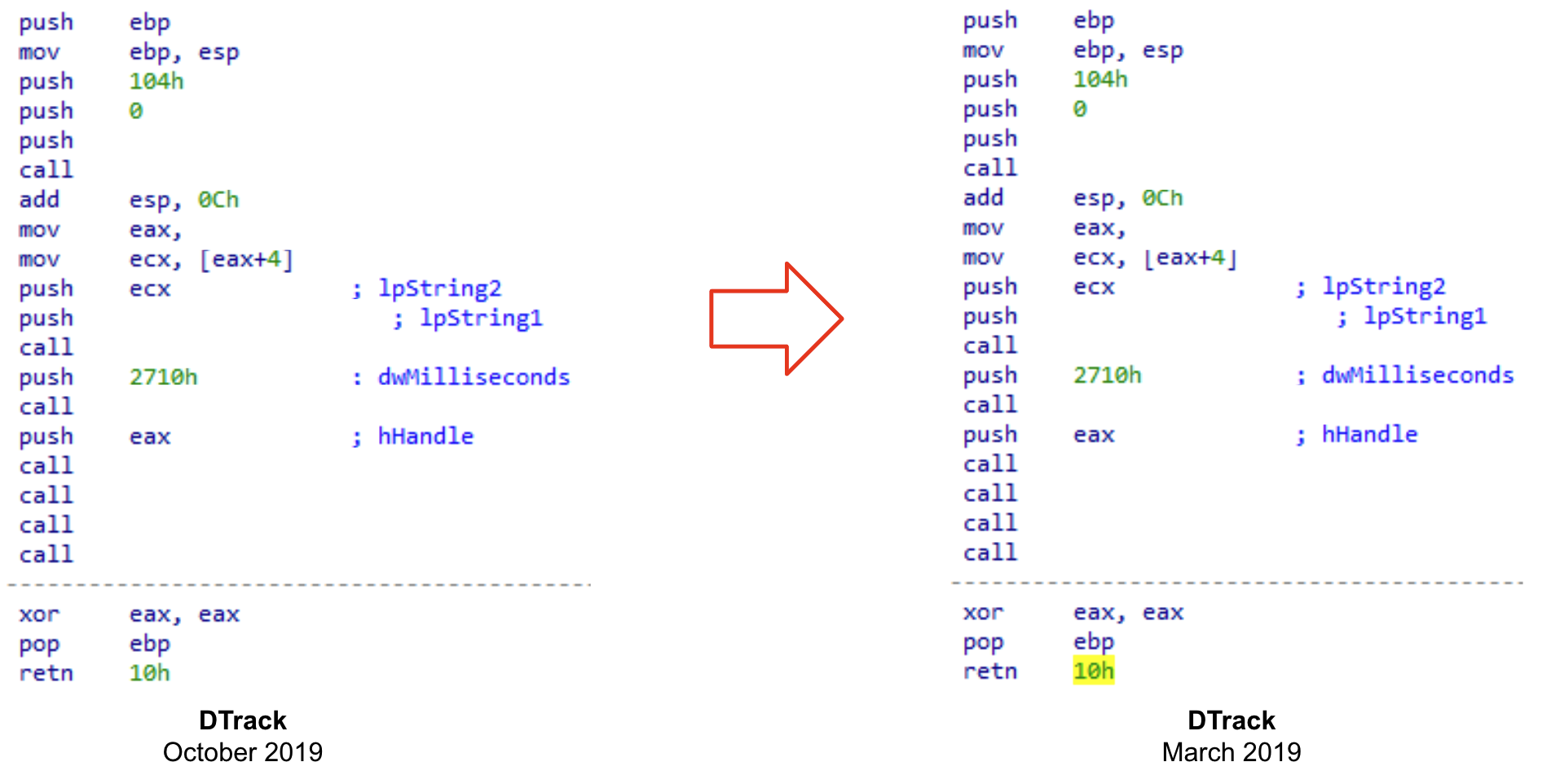
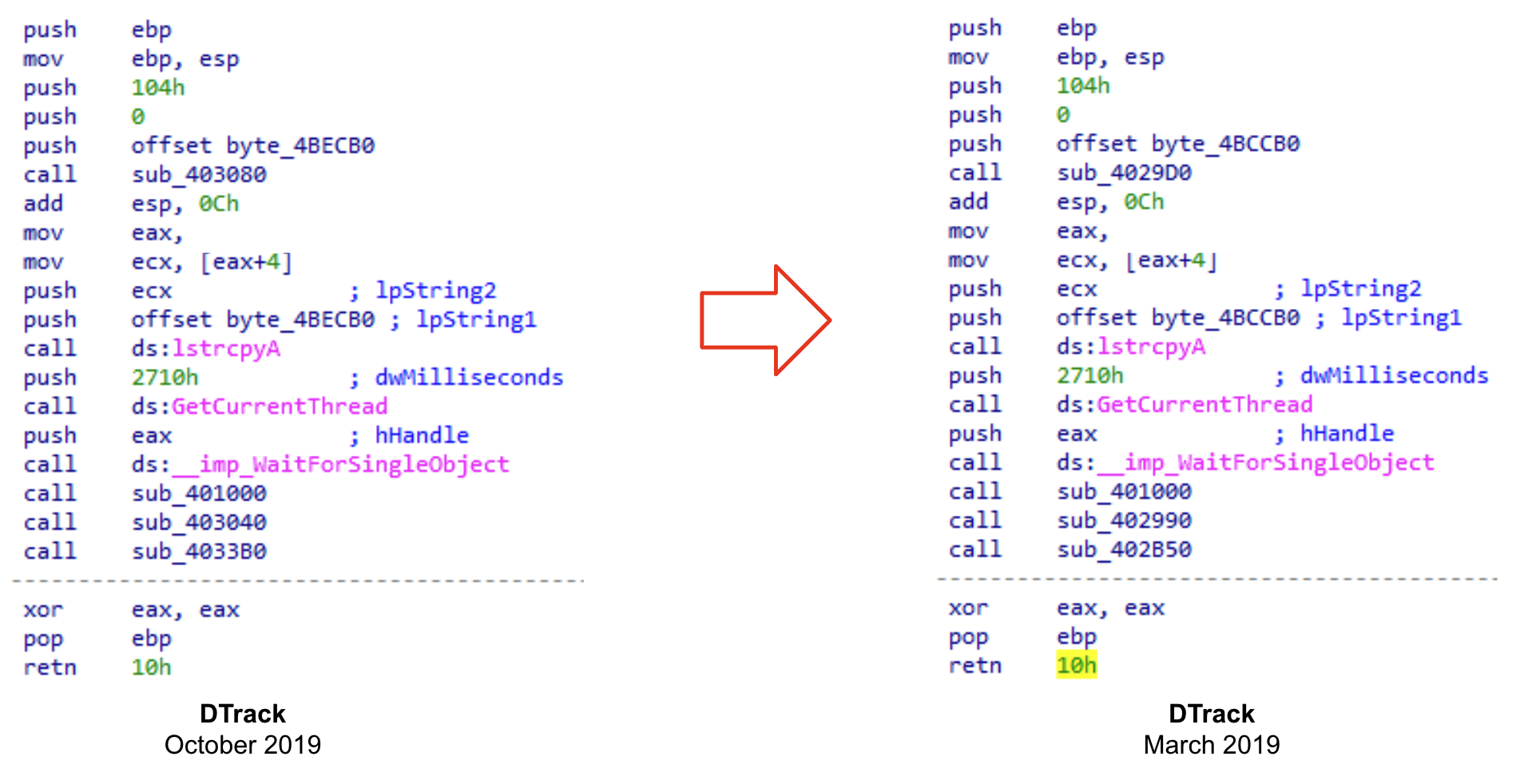
We will usually want to find samples with a similar set of instructions than the one we are analyzing. Let's see an example. If we take a look at both WinMain functions of two different samples (as shown below) it is clear that they are practically identical, only differing in the value of some operands.


If we omit these differences, we can see that they have the same structure and share the same set of instructions.


You never know what kind of valuable information you will find when analyzing a sample. It could be a very peculiar implementation, or a distinctive function that attackers implement in all their samples. It also could be that we are taking a look into earlier versions of recently deployed malware, giving us the opportunity to understand its evolution before attackers implement anti-reversing techniques.

Analyzing corrupted files

Code similarity provides additional advantages. Let’s consider the case where we have some corrupted samples of a recent malware strain. They can be just memory dumped files, or PE files that were modified during the execution - anyways we cannot execute them. These kinds of files are not the best for creating YARA rules, because there is a chance that the content has been modified before the memory image was dumped to disk. In these scenarios is where the use of VirusTotal plugins shine, as we can search for code that we find interesting enough for finding related samples. We previously described this technique to hunt Ryuk samples starting from a corrupted one.

There are many other ways in which these plugins can assist you for code analysis. For instance, we can look for code similarity during a debugging session, the advantage being we can search for decrypted or uncompressed samples uploaded to VirusTotal by just searching for some instructions obtained in runtime. We'll further explore this technique in our webinar with SentinelOne.

What’s next?

So what is the future of the VirusTotal's plugin for IDA Pro? We are working hard on implementing a new exciting set of features focused on assisting you during the reversing process. For instance, we plan to collect contextual information from our database about the sample you are working in and show it in the IDA interface. We will also enrich the disassembled code to highlight the most significant information collected from VirusTotal.

We will show you more about what will be in the new version in our joint webinar next February 24th!

See you there and Happy hunting!
This post was co-authored by Vicente Diaz.

Thursday, November 26, 2020

, , , , , , ,

Using similarity to expand context and map out threat campaigns

TL;DR: VirusTotal allows you to search for similar files according to different orthogonal notions (structure, visual layout, icons, execution behaviour, etc.). File similarity can be combined with the “have:” search modifier in order to gain more context about threats, e.g. what are the emails or URLs that distribute them.

This is the second blog post in our similarity series, the first article focused on how to trigger file similarity searches and the different similarity vectors at your disposal. In the context of this series we have also done a webinar that can be viewed on-demand, it focuses on using similarity to automatically produce optimal YARA rules to detect a given malware framework/family/campaign via VTDIFF.

This situation might sound familiar. As a SOC analyst or Incident Responder you are often confronted with files you know nothing about. Your SIEM describes their internal sightings and actions but fails to transmit the bigger picture. You are constrained by the narrow visibility of your corporate logs. Context is king and the problem is that you are fighting threat actors that operate globally with just a piece of the puzzle, your local data.

What is this file? Who is behind it? What is their modus operandi? How did it get there? Are there other related components? What does it do? Are there other variants that could have impacted my organization in the past? Any that could impact us in the future? How do I contain it? Your SIEM, case management system, EDR, firewall, IDS etc. don’t answer these questions. You are missing a necessary layer in your defense-in-depth security strategy.

VirusTotal is your saving grace. You jump into VT ENTERPRISE and look up the hash: threat reputation is useful, but you need further context. Your task is to identify IoCs that can be used for remediation, e.g. by blocking a command-and-control domain in the network perimeter, as well as artefacts that can be used for proactive threat hunting purposes, to determine whether there has been a breach and what is its scope. The issue is that sometimes VirusTotal does not have full context for a specific individual file in terms of sandbox reports, in-the-wild sightings, relationships, etc. and so your investigation might end here.

How to do it better

Isolated hashes are of limited value. Many times they are unique per victim or campaign, so a better idea would be finding the cluster/family/campaign they belong to in order to unearth remediation IoCs and threat hunting patterns. Most importantly, you need to leverage those groupings in order to surface command-and-control domains, dropzones, distribution URLs, phishing emails, etc. that can be used for mitigation and containment, and, to build proper understanding and situational awareness.

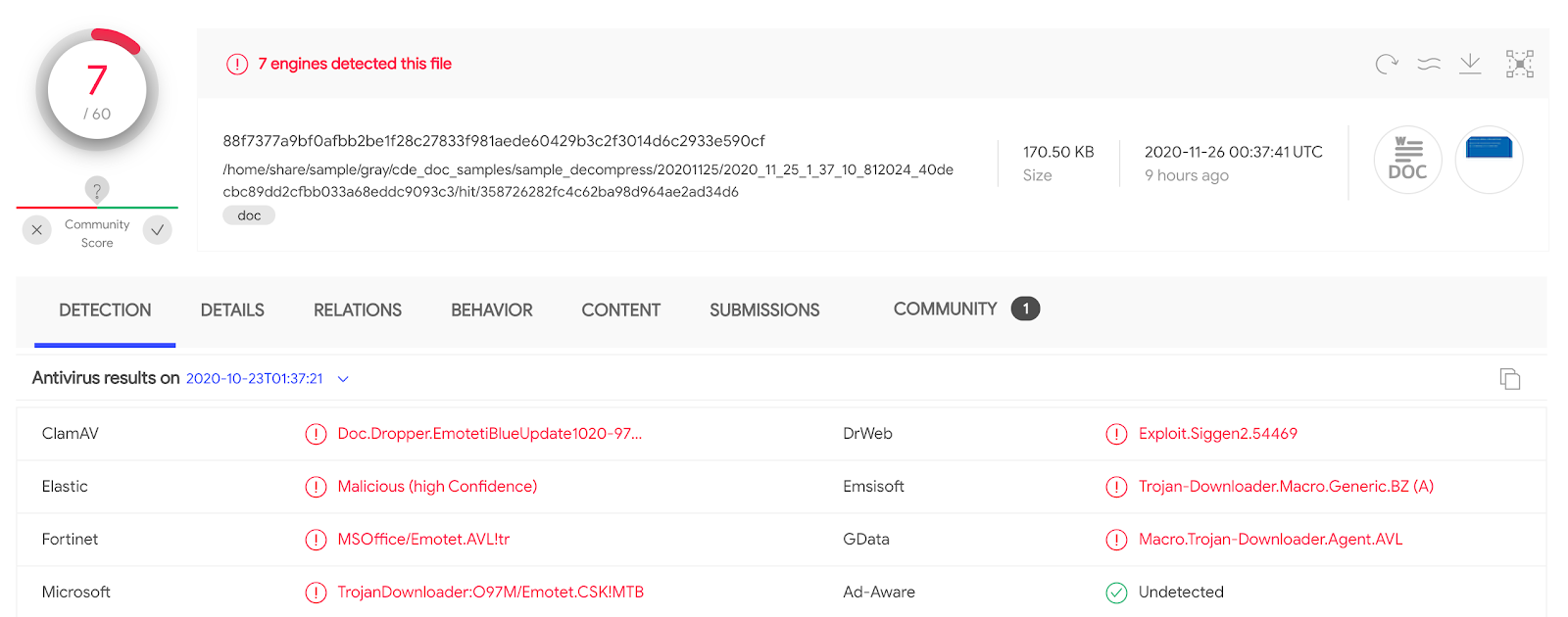
Similarity and the “have” search modifier to the rescue. Let’s imagine the initial hash that popped up as an alert in our environment was a first stage EMOTET dropper, i.e. a document that delivers a malicious payload through macros.


Threat reputation allows you to perform an immediate first assessment (alert triage), but other than that there is little context in terms of remediation IoCs and hunting artifacts. We still know nothing about how this file gets distributed, i.e. its delivery vector. Similarly, we fully ignore whether this is something spear phished exclusively against our organization or part of a larger campaign. What about the threat network infrastructure? Does it download additional payloads? Does it communicate with a command-and-control?

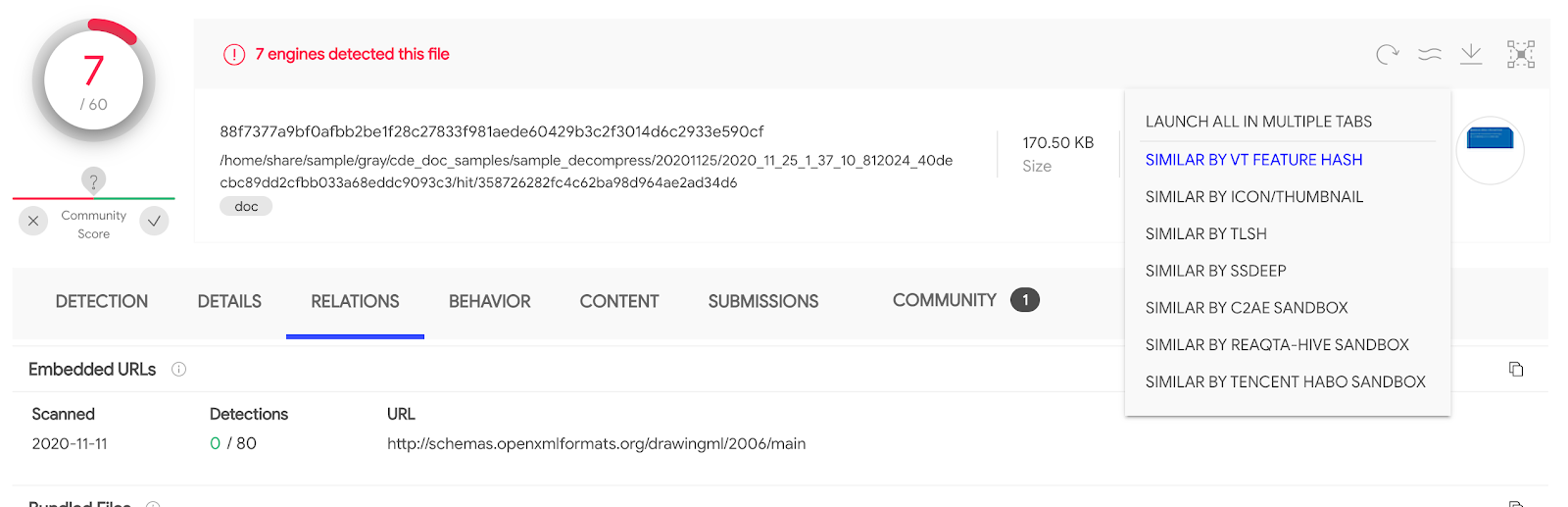
The next step in an incident response engagement - and this is what most analysts fail to do - is to jump into the file’s cluster (its family/framework/campaign) in order to expand context and surface IoCs. This is just one click away:


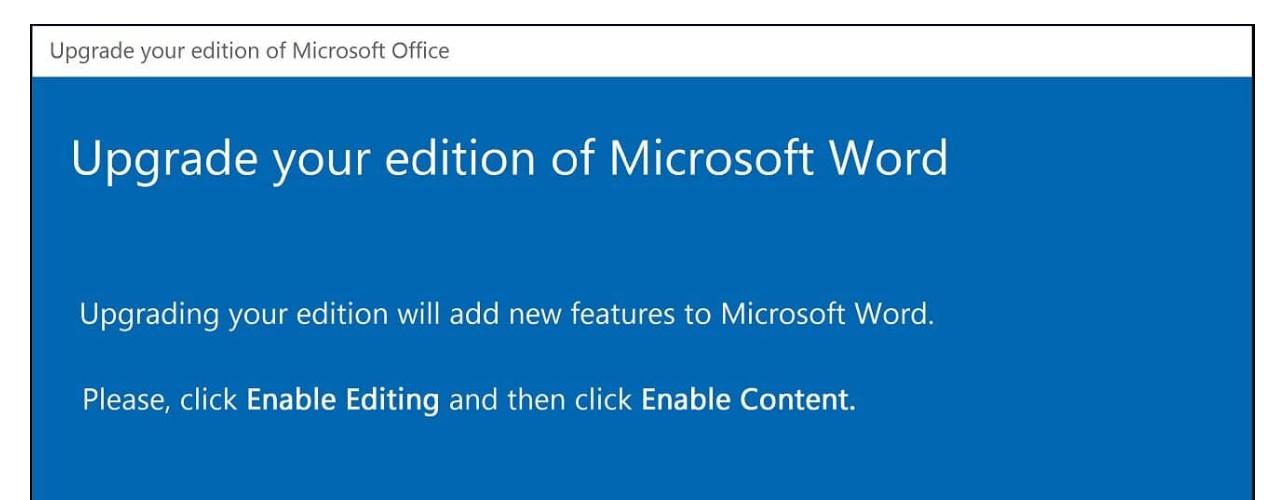
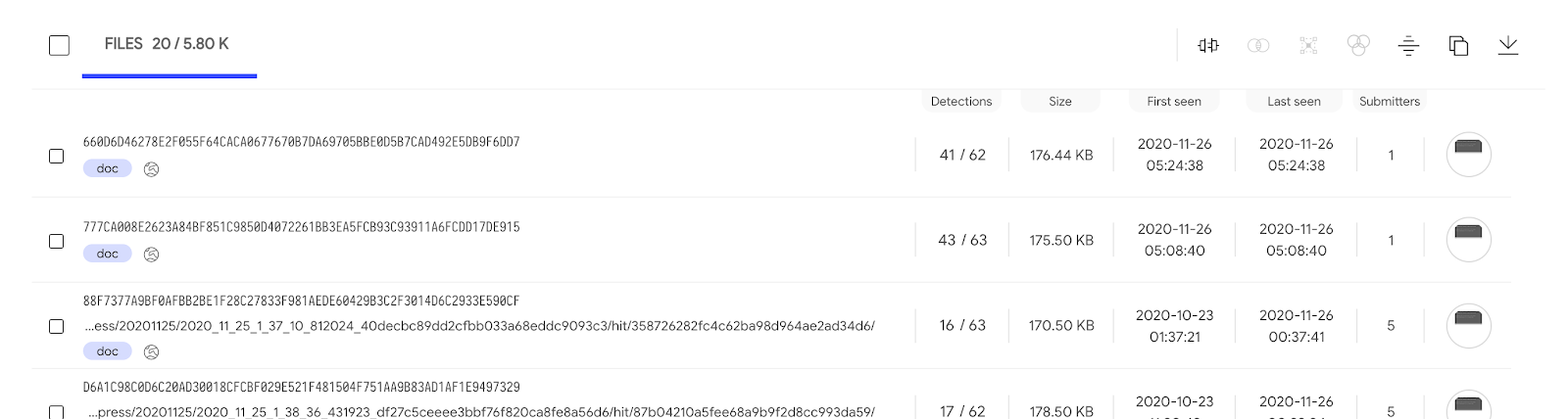
For documents there is a limited number of approaches to find similar files (other file formats will expose more), this said, they are very rich because they are fully orthogonal: structural features, visual layout, local sensitive fuzzy hashing, execution behaviour similarity. Let’s jump to other similar files based on the document’s visual layout by clicking on “Similar by icon/thumbnail” or on the thumbnail itself, located in the top right: main_icon_dhash:23232b2b00010000.


There are too many matches, we would have to iterate over every single one in order to surface particular patterns that may allow us to understand the campaign.

Finding phishing emails that distribute the threat

We can narrow down the search above to match exclusively those files that have been seen as an attachment in some email uploaded to VirusTotal:

main_icon_dhash:23232b2b00010000 AND have:email_parents
(Note that you can also use tag:attachment instead of have:email_parents)

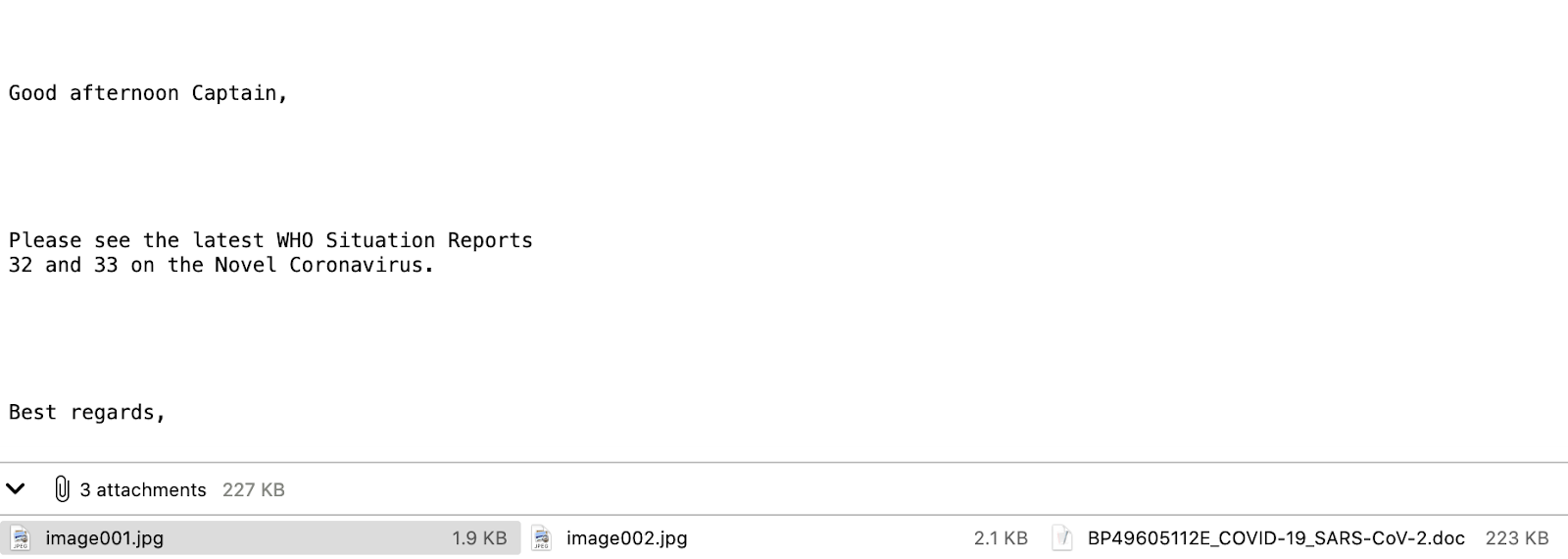
We can now run through the matching files, open up their Relations tab and jump into the pertinent email parent, so as to understand the deception techniques being used in the campaign:


This particular instance poses as some kind of World Health Organization report on COVID. It is important to inspect all the other emails because not only will they tell us more about the lures, it will also allow us to identify targeted industries, geographical spread, activity time spans, etc. For instance, there could be other localized variants that could be targeting some other corporate branches. Access to these emails will not only give us greater insight into the attacker, it is also something we can leverage tactically in order to improve filtering in our email gateways.

Discovering URLs that distribute this threat

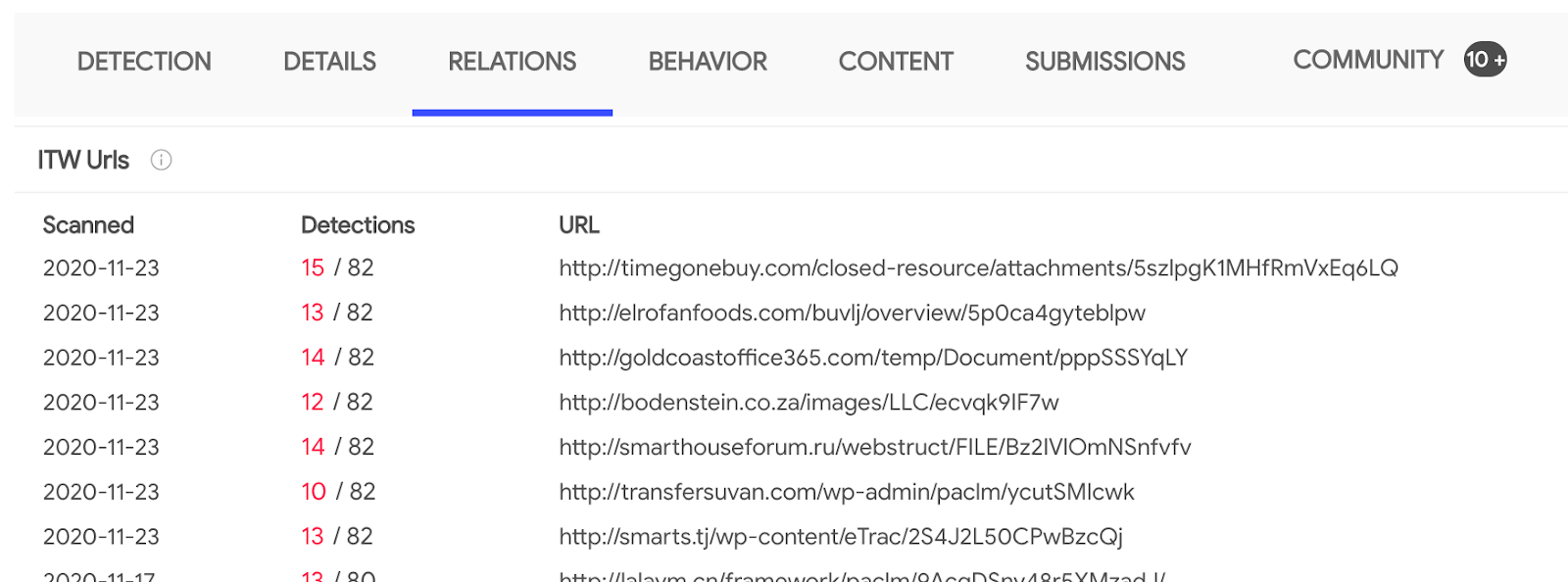
We want to see if this campaign is also being distributed via download URLs. If that´s the case we can block them in our network perimeter or use them to search across web proxy logs. Let’s ask VirusTotal whether any of the files in the cluster have associated in-the-wild URLs:
main_icon_dhash:23232b2b00010000 AND have:itw

We can now jump into the Relations tab in order to export these additional IoCs:


There are over 3K files with in-the-wild URLs, note that we can automate all of this via the API.

Identifying command-and-control/exfiltration infrastructure

The next step is to understand whether any of the machines in our corporate fleet are beaconing out to infrastructure tied to this campaign. At the same time, we will probably want to block the CnC and exfiltration points in order to mitigate the impact of historical undetected breaches. Let’s filter down the search to focus exclusively on those files that exhibited network communications when executed in a dynamic analysis sandbox:

main_icon_dhash:23232b2b00010000 AND have:behaviour_network


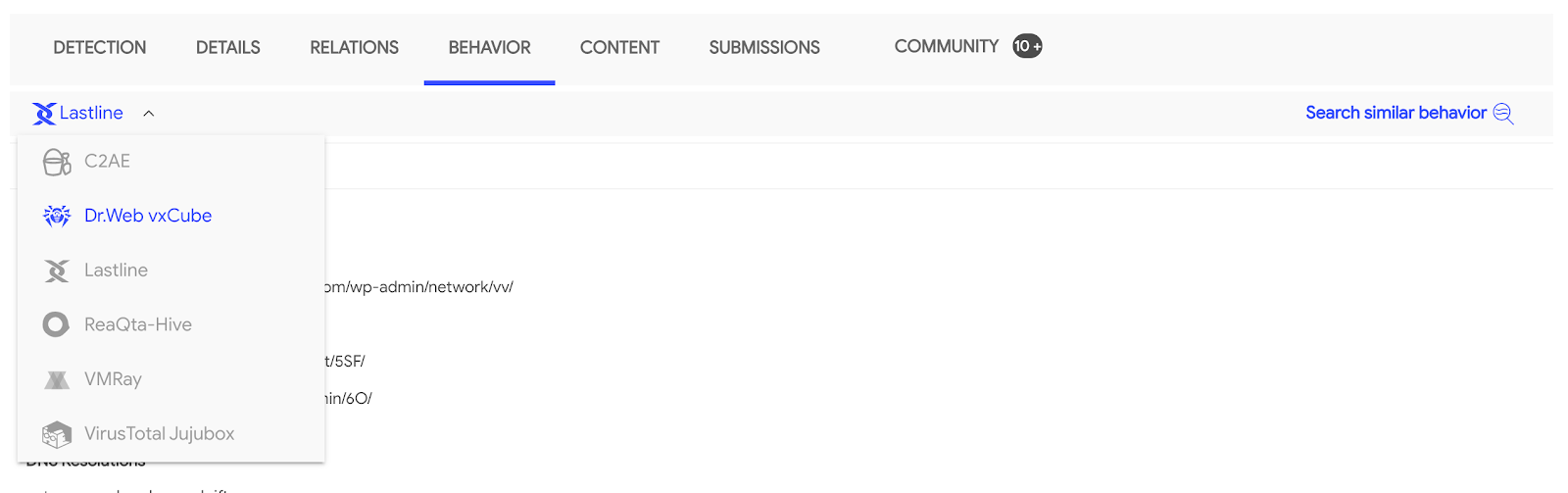
Most of the matching files have been analysed by several sandboxes participating in our multi-sandbox effort. This gives us unparalleled visibility into the campaign. For an attacker it is easy to evade a single sandbox, it is far more complex to do so for 17+ of them at the same time. Each one of them set up in a different geographical region, going out to the internet through a different IP address, running different OS versions, with different software and language packages installed, etc. As a result, we now have very interesting sightings in terms of infrastructure:


These communication points can be very easily triaged. Remember that VirusTotal also characterizes domains, IP addresses and URLs. Threat reputation for these domains further confirms that they are accurate IoCs:


The domain relationships (in-the-wild sightings) tell the same story:


We now have additional IoCs that we can feed into our stack in order to proactively defend our organization from other variants. As a bonus point, pivoting to other campaign files that have sandbox behaviour reports allows us to shed more light into other TTPs that we might be tracking via MITRE ATT&CK (e.g. installation, actions on objectives, etc.).

Gaining context through the community

Furthering on the use of the “have” search modifier, we can also leverage it to find files on which some VT Community user has placed a comment providing more context:

main_icon_dhash:23232b2b00010000 AND have:comments

Community comments often give us interesting details in terms of in-the-wild observations, malware capabilities, reverse engineering reports, attribution, etc. For example, in this particular case we learn about additional distribution URLs:

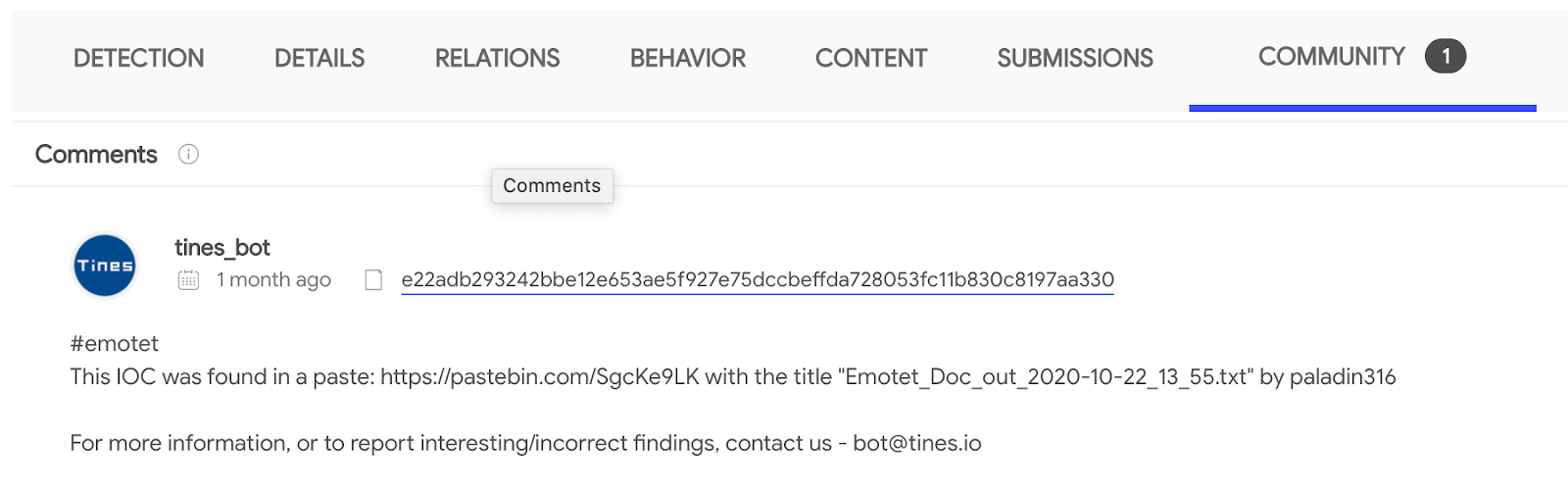
This other case helps us understand that this first stage is EMOTET and allows us to jump into a pastebin dump with further context about the campaign in terms of related hashes and network infrastructure:


Additional context

The “have” modifier accepts many other values, some of the more representative ones are:

  • compressed_parents: the files were seen inside a compressed file uploaded to VirusTotal.
  • pcap_parents: the files were seen in a network traffic recording uploaded to VirusTotal.
  • embedded_(urls/domains/ips): a URL/domain/IP address pattern was extracted from the binary bodies of the files.
  • behaviour: the files managed to execute in at least one sandbox and produced the pertinent dynamic analysis report.
  • behaviour_registry: the files executed in a sandbox and interacted with the Windows Registry.
  • crowdsource_yara_rule: the files match some YARA rule coming from open source community repositories, these rules often provide additional references and descriptions about a threat.

Summing up

VirusTotal aggregates orthogonal means to cluster together groups of related files. Files which may belong to the same malware family/framework/campaign/actor. These file similarity vectors range from structural features to dynamic analysis observations.

We started off with a single IoC for which we had little context, neither did VirusTotal, beyond basic threat reputation. By leveraging file similarity we managed to find thousands of other files related to the campaign/malware framework. Through the “have” search modifier we then narrowed down our searches to identify phishing emails used by the attackers, distribution URLs, additional network infrastructure such as CnCs and context shared by other threat researchers.

All of this is tactical intelligence that can be fed into network perimeter defenses, but also context that can be operationalized and digested into TTPs in order to characterize threat actors. Finally, this blog post presented an incident response scenario but the very same logic can be applied to threat actor tracking or campaign monitoring use cases.

This post was authored by Emiliano Martinez.

Thursday, November 05, 2020

, , , ,

Keep your friends close; keep ransomware closer

“How to avoid being a ransomware victim?” is one of the main questions every single company and organization asks themselves every day. Unfortunately there is no silver bullet against that, but there are several good practices we can follow to minimize our exposure.

We can start by enumerating what are the main vectors that attackers use to get into victims: phishing, brute forcing and the use of exploits. Let's use this information to understand what exactly are attackers doing from a technical point of view, but more importantly, to monitor how their campaigns evolve. And here we want to highlight the importance of continuously tracking malicious activity in order to feed our systems accordingly: attackers evolve their methods and the IOCs used constantly change. We need the whole movie, not just a static picture.

This post describes different examples of techniques we can use to monitor ransomware campaigns, with a special focus on the infection vectors previously mentioned in order to minimize the risk of becoming a victim.

For more details, you can check our recorded anti-ransomware webinar in English and Spanish.

Ransomware in phishing attacks

Phishing is the most common technique used to distribute ransomware. We want to be able to discover how it is being used in new ransomware campaigns and to obtain the infrastructure behind the attack, gathering valuable IOCs and TTPs to feed our defenses.

We can start looking for emails involved in phishing campaigns uploaded this year to VirusTotal:

engines:ransom type:email fs:2020-01-01+

We get a list of generic ransomware email files. We can specify a certain malware family we are interested in. For instance, the following query returns emails related to some of the most common campaigns:

(engines:bitpaymer OR engines:maze OR engines:Ryuk OR engines:gandcrab OR engines:clop OR engines:revil OR engines:sodibiniki OR engines:matrix) type:email

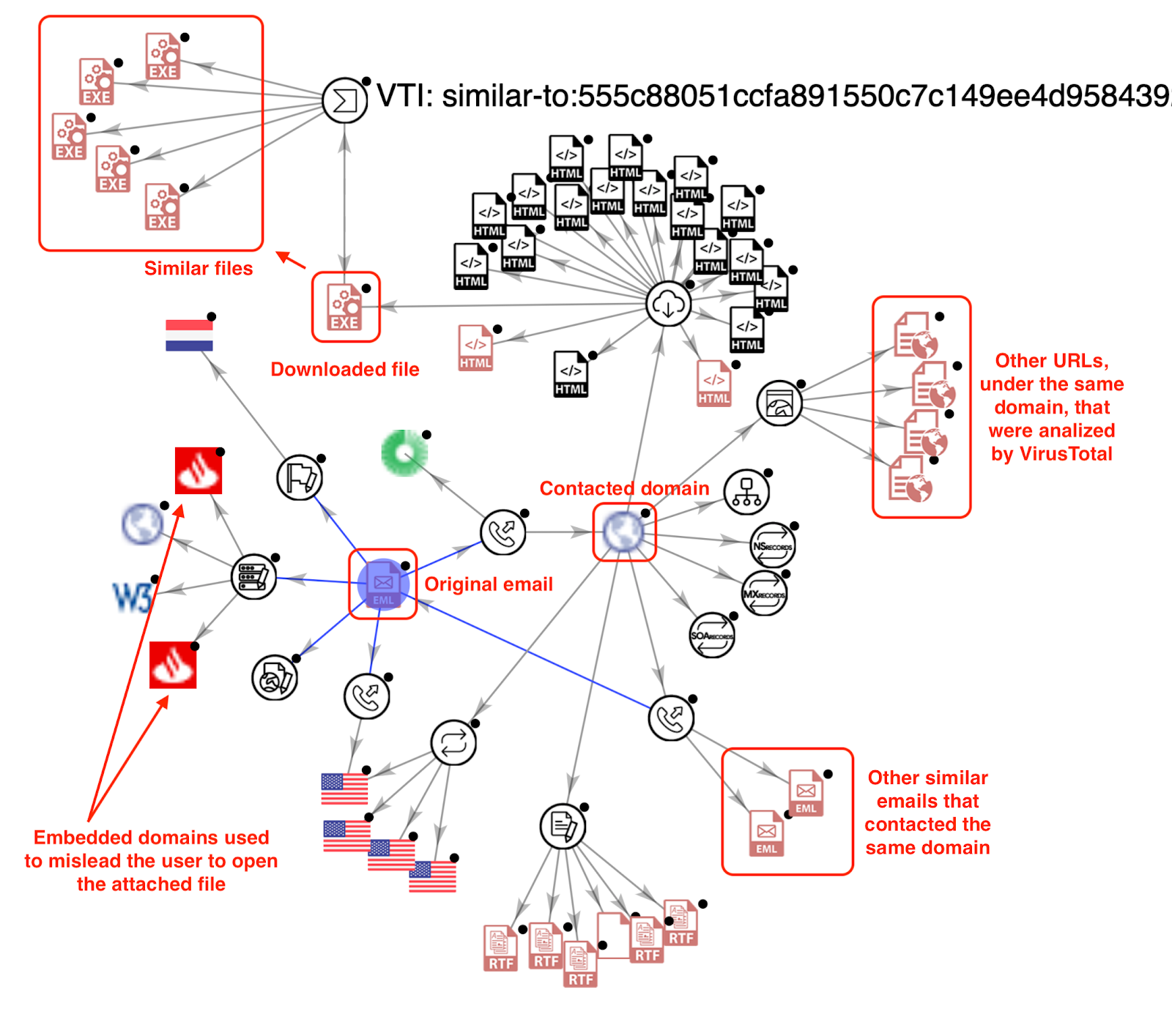
Trickbot is a malware family frequently used to distribute ransomware. By searching for recent samples delivered by email (engines:trickbot fs:2020-09-01+ type:email) we can quickly find an interesting sample implementing an exploit and pretending to be a well known financial institution. We can quickly expand all the domains, URLs and IP addresses embedded into this file into our investigation graph, getting a broader overview of the campaign:


Expanding different nodes uncovers new IOCs to feed our defenses and unfolds this campaign, showing domain names that were used to bait victims into opening the malicious word document attached to the phishing email. 


This kind of phishing attacks where legitimate logos, domains and brand images are used to bait victims into executing malware can hurt a company's reputation, not to speak of being used against the company itself. The sooner we detect a campaign the faster we can perform actions to shut it down. VirusTotal’s Livehunt checks any submitted file against a search criteria written in Yara.

For example, to check for embedded domains in emails detected as phishing, we could use:

import "vt"
rule brandmon_google {
    strings:
        $domain1 = "accounts.google.com"
        $domain2 = "mail.google.com"
        $domain6 = "drive.google.com"
    condition:
        for any engine, signature in vt.metadata.signatures : (
            signature contains "phishing" and vt.metadata.file_type == vt.FileType.EMAIL and (any of them)
        )
}


Exploits used in ransomware attacks

Exploits are commonly used for installing malware or for escalating privileges into your system.

According to this report, the four CVEs that are most frequently used for performing ransomware attacks this year are:
  • CVE-2019-19781 → Revil/Sodinokibi, Ragnarok, DopplePaymer, Maze, CLOP y Nephilim.
  • CVE-2019-11510 → Revil/Sodinokibi y Black Kingdom
  • CVE-2012-0158 → EDA2 y RASOM
  • CVE-2018-8453 → Revil/Sodinokibi
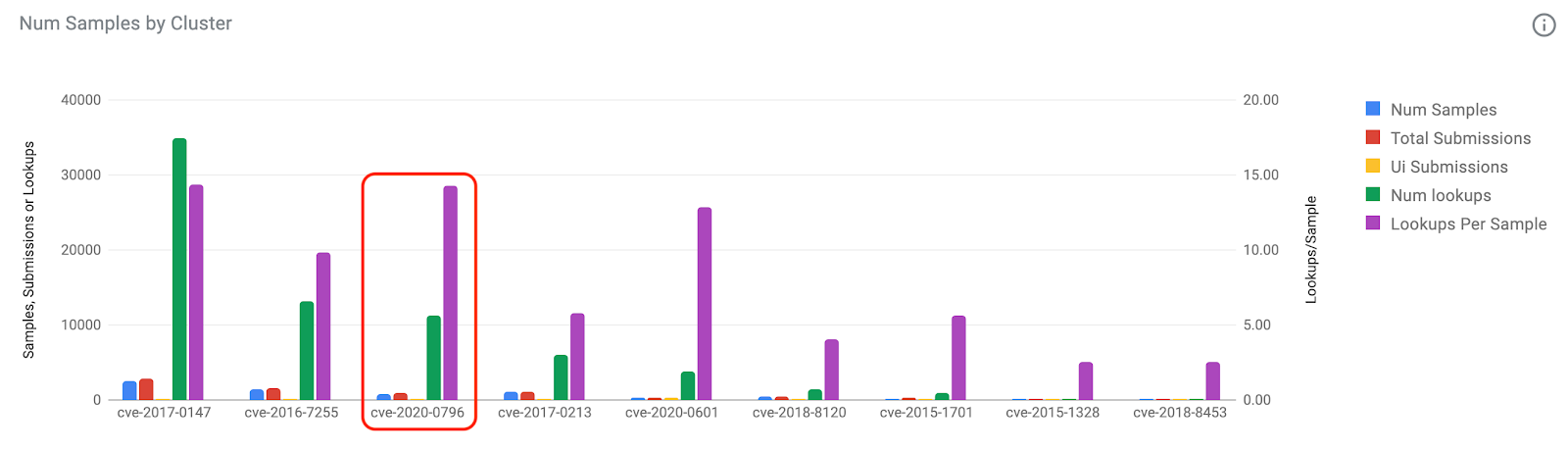
We can add to the list a couple of recent remarkable exploits: zerologon (CVE-2020-1472) and SMBGhost (CVE-2020-0796). We observed several ransomware lookups in VirusTotal tagged with this last vulnerability during the last months:


We could use the following query to get more detailed information about what CVEs were used in ransomware attacks during 2020:

engines:ransom tag:exploit fs:2020-01-01+ tag:CVE-2020*

We can once again filter by malware families. For instance, the previous query is mostly GandCrab malware, which can be easily checked using the query: (engines:ransom and not engines:gandcrab) tag:exploit fs:2020-01-01+ tag:CVE-2020*).

Now, we are ready to create a Livehunt rule to find new files tagged with one of the exploits frequently used by ransomware. 

import "vt"
rule ransomware_exploits {
    condition:
        for any tag in vt.metadata.tags : (
            tag == "cve-2019-19781" or
            tag == "cve-2019-11510" or
            tag == "cve-2012-0158" or
            tag == "cve-2018-8453" or
            tag == "cve-2020-1472" or
            tag == "cve-2020-0796"
        ) and not vt.metadata.file_type == vt.FileType.CAP
}

This will result in an immediate notification, allowing us tracking any new IOCs we can use to protect our system.

More importantly, this is very valuable information we can use on a regular basis to manage our patching policy, prioritizing patches based on fresh data of how different exploits are being used in real attacks.

Tracking fresh campaigns

Now, we want to make sure that we monitor any new ransomware campaign in order to understand how it evolves and what new artefacts and techniques they use.

As an example, we can start with a recent DFIR Report investigation revealing Ryuk exploiting zerologon. There are many ways to track campaigns, however VT Graph is a great choice to get together all the discovered observables and extend our knowledge in a visual way. Here are some tips that could help you during this process:
  • Start by adding all the known observables to a new VT Graph.
  • Expand domains, URLs and IPs to unfold relations and obtain new observables.
  • In order to keep our list of observables up to date, we can translate common Yara rules into Livehunt rules to catch new files, injecting Livehunts results directly into the graph.
  • Additionally, we can use Retrohunt rules to look for similar samples in our collection.
We start the investigation dropping one of the files included in the publication in a new graph, showing domains, urls and ip addresses embedded in the file, ITW URLs hosting the file and network observables contacted by this sample when executed. This file is detected as “bazar” malware, used to install Ryuk. We dropped all this information in our graph:


Additionally to keep pivoting using our graph and indicators, we can also translate the Yara rules from the DFIR report into Livehunt rules.


We can integrate Livehunt results into our graph in just two clicks. Just click on the target icon at the right in the VTGrap interface, select the rule desired and choose "Load results". This will add all the new observables that match our rules to the current graph. We can expand these new nodes to unveil new observables and create relationships.


All these new IOCs are fresh observables that are clearly related to this campaign. All this continuous flow of fresh indicators will help us improve our security mechanisms to stop Ryuk from passing through our defenses.

Summarizing, the knowledge of what attackers are using is the first necessary step for us to minimize our exposure to different campaigns. It wouldn't be right to put all the different ransomware attacks under the same umbrella, as they became highly specialized and protecting from different actors is not exactly the same. The techniques described in this post are a good starting point for automatically minimizing our exposure to more spread ransomware campaigns, however they can be applied both for generic and targeted attacks.

Stay safe and happy hunting!


This post was co-authored by Vicente Diaz.

Tuesday, October 13, 2020

, , , , ,

Tracing fresh Ryuk campaigns itw

Ryuk is one of the most dangerous Ransomware families. It is (allegedly) run by a specialized cybercrime actor that during the last 2 years mainly focused on targeting enterprise environments. The amount of bitcoins demanded in their ransom attacks varies depending on the target. Some of the wallets used by the group to collect the ransom payments reached millions of dollars in a few weeks.

Protecting against such attacks is one of the main priorities for any CISO or security team. This is a problem that should be approached from different perspectives, being prevention (likely) the most relevant one.

Now, what can be done in terms of prevention? Information is power, the first thing we need is understanding how the new campaigns are operating. Is this distributed through phishing or exploiting any vulnerabilities? Do they use brute force attacks? Maybe all together?

In addition to the TTPs described above, we want as many technical details as possible. This will result in very valuable Indicators of Compromise we can use for protecting our infrastructure: deploying networking indicators to disrupt malware communication, making sure our Yara rules will detect all the components of the attack, launching regular scans in our infrastructure to detect any artefact used in the campaign.

We need to quickly deploy our fishing nets to catch everything related to fresh new campaigns! And then to keep monitoring for a while to make sure we keep our systems updated as attackers evolve.

In this blogpost we will describe how we used VirusTotal to detect and monitor new Ryuk activity. However this is a very specific case where we want to show how our IDA plugin can save us a lot of time when dealing with certain samples.

If you want to learn more about how you can keep your organization safe from ransomware and how to easily leverage VirusTotal to monitor ransomware activity, please join us for our next Anti-ransomware workshop - English (Live November 4th, 1pm ET) and Spanish (Live October 28th, 17:00 CEST) versions available.

Starting the investigation

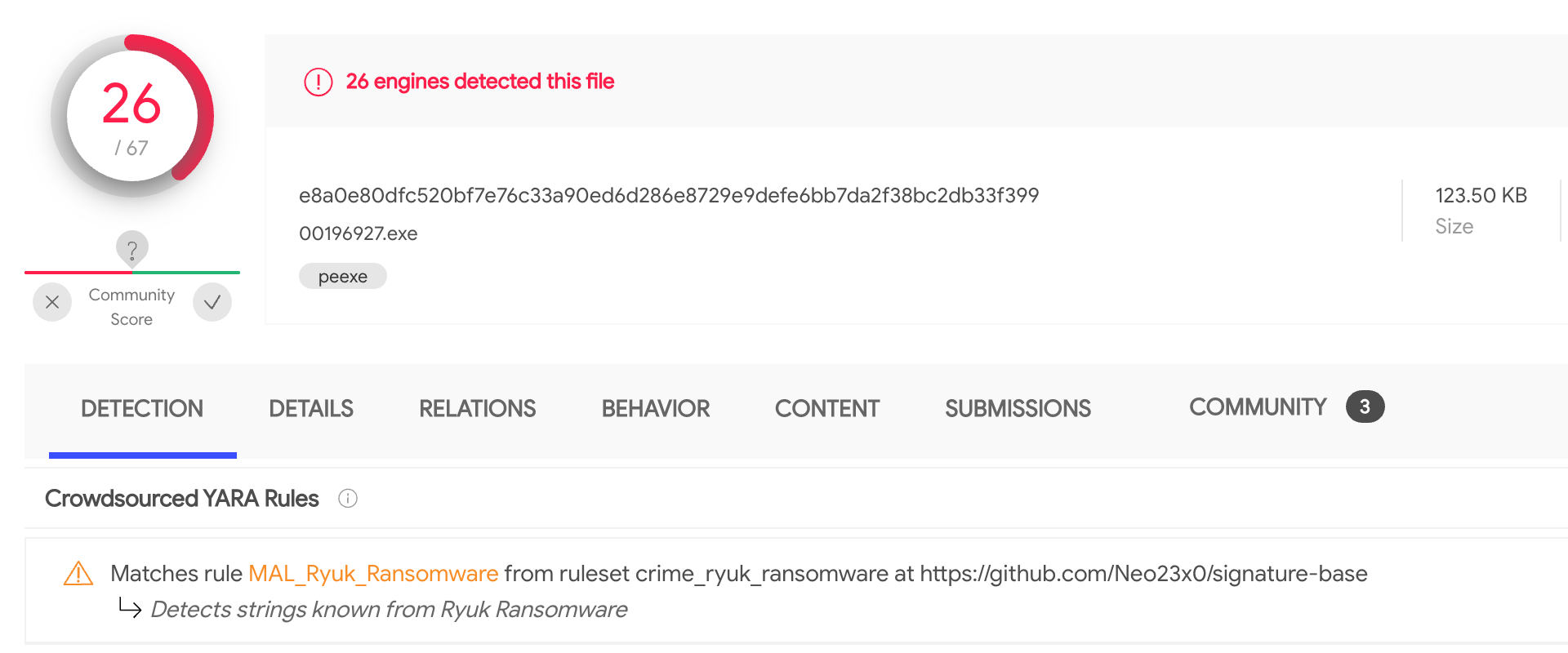
Two weeks ago new files were uploaded to VirusTotal (1, 2). According to the crowdsourced YARA rule that identified them, these files looked like Ryuk malware.


A closer look revealed that these samples have been probably dumped from memory: the disassembled code showed plenty of memory mapped addresses, the import table was missing and the samples crashed when executed - they were definitively corrupted PE files.

Given these were fresh samples, we certainly wanted to know more about them, especially if they were part of a bigger campaign. In such cases, one of our best allies is looking for similar samples that could also be part of the attack. However, when working with memory dumps we need to be careful, given that probably some segments and memory mapped addresses will be execution specific. If we include any of such specifics in our search, we won't be able to find other samples.

IDA plugin to the rescue

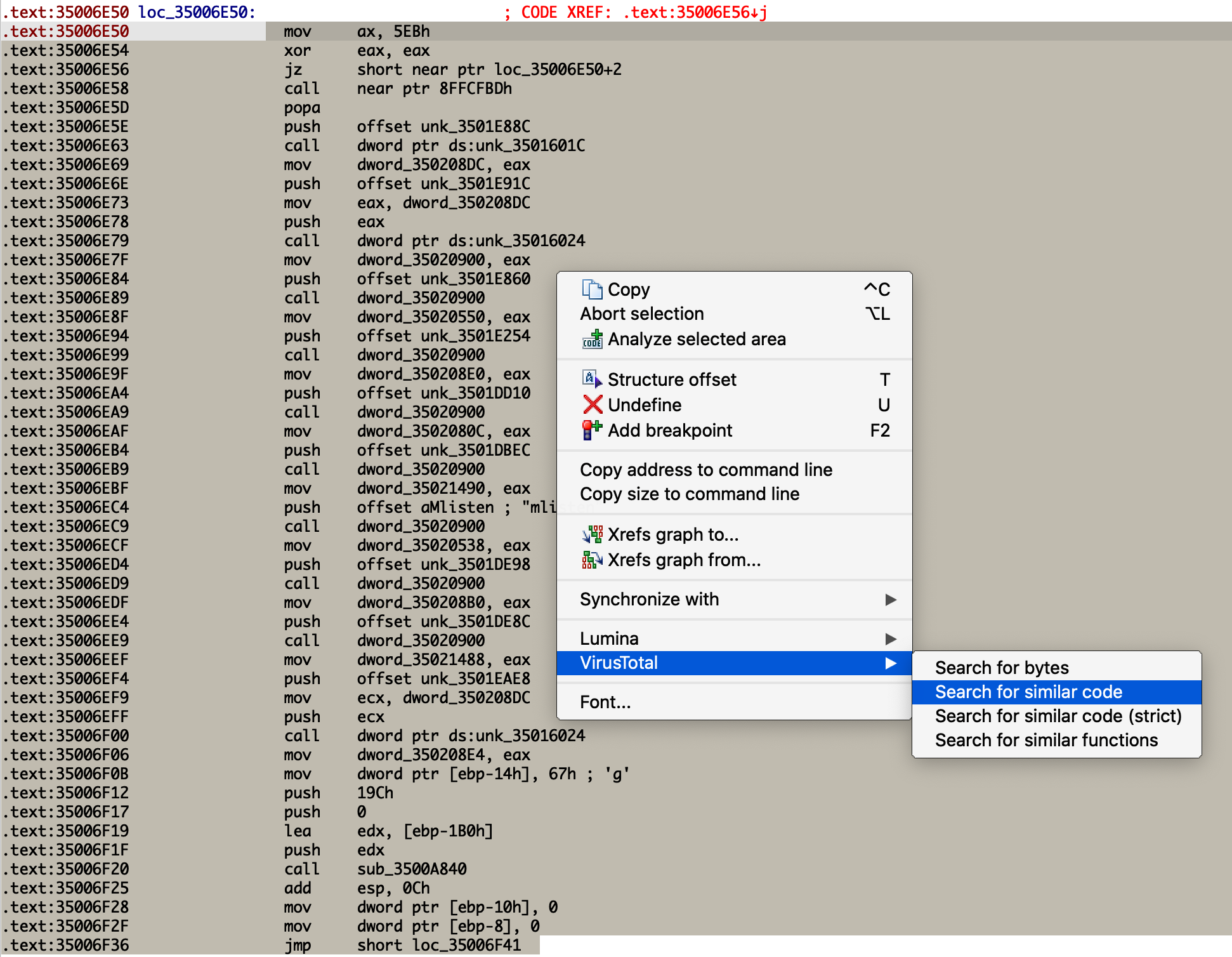
One of the options would be to rebuild the samples we found, which is an extremely time consuming process. Instead, we can use the VirusTotal IDA plugin (see original blog post announcement) to help us search for the original sample. Using the "search for similar code" functionality we can create a query that will ignore all the memory mapped addresses, being a perfect choice for our problem.

Taking a look at the samples with IDA, we can see there are many functions that aren't properly identified by the disassembler engine given the use of anti-disassembly techniques. Precisely for this reason, they are good choices for searching for code similarity.


We just need to select the code, right-button, and search for similar code. The resulting query will take care of ignoring all the memory mapped addresses we wanted to get rid of.


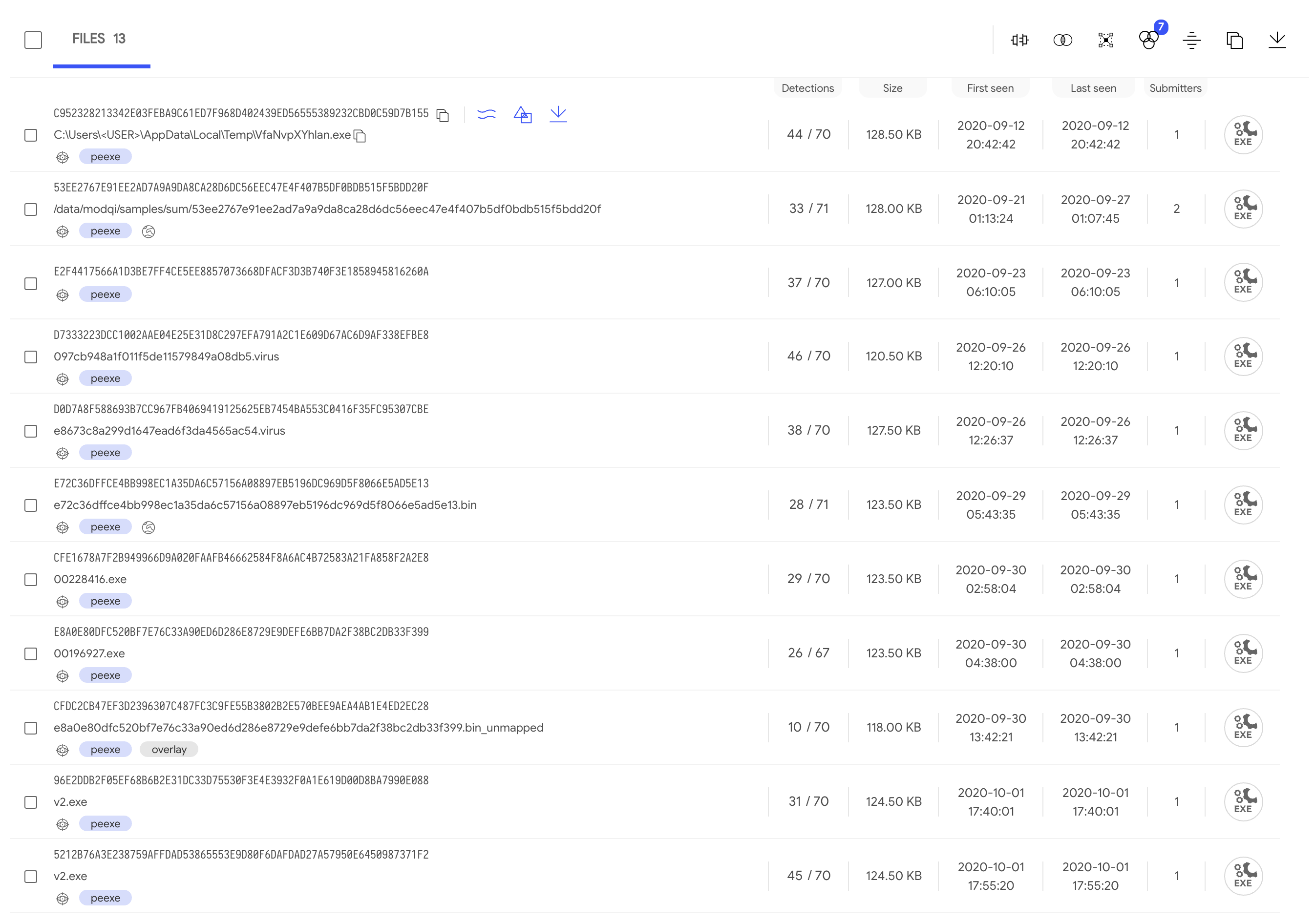
The resulting listing with all the files found shows very close first submission time. Also, some of them report behaviour activity, meaning they executed in the sandboxes without crashing: maybe one of them could be our original sample.

Picking one of our initial samples and another one with behavioural information, we can see that:
  • They don't show up as similar when doing a similarity search (as expected).
  • They have some long sequences of bytes in common.

Is this our sample?

At this point we feel confident that the new sample found is the one we were looking for. Indeed, starting from this sample and taking a look at the (undetected) function located at 0x35008A60, we select a large sequence of instructions with the IDA plugin (as we did before) for a new search. This results in only 4 files that match the query generated: our two initial samples, another file that's also corrupted, and the previously chosen sample that detonated in our sandboxes. Therefore, this is the second time that we get this file when looking for similar code.

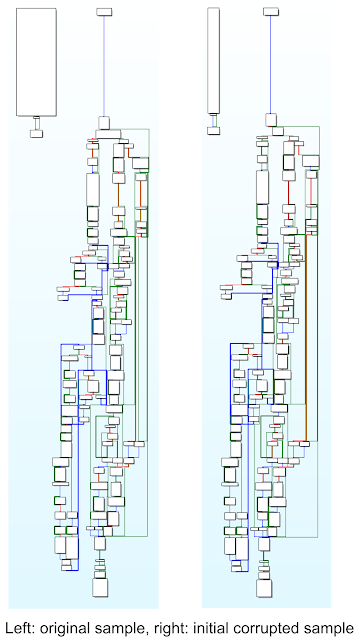
Going deeper, we'll see that it shares the same PE entry point that our two initial corrupted files. Furthermore, their WinMain functions are the same. Initially it looks like a quite simple function, composed of only three blocks of code. But, after overcoming the anti-disassembly trick implemented to confuse IDA, we can compare both function graphs to see the similarity. We conclude that we found the original sample.


What now?

At the time of this research there isn't any Yara rule detecting the original sample and it has 28/71 positives. Inside this file we can find encrypted strings that are extremely useful for pivoting to find additional samples. These strings are included in the corrupted files as well, stored in the ".gfids" segment at the end of the file. In other words, they aren't located in the ".data" segment as seen in the original sample. This new location reveals that probably these strings were initially encrypted and became decrypted after execution, thus they can be seen as footprints of the original sample.


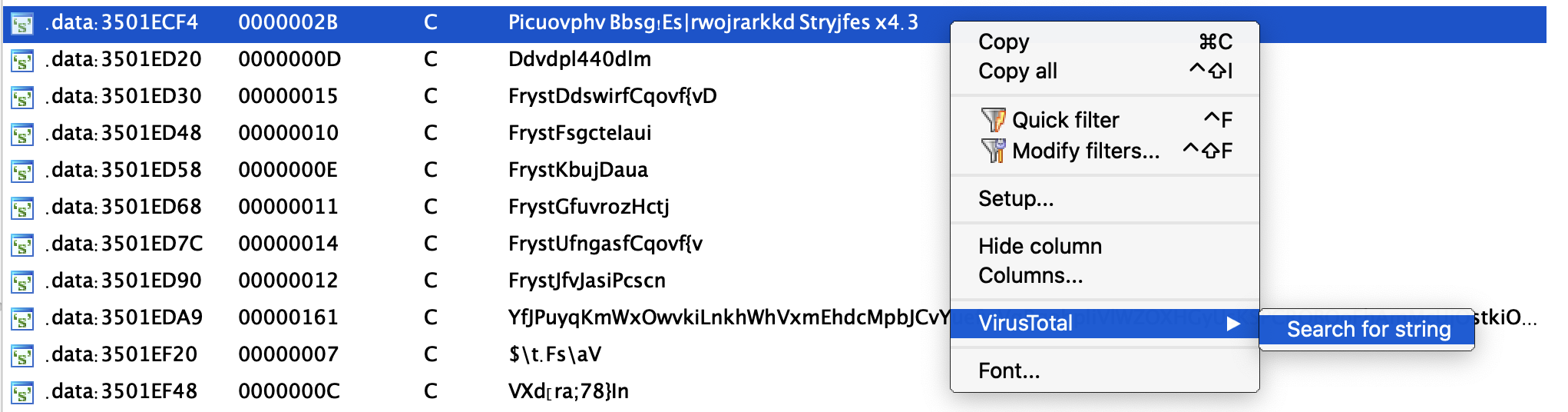
Using the VT-IDA plugin we can search for other files that contain these encrypted strings. As expected, the four files found before are listed now, but there are two other samples that were submitted three days prior to our original sample and can also be investigated.

Moreover, all these new strings can be used to improve the original Yara rule that brought us here, or to create a new one! Remember to keep it running as a LiveHunt to make sure you keep track of any new Indicators of Compromise and to detect anything new attackers use in their campaigns. You can find all the details about the campaign described in this blogpost in the following VT-Graph.

This post was co-authored by Vicente Diaz.