


Malware threat hunting is the process of proactively searching for malicious activity. It is a critical part of any organization's security posture, as it can help to identify and mitigate threats that may have otherwise gone undetected.
Sigma rules and YARA rules are two powerful tools that can be used for detection and malware threat hunting. Sigma rules are a type of open rule language that can be used to describe malicious activity.
Many sigma rules can be converted into yara rules for use with the VT yara module to match data from our inhouse and external sandboxes and behavioral engines. You can then use the VirusTotal IOC Stream , to view the YARA matches on new file analysis.
Below are some examples of how to convert from SIGMA to YARA:
Example 1: Matching processes
Consider Sigma rule to detect base64 decode.
title: Decode Base64 Encoded Text -MacOs
id: 719c22d7-c11a-4f2c-93a6-2cfdd5412f68
status: test
description: Detects usage of base64 utility to decode arbitrary base64-encoded text
references:
    - https://github.com/redcanaryco/atomic-red-team/blob/f339e7da7d05f6057fdfcdd3742bfcf365fee2a9/atomics/T1027/T1027.md
author: Daniil Yugoslavskiy, oscd.community
date: 2020/10/19
modified: 2022/11/26
tags:
    - attack.defense_evasion
    - attack.t1027
logsource:
    category: process_creation
    product: macos
detection:
    selection:
        Image: '/usr/bin/base64'
        CommandLine|contains: '-d'
    condition: selection
falsepositives:
    - Legitimate activities
level: low
The sigma rule can be translated to a Yara rule similar to:
import "vt"

rule base64decode
{
  meta:
    sigma_source = "https://github.com/SigmaHQ/sigma/blob/master/rules/macos/process_creation/proc_creation_macos_base64_decode.yml"
    example1 = "f3e5c20b34731d6611e1a49def1c89d5c180db9bb465f8471ba84c1ad16b90e5"
    example2 = "ea502018cb3eeb56a930df29c7447857c6cca05d3431d2f575d2c62753bb81f1"
  condition:
    for any cmd in vt.behaviour.command_executions : (
        cmd icontains "base64 " and cmd icontains " -d"
    )
}
Remember to test your rule to ensure it matches the desired samples.
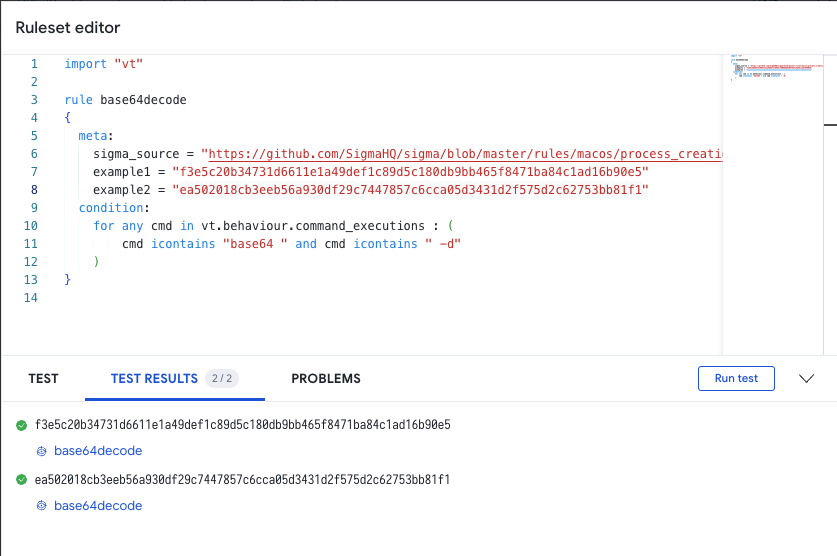
Example 2: Matching DNS
In this example, we will generate YARA matches that produce similar results to the VirusTotal Intelligence query, with a search modifier.
Sigma rule from SigmaHQ to dectect common remote access domains:
title: DNS Query To Remote Access Software Domain
id: 4d07b1f4-cb00-4470-b9f8-b0191d48ff52
related:
- id: 71ba22cb-8a01-42e2-a6dd-5bf9b547498f
type: obsoletes
- id: 7c4cf8e0-1362-48b2-a512-b606d2065d7d
type: obsoletes
- id: ed785237-70fa-46f3-83b6-d264d1dc6eb4
type: obsoletes
status: experimental
description: |
An adversary may use legitimate desktop support and remote access software, such as Team Viewer, Go2Assist, LogMein, AmmyyAdmin, etc, to establish an interactive command and control channel to target systems within networks.
These services are commonly used as legitimate technical support software, and may be allowed by application control within a target environment.
Remote access tools like VNC, Ammyy, and Teamviewer are used frequently when compared with other legitimate software commonly used by adversaries. (Citation: Symantec Living off the Land)
references:
- https://github.com/redcanaryco/atomic-red-team/blob/f339e7da7d05f6057fdfcdd3742bfcf365fee2a9/atomics/T1219/T1219.md#atomic-test-4---gotoassist-files-detected-test-on-windows
- https://github.com/redcanaryco/atomic-red-team/blob/f339e7da7d05f6057fdfcdd3742bfcf365fee2a9/atomics/T1219/T1219.md#atomic-test-3---logmein-files-detected-test-on-windows
- https://github.com/redcanaryco/atomic-red-team/blob/f339e7da7d05f6057fdfcdd3742bfcf365fee2a9/atomics/T1219/T1219.md#atomic-test-6---ammyy-admin-software-execution
- https://redcanary.com/blog/misbehaving-rats/
author: frack113, Connor Martin
date: 2022/07/11
modified: 2023/04/18
tags:
- attack.command_and_control
- attack.t1219
logsource:
product: windows
category: dns_query
detection:
selection:
QueryName|endswith:
- '.getgo.com'
- '.logmein.com'
- '.ammyy.com'
- '.netsupportsoftware.com' # For NetSupport Manager RAT
- 'remoteutilities.com' # Usage of Remote Utilities RAT
- '.net.anydesk.com'
- 'api.playanext.com'
- '.relay.splashtop.com'
- '.api.splashtop.com'
- 'app.atera.com'
- '.agentreporting.atera.com'
- '.pubsub.atera.com'
- 'logmeincdn.http.internapcdn.net'
- 'logmein-gateway.com'
- 'client.teamviewer.com'
The above sigma signature can be expressed as a Yara rule:
import "vt"
rule dns_remote_access
{
meta:
sigma_src = "https://github.com/SigmaHQ/sigma/blob/c05f864047ffbe793299499c79ec52920062159f/rules/windows/dns_query/dns_query_win_remote_access_software_domains.yml#L4"
condition:
  for any lookup in vt.behaviour.dns_lookups : (
    for any host in (".getgo.com",".logmein.com",".ammyy.com",".netsupportsoftware.com","remoteutilities.com","net.anydesk.com","relay.splashtop.com","api.splashtop.com","app.atea.com","agentreporting.atera.com","pubsub.atera.com","http.internapcdn.ne","logmein-gateway.com","client.teamviewer.com") : (
     lookup.hostname contains host
     ))
}
Example 3: Matching registry keys set
In this example we will search registry keys set. Using VT Intelligence you can search for strings within registry keys or values with a query like: behaviour_registry:SystemRestore\DisableConfig"Consider the sigma rule:
title: Registry Disable System Restore
id: 5de03871-5d46-4539-a82d-3aa992a69a83
status: experimental
description: Detects the modification of the registry to disable a system restore on the computer
references:
    - https://github.com/redcanaryco/atomic-red-team/blob/f339e7da7d05f6057fdfcdd3742bfcf365fee2a9/atomics/T1490/T1490.md#atomic-test-9---disable-system-restore-through-registry
author: frack113
date: 2022/04/04
modified: 2022/09/09
tags:
    - attack.impact
    - attack.t1490
logsource:
    category: registry_set
    product: windows
detection:
    selection:
        EventType: Setvalue
        TargetObject|contains:
            - '\Policies\Microsoft\Windows NT\SystemRestore'
            - '\Microsoft\Windows NT\CurrentVersion\SystemRestore'
        TargetObject|endswith:
            - DisableConfig
            - DisableSR
        Details: 'DWORD (0x00000001)'
    condition: selection
falsepositives:
    - Unknown
level: high
The sigma rule as yara:
import "vt"

rule disable_restore
{
  meta:
    sigma_source = "https://github.com/SigmaHQ/sigma/blob/62d4fd26b05f4d81973e7c8e80d7c1a0c6a29d0e/rules/windows/registry/registry_set/registry_set_disable_system_restore.yml#L2"
    example1 = "08c2d3fec8cd9fcced634df7ad0f3db164ffe0cbfc263e2d8be026afca05bfcb"
  condition:
    for any reg in vt.behaviour.registry_keys_set : (
        ( reg.key contains "\\Policies\\Microsoft\\Windows NT\\SystemRestore"
         or reg.key contains "\\Microsoft\\Windows NT\\CurrentVersion\\SystemRestore" )
        and
          (reg.key contains "DisableSR"  or reg.key contains "DisableConfig")
        and (reg.value contains "1")
    )
}
Test your rule to ensure it matches desired samples:

Example 4: Matching files on disk
A sima rule from SigmaHQ to detect linux samples modifying /etc/profile.d
title: Potentially Suspicious Shell Script Creation in Profile Folder
id: 13f08f54-e705-4498-91fd-cce9d9cee9f1
status: experimental
description: Detects the creation of shell scripts under the "profile.d" path.
references:
    - https://blogs.jpcert.or.jp/en/2023/05/gobrat.html
    - https://jstnk9.github.io/jstnk9/research/GobRAT-Malware/
    - https://www.virustotal.com/gui/file/60bcd645450e4c846238cf0e7226dc40c84c96eba99f6b2cffcd0ab4a391c8b3/detection
    - https://www.virustotal.com/gui/file/3e44c807a25a56f4068b5b8186eee5002eed6f26d665a8b791c472ad154585d1/detection
author: Joseliyo Sanchez, @Joseliyo_Jstnk
date: 2023/06/02
tags:
    - attack.persistence
logsource:
    product: linux
    category: file_event
detection:
    selection:
        TargetFilename|contains: '/etc/profile.d/'
        TargetFilename|endswith:
            - '.csh'
            - '.sh'
    condition: selection
falsepositives:
    - Legitimate shell scripts in the "profile.d" directory could be common in your environment. Apply additional filter accordingly via "image", by adding specific filenames you "trust" or by correlating it with other events.
    - Regular file creation during system update or software installation by the package manager
level: low # Can be increased to a higher level after some tuning
This could be searched with a VT intelligence query like: behaviour_files:"/etc/profile.d/" and (behaviour_files:".sh" or behaviour_files:*.csh) and (tag:elf or tag:shell)
import "vt"

rule suspicious_profile_folder
{
  meta:
    sigma_source = "https://github.com/SigmaHQ/sigma/blob/c04bef2fbbe8beff6c7620d5d7ea6872dbe7acba/rules/linux/file_event/file_event_lnx_susp_shell_script_under_profile_directory.yml"
    example_hash1 = "e15e93db3ce3a8a22adb4b18e0e37b93f39c495e4a97008f9b1a9a42e1fac2b0"
    example_hash2 = "447431333b2c2a72ac213a9fa2da8c2b09383ae75c3b31a88acfa79b8d43b8d8"
   author = "author: Joseliyo Sanchez, @Joseliyo_Jstnk"
  condition:
    for any dropped in vt.behaviour.files_dropped : (
      dropped.path contains "/etc/profile.d/"
      and (dropped.path endswith ".sh" or dropped.path endswith ".csh")
    )
    or
    for any file_path in vt.behaviour.files_written : (
      file_path contains "/etc/profile.d/"
      and (file_path endswith ".sh" or file_path endswith ".csh")
    )
}
As yara:
import "vt"

rule suspicious_profile_folder
{
  meta:
    sigma_source = "https://github.com/SigmaHQ/sigma/blob/c04bef2fbbe8beff6c7620d5d7ea6872dbe7acba/rules/linux/file_event/file_event_lnx_susp_shell_script_under_profile_directory.yml"
    example_hash1 = "e15e93db3ce3a8a22adb4b18e0e37b93f39c495e4a97008f9b1a9a42e1fac2b0"
    example_hash2 = "447431333b2c2a72ac213a9fa2da8c2b09383ae75c3b31a88acfa79b8d43b8d8"
   author = "author: Joseliyo Sanchez, @Joseliyo_Jstnk"
  condition:
    for any dropped in vt.behaviour.files_dropped : (
      dropped.path contains "/etc/profile.d/"
      and (dropped.path endswith ".sh" or dropped.path endswith ".csh")
    )
    or
    for any file_path in vt.behaviour.files_written : (
      file_path contains "/etc/profile.d/"
      and (file_path endswith ".sh" or file_path endswith ".csh")
    )
}
Summary of translating sigma to yara:
You may wish to review the sigma specification and review the sigma rules detected on VirusTotal for examples.
Any data contained in the file behavior object can be matched on.
The table below may help in guiding you to the correct keywords to use.
| Sigma Taxonomy | VirusTotal schema |
|---|---|
|
|
|
|
|
|
|
|
|
|
|
|
Malware threat hunting can be complex, by using Sigma rules and YARA rules, you can make the process more efficient and effective. Happy hunting.
