Showing posts with label yara rules. Show all posts

Thursday, July 13, 2023

, , ,

Actionable Threat Intel (III) - Introducing the definitive YARA editor

Thursday, July 13, 2023 Anonymous
One of VirusTotal's biggest strengths is its Hunting capabilities using YARA rules. In addition to matching all files against a big set of crowdsourced YARA rules, it also allows users to create their own detection and classification rules.
YARA was originally intended to support file-based rules. VirusTotal's "vt" module extended YARA's capabilities with file’s metadata and behavior. This allows our users to create advanced Livehunt and Retrohunt rules and get notified via IoC Stream every time new or re-scanned files match our rules.
Designing good YARA rules requires some level of expertise and time investment. That’s why we have reengineered our built-in YARA editor to make it easier for our users to create, test and deploy rules. In this post we will provide details for all its new capabilities!
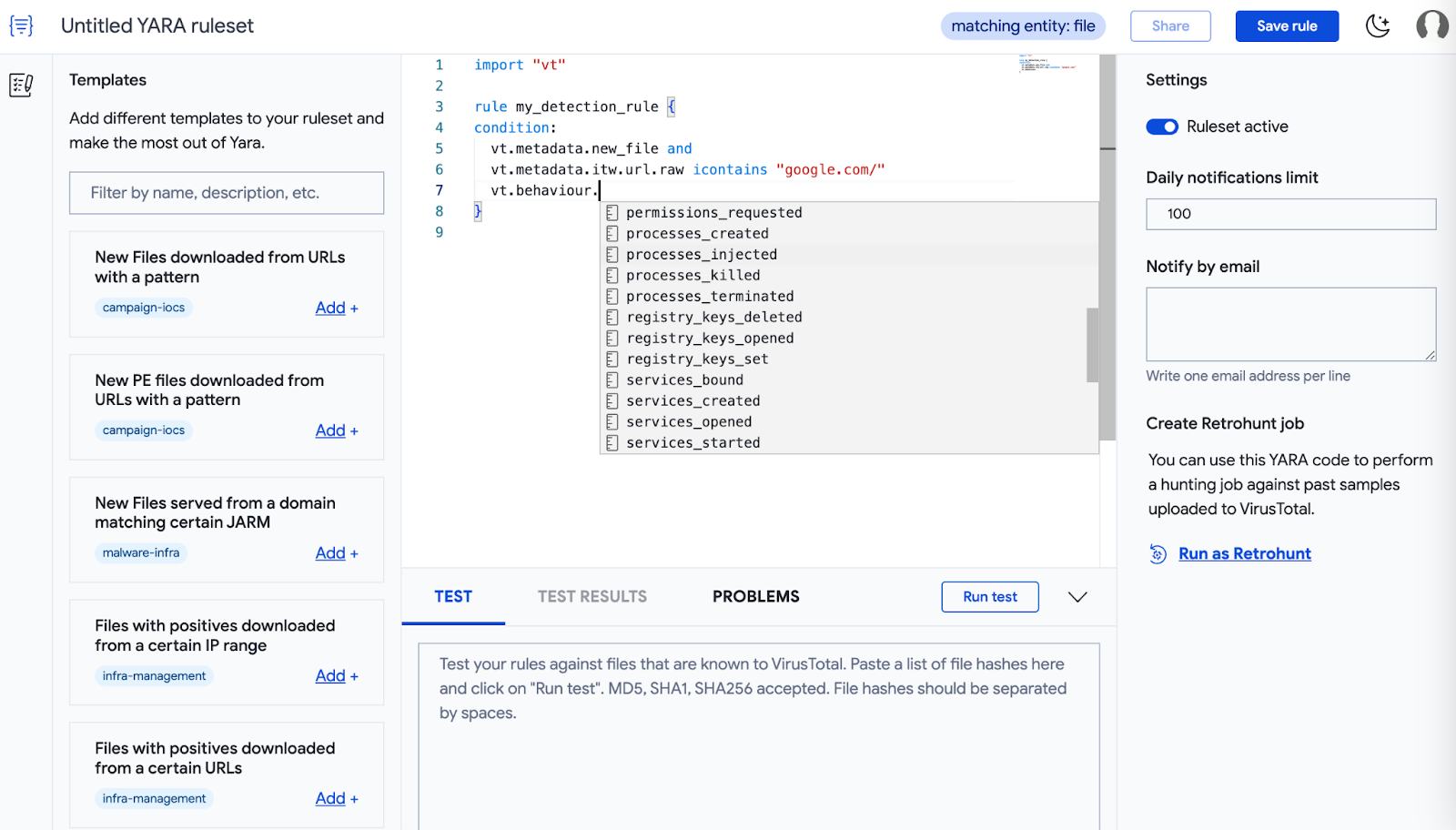
Other than making YARAs look glorious with full syntax coloring and auto-complete, there is much more this editor offers. But first let’s clarify how to find the new editor.
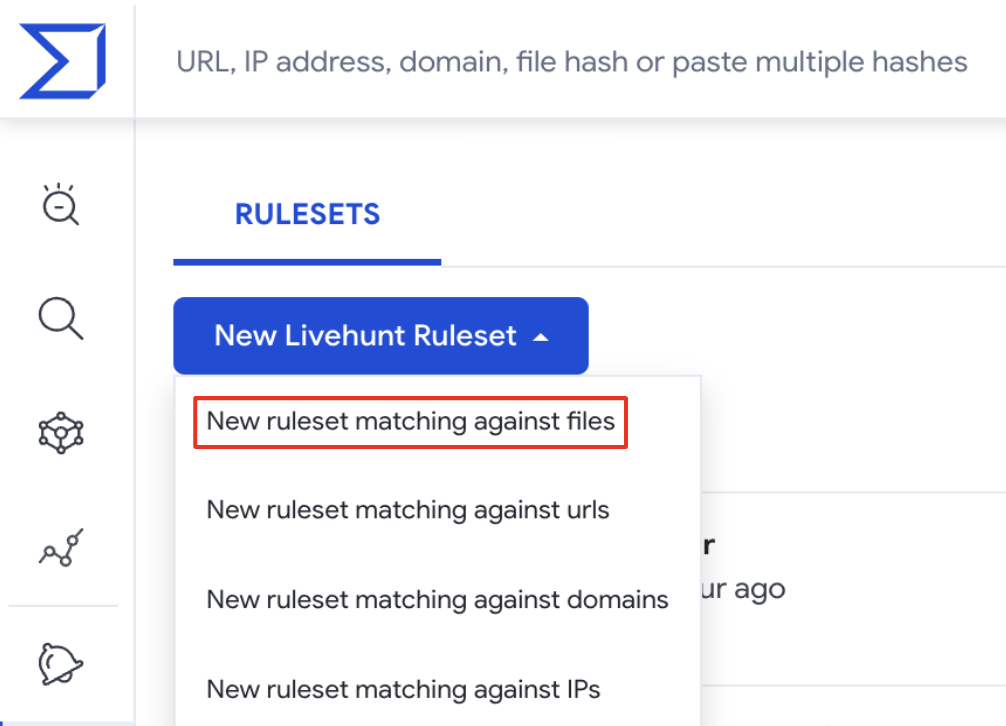
The new YARA editor can be accessed from the Livehunt or Retrohunt dashboards over the Hunting dropdown on the top left menu of the landing page. From the Livehunt dashboard, the “New Livehunt Ruleset” dropdown has 4 options that link you to the YARA editor for the specific entity of your interest.
This post will focus on file rules - but stay tuned for future posts detailing all other options.
Ok, now let’s see in more detail all the big new features!

Feature #1 - YARA rule templates

The YARA editor provides you with pre-defined self-descriptive rule templates (here you can find full details). We will keep adding more templates in the future and refreshing existing ones.
For instance, let’s say that you are interested in new samples, detected as malicious by AntiVirus engines, and hosted on a certain domain or URL. You can filter out templates available using keywords such as: “URL”, “download” and “positive”, and select the one that fits you better based on its description, as shown in the image below.
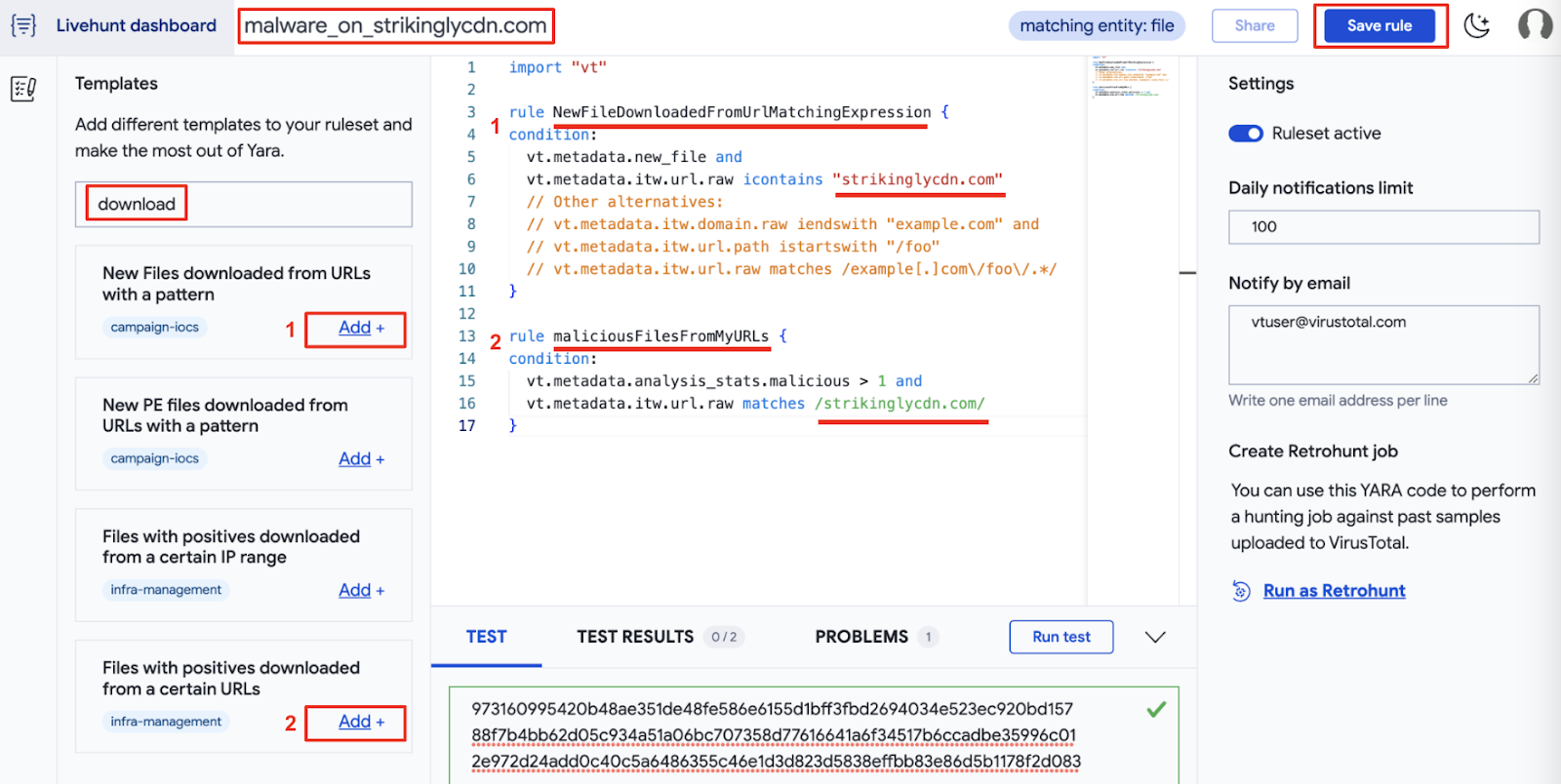
Now it’s easier to build your own rules by making use of the suggested templates. You just need to replace the placeholders with your specifics. Additionally, it is very important to rename the predefined rules so you can easily identify the source of the notifications you'll receive in your IoC Stream. In this case, the target URL and the number of detections for new files.
We will create a new rule based on these templates, with a few extra details: [1] we want to get PDF files only, [2] check if the file was seen hosted in a given domain, and [3] add a couple of extra domains to check if the file resolved them when executed in any of our sandboxes. Here is the resulting rule:
import "vt"

rule malware_hosted_on_strikinglycdn {

  meta:
    description = "Detects malicious files hosted on strikinglycdn.com domain."
    category = "MAL"
    examples = "https://www.virustotal.com/gui/search/p%253A5%252B%2520itw%253Astrikinglycdn.com%2520(behaviour_network%253A%2522oyndr.com%2522%2520or%2520behaviour_network%253A%2522fancli.com%2522)/files"
    creation_date = "2023-07-11"
    last_modified = "2023-07-11"

  condition:
    // combining existing templates
    vt.metadata.analysis_stats.malicious > 5 and
    vt.metadata.new_file and
    // [1] checking filetype
    vt.metadata.file_type == vt.FileType.PDF and
    // [2] check if the file was hosted in this domain
    (
      vt.metadata.itw.domain.raw iendswith ".strikinglycdn.com" or
      vt.metadata.itw.domain.raw == "strikinglycdn.com"
    ) and
    // [3] check if it resolves these domains during sandbox detonation
    for any dns_lookup in vt.behaviour.dns_lookups : (
      dns_lookup.hostname == "oyndr.com" or
      dns_lookup.hostname == "fancli.com"
    )
}

Feature #2 - YARA playground

When designing a rule it is always very hard to find the right balance between over and under fitting. Is our rule detecting the samples it is based on? How many other samples are being detected by it? Does our rule detect any unintended legitimate samples? Given this is the first thing every security expert would do, we decided to make it easier to test your fresh new rule against a set of IoCs.
In the bottom of the editor you will find 3 tabs. In the TEST tab you can add a set of IOCs you want to test your rule against, as shown below.
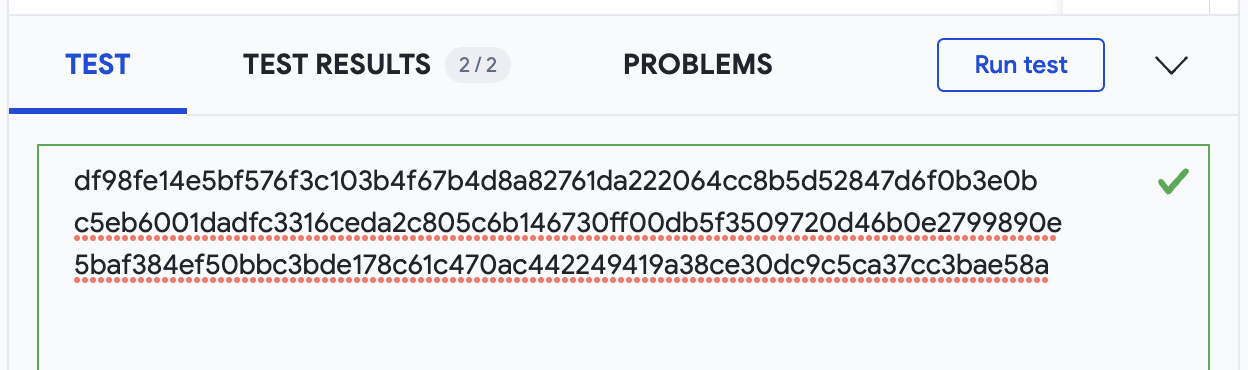
Then we are ready to Run test and find TEST RESULTS in the next tab, showing how the tested IoCs matched our rule.
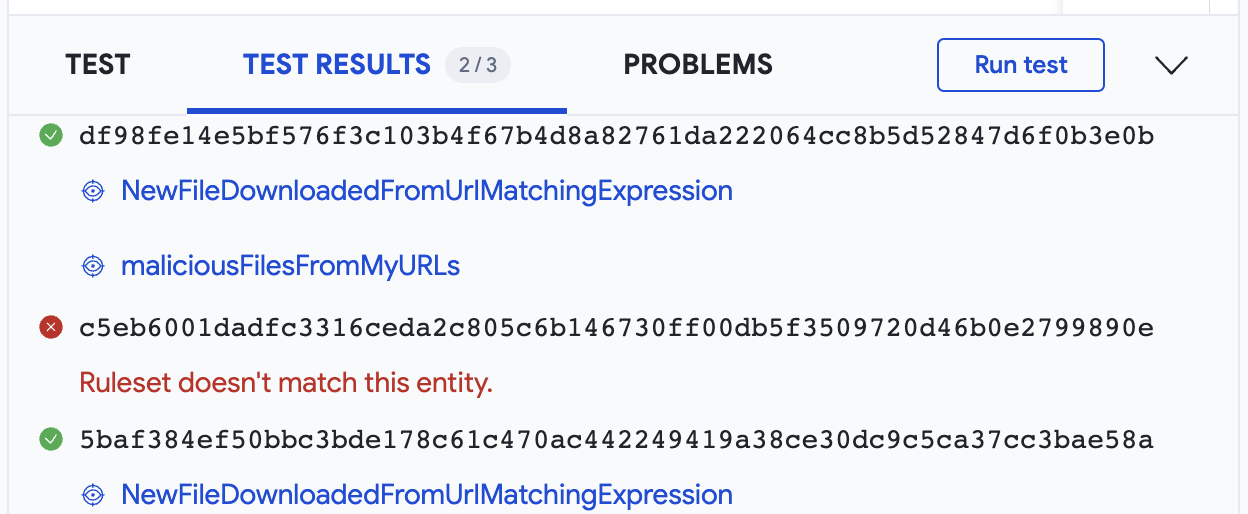
If anything happens, the PROBLEMS tab will give you details.
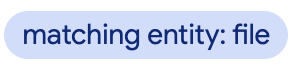
Additionally, when working with multiple rulesets in multiple web browser tabs at the same time, the YARA editor displays a message on the top right corner to help you to always keep in the spotlight the entity you are targeting with your rules.
Wrapping up

The new YARA editor is integrated with both Livehunt and Retrohunt, so basically will be our default editor for anything YARA-related in VirusTotal. The goal is making writing rules easier and faster, and finding everything you need, from templates to testing, in one place.
You may have noticed that the ITW feature is not included in the official documentation, and that it was not previously possible to perform this type of check. This is because it is part of our ongoing improvements to the "vt" module for YARA, which we will be introducing to you very soon.
We hope you find all these new features as useful as we do. If you have any questions or requests please do not hesitate to contact us.
Don’t forget to stay tuned, Netloc Hunting is coming! And as always, happy hunting!
Monday, June 26, 2023

, , , , , , , ,

Threat hunting converting SIGMA to YARA

Malware threat hunting is the process of proactively searching for malicious activity. It is a critical part of any organization's security posture, as it can help to identify and mitigate threats that may have otherwise gone undetected.

Sigma rules and YARA rules are two powerful tools that can be used for detection and  malware threat hunting. Sigma rules are a type of open rule language that can be used to describe malicious activity.  

Many sigma rules can be converted into yara rules for use with the VT yara module to match data from our inhouse and external sandboxes and behavioral engines.  You can then use the VirusTotal IOC Stream ,  to view the YARA matches on new file analysis. 

Below are some examples of how to convert from SIGMA to YARA:


Example 1: Matching processes

Consider Sigma rule to detect base64 decode.

title: Decode Base64 Encoded Text -MacOs
id: 719c22d7-c11a-4f2c-93a6-2cfdd5412f68
status: test
description: Detects usage of base64 utility to decode arbitrary base64-encoded text
references:
    - https://github.com/redcanaryco/atomic-red-team/blob/f339e7da7d05f6057fdfcdd3742bfcf365fee2a9/atomics/T1027/T1027.md
author: Daniil Yugoslavskiy, oscd.community
date: 2020/10/19
modified: 2022/11/26
tags:
    - attack.defense_evasion
    - attack.t1027
logsource:
    category: process_creation
    product: macos
detection:
    selection:
        Image: '/usr/bin/base64'
        CommandLine|contains: '-d'
    condition: selection
falsepositives:
    - Legitimate activities
level: low


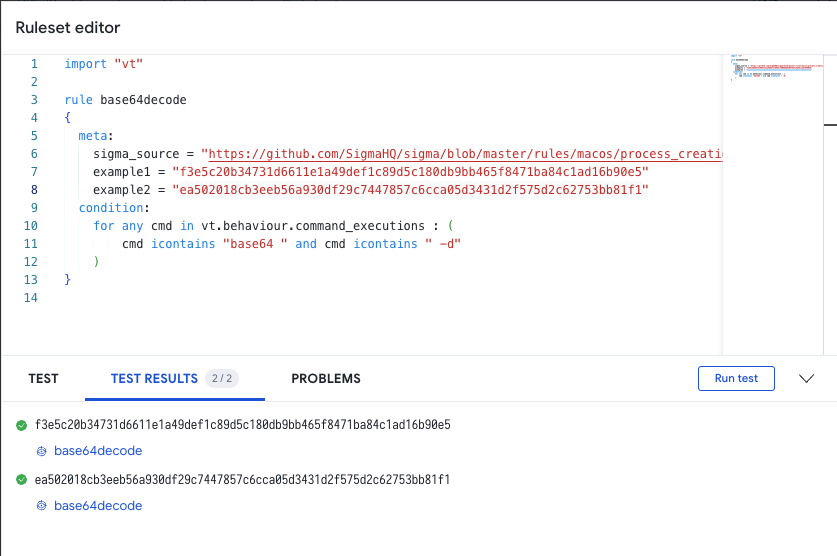
The sigma rule can be translated to a Yara rule similar to:

import "vt"

rule base64decode
{
  meta:
    sigma_source = "https://github.com/SigmaHQ/sigma/blob/master/rules/macos/process_creation/proc_creation_macos_base64_decode.yml"
    example1 = "f3e5c20b34731d6611e1a49def1c89d5c180db9bb465f8471ba84c1ad16b90e5"
    example2 = "ea502018cb3eeb56a930df29c7447857c6cca05d3431d2f575d2c62753bb81f1"
  condition:
    for any cmd in vt.behaviour.command_executions : (
        cmd icontains "base64 " and cmd icontains " -d"
    )
}  
  

Remember to test your rule to ensure it matches the desired samples.


Example 2: Matching DNS

In this example, we will generate YARA matches that produce similar results to the VirusTotal Intelligence query, with a search modifier.

Sigma rule from SigmaHQ to dectect common remote access domains:

title: DNS Query To Remote Access Software Domain
id: 4d07b1f4-cb00-4470-b9f8-b0191d48ff52
related:
- id: 71ba22cb-8a01-42e2-a6dd-5bf9b547498f
type: obsoletes
- id: 7c4cf8e0-1362-48b2-a512-b606d2065d7d
type: obsoletes
- id: ed785237-70fa-46f3-83b6-d264d1dc6eb4
type: obsoletes
status: experimental
description: |
An adversary may use legitimate desktop support and remote access software, such as Team Viewer, Go2Assist, LogMein, AmmyyAdmin, etc, to establish an interactive command and control channel to target systems within networks.
These services are commonly used as legitimate technical support software, and may be allowed by application control within a target environment.
Remote access tools like VNC, Ammyy, and Teamviewer are used frequently when compared with other legitimate software commonly used by adversaries. (Citation: Symantec Living off the Land)
references:
- https://github.com/redcanaryco/atomic-red-team/blob/f339e7da7d05f6057fdfcdd3742bfcf365fee2a9/atomics/T1219/T1219.md#atomic-test-4---gotoassist-files-detected-test-on-windows
- https://github.com/redcanaryco/atomic-red-team/blob/f339e7da7d05f6057fdfcdd3742bfcf365fee2a9/atomics/T1219/T1219.md#atomic-test-3---logmein-files-detected-test-on-windows
- https://github.com/redcanaryco/atomic-red-team/blob/f339e7da7d05f6057fdfcdd3742bfcf365fee2a9/atomics/T1219/T1219.md#atomic-test-6---ammyy-admin-software-execution
- https://redcanary.com/blog/misbehaving-rats/
author: frack113, Connor Martin
date: 2022/07/11
modified: 2023/04/18
tags:
- attack.command_and_control
- attack.t1219
logsource:
product: windows
category: dns_query
detection:
selection:
QueryName|endswith:
- '.getgo.com'
- '.logmein.com'
- '.ammyy.com'
- '.netsupportsoftware.com' # For NetSupport Manager RAT
- 'remoteutilities.com' # Usage of Remote Utilities RAT
- '.net.anydesk.com'
- 'api.playanext.com'
- '.relay.splashtop.com'
- '.api.splashtop.com'
- 'app.atera.com'
- '.agentreporting.atera.com'
- '.pubsub.atera.com'
- 'logmeincdn.http.internapcdn.net'
- 'logmein-gateway.com'
- 'client.teamviewer.com'
  
The above sigma signature can be expressed as a Yara rule:
import "vt"
rule dns_remote_access
{
meta:
sigma_src = "https://github.com/SigmaHQ/sigma/blob/c05f864047ffbe793299499c79ec52920062159f/rules/windows/dns_query/dns_query_win_remote_access_software_domains.yml#L4"
condition:
  for any lookup in vt.behaviour.dns_lookups : (
    for any host in (".getgo.com",".logmein.com",".ammyy.com",".netsupportsoftware.com","remoteutilities.com","net.anydesk.com","relay.splashtop.com","api.splashtop.com","app.atea.com","agentreporting.atera.com","pubsub.atera.com","http.internapcdn.ne","logmein-gateway.com","client.teamviewer.com") : (
     lookup.hostname contains host
     ))
}

Example 3: Matching registry keys set

In this example we will search registry keys set. Using VT Intelligence you can search for strings within registry keys or values with a query like: behaviour_registry:SystemRestore\DisableConfig"
Consider the sigma rule:
title: Registry Disable System Restore
id: 5de03871-5d46-4539-a82d-3aa992a69a83
status: experimental
description: Detects the modification of the registry to disable a system restore on the computer
references:
    - https://github.com/redcanaryco/atomic-red-team/blob/f339e7da7d05f6057fdfcdd3742bfcf365fee2a9/atomics/T1490/T1490.md#atomic-test-9---disable-system-restore-through-registry
author: frack113
date: 2022/04/04
modified: 2022/09/09
tags:
    - attack.impact
    - attack.t1490
logsource:
    category: registry_set
    product: windows
detection:
    selection:
        EventType: Setvalue
        TargetObject|contains:
            - '\Policies\Microsoft\Windows NT\SystemRestore'
            - '\Microsoft\Windows NT\CurrentVersion\SystemRestore'
        TargetObject|endswith:
            - DisableConfig
            - DisableSR
        Details: 'DWORD (0x00000001)'
    condition: selection
falsepositives:
    - Unknown
level: high
  

The sigma rule as yara:

import "vt"

rule disable_restore
{
  meta:
    sigma_source = "https://github.com/SigmaHQ/sigma/blob/62d4fd26b05f4d81973e7c8e80d7c1a0c6a29d0e/rules/windows/registry/registry_set/registry_set_disable_system_restore.yml#L2"
    example1 = "08c2d3fec8cd9fcced634df7ad0f3db164ffe0cbfc263e2d8be026afca05bfcb"
  condition:
    for any reg in vt.behaviour.registry_keys_set : (
        ( reg.key contains "\\Policies\\Microsoft\\Windows NT\\SystemRestore" 
         or reg.key contains "\\Microsoft\\Windows NT\\CurrentVersion\\SystemRestore" )
        and 
          (reg.key contains "DisableSR"  or reg.key contains "DisableConfig")
        and (reg.value contains "1")
    )
}

Test your rule to ensure it matches desired samples:


Example 4: Matching files on disk

A sima rule from SigmaHQ to detect linux samples modifying /etc/profile.d

title: Potentially Suspicious Shell Script Creation in Profile Folder
id: 13f08f54-e705-4498-91fd-cce9d9cee9f1
status: experimental
description: Detects the creation of shell scripts under the "profile.d" path.
references:
    - https://blogs.jpcert.or.jp/en/2023/05/gobrat.html
    - https://jstnk9.github.io/jstnk9/research/GobRAT-Malware/
    - https://www.virustotal.com/gui/file/60bcd645450e4c846238cf0e7226dc40c84c96eba99f6b2cffcd0ab4a391c8b3/detection
    - https://www.virustotal.com/gui/file/3e44c807a25a56f4068b5b8186eee5002eed6f26d665a8b791c472ad154585d1/detection
author: Joseliyo Sanchez, @Joseliyo_Jstnk
date: 2023/06/02
tags:
    - attack.persistence
logsource:
    product: linux
    category: file_event
detection:
    selection:
        TargetFilename|contains: '/etc/profile.d/'
        TargetFilename|endswith:
            - '.csh'
            - '.sh'
    condition: selection
falsepositives:
    - Legitimate shell scripts in the "profile.d" directory could be common in your environment. Apply additional filter accordingly via "image", by adding specific filenames you "trust" or by correlating it with other events.
    - Regular file creation during system update or software installation by the package manager
level: low # Can be increased to a higher level after some tuning
  

This could be searched with a VT intelligence query like: behaviour_files:"/etc/profile.d/" and (behaviour_files:".sh" or behaviour_files:*.csh) and (tag:elf or tag:shell)

import "vt"

rule suspicious_profile_folder
{
  meta:
    sigma_source = "https://github.com/SigmaHQ/sigma/blob/c04bef2fbbe8beff6c7620d5d7ea6872dbe7acba/rules/linux/file_event/file_event_lnx_susp_shell_script_under_profile_directory.yml"
    example_hash1 = "e15e93db3ce3a8a22adb4b18e0e37b93f39c495e4a97008f9b1a9a42e1fac2b0"
    example_hash2 = "447431333b2c2a72ac213a9fa2da8c2b09383ae75c3b31a88acfa79b8d43b8d8"
   author = "author: Joseliyo Sanchez, @Joseliyo_Jstnk"
  condition:
    for any dropped in vt.behaviour.files_dropped : (
      dropped.path contains "/etc/profile.d/"
      and (dropped.path endswith ".sh" or dropped.path endswith ".csh")
    )
    or
    for any file_path in vt.behaviour.files_written : (
      file_path contains "/etc/profile.d/"
      and (file_path endswith ".sh" or file_path endswith ".csh")
    )
}
  

As yara:

import "vt"

rule suspicious_profile_folder
{
  meta:
    sigma_source = "https://github.com/SigmaHQ/sigma/blob/c04bef2fbbe8beff6c7620d5d7ea6872dbe7acba/rules/linux/file_event/file_event_lnx_susp_shell_script_under_profile_directory.yml"
    example_hash1 = "e15e93db3ce3a8a22adb4b18e0e37b93f39c495e4a97008f9b1a9a42e1fac2b0"
    example_hash2 = "447431333b2c2a72ac213a9fa2da8c2b09383ae75c3b31a88acfa79b8d43b8d8"
   author = "author: Joseliyo Sanchez, @Joseliyo_Jstnk"
  condition:
    for any dropped in vt.behaviour.files_dropped : (
      dropped.path contains "/etc/profile.d/"
      and (dropped.path endswith ".sh" or dropped.path endswith ".csh")
    )
    or
    for any file_path in vt.behaviour.files_written : (
      file_path contains "/etc/profile.d/"
      and (file_path endswith ".sh" or file_path endswith ".csh")
    )
}


Summary of translating sigma to yara:

You may wish to review the sigma specification and review the sigma rules detected on VirusTotal for examples.

Any data contained in the file behavior object can be matched on.

The table below may help in guiding you to the correct keywords to use.

Sigma Taxonomy VirusTotal schema
  • file_access
    • TargetFilename
  • file_event
    • TargetFilename
  • sysmon
    • EventID 11 (FileCreate)
  • vt.behaviour.files_written[]
  • vt.behaviour.files_dropped[].path
  • registry_set
  • vt.behaviour.registry_keys_set[].key
  • vt.behaviour.registry_keys_set[].value
  • registry_delete
  • vt.behaviour.registry_keys_deleted[]
  • process_creation
  • ps_script
  • file_event
    • Image
  • vt.behaviour.command_executions[]
  • network_connection
    • DestinationHostname
  • dns_query
    • QueryName
  • dns
    • query
  • vt.behaviour.dns_lookups[].hostname
  • vt.behaviour.tls[].sni
  • vt.behaviour.memory_pattern_urls[]
  • vt.behaviour.memory_pattern_domains[]
  • file_delete
  • vt.behaviour.files_deleted[]


Malware threat hunting can be complex, by using Sigma rules and YARA rules, you can make the process more efficient and effective. Happy hunting.


Monday, October 28, 2019

, , , , , , , ,

Test your YARA rules against a collection of goodware before releasing them in production

The rising tide of malware threats has created an arms race in security tool accumulation, this has led to alarm fatigue in terms of noisy alerts and false positives. The last thing you need is more false alarms coming from buggy or suboptimal YARA rules, be it the ones you use in VT Hunting or the ones that you feed into your own security defenses.

As you may already know, VT Enterprise incorporates a component that allows you to match your own YARA rules against all newly uploaded files (Livehunt) as well as back in time against our historical malware collection (Retrohunt).

A common challenge for YARA users is that of potential false positives. False positives can have a negative effect on a users Livehunt feed by producing incorrect results. Similarly, a buggy rule can be a waste of your Retrohunt quota, and given that Retrohunt jobs are lengthy, it is also a waste of time. Since many security tools incorporate YARA these days, some users will be launching their rules against a fleet of machines that they manage, meaning that a buggy rule can be a big waste of resources.

In order to address this common pain point we are releasing a new Retrohunt feature: fast hunting over a goodware corpus. When you launch your Retrohunt jobs you can now select the corpus on which it should act:


The goodware corpus is a set of 1M files chosen from the NIST National Software Reference Library, accounting for 147GB. Jobs launched against this collection usually finish in under a minute. As such, we imagine that users may be modifying the way they use VT Hunting. Before writing a Livehunt YARA rule or launching a Retrohunt job, they probably will want to test it against this corpus and tweak the rule in order to prevent false positives and avoid unnecessary and lengthy Retrohunt iterations.


- Goodware Retrohunt jobs are correspondingly tagged -


In an effort to give back to the community behind VirusTotal and its premium services, we are making this feature entirely free. In other words, Retrohunt jobs against the goodware corpus do not consume Retrohunt quota.

This new feature builds upon some major improvements that have been recently released such as the new API endpoints to programmatically interact with VT Hunting. Stay tuned, soon we will be announcing far bigger enhancements to Retrohunt, you can take a sneak peek in our 2019 roadmap (Lightning-fast retrohunt).
