Showing posts with label Android malware. Show all posts

Monday, April 16, 2018

, , , , , , ,

Multisandbox project welcomes Cyber adAPT ApkRecon


Two weeks ago we announced the release of our new VirusTotal Droidy Android sandbox, a virtual environment that executes Android applications in an automated fashion in order to capture all the actions that the given app performs on the operating system.

Today we are excited to announce that Cyber adAPT is becoming a multisandbox project partner and will be contributing data from its ApkRecon product to the fight against malware. Like Droidy, its solution also focuses on the Android environment. In their own words:

ApkRecon is a sandbox environment developed by the research team at Cyber adAPT.  Amongst many features, the sandbox boasts a baited Android environment, a decrypted network application level capture, and an attack payload triggering system to gain insight into the true intent of each piece of analyzed malware. ApkRecon is also used to generate detection logic for Cyber adAPT’s Mobile Threat Detection product to keep users safe all around the world.

These are some example reports displaying the data contributed by Cyber adAPT:


It is worth highlighting the usefulness of this kind of data. When facing unknown files for which you have no context it can be very rich contextual information that allows analysts to have an initial judgement of the file before diving into dissecting it. For example, looking at the last example report above we notice that the file performs an HTTP POST to:

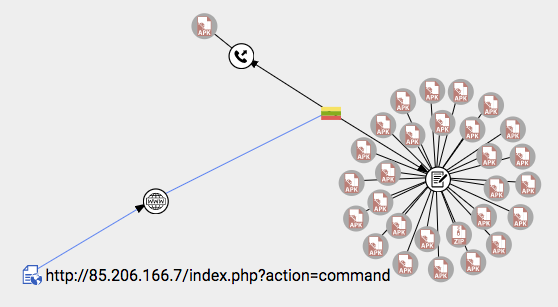
hxxp://85.206.166.7/index.php?action=command

This is a URL that we can look up in VirusTotal Graph and jump to the host referenced in the URL, i.e. 85.206.166.7. When exploring this host we notice that only the file under consideration has communicated with it, however, we do notice that expansions are available according to the referrer files relationship. This relationship pinpoints files that contain the given host within its body, even if they have not been seen communicating with it. Let’s follow this notion, something shady seems to be going on:

Badness is much easier to spot when studying the sample characterised in this other report:

In this case the APK reaches out to the URL:

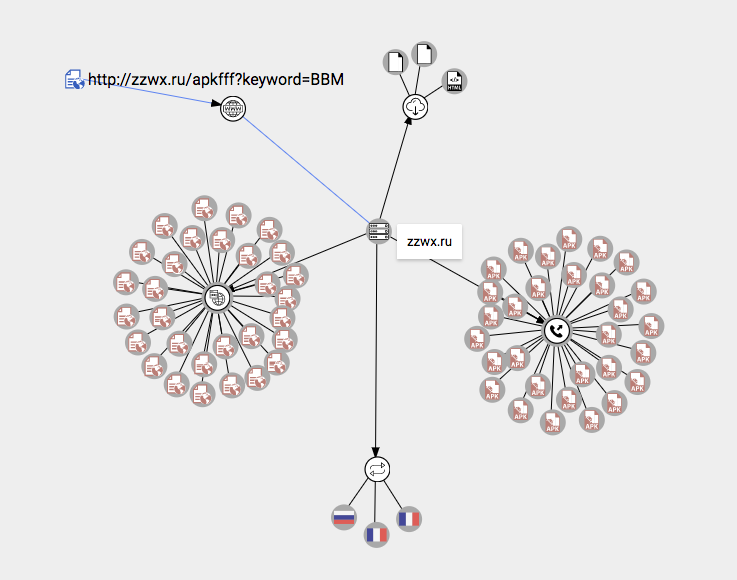
hxxp://zzwx.ru/apkfff?keyword=BBM

From there we can jump to the domain entity, i.e. zzwx.ru, and expand URLs observed under such domain, as well as files communicating with it. Just two hops and we already have a preliminary idea about the initial APK that reached out to the aforementioned URL being malicious:

These examples highlight the importance of extracting as many attributes and behavioral details as possible from files, not only because they allow us to better understand a particular threat, but because they connect the dots and reveal entire campaigns. For instance, very often blocking a given network location will render ineffective all malware variants of a given campaign (inability to reach the mothership server), so even when certain variants fly under detection radars, there is still hope that network security measures will stop a given attack.

This kind of approach to block badness is something that we have shaped into a particular paper hosted in our www.virustotal.com/learn space, more specifically the paper entitled VirusTotal Intelligence for banking trojans. In this paper malicious network infrastructure is shut down by contacting the pertinent domain registrars and hosting providers, however, organizations can also blacklist these locations in their network security controls.

Thursday, April 05, 2018

, , , , , , ,

Meet VirusTotal Droidy, our new Android sandbox

Recently we called out Additional crispinness on the MacOS box of apples sandbox, continuing with our effort to improve our malware behavior analysis infrastructure we are happy to announce the deployment of a new Android sandbox that replaces the existing system that was developed back in 2013.

This setup characterises the actions that Android APKs perform when installed and opened; it has been baptised as “VirusTotal Droidy”. Droidy has been integrated in the context of the multisandbox project and extracts juicy details such as:
  • Network communications and SMS-related activity. 
  • Java reflection calls. 
  • Filesystem interactions. 
  • SQLite database usage. 
  • Services started, stopped, etc. 
  • Permissions checked. 
  • Registered receivers. 
  • Crypto-related activity. 
  • Etc. 

You may find below a couple of reports showcasing this new functionality. Just select the “VirusTotal Droidy” entry in the multisandbox report selector (whenever there are multiple reports):

Don’t forget to also check the detailed report:


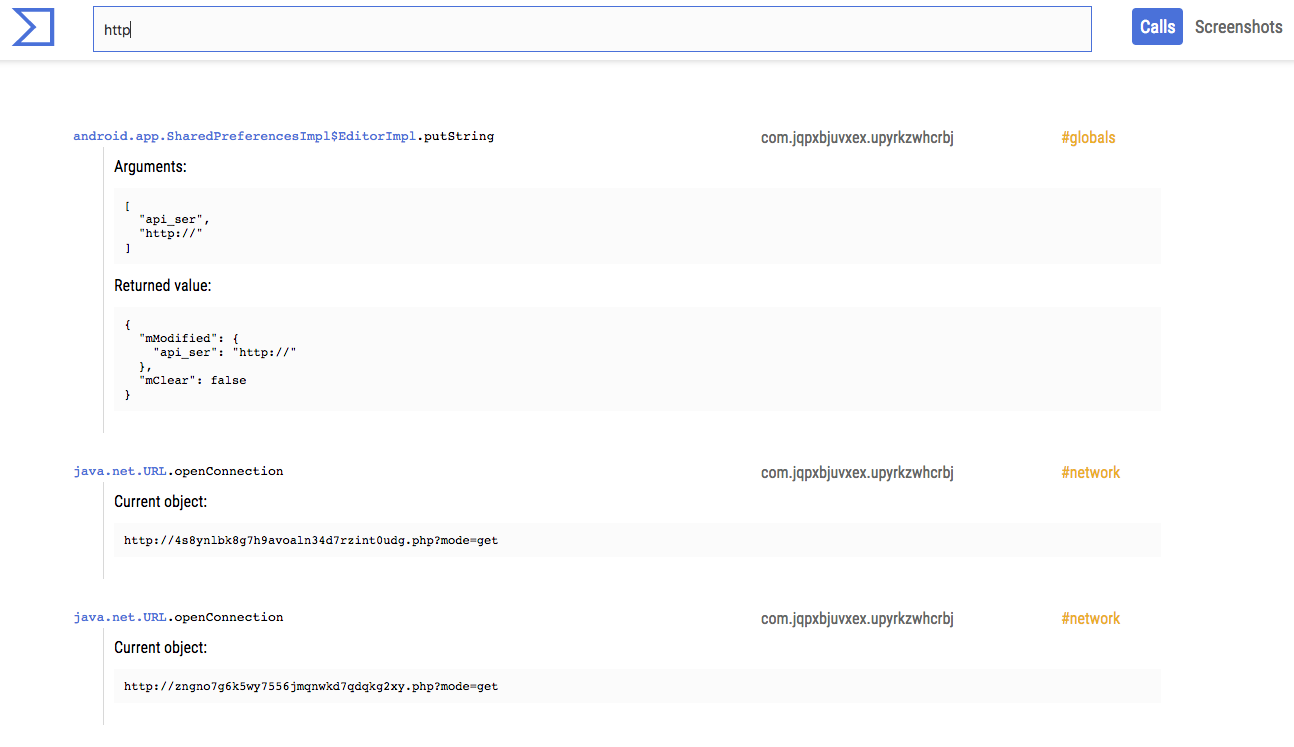
This advanced view allows you to dig into the hooked calls and take a look at the screenshots generated when running the apps:


The multisandbox project is in good shape, and now many samples have reports for multiple sandboxes. For instance, the following report allows you to see the output of Tencent HABO and VirusTotal Droidy:
As you can see, they are pretty complementary, proving the value of having different sandboxing technologies studying the same files.

To understand the extent to which this is an improvement with respect to the 2013 setup, you can take a look at the following report. It displays by default the output of the old sandbox. Use the selector to see the new report with VirusTotal Droidy:

Now, these may seem like minimal features to improve VirusTotal’s “microscope” capabilities for better understanding a particular threat. In fact, the changes go much deeper. All of our sandboxing information nurtures other services such as VirusTotal Intelligence and VirusTotal Graph. The richer the information that we generate for individual data set items, the greater the telescopic capabilities of VirusTotal. This is how we manage to fill in the dots and quickly see all activity tied to certain resources that often show up in malware investigations. For example, let us look at the graph of one of the domains seen in the previous reports:


At a glance you can understand that something shady is going on with wonderf00l.gq and you are able to discover other malicious domains such as flashinglight.tk, checkingupd.tk, flashupdservice.cf, etc. Some of these, for instance checkolimpupd.tk, are not only used as C2 infrastructure for malware but also serve as malware distribution points.

Very often during an investigation, you might not have enough context about an individual threat, and so being able to look at the connected URLs, domains, files, IP addresses, etc. becomes crucial in understanding what is going on. My colleague Evan explains this far better than I can do in just a couple of paragraphs, so make sure you check out his video dissecting a cryptomining attack at https://www.virustotal.com/learn/watch/.

Wrapping up, don’t think of this as just new functionality to dissect individual threats. All of this data contributes to the bigger picture and increases the power of our telescope lens that sheds light into malicious behaviors on the Internet.  

Monday, June 11, 2012

, , , ,

VirusTotal for Android

Years ago there was much fuzz about mobile malware, yet the devices themselves were so limited that the claims made were considered no more than hypes developed exclusively with marketing purposes so as to sell more mobile phone antivirus solutions.

The rise of smartphones has made what once were deceitful claims a real threat. Attackers are well aware that users are moving to mobile devices and performing most of their online activity on them (ebanking, social networking, etc.), and thus have started to target these platforms. Examples of these threats are the Zeus Mitmo banking trojan, fake Angry Birds or Opfake.

VirusTotal is strongly committed to making the Internet a safer place by helping end-users in securing their systems, be it desktop PCs or mobile phones. This is why we have developed and released VirusTotal for Android, an Android application that lets you check all the applications on your phone/mobile device against VirusTotal.


You can download the application directly from the Google Play store:

https://play.google.com/store/apps/details?id=com.virustotal

The application will perform hash lookups for all the applications installed in your mobile device. If the application was scanned by VirusTotal in the past and detected by one or more antivirus vendors its results icon will be a red droid, green if it was not detected. A blue question mark will appear next to applications that are unknown to VirusTotal.

You can upload to VirusTotal any application that was not seen in the past, in order to do this you will have to provide your VirusTotal Community credentials, the application will then use your API key to perform the uploads. The file will enter a low priority scanning queue and the application will trigger an Android notification whenever the scan ends.

The application has some other features such as rescanning, filtering or detailed results, read more about  them at its documentation site. The application was initially coded as part of a University project supervised by Urko Zurutuza from the University of Mondragon, it was later polished and recoded by Anthony Desnos, the most recent member of our team and our resident Android expert. We hope you find it useful!

Please note that VirusTotal for Android does not prive real-time protection and, so, is no substitute for any antivirus product, just a second opinion regarding your apps.