Showing posts with label infrastructure. Show all posts

Friday, October 18, 2024

, , , , , , , , , , , ,

Unveiling Hidden Connections: JA4 Client Fingerprinting on VirusTotal

VirusTotal has incorporated a powerful new tool to fight against malware: JA4 client fingerprinting. This feature allows security researchers to track and identify malicious files based on the unique characteristics of their TLS client communications.

JA4: A More Robust Successor to JA3

JA4, developed by FoxIO, represents a significant advancement over the older JA3 fingerprinting method. JA3's effectiveness had been hampered by the increasing use of TLS extension randomization in https clients, which made fingerprints less consistent. JA4 was specifically designed to be resilient to this randomization, resulting in more stable and reliable fingerprints.

Unveiling the Secrets of the Client Hello

JA4 fingerprinting focuses on analyzing the TLS Client Hello packet, which is sent unencrypted from the client to the server at the start of a TLS connection. This packet contains a treasure trove of information that can uniquely identify the client application or its underlying TLS library. Some of the key elements extracted by JA4 include:
  • TLS Version: The version of TLS supported by the client.
  • Cipher Suites: The list of cryptographic algorithms the client can use.
  • TLS Extensions: Additional features and capabilities supported by the client.
  • ALPN (Application-Layer Protocol Negotiation): The application-level protocol, such as HTTP/2 or HTTP/3, that the client wants to use after the TLS handshake.

JA4 in Action: Pivoting and Hunting on VirusTotal

VirusTotal has integrated JA4 fingerprinting into its platform through the behavior_network file search modifier. This allows analysts to quickly discover relationships between files based on their JA4 fingerprints.

To find the JA4 value, navigate to the "behavior" section of the desired sample and locate the TLS subsection. In addition to JA4, you might also find JA3 or JA3S there.

Example Search: Let's say you've encountered a suspicious file that exhibits the JA4 fingerprint "t10d070600_c50f5591e341_1a3805c3aa63" during VirusTotal's behavioral analysis.
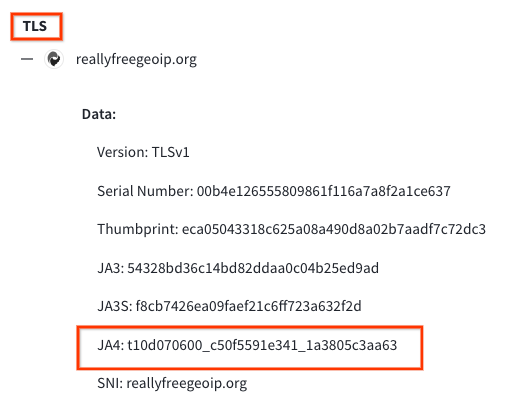
You can click on this JA4 to pivot using the search query behavior_network:t10d070600_c50f5591e341_1a3805c3aa63 finding other files with the same fingerprint This search will pivot you to additional samples that share the same JA4 fingerprint, suggesting they might be related. This could indicate that these files are part of the same malware family or share a common developer or simply share a common TLS library.

Wildcard Searches

To broaden your search, you can use wildcards within the JA4 hash. For instance, the search: behaviour_network:t13d190900_*_97f8aa674fd9

Returns files that match the JA4_A and JA4_C components of the JA4 hash while allowing for variations in the middle section, which often corresponds to the cipher suite. This technique is useful for identifying files that might use different ciphers but share other JA4 characteristics.

YARA Hunting Rules: Automating JA4-Based Detection

YARA hunting rules using the "vt" module can be written to automatically detect files based on their JA4 fingerprints. Here's an example of a YARA rule that targets a specific JA4 fingerprint:
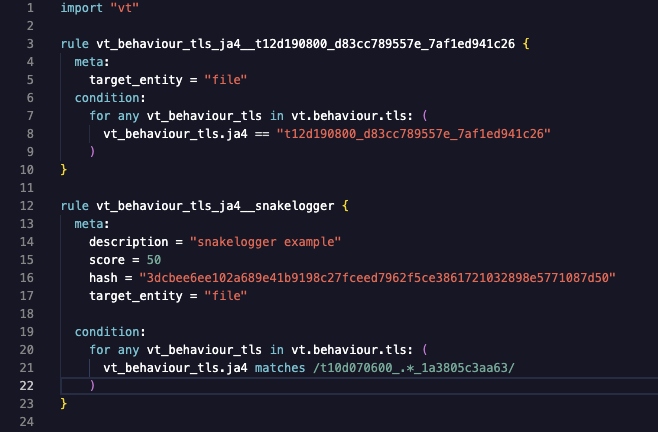

This rules will flag any file submitted to VirusTotal that exhibits the matching JA4 fingerprint. The first example only matches "t12d190800_d83cc789557e_7af1ed941c26" during behavioral analysis. The second rule will match a regular expression /t10d070600_.*_1a3805c3aa63/, only matching JA4_A and JA4_C components, excluding the JA4_B cipher suite. These fingerprints could be linked to known malware, a suspicious application, or any TLS client behavior that is considered risky by security analysts.


JA4: Elevating Threat Hunting on VirusTotal

VirusTotal's adoption of JA4 client fingerprinting will provide users with an invaluable tool for dissecting and tracking TLS client behaviors, leading to enhanced threat hunting, pivoting, and more robust malware identification.

Happy Hunting.

Thursday, February 02, 2023

, , ,

Is malware abusing your infrastructure? Find out with VirusTotal!

Any organization’s infrastructure might inadvertently be abused by attackers as part of a malicious campaign. It is therefore important to monitor any suspicious activity. VirusTotal can help you identify these threats and improve your threat detection and protection capabilities. In this post we will first analyze different available search modifiers and then we will provide different templates to quickly deploy infrastructure monitoring rules.


Hunting for infrastructure abuses

VirusTotal Intelligence allows you to search VT’s extensive dataset for domains, URLs, IP addresses and files. You can find some examples on using search modifiers in our previous blog post.
You can use entity: domain or entity: url along parent_domain (entity:domain parent_domain:file.io or entity:url parent_domain:file.io) search modifiers to find VT details on your infrastructure. You can always adjust the results with the antivirus detection ratio (positives or p keyword).
For IP addresses we can use the ip search modifier, also valid for IP ranges:
The domain/URL/IP report shows the assigned category by antivirus vendors along with the detection ratio. One of the most interesting tabs is “Relations”, where we can check any suspicious samples communicating with it.
Indeed, we can use some additional modifiers to find networking entities having interesting relationships. We can also use them to immediately flag if there is any domain or IP in our infrastructure communicating with any suspicious file.
Search modifier Description
detected_communicating_files_count # of detected files contacting the given domain or IP address when executed in a sandbox
communicating_files_max_detections maximum # of detected files communicating with a given domain or IP address
detected_downloaded_files_count # of detected files downloaded by VirusTotal from a URL hosted under a given domain or an IP address
downloaded_files_max_detections maximum # of detected files downloaded by VirusTotal from a URL hosted under a given domain or an IP address
detected_referring_files_count # of detected files containing the given domain or IP address in their strings
referring_files_max_detections maximum # of detected files containing the given domain or IP address in their strings
detected_urls_count # of detected URLs hosted under a given domain or IP address
urls_max_detections maximum # of detected URLs hosted under a given domain or IP address

Files
The most generic (although noisy) way to find files potentially targeting your infrastructure is the static one checking files’ content. This returns any file matching your IP addresses, domains or URLs in its content’s strings. In this case it is not possible using IP ranges.
❗Please notice that the content search modifier can't be used in combination with the entity modifier in the same query.
This type of query is useful when malware’s infrastructure is not obfuscated and statically found in the sample, which is not common.
There is a better way through dynamic analysis. All samples in VirusTotal are detonated in several sandboxes, which produces valuable data on how it behaves dynamically. Many samples implement anti-sandboxing techniques, so it is not always possible to get all the details.
The best search modifier to find samples communicating with a given URL, domain or IP through sandbox detonation is behaviour_network:
The contacted_ip search modifier also allows specifying IP address ranges:
Besides dynamic execution, you can check if VirusTotal has ever seen any particular suspicious samples being downloaded from your infrastructure. For this you can use the “In the Wild” (itw) search modifier: entity:file itw:file.io p:1+

Do it yourself!
Let’s say you are interested in tracking fresh suspicious samples submitted to VirusTotal communicating your company’s infrastructure (in this case consisting of 2 IPs resolving to our file.io domain). The “first submission” (fs) search modifier gets us files submitted since december last year:
This query returns 4 files that are detected as malicious by at least 12 antivirus engines.
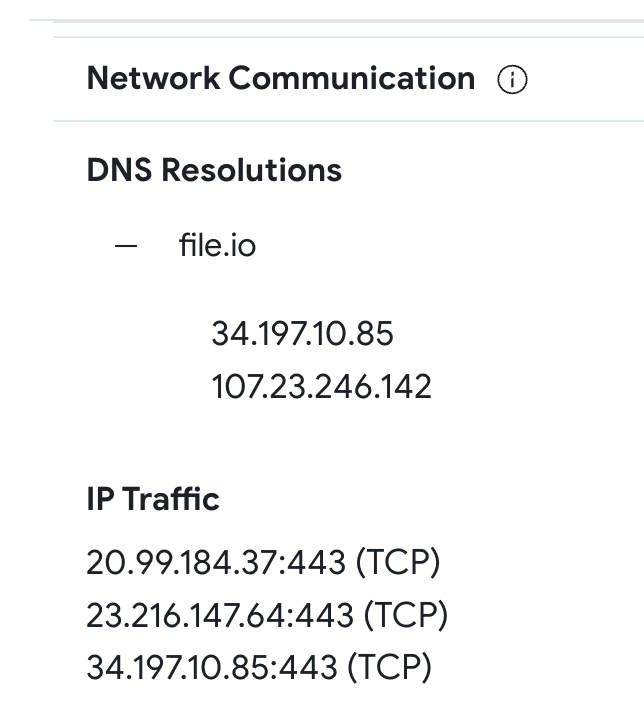
All samples work in the same way, let’s focus on the first one - 5dd5394ffb7b363a23ba93b7d78d626a133d39e4ea93486bbb8e150db6ff4757. In the Behavior tab -> Network Communication section, we confirm the file resolves “file.io” to one of the IP addresses used in our query.
The Content tab shows an encoded Powershell.
In short, this dropper downloads another sample from https://file[.]io/DseDcCxBoGyr, renames it as MicMute_0.1.8.4_Beta_Setup.exe and executes it.

Automated monitoring

We can automate monitoring our infrastructure in two ways.

1. Using the VT API
With VT API v3 you can use the Advanced corpus search endpoint to use VTI queries like the ones described above. This endpoint requires your premium API key and your URL Safe encoded VT Intelligence query. The example below uses CURL for the the previous query:
curl --request GET --url 'https://www.virustotal.com/api/v3/intelligence/search?query={entity%3Afile%20behaviour%5Fnetwork%3Afile%2Eio%20%28contacted%5Fip%3A107%2E23%2E246%2E142%20or%20contacted%5Fip%3A34%2E197%2E10%2E85%29%20p%3A10%2B%20fs%3A2022%2D12%2D01%2B}' --header 'x-apikey: <your API key>'
The result will be a JSON with the results of the query.
You can also use the official VirusTotal Python client library. The following is an example for the same query:
import "vt"

QUERY = "entity:file behaviour_network:file.io (contacted_ip:107.23.246.142 or contacted_ip:34.197.10.85) p:10+ fs:2022-12-01+"

with vt.Client(API_KEY) as client:
 it = client.iterator('/intelligence/search', params={"query": QUERY })
 for file_obj in it:
  print(f'{file_obj.id}')
Please note that queries using “In the Wild” (itw) search modifier cannot be translated (yet) to YARA rules. To automate these queries we encourage you to use the VirusTotal API.

2. Using YARA
YARA allows creating file matching rules based on textual or binary patterns. Each rule consists of a set of strings and a boolean condition. You can deploy Livehunt YARA rules in VirusTotal and get a notification every time a new submitted file matches your rules. Let’s learn how to create basic YARA rules for monitoring your infrastructure.
The first example is based on file content. It will match files containing any of the declared IP addresses, domains or URLs.
import "vt"

rule infrastructure_monitoring {

 meta:
  description = "Description of the logic of the use case and its goal."
  author = "VT Team"

 strings:
  // assets
  $ip1 = "X.X.X.X"
  $ip2 = "Y.Y.Y.Y"
  $url1 = "companyexampledomain.com/url?p=5"
  $url2 = "companyexampledomain.es/url2"
  $domain1 = "companyexampledomain.com"
  $domain2 = "companyexampledomain.es"

 condition:
  any of ($ip*,$domain*,$url*)
}
By its very nature YARA works only on static file properties, which would be limiting as we have discussed. Happily, we can use VirusTotal's custom YARA VT module, which extends the common capabilities of YARA to allow you to check sample behavior, metadata, signatures, submissions, etc. When it comes to network activity, this module exposes information about DNS resolutions, established IP connections, HTTP requests, and even SMTP traffic. The following is a list of the most interesting properties we can use for hunting:
  • vt.behaviour.dns_lookups: this field is a list of DNS resolutions performed by the sample. For each item or resolution in the list, it provides the hostname and the resolved IP address (resolved_ips). We could use this to detect if a sample dynamically tries to contact with a given domain, for example:
    dns_lookup.hostname contains "companyexampledomain.com"
  • vt.behaviour.ip_traffic: this field is a list of established IP connections and it provides the destination IP address, the port and the transport layer protocol (destination_ip, destination_port, transport_layer_protocol) for each connection.
    ip_traffic.destination_ip == "X.X.X.X"
  • vt.behaviour.http_conversations: this field is a list of HTTP requests performed by the sample. Every item in the list provides context information such as request URL, method and headers (url, request_method, request_headers), and response headers, status code and body filetype (response_headers, status_code, response_body_filetype).
    http_conversations.url contains "companyexampledomain.com/url?p=5"
  • vt.behaviour.smtp_conversations: this field is a list of SMTP requests. It provides many features for every item in the list such as the recipient and the sender (message_from, message_to, message_cc, message_bcc), email’s subject and body (subject, html_body, txt_body), and SMTP server related information such as the host name, IP address and port (hostname, destination_ip, destination_port) among others.
    smtp_conversations.hostname contains "companyexampledomain.com"
We can now replicate in YARA the search query we used to find samples dynamically communicating with certain IPs:
import "vt"

rule infrastructure_monitoring {

 meta:
  description = "Description of the logic of the use case and its goal."
  author = "VT Team"
  // assets
  ip1 = "34.197.10.85"
  ip2 = "107.23.246.142"

 condition:
  // Match only samples detected as malicious by more than 9 AVs
  vt.metadata.analysis_stats.malicious > 9 and (
   // Check the list of established IP connections
   for any ip_traffic in vt.behaviour.ip_traffic : (
    // Match samples communicating to any of my IP addresses
    ip_traffic.destination_ip == "34.197.10.85" or
    ip_traffic.destination_ip == "107.23.246.142"
   )
  )
}
Please note the above YARA also takes advantage of the VT module to check the minimum number of antivirus detections.
Unfortunately, ther's no easy way to check for IP ranges in YARA. We will cover more advanced cases in our next post on this topic. Additionally, the use of the VT module is limited to Livehunts, but we hope will be soon available for Retrohunts too.

Conclusions

As a takeaway material, we have prepared a YARA rule template you can use to monitor suspicious samples interacting with your infrastructure. You can edit and fine tune it based on your needs by removing conditions or adding new ones.
import "vt"

rule infrastructure_monitoring {

 meta:
  description = "Description of the logic of the use case and its goal."
  author = "VT Team"

 strings:
  // assets
  $ip1 = "X.X.X.X"
  $ip2 = "Y.Y.Y.Y"
  $url1 = "companyexampledomain.com/url?p=5"
  $url2 = "companyexampledomain.es/url2"
  $domain1 = "companyexampledomain.com"
  $domain2 = "companyexampledomain.es"

 condition:
  // First it checks for strings in sample content
  // This can be potentially noisy, you can consider comment this line
  any of them or

  // Match only samples detected as malicious by more than 10 AVs
  vt.metadata.analysis_stats.malicious > 10 and (
   // Check the list of DNS resolutions performed by the sample
   for any dns_lookup in vt.behaviour.dns_lookups : (
    // Match samples that perform DNS requests for any of my domains
    dns_lookup.hostname contains "companyexampledomain.com" or
    dns_lookup.hostname contains "companyexampledomain.es" or
    // Match samples that resolve to any of my IP addresses
    for any ip in dns_lookup.resolved_ips: (
     ip == "X.X.X.X" or
     ip == "Y.Y.Y.Y"
    )
   ) or

   // Check the list of established IP connections
   for any ip_traffic in vt.behaviour.ip_traffic : (
    // Match samples communicating to any of my IP addresses
    ip_traffic.destination_ip == "X.X.X.X" or
    ip_traffic.destination_ip == "Y.Y.Y.Y"
   ) or

   // Check the list of HTTP requests performed
   for any http_conversations in vt.behaviour.http_conversations : (
    // Match samples communicating to any of my IP addresses
    http_conversations.url contains "companyexampledomain.com/url?p=5" or
    http_conversations.url contains "companyexampledomain.es/url2"
   )
  )
}
❗Please note that YARA doesn’t allow you to implement 2 separate loops consuming the same list of objects.
VirusTotal helps you to automatically monitor and detect samples that target or make use of your network infrastructure. The examples above help you understand the most useful modifiers you can use, but please feel free to explore alternatives you find relevant to filter out noisy results. We recommend a first exploratory manual approach to make sure your searches provide accurate results. After that you can automate your searches using VT API v3, or use Livehunt for deploying YARA rules.
We hope you find this useful, and if you have any suggestions or just want to share feedback please feel free to reach out here. We will be back with a second post with more advanced cases.
Happy hunting!