


VirusTotal has incorporated a powerful new tool to fight against
malware: JA4 client fingerprinting. This feature allows
security researchers to track and identify malicious files based
on the unique characteristics of their TLS client communications.
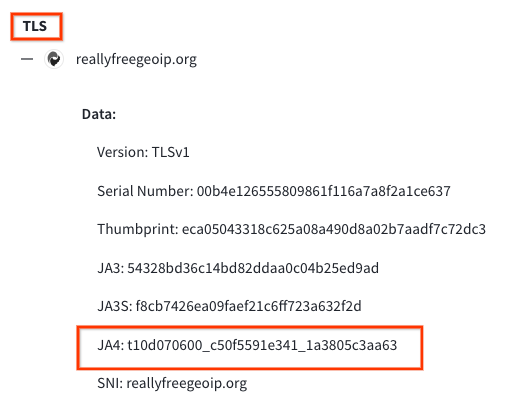
To find the JA4 value, navigate to the "behavior" section of the desired sample and locate the TLS subsection. In addition to JA4, you might also find JA3 or JA3S there.
Example Search: Let's say you've encountered a suspicious file that exhibits the JA4 fingerprint "t10d070600_c50f5591e341_1a3805c3aa63" during VirusTotal's behavioral analysis.
Returns files that match the JA4_A and JA4_C components of the JA4 hash while allowing for variations in the middle section, which often corresponds to the cipher suite. This technique is useful for identifying files that might use different ciphers but share other JA4 characteristics.
This rules will flag any file submitted to VirusTotal that exhibits the matching JA4 fingerprint. The first example only matches "t12d190800_d83cc789557e_7af1ed941c26" during behavioral analysis. The second rule will match a regular expression /t10d070600_.*_1a3805c3aa63/, only matching JA4_A and JA4_C components, excluding the JA4_B cipher suite. These fingerprints could be linked to known malware, a suspicious application, or any TLS client behavior that is considered risky by security analysts.
Happy Hunting.
JA4: A More Robust Successor to JA3
JA4, developed by FoxIO, represents a significant advancement over the older JA3 fingerprinting method. JA3's effectiveness had been hampered by the increasing use of TLS extension randomization in https clients, which made fingerprints less consistent. JA4 was specifically designed to be resilient to this randomization, resulting in more stable and reliable fingerprints.Unveiling the Secrets of the Client Hello
JA4 fingerprinting focuses on analyzing the TLS Client Hello packet, which is sent unencrypted from the client to the server at the start of a TLS connection. This packet contains a treasure trove of information that can uniquely identify the client application or its underlying TLS library. Some of the key elements extracted by JA4 include:- TLS Version: The version of TLS supported by the client.
- Cipher Suites: The list of cryptographic algorithms the client can use.
- TLS Extensions: Additional features and capabilities supported by the client.
- ALPN (Application-Layer Protocol Negotiation): The application-level protocol, such as HTTP/2 or HTTP/3, that the client wants to use after the TLS handshake.
JA4 in Action: Pivoting and Hunting on VirusTotal
VirusTotal has integrated JA4 fingerprinting into its platform through the behavior_network file search modifier. This allows analysts to quickly discover relationships between files based on their JA4 fingerprints.To find the JA4 value, navigate to the "behavior" section of the desired sample and locate the TLS subsection. In addition to JA4, you might also find JA3 or JA3S there.
Example Search: Let's say you've encountered a suspicious file that exhibits the JA4 fingerprint "t10d070600_c50f5591e341_1a3805c3aa63" during VirusTotal's behavioral analysis.

Wildcard Searches
To broaden your search, you can use wildcards within the JA4 hash. For instance, the search: behaviour_network:t13d190900_*_97f8aa674fd9Returns files that match the JA4_A and JA4_C components of the JA4 hash while allowing for variations in the middle section, which often corresponds to the cipher suite. This technique is useful for identifying files that might use different ciphers but share other JA4 characteristics.
YARA Hunting Rules: Automating JA4-Based Detection
YARA hunting rules using the "vt" module can be written to automatically detect files based on their JA4 fingerprints. Here's an example of a YARA rule that targets a specific JA4 fingerprint:
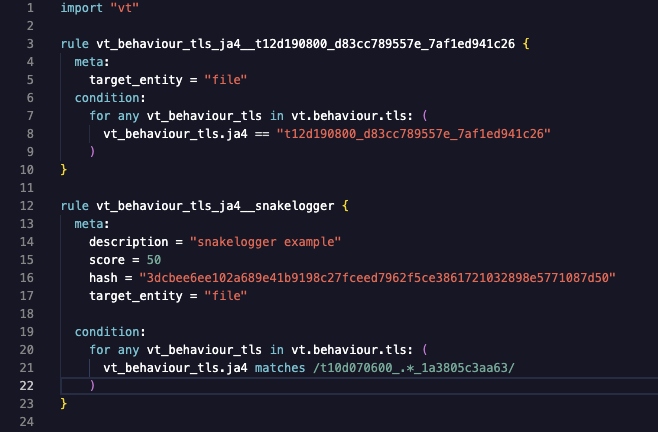
This rules will flag any file submitted to VirusTotal that exhibits the matching JA4 fingerprint. The first example only matches "t12d190800_d83cc789557e_7af1ed941c26" during behavioral analysis. The second rule will match a regular expression /t10d070600_.*_1a3805c3aa63/, only matching JA4_A and JA4_C components, excluding the JA4_B cipher suite. These fingerprints could be linked to known malware, a suspicious application, or any TLS client behavior that is considered risky by security analysts.
A few Interesting JA4 Hash examples
| Description | JA4 | Example SHA256 |
|---|---|---|
| Linux miner, trojan | t12d5908h1_7bd0586cbef7_046e095b7c4a | caed9b2d91f5802da4b1844068e7df971d50a11411ff2a792aedce96554539f9 |
| GoLang | t13d190900_9dc949149365_97f8aa674fd9 | 00b001f5d30e7a51bf9eced4e41267912353153dcc52605a737a6778aaecfbfb |
| SnakeLogger / Redline | t10d070600_c50f5591e341_1a3805c3aa63 | 03461c2a07431aed5ff68bbcf42d7ef82f32190b44ba140befd3f474614b5f3d |
JA4: Elevating Threat Hunting on VirusTotal
VirusTotal's adoption of JA4 client fingerprinting will provide users with an invaluable tool for dissecting and tracking TLS client behaviors, leading to enhanced threat hunting, pivoting, and more robust malware identification.Happy Hunting.