Showing posts with label vtintelligence. Show all posts

Tuesday, August 11, 2026

, , ,

Enriched URL Reports: VirusTotal URL Scanning 2.0

Introduction

In today's fast-moving cybersecurity landscape, threat analysts must move beyond basic, binary reputation scores to successfully defend against modern, highly adaptive web threats. Traditional URL analysis has been redefined by the launch of URL Scanning 2.0, an update that significantly expands VirusTotal's URL analysis capabilities by introducing automated visits with a full browser instance and deeper historical visibility.

Instead of relying on static reputation scores alone, URL Scanning 2.0 enriches reports with "under-the-hood" headless browser telemetry, including the DOM, full-page screenshots, web technologies, and network request logs. Crucially, it introduces historical analysis pivoting, giving analysts the ability to track how a page has changed over time.

URL Scanning 2.0

To successfully defend against modern, highly adaptive web threats, threat analysts must move beyond basic, binary reputation scores. With the debut of URL Scanning 2.0, VirusTotal introduces robust headless browser integration that captures how a page behaves dynamically in a clean sandbox environment.

Every scan now generates rich, granular telemetry that provides a blueprint of the target page's execution:

- Headless Browser Data: Full-page visual screenshots, full DOM (Document Object Model) trees, and web technologies (e.g., Cloudflare, PHP, HTTP/3).

- Page and Network Statistics: Highly detailed counters of individual network requests, encrypted HTTPS transactions, unique contacted domains/subdomains, and serving IP address mappings with geographic tracking.

- Anti-Phishing Fingerprints: Automatic identification of brands, cloned-website tags, password input fields, tracker IDs, and favicon dhashes.

- Historical Pivoting: A timeline containing historical analyses of a URL with its corresponding risk score, allowing analysts to track exactly how its metadata and content have shifted over time.

Access Levels in VirusTotal

Public Access (Free for VirusTotal Users)
The core enhancements of the URL Scanning 2.0 engine are available to everyone. For the latest scan, analysts can access rich telemetry generated by headless browser execution, including visual screenshots, extracted JavaScript globals, console messages, and a list of all loaded network resources.

VirusTotal Premium Customers
For paid VirusTotal customers, the platform unlocks deeper retrospective capabilities and exclusive data fields. Analysts have the ability to pivot to and review the full historical analyses of a URL as it was observed at specific points in time, and access advanced telemetry like the full DOM captures of the execution. Furthermore, premium access unlocks advanced infrastructure relationships, allowing users to pivot on contacted domains, IPs, and downloaded files.

Note: The aforementioned Google Threat Intelligence and Automatic Brand Identification features are exclusively available to Google Threat Intelligence customers.

Investigating a Phishing Case

Initially, when an analyst navigates to the mentioned URL to view the report generated by VirusTotal, they would see something similar to the following with the new URL Scanning features:

At the top of the interface, we can see that the URL has been scanned three times. This means there are three distinct reports for the same URL, each potentially containing different information that could be highly useful for an analyst. In the top right corner, we can view these past analyses by clicking on "History".

This is where the new historical analysis pivoting comes into play: it allows analysts to travel back through a URL's timeline with point-in-time snapshots.

By clicking on "History", we can view all the historical analyses for that URL, including response codes, detections, screenshots, and other metadata. You can also apply filters to narrow down the timeline and view only the historical records you are interested in, based on specific response codes, URL actions, and other criteria.

In this case, if we click on the initial historical analysis performed on July 6, 2026 (as shown in the screenshot above), we can examine its specific information across the "Summary", "Details", and "Detection" tabs. A key feature of URL Scanning 2.0 is that the information within these report tabs will dynamically re-render to match the exact historical state of the snapshot you select.

As observed in the history timeline, after clicking on this specific analysis included a live screenshot and other relevant metadata, indicating the scan occurred while the website was fully operational and actively distributed. The previous screenshot gives us a clear view of how the phishing page was visually structured.

Furthermore, diving into the "Details" tab reveals other interesting technical artifacts from the campaign. These details are incredibly useful for pivoting and identifying new malicious URLs that share similar characteristics.

Among the wealth of information generated by URL Scanning 2.0, analysts will find HTTP transactions, detected JavaScript variables, console messages, external outbound links, and other critical metadata. These key technical markers serve as pivotable and searchable attributes, allowing teams to conduct advanced footprint hunting and instantly find other malicious URLs exhibiting the exact same technical fingerprint.

Furthermore, every snapshot taken during each analysis provides the complete Document Object Model (DOM) tree captured by the full browser instances. It allows you to inspect the exact structure of the page as it was dynamically rendered to the victim, exposing elements that static scans might miss. As can be seen in the following image, having direct access to this point-in-time DOM data empowers analysts to dig deep into the page's architecture.

Advanced Threat Hunting: Scaling the Investigation

Let's scale our investigation using VirusTotal Intelligence queries based on the artifacts discovered via URL Scanning 2.0.

During the analysis of the financial phishing site, we discovered that the page relied on static assets hosted on a third-party domain: jiaoyisuo.thai2570[.]com. We can pivot on this finding using an advanced query:

VT Query
entity:url (outgoing_link:jiaoyisuo.thai2570.com OR content:jiaoyisuo.thai2570.com)

The results demonstrate a multi-brand operation, including fake cryptocurrency exchange portals and typosquatting domains for other financial services. By further pivoting on the hosting domain with entity:domain "thai2570.com", analysts can map out a highly segmented subdomain tree used for hosting assets, capturing payments, and backend control panels.

Conclusion

URL Scanning 2.0 represents a paradigm shift in how security analysts investigate web-based threats. Investigations are no longer limited to static verdicts. By surfacing powerful metadata directly inside the workflow—such as historical DOM captures, live screenshots, and pivotable technical identifiers—analysts can now turn a single indicator into a comprehensive infrastructure map.

Log in to VirusTotal to explore the new URL Scanning 2.0 features today, and consider upgrading to VirusTotal Premium to unlock the full power of historical pivoting and advanced threat hunting.

Wednesday, December 10, 2025

, , , , ,

Introducing Saved Searches in Google Threat Intelligence (GTI) and VirusTotal (VT): Enhance Collaboration and Efficiency


We are excited to announce the launch of Saved Searches in Google Threat Intelligence (GTI) and VirusTotal (VT), a powerful new feature designed to streamline your threat hunting workflows and foster seamless collaboration across your security team.

From Campaign to Feature: Better Search Efficiency

For the last month, we’ve highlighted the critical importance of mastering search in our ongoing #monthofgoogletisearch campaign. We saw how security teams rely on complex, highly-tuned queries to identify threats, track adversaries, and perform deep-dive investigations.

This campaign emphasized a key challenge: once you craft the perfect query - a cornerstone of your investigation - it should be easy to reuse and share. Saved Searches is the direct answer to this need, turning successful, repeatable threat-hunting logic into a shared institutional asset.

Collaboration, Simplified: Save and Share Your Queries

With this initial launch of Saved Searches, we’re delivering two foundational capabilities that will immediately improve your team’s efficiency:

  1. Save Searches: Instantly save any complex or frequently used query directly within GTI. This ensures your best investigative logic is always accessible, eliminating the need to rebuild queries from scratch or store them externally.
  2. Share with Users: Critical insights are often time-sensitive. You can now easily share your saved searches with any other user in your organization with access to GTI. Whether you’re escalating a finding or establishing a standard workflow, sharing the exact query ensures consistency and accelerates joint analysis.
This means that a newly onboarded analyst can instantly access the expertise of senior members, and teams can maintain a unified approach to monitoring high-priority threats. It’s collaboration built right into your investigation tool.

Get Started Today with Campaign Searches

The Saved Searches feature is live now in Google Threat Intelligence and VirusTotal.

To help you hit the ground running, we have made the most impactful searches used throughout the #monthofgoogletisearch campaign public and available to all intelligence users! You can find these expert-crafted queries in your Saved Searches section today - a perfect starting point for your investigations.


Start by exploring these campaign searches and then easily save and share your own complex search queries. Look for the option to Save and Share your searches to transform your investigative logic into a shared asset.


This is just the first phase of enhancing search capabilities within GTI. We are committed to building on this foundation to provide even more robust tools that make your threat intelligence actionable and collaborative.

You can get more info by exploring our documentation page:

Thank you for your feedback during the #monthofgoogletisearch campaign - your input directly fueled this launch.

Happy Hunting! ^_^

Monday, November 03, 2025

, , , ,

November is the Month of Searches: Explore, Learn, and Share with #MonthOfVTSearch

Monday, November 03, 2025 Anonymous
This November, we’re celebrating the power of VirusTotal Enterprise search!
All VirusTotal customers will enjoy uncapped searches through the GUI — no quota consumption for the entire month so long as it is manual searches via the web interface.
Whether you’re investigating malware campaigns, analyzing infrastructure, or tracking threat actor activity, this is your chance to search freely and explore advanced use cases using VirusTotal Intelligence.
Experiment with powerful VT search modifiers to uncover patterns, hunt for related samples, and pivot across hashes, domains, IP addresses, or URLs — without worrying about your quota.

What’s happening

  • No quota consumption for all GUI searches during November (API interaction will continue to consume).
  • Every day, we’ll share interesting and creative search queries on our LinkedIn and X channels using the hashtag #MonthOfVTSearch.
  • We invite you to try these searches, interact with us, and share your own search tips and findings with the community.

Learn and level up

Make the most of this month to sharpen your threat-hunting skills:

Example: Day 1 Search Query

To kick off #MonthOfVTSearch, here’s the first advanced query we’re sharing with the community:

What this query does:

This search helps identify document files that, when executed in a sandbox environment, show behavior consistent with potential malicious activity involving .ru infrastructure. It specifically looks for:
  • Documents (type:document) that were uploaded to VT.
  • During execution, they show process behavior containing:
    • HTTP traffic (behavior_processes:*http*)
    • The string DavSetCookie (often observed in HTTP request headers or custom cookie operations)
    • And references to .ru domains
  • And additionally, they show network or embedded indicators related to .ru domains via:
    • Behavior-based network connections (behavior_network:*.ru*), or
    • Embedded domains or URLs within the file (embedded_domain:*.ru*, embedded_url:*.ru*)

Join the community

Let’s make November a month of discovery and collaboration! Tag your posts with #MonthOfVTSearch, share your favorite searches, and show the world how you use VirusTotal to explore and understand the threat landscape.
In the meantime, if you have any feedback you can contact us.

Thursday, March 07, 2024

, , , , ,

COM Objects Hijacking

The COM Hijacking technique is often utilized by threat actors and various malware families to achieve both persistence and privilege escalation in target systems. It relies on manipulating Component Object Model (COM), exploiting the core architecture of Windows that enables communication between software components, by adding a new value on a specific registry key related to the COM object itself.
We studied the usage of this technique by different malware samples to pinpoint the most exploited COM objects in 2023.

Abused COM Objects

We identified the most abused COM objects by samples using MITRE’s T1546.015 technique during sandbox execution. In addition to the most abused ones, we will also highlight other abused COM objects that we found interesting.
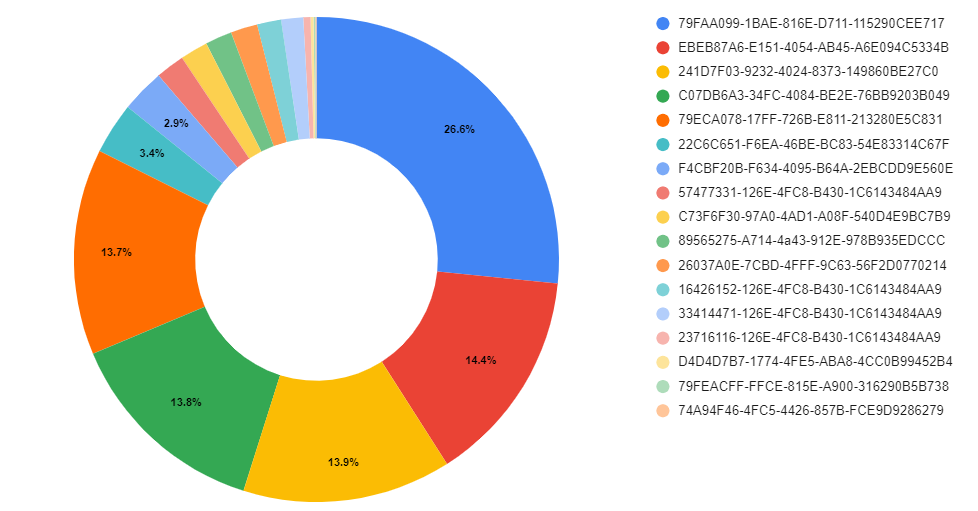
The chart below shows the distribution of how many samples abused different COM objects for persistence:
You can find the most used COM / CLSIDs listed in the Appendix.

Berbew

One of the main malware families we have observed abusing COM for persistence is Padodor/Berbew. This Trojan primarily focuses on stealing credentials and exfiltrating them to remote hosts controlled by attackers. The main COM objects abused by this family are as follows:
  • {79ECA078-17FF-726B-E811-213280E5C831}

  • {79FEACFF-FFCE-815E-A900-316290B5B738}

  • {79FAA099-1BAE-816E-D711-115290CEE717}

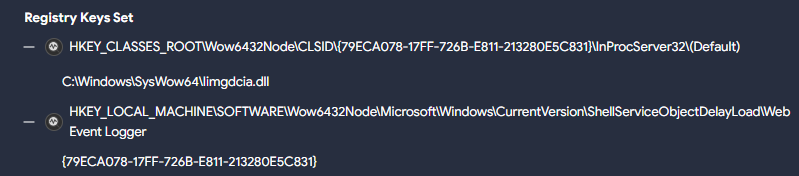
The corresponding registry entries point to the malicious DLL. However, multiple samples of this family use a second registry key for persistence, which points to this previous CLSID we described, as in the following example :
In this case, the registry key …CLSID\{79ECA078-17FF-726B-E811-213280E5C831}\InProcServer32\(Default) points to the malicious DLL C:\Windows\SysWow64\Iimgdcia.dll. A second registry entry …Wow6432Node\Microsoft\Windows\CurrentVersion\ShellServiceObjectDelayLoad\Web Event Logger points to the previous CLSID {79ECA078-17FF-726B-E811-213280E5C831} which loads the malicious DLL.
The ShellServiceObjectDelayLoad registry entry (part of ShellServiceObjectDelayLoad), combined with the Web Event Logger subkey used here by Berbew, has frequently been utilized to initiate the loading of the genuine webcheck.dll. This DLL was tasked with monitoring websites within the Internet Explorer application.
The previously utilized CLSID by WebCheck registry key was {E6FB5E20-DE35-11CF-9C87-00AA005127ED} However, in certain instances today the CLSID {08165EA0-E946-11CF-9C87-00AA005127ED} is used. Both are responsible for loading the webcheck.dll DLL and are abused by malware samples.

RATs

The CLSID {89565275-A714-4a43-912E-978B935EDCCC} seems to be extensively used by various RATs . This CLSID has primarily been associated with families like RemcosRAT and AsyncRAT in our observations. However, we've also encountered instances where BitRAT samples have used it. Researchers at Cisco Talos found this CLSID activity associated with the SugarGh0st RAT malware.
In the majority of cases, the DLL used for persistence with this CLSID is dynwrapx.dll. This DLL was found in the wild in a GitHub repository, currently unavailable, however the DLL originates from a project named DynamicWrapperX (first seen in VirusTotal in 2010). It executes shellcode to inject the RAT into a process.
A similar case is CLSID {26037A0E-7CBD-4FFF-9C63-56F2D0770214}. The associated DLL for persistence is dbggame.dll. First uploaded to VirusTotal in 2012, this DLL is deployed by various types of malware, including ransomware such as XiaoBa.

RATs w/ vulnerabilities

To finish with RATs that use this technique, from late December 2023 to February 2024, there were various incidents linked to the CVE-2024-21412 vulnerability uncovered by the Trend Micro Zero Day Initiative team (ZDI). During these events, active campaigns were distributing the Darkme RAT. Throughout the infection process, a primary goal was to evade Microsoft Defender SmartScreen and introduce victims to the DarkMe malware.
The TrendMicro analysis highlights that the Darkme RAT sample utilizes the CLSID {74A94F46-4FC5-4426-857B-FCE9D9286279} to carry out the final load of the RAT. Yet, we've noted the utilization of other CLSIDs for persistence, including {D4D4D7B7-1774-4FE5-ABA8-4CC0B99452B4} in this sample.
Furthermore, to guarantee the DLL's execution, they generate a registry key employing Autorun keys. This key's objective is to initiate the CLSID using rundll32.exe and /sta parameter, which is used to load a COM object, in this case, the previous malicious COM object created.
EventID:13 
EventType:SetValue
Details:%windir%\SysWOW64\rundll32.exe /sta {D4D4D7B7-1774-4FE5-ABA8-4CC0B99452B4} "USB_Module"
TargetObject:HKU\S-1-5-21-575823232-3065301323-1442773979-1000\Software\Microsoft\Windows\CurrentVersion\Run\RunDllModule

Why use one when you can use many?

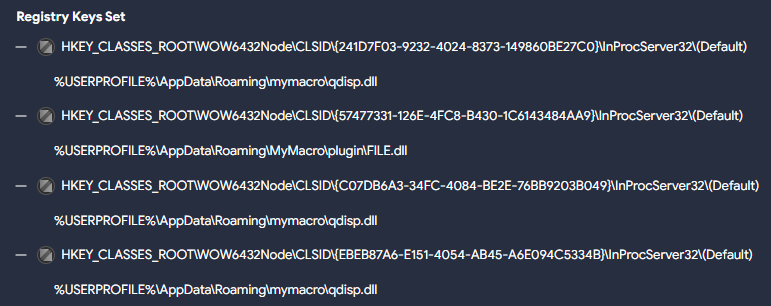
Some samples (like this Sality one) use multiple CLSIDs:
  • {EBEB87A6-E151-4054-AB45-A6E094C5334B}

  • {57477331-126E-4FC8-B430-1C6143484AA9}

  • {241D7F03-9232-4024-8373-149860BE27C0}

  • {C07DB6A3-34FC-4084-BE2E-76BB9203B049}

The sample drops two different DLLs during execution, three of the registry keys point to one of them, the remaining one to the other. The sample also turns off the Windows firewall and UAC to carry out additional actions while infecting the system.
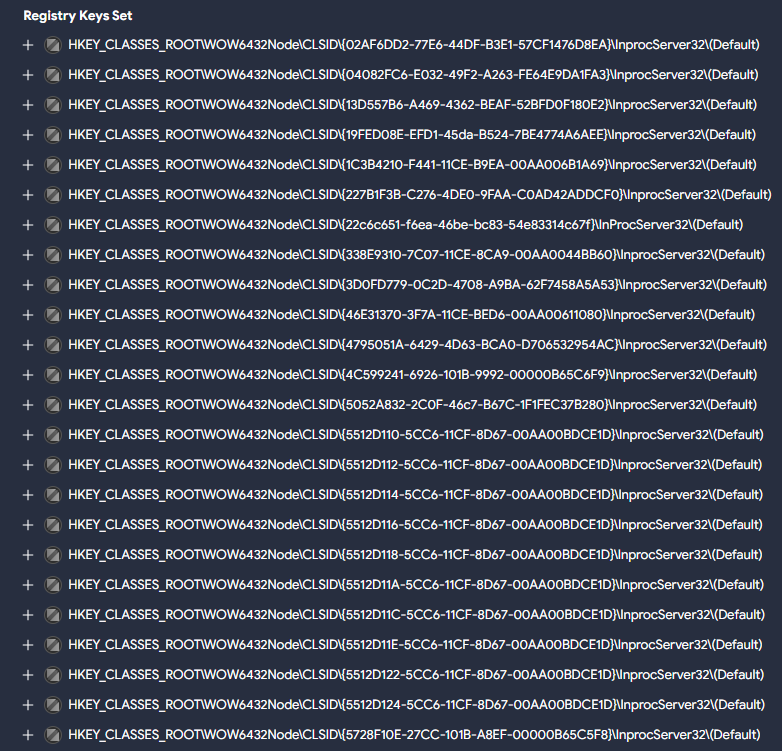
The Allaple worm family deploys multiple COM objects pointing to the malicious DLL during execution, like in this example:

Adware

Citrio, an adware web browser designed by Catalina Group, uses in its more recent versions a COM object for persistence with CLSID {F4CBF20B-F634-4095-B64A-2EBCDD9E560E}. It drops several harmful DLLs, one masquerades as Google Update (goopdate.dll), also observed as psuser.dll, that possesses the capability to establish services on the system along using a COM object for persistence.

Common folders used to store the payloads

Most malicious DLLs we saw so far are typically stored in the C:\Users\<user>\AppData\Roaming\ directory. It's also common to create subfolders within this directory, the most frequently found include:
  • \qmacro

  • \mymacro

  • \MacroCommerce

  • \Plugin

  • \Microsoft

In addition to these, we also found the following folders being frequently used to hide malicious DLLs:
  • The C:\Windows\SysWow64 is a folder found in 64-bit versions of Windows, containing legitimate 32-bit system files and libraries, and is oftenly used to conceal malicious DLLs. Its prevalence makes it an attractive hiding place, complicating detection efforts. However, permissions are required to create files in it.

  • The C:\Program Files (x86) folder is another legitimate directory used to store malicious COM hijacking payloads. Similar to \AppData\Roaming, in this case we have observed that the malicious DLLs are stored under specific subfolders, such as “\Google”, “\Mozilla Firefox”, “\Microsoft”, “\Common Files” or “\Internet Download Manager”.

  • C:\Users\<user>\AppData\Local is another folder used for storing these payloads, including the “\Temp”, “\Microsoft” and “\Google” subfolders.

Detection

In order to detect unusual modifications to registry COM objects, there are a couple of crowdsourced Sigma rules to identify this behavior.

These rules will detect uncommon registry modifications related to COM objects. You can use the following queries to retrieve samples triggered by the previous rules, respectively: VTI query for sigma1 and VTI query for sigma2.
You can also identify this behavior using Livehunt rules that target the creation of registry keys utilized for this purpose, for instance with the vt.behaviour.registry_keys_set modifier.
import "vt"

rule CLSID_COM_Hijacking:  {
  meta:
    target_entity = "file"
    hash = "a19472bd5dd89a6bd725c94c89469f12cdbfee3b0f19035a07374a005b57b5e0"
    author = "@Joseliyo_Jstnk"
    mitre_technique = "T1546.015"
    mitre_tactic = "TA0003"

  condition:
    vt.metadata.new_file and vt.metadata.analysis_stats.malicious >= 5 and 
    for any vt_behaviour_registry_keys_set in vt.behaviour.registry_keys_set: (
      vt_behaviour_registry_keys_set.key matches /\\CLSID\\{[0-9a-fA-F]{8}-[0-9a-fA-F]{4}-[0-9a-fA-F]{4}-[0-9a-fA-F]{4}-[0-9a-fA-F]{12}\}\\InProcServer32\\\(Default\)/
    )  
}
The rule above might generate some noise, so we suggest considering polishing it by excluding certain common families like Berbew, which as mentioned, heavily relies on this technique:
and not 
    (
        for any engine, signature in vt.metadata.signatures : (  
        signature icontains "berbew"  
        )  
    )
You can also use the paths listed in Appendix to identify suspicious samples using them.
A final idea is including interesting existing Sigma rules into our Livehunt. Given that these rules already cover the targeted registry keys, we don’t need to use vt.behaviour.registry_keys_set in our condition.
import "vt"

rule CLSID_COM_Hijacking:  {
  meta:
    target_entity = "file"
    hash = "a19472bd5dd89a6bd725c94c89469f12cdbfee3b0f19035a07374a005b57b5e0"
    author = "@Joseliyo_Jstnk"
    sigma_authors = "Maxime Thiebaut (@0xThiebaut), oscd.community, Cédric Hien"
    mitre_technique = "T1546.015"
    mitre_tactic = "TA0003"

  condition:
    vt.metadata.new_file and vt.metadata.analysis_stats.malicious >= 5 and 
    for any vt_behaviour_sigma_analysis_results in vt.behaviour.sigma_analysis_results: (
      vt_behaviour_sigma_analysis_results.rule_id == "7f5d257abc981b5eddb52d4a9a02fb66201226935cf3d39177c8a81c3a3e8dd4"
    )
}

Wrapping up

The T1546.015 - Event Triggered Execution: Component Object Model Hijacking is just one of several techniques employed for persistence. Leveraging COM objects for this task is frequently straightforward for threat actors. The analysis of how malware abuses this technique helps us get a better understanding in how to identify different families and develop protection methods. Although the technique is not the most popular for persistence (that would be T1547.001 - Boot or Logon Autostart Execution: Registry Run Keys / Startup Folder), it is widely abused by many malware families.
Identifying some of the most abused CLSIDs can help us generate detection rules that identify possible malware abuses in our infrastructure. It can also serve as a good guide for prevalence in order to detect any anomalies for new suspicious activity.
The use of VirusTotal sandbox reports provides a very powerful tool to translate TTPs into actionable queries and monitoring. In this example we used it to better understand how attackers use COM objects, but could be used for any techniques employed by different threat actors.
We hope you join our fan club of Sigma and VirusTotal, and as always we are happy to hear your feedback.

APPENDIX

Abused CLSIDs

Next, you'll find a list of the main CLSIDs described in the blog, along with a chart to show which ones were used the most.

CLSID - COM Objects

79FAA099-1BAE-816E-D711-115290CEE717

EBEB87A6-E151-4054-AB45-A6E094C5334B

241D7F03-9232-4024-8373-149860BE27C0

C07DB6A3-34FC-4084-BE2E-76BB9203B049

79ECA078-17FF-726B-E811-213280E5C831

22C6C651-F6EA-46BE-BC83-54E83314C67F

F4CBF20B-F634-4095-B64A-2EBCDD9E560E

57477331-126E-4FC8-B430-1C6143484AA9

C73F6F30-97A0-4AD1-A08F-540D4E9BC7B9

89565275-A714-4a43-912E-978B935EDCCC

26037A0E-7CBD-4FFF-9C63-56F2D0770214

16426152-126E-4FC8-B430-1C6143484AA9

33414471-126E-4FC8-B430-1C6143484AA9

23716116-126E-4FC8-B430-1C6143484AA9

D4D4D7B7-1774-4FE5-ABA8-4CC0B99452B4

79FEACFF-FFCE-815E-A900-316290B5B738

74A94F46-4FC5-4426-857B-FCE9D9286279

Common paths

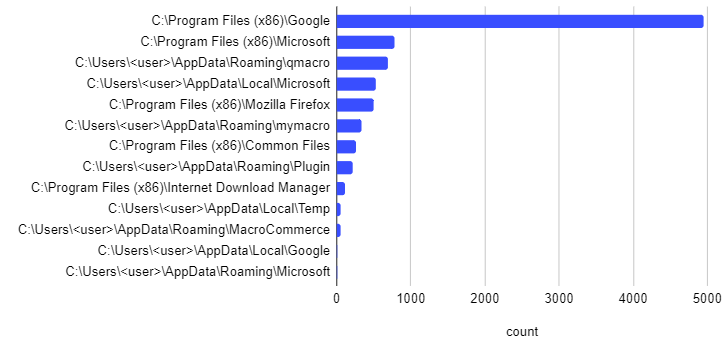
Below you will find a list with some of the most common paths used during the creation of the COM objects for persistence. The table contains the 'parent' paths as well, while the chart includes only the 'subpaths'.

Common paths used during COM object persistence

C:\Users\<user>\AppData\Roaming

C:\Users\<user>\AppData\Roaming\qmacro

C:\Users\<user>\AppData\Roaming\mymacro

C:\Users\<user>\AppData\Roaming\MacroCommerce

C:\Users\<user>\AppData\Roaming\Plugin

C:\Users\<user>\AppData\Roaming\Microsoft

C:\Windows\SysWow64

C:\Program Files (x86)

C:\Program Files (x86)\Google

C:\Program Files (x86)\Mozilla Firefox

C:\Program Files (x86)\Microsoft

C:\Program Files (x86)\Common Files

C:\Program Files (x86)\Internet Download Manager

C:\Users\<user>\AppData\Local

C:\Users\<user>\AppData\Local\Temp

C:\Users\<user>\AppData\Local\Microsoft

C:\Users\<user>\AppData\Local\Google

C:\Windows\Temp

Wednesday, November 06, 2019

, , , , , , , , , ,

Pipelining VT Intelligence searches and sandbox report lookups via APIv3 to automatically generate indicators of compromise

TL;DR: VirusTotal APIv3 includes an endpoint to retrieve all the dynamic analysis reports for a given file. This article showcases programmatic retrieval of sandbox behaviour reports in order to produce indicators of compromise that you can use to power-up your network perimeter/endpoint defenses. We are also releasing a set of python scripts alongside this blog post to illustrate this use case.

We recently rolled out a new Windows dynamic analysis system called VirusTotal Jujubox. This new sandbox represents a major revamp of VirusTotal’s in-house behaviour analysis capabilities as well as a key addition to the multi-sandbox project, which already aggregates behaviour reports from more than 10 partners and the most popular operating systems.

Behaviour reports are often perceived as a mechanism to understand what an individual sample does when executed, a quick overview before diving into disassembly and debugging. However, when you have a massive dynamic analysis setup processing hundreds of thousands of files per day, the microscopic dissection capability is far from being the most attractive use case.

When you generate reports at scale, and more importantly, when you index them in an elasticsearch index and expose it via API, the generated data can be used for advanced hunting, especially when this data can be combined with other static, binary and in-the-wild properties.

The basic workflow would be as follows:

  1. Periodically identify new malware variants pertaining to a family that you are tracking making use of the VT Intelligence search API. Use family variant commonalities (for instance a section name, the compilation timestamp or a document’s author metadata property) to retrieve a stream of malware.
  2. Focus on recent matches since the previous execution (query: fs:2019-11-01+).
  3. For each match, retrieve the generated behaviour reports for the pertinent file. You can also focus specifically on network communications with the contacted_ips, contacted_domains and contacted_urls relationships.
  4. For each automatically extracted network observable, check popularity ranks in order to filter out noise and FPs.
  5. All the newly yielded network artefacts (CnCs) can then be fed into SIEMs or transformed into IDS rules to power up network perimeter defenses.

Let’s illustrate this with a particular example. Bankbot is an Android banking trojan, it allows the attacker to perform:

  • SMS hijacking.
  • GPS tracking.
  • New permission requests.
  • Overlay attacks to mask legit bank apps with forms to intercept credentials. Sometimes based on a remote set of HTML templates. 

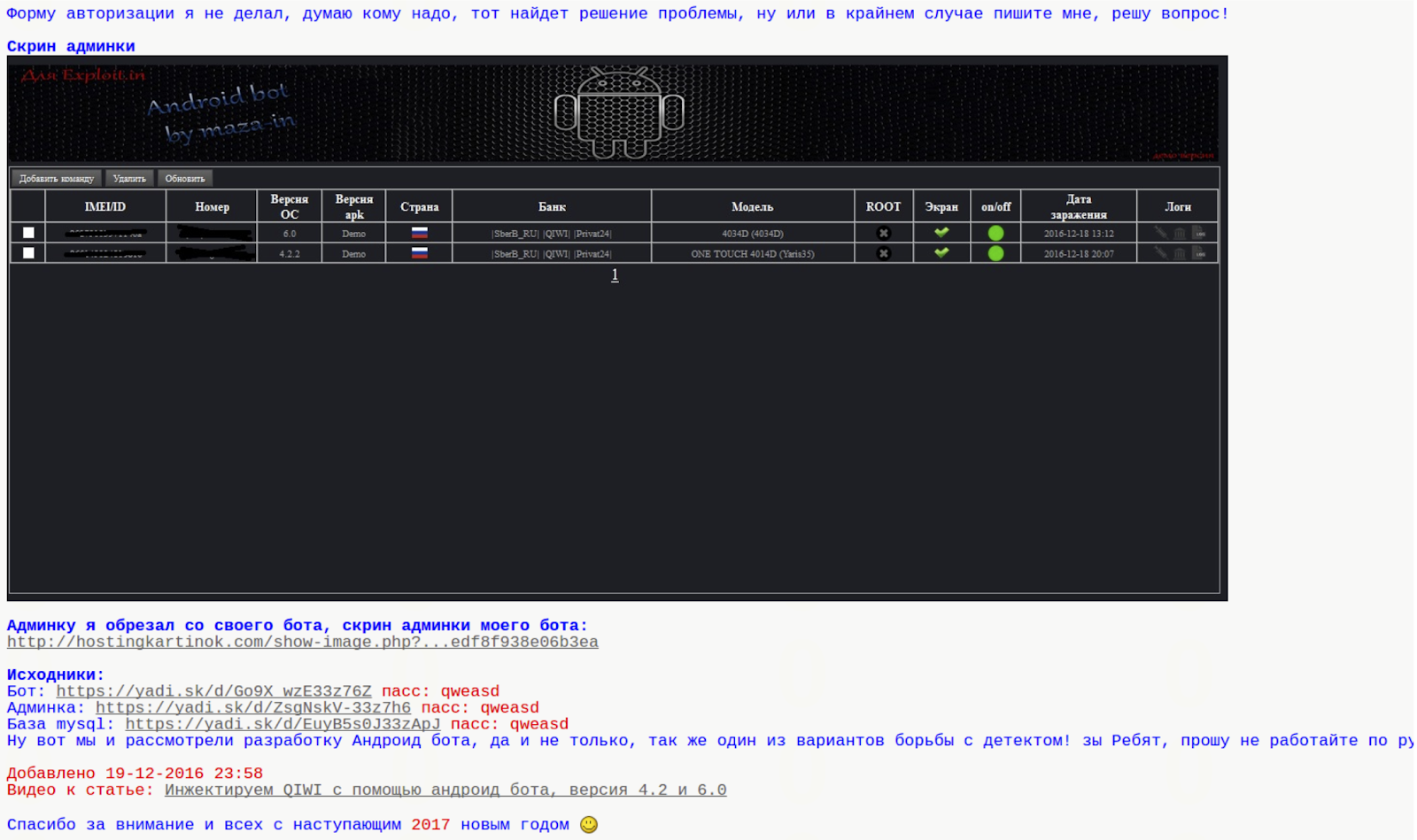
The trojan was released in an underground forum and the post included the source code for the client-side and server-side components, including the database setup to collect stolen information.


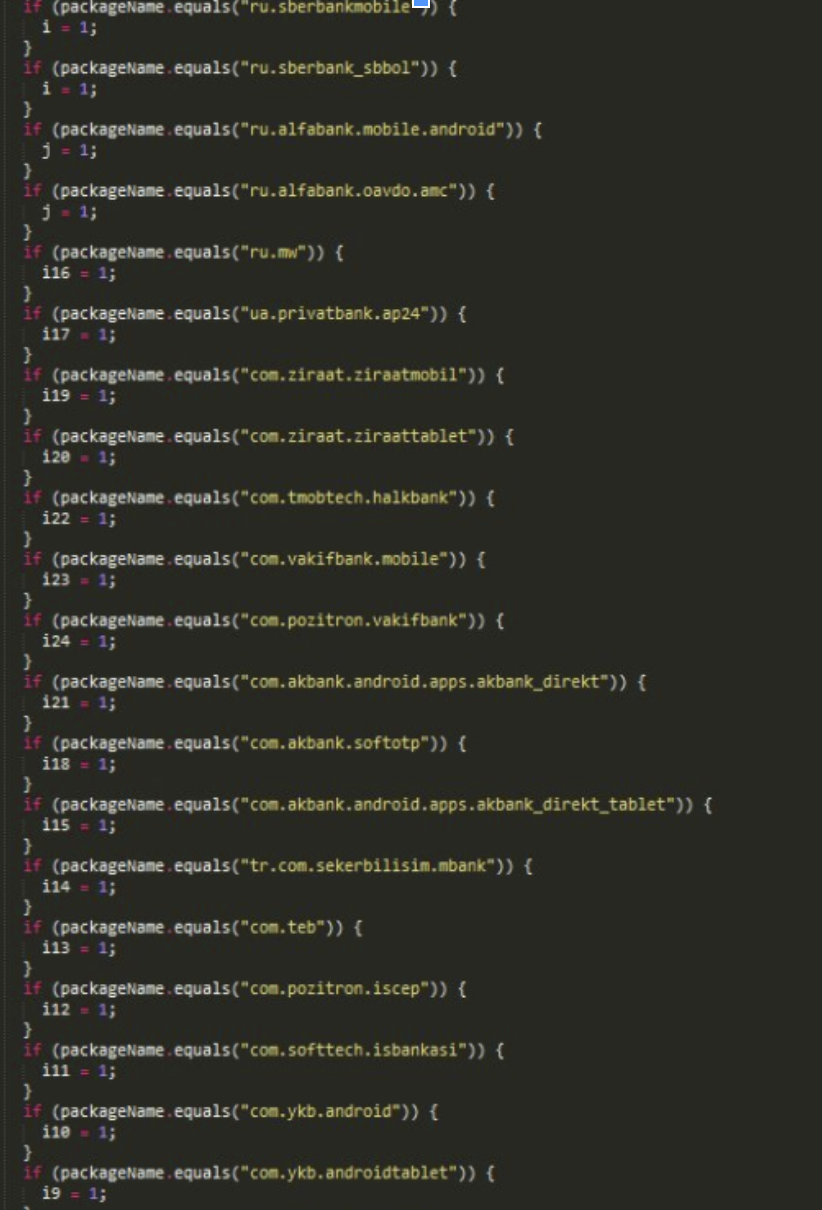
Initially, the trojan included a hardcoded list of target bank applications that it would overlay in order to intercept banking credentials:


Since the source code of the trojan was also published in the underground forum, other crooks soon modified it to accept a remote list of financial entities to attack. This makes target identification more complex, static analysis is not enough to identify the targeted banks and subsequent date-tied CnC infrastructure.


While identifying targeted financial institutions might be a more complex task, discovering new variants of the same family and automatically identifying new network infrastructure tied to it becomes easier. Why is this? A server-side remote target list leads to a common network infrastructure pattern that can be used to track the malware family.

This is an example of a Bankbot sample:
https://www.virustotal.com/gui/file/5fdbe1e83ec9c43929cc348681cb6afde12afee637feaf444a4983c317b18423/detection

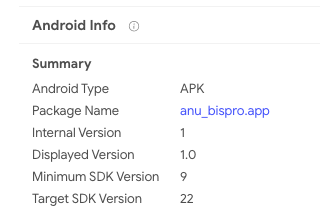
VT Enterprise allows similarity searches and other attribute searches to find additional variants of the same malware family. In this particular case, the Android package name under the details tab seems interesting, clicking on it will launch a VT Intelligence search for other Android APKs that share that very same package name:


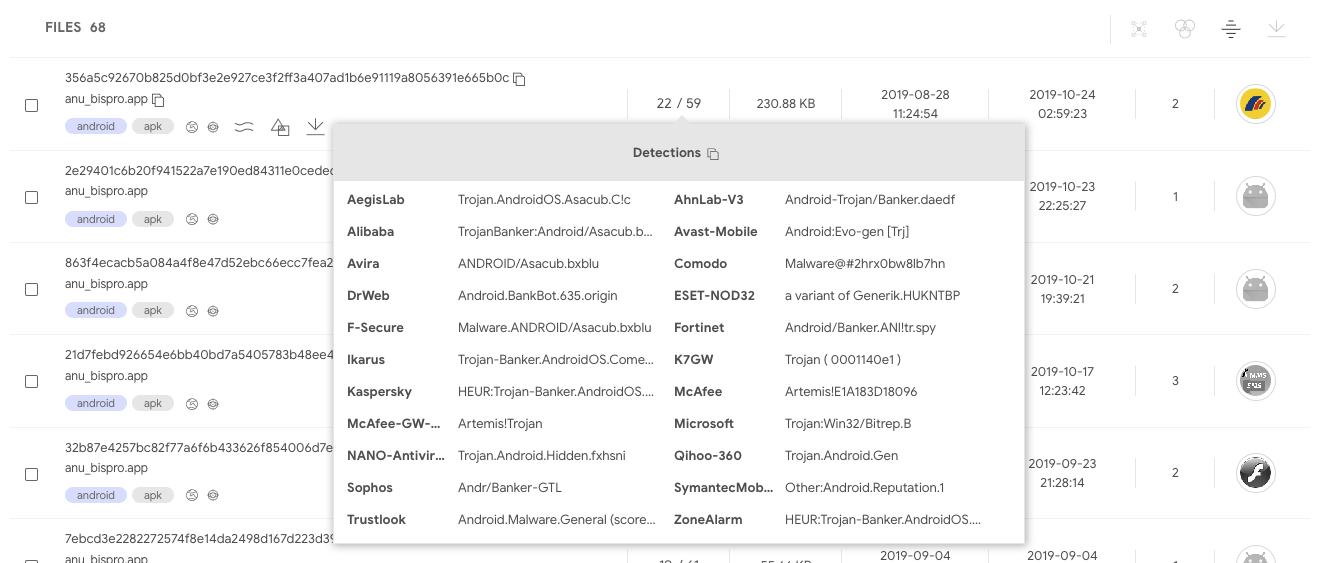
The matches do indeed seem to belong to the same family:


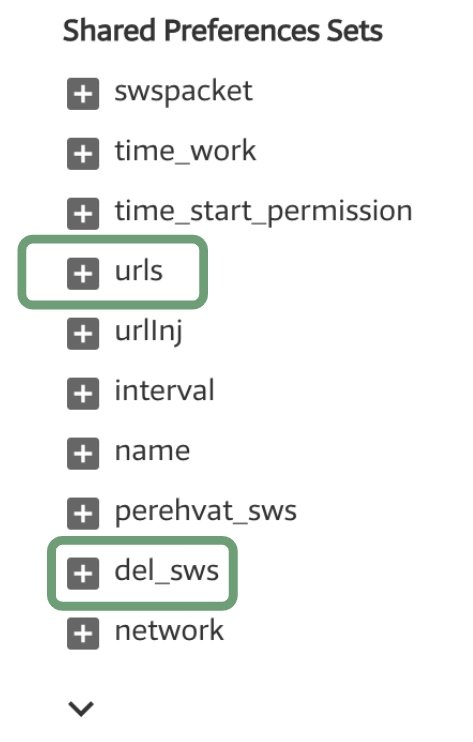
When opening these samples and looking at their behaviour reports, certain commonalities are easily noticed:


Static/behaviour/code commonalities are very frequent since attackers usually reuse code across different campaigns. Sometimes the commonalities are a result of recompiling the same code to communicate with a different network infrastructure. Other times, commonalities are present because the attack binaries are generated with some kind of builder or kit for dummies. Similarly, CnC infrastructure often exhibits commonalities in terms of the same path structure or query parameters, it is the result of attackers reusing the same CnC panel through a server-side kit that they deploy without changing file names or path structure.

These patterns, in conjunction with VT’s massive dynamic analysis setup and indexing, make it easy to automatically discover new malicious network infrastructure and automatically generate indicators of compromise.

The behaviour reports for the identified cluster of samples shows that the CnC panel uses the subpaths tuk_tuk.php or checkPanel.php.

Let’s use this common pattern to periodically check VirusTotal for new variants of this malware family, and by doing so, let’s identify new network infrastructure tied to this attack, live, as samples are uploaded to VirusTotal.

Using the APIv3 Intelligence search endpoint, it’s possible to search for any Android APK whose network recordings contain the substring tuk_tuk.php:
https://developers.virustotal.com/v3.0/reference#intelligence-search
type:apk behaviour_network:"tuk_tuk.php"

Multiple properties, such as dynamic/static analysis and metadata, can be combined to make a more refined search:
type:apk behaviour_network:"tuk_tuk.php" behaviour:"del_sws" androguard:"android.permission.ACCESS_FINE_LOCATION"

The API can sort matches according to first seen descending, meaning that by executing this search periodically and focusing on the latest results, it’s possible to discover new malicious network infrastructure tied to this particular family.

At the time of writing, this search yielded the following results:

5fdbe1e83ec9c43929cc348681cb6afde12afee637feaf444a4983c317b18423
elis[.]ru
92.53.97[.]75
hxxp://elis.ru/private/tuk_tuk.php

52998a07d22b0aa267505635898219ef6104dc6cd255bea69c7ab701285666fa
xzcxzfs.kl.com[.]ua
5.79.66[.]145
hxxp://xzcxzfs.kl.com[.]ua/private/tuk_tuk.php

7c06552f59b594ef0d650204423e97c8ab8f07588f1215ec2a469dc9cb7f5670
u36084.test93w[.]ru
hxxp://u36084.test93w[.]ru/private/tuk_tuk.php

56b220e610d17987b4f96afa79e23c3c9cab16592384ed883e9ac8240907b53b
u36206.test93w[.]ru
185.31.163[.]148
hxxp://u36206.test93w[.]ru/private/tuk_tuk.php

The Intelligence search API endpoint will return a list of file objects matching a search criteria. Each of these file objects can have one or more multi-sandbox reports. These behaviour reports can be retrieved making use of the pertinent relationship (behaviours) for each of the files:
https://developers.virustotal.com/v3.0/reference#files-relationships

It’s also possible to filter the network communication relationships fields, instead of asking for the whole report (contacted_urls, contacted_ips, contacted_domains):
https://www.virustotal.com/api/v3/intelligence/search?query=type:apk behaviour_network:”tuk_tuk.php”&relationships=contacted_urls,contacted_domains,contacted_ips

Once the pertinent network infrastructure is parsed, it’s possible to either rely on the objects returned by the network-related relationships (contacted_urls, contacted_ips, contacted_domains) or make a subsequent automated call to the domain / IP address / URL API endpoint in order to retrieve further details about the given network observable. The aim of this subsequent stage is to filter out potential false positives. For instance, among the details returned for a domain lookup, there are different popularity rank lists that can be useful to filter out TOP domains.

You can easily test this workflow with a little script released along with this blog post. This script makes use of our official APIv3 python library, it can serve as your starting point to build more complex pipelines:
https://github.com/VirusTotal/vt-py/blob/master/examples/intelligence_search_to_network_infrastructure.py

python3 intelligence_search_to_network_infrastructure.py --apikey=<YOUR_API_KEY> --query=’type:apk behaviour_network:"tuk_tuk.php"’

=== Results: ===
DOMAIN: u363571.test93w.ru
IP_ADDRESS: 185.31.163.148
URL: http://u363571.test93w.ru/private/tuk_tuk.php
DOMAIN: bot.mymaster-rem.ru
URL: http://bot.mymaster-rem.ru/private/tuk_tuk.php
DOMAIN: lensfor.xyz
URL: https://lensfor.xyz/private/tuk_tuk.php
IP_ADDRESS: 38.21.243.204
URL: http://38.21.243.204/anib/private/tuk_tuk.php
DOMAIN: f0316480.xsph.ru
IP_ADDRESS: 141.8.192.151
URL: http://f0316480.xsph.ru/private/tuk_tuk.php
DOMAIN: u36255.test93w.ru
DOMAIN: mtalk4.google.com
IP_ADDRESS: 185.31.163.148
URL: http://u36255.test93w.ru/private/tuk_tuk.php
DOMAIN: u36206.test93w.ru
IP_ADDRESS: 185.31.163.148
URL: http://u36206.test93w.ru/private/tuk_tuk.php
DOMAIN: yumishop.co.uk
URL: http://yumishop.co.uk/private/inj_lst.php
URL: http://yumishop.co.uk/private/tuk_tuk.php
DOMAIN: u36317.test93w.ru
IP_ADDRESS: 185.31.163.148
URL: http://u36317.test93w.ru/private/tuk_tuk.php
DOMAIN: u36317.test93w.ru
IP_ADDRESS: 185.31.163.148
URL: http://u36317.test93w.ru/private/tuk_tuk.php


Note that this workflow is exclusively based on behavioural observations and works independently of the detection ratio of files, by pipelining VT Intelligence searches and sandbox report lookups, it is possible to generate indicators of compromise even if the related sample is undetected. The identified domains can be automatically checked against SIEM logs or can be automatically transformed into IDS rules, serving as an additional layer in your onion-like security strategy.

This blog post focuses on combining VT Intelligence searches with behaviour lookups, the same can be done with YARA rule matches. VT Hunting Livehunt matches can programmatically retrieved using APIv3, for each match the pertinent behaviour reports can be retrieved and CnC network infrastructure can be automatically extracted. Similarly, other properties that can be used as IoCs, such as mutexes, registry keys, embedded domains, file names, cmd parameters and the like can be automatically yielded. The following two script showcase this other VT Hunting workflow:
https://github.com/VirusTotal/vt-py/blob/master/examples/hunting_notifications_to_network_infrastructure.py
https://github.com/VirusTotal/vt-py/blob/master/examples/retrohunt_to_network_infrastructure.py

If you are rather a golang fan, feel free to check out our official VirusTotal golang library:
https://github.com/VirusTotal/vt-go

APIv3 was a major component of our 2019 roadmap, soon we will be officially releasing it and announcing a generous deprecation timeline for APIv2, stay tuned!