Wednesday, May 29, 2024

, , , , ,

Tracking Threat Actors Using Images and Artifacts

When tracking adversaries, we commonly focus on the malware they employ in the final stages of the kill chain and infrastructure, often overlooking samples used in the initial ones.
In this post, we will explore some ideas to track adversary activity leveraging images and artifacts mostly used during delivery. We presented this approach at the FIRST CTI in Berlin and at Botconf in Nice.

Hunting early

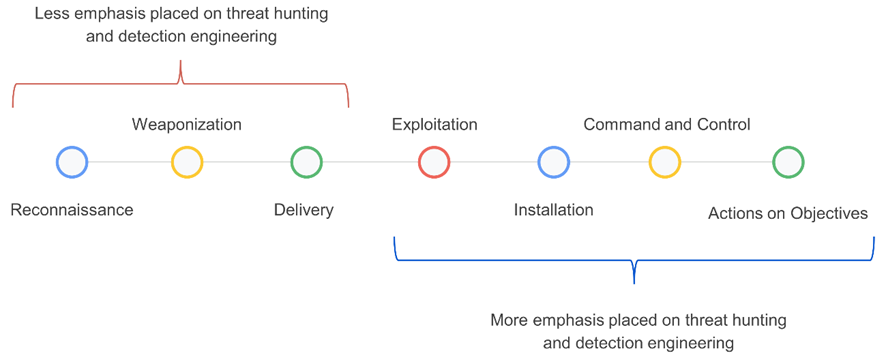
In threat hunting and detection engineering activities, analysts typically focus heavily on the latter stages of the kill chain – from execution to actions on objectives (Figure 1). This is mainly because there is more information available about adversaries in these phases, and it's easier to search for clues using endpoint detection and response (EDR), security information and event management (SIEM), and other solutions.
Figure 1: Stages of the kill chain categorized by their emphasis on threat hunting and detection engineering.
We have been exploring ideas to improve our hunting focused on samples built in the weaponization phase and distributed in the delivery phase, focused on the detection of suspicious Microsoft Office documents (Word, Excel, and PowerPoint), PDF files, and emails.
In threat intelligence platforms and cybersecurity in general, green and red colors are commonly used to quickly indicate results and identify whether or not something is malicious. This is because they are perceived as representing good or bad, respectively.
Multiple studies in psychology have demonstrated how colors can influence our decision-making process. VirusTotal, through the third-party engines integrated into it, shows users when something is detected and therefore deemed "malicious," and when something is not detected and considered "benign."
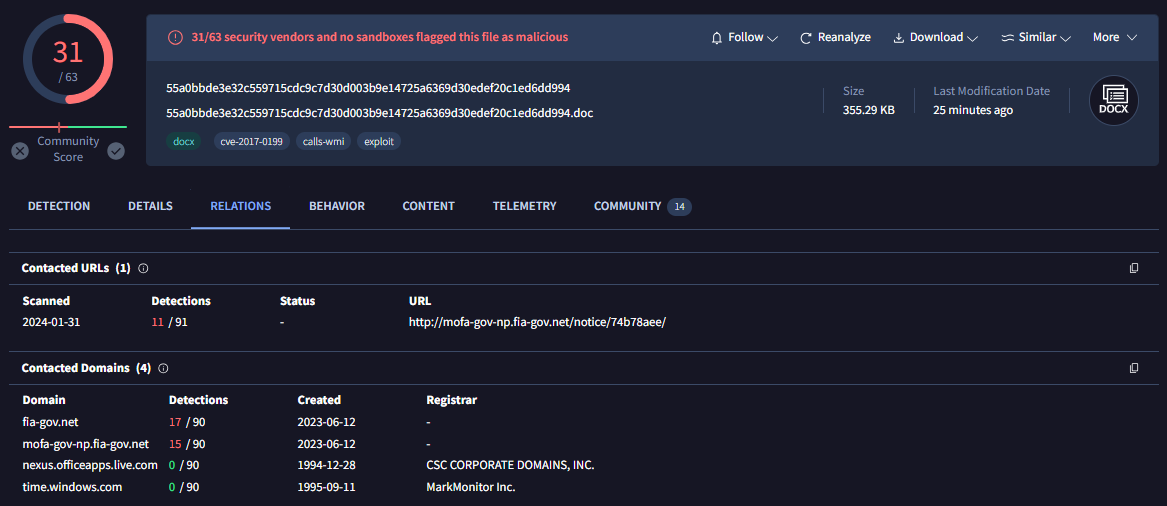
For example, the sample in Figure 2 belongs to a Microsoft Word document distributed by the SideWinder group during the year 2024.
Figure 2: Document used by the SideWinder APT group
The sample in question was identified at the time of writing this post by 31 antivirus engines, leaving no doubt that it is indeed a real malware sample. In the process of pivoting to identify new samples or related infrastructure, starting with Figure 2, the analyst will likely click on the URL detected by 11 out of the 91 engines, and the domains detected by 17 and 15 engines, respectively, to see if there are other samples communicating with them. The remaining two domains (related to windows.com and live.com) in this case are easily identified as legitimate domains that were likely contacted by the sandbox during its execution.
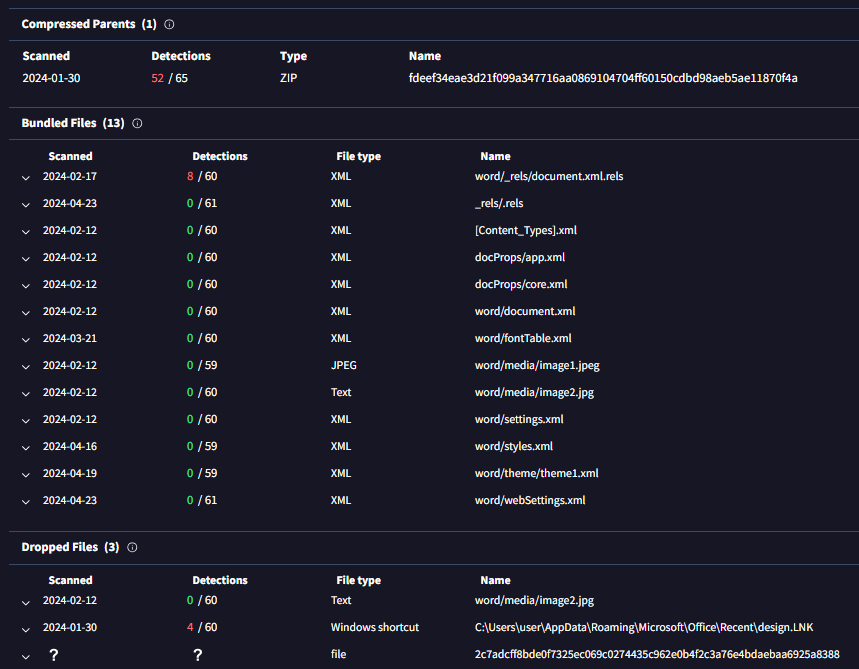
Figure 3: Relationships within the SideWinder APT group document
In the same sample, if you go down in the VirusTotal report (Figure 3), the analyst will likely click on the ZIP file listed as "compressed parent" to check if there are other samples within this ZIP besides the current one. They may also click on the XML file detected by 8 engines, and the LNK file detected by 4 engines. The remaining files in the bundled files section probably won't be clicked, as the green color indicates they are not malicious, and also because they have less enticing formats — mainly XML and JPEG. But what if we explore them?

XML files generated by Microsoft Office

When you create a new Microsoft Office file, it automatically generates a series of embedded XML files containing information about the document. Additionally, if you use images in the document, they are also embedded within it. Microsoft Office files are compressed files (similar to ZIP files). In VirusTotal, when a Microsoft Word file is uploaded, you can see all these embedded files in the embedded files section.
We have mainly focused on three types of embedded files within Office documents:
  • Images:Many threat actors use images related to the organizations or entities they intend to impersonate. They do this to make documents appear legitimate and gain the trust of their victims.

  • [Content_Types].xml:This file specifies the content types and relationships within the Office Open XML (OOXML) document. It essentially defines the types of content and how they are organized within the file structure.

  • Styles.xml:Stores stylistic definitions for your document. These styles provide consistent formatting instructions for fonts, paragraph spacing, colors, numbering, lists, and much more.

Our hypothesis is: If malicious Microsoft Word documents are copied and pasted during the weaponization building process, with only the content being modified, the hashes of the [Content_Types].xml and styles.xml files will likely remain the same.

Office documents

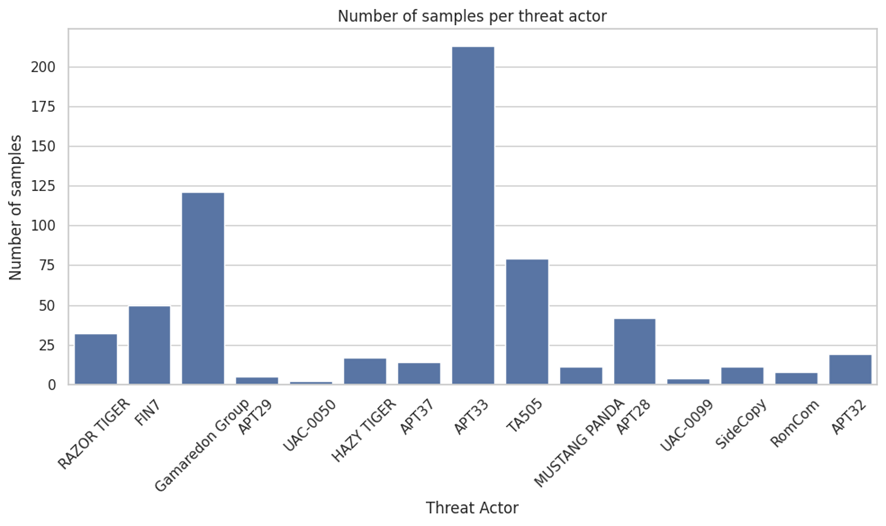
To check our hypothesis, we selected a set of samples used during delivery and belonging the threat actors listed in Figure 4:
Figure 4: Number of samples per actor within the scope
Let’s analyze some of the results we obtained per actor.

APT28 – Images

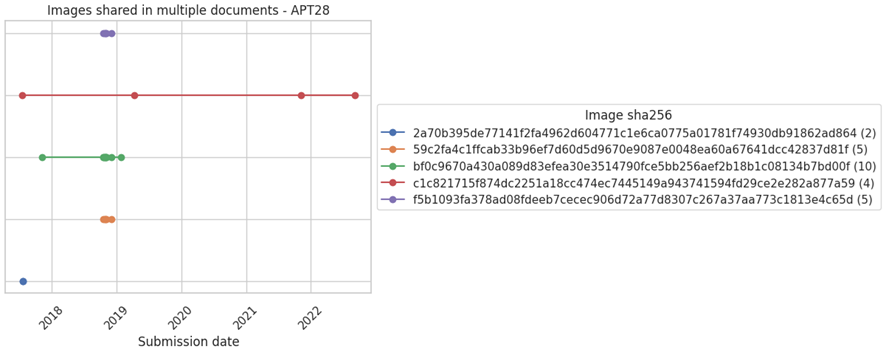
We started by focusing on images APT28 has reused for different delivery samples (Figure 5).
Figure 5: Images shared in multiple documents by APT28
Each line in the Figure 5 graph represents the same image, and each point represents at least two samples that used that particular image.
The second image of the graph shows how it was used by different Office documents at different points in time, from 2018 to 2022 (dates related to their upload to VirusTotal).
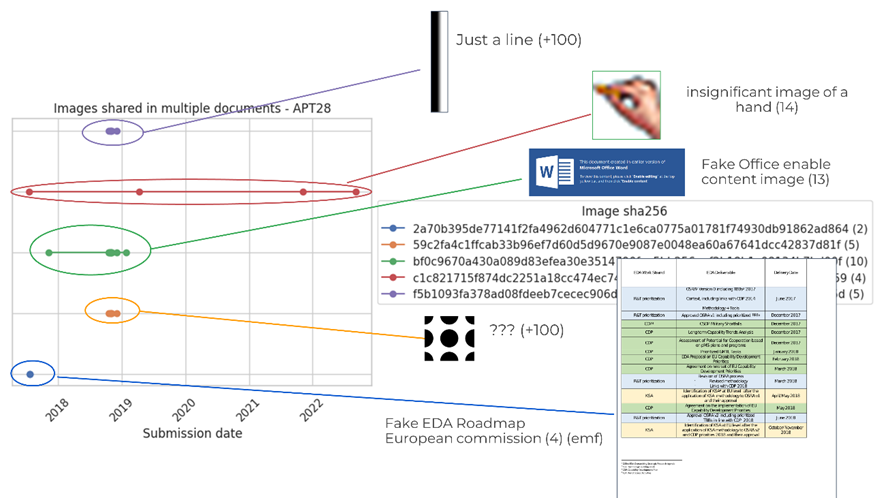
Now, the chart in Figure 6 visualizes each of these images.
Figure 6: Content of the images shared in multiple documents by APT28
  • The first image is just a simple line with no particular meaning. It's embedded in over 100 files known by VirusTotal.

  • The second image is a hand and has 14 compressed parents.

  • The third image consists of black circles and also has over 100 compressed parents.

  • The last image is like a Word page with a table, presenting a fake EDA Roadmap of the European Commission. The image format is EMF (an old format) and it has 4 compressed parents

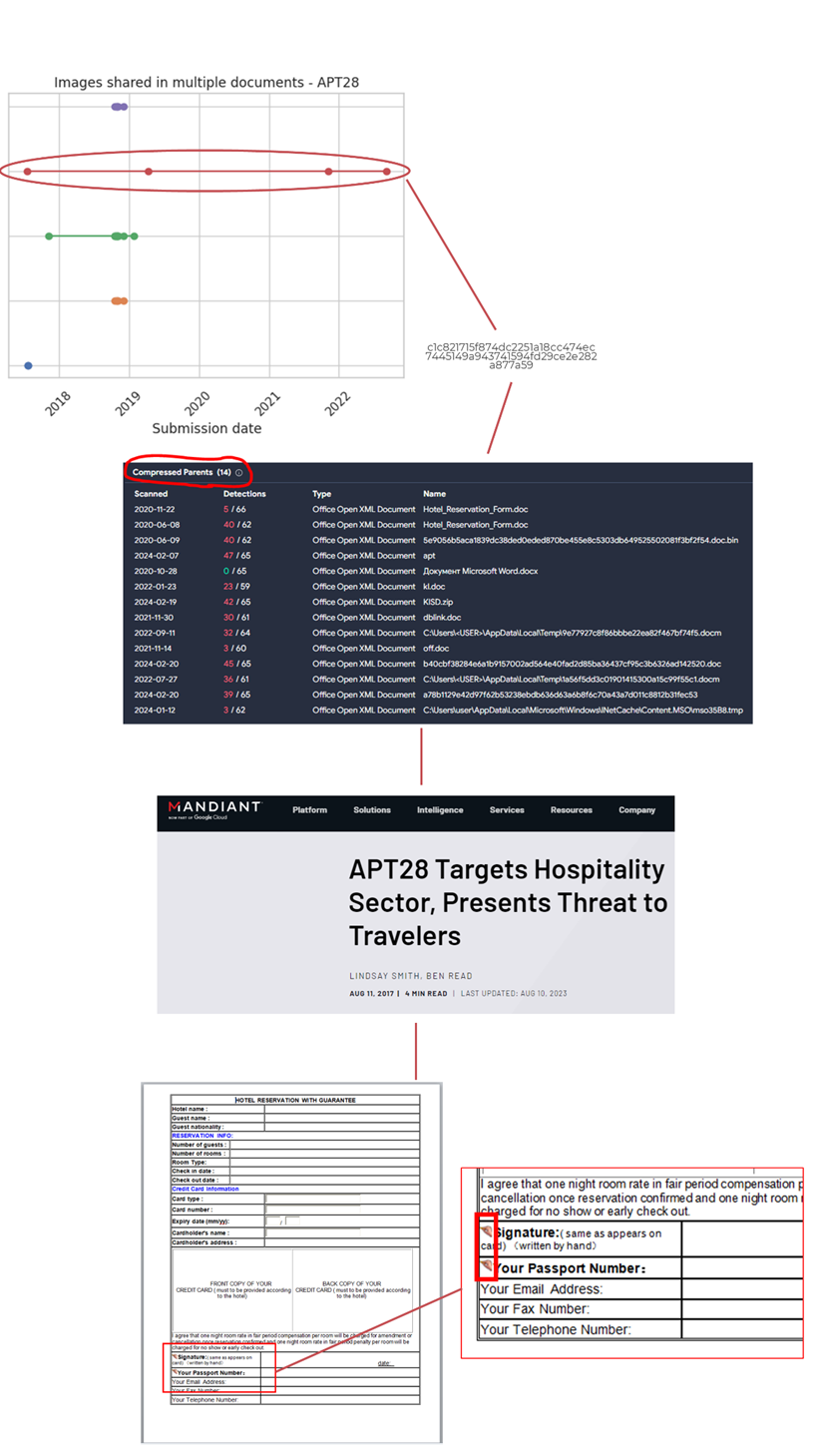
If we delve into the compressed parents of the second image (the one with the hand), we can see how the image is used in Office documents that are part of a campaign reported by Mandiant attributed to APT28. The image of the hand was used in fake Word documents for hotel reservations, particularly in a small section where the client was supposed to sign.
Figure 7: Pivoting through a specific image used by APT28

SideWinder – Images

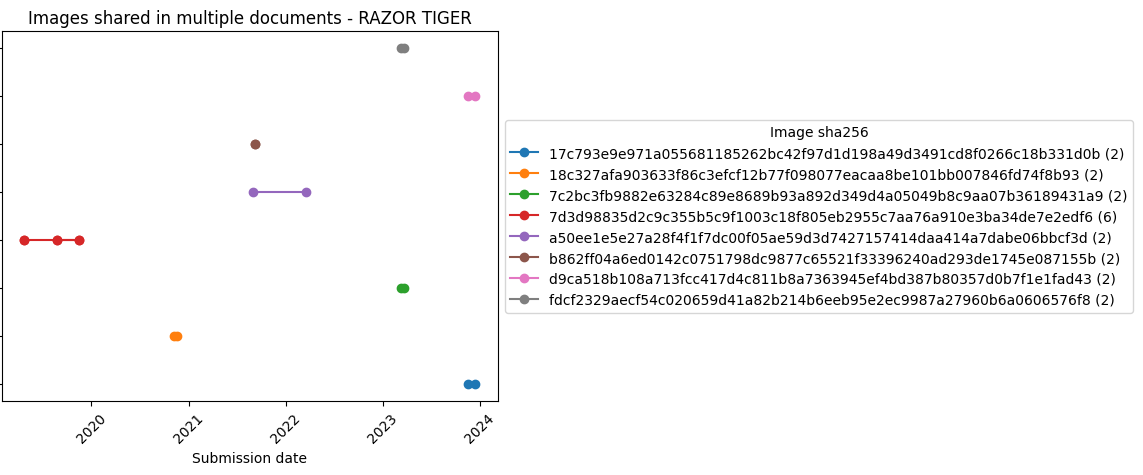
SideWinder (aka RAZER TIGER) is a group focused on carrying out operations against military targets in Pakistan. This group traditionally reused images, which might help monitoring their activity.
Figure 8: Images shared in multiple documents by RAZOR TIGER
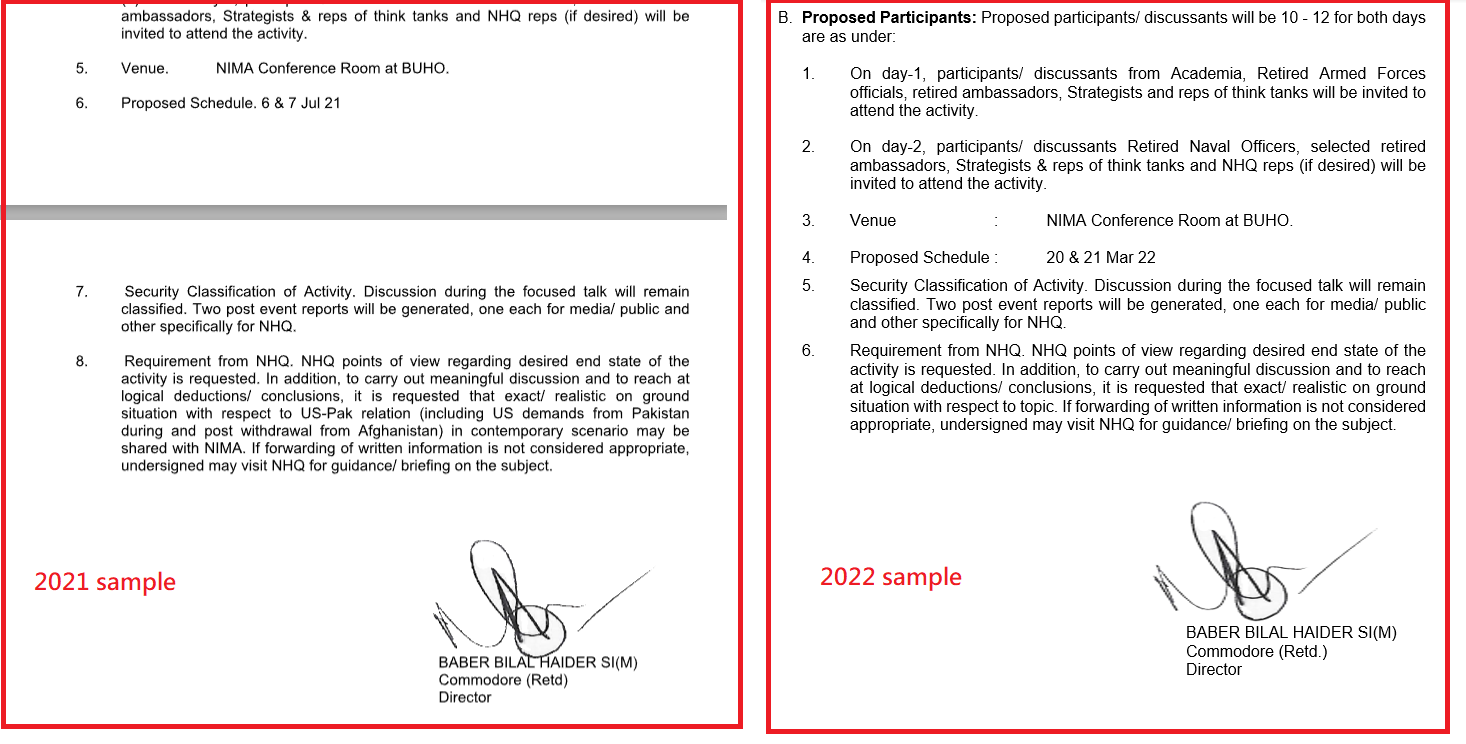
In particular, the image in Figure 9 was used in a sample uploaded in September 2021 and in a second one uploaded March 2022. The image in question is the signature of Baber Bilal Haider.
Figure 9: Two different samples of RAZOR TIGER share the same image of a handwritten signature

Gamaredon – [Content_Types].xml and styles.xml

For Gamaredon we found they reused styles.xml and [Content_Types].xml in different documents, which helped reveal new samples.
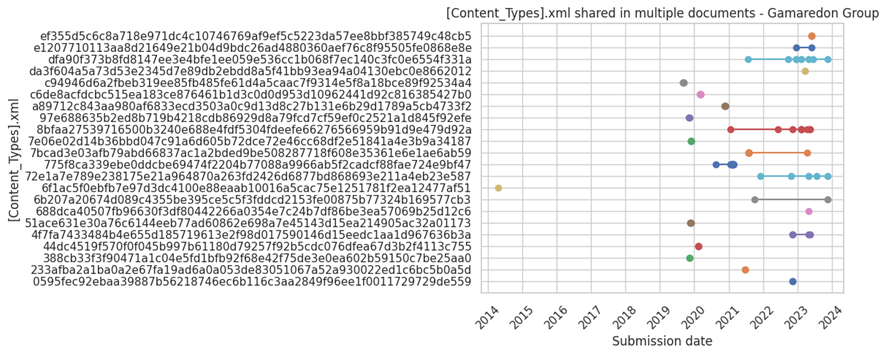
Figure 10 chart displays all the [Content_Types].xml files from Gamaredon's Office documents.
Figure 10: [Content_Types].xml shared in multiple documents by Gamaredon Group
There are a large number of samples that share the same [Content_Types].xml. It's important to highlight that these [Content_Types].xml files are not necessarily exclusively used by Gamaredon, and can be found in other legitimate files created by users worldwide. However, some of these [Content_Types].xml might be interesting to monitor.
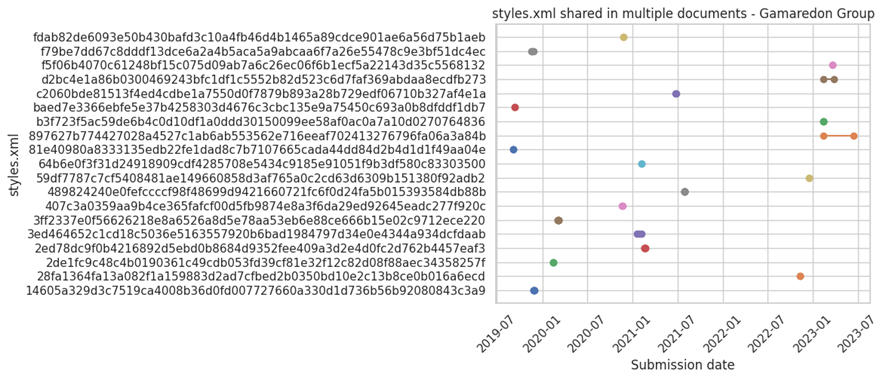
Styles.xml files are usually less generic, which should make them a better candidate to monitor:
Figure 11: Styles.xml shared in multiple documents by Gamaredon Group
We see styles.xml files are less reused than [Content_Types].xml. This could be because some of the samples used by this actor for distribution are created from scratch or reusing legitimate documents.
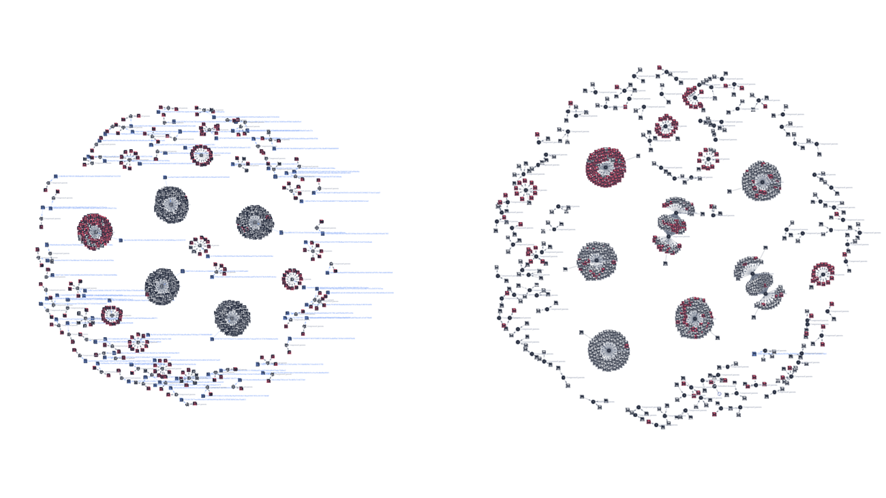
We used identified patterns in the styles.xml files to launch a retrohunt on VirusTotal. Figure 12 visually represents the original set of style.xml files (left) and those that were added later after running the retrohunt (right).
Figure 12: Initial graph of the styles.xml and its parents used by Gamaredon (left). Final graph after identifying new styles.xml and their parents using retrohunt in VirusTotal (right)
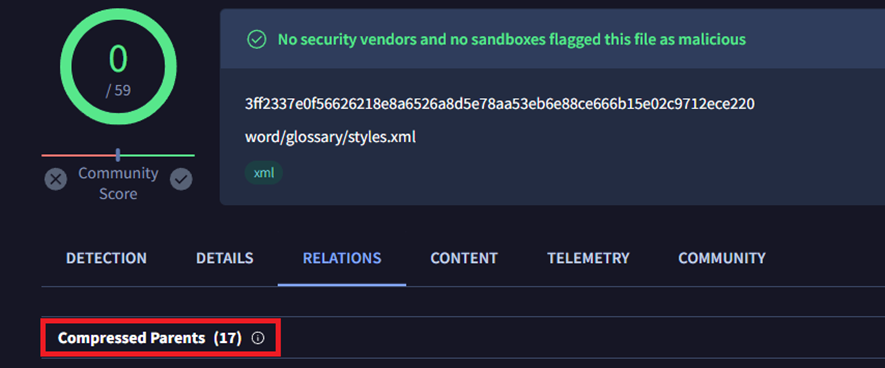
One of the new styles.xml files found in our retrohunt has 17 compressed parents, meaning it was included in 17 Office files.
Figure 13: Number of parent documents for a specific styles.xml file used by Gamaredon
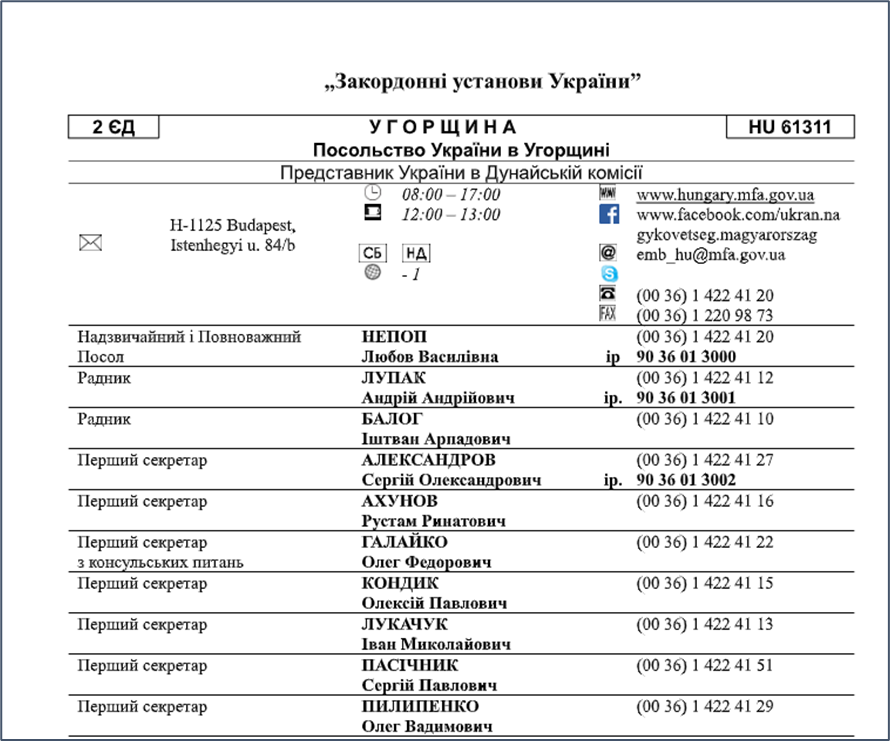
All the parents were malicious, some of them identical and the rest very similar between them. The content of many of them referred to "Foreign institutions of Ukraine - Embassy of Ukraine in Hungary," containing a table with phone numbers and information about the embassy, such as social media links and email accounts. Here's an example:
Figure 14: Document used by Gamaredon in one of its campaigns that includes multiple images which can be used to monitor new samples
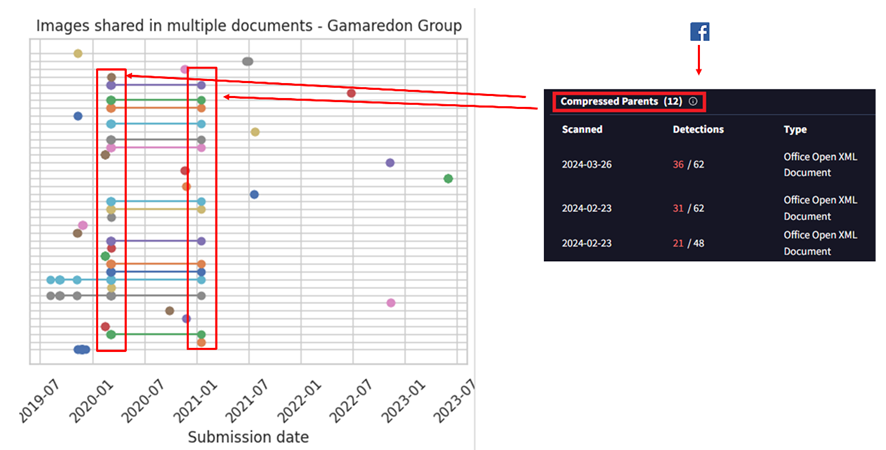
The information for social media includes the logos of these platforms, such as the Facebook logo, Skype logo, an image of a telephone, etc. By pivoting, on the image of the Facebook icon, we find that it has 12 additional compressed parents, meaning it appears in 12 documents, all of them sharing the same styles.xml file.
Visualizing all together, we find a set of about 12-14 images used within the same timeframe by the actor. All of these images can be found in the “Embassy of Ukraine in Hungary” document.
Figure 15: Pivoting through the Facebook image that included the document in Figure 14
There's a pattern evident in the previous image where different images were included in files uploaded simultaneously. This pattern is associated with multiple documents used in the same campaign of the Embassy of Ukraine in Hungary, all of them were using the same social media images explained before.

Styles.xml shared between threat actors

Another aspect we explored was if different threat actors shared similar styles.xml files in their documents. Styles.xml files are somewhat more specific and unique than [Content_Types].xml files because they can contain styles created by threat actors or by legitimate entities that originally created the document and then were modified by the actor. This makes them stand out more and can help in identifying threat actor activity.
This doesn't necessarily imply they share information to conduct separate operations, although in some cases, it could be a scenario worth considering.
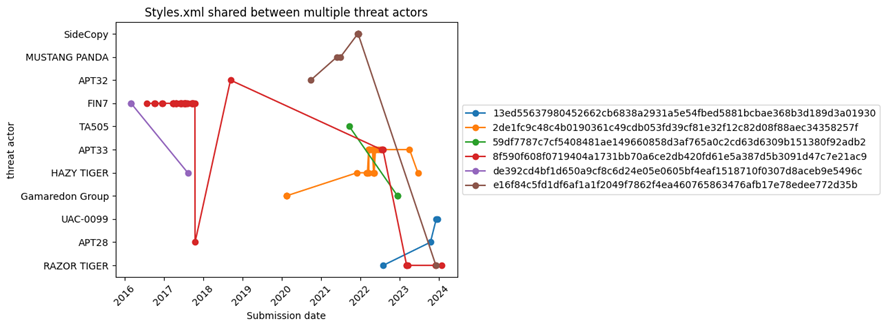
Figure 16: styles.xml shared between different threat actors
Of all styles.xml files related to actors in our initial set, only six of them were found to be shared by at least two actors. Some styles defined by the styles.xml file are very generic and could identify almost any type of file. However, there are others that could be interesting to explore further.
An interesting case is the Styles.xml file, which seems to be shared by Razor Tiger, APT28, and UAC-0099. Specifically, the samples from APT28 and UAC-0099 are attract because they were uploaded to VirusTotal within short time frames, suggesting they might belong to the same threat actor.
You can see the list of hashes in the appendix of this blog

[Content_Types].xml shared between threat actors

Like in the previous case, we checked if there were Office documents among different threat actors sharing [Content_Types].xml:
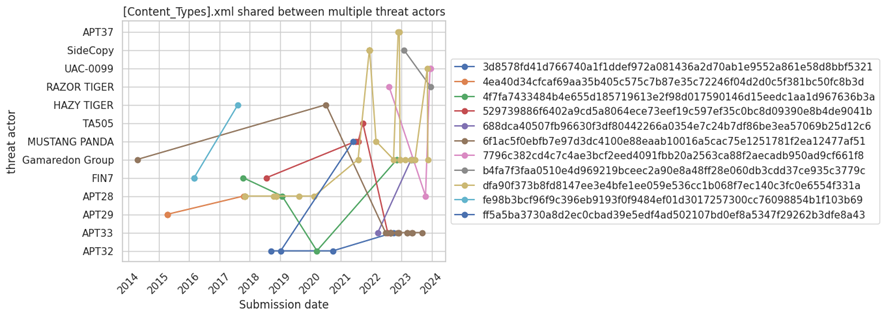
Figure 17: [Content_Types].xml shared between different threat actors
In this case, there are eleven [Content_Types].xml files that are shared by at least two different actors.
An interesting case here is the file dfa90f373b8fd8147ee3e4bfe1ee059e536cc1b068f7ec140c3fc0e6554f331a, which is shared by Gamaredon, APT37, Mustang Panda, APT28, SideCopy, and UAC-0099. Again, there could be different explanations for this.
Another interesting case that is worth analyzing in detail is [Content_Types].xml with hash 4ea40d34cfcaf69aa35b405c575c7b87e35c72246f04d2d0c5f381bc50fc8b3d, which is only shared by APT28 and APT29.
You can see the list of hashes in the appendix of this blog

AI to the rescue

The images reused by attackers seem to be a promising idea we decided to further explore.
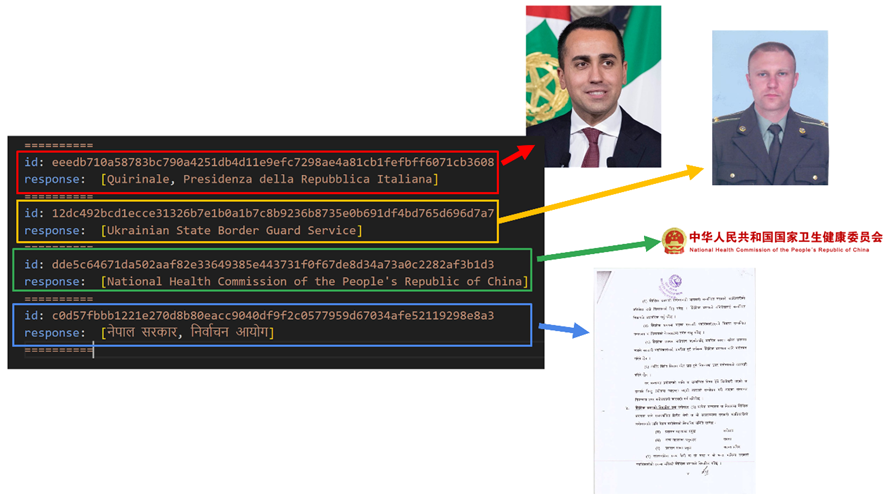
We used the VirusTotal API to download and unzip a set of Office documents used for delivery, this way we obtained all the images. Then we used Gemini to automatically describe what these images were about.
Figure 18: Results obtained with Gemini after processing some of the embedded images in the documents used by the threat actors
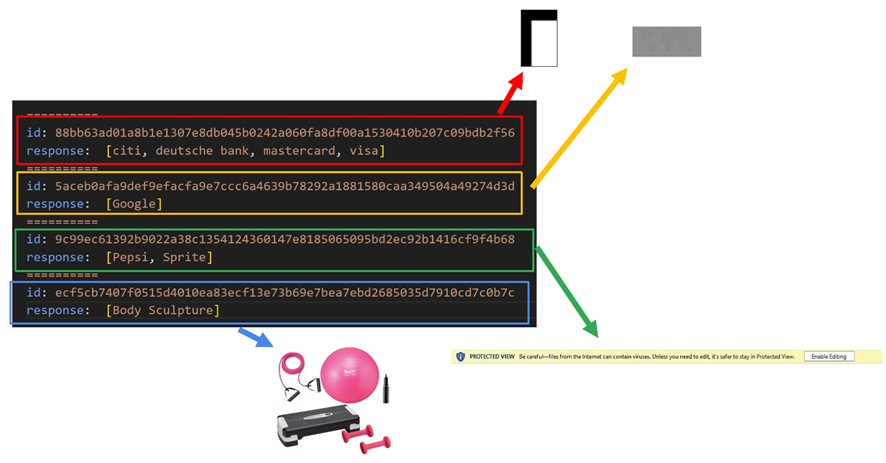
Figure 18 shows some examples of images that were incorporated by certain actors. There were also other results that were not helpful, mainly related to images that did not show a logo or anything specific that indicated what they were.
Figure 19: Results obtained with Gemini after processing some of the embedded images in the documents used by the threat actors
Using the VirusTotal API to obtain documents that you might be looking for and combining the results with Gemini to analyze possible images automatically, can potentially help analysts to monitor potential suspicious documents and create your own database of samples using specific images, for example Government images or specific images about companies. This approach is interesting not only for threat hunting but also for brand monitoring.

PDF Documents

Images dropped by Acrobat Reader

Unlike Office documents, PDF files don't contain embedded XML files or images, although some PDF files may be created from Office documents. Some of our sandboxes include Adobe Acrobat Reader to open PDF documents which generates a thumbnail of the first page in BMP format. This image is stored in the directory C:\Users\\AppData\LocalLow\Adobe\Acrobat\DC\ConnectorIcons. Consequently, our sandboxes provide this BMP image as a dropped file from the PDF, allowing us to pivot.
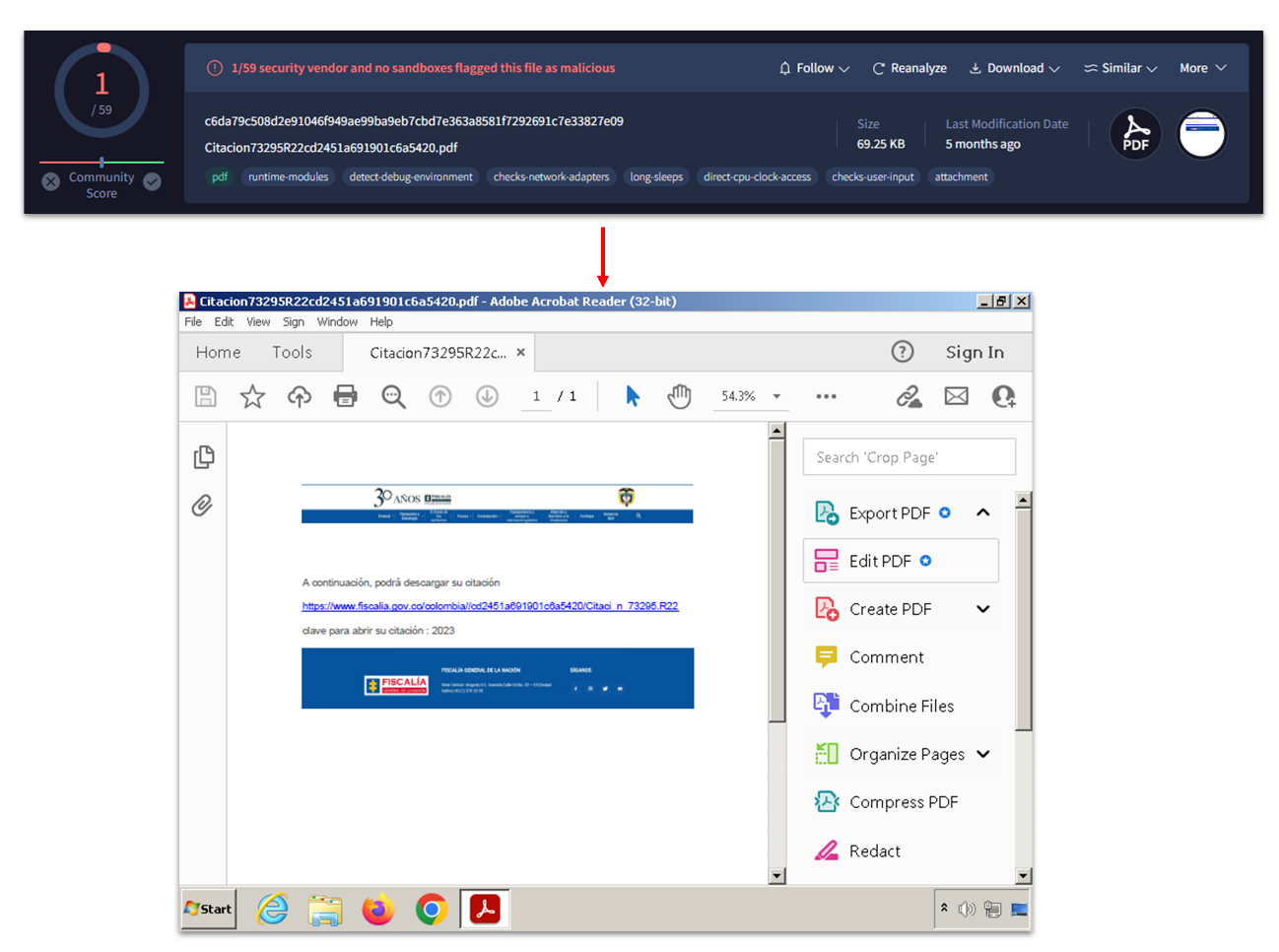
To illustrate this functionality, see Figure 20 attributed to Blind Eagle, a cybercrime actor associated with Latin America.
Figure 20: Content of a PDF file related to Blind Eagle threat actor
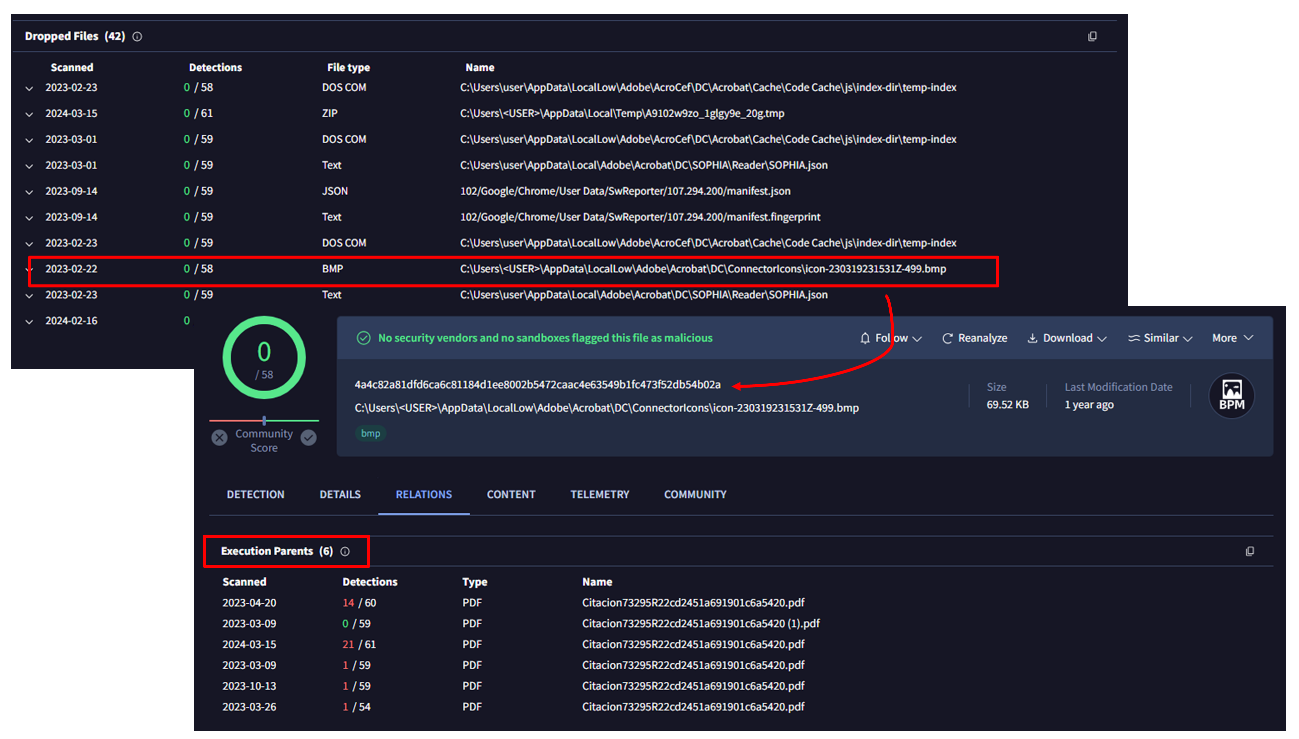
Figure 20 was provided by our sandbox. In the "relations" tab, we can see the BMP image as a dropped file:
Figure 21: BMP file generated by the sandbox that can be used for pivoting
The BMP file itself also shows relations, in particular up to 6 PDF files in the "execution parents" section. In other words, there are other PDFs that look exactly the same as the initial one.
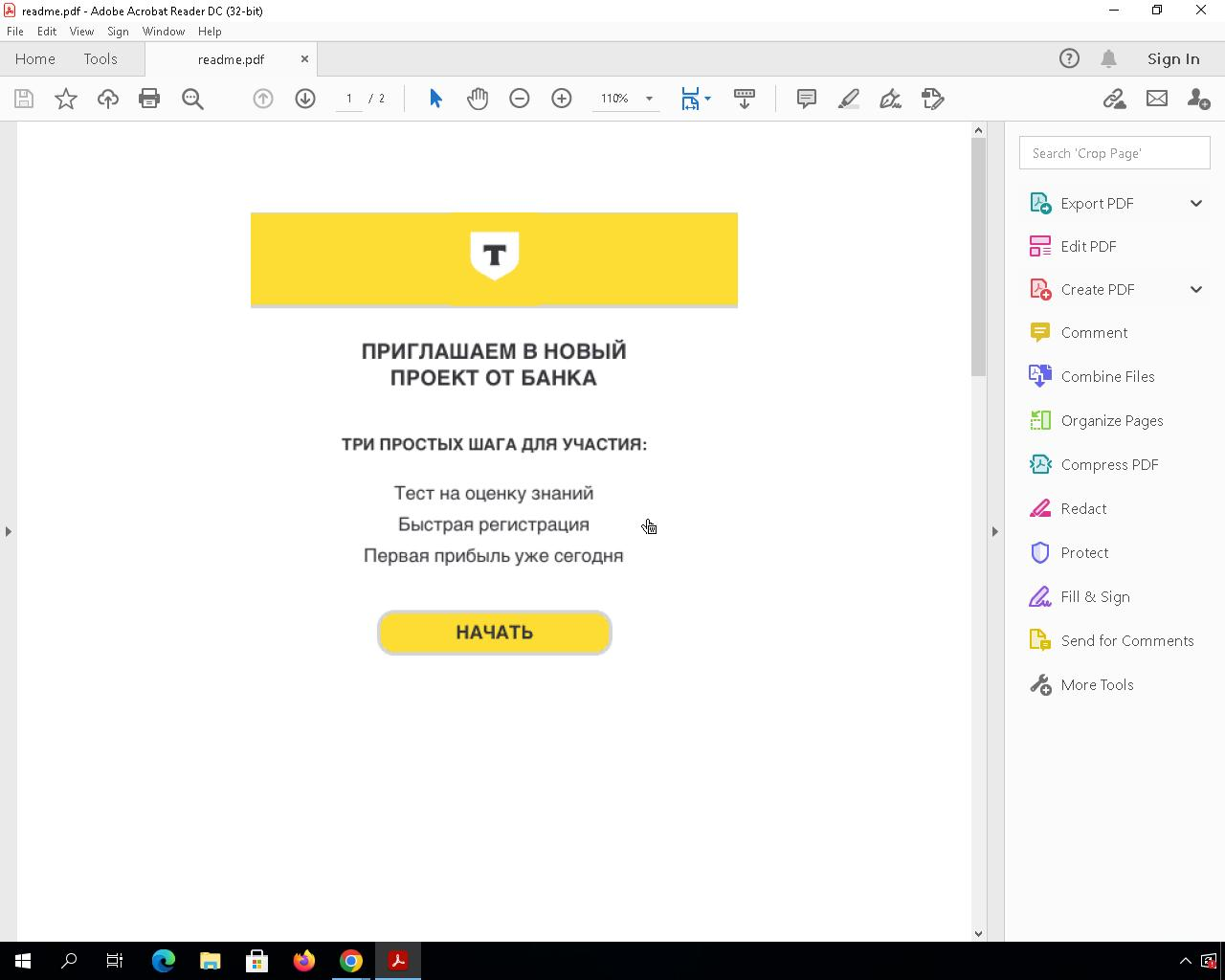
Typically, many actors engaged in financial crime activities utilize widely spread PDF files to deceive their victims, making this approach highly valuable. Another interesting example we found involves phishing activities targeting a Russian bank called "Tinkoff Bank."
The PDF files urge victims to accept an invitation from this bank to participate in a project.
Figure 22: The content of a PDF file used by cybercrime actors
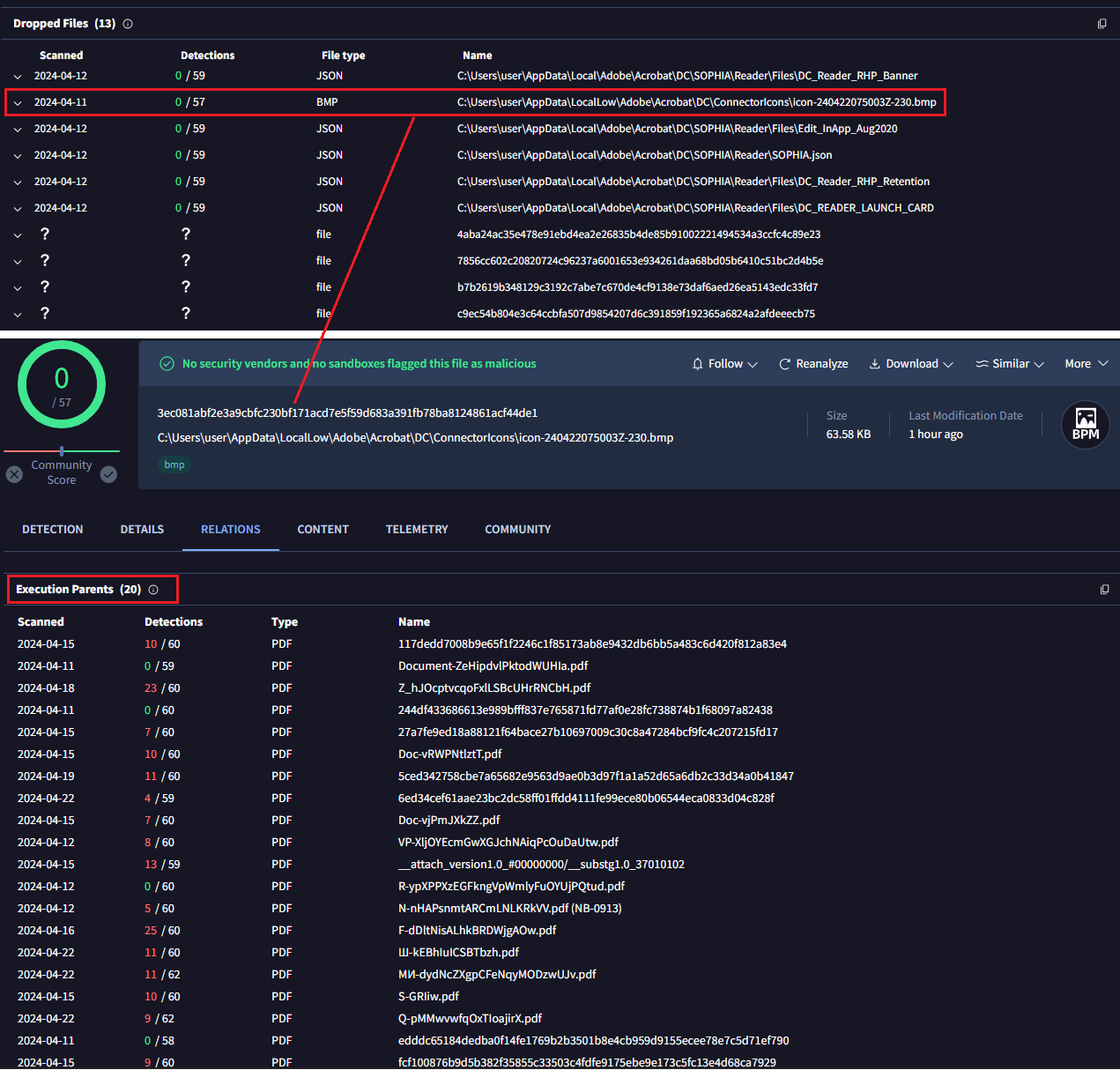
Applying the same approach we identified 20 files with identical content, most of them classified as malicious by AV engines.
Figure 23: BMP file generated by the sandbox that can be used for pivoting, in this case having other 20 PDF with the same image
There are some limitations to this approach. For instance, the PDF file might be slightly modified (font size, some letter/word, color, …) which would generate a completely different hash value for the thumbnail we use to pivot.

Images dropped by Acrobat Reader

Just like the BMP files generated by Acrobat Reader, there are other interesting files that might be dropped during sandbox detonation. These artifacts can be useful on some occasions.
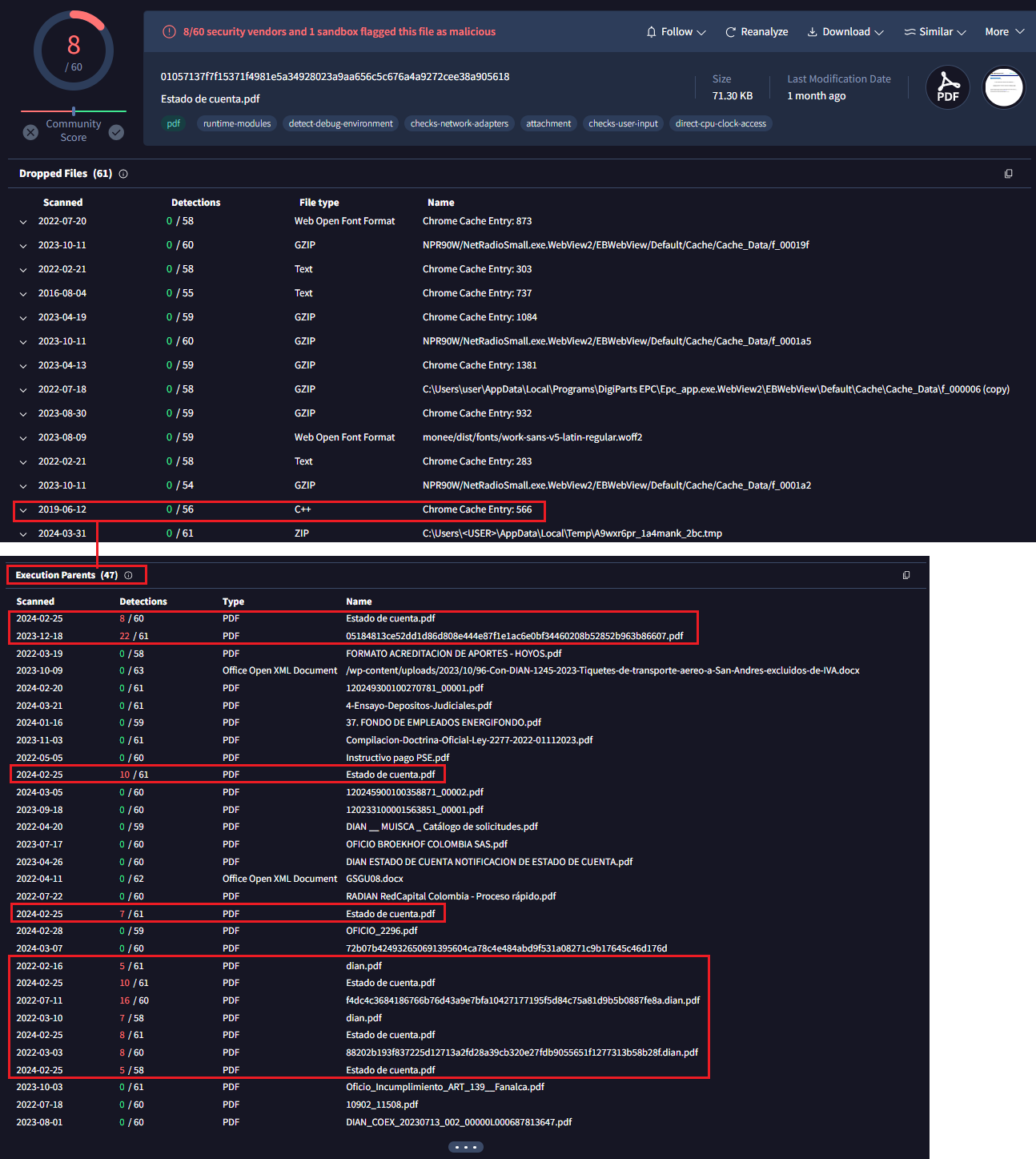
The first example is a JavaScript file dropped in another PDF attributed to Blind Eagle.
Figure 24: BMP file generated by the sandbox that can be used for pivoting, another example of Blind Eagle threat actor
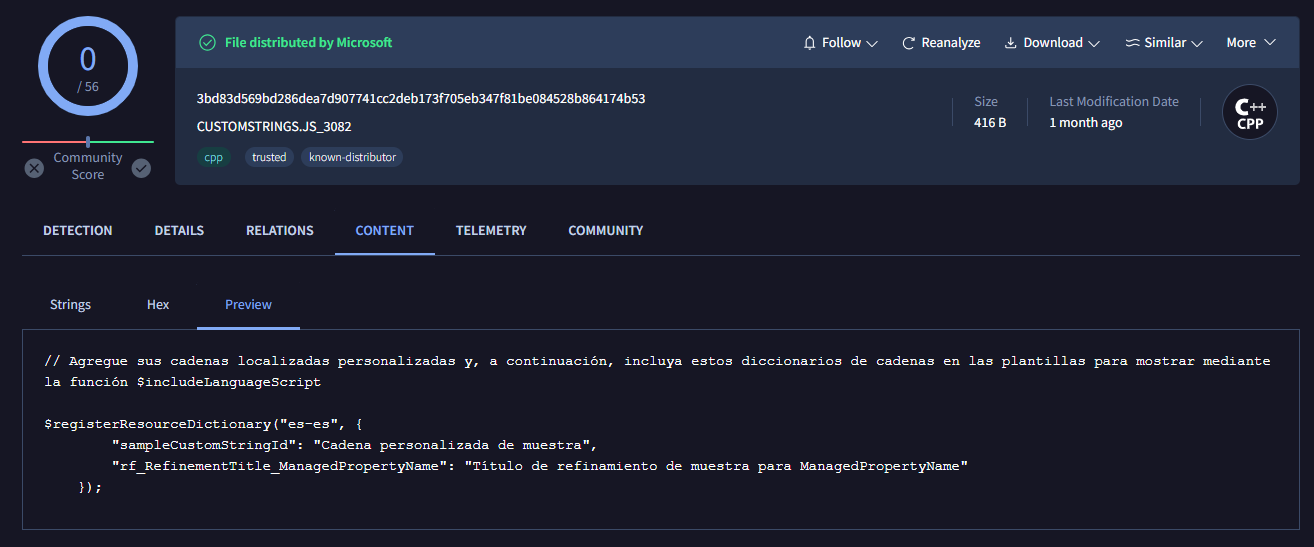
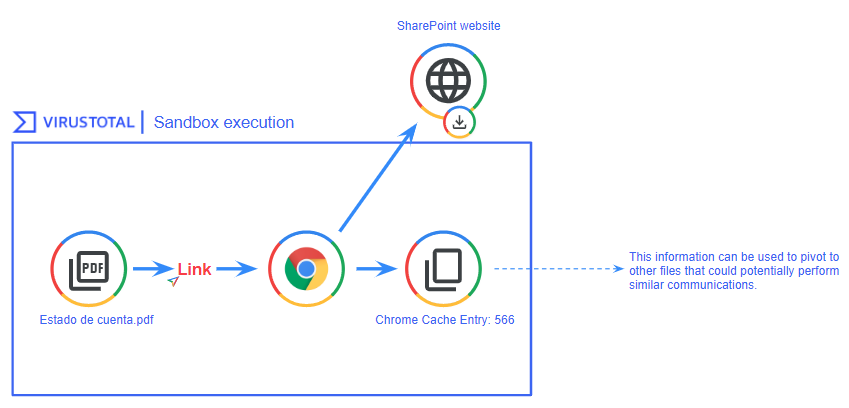
The dropped JavaScript file's name during the PDF execution was "Chrome Cache Entry: 566" indicating that this file was likely generated by opening an URL through Chrome, possibly triggered by a sandbox click on a link within the PDF. Examining the file's contents, we observe some strings and variables in Spanish.
Figure 25: Artifact generated by the sandbox via Google Chrome when connecting to a domain
The strings “registerResourceDictionary”, “sampleCustomStringId”, “rf_RefinementTitle_ManagedPropertyName” are related to Microsoft SharePoint as we were able to confirm. These files were probably generated after visiting sites that have Microsoft Sharepoint functionalities. We found that all the PDFs containing this artifact dropped by Google Chrome came from a website belonging to the Government of Colombia.
Figure 26: Flow of artifact generation related to Google Chrome that can be used for pivoting in VirusTotal

Email files

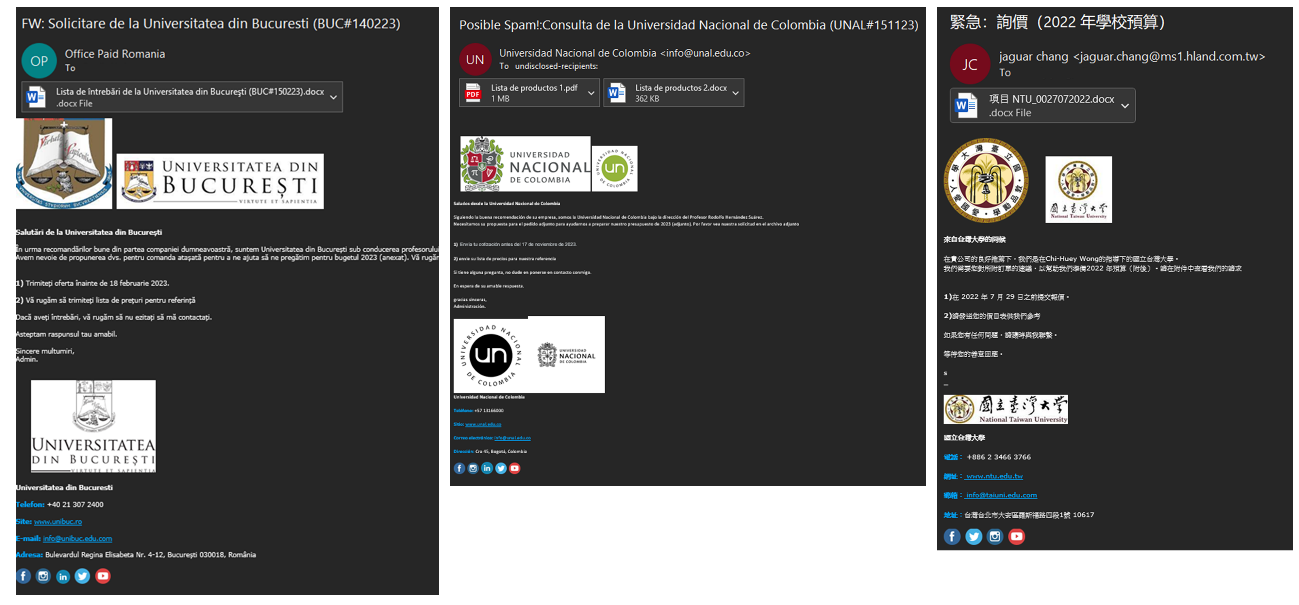
Many threat actors incorporate images in their emails, such as company logos, to deceive victims. We used this to identify several mailing campaigns where the same footer was used.

Campaign impersonating universities

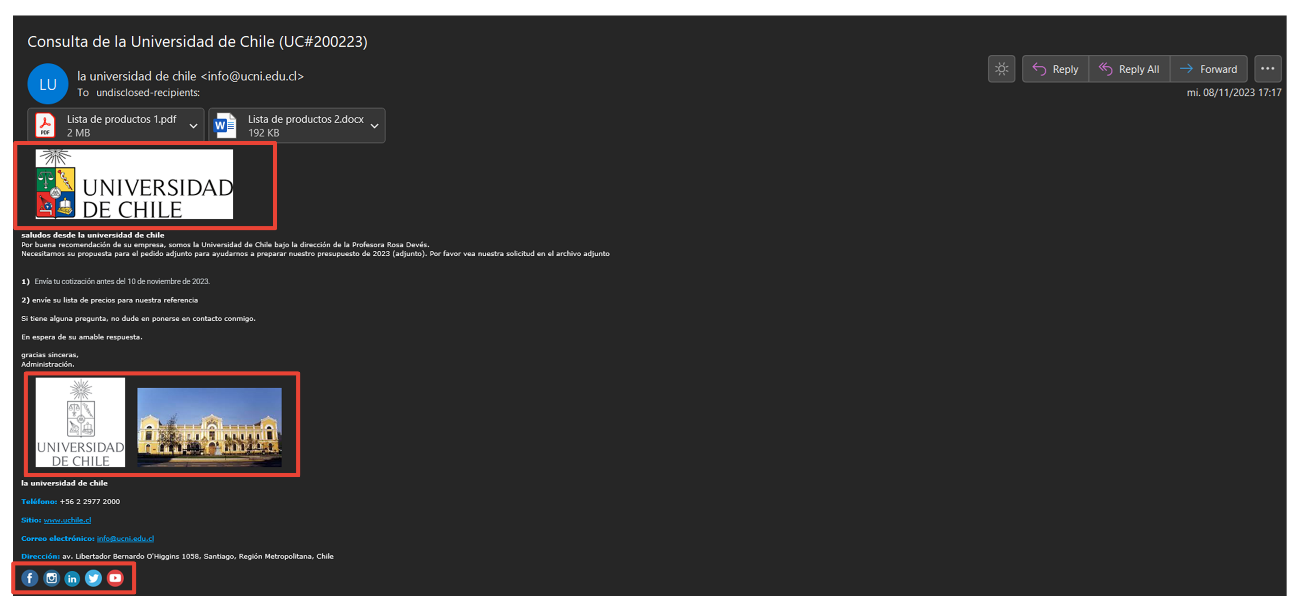
On November 13, 2023, we details about a new campaign impersonating universities, primarily located in Latin America. By leveraging the presence of social network logos in the footer, we were able to find more universities in different continents targeted by the same attacker.
Figure 27: Email impersonating a university that contains multiple images
Figure 27 shows several images, including the University of Chile's logo and building, as well as images related to social networks like YouTube, Facebook, and Twitter.
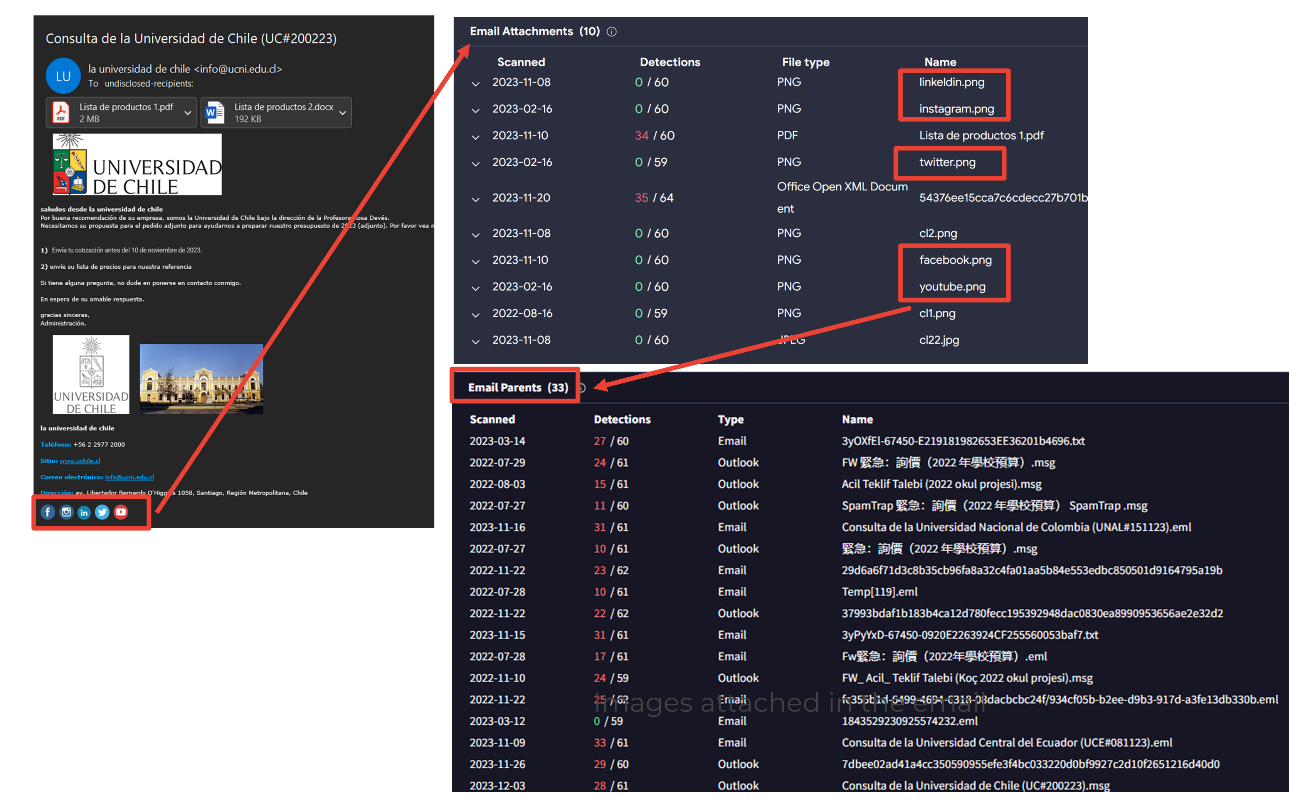
Pivoting through the images related to the University of Chile doesn't yield good results, as it's too specific. However, if we pivot through the images of the social media footer, represented as email attachments, we can observe multiple files using the same logo.
Figure 28: Using the images from the email footer to pivot and identify new emails
Just by analyzing one of the social media logos, we saw 33 email parents, all of them related to the same campaign.
Figure 29: Other emails identified through image pivoting techniques

Campaigns impersonating companies

Another usual case is adding a company logo in the email signatures to enhance credibility. Delivery companies, banks, and suppliers are some of the most observed images during our research.
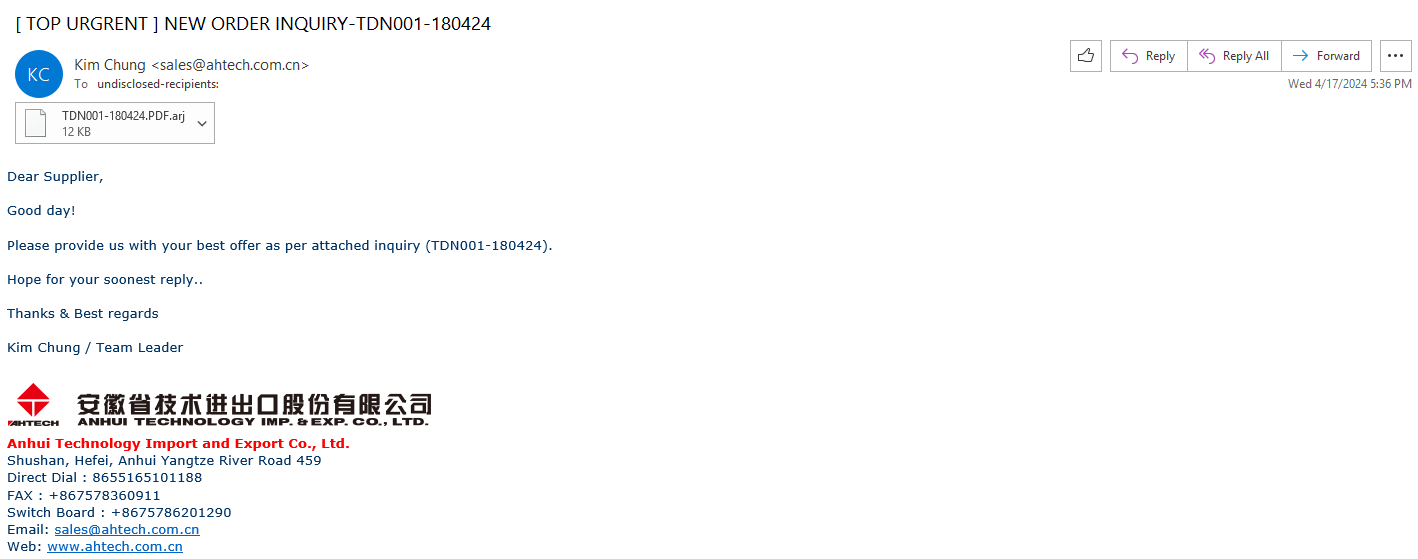
For example, this email utilizes the corporate image of China Anhui Technology Import and Export Co Ltd in the footer.
Figure 30: Email impersonating a Chinese organization using the company logo in the footer
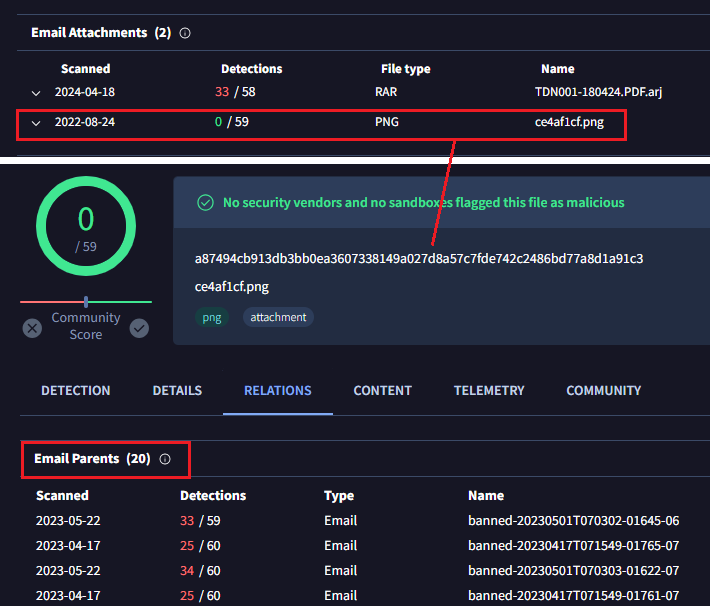
Pivoting through the image we found 20 emails using the same logo.
Figure 31: Other emails identified through image pivoting techniques

Wrapping up

We can potentially trace malicious actors by examining artifacts linked to the initial spreading documents, and in the case of images, AI can help us automate potential victim identification and other hunting aspects.
In order to make this even easier, we are planning to incorporate a new bundled_files field into the IOCs JSON structure, which basically will help to create livehunt rules. In the meantime you can use vt_behaviour_files_dropped.sha256 for those scenarios where the files are dropped.
In certain situations, the styles.xml and [Content_Types].xml files within office documents can provide valuable clues for identifying and tracking the same threat actor. The method presented here offers an alternative to traditional hunting or pivoting techniques, serving as a valuable addition to a team's hunting activities.
We hope you found this research interesting and useful, and as always we are happy to hear your feedback.
Happy hunting!

APPENDIX

[Content_types].xml shared between threat actors

[Content_Type].xml sha256

Shared by

3d8578fd41d766740a1f1ddef972a081436a2d70ab1e9552a861e58d8bbf5321

APT33, APT32

4ea40d34cfcaf69aa35b405c575c7b87e35c72246f04d2d0c5f381bc50fc8b3d

APT29, APT28

4f7fa7433484b4e655d185719613e2f98d017590146d15eedc1aa1d967636b3a

FIN7, Gamaredon, APT28, APT32

529739886f6402a9cd5a8064ece73eef19c597ef35c0bc8d09390e8b4de9041b

FIN7, APT33, TA505, Mustang Panda

688dca40507fb96630f3df80442266a0354e7c24b7df86be3ea57069b25d12c6

Gamaredon, APT33

6f1ac5f0ebfb7e97d3dc4100e88eaab10016a5cac75e1251781f2ea12477af51

Gamaredon, Hazy Tiger, APT33,

7796c382cd4c7c4ae3bcf2eed4091fbb20a2563ca88f2aecadb950ad9cf661f8

Razor Tiger, APT28, UAC-0099

b4fa7f3faa0510e4d969219bceec2a90e8a48ff28e060db3cdd37ce935c3779c

Razor Tiger, SideCopy

dfa90f373b8fd8147ee3e4bfe1ee059e536cc1b068f7ec140c3fc0e6554f331a

Gamaredon, APT37, Mustang Panda, APT28, UAC-0099, SideCopy

fe98b3bcf96f9c396eb9193f0f9484ef01d3017257300cc76098854b1f103b69

FIN7, Hazy Tiger

ff5a5ba3730a8d2ec0cbad39e5edf4ad502107bd0ef8a5347f29262b3dfe8a43

Mustang Panda, APT32

styles.xml shared between threat actors

Styles.xml sha256

Shared by

13ed55637980452662cb6838a2931a5e54fbed5881bcbae368b3d189d3a01930

APT28, UAC-0099, Razor Tiger

2de1fc9c48c4b0190361c49cdb053fd39cf81e32f12c82d08f88aec34358257f

Hazy Tiger, Gamaredon, APT33

59df7787c7cf5408481ae149660858d3af765a0c2cd63d6309b151380f92adb2

TA505, Gamaredon

8f590f608f0719404a1731bb70a6ce2db420fd61e5a387d5b3091d47c7e21ac9

APT28, FIN7, Razor Tiger, APT32, APT33

de392cd4bf1d650a9cf8c6d24e05e0605bf4eaf1518710f0307d8aceb9e5496c

Hazy Tiger, FIN7

e16f84c5fd1df6af1a1f2049f7862f4ea460765863476afb17e78edee772d35b

APT32, SideCopy, Mustang Panda, Razor Tiger

Monday, May 20, 2024

YARA is dead, long live YARA-X

For over 15 years, YARA has been growing and evolving until it became an indispensable tool in every malware researcher's toolbox. Throughout this time YARA has seen numerous updates, with new features added and countless bugs fixed. But today, I'm excited to announce the biggest change yet: a full rewrite.

YARA-X is a completely new implementation of YARA in Rust, and it has the following goals:

  • Better user experience: The new command-line interface is more modern and colorful, and error reports are now more explicative. More features aimed at improving the user's experience will be incorporated in the future.

  • Rule-level compatibility: While achieving 100% compatibility is tough, our aim is to make YARA-X 99% compatible with YARA at the rule level. Incompatibilities should be minimal and thoroughly documented.

  • Improved performance: YARA is known for its speed, but certain rules, especially those utilizing regular expressions or complex loops, can slow it down. YARA-X excels with these rules, often delivering significantly faster results. Our ultimate goal is for YARA-X to outperform YARA across the board.

  • Enhanced reliability and security: YARA's complexity in C code can lead to bugs and security vulnerabilities. YARA-X is built with Rust, offering greater reliability and security.

  • Developer-friendly: We're prioritizing ease of integration into other projects and simplified maintenance. Official APIs for Python, Golang, and C are provided to facilitate seamless integration. YARA-X also addresses some of the design flaws that made YARA challenging to maintain and extend.

Why a rewrite?

Was a complete rewrite necessary to achieve such goals? This question lingered in my mind for a long time before deciding to rewrite YARA. Rewriting is risky, it introduces new bugs, backward compatibility issues, and doubles the maintenance efforts, since legacy code doesn't disappear after launching the new system. In fact, the legacy system may be still in use for years, if not decades.

However, I believe a rewrite was the right decision for multiple reasons:

  • YARA is not a large project, it's a medium-size project that lacks subsystems or components large enough to be migrated in isolation. Incremental migration to Rust was impractical because large portions of the code are interconnected.
  • The improvements I envisioned required significant design changes. Implementing these in the existing C codebase would involve extensive rewrites, carrying the same risks as starting fresh with Rust.
  • After a year of working on the project, I’ve found Rust easier to maintain than C. Rust offers stronger reliability guarantees and simplifies integrating third-party code, especially for multi-platform projects.

Is YARA really dead?

Despite the dramatic title of this post, YARA is not actually dead. I’m aware that many people and organizations rely on YARA to get important work done, and I don’t want to let them down.

YARA is still being maintained, and future releases will include bug fixes and minor features. However, don’t expect new large features or modules. All efforts to enhance YARA, including the addition of new modules, will now focus on YARA-X.

What's the current state of YARA-X?

YARA-X is still in beta, but is mature and stable enough for use, specially from the command-line interface or one-shot Python scripts. While the APIs may still undergo minor changes, the foundational aspects are already established.

At VirusTotal, we have been running YARA-X alongside YARA for a while, scanning millions of files with tens of thousands of rules, and addressing discrepancies between the two. This means that YARA-X is already battle-tested. These tests have even uncovered YARA bugs!

Please test YARA-X and don't hesitate to open an issue if you find a bug or some feature that you want to see implemented.

What's next?

My aim is to surpass YARA in every possible aspect with YARA-X. I want it to be so superior that existing YARA users willingly migrate to YARA-X for its undeniable advantages, not because they are forced to do so.

Publishing a beta version is only the first step towards this goal. I'll continue to enhance YARA-X, releasing updates and sharing insights through blog posts like this one.

Stay tuned, because this journey has only just begun.

Wednesday, May 15, 2024

Crowdsourced AI += ByteDefend

We are pleased to announce the integration of a new solution into our Crowdsourced AI initiative. This model, developed by Dr. Ran Dubin from the Department of Computer Science at Ariel University and head of ByteDefend Cyber Lab at the Ariel Cyber Innovation Center, is designed to analyze suspicious macros in Microsoft Office files, including Word, Excel, and PowerPoint.

VirusTotal's Crowdsourced AI initiative leverages various AI models and community contributions to strengthen cyber defense strategies. Like any other security solution, AI-based models are not infallible, but they offer invaluable contributions by complementing other technologies in analyzing and detecting new threats. The integration of ByteDefend enhances VirusTotal's Code Insight capabilities, currently with up to three independent AI engines for Microsoft Office documents.

Here is the most recent example at the time of writing: all three models agree that the analyzed XLS file is malicious, each providing different levels of detail.


Here's another example where the models don't agree. ByteDefend flags a DOC file as malicious, while Hispasec's engine says it's benign. These disagreements are interesting because even though the final verdict can be subjective depending on the context (what's risky in one situation might not be in another), the models clearly explain how the macros work. This gives the human analyst all the information they need to make the final call..


AI reports’ results are available via VT Intelligence, allowing the use of the "bytedefend_ai_analysis:" modifier to search into the resulting AI’s output, and "bytedefend_ai_verdict:" to search by verdict - malicious or benign. As an example, below we show the results of searching for ByteDefend reports where "telegram" is mentioned and the verdict is "malicious". This search is performed using the following query: bytedefend_ai_analysis:telegram and bytedefend_ai_verdict:malicious


We extend our thanks to Dr. Ran Dubin and the ByteDefend Cyber Lab for their valuable contribution to VirusTotal's Crowdsourced AI initiative. We are continuously working to expand this effort by welcoming more contributors with diverse skills and expertise. Our goal is to build a collaborative and powerful defense strategy to tackle the constantly evolving landscape of cyber threats. We encourage others in the security community to join us in this effort.

Monday, May 06, 2024

VirusTotal's Mission Continues: Sharing Knowledge, Protecting Together

With the recent announcement of Google Threat Intelligence, I want to take this opportunity, as VirusTotal's founder, to directly address our community and reiterate our unwavering commitment to our core mission.

First and foremost, I want to assure our entire community, from security researchers and industry partners to individual users, that VirusTotal's core mission remains unchanged. We remain deeply dedicated to collective intelligence and collaboration, fostering a platform where everyone can come together to share knowledge, access valuable threat information, and contribute to the fight against cyber threats.

Google Threat Intelligence is a new offering that builds upon the strengths of Google, Mandiant, VirusTotal, and other sources. It will be available as a premium tier, evolving the existing VirusTotal Enterprise platform, as well as the Mandiant Advantage Threat Intelligence one.

Importantly, VirusTotal remains committed to a level playing field, ensuring all partners, including Google Threat Intelligence, have equal access to the crowdsourced data VirusTotal collects. We also want to assure you that the core features and functionalities of VirusTotal will remain free and accessible to everyone, as always.

The strength of VirusTotal lies in its network of contributors and the vast amount of data they provide. This data serves as a valuable resource for the entire security industry, empowering our partners and others to enhance their products and contribute to a more secure digital world. This collaborative approach, based on transparency and equal access, strengthens the industry as a whole, ultimately leading to better protection for everyone.

We understand that change can be unsettling, but we want to assure you that VirusTotal is here to stay. We are excited about the future and the opportunity to continue sharing knowledge and protecting together with all of you, making the digital world a safer place through the power of collective intelligence.

Thank you for your continued support.

Bernardo Quintero
Founder of VirusTotal

Tuesday, April 30, 2024

Analyzing Malware in Binaries and Executables with AI

In a recent post titled "From Assistant to Analyst: The Power of Gemini 1.5 Pro for Malware Analysis", published on the Google Cloud Security blog, we explore the capabilities of Gemini 1.5 Pro, which enhances malware analysis by processing up to 1 million tokens. This advancement allows the tool to analyze large amounts of disassembled or decompiled code in a single pass, providing a complete view of the malware's logic to produce verdicts and summary reports. The blog post highlights practical applications of this approach, using well-known malware such as WannaCry and also entirely new and previously undetected malware. These examples show that Gemini 1.5 Pro's reports are not based on pre-trained data of those specific samples but on its ability to analyze the code itself. For more details on how Gemini 1.5 Pro operates in malware analysis, we encourage you to read the complete post here.

At VirusTotal, Gemini 1.5 Pro has been effectively utilized in Code Insight to process macros in Office documents that exceed the token limits of traditional models. For instance, "PLEX.xlam" is the most recent file that, at the time of writing this paragraph, required the use of Gemini 1.5 Pro due to its long content. This file was flagged by several antivirus engines and two sandboxes. Code Insight conducted an analysis by extracting 34 macros, which resulted in 138,332 tokens. The detailed report from Code Insight provides a comprehensive understanding of the macros' functionalities. This analysis aids in clarifying the intentions behind these macros, helping to determine whether the security alerts indicate actual threats or potential false positives.


We will continue to deploy Gemini 1.5 Pro's analysis capabilities across various file formats and are actively working on scaling up disassembly and decompilation techniques to begin processing binaries, as demonstrated in the examples described earlier in this post. Our goal is to expand the scope of our automated malware analysis, enhancing our ability to handle increasingly complex threats efficiently.

We invite the community to collaborate in this initiative. If you have unpacking utilities, specialized models, or innovative ideas related to malware analysis, your contributions would be invaluable. Together, we can expand the boundaries of what is achievable in cybersecurity and strengthen our collective defenses against emerging threats.

Thursday, April 25, 2024

Mastering VirusTotal: Certification Course

We are pleased to announce the partnership with The SOC Academy, a new startup dedicated to providing cybersecurity education, debuting with a VirusTotal Certification course. Founded by Laura, a passionate entrepreneur and especially a cybersecurity enthusiast, The SOC Academy aims to enhance the skills and expertise of professionals in the field. Below, we dive into a conversation with Laura, exploring the motivation behind this initiative, what it offers, and her vision for the future of The SOC Academy.

Laura Marta Mantoani
Founder of The SOC Academy


Q1: Laura, could you tell us about your background in cybersecurity and what inspired you to launch The SOC Academy, particularly focusing on the VirusTotal Certification course?
Laura: Sure, I’d love to share more. Firstly, I studied Marketing, Business Communication and Global Markets at the University of Milan, where my passion for entrepreneurship was born. Then, I earned a second degree in engineering at the University of Malaga, where I focused on Software Engineering and Artificial Intelligence, as well as Reverse Engineering and Malware Intelligence. This background experience shaped my entrepreneurial spirit and particularly my enthusiasm for cybersecurity. Some of my Reverse Engineering and Malware Intelligence teachers, who were from the VirusTotal team, really opened my eyes to what you can do with VirusTotal. This experience got me thinking about how I could help others understand and use VirusTotal better, discovering all its tools and maximizing their potential. That’s why I started The SOC Academy and the VirusTotal Certification course to teach and inspire others in cybersecurity.

Q2: Can you explain the difference between the Free course and the VirusTotal Certification course?
Laura: Absolutely! The Free Introduction Course is designed to provide a taste of The SOC Academy's learning experience and offer a foundational understanding of VirusTotal. They are perfect for individuals curious about VirusTotal and cybersecurity who want to explore the platform before committing to a more in-depth program. The VirusTotal Certification course, on the other hand, is a comprehensive deep dive into all aspects of VirusTotal, from basic search functions to advanced hunting techniques. It is ideal for those who want to become true VirusTotal masters and gain a recognized certification.

Q3: The VirusTotal Certification seems to be a flagship course. What are some of the key benefits for those who complete it?
Laura: The VirusTotal Certification is designed not just as a course, but as a comprehensive learning experience. Those who complete the certification receive a badge on their VirusTotal.com profile, signaling their expertise to peers and potential employers, as well as an official VirusTotal certificate, that demonstrates the users' advanced level of proficiency with VirusTotal. Additionally, certified users gain unlimited access to the course with ongoing updates and early access to new features on the platform. This ensures our graduates are always at the cutting edge of cybersecurity practices.

Q4: How does The SOC Academy ensure the courses remain relevant in the rapidly changing field of cybersecurity?
Laura: We continuously update our course content to reflect the latest in cybersecurity threats and defenses. Our close partnership with VirusTotal allows us to integrate the newest features and updates directly into our curriculum, providing our students with relevant and immediate knowledge they can apply in real-world situations.

Q5: Finally, what’s next for The SOC Academy? Any future plans or developments?
Laura: We're always looking to expand our offerings. Future plans include more advanced courses and possibly live events to foster a greater sense of community and collaboration among our students. We also plan to incorporate more interactive and hands-on training methods to enhance learning outcomes.

At VirusTotal, we are proud to support Laura's initiative. Her passion for cybersecurity, entrepreneurial spirit, and dedication to knowledge sharing are truly inspiring. We encourage you to visit The SOC Academy, enroll in the free introductory course, and provide feedback to Laura as she continues to grow and improve this valuable platform. Together, we can foster a stronger and more knowledgeable cybersecurity community.

Tuesday, March 12, 2024

Know your enemies: An approach for CTI teams

VirusTotal’s Threat Landscape can be a valuable source of operational and tactical threat intelligence for CTI teams, for instance helping us find the latest malware trends used by a given Threat Actor to adjust our intelligence-led security posture accordingly. In this post, we will play the role of a CTI analyst working for a Singaporean financial institution.

As a first step, we search for threat actors that traditionally both targeted the financial industry and Singaporean companies.


“TA505” and “APT41” both match these requirements. For the moment let’s focus on TA505, which seems more active at the moment.

Understanding (TA505):

The Threat Actor card provides details on the actor, which seems to target organizations in the financial, healthcare, retail, and hospitality sectors across Europe, Asia Pacific region, Canada, India and the United States.


According to the description TA505 seems related to Dridex banking trojan and Locky ransomware activity.

In VirusTotal we can find two categories for TTPs:
- The First are TTPs directly ingested from MISP and MITRE.
- The second (called Toolkit TTPs) shows TTPs obtained from sandbox analysis of the IOCs related to a particular actor.

In this case, for TA505 we can find the following Toolkit TTPs:


The T1486 tactic (‘Data Encrypted technique for Impact') seems potentially related to the use of ransomware, such as Locky, by this actor. This seems like a good point for us to retrieve some fresh data and understand this actor’s recent activity. For instance, the following query provide fresh samples from the actor (samples submitted after January 1st, 2024) that use data encryption, and tagged as ransom by AVs:


Multiple of the returned samples belong to the “locky” Collection tagged as ‘locky’, which contains 510 files at the moment.


The Telemetry tab provides information about submissions and lookups, which helps us understand malware family’s distribution and timeframes of operations.


Tailoring defenses:

In addition, the Collection’s Rules panel provides details on crowdsourced Yara, sigma and IDS rules that match different indicators files in this collection.


In this case, the “win_locky_auto” yara rule matches almost all the files in this collection (505/510). This could help to enhance detection capabilities for this threat.

Collection’s commonalities refer to characteristics, behaviors, or technical attributes shared by a set of indicators, which helps to identify patterns. Let’s use this to create a new “Livehunt rule” to track this activity in the future. We will use only recent samples, we can filter them in the IOCS tab (“fs:180d+”):


Based on commonalities results, some useful information to create the livehunt rule may include:

Metadata:
  • File type: EXE and DLL formats.
    (vt.metadata.file_type == vt.FileType.PE_DLL or vt.metadata.file_type == vt.FileType.PE_EXE)
  • File size: Less than 1Mb.
    (vt.metadata.file_size < 1000000)
  • Main icon: Custom and specific icon.
    (vt.metadata.main_icon.dhash == "52c244c9a7a3998b")
  • Imphash: Hash value calculated from PE's import table, that could be matching some locky samples.
    (vt.metadata.imphash == "31553623c43827d554ad9e1b7dfa6a5a")

Behavior:
  • Sandbox attack techniques: Detect T1486 Encryption Data technique.
    (for any tec in vt.behaviour.mitre_attack_techniques: (tec.id == "T1486"))
  • Command execution: Identification of possible rescue note and background set.
    (for any ce in vt.behaviour.command_executions: (ce icontains "\\Desktop\\*.txt" or ce icontains "\\Desktop\\*.bmp"))
  • Memory patterns: Specific patterns observed in locky samples that could be reused.
    (for any mem in vt.behaviour.memory_pattern_urls: (mem icontains "checkupdate" or mem icontains "userinfo.php"))

Remember you can always follow Threat Actor and/or collections and receive fresh new IOCs through the IoC Stream.

Wrapping up:

Threat Landscape empowers CTI teams with insights for prioritizing threats, understanding threat actors and tracking their operations pivoting between Threat Actors <=> Collections <=> IOCs. This provides actionable details based on the technical capabilities of the malware used in these campaigns, including a set of TTPs based on sandbox detonation that we can use both for hunting and monitoring. Collections also provide “Commonalities” on different indicators, including which crowdsourced rules better detect them. This helps us to quickly create effective monitoring and hunting strategies for malware families and threats actors, as well as effective protections adjusted to recent campaigns and malicious activity.

If you have any suggestions or want to share feedback please feel free to reach out here.

Happy Hunting!