Monday, March 13, 2023

,

Introducing VT4Splunk - The official VirusTotal App for Splunk

 TL;DR: VT4Splunk, VirusTotal’s official Splunk plugin, correlates your telemetry with VirusTotal context to automate triage, expedite investigations and unearth threats dwelling undetected in your environment. This extends Splunk’s own VirusTotal plugin for their SOAR. Next March 30th we will host a webinar along with Splunk to show how to do security investigations with Splunk and VirusTotal. Register here!

One of VirusTotal’s main use cases is technology integrations, where VirusTotal’s context is used for automatic security telemetry enrichment, false positive discarding, 2nd opinion detection (true positive confirmation) and incident contextualization + investigation. 

VirusTotal had Splunk plugins for a while, most of theme developed by community contributors and other 3rd-parties. For instance, VirusTotal’s plugin for Splunk SOAR, which ranks #1 in the Threat Intelligence Reputation space is developed by our friends over at Splunk, and we highly recommend it. 

However, we wanted to truly showcase what VirusTotal can do for your SIEM and VT4Splunk v1 is our proposed solutions. It is free and you can download it from Splunkbase. It is compatible with Splunk +8.x Enterprise and Cloud versions.


In a nutshell, VT4Splunk automatically enriches your Splunk logs with threat intelligence coming from VirusTotal, to gain superior visibility and understanding. Let’s dive into specific use cases and outcomes.

Expedite triage and investigations via on-demand command-line driven enrichment

When studying an alert or incident, analysts often need to sweep through hundreds or thousands of events to make sense of an attack. Narrowing down massive amounts of events to focus on those that are relevant in the context of an attack is complex and time consuming. 

VT4Splunk adds a command to trigger correlation of events with threat intelligence (reputation and context) from VirusTotal, which in turn allows you to perform subsequent filtering to focus on events that look particularly anomalous.

The "vt4splunk" command initiates the enrichment, it can be appended to any Splunk SPL query. For example, let's say you have run a query that returns all events related to a specific IP address. To enrich resulting events with information from VirusTotal, simply append the "vt4splunk" command to the query:

index=myindex sourcetype="stream:http" | vt4splunk ip=dest_ip

VT4Splunk will automatically retrieve information from VirusTotal for each IP address returned in the query results. This information includes the number of malicious detections, the first and last seen dates, and most importantly, context and analysis properties that can be used for triage and hunt missions:
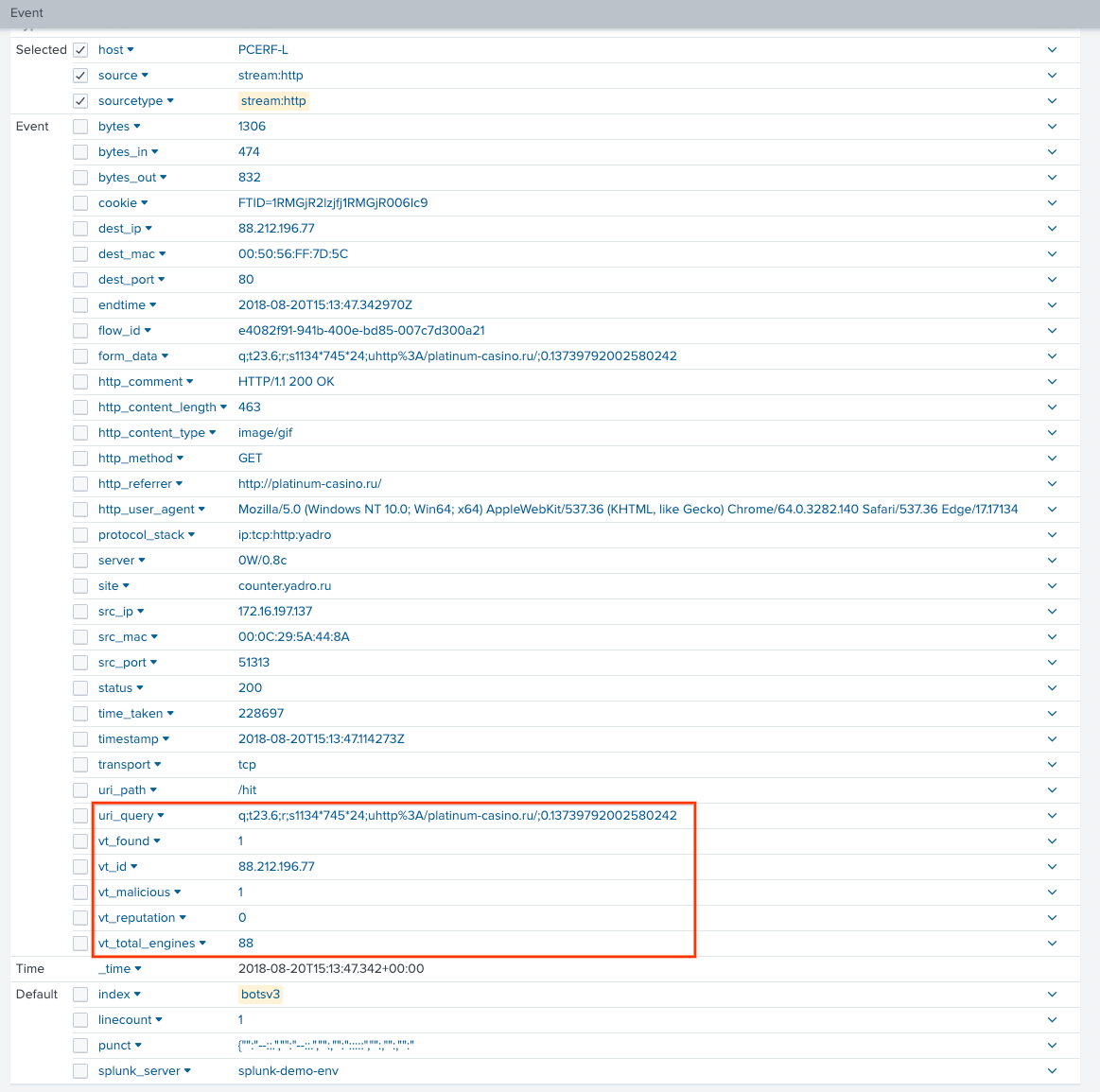
This also applies to other observable types, such as file searches. The following example search enriches hashes found in Sysmon events:

index=botsv3 sourcetype="xmlwineventlog:microsoft-windows-sysmon/operational"
| vt4splunk hash=SHA256


The correlation is made via VirusTotal’s API and, thus, also understands domains and URLs found in events, beyond file hashes and IP addresses. 


Make better decisions and minimize missed threats with IoC contextualization via the VT Augment widget

Security teams are increasingly concerned about missed threats due to lack of context. Indeed, the use of reactive threat feeds, the adoption of ML and generic detections, the popularization of anomaly based detections and UEBA, etc. is leading to alerts where there is extensive context about the internal systems where a given anomaly was observed, but little context about the threat itself. This means that it is easy for analysts to discard true positives. 

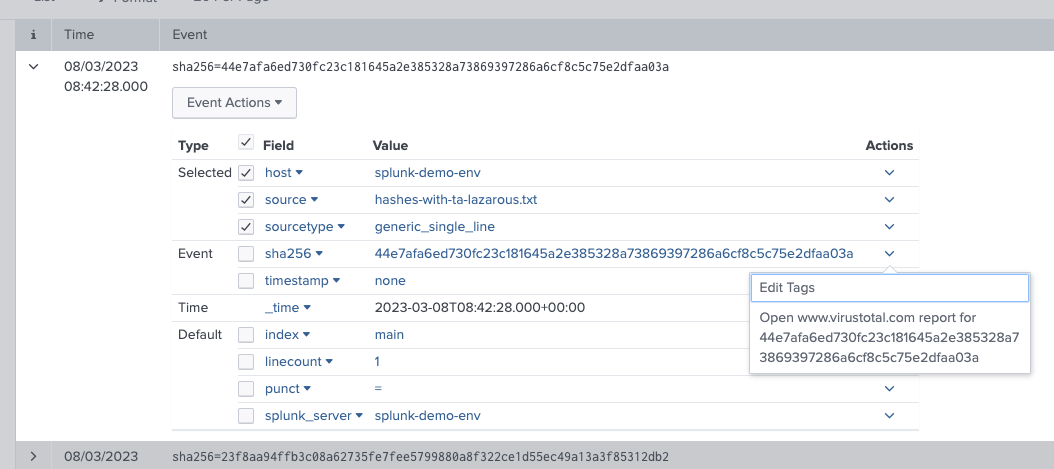
VT4Splunk incorporates hooks throughout the Splunk interface to open up full-blown VirusTotal reports:
But most importantly, it also introduces triggers to open up the VT AUGMENT widget within Splunk, in a single pane of glass fashion, for all IoCs that get highlighted in dashboards and reporting views:
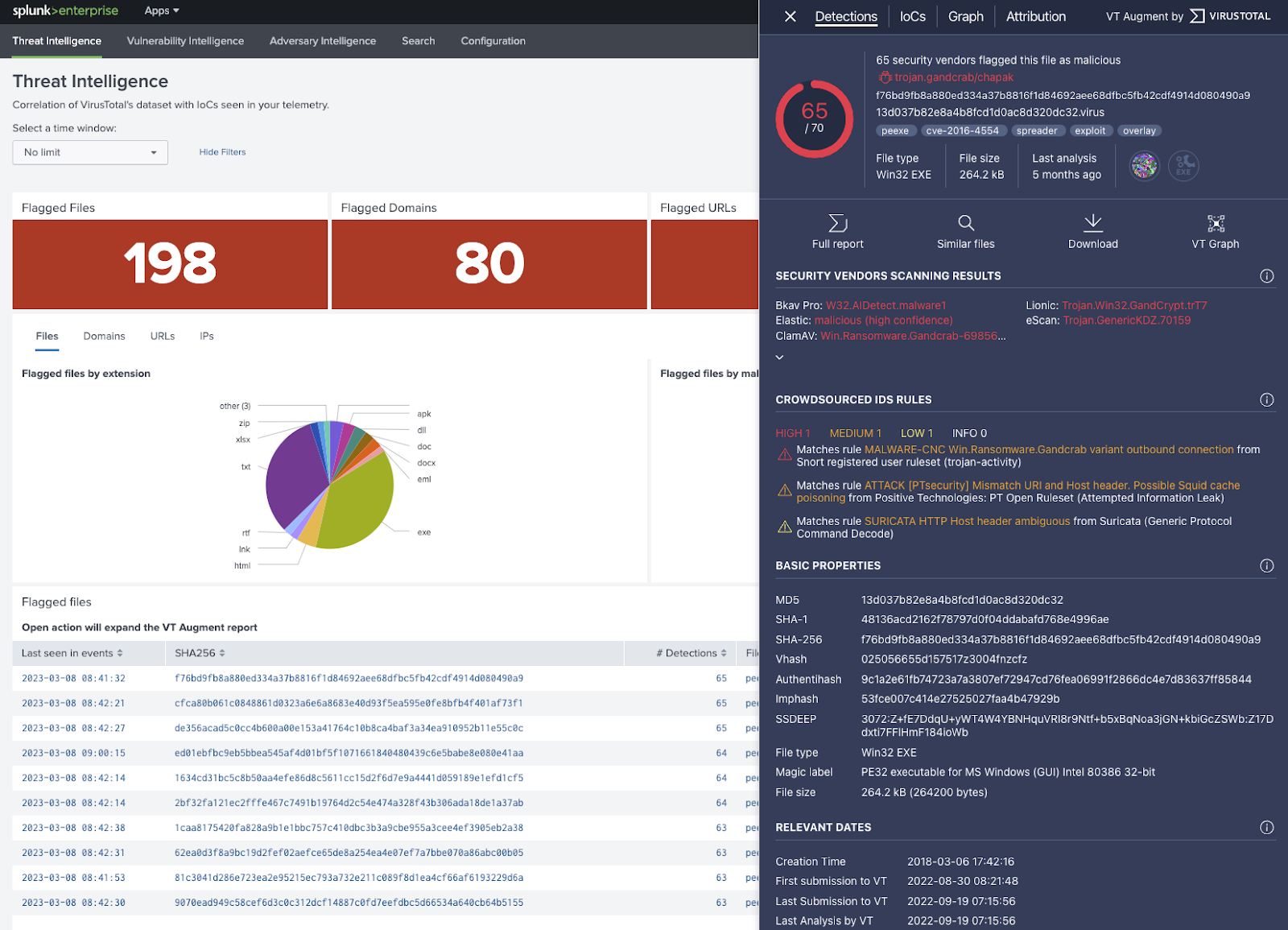
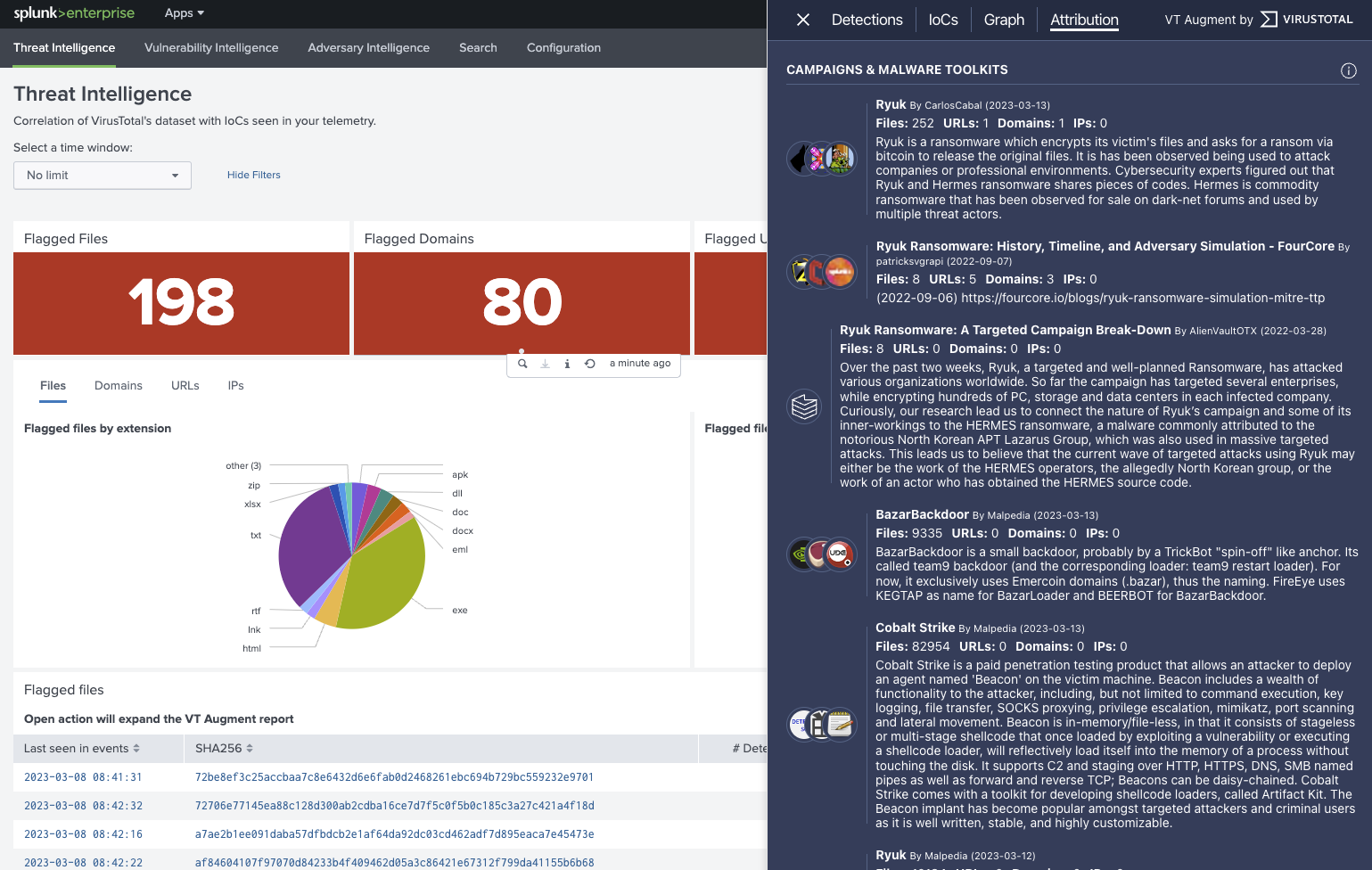
These Crowdsourced Intelligence cards do not only provide a detection 2nd opinion but also in-depth static, dynamic, code and threat graph analysis allowing analysts to make faster and more accurate decisions. Moreover, when available, the embedded report will add a layer of attribution describing campaigns, malware toolkits and threat actors tied to a given flagged IoC. 
Automatically prioritize threats with enrichment and triage via scheduled queries

The aforementioned command-line driven enrichment can actually be automated in the plugin’s configuration (Correlation Settings). 

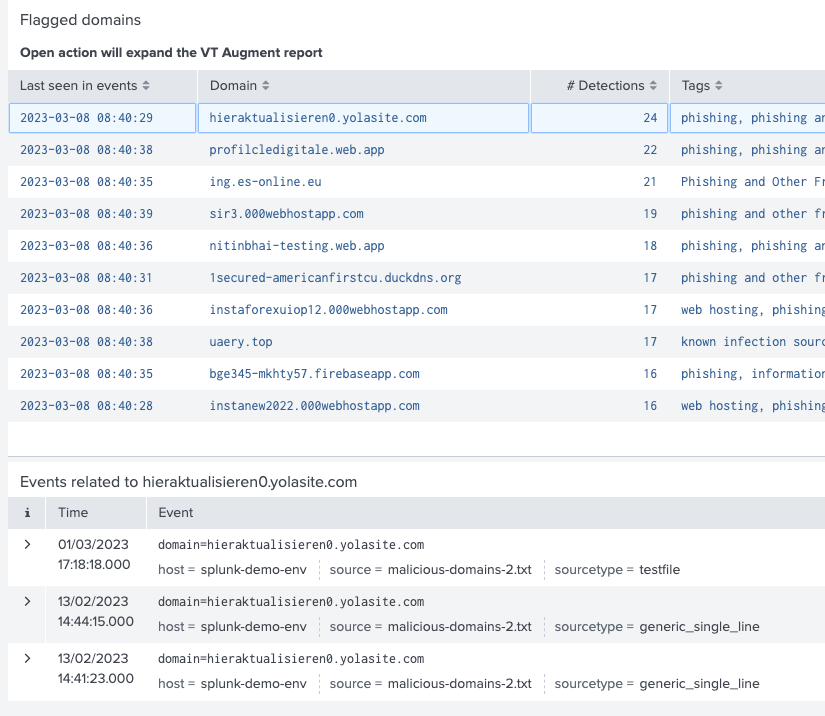
Upon doing so, any notable findings (flagged files, domains, IPs or URLs) will be called out in the Threat Intelligence view, which is both a dashboard and reporting vehicle summarizing malicious activity seen in your environment:

The flagged IoCs are contextualized with relevant data points such as the threat family or category, and upon clicking on them a table opens up with all events in which the pertinent IoC was seen, which tremendously expedites investigations.
Reduce exploitation risk by prioritizing patch application

The Vulnerability Intelligence view is also populated with correlations coming from automatic enrichment. It allows SOC teams to implement vulnerability prioritization. Some logs that are dumped into Splunk come from email gateways, firewalls and other solutions that have network perimeter visibility. These logs are a good reflection of what an organization’s threat landscape is, even when a security solution has stopped a threat, fully tailored intelligence can be derived from them.

Files submitted to VirusTotal are tagged with any CVEs for vulnerabilities that they might be exploiting. This means that VirusTotal allows you to understand which vulnerabilities are truly being abused in-the-wild by attackers as opposed to those for which there is only proof of concepts. 

Security teams often prioritize vulnerabilities based on their severity as reflected in the generic vulnerability report. This is suboptimal, it fully ignores whether the vulnerability is being actively exploited and whether you are actually being hit by exploits targeting it. 

VT4Splunk runs through all your events, extracts hashes seen in them, identifies those that are tagged in VirusTotal with CVEs and summarizes the findings in the Vulnerability Intelligence view. This allows you to implement a tailored vulnerability management strategy that represents the intersection of your organization’s threat landscape and in-the-wild exploitation. 


Again, clicking on any of the highlighted CVEs will open up a table listing all those files seen in your environment and abusing the pertinent vulnerability, and all those events in which those hashes were seen.

Identify threats dwelling undetected in your environment with Adversary Intelligence

VirusTotal is the richest and most actionable Crowdsourced Threat Intelligence suite, as such, its firehose of threats and sightings is often overwhelming. Security teams need to focus on what’s truly relevant for them and often prioritize incident response and threat handling based on the threat actors behind them.

We recently rolled out threat {campaign, toolkit, actor} cards in VT ENTERPRISE. These reports summarize threat campaigns/actors, their motivations, targeted industries, source regions, etc. They also provide actionable intelligence such as related IoCs, TTPs, in-the-wild geo+time activity telemetry, {YARA, Sigma, IDS} rules to detect them, online reporting, etc.

If your account has access to the aforementioned Threat Landscape module, VT4Splunk will also populate an “Adversary Intelligence” view flagging any campaigns/toolkit or actors seen in your environment:
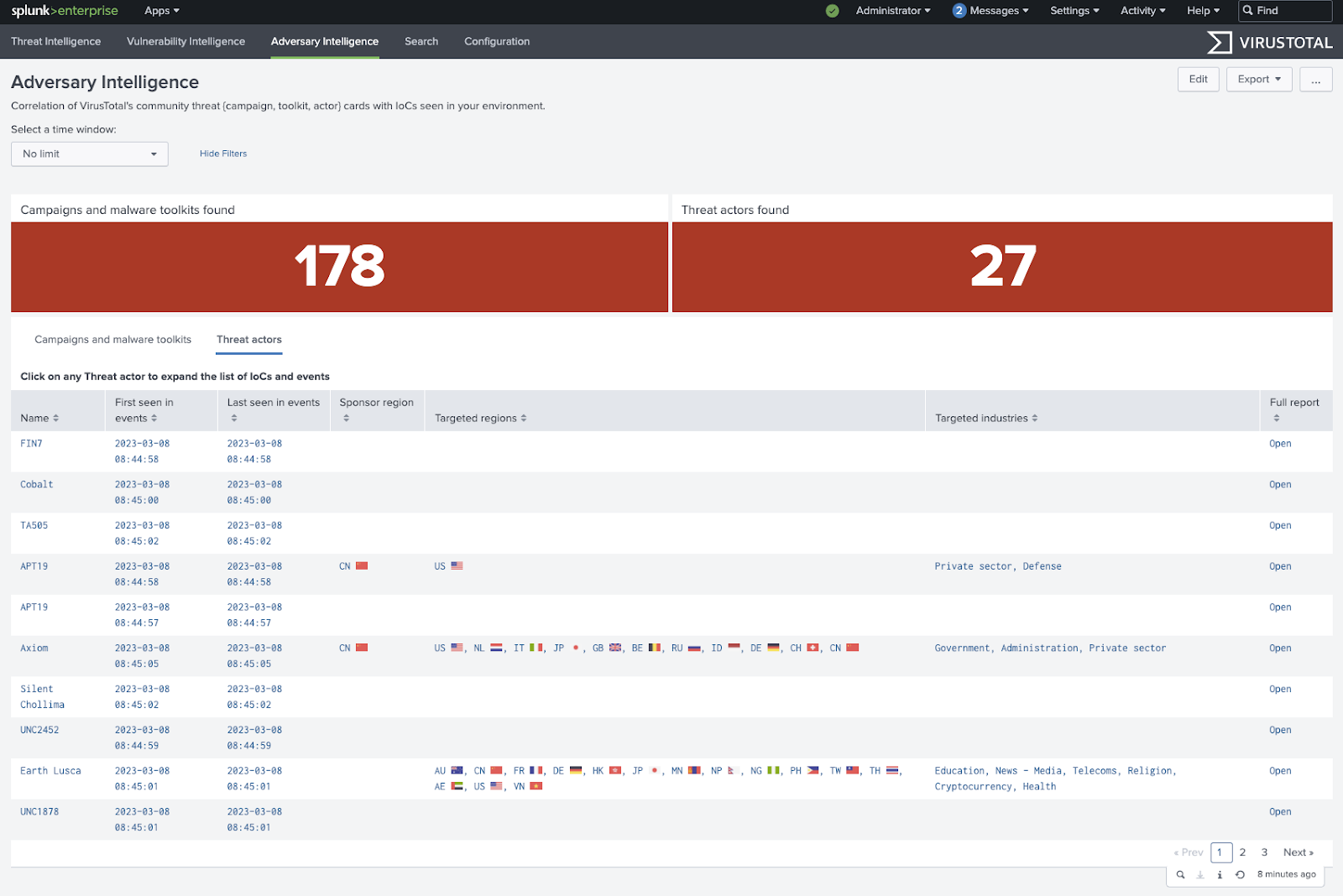
Yet again, upon clicking on an identified campaign/toolkit or actor, the associated IoCs and events in which they are contained will open up. This allows security teams to focus on more severe threats first as opposed to script kiddies, mass malware or generic ecrime. 

Similarly, all of the flagged items have a shortcut to jump into VirusTotal’s report about the given campaign/toolkit/actor, where you can continue to investigate and dive into things such as their geographical and time-based activity:

What’s coming next?

This is by no means the end of the road for VT4Splunk, we have many features in the making. Over the coming months, among other things, we will:

  • Add a MITRE ATT&CK view summarizing TTPs seen in your environment, through the dynamic analysis to MITRE ATT&CK mappings that VirusTotal sandboxes perform.

  • Incorporate a tab summarizing adversary TTPs into the Adversary Intelligence view, providing a more focused understanding of the modus operandi of identified actors in particular. 

  • Democratize threat hunting with one-click canned hunts that will act on the correlation of your events with VirusTotal analysis metadata and relationships.

  • Enhance detection with tailored threat feeds based on subscriptions to specific threat campaign/toolkit/actor cards, Livehunts and scheduled VT Intelligence queries. 

  • Implement multi-layered detection by allowing users to apply crowdsourced Sigma rules from VirusTotal to their own telemetry, acting as event based/behavioral pattern detection and thus complementing the rest of their security stack. 

Please do not hesitate to join us next March 30th, when we will host along with Splunk a webinar to show how to do security investigations with Splunk and VirusTotal. Register here!

Happy hunting!


Tuesday, March 07, 2023

Threat Hunting with VirusTotal - Episode 2

Last week we conducted the second episode of our “Threat Hunting with VirusTotal” open training session, where we covered YARA services at VirusTotal. We focused on practical aspects of YARA rules providing real life examples of infamous malware and historical APT attacks. You can find the video recording on Brighttalk and Youtube, as well PDF version of the slides, where you can quickly copy-paste interesting rule patterns and explore attached documentation links. 
As in our previous session we received lots of inquiries that we decided to cover separately in this blog post.

1. Can you explain a bit more on the water mark usage in docs. How can we hunt using this? Also, how can we create a watermark as well?
As a quick example, here is the article describing the process of adding an invisible watermark in a PDF document. You can deploy a Livehunt YARA rule detecting this watermark and be notified every time your document is uploaded to VirusTotal.

2. Do you have tools helping you write YARA rules to find more easily nested item properties and syntax linting?
Recently we introduced a new YARA editor with pop-up suggestions, rule templates and new syntax highlighting, it's live on both Retrohunt and Livehunt, check it out!
Also you can leverage VT Diff to help you find the most relevant entities to detect.

New YARA rule editor was deployed recently on Retrohunt/Livehunt

3. Whom to reach out for accidentally uploaded sensitive files removal?
The official (and by far) fastest way is making request to our tech support, also available for any other technical questions.
 
4. Is VT aware of CrowdStrike's new memory scanning feature? Can we hunt process injected codes?
Scanning Memory dumps with YARA is something we are working in, so stay tuned for the latest updates in our social media and VT blog.

5. When might we expect to be able to search further back than a year in Retrohunt?
We are now collecting customers' feedback on this feature. If you are interested, please feel free to submit this form (visible after checking the “Full history” option) or to directly reach out

Express your interest in Full History Retrohunt

6. Are there courses for learning YARA that you recommend? Does Virustotal provide some kind of training for this subject? Is it free or paid? Do you suggest some kind of training to become a threat hunter?
Thank you for your interest! We are working on that kind of trainings and trying to find the best approach to deliver such content, stay tuned! At the moment, you can check out our Youtube channel for a number of tips & tricks videos as well as VirusTotal walkthrough materials. Plus, we have a dedicated “Applied YARA training”

7. Is VirusTotal planning to implement a built-in YarGen capability? So I can just search for samples, check which ones I want a rule for, and then create a rule?
You described the functionality of our own diff tool and YARA generator that we called VT Diff. You can find the quick demonstration at the end of the training session, as well as documentation provided here.

8. Would be nice to have an option to remove hits from VT Diff results that are clean codes from libraries, just like yarGen. Just an idea to consider :)
How can we delete/edit/update Diff results?
Thanks for your request! We will check this out.

9. Does VTDiff have limitations on what file types it can accept? For example, when I try to create a VTDiff session for OneNote extensions, with file type ".one" I get an error. But I don't get an error when creating a separate search for .exe files.
That depends on the specific error, but I assume you are getting “Need to give exclusion list for filetype one” error. Please check this manual for a quick fix.

10. How would you adjust the rule "SUSP_NVIDIA_Leak_Compromised_Cert_Mar22_1" if the timestomping was involved? Not sure if that can play a role based on the intel.
Compilation timestamp check is a nice way to filter out False Positives, but not the only one. If you want to avoid timestomping, you might want to use another legitimacy indicator, it could be the first submission date to VT (vt.metadata.first_submission_date) or any other signatures you find relevant to the original Nvidia software.

Rule to detect files signed with Nvidia leaked certificates

11. Can we use wildcards/regex while searching with the VT YARA module?
Absolutely! You are free to use wildcards for hexadecimal strings and regular expressions for text strings, just as in regular YARA.  

12. Can we expect to have the macho YARA module for Livehunt/Retrohunt rules? 
Historically there were a couple of security issues with this module, preventing it from being included in YARA distributions. Recently they’ve been fixed and we are now considering the possibility to include it in Livehunt/Retrohunt services.

13. Are you planning the next episode?
Yes, our open training will be delivered quarterly.

14. When you have samples that have come back from a YARA rule, what is the best way to investigate them and check their relevance? Behavior tab? Content?
That depends on the specific samples. If we are talking about some short script you can instantly check its relevance in the Content tab. If it's a compiled executable it makes sense to check the Behaviour tab first. Checking the Relations tab is also very important to me, you can quickly get lots of valuable info such as known distribution hosts/c2 address/dropped files/parent files/etc. 

15. Can we do this with the free version? Can this feature be available for independent paid users?
VT Intelligence and VT Hunting are only available starting VT Enterprise packages.

16. Is there a library of hunts for certain malwares?
VirusTotal maintains a collection of crowdsourced rules provided by third parties, you can find details on the repositories we ingest in our Contributors list. You can also explore all the YARA rules with the recently introduced interface for VT Hunting, with filters for name and author also available.

You can now explore a full list of crowdsourced YARA rules used by Virustotal

17. Can the "vt" module be used as a file search modifier?
We are working on bringing the same functionality to VT Hunting and VT Intelligence services, let us know if you miss anything.

18. Are there any threat intelligence operations you would recommend as a good first step towards leveraging automations using VTI API? Intent is to bring more awareness into threats that may impact an organization. 
A high level example being malicious artifacts collected from an email protection platform to help generate content filters within VTI searches. In this particular case, what would be your recommendations for automation aimed at highlighting similar records of interest?
With API you can literally fetch all available information for any specific entity in VirusTotal. Here you can find our recent APIv2 to v3 migration guide where you can find some examples. 
For emails, you can automate the process of checking any attached file or uploading it to VirusTotal. Then you can check the number of submissions to understand the file's popularity or email parents to get other emails containing this file as an attachment. You can actually execute any other VT Intelligence query with our API, just as you do manually.

19. Decryption is cool, do you dump it from the mem? 
Specific implementation depends on the sandbox. It’s usually based on crypto function hooks.

20. How can I download the YARA modules mentioned in the talk?
Most of the specified modules are available by default in the official YARA build. The VT module is available only on Retrohunt/Livehunt. Additionally, you can always implement your own module and compile your custom build of YARA.

21. Is there any way to limit the access to my YARA rules in Livehunt, make them visible to me only, team, org, etc?
Your Livehunt rulesets are by default only visible to you. You can share it with any other VT accounts by specifying their email addresses:

Livehunt ruleset sharing options

22. Can we retrieve YARA job results via API?
Yes, you can leverage VT Hunting capabilities using our API, check out the documentation on Retrohunt and Livehunt. In particular, you can list Livehunt notifications with this endpoint.

23. Which of the features you showed falls under quotas?
You can always check all of your current quotas in your work group control interface - https://www.virustotal.com/gui/group/*your_org_name*/users.

Users group consumption

24. How do you determine the magic number in the condition?
The most popular way to do this is to check data at specific offset. For example, uint16(0) == 0x5A4D checks that the first two bytes are 0x5A4D, which is a little-endian representation of 4D5A - MZ signature of Windows executable files.

25. Is there a VT module for Android in YARA rule hunt?
Yes, there is a YARA module for Androguard, which is an Android applications reverse engineering tool. We are now considering the possibility of including it into YARA distribution, so if you have any business needs to use it, please reach out to us.

26. Do I need a special subscription to search for a year? I only see an option for 90 days.
Yes indeed, It is only available for Threat Hunter Pro subscribers.

Different options of VT subscription

27. When I'm searching for some samples I want to find them only if they are in ZIP/RAR/etc archives. My IOCs are for the files, but it's the zips I want to uncover.
If you are using VT Intelligence searches, you can leverage the have:compressed_parents search modifier and then pivot to the parent files. 

28. Thanks for the first seen tidbit. As far as the LiveHunt result alerts, do they repeat? I've set up a few and I think I'm getting alerted on the same samples.
Yes, that's the point. You are getting alerted on both newly submitted and rescanned samples. To only get files that are new to VirusTotal feel free to use vt.metadata.new_file in your YARA rules.

29. How can we scale this? Is the point to update "detections" or essentially hunt for the newer functionalities on these samples found through livehunt/retrohunt?
That depends on specific business needs, but usually keeping your YARA rulesets fresh is one of the main goals of a threat hunter.

If you have any other questions, please feel free to reach out.

Happy hunting!


Friday, February 24, 2023

,

Upgrading from API v2 to v3: What You Need to Know

The VirusTotal API is a versatile and powerful tool that can be utilized in so many ways. Although it is commonly used for threat intelligence enrichment and threat analysis, the potential uses are virtually limitless. The latest version, VirusTotal API v3, is continuously updated with new features to enhance its capabilities with every new release.

With this post we want to help you understand its potential and, in case you are a VT API veteran, help you migrate from API v2 to API v3 to unleash its full potential.

To simplify the process of adopting and migrating to VirusTotal API v3, we have updated the official documentation with a specific section dedicated to this purpose. We also created a GitHub repository with working examples. In the next few weeks we will host a webinar showing you cool use cases you can implement with VT API, so stay tuned!


Why use VT API v3?

The migration guide describes in detail most API v3 benefits, including:

  • Endpoints for all VirusTotal products and scanners. VT users can access all of VirusTotal’s tools through a single API, simplifying the integration process.
  • User and group management helping administrators to automate managing access and accounts, as well as tracking usage across your team.
  • Extra relevant information for file, URL, domain and IP reports. VT API v3 provides additional information for all file, URL, domain and IP reports, including metadata and context.
  • REST-based, with predictable, resource-oriented URLs. VirusTotal API v3 uses a RESTful architecture, following a standard set of design principles for building web services with HTTP methods accessed through predictable, resource-oriented URLs, making it easier to use and integrate with other tools.
  • MITRE related tactics and techniques seen in file behavior. API v3 provides information on TTPs used by malware samples, as defined by the MITRE ATT&CK framework. This helps understanding the potential impact of a sample and how to respond to any threats.
  • More extensive documentation and code examples based on the Python module. V3 has more extensive documentation and code examples which make it easier for users to get started with the API and integrate it into their workflows.

API v2-v3 Migration Guide

Our migration guide outlines the differences between VT API v2 and v3, touching on aspects such as data formats, available integration with other VT products and features, and what are the API Scripts and client libraries available for each one.

It also details the differences between v2 and v3 endpoints, including differences in requests and responses. The table below summarizes endpoint correspondence between v2 and v3:


One more thing

In addition to the examples provided in the GitHub repository, the official API documentation offers additional cool features.

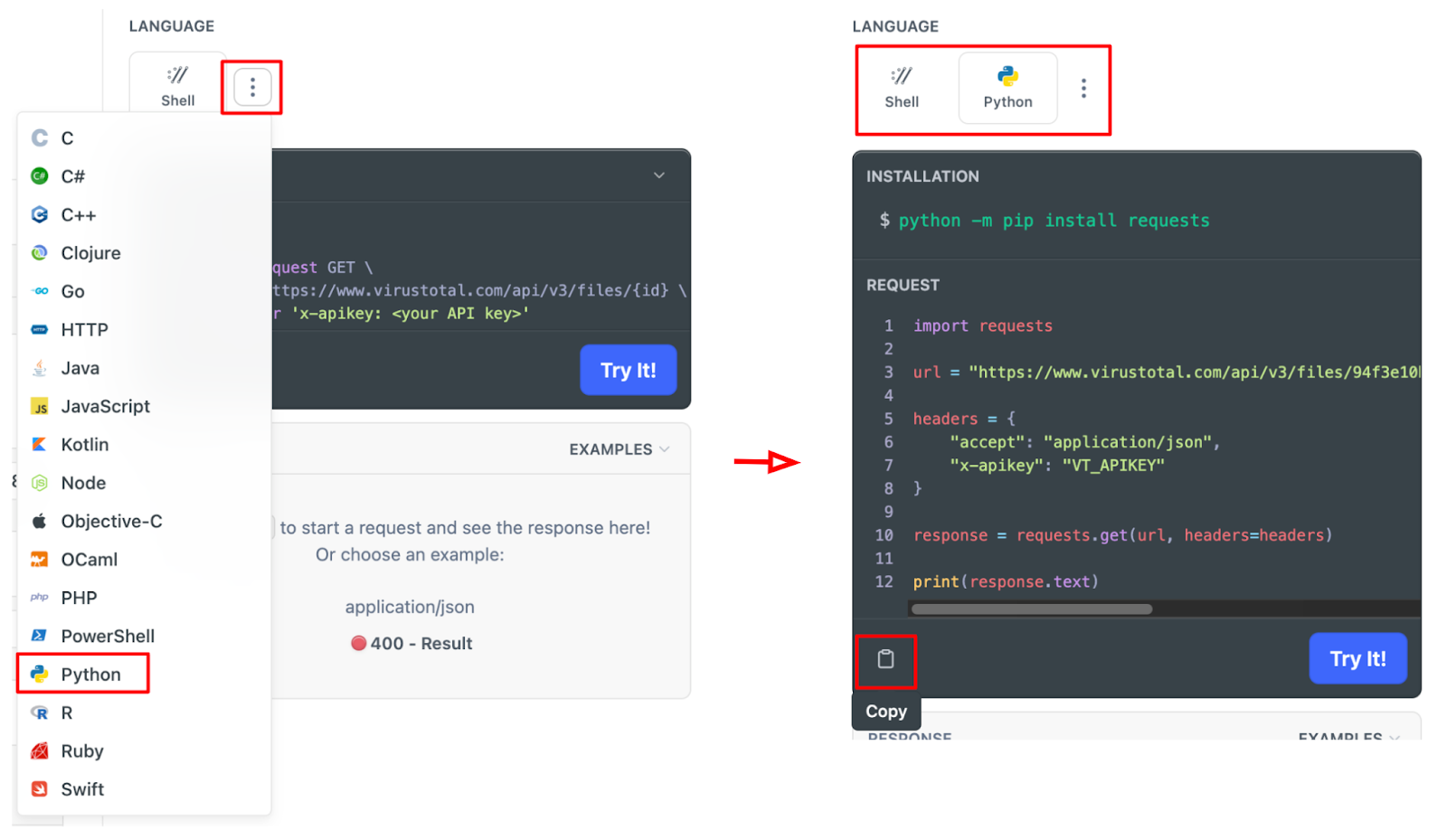
First of all, it provides code examples for every endpoint! The 3 dots button shows a list of available programming languages you can get examples. Select any of them and the code is automatically updated to that language.

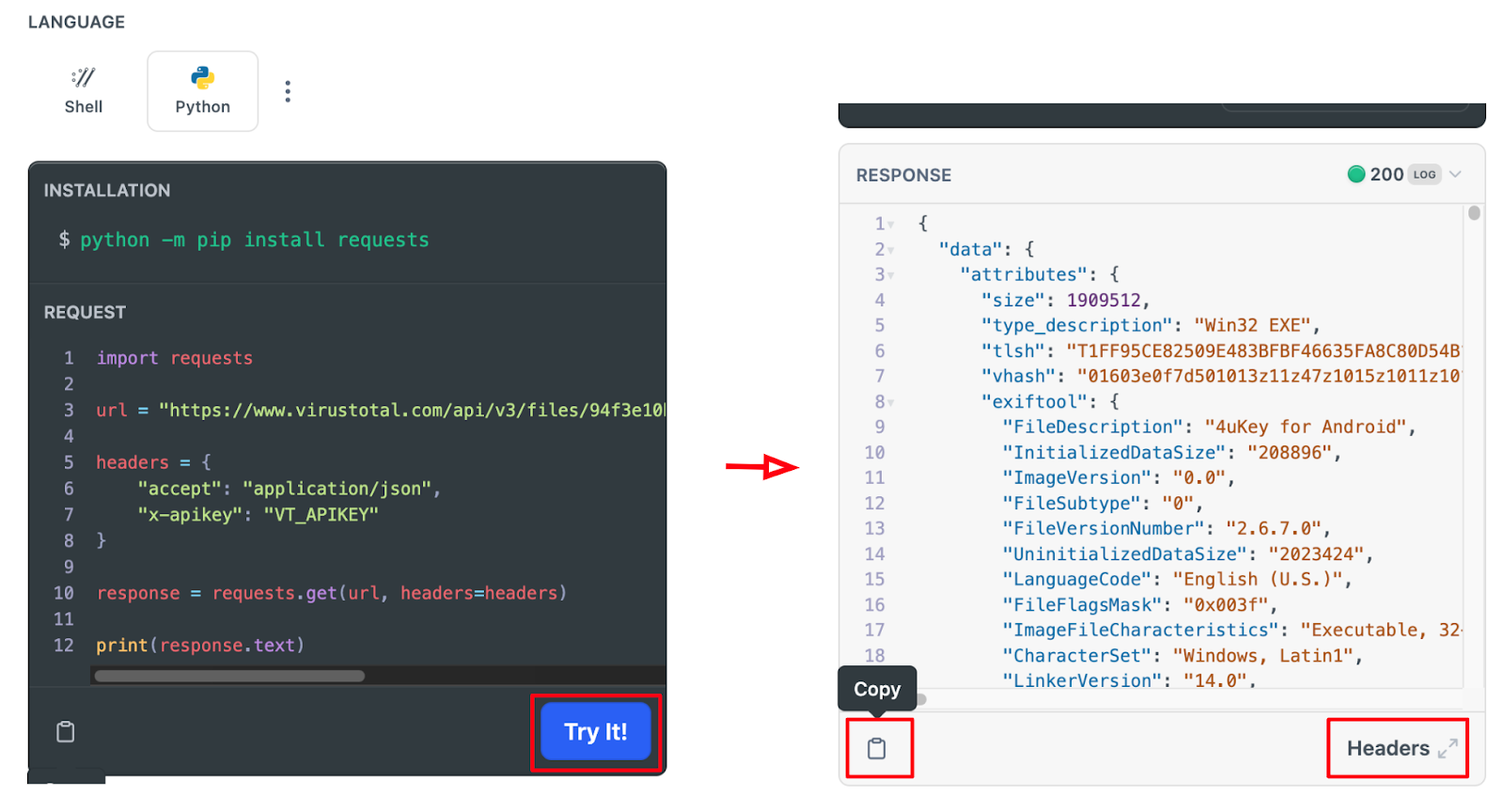
Additionally, the ‘Try It!’ button executes the request for you and shows the JSON result in the ‘RESPONSE’ section under the code snippet.


Conclusions

API v2 served VirusTotal users well for many years, but it lacks some features required to any modern professional API. Don’t panic, you can still continue using API v2 if you really have to. We want to make sure you understand the advantages of using v3 and provide you with everything needed to make v2 to v3 transition as smooth as possible.

Probably the main advantage is that API v3 is VirusTotal’s standard, and some day in the future we will have to sunset v2. Nevertheless, in v3 we make sure that every service and feature has its corresponding endpoint. That includes many functionalities not available in v2, like user and group management, threat landscape, Graphs or Private Scanning, among others. Moreover, API v3 provides extended data on VT reports for any observable!

We hope the extensive documentation and code examples will help you master API v3 very soon! If you have any suggestions or just want to share feedback, please feel free to reach out here.

Happy hunting!

Thursday, February 02, 2023

, , ,

Is malware abusing your infrastructure? Find out with VirusTotal!

Any organization’s infrastructure might inadvertently be abused by attackers as part of a malicious campaign. It is therefore important to monitor any suspicious activity. VirusTotal can help you identify these threats and improve your threat detection and protection capabilities. In this post we will first analyze different available search modifiers and then we will provide different templates to quickly deploy infrastructure monitoring rules.


Hunting for infrastructure abuses

VirusTotal Intelligence allows you to search VT’s extensive dataset for domains, URLs, IP addresses and files. You can find some examples on using search modifiers in our previous blog post.
You can use entity: domain or entity: url along parent_domain (entity:domain parent_domain:file.io or entity:url parent_domain:file.io) search modifiers to find VT details on your infrastructure. You can always adjust the results with the antivirus detection ratio (positives or p keyword).
For IP addresses we can use the ip search modifier, also valid for IP ranges:
The domain/URL/IP report shows the assigned category by antivirus vendors along with the detection ratio. One of the most interesting tabs is “Relations”, where we can check any suspicious samples communicating with it.
Indeed, we can use some additional modifiers to find networking entities having interesting relationships. We can also use them to immediately flag if there is any domain or IP in our infrastructure communicating with any suspicious file.
Search modifier Description
detected_communicating_files_count # of detected files contacting the given domain or IP address when executed in a sandbox
communicating_files_max_detections maximum # of detected files communicating with a given domain or IP address
detected_downloaded_files_count # of detected files downloaded by VirusTotal from a URL hosted under a given domain or an IP address
downloaded_files_max_detections maximum # of detected files downloaded by VirusTotal from a URL hosted under a given domain or an IP address
detected_referring_files_count # of detected files containing the given domain or IP address in their strings
referring_files_max_detections maximum # of detected files containing the given domain or IP address in their strings
detected_urls_count # of detected URLs hosted under a given domain or IP address
urls_max_detections maximum # of detected URLs hosted under a given domain or IP address

Files
The most generic (although noisy) way to find files potentially targeting your infrastructure is the static one checking files’ content. This returns any file matching your IP addresses, domains or URLs in its content’s strings. In this case it is not possible using IP ranges.
❗Please notice that the content search modifier can't be used in combination with the entity modifier in the same query.
This type of query is useful when malware’s infrastructure is not obfuscated and statically found in the sample, which is not common.
There is a better way through dynamic analysis. All samples in VirusTotal are detonated in several sandboxes, which produces valuable data on how it behaves dynamically. Many samples implement anti-sandboxing techniques, so it is not always possible to get all the details.
The best search modifier to find samples communicating with a given URL, domain or IP through sandbox detonation is behaviour_network:
The contacted_ip search modifier also allows specifying IP address ranges:
Besides dynamic execution, you can check if VirusTotal has ever seen any particular suspicious samples being downloaded from your infrastructure. For this you can use the “In the Wild” (itw) search modifier: entity:file itw:file.io p:1+

Do it yourself!
Let’s say you are interested in tracking fresh suspicious samples submitted to VirusTotal communicating your company’s infrastructure (in this case consisting of 2 IPs resolving to our file.io domain). The “first submission” (fs) search modifier gets us files submitted since december last year:
This query returns 4 files that are detected as malicious by at least 12 antivirus engines.
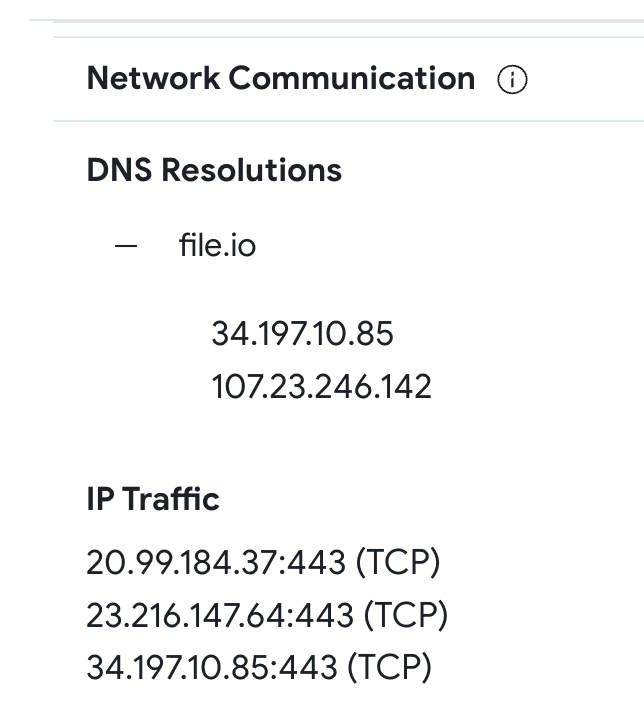
All samples work in the same way, let’s focus on the first one - 5dd5394ffb7b363a23ba93b7d78d626a133d39e4ea93486bbb8e150db6ff4757. In the Behavior tab -> Network Communication section, we confirm the file resolves “file.io” to one of the IP addresses used in our query.
The Content tab shows an encoded Powershell.
In short, this dropper downloads another sample from https://file[.]io/DseDcCxBoGyr, renames it as MicMute_0.1.8.4_Beta_Setup.exe and executes it.

Automated monitoring

We can automate monitoring our infrastructure in two ways.

1. Using the VT API
With VT API v3 you can use the Advanced corpus search endpoint to use VTI queries like the ones described above. This endpoint requires your premium API key and your URL Safe encoded VT Intelligence query. The example below uses CURL for the the previous query:
curl --request GET --url 'https://www.virustotal.com/api/v3/intelligence/search?query={entity%3Afile%20behaviour%5Fnetwork%3Afile%2Eio%20%28contacted%5Fip%3A107%2E23%2E246%2E142%20or%20contacted%5Fip%3A34%2E197%2E10%2E85%29%20p%3A10%2B%20fs%3A2022%2D12%2D01%2B}' --header 'x-apikey: <your API key>'
The result will be a JSON with the results of the query.
You can also use the official VirusTotal Python client library. The following is an example for the same query:
import "vt"

QUERY = "entity:file behaviour_network:file.io (contacted_ip:107.23.246.142 or contacted_ip:34.197.10.85) p:10+ fs:2022-12-01+"

with vt.Client(API_KEY) as client:
 it = client.iterator('/intelligence/search', params={"query": QUERY })
 for file_obj in it:
  print(f'{file_obj.id}')
Please note that queries using “In the Wild” (itw) search modifier cannot be translated (yet) to YARA rules. To automate these queries we encourage you to use the VirusTotal API.

2. Using YARA
YARA allows creating file matching rules based on textual or binary patterns. Each rule consists of a set of strings and a boolean condition. You can deploy Livehunt YARA rules in VirusTotal and get a notification every time a new submitted file matches your rules. Let’s learn how to create basic YARA rules for monitoring your infrastructure.
The first example is based on file content. It will match files containing any of the declared IP addresses, domains or URLs.
import "vt"

rule infrastructure_monitoring {

 meta:
  description = "Description of the logic of the use case and its goal."
  author = "VT Team"

 strings:
  // assets
  $ip1 = "X.X.X.X"
  $ip2 = "Y.Y.Y.Y"
  $url1 = "companyexampledomain.com/url?p=5"
  $url2 = "companyexampledomain.es/url2"
  $domain1 = "companyexampledomain.com"
  $domain2 = "companyexampledomain.es"

 condition:
  any of ($ip*,$domain*,$url*)
}
By its very nature YARA works only on static file properties, which would be limiting as we have discussed. Happily, we can use VirusTotal's custom YARA VT module, which extends the common capabilities of YARA to allow you to check sample behavior, metadata, signatures, submissions, etc. When it comes to network activity, this module exposes information about DNS resolutions, established IP connections, HTTP requests, and even SMTP traffic. The following is a list of the most interesting properties we can use for hunting:
  • vt.behaviour.dns_lookups: this field is a list of DNS resolutions performed by the sample. For each item or resolution in the list, it provides the hostname and the resolved IP address (resolved_ips). We could use this to detect if a sample dynamically tries to contact with a given domain, for example:
    dns_lookup.hostname contains "companyexampledomain.com"
  • vt.behaviour.ip_traffic: this field is a list of established IP connections and it provides the destination IP address, the port and the transport layer protocol (destination_ip, destination_port, transport_layer_protocol) for each connection.
    ip_traffic.destination_ip == "X.X.X.X"
  • vt.behaviour.http_conversations: this field is a list of HTTP requests performed by the sample. Every item in the list provides context information such as request URL, method and headers (url, request_method, request_headers), and response headers, status code and body filetype (response_headers, status_code, response_body_filetype).
    http_conversations.url contains "companyexampledomain.com/url?p=5"
  • vt.behaviour.smtp_conversations: this field is a list of SMTP requests. It provides many features for every item in the list such as the recipient and the sender (message_from, message_to, message_cc, message_bcc), email’s subject and body (subject, html_body, txt_body), and SMTP server related information such as the host name, IP address and port (hostname, destination_ip, destination_port) among others.
    smtp_conversations.hostname contains "companyexampledomain.com"
We can now replicate in YARA the search query we used to find samples dynamically communicating with certain IPs:
import "vt"

rule infrastructure_monitoring {

 meta:
  description = "Description of the logic of the use case and its goal."
  author = "VT Team"
  // assets
  ip1 = "34.197.10.85"
  ip2 = "107.23.246.142"

 condition:
  // Match only samples detected as malicious by more than 9 AVs
  vt.metadata.analysis_stats.malicious > 9 and (
   // Check the list of established IP connections
   for any ip_traffic in vt.behaviour.ip_traffic : (
    // Match samples communicating to any of my IP addresses
    ip_traffic.destination_ip == "34.197.10.85" or
    ip_traffic.destination_ip == "107.23.246.142"
   )
  )
}
Please note the above YARA also takes advantage of the VT module to check the minimum number of antivirus detections.
Unfortunately, ther's no easy way to check for IP ranges in YARA. We will cover more advanced cases in our next post on this topic. Additionally, the use of the VT module is limited to Livehunts, but we hope will be soon available for Retrohunts too.

Conclusions

As a takeaway material, we have prepared a YARA rule template you can use to monitor suspicious samples interacting with your infrastructure. You can edit and fine tune it based on your needs by removing conditions or adding new ones.
import "vt"

rule infrastructure_monitoring {

 meta:
  description = "Description of the logic of the use case and its goal."
  author = "VT Team"

 strings:
  // assets
  $ip1 = "X.X.X.X"
  $ip2 = "Y.Y.Y.Y"
  $url1 = "companyexampledomain.com/url?p=5"
  $url2 = "companyexampledomain.es/url2"
  $domain1 = "companyexampledomain.com"
  $domain2 = "companyexampledomain.es"

 condition:
  // First it checks for strings in sample content
  // This can be potentially noisy, you can consider comment this line
  any of them or

  // Match only samples detected as malicious by more than 10 AVs
  vt.metadata.analysis_stats.malicious > 10 and (
   // Check the list of DNS resolutions performed by the sample
   for any dns_lookup in vt.behaviour.dns_lookups : (
    // Match samples that perform DNS requests for any of my domains
    dns_lookup.hostname contains "companyexampledomain.com" or
    dns_lookup.hostname contains "companyexampledomain.es" or
    // Match samples that resolve to any of my IP addresses
    for any ip in dns_lookup.resolved_ips: (
     ip == "X.X.X.X" or
     ip == "Y.Y.Y.Y"
    )
   ) or

   // Check the list of established IP connections
   for any ip_traffic in vt.behaviour.ip_traffic : (
    // Match samples communicating to any of my IP addresses
    ip_traffic.destination_ip == "X.X.X.X" or
    ip_traffic.destination_ip == "Y.Y.Y.Y"
   ) or

   // Check the list of HTTP requests performed
   for any http_conversations in vt.behaviour.http_conversations : (
    // Match samples communicating to any of my IP addresses
    http_conversations.url contains "companyexampledomain.com/url?p=5" or
    http_conversations.url contains "companyexampledomain.es/url2"
   )
  )
}
❗Please note that YARA doesn’t allow you to implement 2 separate loops consuming the same list of objects.
VirusTotal helps you to automatically monitor and detect samples that target or make use of your network infrastructure. The examples above help you understand the most useful modifiers you can use, but please feel free to explore alternatives you find relevant to filter out noisy results. We recommend a first exploratory manual approach to make sure your searches provide accurate results. After that you can automate your searches using VT API v3, or use Livehunt for deploying YARA rules.
We hope you find this useful, and if you have any suggestions or just want to share feedback please feel free to reach out here. We will be back with a second post with more advanced cases.
Happy hunting!