Tuesday, March 07, 2023

Threat Hunting with VirusTotal - Episode 2

Last week we conducted the second episode of our “Threat Hunting with VirusTotal” open training session, where we covered YARA services at VirusTotal. We focused on practical aspects of YARA rules providing real life examples of infamous malware and historical APT attacks. You can find the video recording on Brighttalk and Youtube, as well PDF version of the slides, where you can quickly copy-paste interesting rule patterns and explore attached documentation links. 
As in our previous session we received lots of inquiries that we decided to cover separately in this blog post.

1. Can you explain a bit more on the water mark usage in docs. How can we hunt using this? Also, how can we create a watermark as well?
As a quick example, here is the article describing the process of adding an invisible watermark in a PDF document. You can deploy a Livehunt YARA rule detecting this watermark and be notified every time your document is uploaded to VirusTotal.

2. Do you have tools helping you write YARA rules to find more easily nested item properties and syntax linting?
Recently we introduced a new YARA editor with pop-up suggestions, rule templates and new syntax highlighting, it's live on both Retrohunt and Livehunt, check it out!
Also you can leverage VT Diff to help you find the most relevant entities to detect.

New YARA rule editor was deployed recently on Retrohunt/Livehunt

3. Whom to reach out for accidentally uploaded sensitive files removal?
The official (and by far) fastest way is making request to our tech support, also available for any other technical questions.
 
4. Is VT aware of CrowdStrike's new memory scanning feature? Can we hunt process injected codes?
Scanning Memory dumps with YARA is something we are working in, so stay tuned for the latest updates in our social media and VT blog.

5. When might we expect to be able to search further back than a year in Retrohunt?
We are now collecting customers' feedback on this feature. If you are interested, please feel free to submit this form (visible after checking the “Full history” option) or to directly reach out. 

Express your interest in Full History Retrohunt

6. Are there courses for learning YARA that you recommend? Does Virustotal provide some kind of training for this subject? Is it free or paid? Do you suggest some kind of training to become a threat hunter?
Thank you for your interest! We are working on that kind of trainings and trying to find the best approach to deliver such content, stay tuned! At the moment, you can check out our Youtube channel for a number of tips & tricks videos as well as VirusTotal walkthrough materials. Plus, we have a dedicated “Applied YARA training”. 

7. Is VirusTotal planning to implement a built-in YarGen capability? So I can just search for samples, check which ones I want a rule for, and then create a rule?
You described the functionality of our own diff tool and YARA generator that we called VT Diff. You can find the quick demonstration at the end of the training session, as well as documentation provided here.

8. Would be nice to have an option to remove hits from VT Diff results that are clean codes from libraries, just like yarGen. Just an idea to consider :)
How can we delete/edit/update Diff results?
Thanks for your request! We will check this out.

9. Does VTDiff have limitations on what file types it can accept? For example, when I try to create a VTDiff session for OneNote extensions, with file type ".one" I get an error. But I don't get an error when creating a separate search for .exe files.
That depends on the specific error, but I assume you are getting “Need to give exclusion list for filetype one” error. Please check this manual for a quick fix.

10. How would you adjust the rule "SUSP_NVIDIA_Leak_Compromised_Cert_Mar22_1" if the timestomping was involved? Not sure if that can play a role based on the intel.
Compilation timestamp check is a nice way to filter out False Positives, but not the only one. If you want to avoid timestomping, you might want to use another legitimacy indicator, it could be the first submission date to VT (vt.metadata.first_submission_date) or any other signatures you find relevant to the original Nvidia software.

Rule to detect files signed with Nvidia leaked certificates

11. Can we use wildcards/regex while searching with the VT YARA module?
Absolutely! You are free to use wildcards for hexadecimal strings and regular expressions for text strings, just as in regular YARA.  

12. Can we expect to have the macho YARA module for Livehunt/Retrohunt rules? 
Historically there were a couple of security issues with this module, preventing it from being included in YARA distributions. Recently they’ve been fixed and we are now considering the possibility to include it in Livehunt/Retrohunt services.

13. Are you planning the next episode?
Yes, our open training will be delivered quarterly.

14. When you have samples that have come back from a YARA rule, what is the best way to investigate them and check their relevance? Behavior tab? Content?
That depends on the specific samples. If we are talking about some short script you can instantly check its relevance in the Content tab. If it's a compiled executable it makes sense to check the Behaviour tab first. Checking the Relations tab is also very important to me, you can quickly get lots of valuable info such as known distribution hosts/c2 address/dropped files/parent files/etc. 

15. Can we do this with the free version? Can this feature be available for independent paid users?
VT Intelligence and VT Hunting are only available starting VT Enterprise packages.

16. Is there a library of hunts for certain malwares?
VirusTotal maintains a collection of crowdsourced rules provided by third parties, you can find details on the repositories we ingest in our Contributors list. You can also explore all the YARA rules with the recently introduced interface for VT Hunting, with filters for name and author also available.

You can now explore a full list of crowdsourced YARA rules used by Virustotal

17. Can the "vt" module be used as a file search modifier?
We are working on bringing the same functionality to VT Hunting and VT Intelligence services, let us know if you miss anything.

18. Are there any threat intelligence operations you would recommend as a good first step towards leveraging automations using VTI API? Intent is to bring more awareness into threats that may impact an organization. 
A high level example being malicious artifacts collected from an email protection platform to help generate content filters within VTI searches. In this particular case, what would be your recommendations for automation aimed at highlighting similar records of interest?
With API you can literally fetch all available information for any specific entity in VirusTotal. Here you can find our recent APIv2 to v3 migration guide where you can find some examples. 
For emails, you can automate the process of checking any attached file or uploading it to VirusTotal. Then you can check the number of submissions to understand the file's popularity or email parents to get other emails containing this file as an attachment. You can actually execute any other VT Intelligence query with our API, just as you do manually.

19. Decryption is cool, do you dump it from the mem? 
Specific implementation depends on the sandbox. It’s usually based on crypto function hooks.

20. How can I download the YARA modules mentioned in the talk?
Most of the specified modules are available by default in the official YARA build. The VT module is available only on Retrohunt/Livehunt. Additionally, you can always implement your own module and compile your custom build of YARA.

21. Is there any way to limit the access to my YARA rules in Livehunt, make them visible to me only, team, org, etc?
Your Livehunt rulesets are by default only visible to you. You can share it with any other VT accounts by specifying their email addresses:

Livehunt ruleset sharing options

22. Can we retrieve YARA job results via API?
Yes, you can leverage VT Hunting capabilities using our API, check out the documentation on Retrohunt and Livehunt. In particular, you can list Livehunt notifications with this endpoint.

23. Which of the features you showed falls under quotas?
You can always check all of your current quotas in your work group control interface - https://www.virustotal.com/gui/group/*your_org_name*/users.

Users group consumption

24. How do you determine the magic number in the condition?
The most popular way to do this is to check data at specific offset. For example, uint16(0) == 0x5A4D checks that the first two bytes are 0x5A4D, which is a little-endian representation of 4D5A - MZ signature of Windows executable files.

25. Is there a VT module for Android in YARA rule hunt?
Yes, there is a YARA module for Androguard, which is an Android applications reverse engineering tool. We are now considering the possibility of including it into YARA distribution, so if you have any business needs to use it, please reach out to us.

26. Do I need a special subscription to search for a year? I only see an option for 90 days.
Yes indeed, It is only available for Threat Hunter Pro subscribers.

Different options of VT subscription

27. When I'm searching for some samples I want to find them only if they are in ZIP/RAR/etc archives. My IOCs are for the files, but it's the zips I want to uncover.
If you are using VT Intelligence searches, you can leverage the have:compressed_parents search modifier and then pivot to the parent files. 

28. Thanks for the first seen tidbit. As far as the LiveHunt result alerts, do they repeat? I've set up a few and I think I'm getting alerted on the same samples.
Yes, that's the point. You are getting alerted on both newly submitted and rescanned samples. To only get files that are new to VirusTotal feel free to use vt.metadata.new_file in your YARA rules.

29. How can we scale this? Is the point to update "detections" or essentially hunt for the newer functionalities on these samples found through livehunt/retrohunt?
That depends on specific business needs, but usually keeping your YARA rulesets fresh is one of the main goals of a threat hunter.

If you have any other questions, please feel free to reach out.

Happy hunting!

Friday, February 24, 2023

,

Upgrading from API v2 to v3: What You Need to Know

The VirusTotal API is a versatile and powerful tool that can be utilized in so many ways. Although it is commonly used for threat intelligence enrichment and threat analysis, the potential uses are virtually limitless. The latest version, VirusTotal API v3, is continuously updated with new features to enhance its capabilities with every new release.

With this post we want to help you understand its potential and, in case you are a VT API veteran, help you migrate from API v2 to API v3 to unleash its full potential.

To simplify the process of adopting and migrating to VirusTotal API v3, we have updated the official documentation with a specific section dedicated to this purpose. We also created a GitHub repository with working examples. In the next few weeks we will host a webinar showing you cool use cases you can implement with VT API, so stay tuned!


Why use VT API v3?

The migration guide describes in detail most API v3 benefits, including:

  • Endpoints for all VirusTotal products and scanners. VT users can access all of VirusTotal’s tools through a single API, simplifying the integration process.
  • User and group management helping administrators to automate managing access and accounts, as well as tracking usage across your team.
  • Extra relevant information for file, URL, domain and IP reports. VT API v3 provides additional information for all file, URL, domain and IP reports, including metadata and context.
  • REST-based, with predictable, resource-oriented URLs. VirusTotal API v3 uses a RESTful architecture, following a standard set of design principles for building web services with HTTP methods accessed through predictable, resource-oriented URLs, making it easier to use and integrate with other tools.
  • MITRE related tactics and techniques seen in file behavior. API v3 provides information on TTPs used by malware samples, as defined by the MITRE ATT&CK framework. This helps understanding the potential impact of a sample and how to respond to any threats.
  • More extensive documentation and code examples based on the Python module. V3 has more extensive documentation and code examples which make it easier for users to get started with the API and integrate it into their workflows.

API v2-v3 Migration Guide

Our migration guide outlines the differences between VT API v2 and v3, touching on aspects such as data formats, available integration with other VT products and features, and what are the API Scripts and client libraries available for each one.

It also details the differences between v2 and v3 endpoints, including differences in requests and responses. The table below summarizes endpoint correspondence between v2 and v3:


One more thing

In addition to the examples provided in the GitHub repository, the official API documentation offers additional cool features.

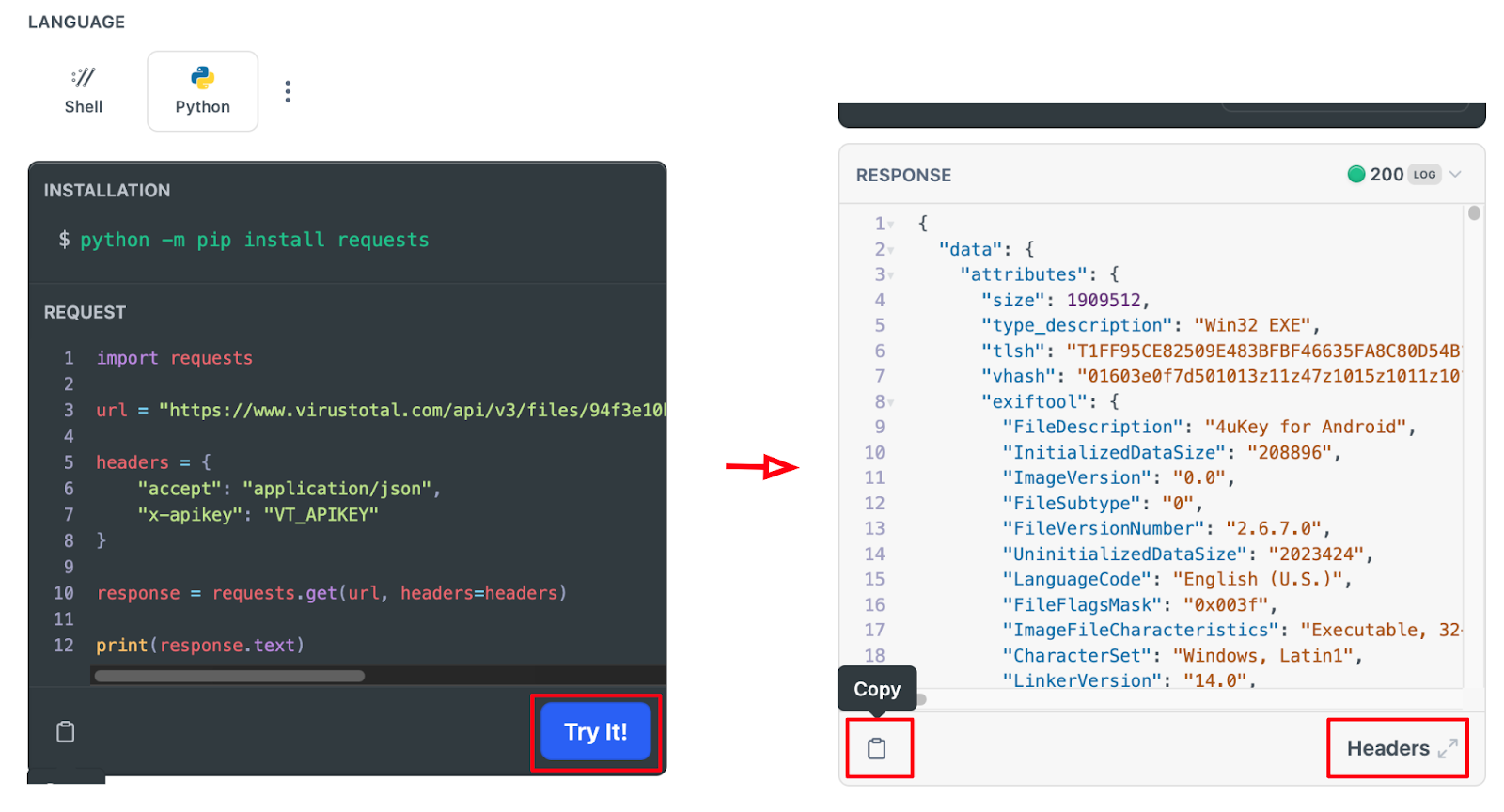
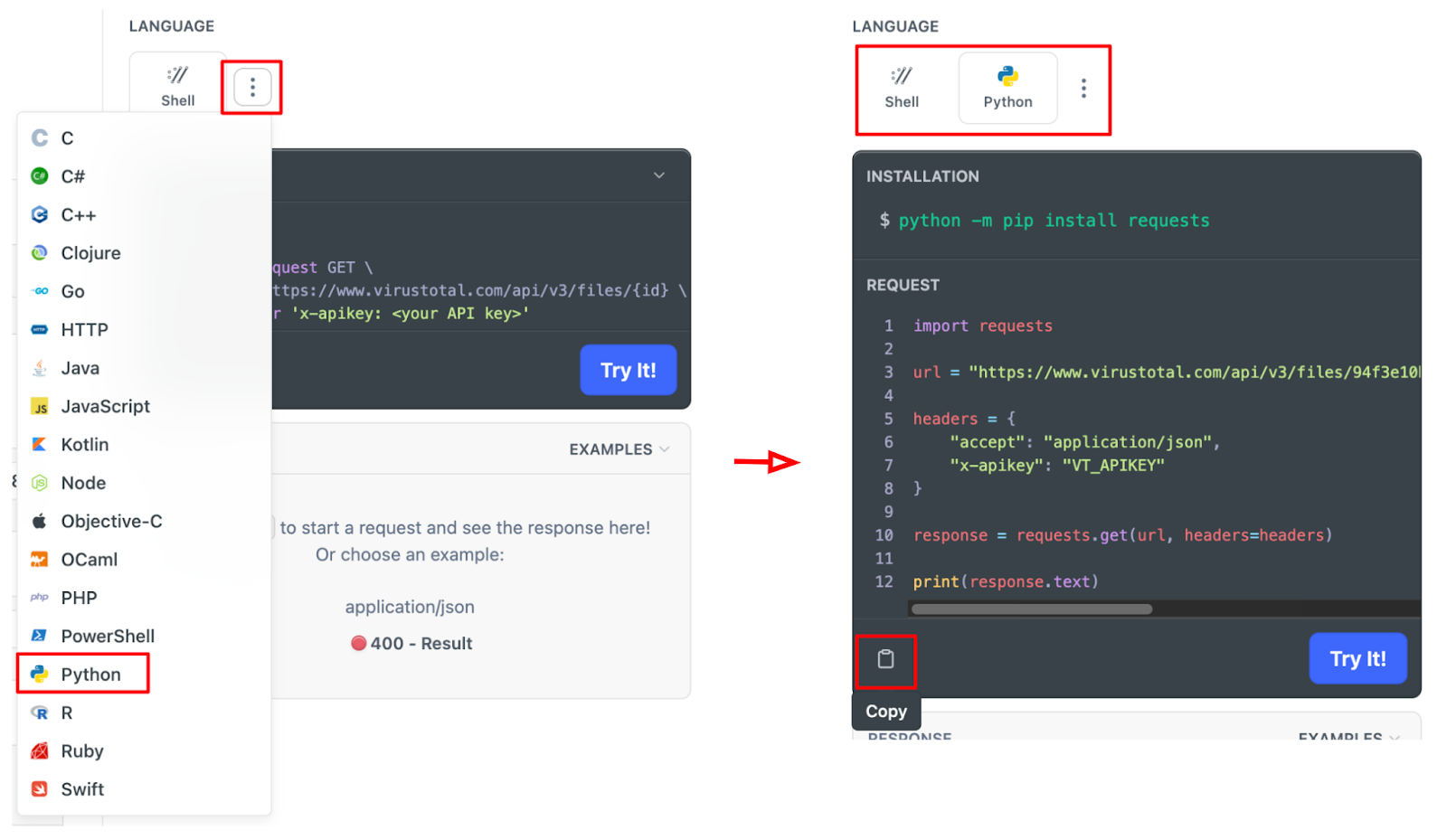
First of all, it provides code examples for every endpoint! The 3 dots button shows a list of available programming languages you can get examples. Select any of them and the code is automatically updated to that language.

Additionally, the ‘Try It!’ button executes the request for you and shows the JSON result in the ‘RESPONSE’ section under the code snippet.


Conclusions

API v2 served VirusTotal users well for many years, but it lacks some features required to any modern professional API. Don’t panic, you can still continue using API v2 if you really have to. We want to make sure you understand the advantages of using v3 and provide you with everything needed to make v2 to v3 transition as smooth as possible.

Probably the main advantage is that API v3 is VirusTotal’s standard, and some day in the future we will have to sunset v2. Nevertheless, in v3 we make sure that every service and feature has its corresponding endpoint. That includes many functionalities not available in v2, like user and group management, threat landscape, Graphs or Private Scanning, among others. Moreover, API v3 provides extended data on VT reports for any observable!

We hope the extensive documentation and code examples will help you master API v3 very soon! If you have any suggestions or just want to share feedback, please feel free to reach out here.

Happy hunting!

Thursday, February 02, 2023

, , ,

Is malware abusing your infrastructure? Find out with VirusTotal!

Any organization’s infrastructure might inadvertently be abused by attackers as part of a malicious campaign. It is therefore important to monitor any suspicious activity. VirusTotal can help you identify these threats and improve your threat detection and protection capabilities. In this post we will first analyze different available search modifiers and then we will provide different templates to quickly deploy infrastructure monitoring rules.


Hunting for infrastructure abuses

VirusTotal Intelligence allows you to search VT’s extensive dataset for domains, URLs, IP addresses and files. You can find some examples on using search modifiers in our previous blog post.
You can use entity: domain or entity: url along parent_domain (entity:domain parent_domain:file.io or entity:url parent_domain:file.io) search modifiers to find VT details on your infrastructure. You can always adjust the results with the antivirus detection ratio (positives or p keyword).
For IP addresses we can use the ip search modifier, also valid for IP ranges:
The domain/URL/IP report shows the assigned category by antivirus vendors along with the detection ratio. One of the most interesting tabs is “Relations”, where we can check any suspicious samples communicating with it.
Indeed, we can use some additional modifiers to find networking entities having interesting relationships. We can also use them to immediately flag if there is any domain or IP in our infrastructure communicating with any suspicious file.
Search modifier Description
detected_communicating_files_count # of detected files contacting the given domain or IP address when executed in a sandbox
communicating_files_max_detections maximum # of detected files communicating with a given domain or IP address
detected_downloaded_files_count # of detected files downloaded by VirusTotal from a URL hosted under a given domain or an IP address
downloaded_files_max_detections maximum # of detected files downloaded by VirusTotal from a URL hosted under a given domain or an IP address
detected_referring_files_count # of detected files containing the given domain or IP address in their strings
referring_files_max_detections maximum # of detected files containing the given domain or IP address in their strings
detected_urls_count # of detected URLs hosted under a given domain or IP address
urls_max_detections maximum # of detected URLs hosted under a given domain or IP address

Files
The most generic (although noisy) way to find files potentially targeting your infrastructure is the static one checking files’ content. This returns any file matching your IP addresses, domains or URLs in its content’s strings. In this case it is not possible using IP ranges.
❗Please notice that the content search modifier can't be used in combination with the entity modifier in the same query.
This type of query is useful when malware’s infrastructure is not obfuscated and statically found in the sample, which is not common.
There is a better way through dynamic analysis. All samples in VirusTotal are detonated in several sandboxes, which produces valuable data on how it behaves dynamically. Many samples implement anti-sandboxing techniques, so it is not always possible to get all the details.
The best search modifier to find samples communicating with a given URL, domain or IP through sandbox detonation is behaviour_network:
The contacted_ip search modifier also allows specifying IP address ranges:
Besides dynamic execution, you can check if VirusTotal has ever seen any particular suspicious samples being downloaded from your infrastructure. For this you can use the “In the Wild” (itw) search modifier: entity:file itw:file.io p:1+

Do it yourself!
Let’s say you are interested in tracking fresh suspicious samples submitted to VirusTotal communicating your company’s infrastructure (in this case consisting of 2 IPs resolving to our file.io domain). The “first submission” (fs) search modifier gets us files submitted since december last year:
This query returns 4 files that are detected as malicious by at least 12 antivirus engines.
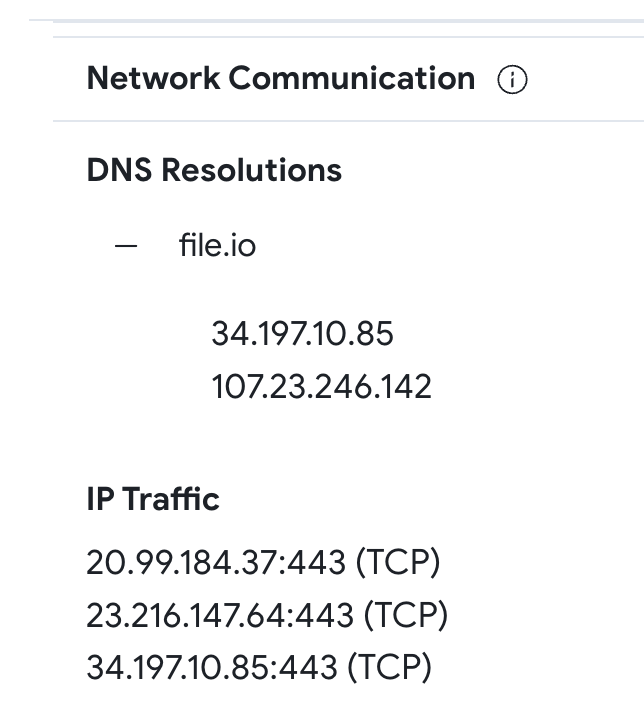
All samples work in the same way, let’s focus on the first one - 5dd5394ffb7b363a23ba93b7d78d626a133d39e4ea93486bbb8e150db6ff4757. In the Behavior tab -> Network Communication section, we confirm the file resolves “file.io” to one of the IP addresses used in our query.
The Content tab shows an encoded Powershell.
In short, this dropper downloads another sample from https://file[.]io/DseDcCxBoGyr, renames it as MicMute_0.1.8.4_Beta_Setup.exe and executes it.

Automated monitoring

We can automate monitoring our infrastructure in two ways.

1. Using the VT API
With VT API v3 you can use the Advanced corpus search endpoint to use VTI queries like the ones described above. This endpoint requires your premium API key and your URL Safe encoded VT Intelligence query. The example below uses CURL for the the previous query:
curl --request GET --url 'https://www.virustotal.com/api/v3/intelligence/search?query={entity%3Afile%20behaviour%5Fnetwork%3Afile%2Eio%20%28contacted%5Fip%3A107%2E23%2E246%2E142%20or%20contacted%5Fip%3A34%2E197%2E10%2E85%29%20p%3A10%2B%20fs%3A2022%2D12%2D01%2B}' --header 'x-apikey: <your API key>'
The result will be a JSON with the results of the query.
You can also use the official VirusTotal Python client library. The following is an example for the same query:
import "vt"

QUERY = "entity:file behaviour_network:file.io (contacted_ip:107.23.246.142 or contacted_ip:34.197.10.85) p:10+ fs:2022-12-01+"

with vt.Client(API_KEY) as client:
 it = client.iterator('/intelligence/search', params={"query": QUERY })
 for file_obj in it:
  print(f'{file_obj.id}')
Please note that queries using “In the Wild” (itw) search modifier cannot be translated (yet) to YARA rules. To automate these queries we encourage you to use the VirusTotal API.

2. Using YARA
YARA allows creating file matching rules based on textual or binary patterns. Each rule consists of a set of strings and a boolean condition. You can deploy Livehunt YARA rules in VirusTotal and get a notification every time a new submitted file matches your rules. Let’s learn how to create basic YARA rules for monitoring your infrastructure.
The first example is based on file content. It will match files containing any of the declared IP addresses, domains or URLs.
import "vt"

rule infrastructure_monitoring {

 meta:
  description = "Description of the logic of the use case and its goal."
  author = "VT Team"

 strings:
  // assets
  $ip1 = "X.X.X.X"
  $ip2 = "Y.Y.Y.Y"
  $url1 = "companyexampledomain.com/url?p=5"
  $url2 = "companyexampledomain.es/url2"
  $domain1 = "companyexampledomain.com"
  $domain2 = "companyexampledomain.es"

 condition:
  any of ($ip*,$domain*,$url*)
}
By its very nature YARA works only on static file properties, which would be limiting as we have discussed. Happily, we can use VirusTotal's custom YARA VT module, which extends the common capabilities of YARA to allow you to check sample behavior, metadata, signatures, submissions, etc. When it comes to network activity, this module exposes information about DNS resolutions, established IP connections, HTTP requests, and even SMTP traffic. The following is a list of the most interesting properties we can use for hunting:
  • vt.behaviour.dns_lookups: this field is a list of DNS resolutions performed by the sample. For each item or resolution in the list, it provides the hostname and the resolved IP address (resolved_ips). We could use this to detect if a sample dynamically tries to contact with a given domain, for example:
    dns_lookup.hostname contains "companyexampledomain.com"
  • vt.behaviour.ip_traffic: this field is a list of established IP connections and it provides the destination IP address, the port and the transport layer protocol (destination_ip, destination_port, transport_layer_protocol) for each connection.
    ip_traffic.destination_ip == "X.X.X.X"
  • vt.behaviour.http_conversations: this field is a list of HTTP requests performed by the sample. Every item in the list provides context information such as request URL, method and headers (url, request_method, request_headers), and response headers, status code and body filetype (response_headers, status_code, response_body_filetype).
    http_conversations.url contains "companyexampledomain.com/url?p=5"
  • vt.behaviour.smtp_conversations: this field is a list of SMTP requests. It provides many features for every item in the list such as the recipient and the sender (message_from, message_to, message_cc, message_bcc), email’s subject and body (subject, html_body, txt_body), and SMTP server related information such as the host name, IP address and port (hostname, destination_ip, destination_port) among others.
    smtp_conversations.hostname contains "companyexampledomain.com"
We can now replicate in YARA the search query we used to find samples dynamically communicating with certain IPs:
import "vt"

rule infrastructure_monitoring {

 meta:
  description = "Description of the logic of the use case and its goal."
  author = "VT Team"
  // assets
  ip1 = "34.197.10.85"
  ip2 = "107.23.246.142"

 condition:
  // Match only samples detected as malicious by more than 9 AVs
  vt.metadata.analysis_stats.malicious > 9 and (
   // Check the list of established IP connections
   for any ip_traffic in vt.behaviour.ip_traffic : (
    // Match samples communicating to any of my IP addresses
    ip_traffic.destination_ip == "34.197.10.85" or
    ip_traffic.destination_ip == "107.23.246.142"
   )
  )
}
Please note the above YARA also takes advantage of the VT module to check the minimum number of antivirus detections.
Unfortunately, ther's no easy way to check for IP ranges in YARA. We will cover more advanced cases in our next post on this topic. Additionally, the use of the VT module is limited to Livehunts, but we hope will be soon available for Retrohunts too.

Conclusions

As a takeaway material, we have prepared a YARA rule template you can use to monitor suspicious samples interacting with your infrastructure. You can edit and fine tune it based on your needs by removing conditions or adding new ones.
import "vt"

rule infrastructure_monitoring {

 meta:
  description = "Description of the logic of the use case and its goal."
  author = "VT Team"

 strings:
  // assets
  $ip1 = "X.X.X.X"
  $ip2 = "Y.Y.Y.Y"
  $url1 = "companyexampledomain.com/url?p=5"
  $url2 = "companyexampledomain.es/url2"
  $domain1 = "companyexampledomain.com"
  $domain2 = "companyexampledomain.es"

 condition:
  // First it checks for strings in sample content
  // This can be potentially noisy, you can consider comment this line
  any of them or

  // Match only samples detected as malicious by more than 10 AVs
  vt.metadata.analysis_stats.malicious > 10 and (
   // Check the list of DNS resolutions performed by the sample
   for any dns_lookup in vt.behaviour.dns_lookups : (
    // Match samples that perform DNS requests for any of my domains
    dns_lookup.hostname contains "companyexampledomain.com" or
    dns_lookup.hostname contains "companyexampledomain.es" or
    // Match samples that resolve to any of my IP addresses
    for any ip in dns_lookup.resolved_ips: (
     ip == "X.X.X.X" or
     ip == "Y.Y.Y.Y"
    )
   ) or

   // Check the list of established IP connections
   for any ip_traffic in vt.behaviour.ip_traffic : (
    // Match samples communicating to any of my IP addresses
    ip_traffic.destination_ip == "X.X.X.X" or
    ip_traffic.destination_ip == "Y.Y.Y.Y"
   ) or

   // Check the list of HTTP requests performed
   for any http_conversations in vt.behaviour.http_conversations : (
    // Match samples communicating to any of my IP addresses
    http_conversations.url contains "companyexampledomain.com/url?p=5" or
    http_conversations.url contains "companyexampledomain.es/url2"
   )
  )
}
❗Please note that YARA doesn’t allow you to implement 2 separate loops consuming the same list of objects.
VirusTotal helps you to automatically monitor and detect samples that target or make use of your network infrastructure. The examples above help you understand the most useful modifiers you can use, but please feel free to explore alternatives you find relevant to filter out noisy results. We recommend a first exploratory manual approach to make sure your searches provide accurate results. After that you can automate your searches using VT API v3, or use Livehunt for deploying YARA rules.
We hope you find this useful, and if you have any suggestions or just want to share feedback please feel free to reach out here. We will be back with a second post with more advanced cases.
Happy hunting!

Friday, January 27, 2023

, , , ,

Lessons learned from 2022

One of our goals is sharing with the security community as much as we learn from VirusTotal’s data to help stop, monitor and mitigate malicious activity. When looking back to 2022 we observe different interesting trends; we decided to go deeper into the three most interesting ones: evolution of distribution vectors, trending malware artifacts and toolsets, and threat landscape evolution.

Distribution vector evolution

During 2022 we detected changes in the way malware is distributed. First, the number of URLs used in phishing attacks has doubled since 2021, and the number of emails distributing any kind of malware increased from 11.4% in 2021 to 26.5% in 2022, that is a 132% increase.

This seems to correlate with the huge increase (almost doubled compared to 2021) of malicious PDF files hosted in phishing URLs. Probably this combination was one of the main distribution vectors of fraudulent content in 2022.


Malicious PDFs hosted in phishing sites

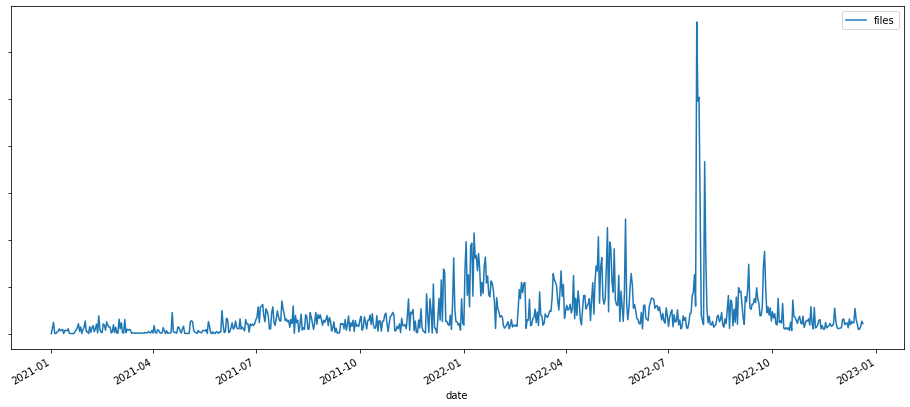
At the same time, the number of emails attaching malware files increased, mostly due to spam campaigns distributing common malware (like lovgate and noon). We observed a high peak of formbook and AgentTesla samples in January 2022:


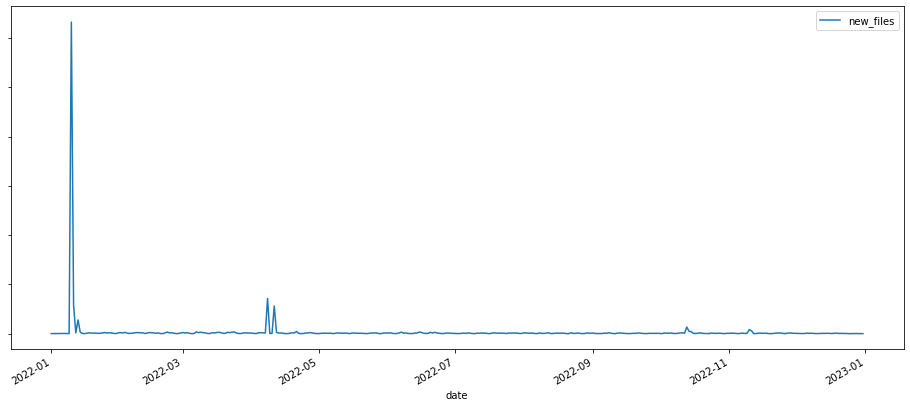
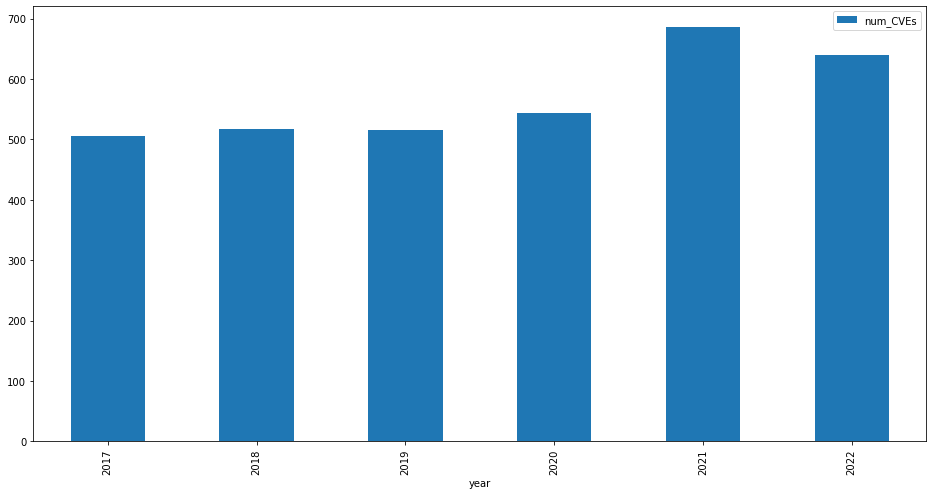
Additionally, the adoption of exploits keeps its growing trend for the last five years, however at a lower rate than it did in 2021. Indeed, in 2021 we observed a peak in the number of different CVEs exploited by new malware samples.

Total of CVEs exploited by new samples per year

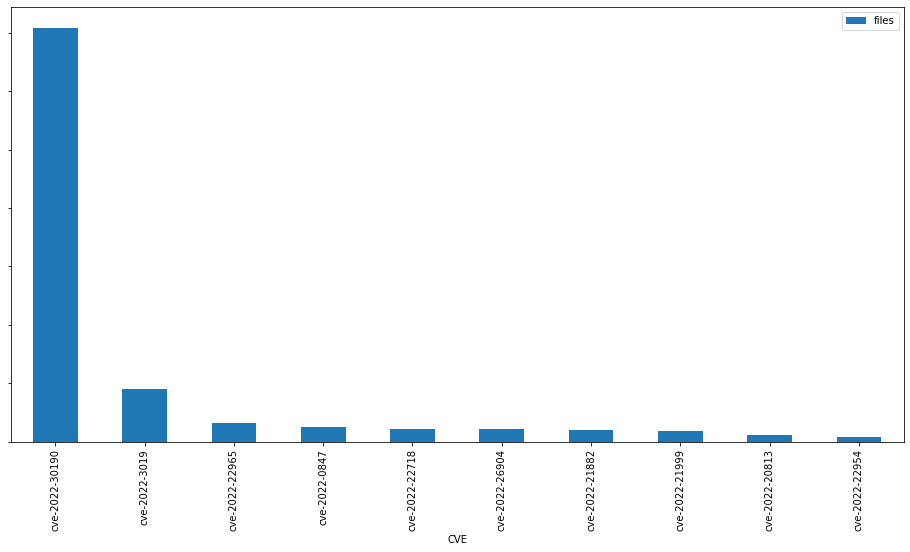
Overall, the count of new malware samples exploiting CVEs hasn't changed much during the last three years. Only 5% of the CVEs tagged in 2022 were related to vulnerabilities published the same year, compared to a 7.8% in 2021. The following graph shows the 2022's top ten exploited CVEs by number of samples.


CVE-2022-30190 (aka Follina) was the most exploited new CVE in 2022. This vulnerability affects the Microsoft Windows Support Tool and allows attackers to remotely execute code in the compromised machine. We wrote about this vulnerability some months ago in our blog.

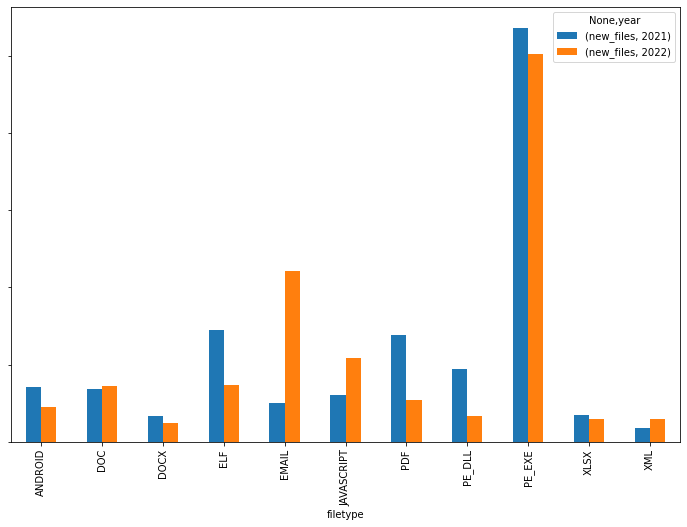
Additionally, we observed an increase in the number of email, android, javascript and xml file types exploiting vulnerabilities. Some of the most popular CVEs for these file types in 2022 were CVE-2017-11882 (20 year old MS Office vulnerability patched in 2017), CVE-2017-0199 (MS Office/WordPad RCE vulnerability) and the most recent CVE-2022-30190 (aka Follina). This might indicate the adoption of Follina into kits used to weaponize attachments that would still keep the old exploits.

The number of new PE, ELF, Android, PDF, XLSX and DOCX files exploiting vulnerabilities decreased in 2022 when compared to 2021. However, the number of DOC, Email (attachments), Javascript and Text files (scripts, such as powershell), increased:

Number of samples exploiting vulnerabilities by file type (2021 vs 2022)

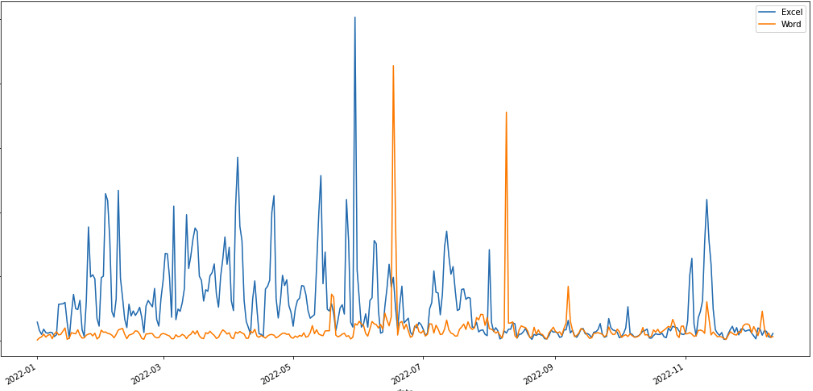
As we discussed in our VirusTotal's 2021 Malware Trends report, we observed a shift from Microsoft Word to Excel files as a way to carry malicious macros. The difference in the number of new files was significatively bigger during the first half of the year, probably due to Emotet heavily distributing excel files with malicious macros during this period.


Excel vs Word files exploiting vulnerabilities in 2022


Malware artifacts and toolsets

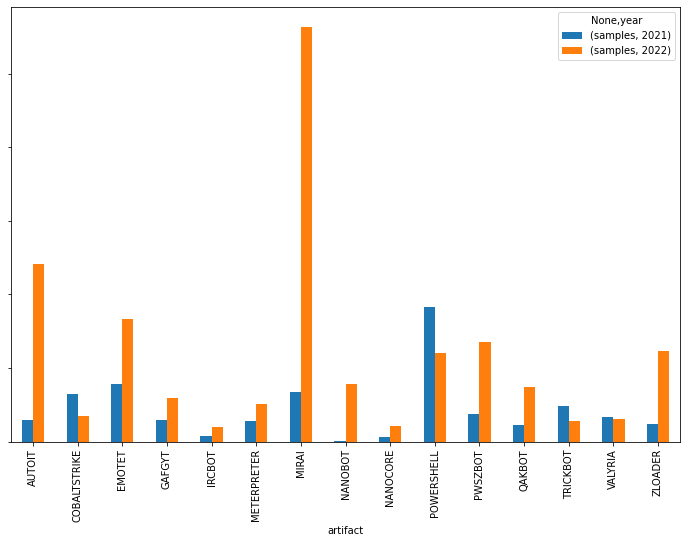
We explored how some common malware artifacts and tool sets evolved in 2022. This includes botnets, pentesting tools such as meterpreter, and common operating system tools like powershell or autoit used for lateral movement.


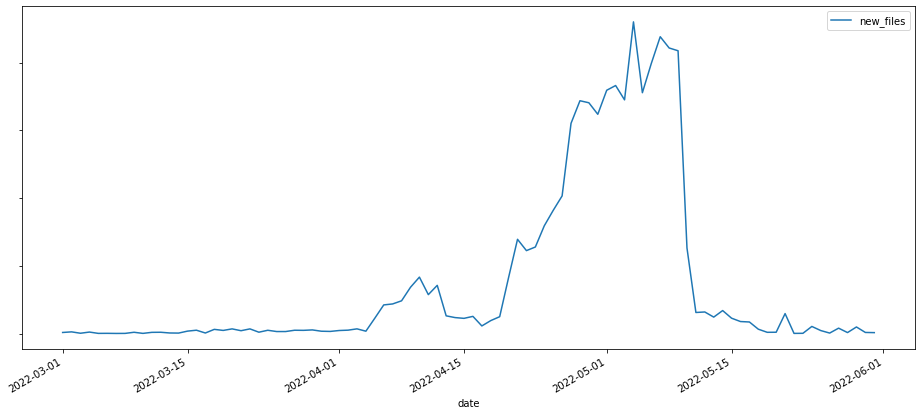
First thing that caught our attention was the apparently vanishing of Dridex from the Top10 in 2022. On the other hand, Mirai is surprisingly active. We observed a high peak of Linux sample submissions around May 2022 corresponding to a Mirai burst. A peak in lookups for these samples during the same period confirms users’ interest. One of Mirai’s recent attacks was a DDoS attack against Minecraft Wynncraft.


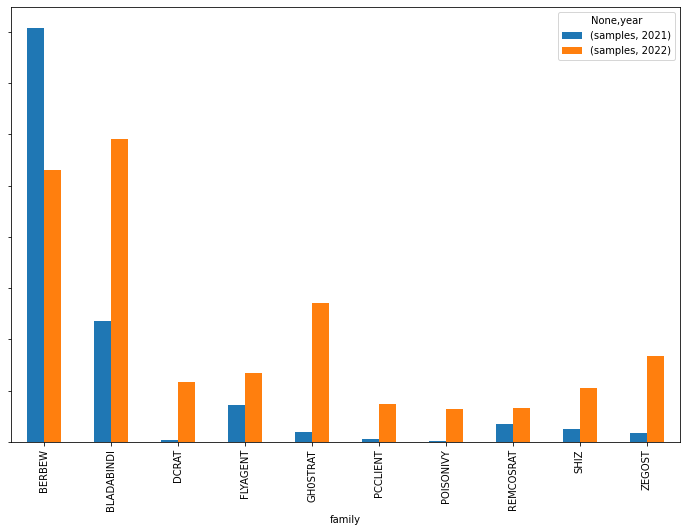
For RATs and backdoors the landscape hasn't changed much since 2021. Padodor/Berbew is still at the top, together with Bladabindi, Gh0strat, FlyAgent, Zegost, DCRat and RemcosRAT as it can be seen in the following chart.


In 2022 we found old and new contenders. Bladabindi, Gh0stRat, FlyAgent, RemcosRAT and Shiz increased their presence in the top10, while others like AsyncRat, DarkComet, QuasarRAT or RBOT are out of the ranking, replaced by DCRAT, PCCLIENT, POISONIVY and Zegost

We also detected an increase in the number of malware samples using LOLBIN ("Living Off the Land BINary") legitimate operating system files to camouflage malicious activity or take advantage of already implemented functionality. The percentage of malware samples using lolbins shows a continuous increase.


We can find traces of these lolbins files in the VTI interface, under different sections in the behavior report: process created, command executions, modules loaded, registry keys set key/value, etc.


A list with the most common lolbin files used in malware samples in 2022 includes update.exe, cmd.exe, installutil.exe, sc.exe, at.exe, certutil.exe, msiexec.exe and msbuild.exe.

Threat Landscape

Last year we launched Collections as an actionable tool for strategic intelligence. You can learn more about them in our recent webinar. We analyzed this data to have a better understanding of the impact of malicious campaigns in 2022.

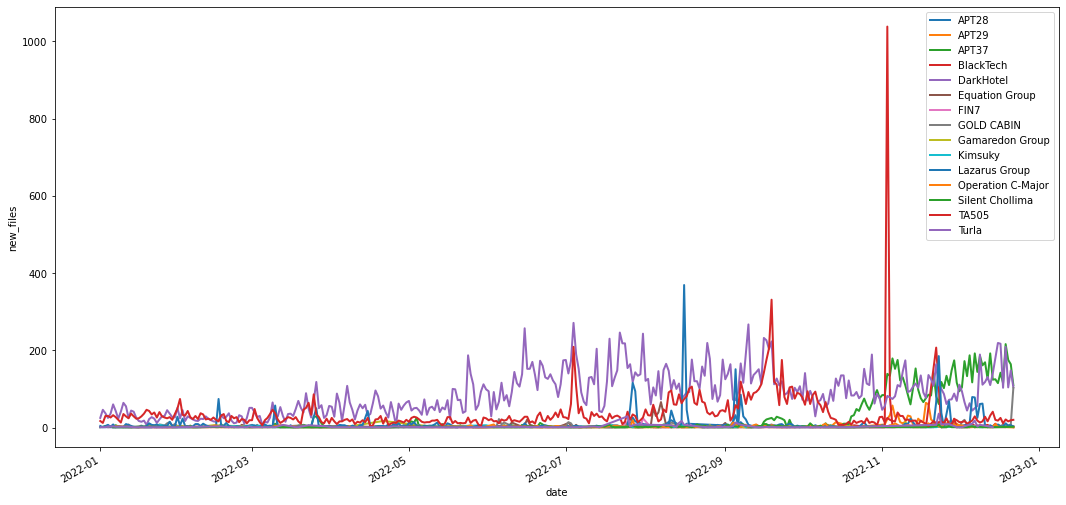
The first graph is based on the actor attribution we find in Collections. It shows the number of samples first seen in 2022 included in collections belonging to different threat actors. To minimize noise, we excluded samples belonging to common software toolkits used by threat actors in their operations (like CobaltStrike).


The graph shows a very active BlackTech from July to October and at the beginning of November, most samples related to the SpiderPig RAT collection. Other actors like DarkHotel had a continuous stream of submissions during the year, mainly through Jaku samples attributed to this actor by Malpedia. The Lazarus Group is the most prolific group in terms of the number of new collections attributed to them.

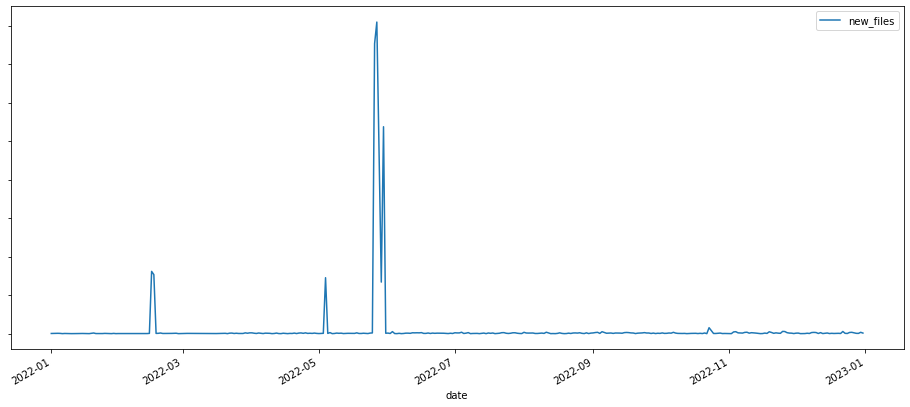
Now back to Cobalt Strike, this is one of the most used artifacts by different actors, including but not exclusive to APT32, APT41, FIN7 or APT29. June 2022 was the most active month of the year in terms of new files attributed to Cobalt Strike in VirusTotal.


Last year we added 165 yara rules that helped to shape this collection. In fact, 99% of the files in this collection are detected by any of the Crowdsourced Cobalt Strike Yara rules available in VirusTotal. Last year we also saw the discovery of cracked Cobalt Strike versions in the wild that probably contributed to the proliferation of this artifact in malware campaigns.

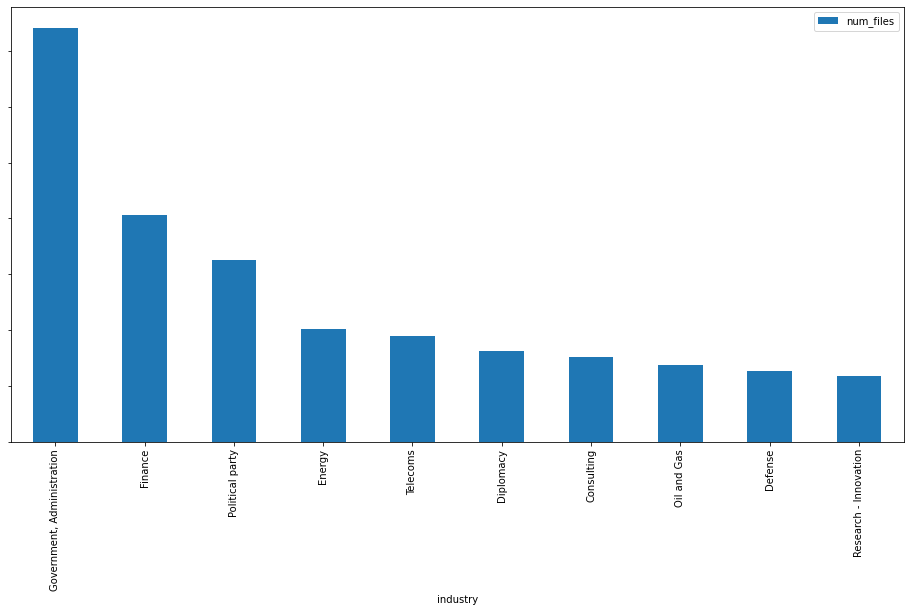
Finally, OSINT Collections victimology also shed some light on potential victimology. According to this data, the top10 rank of preferred targeted industries by attackers in 2022 is as follows:


According to the same source the following are the top five territories impacted by malicious activity: (1) Ukraine, (2) Russia, (3) United States, (4) South Korea and (5) Vietnam.

Conclusions

A high-level vision of the malware ecosystem serves different purposes, including understanding how to prioritize monitoring and prevention, optimize security stack, resource allocation, brief CTI and IR teams, and polish the security strategy.

As a very brief summary, email as a distribution vector hosting suspicious PDFs in external hosting was an unexpected return to the past. The rotation in exploitation techniques seems to follow whatever works better for attackers given the quick adoption of any exploit, with some outliers such as Follina. It is also interesting comparing the scale of some threats that we sometimes tend to underestimate just because they became ubiquitous, with examples such as Mirai or Zloader. LOLBINs seem to keep growing in terms of internal monitoring to avoid lateral movement. Finally, Collections offer a OSINT-based high level overview of actors and victimology.

At VirusTotal, we will keep sharing both our visibility and best practices to protect against new attacks and to keep our world a little bit safer. As usual, we are happy to hear from you.

Happy hunting !

Thursday, January 26, 2023

Mandiant's CAPA + GoReSym to reinforce VT's capabilities

VirusTotal, the world’s largest crowdsourced threat intelligence platform, is made possible thanks to a large community of security practitioners and vendors who integrate into our platform their best security tools. We are happy to announce the inclusion of two remarkable additions, both already having wide acceptance in the security community: Capa and GoReSym from Mandiant’s FLARE team.

CAPA


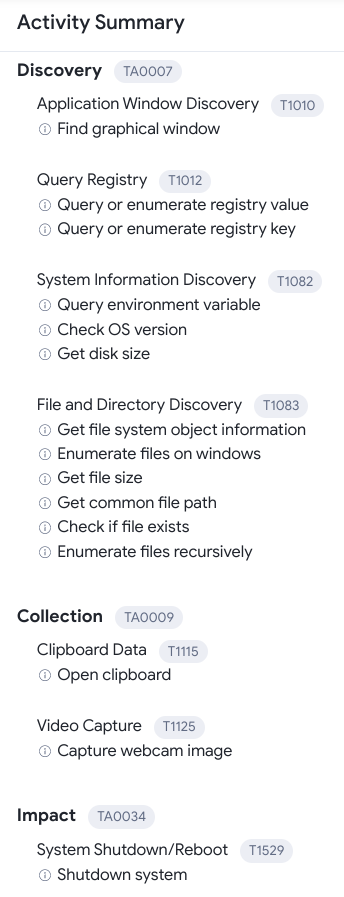
Capa provides a human readable explanation of what a suspicious binary might do and describes the evidence that it found. This gives analysts a high level understanding without the need of going into time consuming Reverse Engineering. We now run Capa against all PE and ELF files submitted to VirusTotal and display the results under the behavior tab.

Here you can find an example: 

Because we map the Capa results into ATT&CK Tactics and Techniques, you can pivot across them, making it easy to find other malware samples with the same behaviors. You can also create YARA rules for VirusTotal LiveHunt to get notified when any new file matching the same ATT&CK Tactics and Techniques is uploaded to VirusTotal. For example:

import "vt"

rule capa_mitre_attack_techniques {
    condition:

    for 2 vt_behaviour_mitre_attack_techniques in vt.behaviour.mitre_attack_techniques: (
        vt_behaviour_mitre_attack_techniques.id == "T1222" // set file attributes
        or vt_behaviour_mitre_attack_techniques.id == "T1083" // get file system object information
    )
}

When contributing to the Capa rules open source project, you’ll influence the behaviors and capabilities that VirusTotal extracts and indexes for all executables. That’s a pretty big impact!

GoReSym


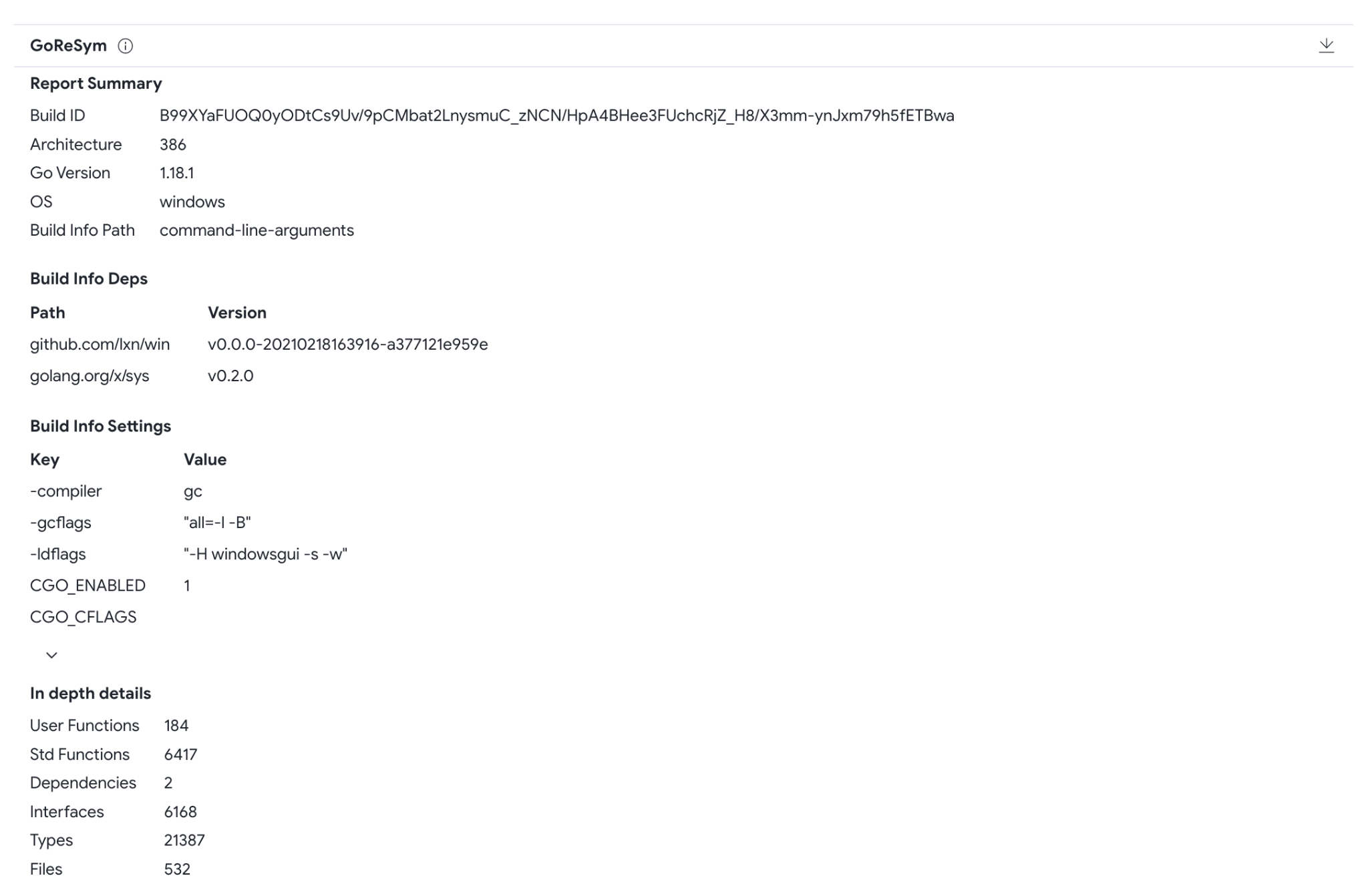
GoReSym is a very useful tool for analyzing Go samples, parsing the binary to extract all kinds of valuable metadata. Some of this information includes function names, the Go version used to compile a binary, compiler flags, and much more. The tool is designed to be resilient in the face of malformed binaries, such as those that result from manually unpacking malware samples. Below is an example of the kind of output you’ll now see from this tool in VirusTotal:


Here you can find an example:

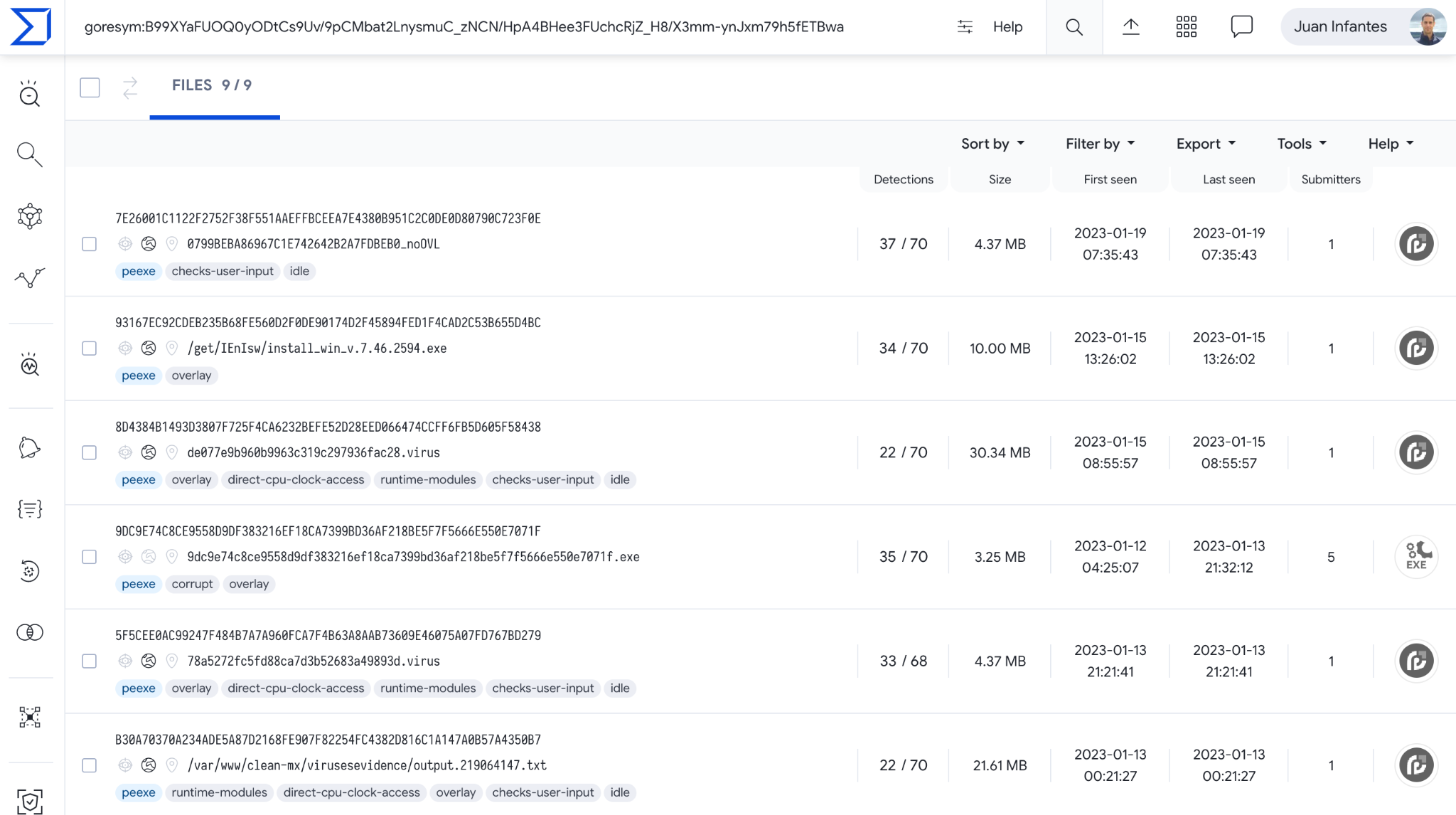
Some fields are pivotable and will help you find similar samples, for instance the Build ID field which is a Go compiler artifact. Pivoting on this feature, we find 9 related files to the previous sample:


Other pivots are available as well, such as finding Go binaries with common shared dependencies. In the example above, note that the Build Info Path field has the value “command-line-arguments”, this is a default package path used in Go projects that were compiled manually by invoking the Go compiler with flags on the command line. By pivoting on that path, all Go binaries built this way could be located, projects not built this way will instead have a unique package path chosen by the source code author. As a final example, we could also pivot on the -ldflags “-s -w” using the query goresym:”-s -w” to find binaries that have their symbols stripped. 

The GoReSym tool generates a lot of additional output that might be useful for analysts beyond the fields displayed in the web interface, which is available to download in the tool header for more advanced use cases. The full tool output contains interfaces, user defined structures, user defined and standard function names, and much more. Check out the github repository of GoReSym for IDA and Ghidra scripts, so you can import this full output into your IDB or Ghidra project when doing manual analysis!

You can also use the GoReSym output in Yara rules, for example:

import "vt"

rule match_goresym_id {
    condition:
    vt.metadata.goresym.build_id == "B99XYaFUOQ0yODtCs9Uv/9pCMbat2LnysmuC_zNCN/HpA4BHee3FUchcRjZ_H8/X3mm-ynJxm79h5fETBwa"
}

Conclusions


The tools presented in this blog post not only provide added value to VirusTotal users, they also represent the first baby steps in our collaboration with Mandiant, now part of Google Cloud Security. We are happy to continue growing our community with valuable content.

Happy hunting!


Monday, December 19, 2022

VT Intelligence Cheat Sheet

Monday, December 19, 2022 Anonymous

Many of you asked for this, and today we are happy to announce the release of our VTI Cheat Sheet with hints and examples on the most useful VT Intelligence queries and modifiers. Instead of providing a list of already documented search modifiers, we created something more specific and close to the real life cases, such as searching for files signed with leaked Nvidia certificates or recent samples from collections attributed to CozyBear.

You can find the PDF version of the Cheat Sheet here. In this post we are providing some of the clickable examples with additional explanations.

Entities

One of the basics of VT Intelligence is using the “entity” search keyword to directly specify the type of output you want to get. There are specific modifiers for every entity, here you can find direct links to documentation for file, URL, IP and Domain (Collection will be available soon, stay tuned). Here there are quick examples for each of them:

Specific group activities

There are a number of different ways to explore the latest footprints of certain threat actor in VT Intelligence. 
In case you don’t have any other inputs except the campaign or malware family name, you can leverage AV verdict VTI search:
If you want to search for a verdict from a certain vendor, you can specify it explicitly:
Instead of getting file hashes as your search output, you can list all collections related to a specific actor/campaign:


You can also search within a specific collection, which is very handy when dealing with collections containing a large number of entities:
You can get the collection ID from the browser address bar when navigating a specific collection or simply click “Share the collection” when there.
Another approach for getting files related to a specific threat actor is by leveraging crowdsourced detection rules: Yara, Sigma and IDS. We are always looking for solid and active repositories constantly updated with the latest malware signatures. You can find more details in our Contributors list. 
For example, the following query provides files matching YARA and IDS rules containing “APT29” or “CozyBear” in their names, as well as files detected by a specific Sigma rules:
At the moment the only way to perform Sigma rules search is specifying the rule hash explicitly, you can find here the full list.
Finally, searching for specific comments can bring valuable results. It’s important to note that there are many third-party solutions contributing with useful comments in VirusTotal. Some of the most popular and reputed ones include THOR APT scanner and Intezer:

Comments on suspected APT29 malware

The following query searches for files containing some APT actor aliases in their comments:
This also works for IPs, domains and URLs: 

Documents

Any query can specify the document format for the results. For example, the following query provides recently created (using “generated” modifier) documents (thanks to the “type” modifier) with macros embedded (by using “tag”), detected at least by 5 AVs (“p” modifier):
A second example retrieves Excel files bundled with powershell scripts and uploaded to VT for the last 10 days:
There is plenty of cool stuff you can do with the “tag:” search modifier, here is the full list with dozens of different tags supported, and here you can find descriptions for the most common ones. For example, you can search for documents with obfuscated VBA code executing other files:
You can also use “type:document” to search for all the document formats (office, pdf, text, rtf, latex, etc). The following query returns all documents having “invoice” in its file name and used as email attachments:
Or documents exploiting any vulnerability published in 2022:
It's important to highlight that “tag” is one of the few modifiers supporting wildcards.
Many of you asked about language specific document searches during our Threat Hunting with VirusTotal session. The “lang:” keyword uses Exif language property to find files matching any language:

Non-Windows samples

We have dedicated keywords to perform searches for platforms such as Android, MacOS or even Symbian. 
For Android, which is one of the most popular non-Windows platforms by number of malware samples, we use Androguard to process all ingested samples. You can query for any Androguard output which is stored under the umbrella “androguard:” keyword:
This includes all sorts of different types of processed data: code strings, manifest entities, certificate signatures, etc. For example, this example looks for APKs that mimic a legitimate app by using the same icon (“main_icon_dhash”), but signed with a different certificate:
However when looking for something specific it is better using “androguard_package:” to search for APKs with explicit package names (please note this  only works for newly indexed files since March 2022):
Since this is a new search modifier, please feel free to share our feedback with us.
In some cases you can skip using any special keyword and build your query using APK internal paths only:
Here are some more examples for different platforms.
tag:iphone tag:signed p:5+ - signed iOS app packages detected by at least 5 AVs.
(type:apple OR type:mac) itw:cdn.discordapp.com - iOS/macOS files served from a given URL.
type:symbian name:"*spy*" - Symbian files (.sis) containing “spy” substring in its name.

Network

First of all, we encourage you to check the full list of network-related search modifiers for URLs, IPs and domains, as the list is too large to fit them all in this post.


However, network modifiers can save the day for different specific cases. Here are a bunch of practical examples.
If you are looking for botnet admin panels within a certain TLD (Top Level Domain) knowing only specific HTML meta information from the response, you can use this query:
In cases when you extracted the C2 endpoint from a malware sample and want to search for other servers using the same backend path:
You can even search for specific HTML body content with the “NOT parent_domain:” syntax to filter out legitimate results:
There are plenty of different ways to detect malicious domains mimicking legitimate ones, including favicon similarity. To get a specific dhash you can just click on the original file/website icon in Virustotal and it will produce the query for you. Then you can check for additional domains using this favicon but detected by different AVs:
Another approach is to use the “fuzzy_domain” keyword, which is based on Levenshtein distance and will get you domain names similar to a given one. The best use case for this is typosquatting attack detection. In the following example, we filter results using “urls_max_detections” to get only domains with URLs detected as malicious:
Instead of an IP range, you can specify the whole ASN:

Summarizing, the number of different options to query VT Intelligence can be overwhelming, but hopefully the above examples and our VTI Cheat Sheet will make your life easier.  We will continuously update the VTI Cheat Sheet to keep it as fresh and useful as possible, we will be announcing every time there is any major update. In the meantime, we hope this will be useful for you, and as usual if you have any suggestions or just want to share feedback please feel free to reach out here.
Happy hunting!