The multi-sandbox project is under continual improvement. In June 2018, we announced our integration with Dr.Web vxCube. Today we are happy to announce an update to Dr.Web vxCube that adds support for Android. With more than 2 billion active android devices, having visibility into android is a very welcome feature. Note that this adds to other multi-sandbox Android setups such as Tencent HABO for Android and VirusTotal Droidy.
In their own words:

To demonstrate some of the features, lets take a look at a few malware samples:
https://www.virustotal.com/gui/file/beb7eefb2008aaf28e75d6ec24eb055c57473c4fd91c4ed70c15e352c0c825f8/behavior/Dr.Web%20vxCube
https://www.virustotal.com/gui/file/a8bf520bcc7336ec447d58794be22715f65ccd0f1c020b5cb7fd6a3599d79e44/behavior/Dr.Web%20vxCube


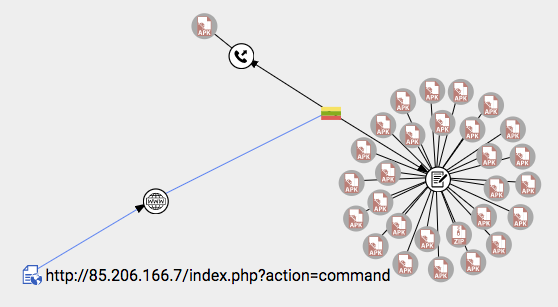
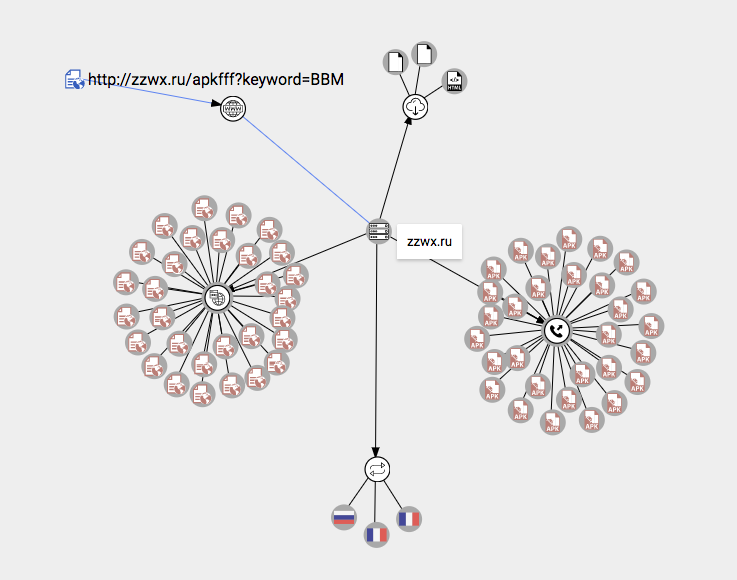
Moreover, as you can see above, you can easily generate an embeddable graph object in order to display your investigation in sites other than VT Graph.
For example you can search for filenames within the behavior data:
behavior_files:"com.adobe.flash/files/BotPrefix"

Similarly, the behavior-scoped modifiers can be combined with any other facets in order to pinpoint not only malware families but also their command and command-and-control servers, drop-zones, additional infrastructure, etc.
type:apk androguard:"android.permission.READ_PHONE_STATE" behavior_network:http positives:10+

https://play.google.com/store/apps/details?id=com.funnycat.virustotal
We look forward to keep working close with Doctor Web, meanwhile we continue to encourage other sandbox setups to join the multisandbox project.
In their own words:
We are proud to introduce our newest malware analyzer that now supports Android platform - Dr.Web vxCube 1.2. It maintains the same fast and versatile functionality when working with the Android files. Dr.Web vxCube 1.2 conducts a thorough analysis of APK files and provides in-depth reports on their behavior in the sandbox environment, including information about SMS and calls they could try to make. Moreover, each report includes manifest information with a full list of app’s permissions, activities, broadcast receivers and services.To view the details generated by Dr.Web vxCube make sure to click on the behavior tab:

To demonstrate some of the features, lets take a look at a few malware samples:
https://www.virustotal.com/gui/file/beb7eefb2008aaf28e75d6ec24eb055c57473c4fd91c4ed70c15e352c0c825f8/behavior/Dr.Web%20vxCube
https://www.virustotal.com/gui/file/a8bf520bcc7336ec447d58794be22715f65ccd0f1c020b5cb7fd6a3599d79e44/behavior/Dr.Web%20vxCube
Detection summary
At the top of the detailed report we can clearly see a detection summary for this APK file. Note that it display a verdict based on execution behavior, this verdict may complement Doctor Web's antivirus engine running in VirusTotal.
Malicious functions
We can see the app is sending SMS spam with malicious URLs:

Network activity
The network activity map, visually shows where the traffic goes, along with protocol and address information.
Connect the dots
With VT Graph you can see all the relationships above in a single nodes and arcs graph enriched with the historical knowledge of the VirusTotal dataset. Forget about having dozens of open tabs to investigate a single incident, one canvas is all you need.Moreover, as you can see above, you can easily generate an embeddable graph object in order to display your investigation in sites other than VT Graph.
Digging deeper
VT Enterprise users can try some more advanced searches using search modifiers in order to identify interesting samples based on behavioral observations and other structural and in-the-wild metadata.For example you can search for filenames within the behavior data:
behavior_files:"com.adobe.flash/files/BotPrefix"

Similarly, the behavior-scoped modifiers can be combined with any other facets in order to pinpoint not only malware families but also their command and command-and-control servers, drop-zones, additional infrastructure, etc.
type:apk androguard:"android.permission.READ_PHONE_STATE" behavior_network:http positives:10+

More insights and giving back to Doctor Web and the community
If you are as grateful as we are for this new insights into Android apps, you can give back to Doctor Web and the community by helping them receive more APKs so that they can continue to improve their defenses. The easiest way to do this is through a community-developed VirusTotal App that will make the task of uploading new APKs to VirusTotal a no-brainer:https://play.google.com/store/apps/details?id=com.funnycat.virustotal
We look forward to keep working close with Doctor Web, meanwhile we continue to encourage other sandbox setups to join the multisandbox project.