Showing posts sorted by relevance for query multisandbox. Sort by date Show all posts

Thursday, April 05, 2018

, , , , , , ,

Meet VirusTotal Droidy, our new Android sandbox

Recently we called out Additional crispinness on the MacOS box of apples sandbox, continuing with our effort to improve our malware behavior analysis infrastructure we are happy to announce the deployment of a new Android sandbox that replaces the existing system that was developed back in 2013.

This setup characterises the actions that Android APKs perform when installed and opened; it has been baptised as “VirusTotal Droidy”. Droidy has been integrated in the context of the multisandbox project and extracts juicy details such as:
  • Network communications and SMS-related activity. 
  • Java reflection calls. 
  • Filesystem interactions. 
  • SQLite database usage. 
  • Services started, stopped, etc. 
  • Permissions checked. 
  • Registered receivers. 
  • Crypto-related activity. 
  • Etc. 

You may find below a couple of reports showcasing this new functionality. Just select the “VirusTotal Droidy” entry in the multisandbox report selector (whenever there are multiple reports):

Don’t forget to also check the detailed report:


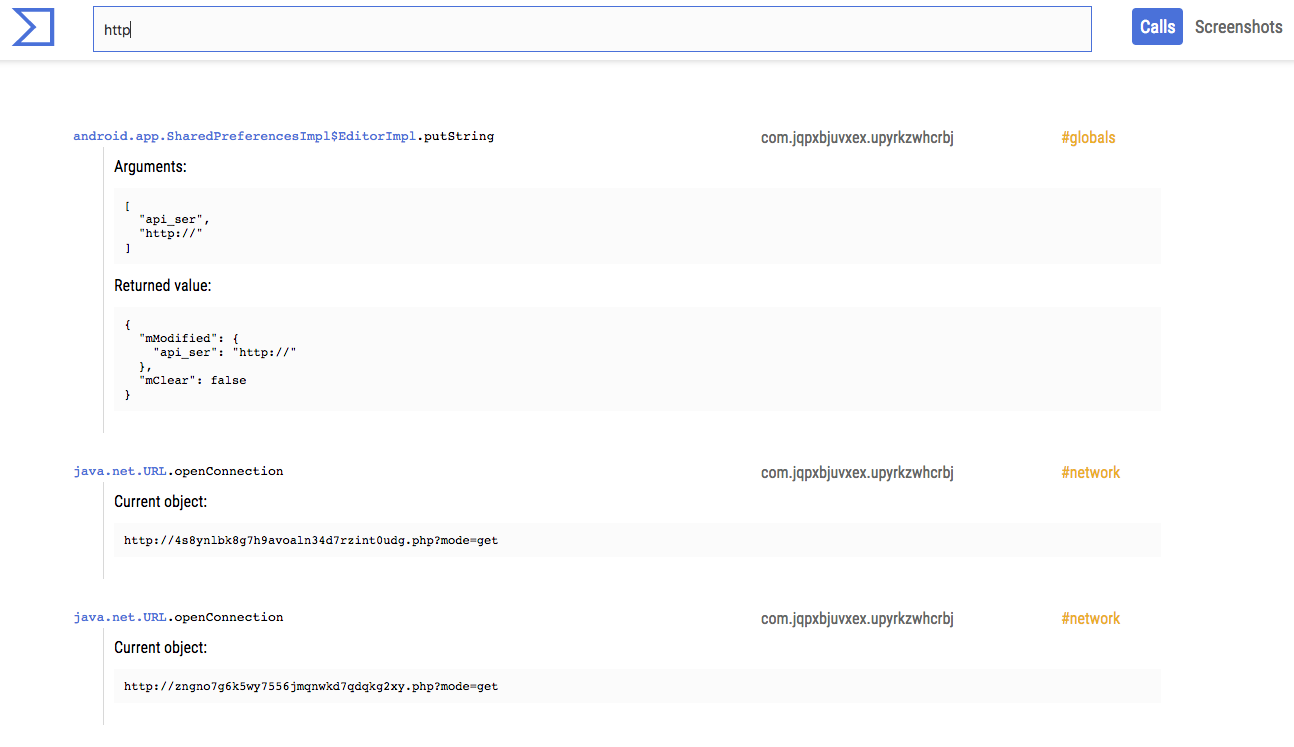
This advanced view allows you to dig into the hooked calls and take a look at the screenshots generated when running the apps:

The multisandbox project is in good shape, and now many samples have reports for multiple sandboxes. For instance, the following report allows you to see the output of Tencent HABO and VirusTotal Droidy:
As you can see, they are pretty complementary, proving the value of having different sandboxing technologies studying the same files.

To understand the extent to which this is an improvement with respect to the 2013 setup, you can take a look at the following report. It displays by default the output of the old sandbox. Use the selector to see the new report with VirusTotal Droidy:

Now, these may seem like minimal features to improve VirusTotal’s “microscope” capabilities for better understanding a particular threat. In fact, the changes go much deeper. All of our sandboxing information nurtures other services such as VirusTotal Intelligence and VirusTotal Graph. The richer the information that we generate for individual data set items, the greater the telescopic capabilities of VirusTotal. This is how we manage to fill in the dots and quickly see all activity tied to certain resources that often show up in malware investigations. For example, let us look at the graph of one of the domains seen in the previous reports:


At a glance you can understand that something shady is going on with wonderf00l.gq and you are able to discover other malicious domains such as flashinglight.tk, checkingupd.tk, flashupdservice.cf, etc. Some of these, for instance checkolimpupd.tk, are not only used as C2 infrastructure for malware but also serve as malware distribution points.

Very often during an investigation, you might not have enough context about an individual threat, and so being able to look at the connected URLs, domains, files, IP addresses, etc. becomes crucial in understanding what is going on. My colleague Evan explains this far better than I can do in just a couple of paragraphs, so make sure you check out his video dissecting a cryptomining attack at https://www.virustotal.com/learn/watch/.

Wrapping up, don’t think of this as just new functionality to dissect individual threats. All of this data contributes to the bigger picture and increases the power of our telescope lens that sheds light into malicious behaviors on the Internet.  
Tuesday, May 07, 2019

, , , , , ,

VirusTotal Multisandbox += NSFOCUS POMA

We are pleased to announce that the multisandbox project has partnered with NSFOCUS POMA. This brings VirusTotal up to six integrated sandboxes. The NSFOCUS sandbox gives us insight into the behaviour of samples that run on Windows 7 and XP SP3.

In their own words:

NSFOCUS POMA, as an integral part of the NSFOCUS Threat Intelligence (NTI) system, is a cloud‐based malware analysis engine built by the NSFOCUS Security Lab. It can take various types of files and perform both static and dynamic analysis on them to detect potentially malicious behavior, and produce analytic reports in many formats (including STIX). This service can help a user to protect his environment from various threats, such as 0‐day attacks, advanced persistent threats (APTs), ransomware, botnets, cryptocurrency mining and other malware.


We are very honored and proud to bring such values to the VirusTotal users and community.

Here are a few examples:

https://www.virustotal.com/gui/file/a01b10ae6e81c4efc7c4a7b0a6c893907e4a6044b87ed72be7e5800ae104c8c8/behavior/NSFOCUS%20POMA

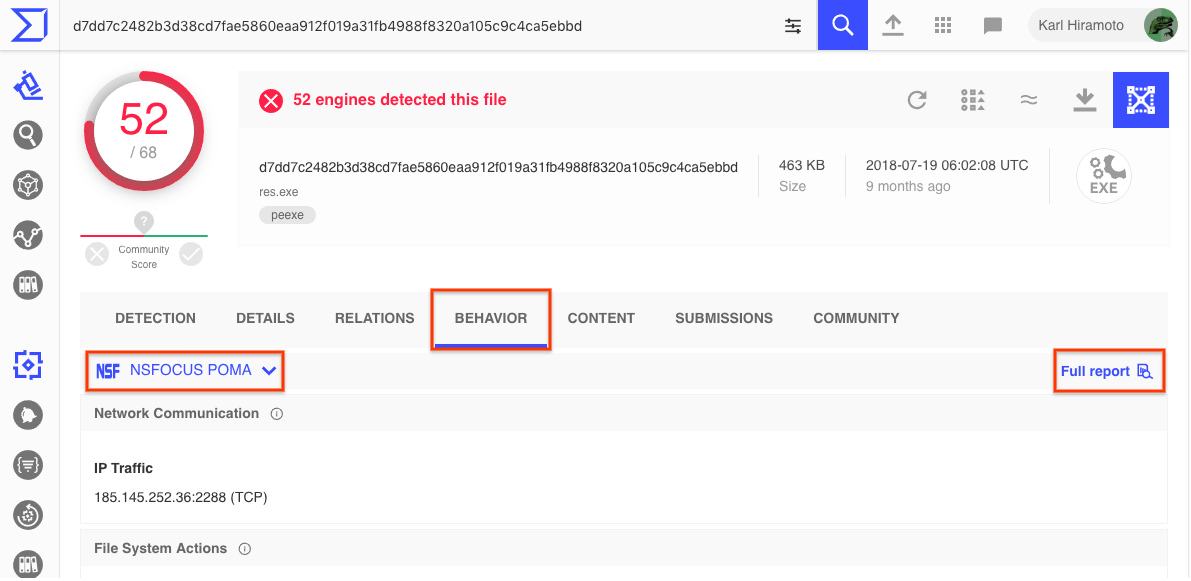
https://www.virustotal.com/gui/file/d7dd7c2482b3d38cd7fae5860eaa912f019a31fb4988f8320a105c9c4ca5ebbd/behavior/NSFOCUS%20POMA

https://www.virustotal.com/gui/file/430aa2f84cc7934cabdb644eccbdb9d8355899ed9665570bc80b58fd4c010150/behavior/NSFOCUS%20POMA


You can find the sandbox behaviour reports on the behavior tab.

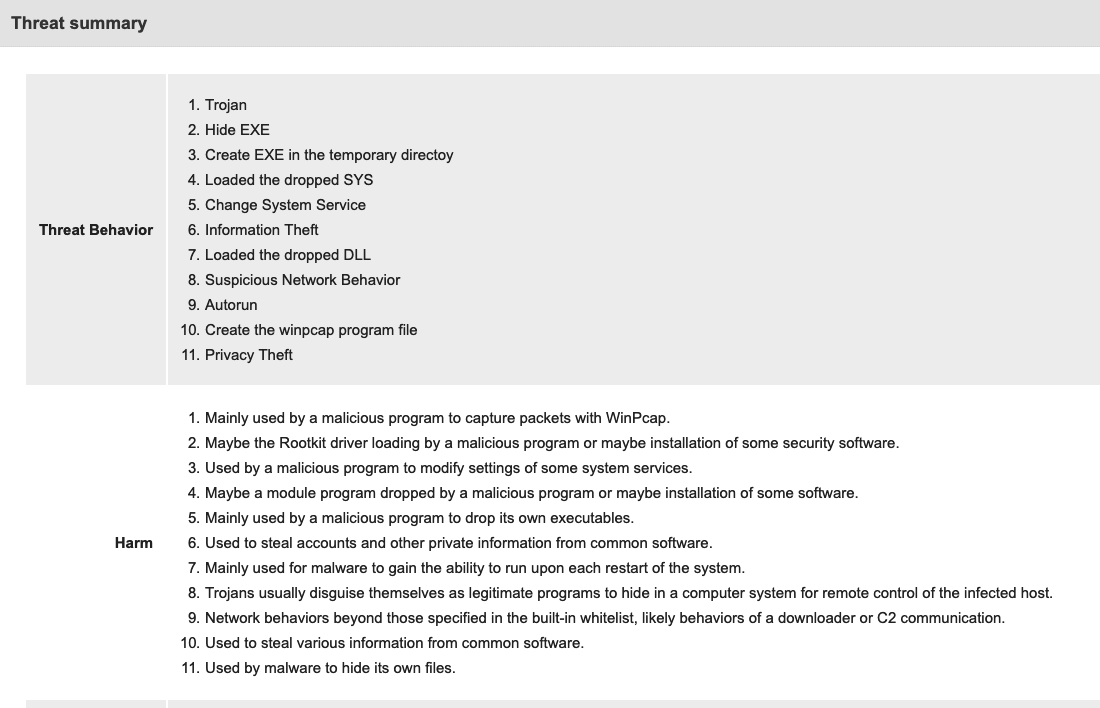
Threat Summary

At the top of the detailed report, right away we can see a summary of the detection.

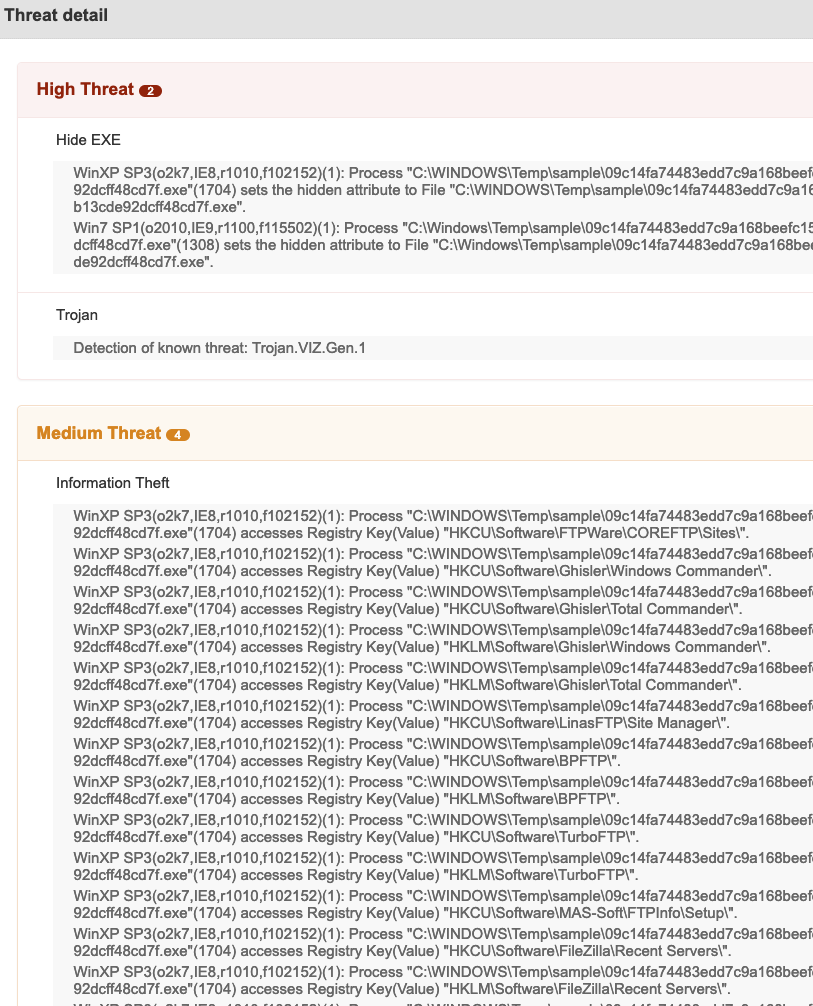
Threat Detail


Within the threat detail section we can see the behavior in both Windows XP SP3 and Windows 7 SP1 ordered by risk, most important at the top.


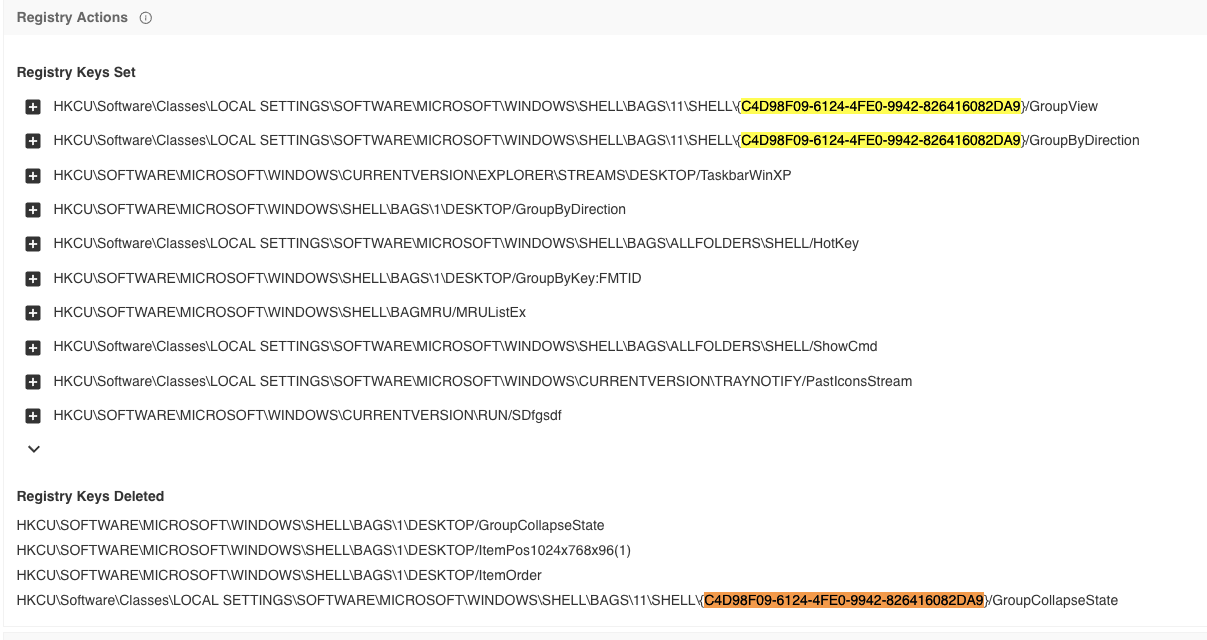
Registry actions:
Within the behaviour report we can see an interesting UUID


Using  a behavior search in VT Intelligence, we can find other samples that also use this same UUID


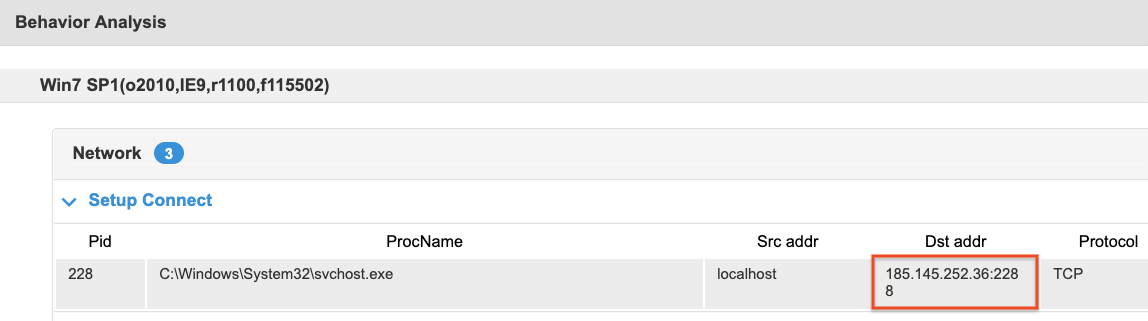
Connecting the dots

In the sample we can see the relationship with the IP address 185[.]45[.]252[.]36


Within VTGraph we can visually see the relationships between this sample, the IP address, domains and URLS that we know about


Thursday, December 10, 2020

, , , , , , , ,

VirusTotal Multisandbox += Sangfor ZSand

VirusTotal multisandbox project welcomes Sangfor ZSandThe ZSand currently focuses on PE files,with extensions to other popular file types like javascript and Microsoft office to be released soon.


In their own words:
ZSand, developed by Sangfor Technologies’ Cloud Computing & Security Team, is an agentless behavioral analysis engine incorporating multiple innovative techniques. At the systems level, zSand employs Two-Dimensional Paging (TDP) techniques to inject hidden breakpoints, enabling accurate monitoring of the API calling sequence of a given process for further fine-grained analysis. At the GUI level, interactions are simulated by the virtual network console (VNC) and visual artificial intelligence (AI) techniques, providing a lifelike and fully functional sandbox. At the detection level, zSand identifies all forms of malware, including vulnerability exploits, by uncovering malicious behaviors and synergistically applying both conventional rule-based approaches and advanced AI algorithms. As a core innovation of the Sangfor anti-malware research group, zSand is a significant improvement in cyber-security capability for both Sangfor Technologies and its clients, customers and partners. Use cases include proactive hunting for unknown threats and the near real-time production of threat intelligence identifying malicious URLs, domain names, files, memory fingerprints, and malicious behavioral patterns. zSand is an agentless behavior monitoring engine, allowing users to deploy real-time defenses in a virtual environment.

In comparison with other sandboxes, the key advantages of zSand include:
  • High runtime performance -- By optimising the configuration of TDP and reducing the number of VMExit events, zSand minimizes monitoring overhead and resource utilization.
  • Strong anti-evasion measures -- Thanks to high performance hardware virtualisation and agentless features, zSand is immune to anti-sandbox detection. 
  • Comprehensive monitoring -- zSand retrieves detailed malware behavioral events and associated states of hardware including CPU, memory, disks, and network interfaces. 
  • Extensive and in-depth analysis -- Designed by cyber-security specialists and AI specialists, zSand is able to dynamically detect elusive and concealed malicious behavior, vulnerability exploits, malware persistence, and privilege escalation, at low levels.


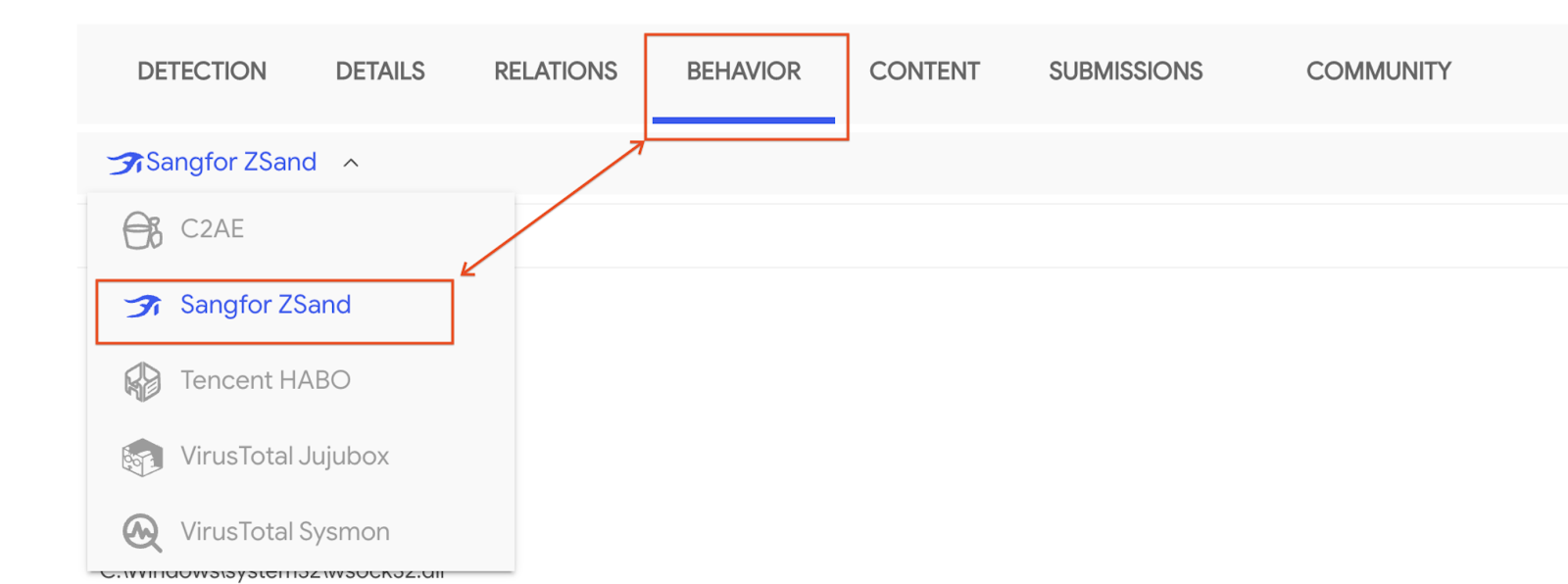
Take take a look in the behavior tab to view these new sandbox reports:


Example reports:

You can also take a look at a couple of Sangfor ZSand behavior analysis reports here and here.
In case you are interested in searching for specific Sangfor ZSand reports, VirusTotal premium services customers may specify so using sandbox_name:sangfor in their queries.

Pivot on interesting behavioural characteristics

All malware uploaded to VirusTotal is detonated in multiple sandboxes, providing security analysts with many interesting and powerful possibilities. Having multiple fine-tuned sandboxes increases the possibilities of malware detonating properly (remember malware usually implements different anti-sandboxing techniques), and provides valuable dynamic data on how the malware behaves.


Why is this data valuable? Because it gives us details that are not visible at static analysis time. For instance, we can use this data to land some TTPs into something more actionable. We will get back on this topic on a future blogpost.


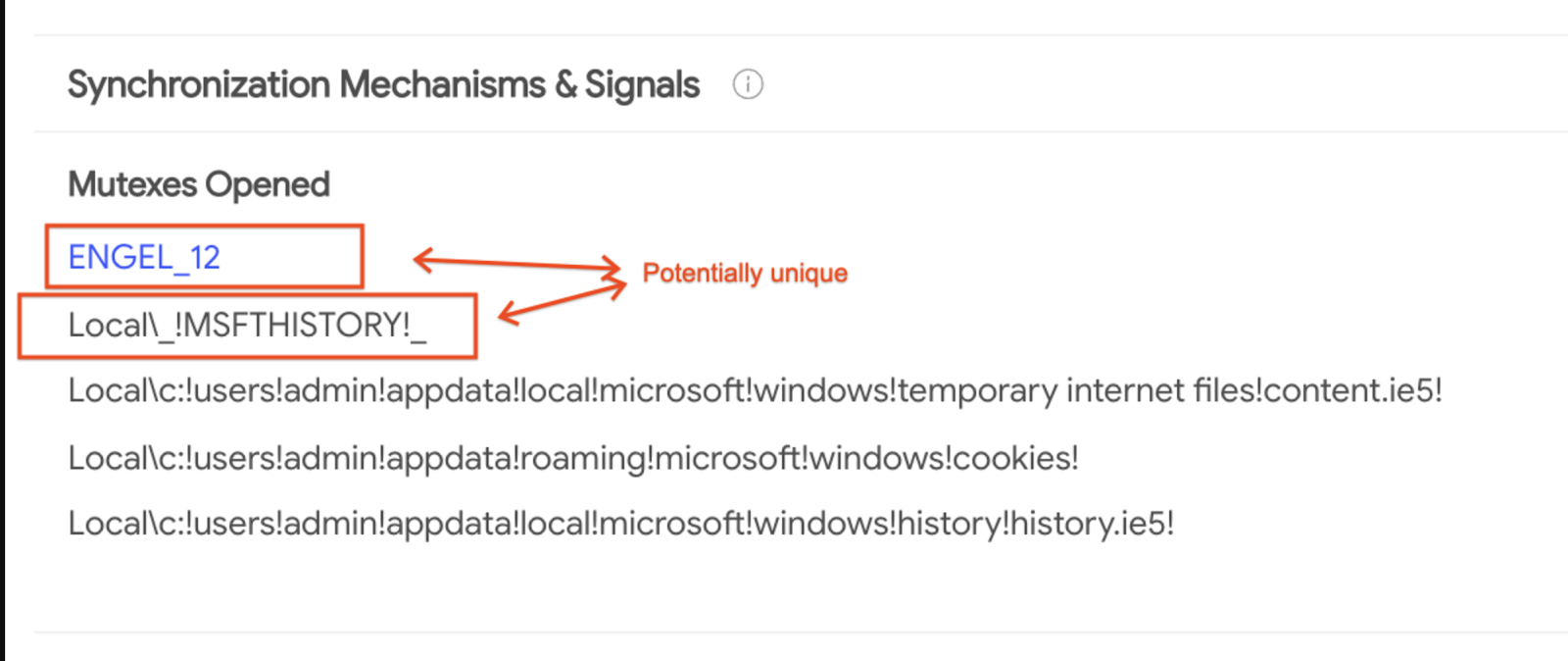
For example, taking in the following sandbox report we find some potentially interesting mutex names. 


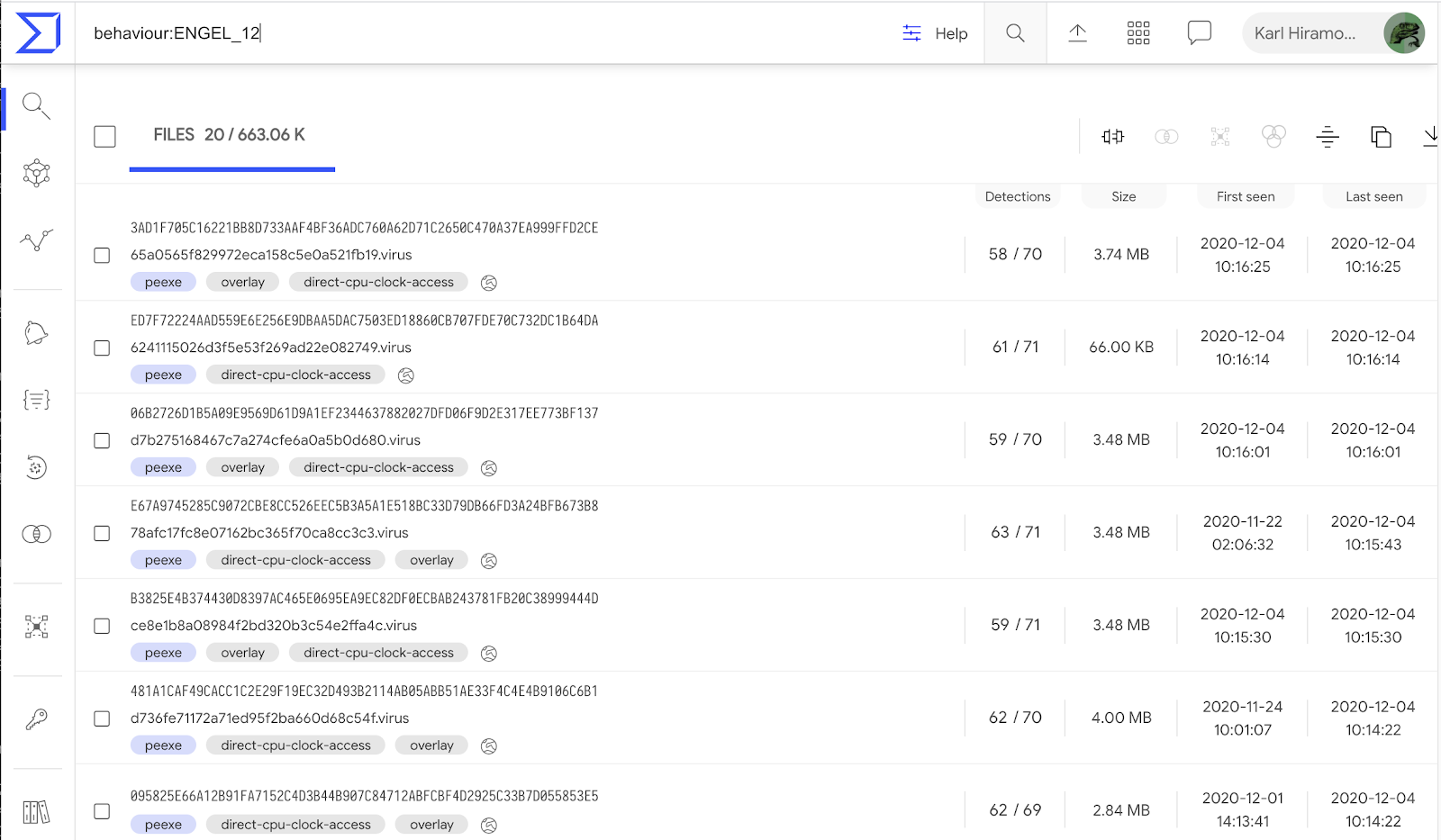
We can use this data to pivot and find other malware having the same mutexes when detonated on our sandboxes. By clicking on one of the interesting mutexes, in this case ENGEL_12, we will create a new search ( behaviour:ENGEL_12) which provides us with samples belonging to a common family of padodor malware.


It turns out that this is a valuable dynamic indicator we can use to identify malware samples belonging to this particular malware strain.   From VirusTotal, we welcome this new addition to our Sandboxing arsenal. Happy hunting!

Tuesday, January 08, 2019

, , , , , ,

Multisandbox project welcomes ReaQta-Hive

We are pleased to announce the addition of ReaQta-Hive to the multisandbox project, after the integrations of Tencent Habo, VirusTotal Droidy, Cyber adAPT ApkRecon, and Dr. Web vxCube. The unique new feature that this integration brings is XSL documents in addition to  PE files, PDF, MS Office documents and scriptlets.

In their own words:

ReaQta-Hive is an Endpoint Threat Response and Hunting platform that uses A.I. to detect new types of attacks. A live hypervisor, called the NanoOS, collects detailed security information at the lowest possible level of an endpoint, which Hive uses to perform dynamic behavioral analysis. This analysis is automatic and constructs a comprehensive storyline of an attack. The end result is an intuitive report of all the actions carried out by an attacker, including a summary of the meta-behaviors that highlight key components of the attack. ReaQta-Hive is a vector-agnostic platform, so it can analyze the behavior of any type of attack, whether it is file-less, script-based, exploit driven, or a plain executable file. We are happy to use our software and expertise to contribute actively to the VirusTotal community, and to help analysts worldwide be more effective and efficient.


To view the ReaQta report when viewing a file analysis, click on the Behaviour tab, select  ReaQta-Hivethen the detailed report.


In the detailed report, you can view copious amounts of information obtained by ReaQta-Hive:


Lets take a look at some example use cases where this data is interesting. 

XSL document  / #squiblytwo

This example is an interesting malicious XSL document which only ReaQta processes:
https://www.virustotal.com/#/file/9d3746779bc2b2d1ecbd90da8626f81978db4be1eb346106a6334295fce568cd/behavior 
In the relationships tab you can see a  link to VT Graph where you we can see some relationships to other domains and URLs VirusTotal has seen before.


Malicious document using LOLBins

Malicious code using Living off the land binaries and scripts (LOLBins) have become popular since they are binaries/scripts that are included with the operating systems, hence trusted. Here is a MS Office trojan that does so: 
https://www.virustotal.com/#/file/1f4f22f1814712880b2bbdc5c6418aeaf08c598be0990c5fad55136c9e769951/behavior 


Windows PE file, detecting behaviors like  key-logging/screenshots

https://www.virustotal.com/#/file/d72f74208c8960ae70469af3968324c6d5f90a305931763c0f5e23cd7922bcea/behavior
In the report we can see the detection and severity:


Wednesday, October 20, 2021

, , , , , ,

VirusTotal Multisandbox += Microsoft Sysinternals

We welcome the new multisandbox integration with Microsoft sysinternals. It was also recently announced on the sysinternals blog as part of their 25th anniversary. This industry collaboration will greatly benefit the entire cybersecurity community helping put the spotlight on indicators of compromise that may be seen if malware is detonated within your own environment.


In their own words:

"The new Microsoft Sysinternals behavior report in VirusTotal, including an extraction of Microsoft Sysmon logs for Windows executables (EXE) on Windows 10, is the latest milestone in the long history of collaboration between Microsoft and VirusTotal. Microsoft uses VirusTotal reports as an accurate threat intelligence source, and VirusTotal uses detections from Microsoft Defender Antivirus and Microsoft Sysinternals Autoruns, Process Explorer and Sigcheck tools. This cross-industry collaboration has a significant impact on improving customers protection. " says Andi Comisioneru, Group Program Manager, Cloud Security, Microsoft.


Let's take a look at a few example reports. For example in the file with sha256 1bb93d8cc7440ca2ccc10672347626fa9c3f227f46ca9d1903dd360d9264cb47

Here we see a report from Microsoft sysinternals sysmon with DNS resolutions, process tree and shell commands:


From the DNS resolution seen, we can make use of VT-Graph to pivot on other samples that also resolve the same hostname.


For our second example let's look at 1247bb4e1d0aa5aec6fadccaac6e898980ac33b16b69a4aa48fc6e2fb570141d.  Here we see a suspicious email address contained within some files written to the disk:


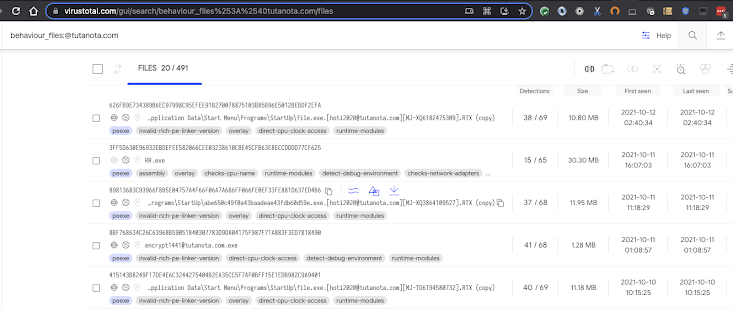
If we wish to pivot on that, we can search for other similar samples with the same modus operandi with a search query like:
behaviour_files:@tutanota.com


Finally our last example is:

4bb1227a558f5446811ccbb15a7bfe3e1f93fce5a87450b2f2ea05a0bca36bb2. This sample is a coinminer that stores a dropped file in %USERPROFILE%\AppData\Roaming\Microsoft\Telemetry\sihost32.exe

It also registers a scheduled task on logon. It is possible to find other samples doing the same thing with the following intelligence query:
behaviour_processes:"\"AppData\\Microsoft\\Telemetry\\sihost32.exe\""

For more ways to search, see documentation on the available file search modifiers.
 

Happy hunting!


Monday, April 16, 2018

, , , , , , ,

Multisandbox project welcomes Cyber adAPT ApkRecon


Two weeks ago we announced the release of our new VirusTotal Droidy Android sandbox, a virtual environment that executes Android applications in an automated fashion in order to capture all the actions that the given app performs on the operating system.

Today we are excited to announce that Cyber adAPT is becoming a multisandbox project partner and will be contributing data from its ApkRecon product to the fight against malware. Like Droidy, its solution also focuses on the Android environment. In their own words:

ApkRecon is a sandbox environment developed by the research team at Cyber adAPT.  Amongst many features, the sandbox boasts a baited Android environment, a decrypted network application level capture, and an attack payload triggering system to gain insight into the true intent of each piece of analyzed malware. ApkRecon is also used to generate detection logic for Cyber adAPT’s Mobile Threat Detection product to keep users safe all around the world.

These are some example reports displaying the data contributed by Cyber adAPT:


It is worth highlighting the usefulness of this kind of data. When facing unknown files for which you have no context it can be very rich contextual information that allows analysts to have an initial judgement of the file before diving into dissecting it. For example, looking at the last example report above we notice that the file performs an HTTP POST to:

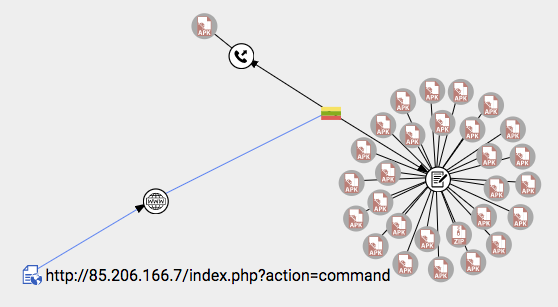
hxxp://85.206.166.7/index.php?action=command

This is a URL that we can look up in VirusTotal Graph and jump to the host referenced in the URL, i.e. 85.206.166.7. When exploring this host we notice that only the file under consideration has communicated with it, however, we do notice that expansions are available according to the referrer files relationship. This relationship pinpoints files that contain the given host within its body, even if they have not been seen communicating with it. Let’s follow this notion, something shady seems to be going on:


Badness is much easier to spot when studying the sample characterised in this other report:

In this case the APK reaches out to the URL:

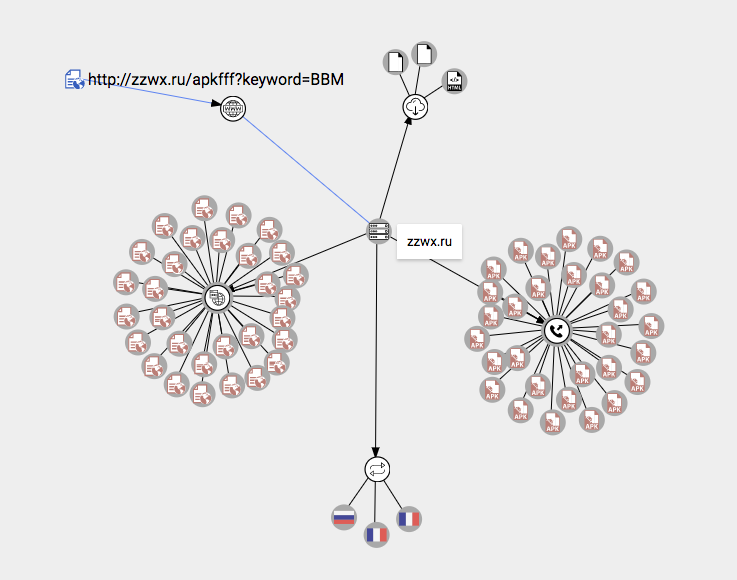
hxxp://zzwx.ru/apkfff?keyword=BBM

From there we can jump to the domain entity, i.e. zzwx.ru, and expand URLs observed under such domain, as well as files communicating with it. Just two hops and we already have a preliminary idea about the initial APK that reached out to the aforementioned URL being malicious:


These examples highlight the importance of extracting as many attributes and behavioral details as possible from files, not only because they allow us to better understand a particular threat, but because they connect the dots and reveal entire campaigns. For instance, very often blocking a given network location will render ineffective all malware variants of a given campaign (inability to reach the mothership server), so even when certain variants fly under detection radars, there is still hope that network security measures will stop a given attack.

This kind of approach to block badness is something that we have shaped into a particular paper hosted in our www.virustotal.com/learn space, more specifically the paper entitled VirusTotal Intelligence for banking trojans. In this paper malicious network infrastructure is shut down by contacting the pertinent domain registrars and hosting providers, however, organizations can also blacklist these locations in their network security controls.

Tuesday, June 05, 2018

, , , , , ,

Multisandbox project welcomes Dr.Web vxCube


The multisandbox project keeps growing, short after the integration of Tencent Habo, VirusTotal Droidy and Cyber adAPT ApkRecon we are now welcoming Dr.Web vxCube. What is most exciting about this integration is that not only does it run executables, but also opens documents with potentially vulnerable software in order to spot exploits and characterize dropped malicious payloads.


In their own words:
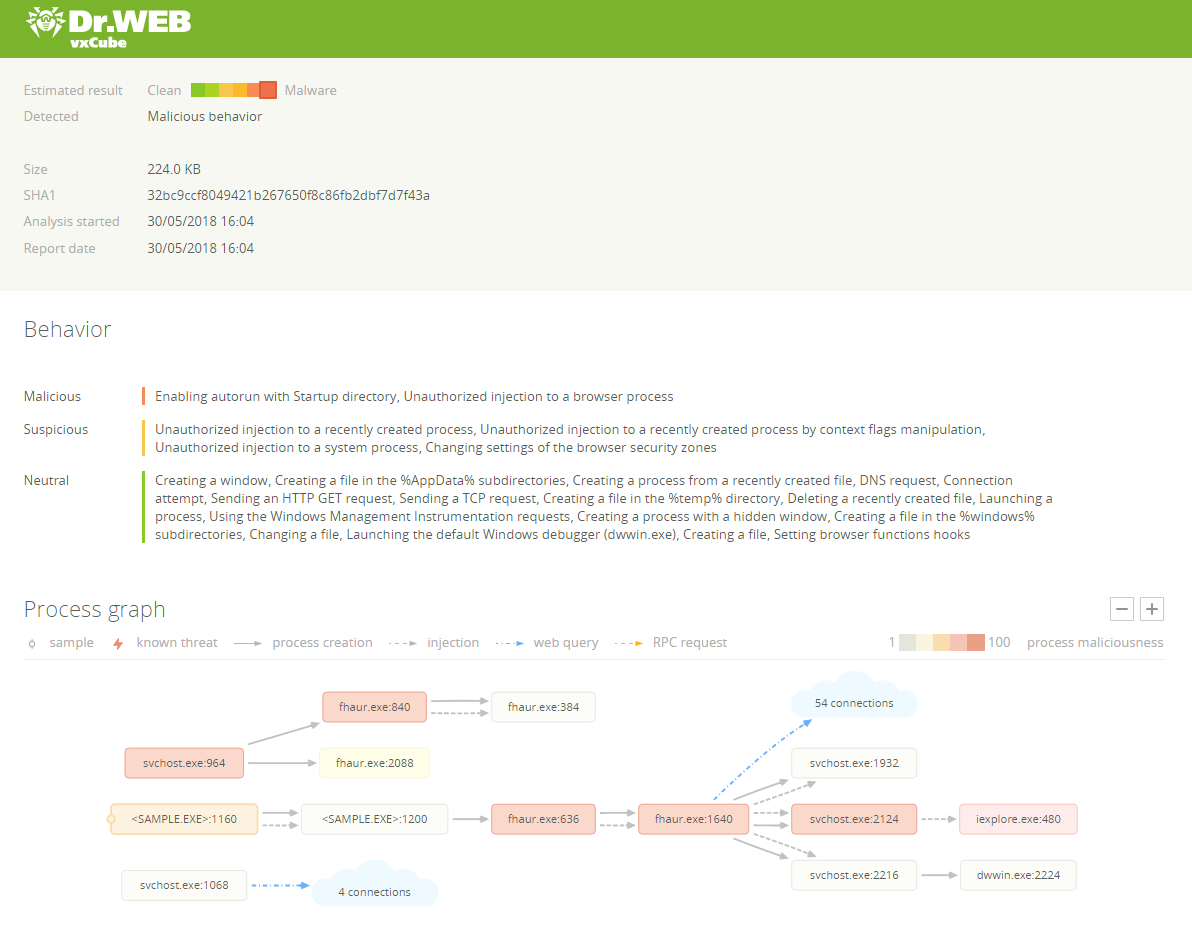
Dr.Web vxCube was born inside Doctor Web Anti-Virus Laboratory. It is a hypervisor-based sandbox that uses agentless technology to analyze malware inside the operating system. It works incredibly fast and invisibly to the analyzed sample. Dr.Web vxCube offers comprehensive but intuitive reports containing information about sample's behavior, created files and dumps, process graph, API log and network activity map. We are happy to bring our expertise to the VirusTotal community.


The following report examples highlight how useful this new integration is:


The following ones are particularly interesting as they exemplify how Dr.Web vxCube is able to spot exploitations triggered when opening a document, most specifically exploitation of CVE-2017-11882:


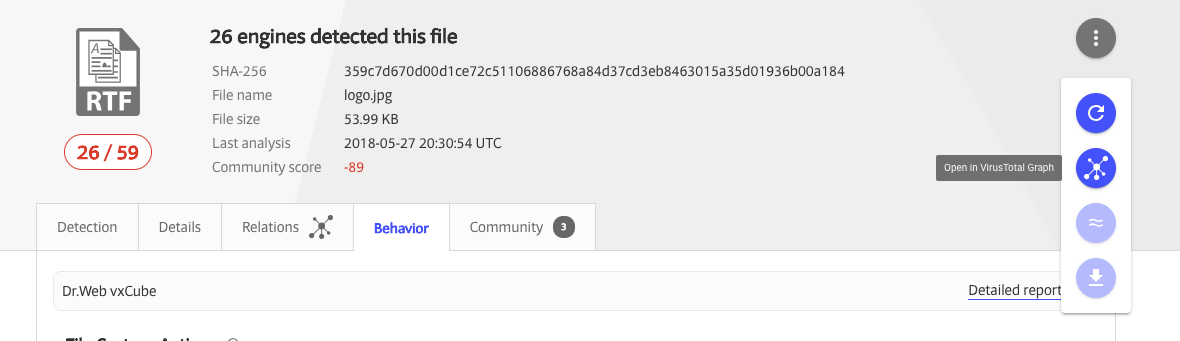
Make sure you also open the detailed report:

This will open up a far more insightful HTML capturing fine grained execution details that are presented in an aggregate fashion in the summarized behavior tab or perhaps not even included at all:


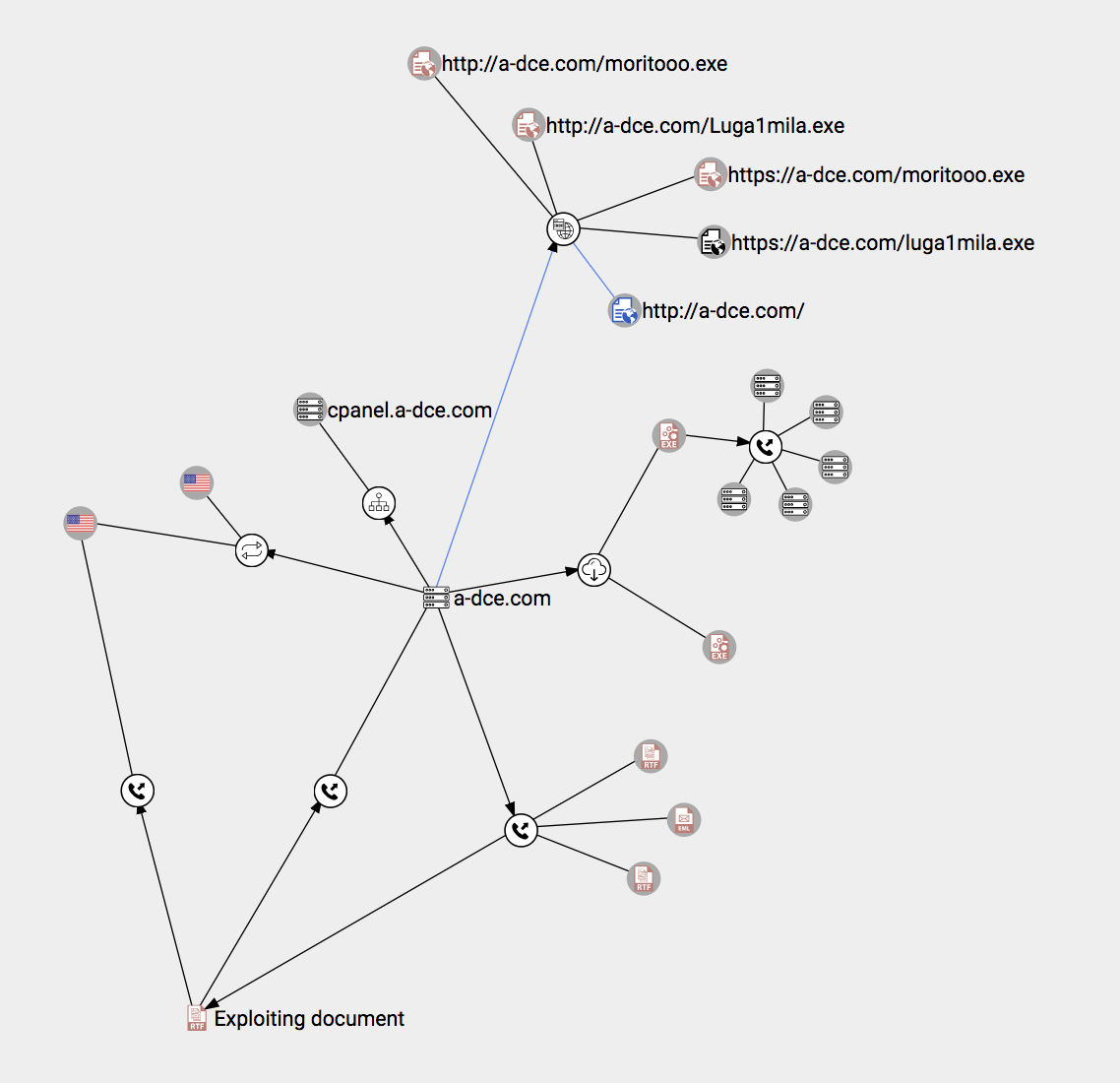
Behavior information is essential when diving into investigations because it allows analysts to pivot over certain indicators of compromise and discover other malicious files and network infrastructure that is related to the same campaign or attacker group. For instance, if we focus on the first CVE-2017-11882 file and open it up in VirusTotal Graph:


We can immediately get a sense of the file indeed being malicious (due to its connection to malicious items) but we may also easily discover the network infrastructure used by it, and most importantly, we get to see other malware served by that very same network infrastructure, without having to follow a huge amount of report links:


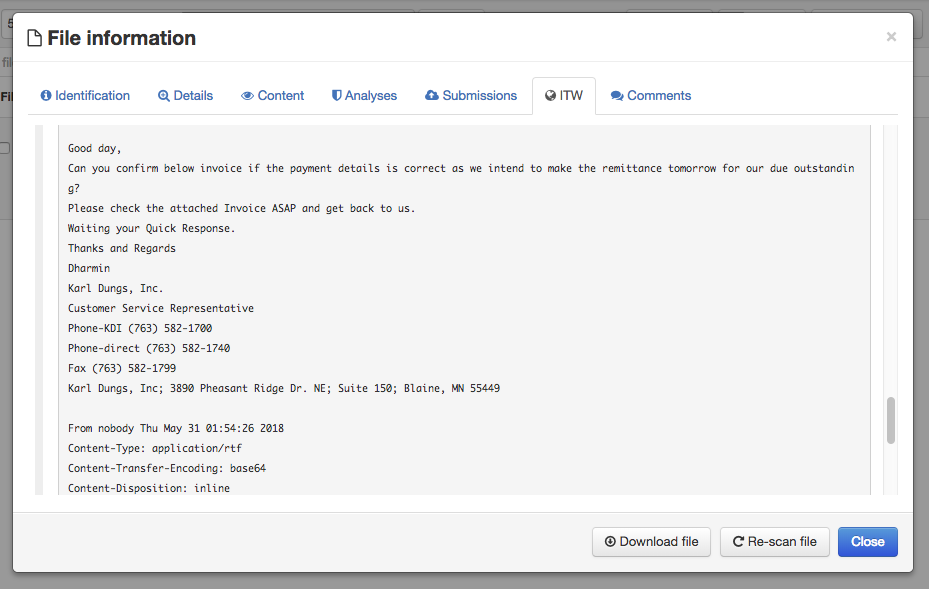
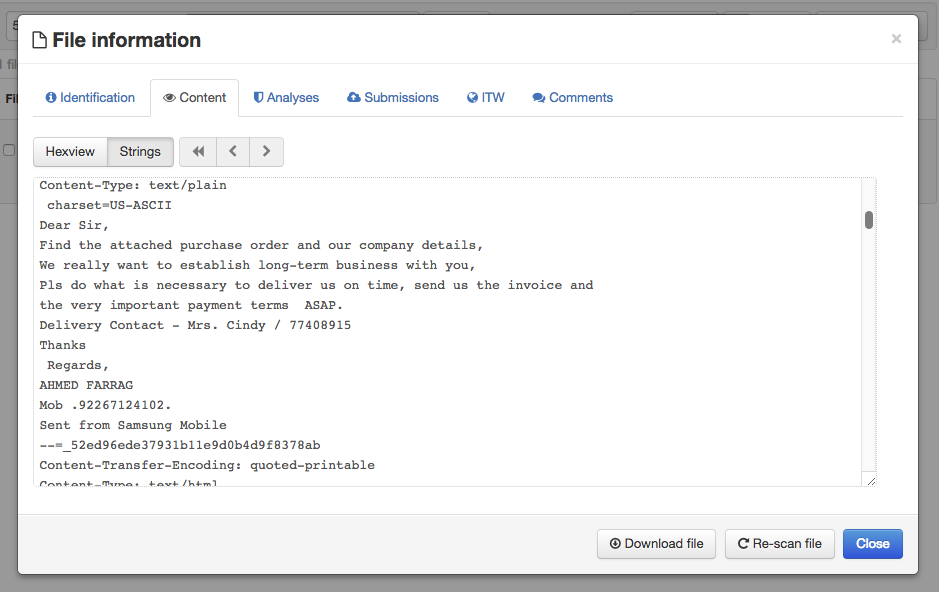
And this is precisely how we discover some of the deception techniques being used by the attackers behind this particular threat. The exploiting document communicates with a-dce.com, so do 3 other samples. By investigating these in VirusTotal Intelligence we get to see that some of those files were spotted as attachments in spam email files uploaded to VirusTotal, we can see the body of these messages and discover how they trick users into downloading and opening the exploiting document:


Fake purchase orders and invoices remain a common simple bait inducing users to execute malware. Having reached this point it would be a good moment to build a Yara rule to detect variants of this malware family and set them up in Malware Hunting in order to discover new threats created by the very same group and keep expanding the investigation graph.

We hope you find this new sandbox as exciting as we do. We already have more integrations in the pipeline and we are certain this will heavily contribute to identifying new threats and strengthening anti-malware defenses worldwide.


If you have a sandbox setup or develop dynamic malware analysis systems please contact us to join this effort.